 February 4, 2013 at 07:48
Living with a tablet or list of Android apps
Hello!
Today I want to talk about my life with a tablet, or rather to share a list of applications that help me in my life and work.
The post was written for devices based on the Android operating system, but I think other systems have analogues.
My life with a tablet began in December 2012. I bought it with the goal of becoming a little more productive. Since I work as a manager in the web field, the main task for the tablet was to help me in everyday affairs.
It just so happened that inspiration does not always come to me in the workplace, and it became uncomfortable to write down some thoughts, draw graphs and structures on a smartphone. My tablet came to my aid in this. I chose a model based on the Android operating system, with a diagonal of 10.1 inches.
It would not be interesting to make a list of applications for the manager, and this undertaking would not describe my whole life. The article includes applications that help me in programming and my hobbies.
In December, I needed to speak at a conference, which means preparing a presentation. A draft version was prepared in the Polaris Office application , which turned out to be preinstalled on my tablet. The presentation was already completed on the computer, since I could not arrange the repeating elements in the same places.
I admit, I did not write the text of my speech on the tablet, because I believe that when writing by hand, the information is better remembered.
Let's get back to my daily tasks.
You won’t surprise anyone with corporate mail on gmail, so I use the entire set of applications from Google that were preinstalled. The only thing that I did not find from Google is work with tasks. Then the GTask application came to my aid , which copes with its functions 100%.
Managers also have to develop new sections, for this it is useful to outline the structure. For PC, there are many programs for compiling various kinds of structures, but good thoughts can overtake me at any time, I have to be ready. I installed the Mindjet application and did not lose at all with it. I recommend this application not only to managers, but also to all those associated with the development of applications, sites and software.
Of course, I think not only structures, sometimes I want to draw a lot of lines and think looking at them. For such purposes, the SketchBook app was the best for me . This is such a simple picture editor that I really liked. It saves to png, has tool settings simple and straightforward. It works, however, it is only in the vertical screen mode, but I'm used to it.
The costs of specialists, project dates, planning, all this is the manager’s job, to monitor everything, to control everything. The Project Schedule and spreadsheet in Google Drive helps me with this . Project Schedule supports the import of MPP and MSPDI-XML, as well as the construction of Gantt charts, filtering tasks and much more. In fact, it doesn’t completely suit me, but I haven’t found anything better yet and sometimes use “cloud” solutions.
The title is too loud for me, but it seems to me that the applications will suit developers well.
Since I work in the field of the web, the main hobby is writing code in PHP and JavaScript, of course it can not do without HTML and CSS.
First I needed a server. He always stood on my favorite Ubuntu operating system, but on long journeys I still had a tablet with me. The only application I found for the server was KSWEB . It turned out to be simple and clear, after the first run it was necessary to create a table through PHPMyAdmin, and then everything was as usual. A huge plus was external access to the server, that is, from another device. Then I cheated a little and used to run the application on a smartphone, using it as a server.
Not the only server we live in. For quick access to my SSH hosting, I use ConnectBot .
To access the tablet file system, I use Total Commander . The story with him began a long time ago, I started with Norton Commander , and then came to Total along the evolutionary path. It seems to me very logical to use.
Many text / code editors exist in the market, but I opted for WebMaster's HTML . It includes viewing the result in a browser, quickly adding attributes and much more. You could consider other options, pick a good IDE, but I'm so used to it that I don’t want to change it anymore.
I also do Java programming. Well, how I study, I study. Having overcome C ++ at the institute (I have nothing against C ++, I just somehow did not interest me at the institute), I decided to cast my eyes on this language, maybe in the future I will write an Android application, but for now AIDE helps me in viewing the results of code execution from examples. I can’t describe any of its features so far, unless I say that it compiles the code in apk, and it needs to be installed every time.
It would not be superfluous to add a WordPress application to this list , although it does not apply to development. I use it to blog, and help friends publish articles on blogs. I only include WordPress here just because I have made changes to the code of my blog and am testing the content through it.
You can’t do without a computer, its computing power is superior to the tablet, so I use Splashtop 2 remote desktop . It only works when devices are on the same local network.
Well, the last thing I use in development is the very handy Hacker's Keyboard . I only use it in those applications where code or commands are written (terminal).
As a person, I have various hobbies. I could not divide them into categories, so I’ll list them in one list.
I like to write music, learn beautiful sketches or complex guitar parts. For all this I use the Guitar Pro app .
It's nice to sit around the campfire in the summer and play early Letov’s friends, but I don’t remember the chords by heart, and the AmDm Lite application helps me
I also like films, series and training videos. The best player in the Play Market I consider VLC
Perfect Keyboard - for typing, including this article. Since when I’m typing on mobile devices, I’m used to typing with a big finger, it’s just convenient to use a keyboard that is spread around the edges of the screen.
Of course, this is not the whole list of what I have on the tablet. I, like most users, love to relax and play. I have many games, but I decided not to list them here.
From my own experience, I can say that the tablet will not replace a laptop or desktop computer. This device is for other purposes. They often tell me that I am trying to do too much with a device that is not intended for this. But it seems to me that I have not yet squeezed the maximum out of the tablet. :)
Many thanks to all application developers for all existing platforms. You make our lives easier and more interesting.
PS Thank you for reading. Of course, you know everything about the Easter eggs of Android, but I could not resist.
Today I want to talk about my life with a tablet, or rather to share a list of applications that help me in my life and work.
The post was written for devices based on the Android operating system, but I think other systems have analogues.
Introduction
My life with a tablet began in December 2012. I bought it with the goal of becoming a little more productive. Since I work as a manager in the web field, the main task for the tablet was to help me in everyday affairs.
It just so happened that inspiration does not always come to me in the workplace, and it became uncomfortable to write down some thoughts, draw graphs and structures on a smartphone. My tablet came to my aid in this. I chose a model based on the Android operating system, with a diagonal of 10.1 inches.
It would not be interesting to make a list of applications for the manager, and this undertaking would not describe my whole life. The article includes applications that help me in programming and my hobbies.
I am a manager
In December, I needed to speak at a conference, which means preparing a presentation. A draft version was prepared in the Polaris Office application , which turned out to be preinstalled on my tablet. The presentation was already completed on the computer, since I could not arrange the repeating elements in the same places.
Illustration, description and link to the Polaris Office 4 app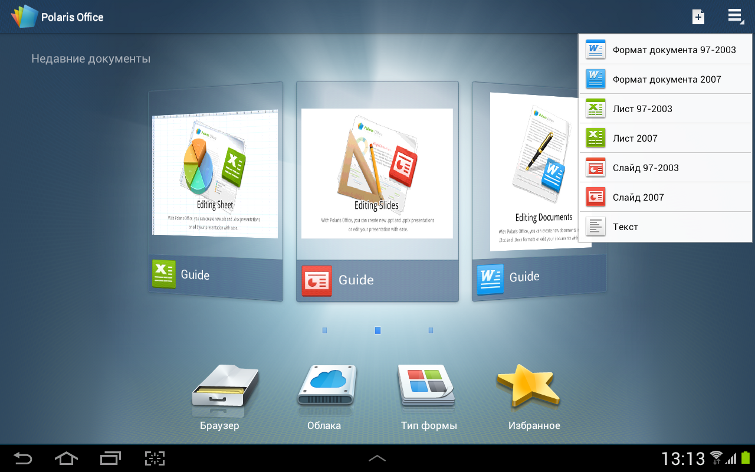
Polaris ® Office is the simplest and most powerful office product designed for mobile devices. Anytime, anywhere, you can easily use various types of documents, such as Microsoft Word, Excel, PowerPoint, Adobe PDF, work with multiple tabs, and organize your data quickly and make your presentation impressive.
View on Google Play
Polaris ® Office is the simplest and most powerful office product designed for mobile devices. Anytime, anywhere, you can easily use various types of documents, such as Microsoft Word, Excel, PowerPoint, Adobe PDF, work with multiple tabs, and organize your data quickly and make your presentation impressive.
View on Google Play
I admit, I did not write the text of my speech on the tablet, because I believe that when writing by hand, the information is better remembered.
Let's get back to my daily tasks.
You won’t surprise anyone with corporate mail on gmail, so I use the entire set of applications from Google that were preinstalled. The only thing that I did not find from Google is work with tasks. Then the GTask application came to my aid , which copes with its functions 100%.
GTask illustration, description and link
GTasks is a simple and effective Android application for creating lists. It will help you organize your life in a simple and elegant way. You can sync the application with Google Tasks.
View on Google Play
GTasks is a simple and effective Android application for creating lists. It will help you organize your life in a simple and elegant way. You can sync the application with Google Tasks.
View on Google Play
Managers also have to develop new sections, for this it is useful to outline the structure. For PC, there are many programs for compiling various kinds of structures, but good thoughts can overtake me at any time, I have to be ready. I installed the Mindjet application and did not lose at all with it. I recommend this application not only to managers, but also to all those associated with the development of applications, sites and software.
Illustration, description and link to the Mindjet app
Mindjet is the best way to visually capture and organize information. You can structure ideas, take notes and track tasks on your mobile device.
View on Google Play
Mindjet is the best way to visually capture and organize information. You can structure ideas, take notes and track tasks on your mobile device.
View on Google Play
Of course, I think not only structures, sometimes I want to draw a lot of lines and think looking at them. For such purposes, the SketchBook app was the best for me . This is such a simple picture editor that I really liked. It saves to png, has tool settings simple and straightforward. It works, however, it is only in the vertical screen mode, but I'm used to it.
SketchBook app illustration, description, and link
Autodesk SketchBook is a professional sketching application. Designed for devices with a diagonal of 7 inches or less. (It looks pretty decent on my 10.1)
Honestly, you could buy the full version, but it will do for such purposes.
View on Google Play
Autodesk SketchBook is a professional sketching application. Designed for devices with a diagonal of 7 inches or less. (It looks pretty decent on my 10.1)
Honestly, you could buy the full version, but it will do for such purposes.
View on Google Play
The costs of specialists, project dates, planning, all this is the manager’s job, to monitor everything, to control everything. The Project Schedule and spreadsheet in Google Drive helps me with this . Project Schedule supports the import of MPP and MSPDI-XML, as well as the construction of Gantt charts, filtering tasks and much more. In fact, it doesn’t completely suit me, but I haven’t found anything better yet and sometimes use “cloud” solutions.
Illustration, description and link to Project Schedule
Project Schedule is designed to manage projects and schedule tasks on your tablet or smartphone. Use the application to create / import business projects or plan daily tasks.
View on Google Play
Project Schedule is designed to manage projects and schedule tasks on your tablet or smartphone. Use the application to create / import business projects or plan daily tasks.
View on Google Play
I am a developer
The title is too loud for me, but it seems to me that the applications will suit developers well.
Since I work in the field of the web, the main hobby is writing code in PHP and JavaScript, of course it can not do without HTML and CSS.
First I needed a server. He always stood on my favorite Ubuntu operating system, but on long journeys I still had a tablet with me. The only application I found for the server was KSWEB . It turned out to be simple and clear, after the first run it was necessary to create a table through PHPMyAdmin, and then everything was as usual. A huge plus was external access to the server, that is, from another device. Then I cheated a little and used to run the application on a smartphone, using it as a server.
Illustration, description and link to the KSWEB application
This is what it looks like with WP already installed on the server:

KSWEB is a web developer kit for the Android platform. It consists of a web server, PHP, MySQL database and msmtp for Sendmail support.
After some time, you will need to buy a key.
View on Google Play
This is what it looks like with WP already installed on the server:
KSWEB is a web developer kit for the Android platform. It consists of a web server, PHP, MySQL database and msmtp for Sendmail support.
After some time, you will need to buy a key.
View on Google Play
Not the only server we live in. For quick access to my SSH hosting, I use ConnectBot .
ConnectBot app illustration, description and link

To access the tablet file system, I use Total Commander . The story with him began a long time ago, I started with Norton Commander , and then came to Total along the evolutionary path. It seems to me very logical to use.
Illustration, description and link to the Total Commander app

Many text / code editors exist in the market, but I opted for WebMaster's HTML . It includes viewing the result in a browser, quickly adding attributes and much more. You could consider other options, pick a good IDE, but I'm so used to it that I don’t want to change it anymore.
WebMaster's HTML Illustration, Description, and Link
Source Editor for webmasters and web designers. Syntax highlighting and code completion for HTML, PHP, CSS and JavaScript files. Built-in preview function and virtual keys for tags and key phrases. Day and night color schemes.
View on Google Play
Source Editor for webmasters and web designers. Syntax highlighting and code completion for HTML, PHP, CSS and JavaScript files. Built-in preview function and virtual keys for tags and key phrases. Day and night color schemes.
View on Google Play
I also do Java programming. Well, how I study, I study. Having overcome C ++ at the institute (I have nothing against C ++, I just somehow did not interest me at the institute), I decided to cast my eyes on this language, maybe in the future I will write an Android application, but for now AIDE helps me in viewing the results of code execution from examples. I can’t describe any of its features so far, unless I say that it compiles the code in apk, and it needs to be installed every time.
Illustration, description and link to the AIDE app
AIDE is an integrated development environment (IDE) for developing Android applications right on your device. AIDE implements a full cycle of code editing - compilation - launch.
View on Google Play
AIDE is an integrated development environment (IDE) for developing Android applications right on your device. AIDE implements a full cycle of code editing - compilation - launch.
View on Google Play
It would not be superfluous to add a WordPress application to this list , although it does not apply to development. I use it to blog, and help friends publish articles on blogs. I only include WordPress here just because I have made changes to the code of my blog and am testing the content through it.
WordPress app illustration, description and link
WordPress for Android is an open source application that allows you to write new posts, edit content, view statistics and manage comments with built-in notifications.
View on Google Play
WordPress for Android is an open source application that allows you to write new posts, edit content, view statistics and manage comments with built-in notifications.
View on Google Play
You can’t do without a computer, its computing power is superior to the tablet, so I use Splashtop 2 remote desktop . It only works when devices are on the same local network.
Illustration, description and link to the Splashtop 2 application
Splashtop is the easiest and fastest desktop application to remotely access Windows, Mac or Ubuntu from your Android phone or tablet.
Full functionality is available in the paid version.
View on Google Play
Splashtop is the easiest and fastest desktop application to remotely access Windows, Mac or Ubuntu from your Android phone or tablet.
Full functionality is available in the paid version.
View on Google Play
Well, the last thing I use in development is the very handy Hacker's Keyboard . I only use it in those applications where code or commands are written (terminal).
Hacker's Keyboard app illustration, description and link
Just a brilliant keyboard with additional keys. Suitable for working with code, terminal and other applications.
View on Google Play
Just a brilliant keyboard with additional keys. Suitable for working with code, terminal and other applications.
View on Google Play
I am human
As a person, I have various hobbies. I could not divide them into categories, so I’ll list them in one list.
I like to write music, learn beautiful sketches or complex guitar parts. For all this I use the Guitar Pro app .
Illustration, description and link to the Guitar Pro application
If you are familiar with the desktop version of Guitar Pro or Tux Guitar and want to have the same features on your mobile device, then this application is for you.
View on Google Play
If you are familiar with the desktop version of Guitar Pro or Tux Guitar and want to have the same features on your mobile device, then this application is for you.
View on Google Play
It's nice to sit around the campfire in the summer and play early Letov’s friends, but I don’t remember the chords by heart, and the AmDm Lite application helps me
Illustration, description and link to the AmDm Lite application
The application allows you to search and view chords for songs, as well as to look at the tabs of chords.
View on Google Play
The application allows you to search and view chords for songs, as well as to look at the tabs of chords.
View on Google Play
I also like films, series and training videos. The best player in the Play Market I consider VLC
Illustration, description and link to the VLC application

Perfect Keyboard - for typing, including this article. Since when I’m typing on mobile devices, I’m used to typing with a big finger, it’s just convenient to use a keyboard that is spread around the edges of the screen.
Illustration, description and link to the Perfect Keyboard app
Just a great keyboard for tablets, with the ability to "push" the keyboard around the edges of the screen.
View on Google Play
Just a great keyboard for tablets, with the ability to "push" the keyboard around the edges of the screen.
View on Google Play
A few words about this article.
The article was written in Google Docs from a tablet. Typing a large amount of text was difficult, but I decided to go on principle.
I lost the size of the images, at first it seemed to me that the best width would be 755px, but I did not take into account the indentation of the spoiler tag. I also prepared pictures on a tablet, the functionality built into the gallery, and getting into the same size everywhere was difficult. Here is an example of resizing a picture:

Each spoiler link contains an opening in a new window, but for some reason this attribute is lost when publishing.
I lost the size of the images, at first it seemed to me that the best width would be 755px, but I did not take into account the indentation of the spoiler tag. I also prepared pictures on a tablet, the functionality built into the gallery, and getting into the same size everywhere was difficult. Here is an example of resizing a picture:
Each spoiler link contains an opening in a new window, but for some reason this attribute is lost when publishing.
Conclusion
Of course, this is not the whole list of what I have on the tablet. I, like most users, love to relax and play. I have many games, but I decided not to list them here.
From my own experience, I can say that the tablet will not replace a laptop or desktop computer. This device is for other purposes. They often tell me that I am trying to do too much with a device that is not intended for this. But it seems to me that I have not yet squeezed the maximum out of the tablet. :)
Many thanks to all application developers for all existing platforms. You make our lives easier and more interesting.
PS Thank you for reading. Of course, you know everything about the Easter eggs of Android, but I could not resist.
Easter egg









