Listeners on Ext.NET
- Transfer
- Tutorial
In Ext.NET, understanding the difference between different types of events and their event handlers is very important. The choice depends on the specific scenario that you want to implement your application.
In this series of four articles, we will consider various events on the client and on the server, how they are called, processed, and which have advantages. This article will discuss Listeners - allowing you to "listen" to events on the client and process it there, on the client, avoiding a server request.
All components in Ext.NET, such as Panel, Window, Button , have the following four types of event handlers:
Listeners are event handlers on the client. They execute your code after the appearance of some event, for example, clicking on the button ( Button ).
Using Intellisense in Visual Studio makes it possible to find out what specific events each component has. Each component inherits events from its ancestor and usually adds its own.
All classes in Ext.NET inherit events from the base class Observable . All events are in Listeners .
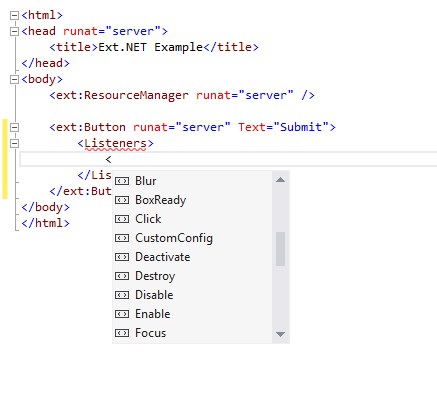
If a component raises some event on the client, then for your code on the client to process this event, you must subscribe to this event by adding a JavaScript function.
Listeners can be configured both in markup and in Code-Behind. For example, to process a click event on a button ( Button ), you must use the Handler field on Click; in this field you need to enter your JavaScript code that will be executed by the browser when you click on this button.

Another important property of Listener is Fn .
The Fn property must contain the name of the JavaScript function or anonymous function (inline function):
The JavaScript code that is declared in the Handler must be the body of the function and when displayed on the Ext.NET page, it will automatically wrap it with the function template that corresponds to this event.
For instance:
Ext.NET will automatically wrap this code and display it on the page as follows:
Each event has its own list of arguments, which you can find either on the Sencha Ext JS API documentation documentation website or by studying the source code of the Listener you are interested in (if you have the Ext.NET source code, you can look at all Listeners classes in the directory\ Events \ Listeners )
Also on the Ext.NET page with examples there is a special example - Listeners Arguments Reflector , in which you can view all function signatures of any event for any component.

For example, the Click event of the Button component has two arguments: item and e : item is a reference to the Button itself , e is an object that stores information about the event.
The Reconfigure event handler for the GridPanel component is called with the following arguments: item, store, and columns .

If you use the Fn property , then you must add the arguments to the function yourself. Arguments can have arbitrary names, but the order of the arguments is very important. For example, the following two functions have different argument names, but they work exactly the same.
Each Listener has the following properties:
These methods are used to add a Listener for some event during DirectEvent , after the component has already been displayed in the browser (server-side event processing will be discussed in further articles).
These methods allow you to add client-side handlers to components that are already displayed on the page, and are typically used at runtime by DirectEvent . Unlike use
Arguments can be omitted if you do not use them in a handler.
However, it should be remembered that if the handler returns false , then other handlers will not be called, nor will DirectEvent event handlers be called.
If you want to add an event handler using JavaScript, you can call the on function for some component entity:
You can find more information and usage examples on this man page .
You can also trigger an event manually using the JavaScript fireEvent function . You must pass the name of the event as the first argument and then list the list of arguments. The following example shows a call to the fireEvent function :
Remember that server-side event handlers ( DirectEvents ) can also be called using the fireEvent function (Server- side handlers ( DirectEvent ) are called after the client ( Listeners ), but this sequence can be changed using the Delay property ).
The call to the server handler ( DirectEvent ) can be canceled if any handler (without the Delay property set ) returns false . You can read more information on the man page of the fireEvent method .
In this part of the article, we looked at Listeners , which are client-side event handlers. They make it possible to quickly process events on the client side and to avoid unnecessary interaction with the server.
The following article will describe server-side event handlers - DirectEvents .
In this series of four articles, we will consider various events on the client and on the server, how they are called, processed, and which have advantages. This article will discuss Listeners - allowing you to "listen" to events on the client and process it there, on the client, avoiding a server request.
All components in Ext.NET, such as Panel, Window, Button , have the following four types of event handlers:
| Listeners | They listen to events on the client and process them in the same way on the client side. |
| DirectEvents | They listen to events on the client, but they are processed on the server side, the call is made through an AJAX request. |
| Directmethods | They allow calling functions on the server, for example, written in C # or VB; the call is made through an AJAX request. |
| Messagebus | MessageBus allows you to send various events between components that may not know about each other. Message processing occurs through subscribing to certain messages and sending event messages through MessageBus. Each component on the client has a special MessageBusListeners handler, as well as MessageBusDirectDirectEvents for transferring processing to the server side. |
Listeners
Listeners are event handlers on the client. They execute your code after the appearance of some event, for example, clicking on the button ( Button ).
Using Intellisense in Visual Studio makes it possible to find out what specific events each component has. Each component inherits events from its ancestor and usually adds its own.
All classes in Ext.NET inherit events from the base class Observable . All events are in Listeners .
All available events can be viewed using Intellisense.
If a component raises some event on the client, then for your code on the client to process this event, you must subscribe to this event by adding a JavaScript function.
Setting up Listeners
Listeners can be configured both in markup and in Code-Behind. For example, to process a click event on a button ( Button ), you must use the Handler field on Click; in this field you need to enter your JavaScript code that will be executed by the browser when you click on this button.
// C#
Button1.Listeners.Click.Handler = "alert('Hello World');";
// ASPX
Clicking on the button brings up the 'Hello World' window.
Another important property of Listener is Fn .
The Fn property must contain the name of the JavaScript function or anonymous function (inline function):
// Вызываемая JavaScript функция,
// размещается где-то на странице
var doSomething = function () {
    alert('Hello World');
};
// Вариант #1
// Свойству Fn присвоено имя JavaScript функции
Fn="doSomething";
// Вариант #2
// Анонимная JavaScript функция
Fn="function () { alert('Hello World'); }"
// Вариант #2b
// Такая же функция, что и выше, но с аргументами
Fn="function (item, e) { alert('Hello World'); }"
The JavaScript code that is declared in the Handler must be the body of the function and when displayed on the Ext.NET page, it will automatically wrap it with the function template that corresponds to this event.
For instance:
Ext.NET will automatically wrap this code and display it on the page as follows:
Ext.create("Ext.button.Button", {
    text: "Submit",
    listeners: {
        click: function (item, e) {
            alert('Hello World');
        }
    }
});
Each event has its own list of arguments, which you can find either on the Sencha Ext JS API documentation documentation website or by studying the source code of the Listener you are interested in (if you have the Ext.NET source code, you can look at all Listeners classes in the directory
Also on the Ext.NET page with examples there is a special example - Listeners Arguments Reflector , in which you can view all function signatures of any event for any component.
Description of the Click event signature of the Button component
For example, the Click event of the Button component has two arguments: item and e : item is a reference to the Button itself , e is an object that stores information about the event.
The Reconfigure event handler for the GridPanel component is called with the following arguments: item, store, and columns .
Arguments for the Reconfigure event of the GridPanel component
If you use the Fn property , then you must add the arguments to the function yourself. Arguments can have arbitrary names, but the order of the arguments is very important. For example, the following two functions have different argument names, but they work exactly the same.
var doSomething = function (item, e) {
    alert(item.id); // Отобразит 'Button1'
};
var doSomethingElse = function (cmp, ev) {
    alert(cmp.id); // Отобразит 'Button2'
};
Each Listener has the following properties:
| AutoPostBack | Indicates whether the status of the component is automatically sent to the server. Identical to a regular field in ASP.NET Control. | false |
| BroadcastOnBus | Indicates whether the event should be sent to MessageBus (it will be explained in detail in the article on MessageBus) | false |
| Buffer | Indicates the number of milliseconds by which the event processing will be delayed; if during this time this event appears again, the original handler will be replaced with a new one. For example, for some event (let it be 'click'), this field is equal to 1000 and if 10 such events ('click') arrive in 1000 milliseconds, then the event handler will be called only once, for the most recent event. | 0 |
| Delay | Indicates the number of milliseconds that an event handler call will be delayed. | 0 |
| Delegationate | Filters the HTML element for which this event can be raised. For example, if you assign the following value to this property: Delegate = , then for the Click event, the handler will be called only if you click on the HTML element directly within the HTML markup of the component. | "" |
| PreventDefault | If the value is True, then calling the default browser handler will be prevented. (For example, following the link) | false |
| Scope | Specifies the context of the this variable for an event handler function. If no value is specified, then by default this points to the object that raised the event. | this |
| Single | If the value is True, then the event handler will be called only once and will be automatically deleted after its first and last call. | false |
| StopEvent | If the value is True, it stops the event, which stops the further sending of the event and prevents the browser from processing it. It should be used only for events that are processed by the browser. (click, mousemove, keypress, etc.) | false |
| StopPropagation | If the value is True, then stops the further sending of the event. | false |
Using server methods .On and .AddListener
These methods are used to add a Listener for some event during DirectEvent , after the component has already been displayed in the browser (server-side event processing will be discussed in further articles).
These methods allow you to add client-side handlers to components that are already displayed on the page, and are typically used at runtime by DirectEvent . Unlike use
Button1.On("click", new JFunction("alert('The button is clicked');", "button", "e"));Arguments can be omitted if you do not use them in a handler.
However, it should be remembered that if the handler returns false , then other handlers will not be called, nor will DirectEvent event handlers be called.
Using .on and .addListener methods on the client side
If you want to add an event handler using JavaScript, you can call the on function for some component entity:
Button1.on(
    "click",
    function (button, e) {
        alert('The button is clicked');
    }
);
You can find more information and usage examples on this man page .
You can also trigger an event manually using the JavaScript fireEvent function . You must pass the name of the event as the first argument and then list the list of arguments. The following example shows a call to the fireEvent function :
// Это вызовет все обработчики события 'click'
App.Button1.fireEvent('click', App.Button1);
Remember that server-side event handlers ( DirectEvents ) can also be called using the fireEvent function (Server- side handlers ( DirectEvent ) are called after the client ( Listeners ), but this sequence can be changed using the Delay property ).
The call to the server handler ( DirectEvent ) can be canceled if any handler (without the Delay property set ) returns false . You can read more information on the man page of the fireEvent method .
Conclusion
In this part of the article, we looked at Listeners , which are client-side event handlers. They make it possible to quickly process events on the client side and to avoid unnecessary interaction with the server.
The following article will describe server-side event handlers - DirectEvents .