January 22, 2013 at 16:15
Performance Comparison: curl, php curl, php socket, python pycurl
I have a project, the module of which will work with another server most of the time, sending him GET requests.
I conducted tests to determine how to get the page faster (as part of the project’s proposed technologies).
The first 3 tests: each method performed 50 queries in a row to one site.

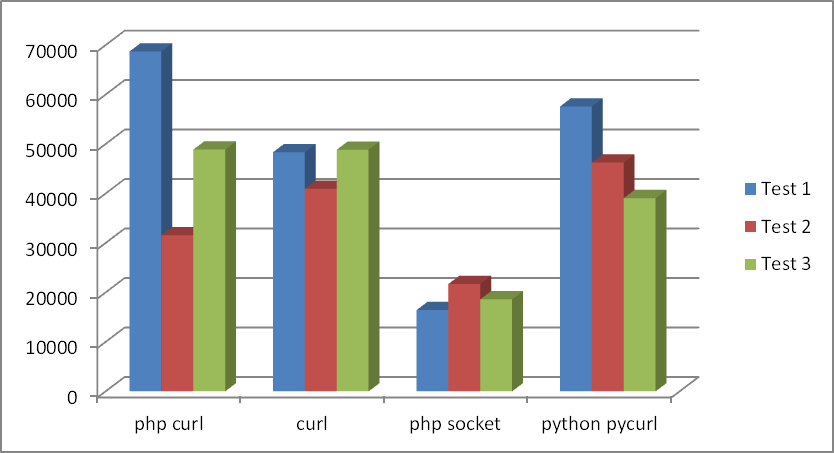
Let me explain that curl is getting a page with the curl console utility on Linux. All tests were conducted on Linux.
There was also a fifth test - calling curl from php via exec, but I dropped that stupidity.
If you average the tests, you get the following result:
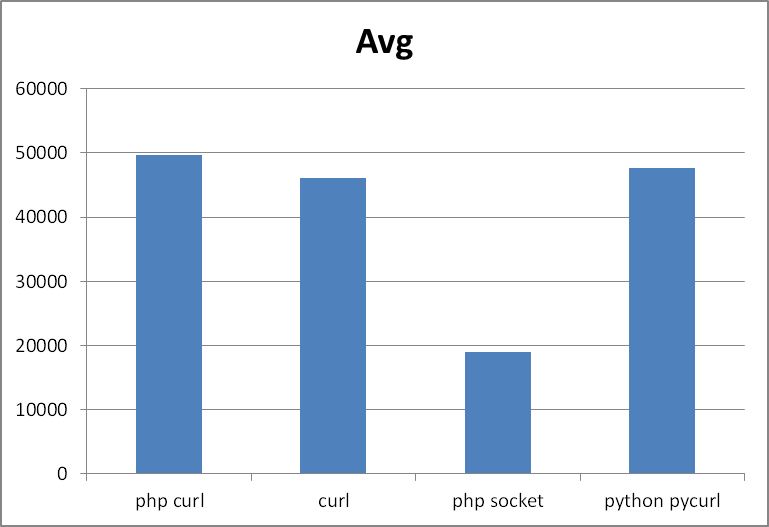
Places:
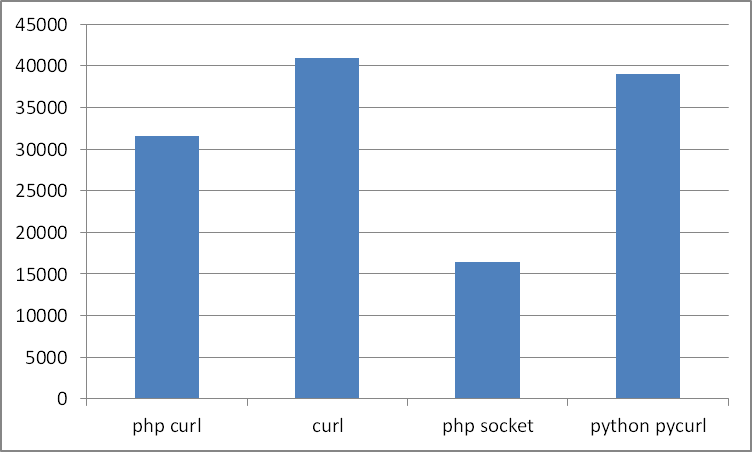
If you start from the lower value, the result changes:
Console curl without JP doesn't interest me after such tests, but who is still faster than php + curl or python + pycurl? 4 more tests in which only this pair participated:


php honestly worked faster in all 4 tests.
Using curl library with simple GET requests
is almost 2 times lower execution speed compared to working through sockets.
In addition, we noticed that python with the pycurl library handles a little slower than php with curl.
Perhaps the tests are biased in something, if you think that this is so, justify in the comments.
It starts the program passed in the parameter and measures the time of its work in milliseconds.
The fastest option (sockets)
To run curl:
To run all tests:
I conducted tests to determine how to get the page faster (as part of the project’s proposed technologies).
The first 3 tests: each method performed 50 queries in a row to one site.
Let me explain that curl is getting a page with the curl console utility on Linux. All tests were conducted on Linux.
There was also a fifth test - calling curl from php via exec, but I dropped that stupidity.
If you average the tests, you get the following result:
Places:
- php socket
- curl
- python pycurl
- php curl
If you start from the lower value, the result changes:
- php socket
- php curl
- python pycurl
- curl
Console curl without JP doesn't interest me after such tests, but who is still faster than php + curl or python + pycurl? 4 more tests in which only this pair participated:
php honestly worked faster in all 4 tests.
Test results
Using curl library with simple GET requests
is almost 2 times lower execution speed compared to working through sockets.
In addition, we noticed that python with the pycurl library handles a little slower than php with curl.
Perhaps the tests are biased in something, if you think that this is so, justify in the comments.
Code for these tests
A small C program
It starts the program passed in the parameter and measures the time of its work in milliseconds.
#include
#include
struct timeval tv1, tv2, dtv;
struct timezone tz;
//time_ functions from http://ccfit.nsu.ru/~kireev/lab1/lab1time.htm
void time_start()
{
	gettimeofday(&tv1, &tz);
}
long time_stop()
{
	gettimeofday(&tv2, &tz);
	dtv.tv_sec= tv2.tv_sec -tv1.tv_sec;
	dtv.tv_usec=tv2.tv_usec-tv1.tv_usec;
	if(dtv.tv_usec < 0)
	{
		dtv.tv_sec--;
		dtv.tv_usec += 1000000;
	}
    return dtv.tv_sec * 1000 + dtv.tv_usec / 1000;
}
int main(int argc, char **argv)
{
	if(argc > 1)
	{
		time_start();
		system(argv[1]);
		printf("\nTime: %ld\n", time_stop());
	}
	else
		printf("Usage:\n timer1 command\n");
	return 0;
}
Php
$t = 'http://www.2ip.ru/'; //target
for($i=0; $i < 50; $i++)
{
	$ch = curl_init();
	curl_setopt($ch, CURLOPT_URL, $t);
	curl_setopt($ch, CURLOPT_HEADER, 1);
	curl_setopt($ch, CURLINFO_HEADER_OUT, 1);
	curl_setopt($ch, CURLOPT_RETURNTRANSFER, 1);
	curl_setopt($ch, CURLOPT_USERAGENT, 'Mozilla/5.0 (X11; Linux x86_64; rv:17.0) Gecko/17.0 Firefox/17.0');
	curl_setopt($ch, CURLOPT_ENCODING, 'utf-8');
	curl_setopt($ch, CURLOPT_TIMEOUT, 200);
	curl_setopt($ch, CURLOPT_SSL_VERIFYHOST, 0);
	curl_setopt($ch, CURLOPT_SSL_VERIFYPEER, 0);
	$data = curl_exec($ch);
	curl_close($ch);
}
The fastest option (sockets)
$t = 'http://www.2ip.ru/'; //target
for($i=0; $i < 50; $i++)
{
	$service_port = 80;
	$address = gethostbyname('www.2ip.ru');
	$socket = socket_create(AF_INET, SOCK_STREAM, SOL_TCP);
	if ($socket === false) {
		echo "socket_create() failed: reason: " . socket_strerror(socket_last_error()) . "\n";
	} else {
		//echo "OK.\n";
	}
	$result = socket_connect($socket, $address, $service_port);
	if ($result === false) {
		echo "socket_connect() failed.\nReason: ($result) " . socket_strerror(socket_last_error($socket)) . "\n";
	} else {
		//echo "OK.\n";
	}
	$in = "GET / HTTP/1.1\r\n";
	$in .= "Host: www.example.com\r\n";
	$in .= "Connection: Close\r\n\r\n";
	$out = '';
	$r = '';
	socket_write($socket, $in, strlen($in));
	while ($out = socket_read($socket, 2048)) {
		$r .= $out;
	}
	socket_close($socket);
	//echo $r;
}
Python
import pycurl
import cStringIO
for i in range(50):
	buf = cStringIO.StringIO()
	c = pycurl.Curl()
	c.setopt(c.URL, 'http://www.2ip.ru/')
	c.setopt(c.WRITEFUNCTION, buf.write)
	c.perform()
	#print buf.getvalue()
	buf.close()
Bash scripts
To run curl:
#!/bin/bash
testdir="/home/developer/Desktop/tests"
i=0
while [ $i -lt 50 ]
do
  curl -s -o "$testdir/tmp_some_file" "http://www.2ip.ru/"
  let i=i+1
done
To run all tests:
#!/bin/bash
testdir="/home/developer/Desktop/tests"
echo "php curl"
"$testdir/timer1" "php $testdir/testCurl.php"
echo "curl to file"
"$testdir/timer1" "bash $testdir/curl2file.sh"
#echo "curl to file (php)"
#"$testdir/timer1" "php $testdir/testCurl2.php"
echo "php socket"
"$testdir/timer1" "php $testdir/testCurl3.php"
echo "python pycurl"
"$testdir/timer1" "python $testdir/1.py"