October 16, 2012 at 12:50
Linux ipsec decoding
- Tutorial
Sometimes it becomes necessary to remove traffic dumps inside the ipsec tunnel. I will tell you how to do this in the case of ipsec, raised on a Linux server with PSK authentication using wireshark.
For successful traffic decoding, it is necessary to start dumping immediately after raising ipsec.
To capture traffic, we use tcpdump, for example like this: Then we raise ipsec: Since ipsec is configured using PSK (pre shared key) authentication, you need to find out the session key for successful decoding. This can be done using the setkey command. This command, in the case of debian, is included in the ipsec-tools package. You need to run as root.
We need:
1) ip-addresses
2) spi - security parameter index
3) string “E:” (encryption algorithm and session key), for this example, aes-cbc encryption algorithm, and 128-bit AES key “2a787e41 bbdc2f94 9ced721c 7fcf934e ”
4) the string“ A: ”(authentication algorithm and its key), for this example it is hmac-sha1 and the key is“ 6af6847a 477bea9f 5c9a8d13 7ea9a5b5 9a318d29 "
Because we use AES-CBC, that is why (because of the -CBC prefix) all traffic will be required from the moment the ipsec tunnel is raised (CBC - cipher block chaining). It may not be necessary to have all the traffic with other algorithms, I don’t know this, but I think that most of all traffic will be required from the moment the ipsec tunnel is raised.
For decoding and viewing, we use wireshark (1.8.2, you can use an earlier version, but it will be a little different there).
These parameters need to be driven into wireshark. You need to open the “Edit-> Preferences” settings window, select “Protocols-> ESP” there, where check the boxes “Attempt to detect / decode NULL encrypted ESP payloads”, “Attempt to detect / decode encrypted ESP payloads” and “Attempt to Check ESP Authentication. "

Then click the “Edit” button (“Edit” -> “Create”) and drive in the ip-addresses, spi and keys obtained using setkey:

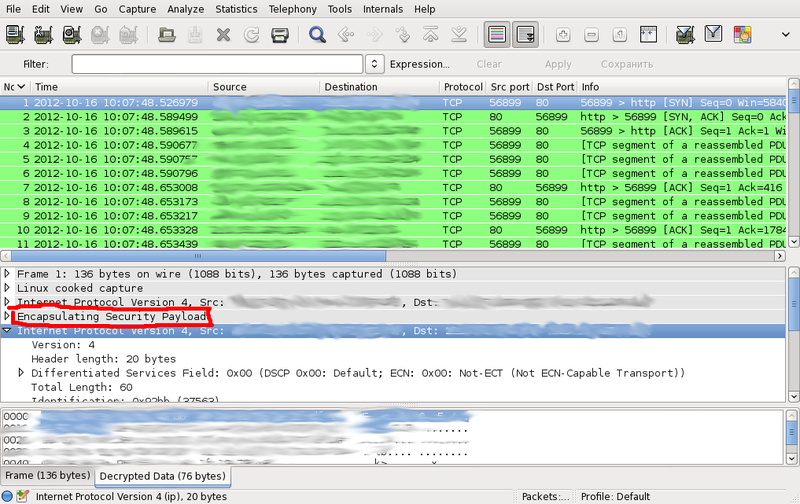
After saving the entered changes, we should get the decoded traffic:
To facilitate the configuration of wireshark, I wrote a small utility on perl, which runs setkey -D and formats the output to the wireshark settings format:
The result must be written to the file ~ / .wireshark / esp_sa. Then restart wireshark.
If the script doesn’t work for you and gives the error “Unknown encr alg” or “Unknown auth alg”, you will need to drive the correspondence of this algorithm in setkey utility and the corresponding value for wireshark into the hash tables% ealg or% aalg. I tested only with aes-cbc and hmac-sha1.
Additional information (slightly outdated) on the wireshark website .
For successful traffic decoding, it is necessary to start dumping immediately after raising ipsec.
To capture traffic, we use tcpdump, for example like this: Then we raise ipsec: Since ipsec is configured using PSK (pre shared key) authentication, you need to find out the session key for successful decoding. This can be done using the setkey command. This command, in the case of debian, is included in the ipsec-tools package. You need to run as root.
# tcpdump -i any -s 0 -w ipsec.pcap esp
# /etc/init.d/ipsec start
# setkey -D
10.1.1.1  10.2.2.2
	esp mode=tunnel spi=2548102798(0x97e0f68e) reqid=16389(0x00004005)
	E: aes-cbc  2a787e41 bbdc2f94 9ced721c 7fcf934e
	A: hmac-sha1  6af6847a 477bea9f 5c9a8d13 7ea9a5b5 9a318d29
	seq=0x00000000 replay=32 flags=0x00000000 state=mature
	created: Oct 16 10:37:52 2012	current: Oct 16 11:04:26 2012
	diff: 1594(s)	hard: 0(s)	soft: 0(s)
	last:                     	hard: 0(s)	soft: 0(s)
	current: 0(bytes)	hard: 0(bytes)	soft: 0(bytes)
	allocated: 0	hard: 0	soft: 0
	sadb_seq=1 pid=9195 refcnt=0
We need:
1) ip-addresses
2) spi - security parameter index
3) string “E:” (encryption algorithm and session key), for this example, aes-cbc encryption algorithm, and 128-bit AES key “2a787e41 bbdc2f94 9ced721c 7fcf934e ”
4) the string“ A: ”(authentication algorithm and its key), for this example it is hmac-sha1 and the key is“ 6af6847a 477bea9f 5c9a8d13 7ea9a5b5 9a318d29 "
Because we use AES-CBC, that is why (because of the -CBC prefix) all traffic will be required from the moment the ipsec tunnel is raised (CBC - cipher block chaining). It may not be necessary to have all the traffic with other algorithms, I don’t know this, but I think that most of all traffic will be required from the moment the ipsec tunnel is raised.
For decoding and viewing, we use wireshark (1.8.2, you can use an earlier version, but it will be a little different there).
These parameters need to be driven into wireshark. You need to open the “Edit-> Preferences” settings window, select “Protocols-> ESP” there, where check the boxes “Attempt to detect / decode NULL encrypted ESP payloads”, “Attempt to detect / decode encrypted ESP payloads” and “Attempt to Check ESP Authentication. "
Then click the “Edit” button (“Edit” -> “Create”) and drive in the ip-addresses, spi and keys obtained using setkey:
After saving the entered changes, we should get the decoded traffic:
To facilitate the configuration of wireshark, I wrote a small utility on perl, which runs setkey -D and formats the output to the wireshark settings format:
#!/usr/bin/perl -w
%ealg = (
	'aes-cbc' => 'AES-CBC [RFC3602]',
	'3des-cbc' => 'TripleDES-CBC [RFC2451]',
	'aes-ctr' => 'AES-CTR [RFC3686]',
	'todo' => 'DES-CBC [RFC2405]',
	'todo' => 'CAST5-CBC [RFC2144]',
	'blowfish-cbc' => 'BLOWFISH-CBC [RFC2451]',
	'twofish-cbc' => 'TWOFISH-CBC'
);
%aalg = (
	'hmac-sha1' => 'HMAC-SHA-1-96 [RFC2404]',
	'hmac-sha256' => 'HMAC-SHA-256-96 [draft-ietf-ipsec-ciph-sha-256-00]',
	'todo' => 'HMAC-SHA-256-128 [RFC4868]',
	'todo' => 'HMAC-MD5-96 [RFC2403]',
	'todo' => 'MAC-RIPEMD-160-96 [RFC2857]',
	'todo' => 'ANY 96 bit authentication [no checking]',
	'todo' => 'ANY 128 bit authentication [no checking]',
	'todo' => 'ANY 192 bit authentication [no checking]',
	'todo' => 'ANY 256 bit authentication [no checking]'
);
open KEYS, "setkey -D |";
while (defined($l = )) {
	if ($l =~ /^\d/) {
		($ip_src, $ip_dst) = (split(/\s+/, $l))[0,1];
	} elsif ($l =~ /^\s+esp mode=.*? spi=\d+\((0x.*?)\)/) {
		$spi = $1;
	} elsif ($l =~ /^\s+E: ([^\s]+)\s+(.*)$/) {
		($ealg, $ekey) = ($1, $2);
		$ealg = ($ealg{$ealg} or die "Unknown encr alg: '$ealg'");
		$ekey =~ s/\s+//g;
	} elsif ($l =~ /^\s+A: ([^\s]+)\s+(.*)$/) {
		($aalg, $akey) = ($1, $2);
		$aalg = ($aalg{$aalg} or die "Unknown auth alg: '$aalg'");
		$akey =~ s/\s+//g;
		print qq#"IPv4","$ip_src","$ip_dst","$spi",$ealg,"0x$ekey","$aalg","0x$akey"\n#;
		($ip_src, $ip_dst, $spi, $ealg, $ekey, $aalg, $akey) = ();
	}
}
close KEYS
The result must be written to the file ~ / .wireshark / esp_sa. Then restart wireshark.
If the script doesn’t work for you and gives the error “Unknown encr alg” or “Unknown auth alg”, you will need to drive the correspondence of this algorithm in setkey utility and the corresponding value for wireshark into the hash tables% ealg or% aalg. I tested only with aes-cbc and hmac-sha1.
Additional information (slightly outdated) on the wireshark website .