Methods of dealing with loneliness on the example of DS112 +
 With the situation when the place for data storage ends, users regularly encounter both at home and at work. It can be a new smartphone, or a PC, or even a network drive. If with a phone and a computer the issue is solved by purchasing additional memory cards or hard drives, then what about the NAS, especially if it is single-disk? How not to lose data if the hard drive crashes? So, if the place on the single-disk NAS has run out, then there is only one solution - somehow “add”. This can be achieved using an external drive, flash drive or DAS-drive, which has increased storage reliability compared to alternative options. Two questions immediately appear: will they be able to “make friends”? And is it possible to talk about high or at least sufficient for normal operation data exchange rates.
As an object of research, we take Synology DS112 + , which is one of the most productive among single- and dual-disk NASs in the Synology line. This drive is equipped with all modern interfaces and will be able to provide us with the maximum understanding of NAS capabilities for connecting external storage to the network.
As a "lifebuoy" for the DS112 + we will try to use the 5-disk CFI-B8253JDGG .
Perhaps someone will say that it’s already too much - to connect 5-disk storage to a 1-disk NAS! We will not rush to conclusions and see what solution we get in the end.
Let's start with the answer to the first question - will the devices “make friends”. The answer is definitely yes - “YES”. We tried to connect DAS CFI to different NAS Synology models and got the same positive result: both when connected via USB 3.0 and eSATA. Looking ahead, let's say that eSATA connection turned out to be much preferable in terms of speed.
Now let's move on to the practical, laboratory part. We will answer the second question - how much the speed of interaction between NAS, PC and DAS can be considered “decent”.
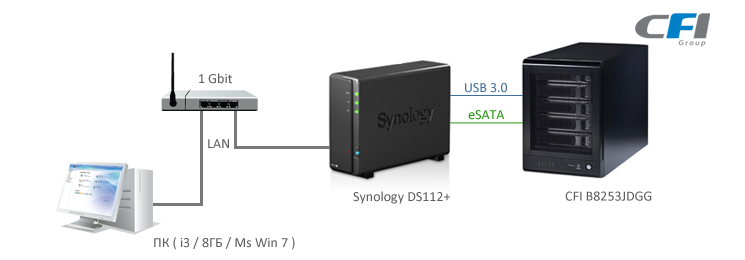
To begin with, we need to get a reference point of “decency” - this, of course, is the work of DAS and NAS from a PC. We connect both devices directly to the computer and measure the speed of data exchange of Synology and CFI from the PC:
| PC and Synology | PC and CFI | ||
| Reading | Record | Reading | Record |
| 95.3 MB / s | 71 MB / s | 220 MB / s | 110 MB / s |
Let us remember these results and consider them to be reference ones.
Now let's move on to the practice of using DAS in conjunction with a Synology NAS. We add that a similar scheme will work with any NAS from various manufacturers. However, Synology has a USB 3.0 port even on single-disc models, which makes the experiment as interesting as possible.
First, on CFI, using the dip switches on the rear panel, set the RAID0 storage mode as the fastest RAID mode and format the resulting array in NTFS. We connect the DAS drive to Synology and go straight to the FileStation application. Here, our array is displayed as a shared folder with the name usbshare1-2 (USB 3.0 connection).
Note: Simultaneous connection of DAS via USB3.0 and eSATA is not possible.
For this folder, you can assign read / write permissions in the settings of the shared folders.
We connect this folder as a network drive and measure the speed of access to the DAS folder over the network:
| Connection interface | Reading | Record |
| USB 3.0 | 23.5 MB \ s | 23.5 MB \ s |
We measure the speed of interaction between NAS and DAS devices among themselves, copying the data array directly with the command from FileStation:
| Connection interface | Recording from Synology to CFI | Recording from CFI to Synology |
| USB 3.0 | 12.5 MB \ s | 22.5 MB \ s |
Now we connect the devices via eSata and repeat the measurements of the PC access speed to the DAS folder through the network:
| Connection interface | Recording from Synology to CFI | Recording from CFI to Synology |
| eSata | 52.5 MB \ s | 56.7 MB \ s |
Interaction between devices:
| Connection interface | Recording from Synology to CFI | Recording from CFI to Synology |
| eSata | 55.7 MB \ | 56.8 MB \ s |
Table of experimental results:
| USB 3.0 | eSATA | |
| Reading | 23.5 MB \ s | 52.5 MB \ s |
| Record | 23.5 MB \ s | 56.7 MB \ s |
| From CFI to Synology | 22.5 MB \ s | 56.8 MB \ s |
| From Synology to CFI | 12.5 MB \ s | 55.7 MB \ s |
The data obtained allow us to conclude that the best connection option is eSata.
Now let's try to “add” reliability to our storage system and set the RAID 5 array mode to CFI. We format the DAS in NTFS to simplify the connection to a regular PC and measure the speed:
| USB 3.0 | eSATA | |
| Read over the network on a PC | 22.5 MB \ s | 42 MB \ s |
| Network recording from PC | 10 MB \ s | 52.7 MB \ s |
| From CFI to Synology | 18.5 MB \ s | 40 MB \ s |
| From Synology to CFI | 6.6 MB \ s | 52.7 MB \ s |
And in this case, eSata wins in speed.
Experimentally, we received a positive answer to the question of “decency” of speeds. The speed of access to the DAS drive connected to the Synology DS112 + is comparable to the speed of the NAS server on the network. This is not only about Synology NAS, but also about NAS from other manufacturers, both home series and older. What can be considered absolutely acceptable for daily work.
Moreover, the more powerful the NAS platform will be used to connect the DAS drive to the network, the higher speed performance we will get. The exchange speed over USB 3.0, unfortunately, completely depends on the performance of the host device to which DAS is connected. Accordingly, the results obtained reflect the natural limitations of the platform used.
Conclusions:
If necessary, increase the volume of the network drive, even a single-disk one, an excellent solution is to connect an external DAS drive (in our case, a 5-disk CFI B8253JDGG). Using the RAID5 storage array mode will add to the entire system such an important element as reliability, which was initially not available for the single-disk NAS itself.
Estimate the cost of this solution. It turns out that for money less than the cost of any 5-disk NAS, we get almost a 6-disk storage system with performance close to DS112 +. Note that the Plus series, of which the DS112 + is a representative, is a series of productive devices. The only difference is that the entire new storage volume is one, not several folders and, accordingly, only one set of rights for users. Nevertheless, to solve many problems this is enough, and the savings, as they say "on the face."
The fact that even a single-disk NAS can now be turned into a 1 + 4, 1 + 5, 1 + 8 system, etc. simply by connecting an external RAID storage module - is it not a dream come true.
It should be noted that DAS can be an excellent option not only to expand the capacity of the NAS, but also a reliable external capacity for local backup. For a single-disk NAS - this is not relevant, you can do with a simple external HDD. But what if you have, say, an 8-disk NAS? The answer is to use an 8-disk DAS!
Once again, we note that the best speed result is achieved by connecting devices via eSATA, so we recommend that you use this interface if possible.
Author: Synology Technical Support Synology
Official Website: www.synology.su
CFI Official Website: www.cfi-rus.ru









