 August 26, 2012 at 20:59
Standalone IP Camera
After my review of the Chinese IP video camera ( habrahabr.ru/post/146344 ) I got the opportunity to try a standalone IP video camera that allows you to conduct Internet video broadcasting without using a computer.
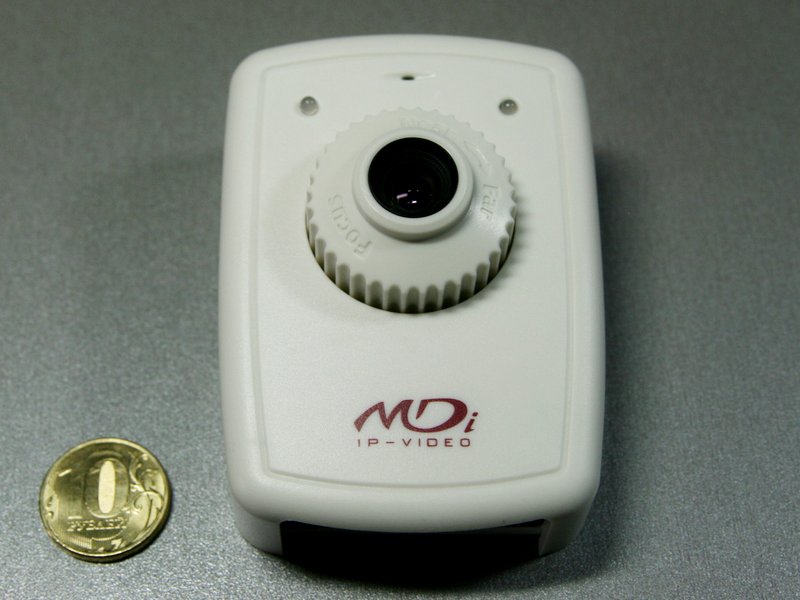
This is a Micro Digital MDC-i4220 IP camera with special firmware that supports ivideon service.
The camera sells for 5500 rubles. There is also a model with Wi-Fi MDC-i4220w, it costs 7,000 rubles. It is no more expensive than the same camera with conventional firmware.
First of all, I’ll tell you what the camera allows you to do and why this can come in handy.
The camera is configured in just five minutes, it connects to the wired Internet or a Yota modem is inserted into it (they promise to make support for 3G modems soon), after which you can watch live video from the camera on ivideon.ru or through applications for iPad / iPhone / Android. In addition, videos can be embedded on sites and blogs. It is very important that the camera does not need a dedicated ip-address. It works wherever there is Internet and the channel speed is sufficient to transmit video.
I see two options for using such a camera:
• Creating a public webcam
• Video surveillance
Now everything is in order.
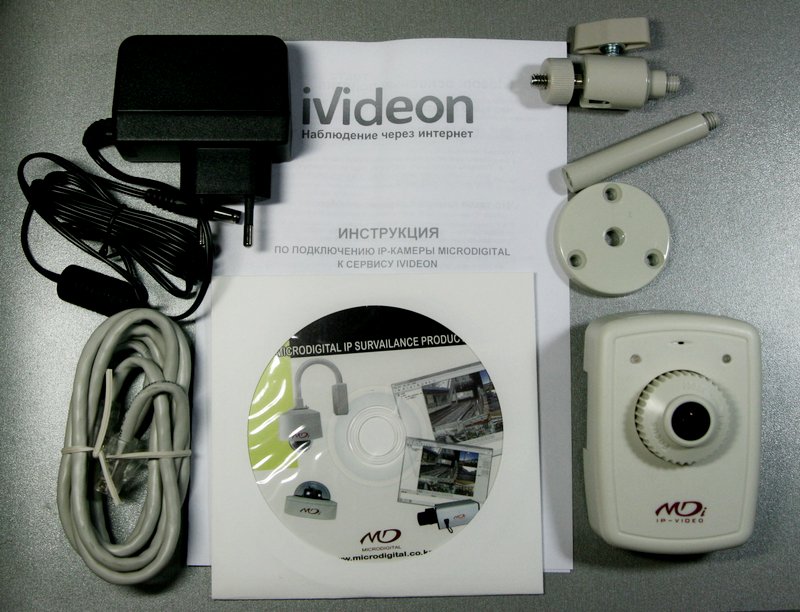
The delivery kit includes the camera itself, a power supply, a mounting bracket, a network cable, a disk with the setup program and instructions in English, installation instructions.
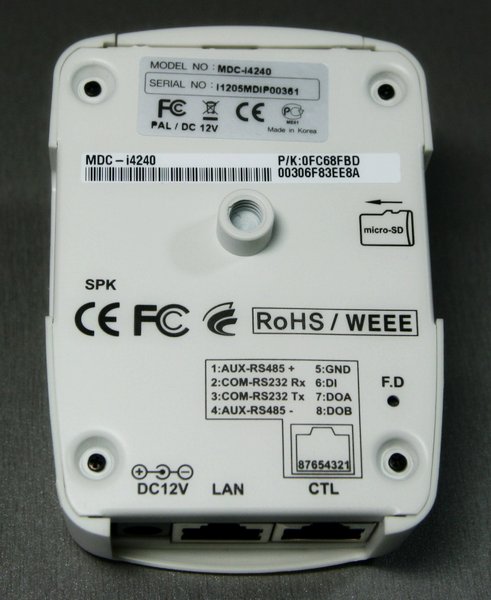
The camera is powered by twelve volts, has two RJ-45 connectors (one for the local network, the second for RS-485 and RS-232 interfaces and input and output contacts), a microSD card slot and a USB modem port.

By default, the camera has a static address of 10.20.30.40, so to get started, you need to install the IP-Installer program from the disk and use it to assign the camera a DHCP address or a static address on your network.
Next, you need to register at ivideon.ru.
The last step - you need to go to the camera’s address with the browser (you can see it in the IP-Installer program) and write down the email address in which Ivideon’s account was registered in the Ivideon section of the web interface and at the same time come up with a camera name.

After these simple steps, you can start watching the broadcast.

If desired, you can turn on the sound broadcast.

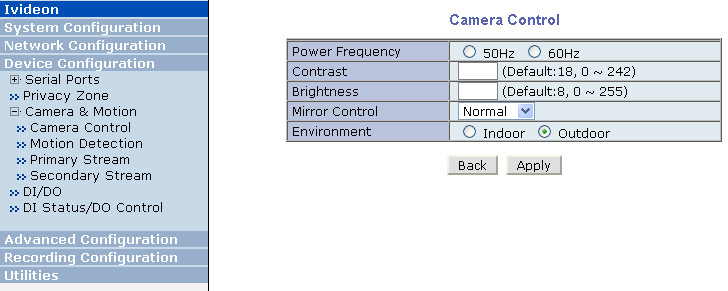
If the camera will look at the street, like mine, you need to enable the "outdoor" mode, otherwise bright sunlight will blind the camera.
If you install a MicroSD card in the camera (cards up to 32GB are supported) in all viewers, except for the video embedded on the site, you can watch not only live video, but also a recording that can be performed continuously, either by a motion detector or by the appearance of control signal on the contact of the second connector.
Although the camera is simple, the image quality is quite decent and significantly exceeds the image quality of cheap Chinese cameras.
Of course it is very cool that the camera works autonomously without a computer. It is a pity that I did not have such a camera when I was broadcasting from the nest of the wagtail.
This is a Micro Digital MDC-i4220 IP camera with special firmware that supports ivideon service.
The camera sells for 5500 rubles. There is also a model with Wi-Fi MDC-i4220w, it costs 7,000 rubles. It is no more expensive than the same camera with conventional firmware.
First of all, I’ll tell you what the camera allows you to do and why this can come in handy.
The camera is configured in just five minutes, it connects to the wired Internet or a Yota modem is inserted into it (they promise to make support for 3G modems soon), after which you can watch live video from the camera on ivideon.ru or through applications for iPad / iPhone / Android. In addition, videos can be embedded on sites and blogs. It is very important that the camera does not need a dedicated ip-address. It works wherever there is Internet and the channel speed is sufficient to transmit video.
I see two options for using such a camera:
• Creating a public webcam
• Video surveillance
Now everything is in order.
The delivery kit includes the camera itself, a power supply, a mounting bracket, a network cable, a disk with the setup program and instructions in English, installation instructions.
The camera is powered by twelve volts, has two RJ-45 connectors (one for the local network, the second for RS-485 and RS-232 interfaces and input and output contacts), a microSD card slot and a USB modem port.
By default, the camera has a static address of 10.20.30.40, so to get started, you need to install the IP-Installer program from the disk and use it to assign the camera a DHCP address or a static address on your network.
Next, you need to register at ivideon.ru.
The last step - you need to go to the camera’s address with the browser (you can see it in the IP-Installer program) and write down the email address in which Ivideon’s account was registered in the Ivideon section of the web interface and at the same time come up with a camera name.
After these simple steps, you can start watching the broadcast.
If desired, you can turn on the sound broadcast.
If the camera will look at the street, like mine, you need to enable the "outdoor" mode, otherwise bright sunlight will blind the camera.
If you install a MicroSD card in the camera (cards up to 32GB are supported) in all viewers, except for the video embedded on the site, you can watch not only live video, but also a recording that can be performed continuously, either by a motion detector or by the appearance of control signal on the contact of the second connector.
Although the camera is simple, the image quality is quite decent and significantly exceeds the image quality of cheap Chinese cameras.
Of course it is very cool that the camera works autonomously without a computer. It is a pity that I did not have such a camera when I was broadcasting from the nest of the wagtail.









