June 26, 2012 at 12:54
What is the Digital Venturis 466 capable of?
Although I have not been so many years (21, to be precise), I have been interested in the history of the IT industry for quite some time. Until recently, I had enough experiments with virtual machines, but after reading the article “Experiment: What can I squeeze 166 megahertz from Pentium?” I finally decided to do what I had been thinking for a long time, namely to buy some old machine for experiences. I was lucky: according to the rarity at the site of the forum, there was a fresh announcement about the sale of the Digital Venturis 466 computer manufactured by the now deceased company DEC, aka Digital Equipment Corporation, which I soon became the owner of for 110 rubles. Will I be able to catch up and overtake the author of the above article? Details under the cut.
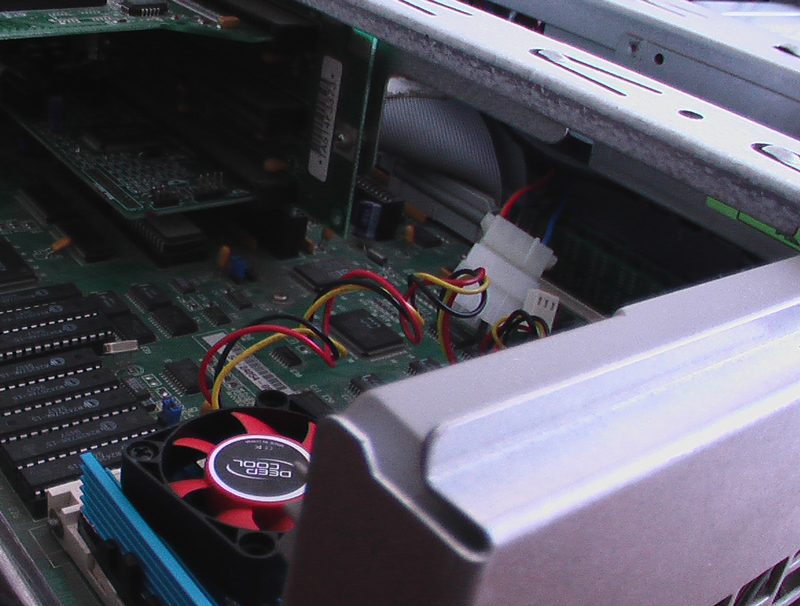
Digital Venturis 466 is a 1994 model, and a copy that fell into my hands was released in February ninety-fifth. At that time, its estimated price in Russia was a little more than a thousand dollars. This computer is assembled on the basis of the processor from AMD, Am486DX2-66, a representative of the Am486 line created in 1993 to compete with Intel. What is interesting about this line? Well, for example, the fact that AMD was 4 years behind Intel in copying their own processors. But at the same time, AMD processors had higher frequencies and good overclocking capabilities. Just like Intel processors, and like any modern processor, they are attached to the motherboard using a ZIF socket, which allows almost no effort to insert and remove the processor. Before that, in the best case, we had to pick out the processors with a screwdriver, and sometimes they were completely soldered to the motherboard. But first of all, in comparison with the processors of previous generations, a huge jump in performance is noticeable to the naked eye. It is now possible to safely use a computer released about 10 years ago, and in those years, technology developed by leaps and bounds, and, between different generations of processors, one could say, there was an abyss. So, for example, to run Windows 95, at least the 386th processor is required, and to work in Windows 98 it is already the 486th. The older models of the 486th, which have a built-in mathematical coprocessor, allow you to play games such as Warcraft II, Heroes of Might and Magic, Duke Nukem 3D without brakes, and with some tricks you can already listen to mp3. Also, as far as I know, such a phenomenon, how emulation on PC of game consoles arose precisely at the time of the 486th processor, at least it already pulls out the NES emulator that works very poorly with commercial games (the unofficial clone of which is known to us under the name "Dandy"). Moreover, being equipped with a network card, a computer with such a processor allows now, in 2012, to read the Habrahabr, which I will definitely discuss in more detail below.
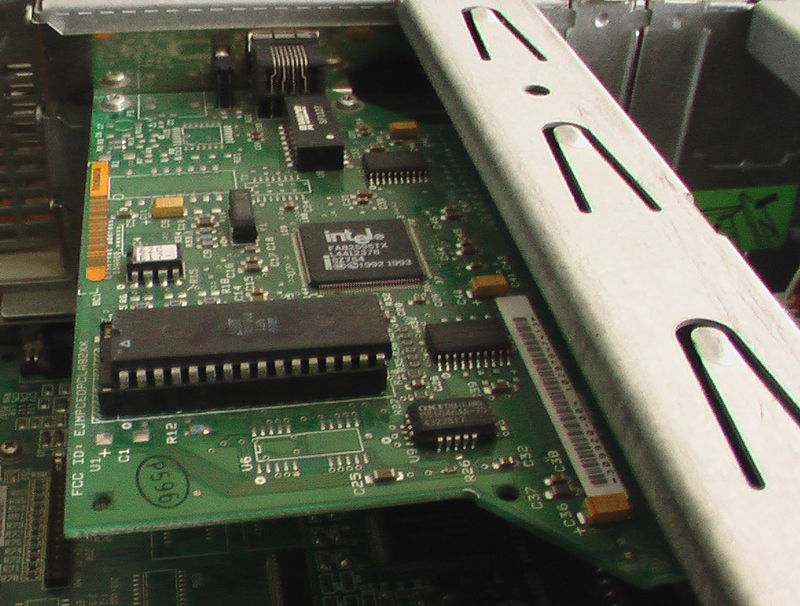
The computer came to me in a half working condition. First of all, it was required to install some kind of operating system, and since I wanted to get the most out of it, the choice fell on Windows 98 SE. Yes, Windows 95 has lower system requirements, but it’s even difficult to find an archiver for it, not to mention everything else, and such things as the need to manually configure the network, etc. In addition, there is such a thing for Windows 98, like KernelEx, but for Windows 95 it’s not. That is, to launch some kind of Firefox 13 does not work. Installing Windows 98 on such a computer is not such a trivial task as it might seem at first glance. To begin with, it is worth mentioning that the volume of the hard drive there is only 420 megabytes, which is slightly less than what is required only for the installation files. There was no CD drive either. And when he appeared, it turned out that its initialization occurs only after loading the OS, and the BIOS does not see it (as it turned out later, the universal PLoP bootloader helps to solve this problem). However, by the time the drive was purchased, I already managed to break the hard drive: once I dropped it, it stopped working after 10 minutes. I had to search for missing components, and when I started, I couldn’t just stop there. As a result, a CD writer, a 2-gigabyte HDD was installed, the processor was replaced with a DX4-100, which, in addition, was aimed at increasing the frequency of the shamanism bus with jumpers and was overclocked to 120 megahertz (bus frequency x 3). By the way, the second-level cache here is located on the motherboard, it can be finished with these chips in DIP packages: that it is initialized only after loading the OS, and the BIOS does not see it (as it turned out later, the universal PLoP bootloader helps to solve this problem). However, by the time the drive was purchased, I already managed to break the hard drive: once I dropped it, it stopped working after 10 minutes. I had to search for missing components, and when I started, I couldn’t just stop there. As a result, a CD writer, a 2-gigabyte HDD was installed, the processor was replaced with a DX4-100, which, in addition, was aimed at increasing the frequency of the shamanism bus with jumpers and was overclocked to 120 megahertz (bus frequency x 3). By the way, the second-level cache here is located on the motherboard, it can be finished with these chips in DIP packages: that it is initialized only after loading the OS, and the BIOS does not see it (as it turned out later, the universal PLoP bootloader helps to solve this problem). However, by the time the drive was purchased, I already managed to break the hard drive: once I dropped it, it stopped working after 10 minutes. I had to search for missing components, and when I started, I couldn’t just stop there. As a result, a CD writer, a 2-gigabyte HDD was installed, the processor was replaced with a DX4-100, which, in addition, was aimed at increasing the frequency of the shamanism bus with jumpers and was overclocked to 120 megahertz (bus frequency x 3). By the way, the second-level cache here is located on the motherboard, it can be finished with these chips in DIP packages: this problem helps to solve the universal loader PLoP). However, by the time the drive was purchased, I already managed to break the hard drive: once I dropped it, it stopped working after 10 minutes. I had to search for missing components, and when I started, I couldn’t just stop there. As a result, a CD writer, a 2-gigabyte HDD was installed, the processor was replaced with a DX4-100, which, in addition, was aimed at increasing the frequency of the shamanism bus with jumpers and was overclocked to 120 megahertz (bus frequency x 3). By the way, the second-level cache here is located on the motherboard, it can be finished with these chips in DIP packages: this problem helps to solve the universal loader PLoP). However, by the time the drive was purchased, I already managed to break the hard drive: once I dropped it, it stopped working after 10 minutes. I had to search for missing components, and when I started, I couldn’t just stop there. As a result, a CD writer, a 2-gigabyte HDD was installed, the processor was replaced with a DX4-100, which, in addition, was aimed at increasing the frequency of the shamanism bus with jumpers and was overclocked to 120 megahertz (bus frequency x 3). By the way, the second-level cache here is located on the motherboard, it can be finished with these chips in DIP packages: once it was dropped, it stopped working after 10 minutes. I had to search for missing components, and when I started, I couldn’t just stop there. As a result, a CD writer, a 2-gigabyte HDD was installed, the processor was replaced with a DX4-100, which, in addition, was aimed at increasing the frequency of the shamanism bus with jumpers and was overclocked to 120 megahertz (bus frequency x 3). By the way, the second-level cache here is located on the motherboard, it can be finished with these chips in DIP packages: once it was dropped, it stopped working after 10 minutes. I had to search for missing components, and when I started, I couldn’t just stop there. As a result, a CD writer, a 2-gigabyte HDD was installed, the processor was replaced with a DX4-100, which, in addition, was aimed at increasing the frequency of the shamanism bus with jumpers and was overclocked to 120 megahertz (bus frequency x 3). By the way, the second-level cache here is located on the motherboard, it can be finished with these chips in DIP packages: by aiming to increase the frequency of the shamanism bus with jumpers, it was dispersed to 120 megahertz (bus frequency x 3). By the way, the second-level cache here is located on the motherboard, it can be finished with these chips in DIP packages: by aiming to increase the frequency of the shamanism bus with jumpers, it was dispersed to 120 megahertz (bus frequency x 3). By the way, the second-level cache here is located on the motherboard, it can be finished with these chips in DIP packages:
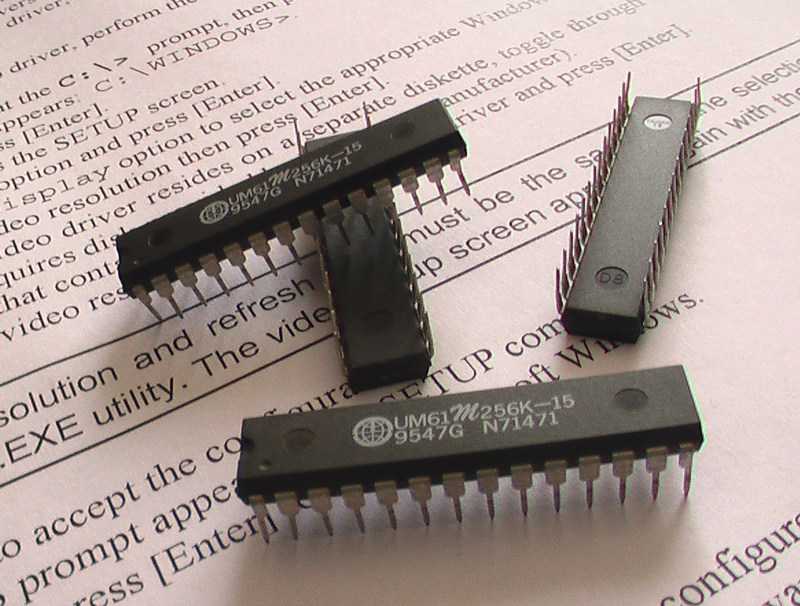
Which was done. Increasing the cache volume from 128 to 256 kb has a positive effect on performance. You can also increase performance (albeit slightly) by changing the cache type from write-through to write-back . It is also worth mentioning that initially in this computer the processor did not cool at all, there wasn’t even a heatsink, and since such jokes no longer work with DX4, I had to invent cooling myself. The radiator was removed from some Pentium MMX and barbarously processed with a hacksaw for metal, and the forty-millimeter cooler was removed from the cooling system of the DEEPCOOL chipset. Actually, at first I just wanted to put it on the processor, but, yes, it was too lazy to check the sizes before the purchase.
An authentic three-button serial mouse has been added to all this:
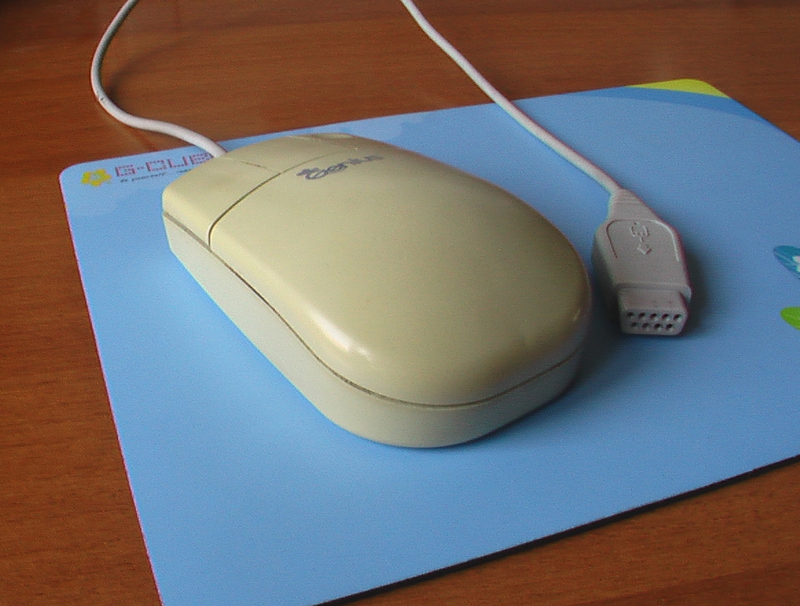
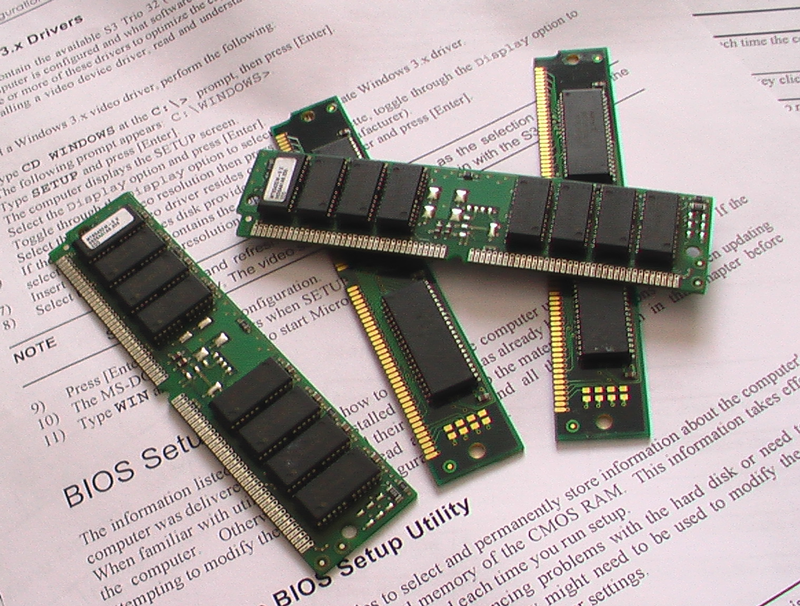
An Intel network card was also installed under the ISA slot (and there are no others) and the amount of RAM was increased from 8 to 36 megabytes (two slots of 16 + 4 built-in). And although the motherboard supports up to 68 mb, I could not find the 72-pin Simm strips of 32 megabytes. In principle, 36 MB for Windows 98 is enough.
After installing the system, it turned out that the existing ALS 120 sound card on the Realtek chip is not able to process sound normally in a significant part of games running from under Windows, and if it is capable, the quality of this sound leaves much to be desired. I must say that I never loved Realtek, and on my work computer there is a SB Audigy 2 ZS bought back in 2004, which I, in general, am quite pleased with. That is, you understand why the decision was logical for me to insert a sound card from Creative, some legendary Sound Blaster, into this computer. According to an announcement on the forum, I found Sound Blaster AWE64 GOLD, and the announcement was almost a year ago, the seller had already managed to move, and could not find this card for several days. It is unlikely that he seriously expected that anyone would buy it at all. But when the card, Finally, it turned out to be with me, I realized that I was not mistaken. Of course, the sound here was clean and wonderful, there were no problems with it, but what surprised me most was how PnP technology worked already in the days of Windows 98 and the ISA interface: in fact, I didn’t need any additional actions after the first inclusion the system detected a new device and installed the driver itself. Even during XP, this did not always work.

By the way, if you think that I didn’t try to run any of the “light” linux distributions on this unit, you are mistaken. I tried, but alas ... Damn Small Linux, some old version of Puppy, Tiny Core - all of them, after some thought, reported errors and refused to work. I think that the built-in S3 video card or the built-in IDE controller could serve as a stumbling block. One way or another, Windows 98 was installed. To reduce memory consumption with the 98lite program, the graphical environment of win98 was replaced with that of win95, as a result, the memory consumption of a clean system was reduced from 24 to 16 mb.
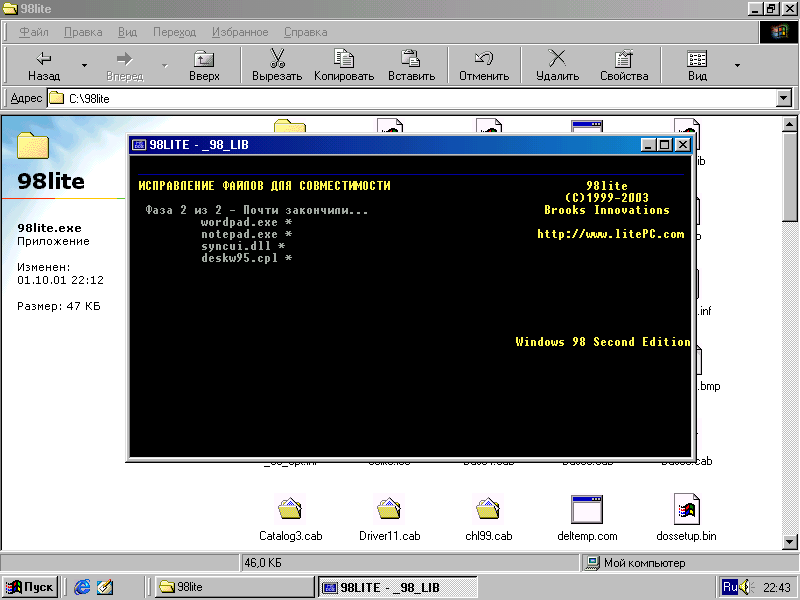
After that, Windows 98 is more like Windows 95. It immediately catches the eye that the Quick Launch bar has disappeared:
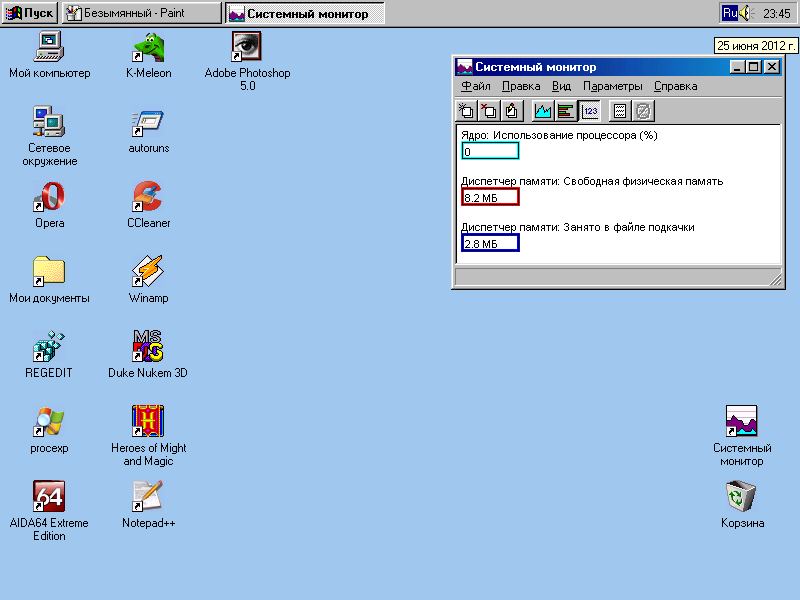
But if you can still somehow live without a quick launch panel, then it is unlikely to live without a browser. The best option for such a system would be K-Meleon : it is not too old (the latest version was released in 2010, it’s not Netscape 4.72 for you), it is compatible with Windows 98 and it works pretty well on the hardware described.

I promised to show you Habrahabr?

No unnecessary processes.
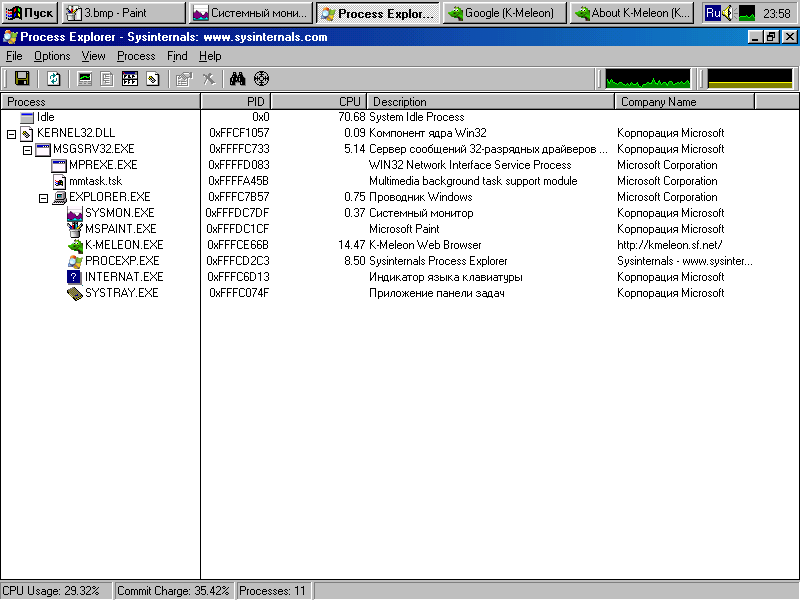
You can relax and read someone's cozy zhezheshekku.

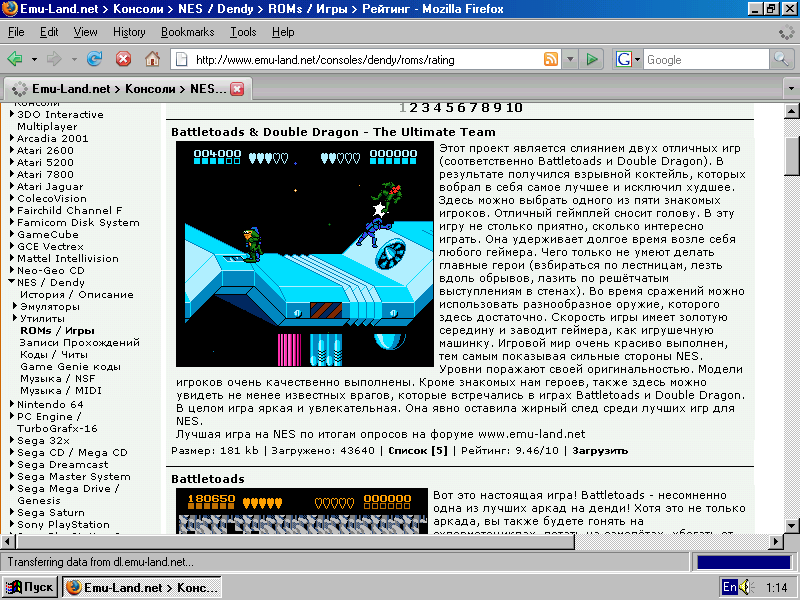
However, firefox is also here. But at times it slows down.
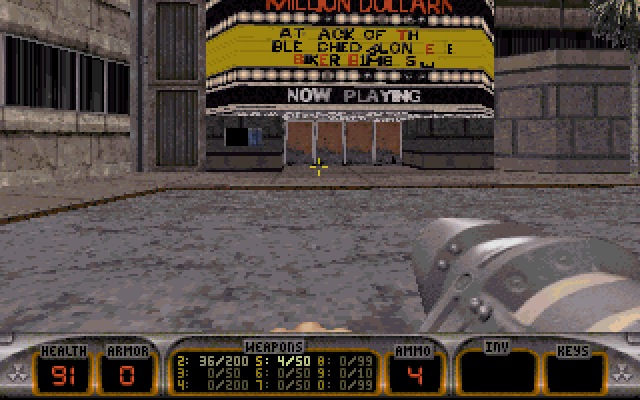
You can play Duke.
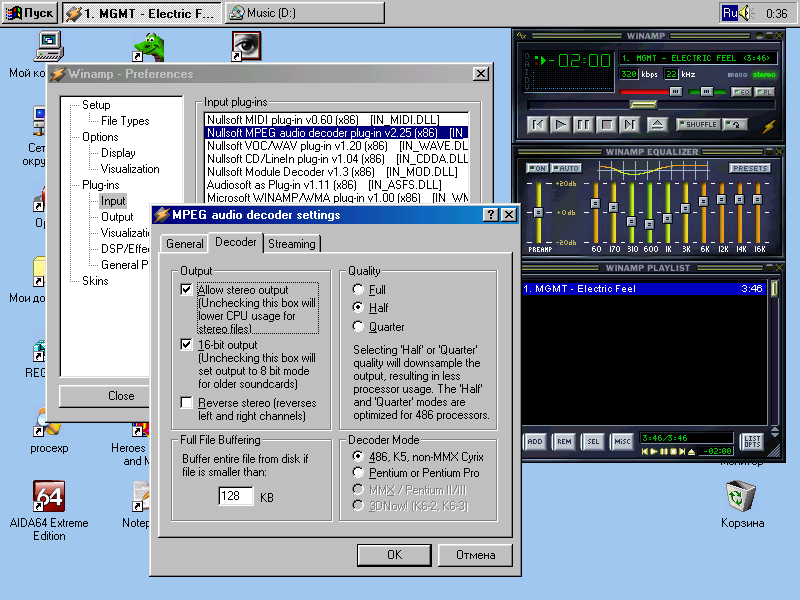
Or listen to mp3. 320 kbps is enough for us.
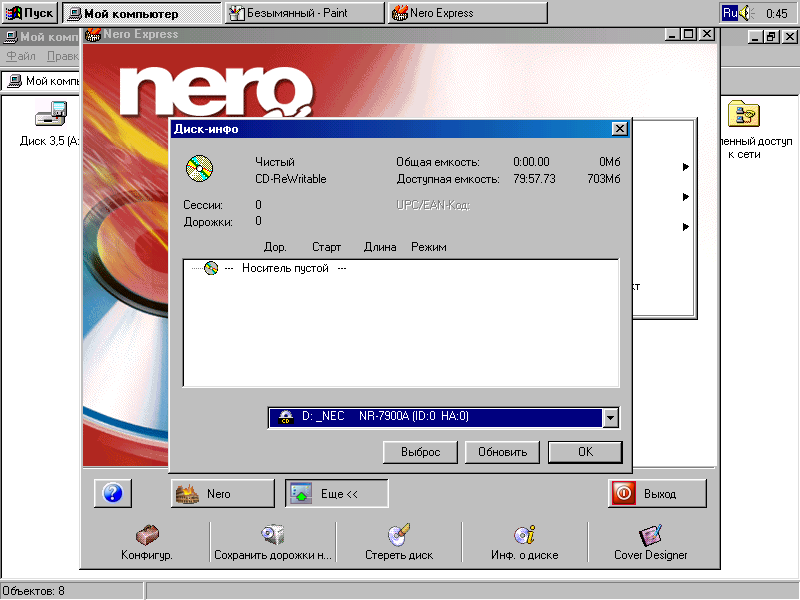
To transfer screenshots made for this article using a floppy disk would, of course, be a mockery, but the disk will do for something else. Everything is recorded very quickly.
Finally, I will give the testimony of the AIDA64 program: The
system BIOS has been in use for over two years now. Need to upgrade.
All such topics end the same way.

Digital Venturis 466 is a 1994 model, and a copy that fell into my hands was released in February ninety-fifth. At that time, its estimated price in Russia was a little more than a thousand dollars. This computer is assembled on the basis of the processor from AMD, Am486DX2-66, a representative of the Am486 line created in 1993 to compete with Intel. What is interesting about this line? Well, for example, the fact that AMD was 4 years behind Intel in copying their own processors. But at the same time, AMD processors had higher frequencies and good overclocking capabilities. Just like Intel processors, and like any modern processor, they are attached to the motherboard using a ZIF socket, which allows almost no effort to insert and remove the processor. Before that, in the best case, we had to pick out the processors with a screwdriver, and sometimes they were completely soldered to the motherboard. But first of all, in comparison with the processors of previous generations, a huge jump in performance is noticeable to the naked eye. It is now possible to safely use a computer released about 10 years ago, and in those years, technology developed by leaps and bounds, and, between different generations of processors, one could say, there was an abyss. So, for example, to run Windows 95, at least the 386th processor is required, and to work in Windows 98 it is already the 486th. The older models of the 486th, which have a built-in mathematical coprocessor, allow you to play games such as Warcraft II, Heroes of Might and Magic, Duke Nukem 3D without brakes, and with some tricks you can already listen to mp3. Also, as far as I know, such a phenomenon, how emulation on PC of game consoles arose precisely at the time of the 486th processor, at least it already pulls out the NES emulator that works very poorly with commercial games (the unofficial clone of which is known to us under the name "Dandy"). Moreover, being equipped with a network card, a computer with such a processor allows now, in 2012, to read the Habrahabr, which I will definitely discuss in more detail below.
The computer came to me in a half working condition. First of all, it was required to install some kind of operating system, and since I wanted to get the most out of it, the choice fell on Windows 98 SE. Yes, Windows 95 has lower system requirements, but it’s even difficult to find an archiver for it, not to mention everything else, and such things as the need to manually configure the network, etc. In addition, there is such a thing for Windows 98, like KernelEx, but for Windows 95 it’s not. That is, to launch some kind of Firefox 13 does not work. Installing Windows 98 on such a computer is not such a trivial task as it might seem at first glance. To begin with, it is worth mentioning that the volume of the hard drive there is only 420 megabytes, which is slightly less than what is required only for the installation files. There was no CD drive either. And when he appeared, it turned out that its initialization occurs only after loading the OS, and the BIOS does not see it (as it turned out later, the universal PLoP bootloader helps to solve this problem). However, by the time the drive was purchased, I already managed to break the hard drive: once I dropped it, it stopped working after 10 minutes. I had to search for missing components, and when I started, I couldn’t just stop there. As a result, a CD writer, a 2-gigabyte HDD was installed, the processor was replaced with a DX4-100, which, in addition, was aimed at increasing the frequency of the shamanism bus with jumpers and was overclocked to 120 megahertz (bus frequency x 3). By the way, the second-level cache here is located on the motherboard, it can be finished with these chips in DIP packages: that it is initialized only after loading the OS, and the BIOS does not see it (as it turned out later, the universal PLoP bootloader helps to solve this problem). However, by the time the drive was purchased, I already managed to break the hard drive: once I dropped it, it stopped working after 10 minutes. I had to search for missing components, and when I started, I couldn’t just stop there. As a result, a CD writer, a 2-gigabyte HDD was installed, the processor was replaced with a DX4-100, which, in addition, was aimed at increasing the frequency of the shamanism bus with jumpers and was overclocked to 120 megahertz (bus frequency x 3). By the way, the second-level cache here is located on the motherboard, it can be finished with these chips in DIP packages: that it is initialized only after loading the OS, and the BIOS does not see it (as it turned out later, the universal PLoP bootloader helps to solve this problem). However, by the time the drive was purchased, I already managed to break the hard drive: once I dropped it, it stopped working after 10 minutes. I had to search for missing components, and when I started, I couldn’t just stop there. As a result, a CD writer, a 2-gigabyte HDD was installed, the processor was replaced with a DX4-100, which, in addition, was aimed at increasing the frequency of the shamanism bus with jumpers and was overclocked to 120 megahertz (bus frequency x 3). By the way, the second-level cache here is located on the motherboard, it can be finished with these chips in DIP packages: this problem helps to solve the universal loader PLoP). However, by the time the drive was purchased, I already managed to break the hard drive: once I dropped it, it stopped working after 10 minutes. I had to search for missing components, and when I started, I couldn’t just stop there. As a result, a CD writer, a 2-gigabyte HDD was installed, the processor was replaced with a DX4-100, which, in addition, was aimed at increasing the frequency of the shamanism bus with jumpers and was overclocked to 120 megahertz (bus frequency x 3). By the way, the second-level cache here is located on the motherboard, it can be finished with these chips in DIP packages: this problem helps to solve the universal loader PLoP). However, by the time the drive was purchased, I already managed to break the hard drive: once I dropped it, it stopped working after 10 minutes. I had to search for missing components, and when I started, I couldn’t just stop there. As a result, a CD writer, a 2-gigabyte HDD was installed, the processor was replaced with a DX4-100, which, in addition, was aimed at increasing the frequency of the shamanism bus with jumpers and was overclocked to 120 megahertz (bus frequency x 3). By the way, the second-level cache here is located on the motherboard, it can be finished with these chips in DIP packages: once it was dropped, it stopped working after 10 minutes. I had to search for missing components, and when I started, I couldn’t just stop there. As a result, a CD writer, a 2-gigabyte HDD was installed, the processor was replaced with a DX4-100, which, in addition, was aimed at increasing the frequency of the shamanism bus with jumpers and was overclocked to 120 megahertz (bus frequency x 3). By the way, the second-level cache here is located on the motherboard, it can be finished with these chips in DIP packages: once it was dropped, it stopped working after 10 minutes. I had to search for missing components, and when I started, I couldn’t just stop there. As a result, a CD writer, a 2-gigabyte HDD was installed, the processor was replaced with a DX4-100, which, in addition, was aimed at increasing the frequency of the shamanism bus with jumpers and was overclocked to 120 megahertz (bus frequency x 3). By the way, the second-level cache here is located on the motherboard, it can be finished with these chips in DIP packages: by aiming to increase the frequency of the shamanism bus with jumpers, it was dispersed to 120 megahertz (bus frequency x 3). By the way, the second-level cache here is located on the motherboard, it can be finished with these chips in DIP packages: by aiming to increase the frequency of the shamanism bus with jumpers, it was dispersed to 120 megahertz (bus frequency x 3). By the way, the second-level cache here is located on the motherboard, it can be finished with these chips in DIP packages:
Which was done. Increasing the cache volume from 128 to 256 kb has a positive effect on performance. You can also increase performance (albeit slightly) by changing the cache type from write-through to write-back . It is also worth mentioning that initially in this computer the processor did not cool at all, there wasn’t even a heatsink, and since such jokes no longer work with DX4, I had to invent cooling myself. The radiator was removed from some Pentium MMX and barbarously processed with a hacksaw for metal, and the forty-millimeter cooler was removed from the cooling system of the DEEPCOOL chipset. Actually, at first I just wanted to put it on the processor, but, yes, it was too lazy to check the sizes before the purchase.
An authentic three-button serial mouse has been added to all this:
An Intel network card was also installed under the ISA slot (and there are no others) and the amount of RAM was increased from 8 to 36 megabytes (two slots of 16 + 4 built-in). And although the motherboard supports up to 68 mb, I could not find the 72-pin Simm strips of 32 megabytes. In principle, 36 MB for Windows 98 is enough.
After installing the system, it turned out that the existing ALS 120 sound card on the Realtek chip is not able to process sound normally in a significant part of games running from under Windows, and if it is capable, the quality of this sound leaves much to be desired. I must say that I never loved Realtek, and on my work computer there is a SB Audigy 2 ZS bought back in 2004, which I, in general, am quite pleased with. That is, you understand why the decision was logical for me to insert a sound card from Creative, some legendary Sound Blaster, into this computer. According to an announcement on the forum, I found Sound Blaster AWE64 GOLD, and the announcement was almost a year ago, the seller had already managed to move, and could not find this card for several days. It is unlikely that he seriously expected that anyone would buy it at all. But when the card, Finally, it turned out to be with me, I realized that I was not mistaken. Of course, the sound here was clean and wonderful, there were no problems with it, but what surprised me most was how PnP technology worked already in the days of Windows 98 and the ISA interface: in fact, I didn’t need any additional actions after the first inclusion the system detected a new device and installed the driver itself. Even during XP, this did not always work.
By the way, if you think that I didn’t try to run any of the “light” linux distributions on this unit, you are mistaken. I tried, but alas ... Damn Small Linux, some old version of Puppy, Tiny Core - all of them, after some thought, reported errors and refused to work. I think that the built-in S3 video card or the built-in IDE controller could serve as a stumbling block. One way or another, Windows 98 was installed. To reduce memory consumption with the 98lite program, the graphical environment of win98 was replaced with that of win95, as a result, the memory consumption of a clean system was reduced from 24 to 16 mb.
After that, Windows 98 is more like Windows 95. It immediately catches the eye that the Quick Launch bar has disappeared:
But if you can still somehow live without a quick launch panel, then it is unlikely to live without a browser. The best option for such a system would be K-Meleon : it is not too old (the latest version was released in 2010, it’s not Netscape 4.72 for you), it is compatible with Windows 98 and it works pretty well on the hardware described.
I promised to show you Habrahabr?
No unnecessary processes.
You can relax and read someone's cozy zhezheshekku.
However, firefox is also here. But at times it slows down.
You can play Duke.
Or listen to mp3. 320 kbps is enough for us.
To transfer screenshots made for this article using a floppy disk would, of course, be a mockery, but the disk will do for something else. Everything is recorded very quickly.
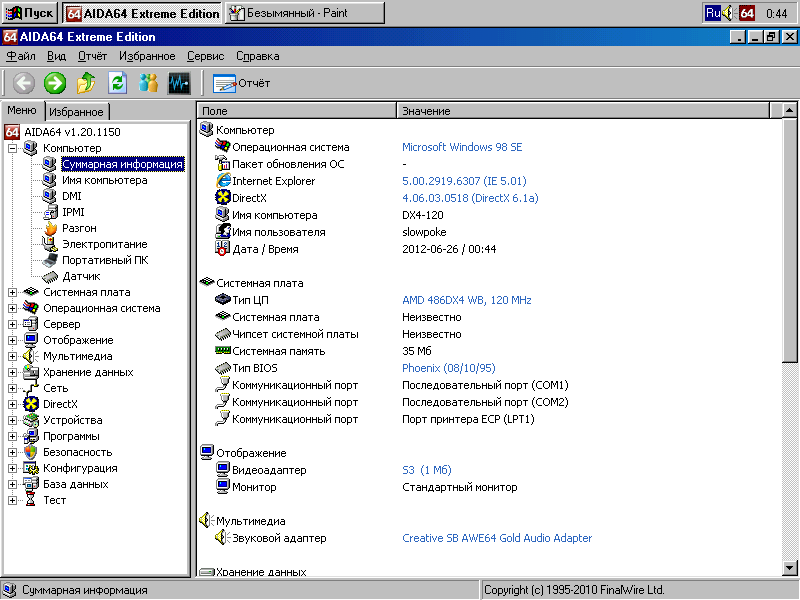
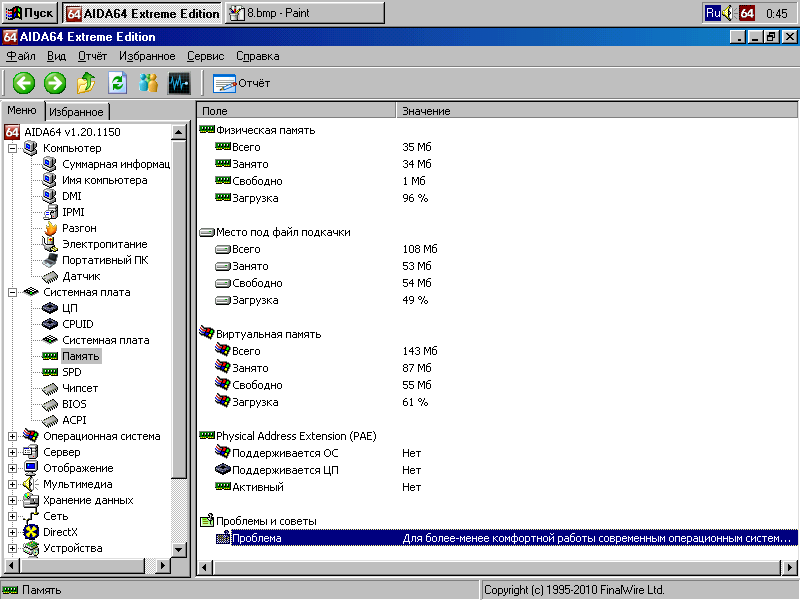
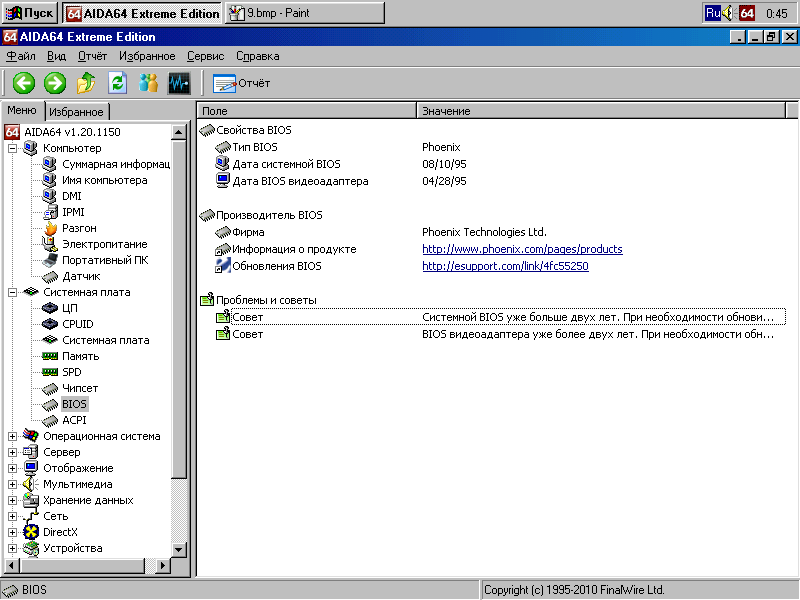
Finally, I will give the testimony of the AIDA64 program: The
system BIOS has been in use for over two years now. Need to upgrade.
All such topics end the same way.