June 25, 2012 at 15:32
Modern servers on Intel Xeon E5-2600 on the example of ETegro Hyperion RS230 G4
Hello, habralyudi. Today we would like to tell you about the latest ETegro Hyperion RS servers built on the new Intel Xeon E5-2600 processors, and show and tell by their example what you can squeeze out of the modern server platform if you approach this with all due diligence. You may not find this topic very interesting, but still: how often do you look at modern servers and how well do you know their capabilities? Maybe it’s worth refreshing the memory? We chose this line of servers for a reason. Firstly, it is the servers on this latest platform that are now extremely popular among the corporate sector, and secondly, we are somewhat proud that we introduced them to the Russian market earlier than others. And we will talk about the ETegro Hyperion RS230 G4 model - a dual-processor server in the 2U version. Before getting inside the server, let us introduce ourselves briefly. We are ETegro Technologies, a Russian company engaged in the development and production of a wide variety of computing equipment, including servers, storage systems, cluster solutions, workstations and graphic workstations, and more ... You can learn more about us on our website: http: // www. etegro.com. We hope that our blog will become not just another “dull corporate blog of the company”, but a full-fledged interesting source of information. Well, now to the point. Perhaps everyone who is interested in the server market has already managed to take a closer look at the new Intel platform. However, ETegro produces proprietary platforms. Therefore, we strive to share with you our original approach to the design of new generation servers. It’s already the fourth,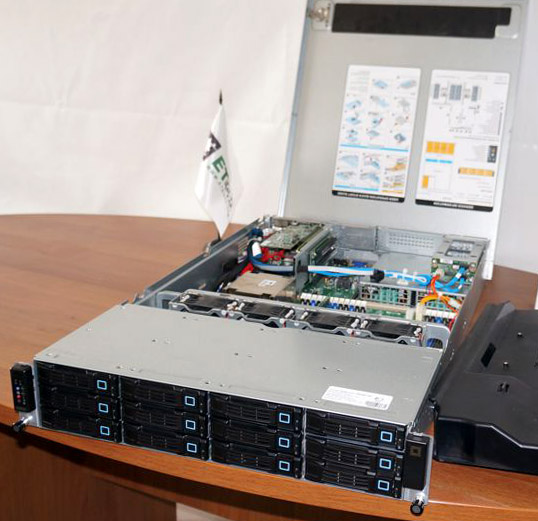
Let's look inside this 2U-handsome (we also have single-unit models in this series, but they are almost identical in design, and we'll talk about them in one of the following posts when ... in general, we still have topics for conversation).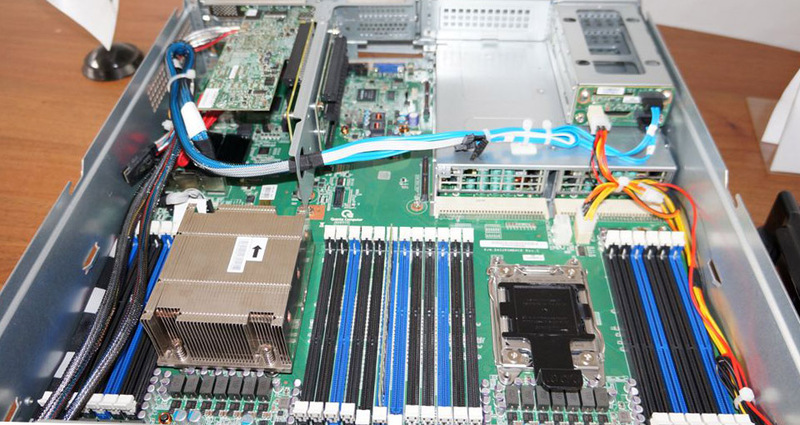 The focus is on the motherboard of its own design, with two processor sockets located on it. The Intel Xeon processor E5-2600 series installed in them provides a significant increase in performance compared to the previous generation, reaching up to 80%, and in the case of floating-point calculations, it is completely double. This largely explains the increased desire of the traditionally very conservative corporate sector to switch to a new platform - it saves space with a noticeable performance gain.
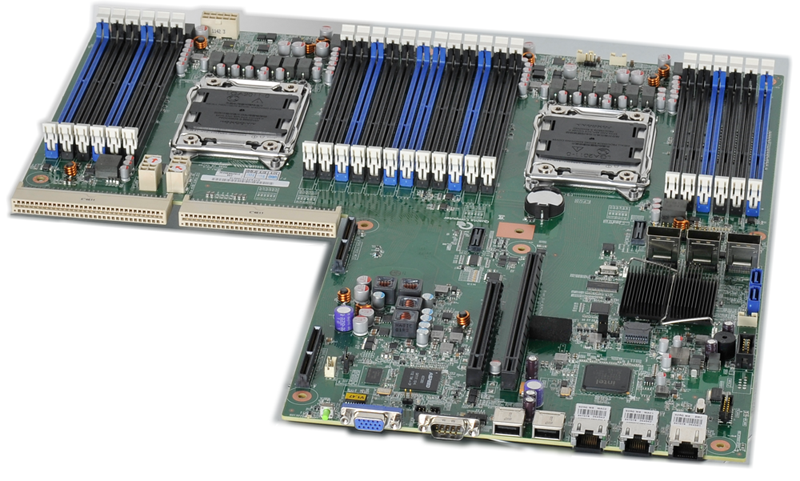 The new motherboard design and the capabilities of the Intel Xeon E5-2600 processors allowed us to separate and install 24 DDR3-1600 memory slots on it. There is never much memory, right? So if finances allow you, then you can install up to 768 GB of memory working in 4-channel mode in just one 2U server. A separate pleasant moment is the use of LRDIMM modules - their energy consumption is very small, which is extremely pleasant for both electricity bills and cooling needs.
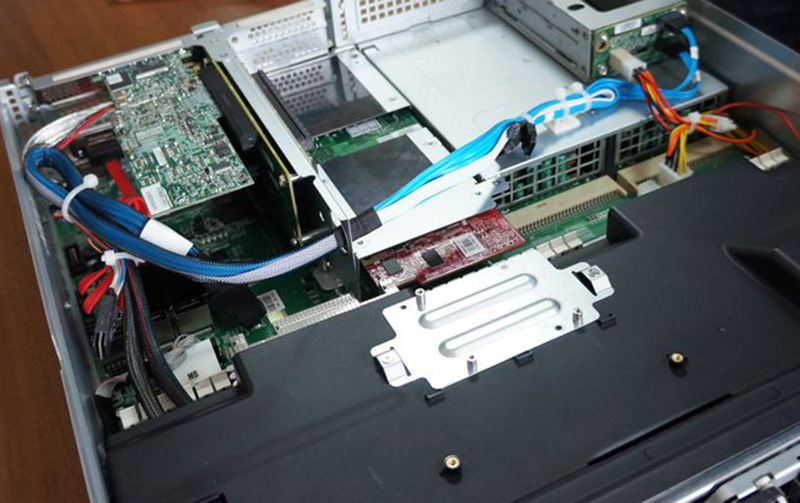 Following are ... right, expansion slots. And here we again have something to interest the user. The fact is, we use daughterboards of our own production (there are already two slots for them), which allowed us to make them as compact as possible, and subject the remaining space to rationalization. As a result, using (no, not a hammer and some kind of mother) riser (this is a special board that stands upright and allows you to put expansion cards parallel to the motherboard) we have five PCI-Express 3.0 slots. By the way, the metal platform on the plastic duct directly in front of us is not our abstract whim, but a place to place the battery of the RAID controller.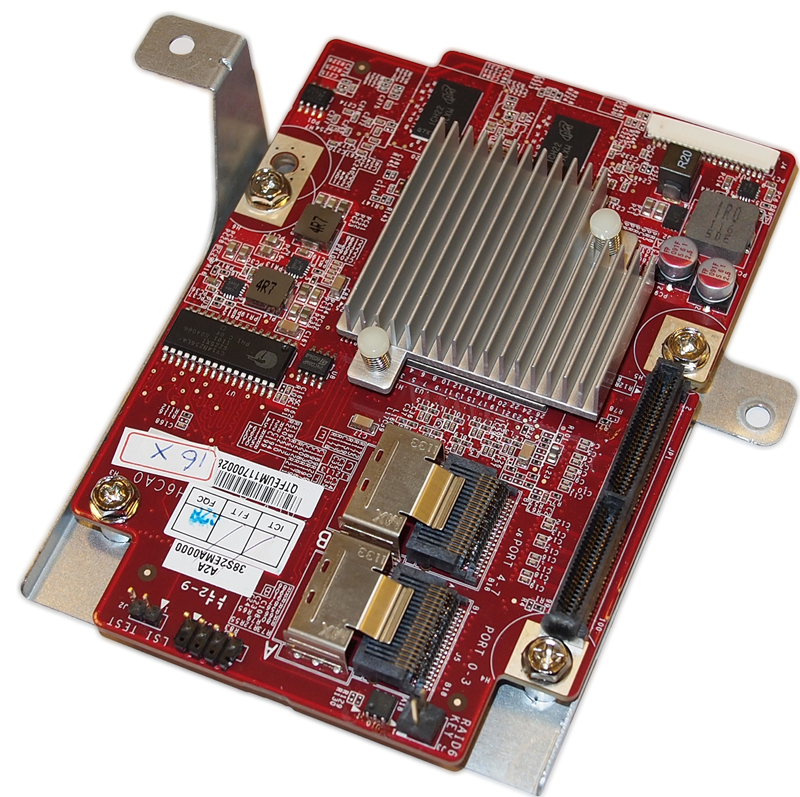
 As for the daughterboards, the one with the red textolite is the LSI SAS RAID controller or the HBA adapter (by the way, it is almost half the size of the similar “branded” controller), and the second (green) carries two 10G SFP + Ethernet ports (two more ports are on the motherboard itself, and they can be either gigabit or 10G if your network is already ready for such speeds). However, if you do not need these daughter cards, but desperately want one more of your own controller, then you can put another riser on two slots instead of them, and you can install the same additional sixth controller in it.
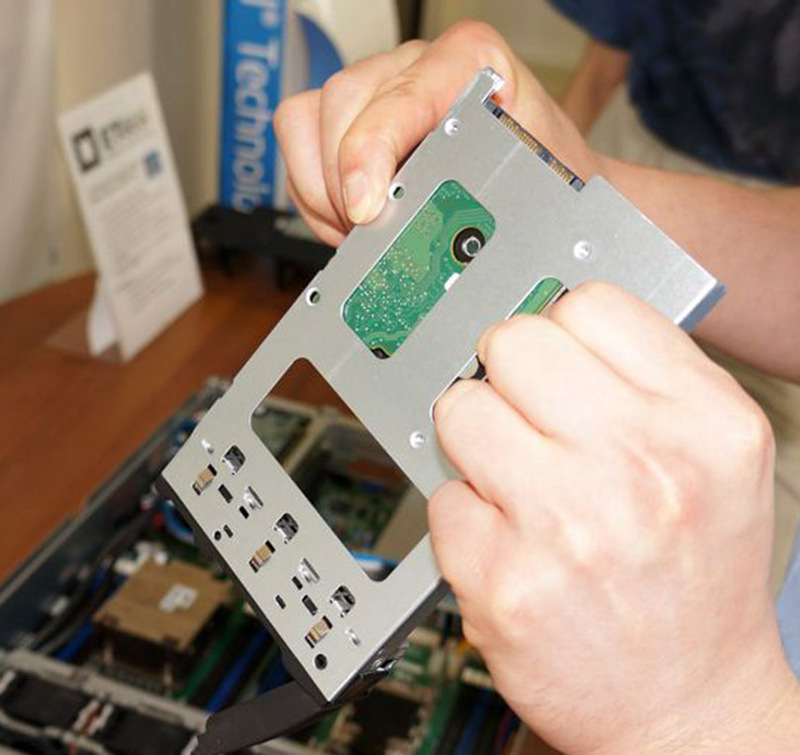
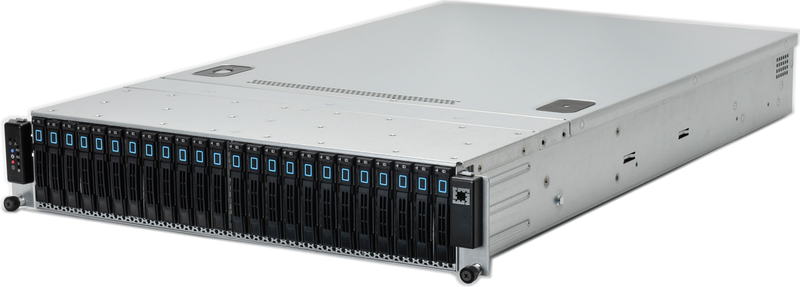 Since we touched the word RAID - it's time to talk about the disk subsystem. Here, modern 2U systems already have a certain standard. We are releasing 2 modifications of the case: one is designed for 12 seats with hot-swap for 3.5-inch drives - this is what goes on the title photo for the article. The second modification, shown in the photo, accommodates up to 24 2.5-inch drives due to the vertical installation of disks. In the first version, we decided to leave the freedom to the user to the maximum, so we use special landing 3.5-inch baskets to replace “large »Discs for smaller brothers, which makes it easy to collect mixed combinations (with the modern distribution of SSD it is very practical) - this option looks like you can see in the photo below.
 Still, we wanted to stand out against the background of traditional server “designers”, so the SAS expander we use can work along two access paths at once (of course, support from the controller is required), which means that the disk basket has twice the SAS 6G bandwidth. What to do, if you “stuff” the system with SSD's, then this is not so much.
 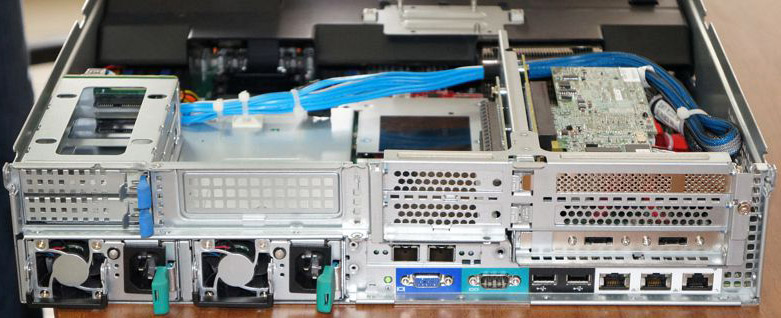 And we also provided two additional seats for 2.5-inch drives near the power supplies - yes, these are the two small compartments in the upper left. If you want to use the system to the maximum, it is possible that they will come in handy: after all, you can put a disk with the OS there, and fill the basket with one large array. Well, or send a caching SSD there for the RAID controller, if you want to use a similar option.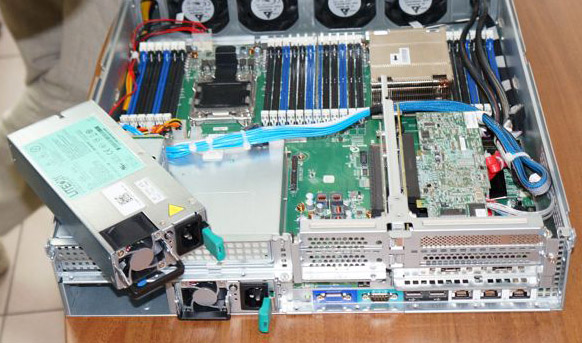
 Well, we smoothly got to the food. And it is required decently, because it is necessary to proceed from the fact that the maximum configuration of possible components will be installed. 2 processors, 24 memory modules, 14 disks, 7 expansion cards ... In general, hello 1100 W. More precisely, two times 1100 W each, since a modern mid-level server is already inconceivable without power backup. To place them, we had to go to a trick, not just military, but engineering: at the output of the power supplies, we remove only 12V with a pair of dozens of conductors that go directly to the motherboard. All other voltages are already created on the board itself. This approach not only eliminates unnecessary wires, but also allows you to significantly reduce power supplies in size. Right word, it's hard to believe that this small box gives out kilowatts,
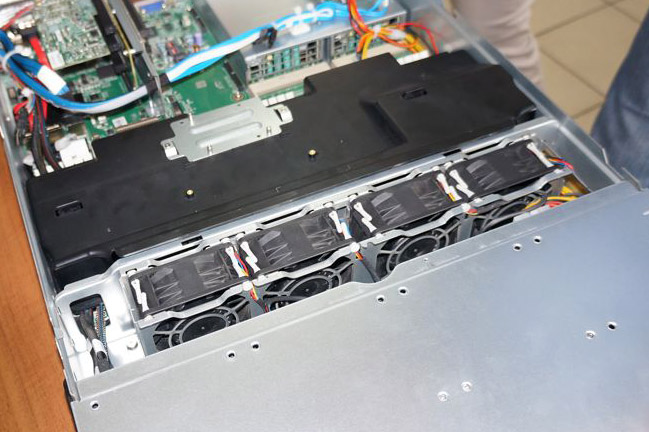 And finally, cooling. It’s difficult to come up with something unique here, you just need to carefully use the available space and carefully calculate and organize the air flows inside the case. Power supplies have their own individual fans. But for the cooling of everything else, a group of four fans is responsible, located exactly between the basket of hard drives and the board. The fans are powerful and controlled by a service processor - this is the only way to get the necessary peak air flow from them and economical operation at medium loads.
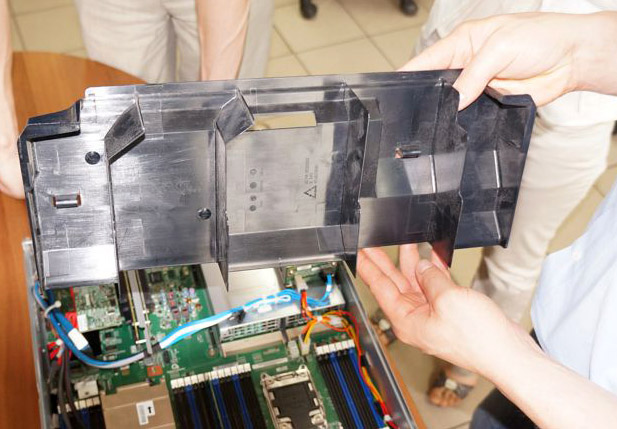 The air will pass first along the disks, then under the cover flow around the memory and passive heatsinks of the processors, and flow around the expansion cards to the outside. Pay attention to the complex shape of the casing - it is thanks to it that the air flow evenly flows through the entire internal space of the server.
 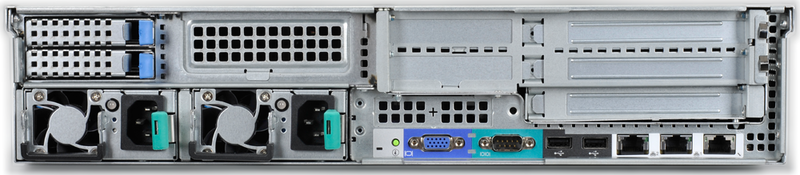 Oh, we almost forgot about management. In the second decade of the twenty-first century, it is already somehow not customary to console-connect via the COM port, or (here you can sob with nostalgia) drag the keyboard with the monitor, although the corresponding ports are available. No, you can, of course, but it’s much more convenient to use such a thing as KVM over IP. Moreover, special service processors providing full hardware control over the server using the web interface are no longer rare.Well, something like this looks inside the most modern rack server. In conclusion, I would like to ask you to tell us in the comments what you would like to hear from us?
Before getting inside the server, let us introduce ourselves briefly. We are ETegro Technologies, a Russian company engaged in the development and production of a wide variety of computing equipment, including servers, storage systems, cluster solutions, workstations and graphic workstations, and more ... You can learn more about us on our website: http: // www. etegro.com. We hope that our blog will become not just another “dull corporate blog of the company”, but a full-fledged interesting source of information. Well, now to the point. Perhaps everyone who is interested in the server market has already managed to take a closer look at the new Intel platform. However, ETegro produces proprietary platforms. Therefore, we strive to share with you our original approach to the design of new generation servers. It’s already the fourth,Let's look inside this 2U-handsome (we also have single-unit models in this series, but they are almost identical in design, and we'll talk about them in one of the following posts when ... in general, we still have topics for conversation).
The focus is on the motherboard of its own design, with two processor sockets located on it. The Intel Xeon processor E5-2600 series installed in them provides a significant increase in performance compared to the previous generation, reaching up to 80%, and in the case of floating-point calculations, it is completely double. This largely explains the increased desire of the traditionally very conservative corporate sector to switch to a new platform - it saves space with a noticeable performance gain.The new motherboard design and the capabilities of the Intel Xeon E5-2600 processors allowed us to separate and install 24 DDR3-1600 memory slots on it. There is never much memory, right? So if finances allow you, then you can install up to 768 GB of memory working in 4-channel mode in just one 2U server. A separate pleasant moment is the use of LRDIMM modules - their energy consumption is very small, which is extremely pleasant for both electricity bills and cooling needs.Following are ... right, expansion slots. And here we again have something to interest the user. The fact is, we use daughterboards of our own production (there are already two slots for them), which allowed us to make them as compact as possible, and subject the remaining space to rationalization. As a result, using (no, not a hammer and some kind of mother) riser (this is a special board that stands upright and allows you to put expansion cards parallel to the motherboard) we have five PCI-Express 3.0 slots. By the way, the metal platform on the plastic duct directly in front of us is not our abstract whim, but a place to place the battery of the RAID controller.As for the daughterboards, the one with the red textolite is the LSI SAS RAID controller or the HBA adapter (by the way, it is almost half the size of the similar “branded” controller), and the second (green) carries two 10G SFP + Ethernet ports (two more ports are on the motherboard itself, and they can be either gigabit or 10G if your network is already ready for such speeds). However, if you do not need these daughter cards, but desperately want one more of your own controller, then you can put another riser on two slots instead of them, and you can install the same additional sixth controller in it.Since we touched the word RAID - it's time to talk about the disk subsystem. Here, modern 2U systems already have a certain standard. We are releasing 2 modifications of the case: one is designed for 12 seats with hot-swap for 3.5-inch drives - this is what goes on the title photo for the article. The second modification, shown in the photo, accommodates up to 24 2.5-inch drives due to the vertical installation of disks. In the first version, we decided to leave the freedom to the user to the maximum, so we use special landing 3.5-inch baskets to replace “large »Discs for smaller brothers, which makes it easy to collect mixed combinations (with the modern distribution of SSD it is very practical) - this option looks like you can see in the photo below.Still, we wanted to stand out against the background of traditional server “designers”, so the SAS expander we use can work along two access paths at once (of course, support from the controller is required), which means that the disk basket has twice the SAS 6G bandwidth. What to do, if you “stuff” the system with SSD's, then this is not so much. And we also provided two additional seats for 2.5-inch drives near the power supplies - yes, these are the two small compartments in the upper left. If you want to use the system to the maximum, it is possible that they will come in handy: after all, you can put a disk with the OS there, and fill the basket with one large array. Well, or send a caching SSD there for the RAID controller, if you want to use a similar option.Well, we smoothly got to the food. And it is required decently, because it is necessary to proceed from the fact that the maximum configuration of possible components will be installed. 2 processors, 24 memory modules, 14 disks, 7 expansion cards ... In general, hello 1100 W. More precisely, two times 1100 W each, since a modern mid-level server is already inconceivable without power backup. To place them, we had to go to a trick, not just military, but engineering: at the output of the power supplies, we remove only 12V with a pair of dozens of conductors that go directly to the motherboard. All other voltages are already created on the board itself. This approach not only eliminates unnecessary wires, but also allows you to significantly reduce power supplies in size. Right word, it's hard to believe that this small box gives out kilowatts,And finally, cooling. It’s difficult to come up with something unique here, you just need to carefully use the available space and carefully calculate and organize the air flows inside the case. Power supplies have their own individual fans. But for the cooling of everything else, a group of four fans is responsible, located exactly between the basket of hard drives and the board. The fans are powerful and controlled by a service processor - this is the only way to get the necessary peak air flow from them and economical operation at medium loads.The air will pass first along the disks, then under the cover flow around the memory and passive heatsinks of the processors, and flow around the expansion cards to the outside. Pay attention to the complex shape of the casing - it is thanks to it that the air flow evenly flows through the entire internal space of the server. Oh, we almost forgot about management. In the second decade of the twenty-first century, it is already somehow not customary to console-connect via the COM port, or (here you can sob with nostalgia) drag the keyboard with the monitor, although the corresponding ports are available. No, you can, of course, but it’s much more convenient to use such a thing as KVM over IP. Moreover, special service processors providing full hardware control over the server using the web interface are no longer rare.Well, something like this looks inside the most modern rack server. In conclusion, I would like to ask you to tell us in the comments what you would like to hear from us?