
 June 18, 2012 at 06:15
Stream radio or police wave online
- Tutorial
When I bought a walkie-talkie, I walked with a headset for two weeks and listened to everything. Taxis, ship dispatchers, railway workers, police, builders, security guards. Then came the idea that listening is just not so interesting. We must give the rest to listen!

Interesting?
Actually, I already talked about the radio here: tyts .
In short: the walkie-talkie of the original Chinese company Puxing (yes, hello to lovers of Zopo and Huawei), receiving in the UHF and VHF bands, transmitting, however, only in the UHF. I bought on a dinodirect . Here is one:
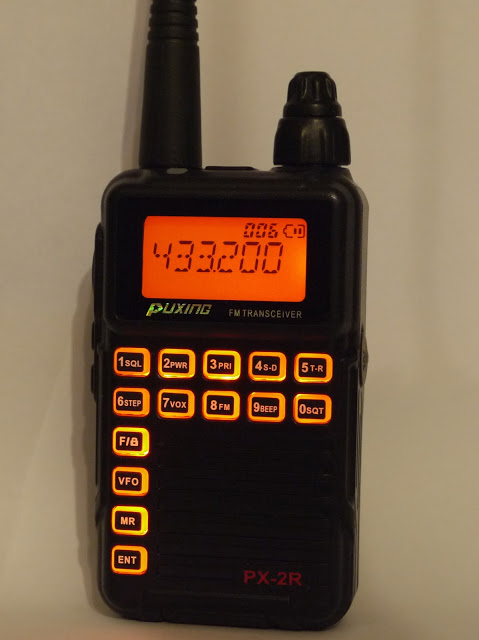
So. Step one, connect the walkie-talkie to the computer.
Laziness and assassination prompted you to wind a microphone to the radio, but common sense did not allow it.
Therefore, the collective farm adapter on the divider:
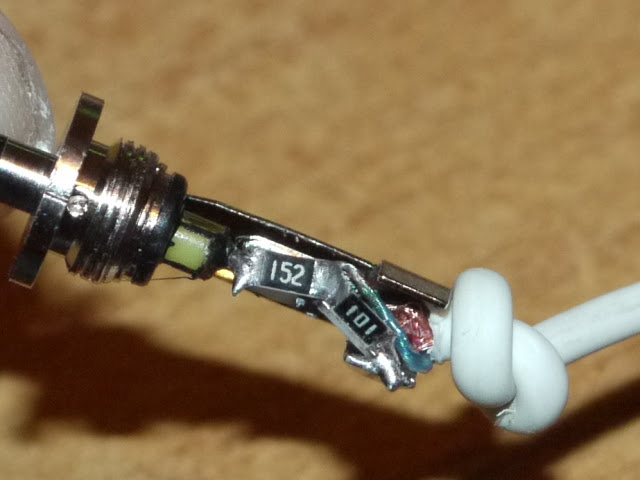
You can familiarize yourself with the physical meaning here . I did not count on anything, I just figured out what would fit in the stock and almost guessed.
We put one plug into the headset jack, the second into the microphone. It was possible to linear input, but I do not have it. We set the volume on the headset, and the microphone level on the computer. You can put Audacity on and start recording (by the way, there is a recording by level, which allows you to get rid of pauses between conversations).
Here's an example:
Evening on the taxi channel
DPS-nicki
But the soul wantedsex, preferably with servers of something more.
Let me once again repeat the picture from the title:
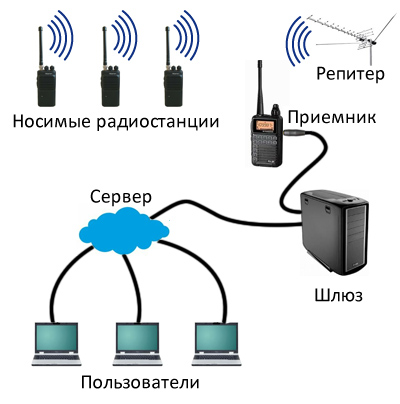
For a full broadcast, we need: A gateway that digitizes the audio signal and sends it to the server. And the server that will distribute this audio stream to everyone.
Step two, configure the gateway
Gateway transmitting audio stream to the server. In this capacity, a regular computer will be used, which one hell does not turn off anyway. I would be glad to use it as a server, but I’m afraid you are not holding it, not just the habra effect, but at least a dozen listeners at once - the upstream channel is extremely thin.
Software - SAM Broadcaster.
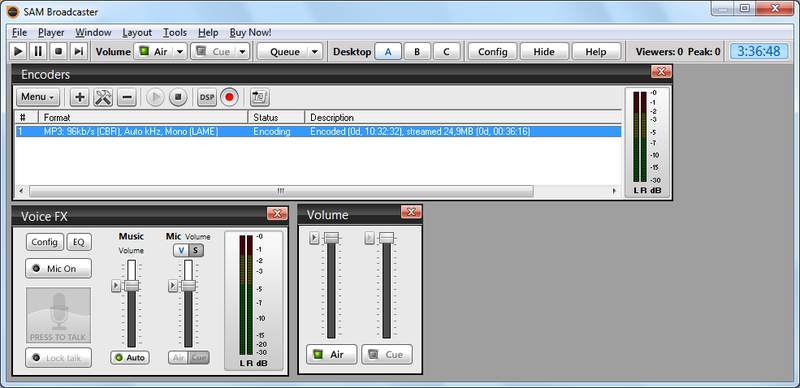
I’m too lazy to describe its setting, and there’s nothing complicated there. Indicate the microphone input as the source, set the flow parameters, and register the server address. Stop. Which server?
Step three, start the server
We go to amazon (however, any server with access to the shell is suitable, but Amazon has good hourly pay and an easy ability to increase capacity), and create a new Instance.
Again, AWS setup descriptions are not part of this article. A good guide in which everything is chewed is here .
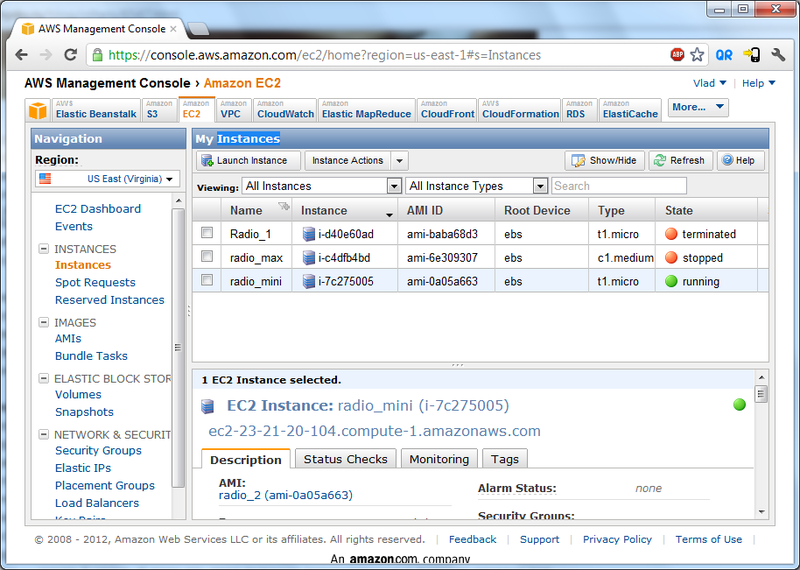
It also describes how to install ddclient to access the server by its normal name and not by IP. I advise you to do it right away, and drive the name into sftp and ssh clients.
After that, we need to install the Icecast server, which will distribute the audio stream.
Ubunta is such a ubunta, apt-get install icecast2 and that's it. The setting is described here
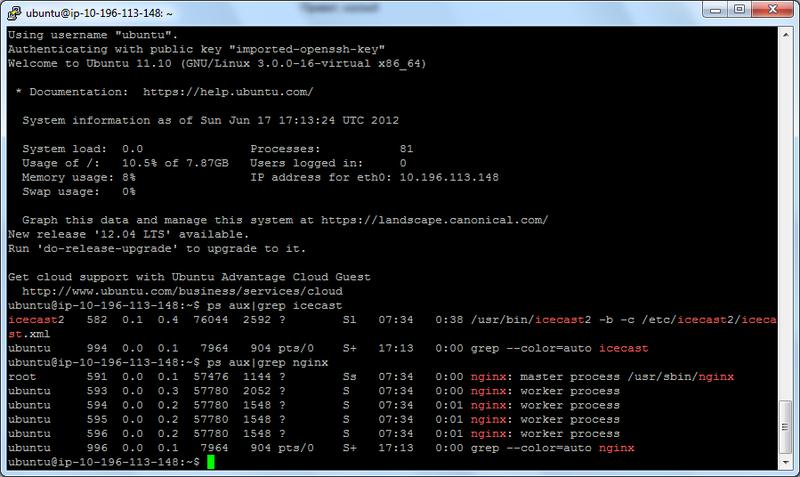
With a caveat - Ices should not be set, this is a program for playing music from the server itself.
For those who want everything to be beautiful - even nginx (apt-get install nginx) for the web-muzzle, and Uppod for the flash player on the site.
Advertising to pay for the server, and counters are optional.
1) If there is silence on the channel, it means ... means nothing. maybe they’re just silent, maybe they’re sleeping, maybe my computer has been cut out, or the Internet is gone (zhalzvyaz).
2) I am in Vladivostok, and the activity on the channel is also along the seaside time. Morning in Moscow, or night.
3) I can’t keep broadcasting forever, maybe a week, maybe a little more. How to turn it off - I’ll write, do not be offended.
UPD:
For the first day: The
maximum number of students is 250, the average is 20. Earned 40 rubles on advertising.
620 people spent more than 5 minutes on the site.
23,466 connections 11,738
unique visitors
29,871 GB spent and 122 Hrs IP was allocated for a total of $ 5.14 money.
UPD2:
On the third day, there are only 100 visitors. The habraeffect has passed.
UPD3: 0 people are listening, 0 in the chat. Stopped the server. Who wants to continue - welcome, mail in the profile.
Interesting?
Actually, I already talked about the radio here: tyts .
In short: the walkie-talkie of the original Chinese company Puxing (yes, hello to lovers of Zopo and Huawei), receiving in the UHF and VHF bands, transmitting, however, only in the UHF. I bought on a dinodirect . Here is one:
So. Step one, connect the walkie-talkie to the computer.
Laziness and assassination prompted you to wind a microphone to the radio, but common sense did not allow it. Therefore, the collective farm adapter on the divider:
You can familiarize yourself with the physical meaning here . I did not count on anything, I just figured out what would fit in the stock and almost guessed.
We put one plug into the headset jack, the second into the microphone. It was possible to linear input, but I do not have it. We set the volume on the headset, and the microphone level on the computer. You can put Audacity on and start recording (by the way, there is a recording by level, which allows you to get rid of pauses between conversations).
Here's an example:
Evening on the taxi channel
DPS-nicki
But the soul wanted
Let me once again repeat the picture from the title:
For a full broadcast, we need: A gateway that digitizes the audio signal and sends it to the server. And the server that will distribute this audio stream to everyone.
Step two, configure the gateway
Gateway transmitting audio stream to the server. In this capacity, a regular computer will be used, which one hell does not turn off anyway. I would be glad to use it as a server, but I’m afraid you are not holding it, not just the habra effect, but at least a dozen listeners at once - the upstream channel is extremely thin. Software - SAM Broadcaster.
I’m too lazy to describe its setting, and there’s nothing complicated there. Indicate the microphone input as the source, set the flow parameters, and register the server address. Stop. Which server?
Step three, start the server
We go to amazon (however, any server with access to the shell is suitable, but Amazon has good hourly pay and an easy ability to increase capacity), and create a new Instance. Again, AWS setup descriptions are not part of this article. A good guide in which everything is chewed is here .
It also describes how to install ddclient to access the server by its normal name and not by IP. I advise you to do it right away, and drive the name into sftp and ssh clients.
After that, we need to install the Icecast server, which will distribute the audio stream.
Ubunta is such a ubunta, apt-get install icecast2 and that's it. The setting is described here
With a caveat - Ices should not be set, this is a program for playing music from the server itself.
For those who want everything to be beautiful - even nginx (apt-get install nginx) for the web-muzzle, and Uppod for the flash player on the site.
Advertising to pay for the server, and counters are optional.
In general, listen to: Russian Cops Broadcast Radio
1) If there is silence on the channel, it means ... means nothing. maybe they’re just silent, maybe they’re sleeping, maybe my computer has been cut out, or the Internet is gone (zhalzvyaz).
2) I am in Vladivostok, and the activity on the channel is also along the seaside time. Morning in Moscow, or night.
3) I can’t keep broadcasting forever, maybe a week, maybe a little more. How to turn it off - I’ll write, do not be offended.
UPD:
For the first day: The
maximum number of students is 250, the average is 20. Earned 40 rubles on advertising.
620 people spent more than 5 minutes on the site.
23,466 connections 11,738
unique visitors
29,871 GB spent and 122 Hrs IP was allocated for a total of $ 5.14 money.
UPD2:
On the third day, there are only 100 visitors. The habraeffect has passed.
UPD3: 0 people are listening, 0 in the chat. Stopped the server. Who wants to continue - welcome, mail in the profile.