
 March 22, 2012 at 01:13
About code formatting and User Scripts in Xcode 4
 When a person gets tired of doing routine work, he has a wild desire to get rid of this work. However, in real life, getting rid of it is not so simple, and all of it, however, must be done. Depending on the type of work and on its quantity, one can act in different ways. You can continue to carry out already learned actions, you can go into yourself and accumulate anger at everyone and everything, at this world, at the boss, at PM'a, at <write your reason> Or you can try to automate this routine.
 And the post will be about a specific task that needs to be automated (Code Formatting) and how to extend Xcode with all sorts of useful goodies for further automation. Last time it was Copy Paste Detector. And now it's time for Code-Formattera. I will say right away that the question does not arise here whether an automatic Code-Formatter is needed. It is assumed that you need it. If you still don’t need it, you can look under the cat to remember about the ability to use external scripts in Xcode.
The initial task is to provide the ability to automatically format parts of the source code in Xcode.
Immediately several options for solving this problem:
- Continue to format manually
- Use the built-in Xcode Reindent
- Use custom scripts
- Use external formatter programs, copy text from Xcode into them, format, copy text back to Xcode
- Use Xcode in parallel with other programs that open files from the Xcode project
Let's see how they suit us.
That I will correct with my hands! I format with Xcode 1.0 hands
There are such people. Maybe they really do not need text formatting. For those who need it, but they are too lazy:

I mean, if the task (in particular, formatting the code) is large enough, then automation wins a long distance. In the end, it comes down to time. But, even if the time for writing the script + the time for solving the problem is
немногоlonger, in comparison, if this task was done by hand, then all the same, you should try to write such a script - the automation experience is all the same.In Xcode, and so it is ... No? So it’s not necessary.
The opinion of the author regarding the Reindent command built into Xcode: is not enough to fully format the code. However, many people developing under Xcode just use it. Sometimes there is still Code-Style. Sometimes Code-Style is described somewhere, and they try to follow it.
All Re-Indent’s functionality is to set spaces / tabs correctly, and its settings are placed on one tab of the Xcode menu.
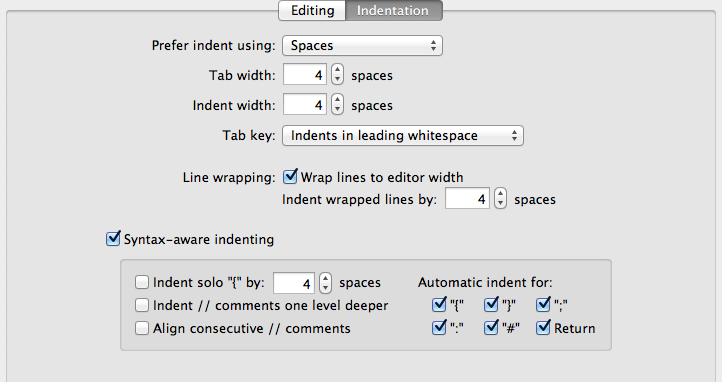
Although this option does not replete with a variety of settings, but it has just a huge advantage. It is built into Xcode. No need to install anything, surf the Internet and run scripts. Select a piece of code, press ^ I. Maybe this is the part that people who vigorously defend Xcode like.
Custom scripts? So they were gone in Xcode 4 ...
Yes, in Xcode 4, a lot of things died, compared to Xcode 3. User scripts just go to the list of what was gone in Xcode 4. People were very disappointed at that time .
However, kind people thought, thought, and got out. They began to use Automator Services . Not quite what people used to mean by User Scripts in Xcode 3, but they do solve many tasks.
Xcode Integration
Thanks to kind people and OpenSource, integrating Uncrustify into Xcode has become a very easy task.
The project to integrate Uncrustify into Xcode through Automator Services is on GitHub .
We put Uncrustify (For the last time, I installed uncrustify using homebrew , in principle, as described in the project itself), put our service scripts in the correct folder ( ~ / Library / Services / Automator / ). Profit If everything is done correctly, now additional commands will appear on the menu in Xcode that allow you to format the code and which can be used without leaving Xcode.
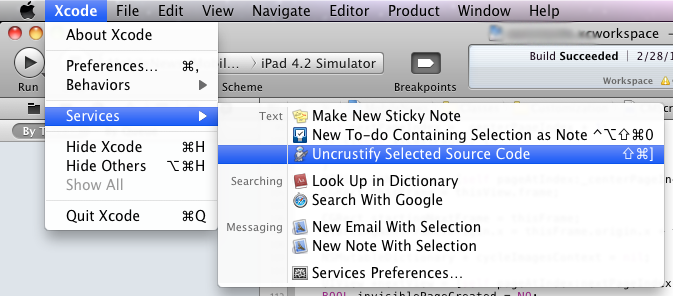
And here is what you can see by highlighting a piece of code and pressing the right button:

Where to go?
When you complete all of the above steps, you have the opportunity to automatically format text in Xcode.
What to do next depends on what you needed before;)
If the task was initially set to automatically / semi-automatically format the code, then you should start setting up the uncrustify.cfg configuration file . The Universal Indent GUI , a cross-platform code-formatter editor, including for uncrustify , can help with this.
If there was more interest in the possibility of implementing external scripts in Xcode, then by trial and error, using the example of a ready-made connected service, you can come up with a lot of useful things.
Alternatives
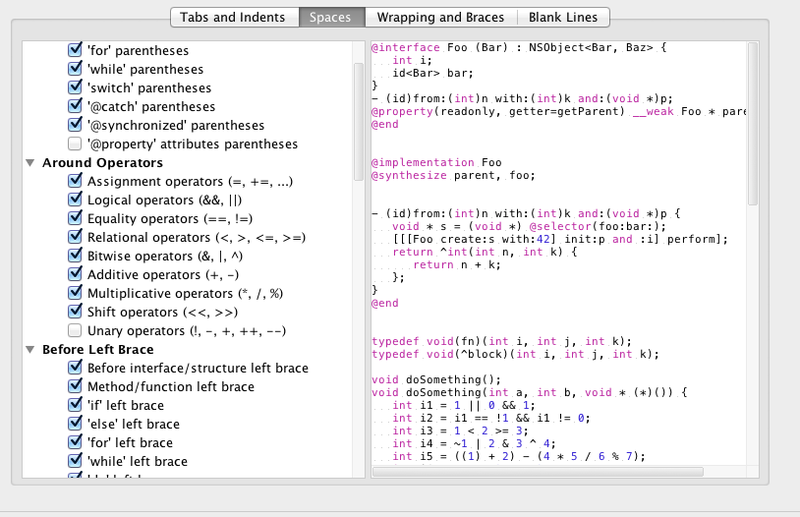
Personally, I would recommend looking in the direction of AppCode , which was already written on Habré at one time . Even if it’s paid with a 30-day free period. The issue of code formatting in Appcod is solved at a completely different level:
Total
There would be a task. You can always find a solution. From time to time, this decision will be correct, work quickly and solve the task.