 February 1, 2012 at 05:30
Open Server - A Professional Windows Web Developer Tool
I want to introduce you a new professional tool for web development for Windows.
Open Server is a portable local WAMP / WNMP server that has a multifunctional management program and a large selection of connected components. The presented software package is not another amateur assembly assembled “on the knee”, it is the first full-fledged professional tool created specifically for web developers taking into account their recommendations and wishes.
If you are still using Denwer, Xampp, Vertrigo, etc. or prefer to install all server components separately - welcome to cat.
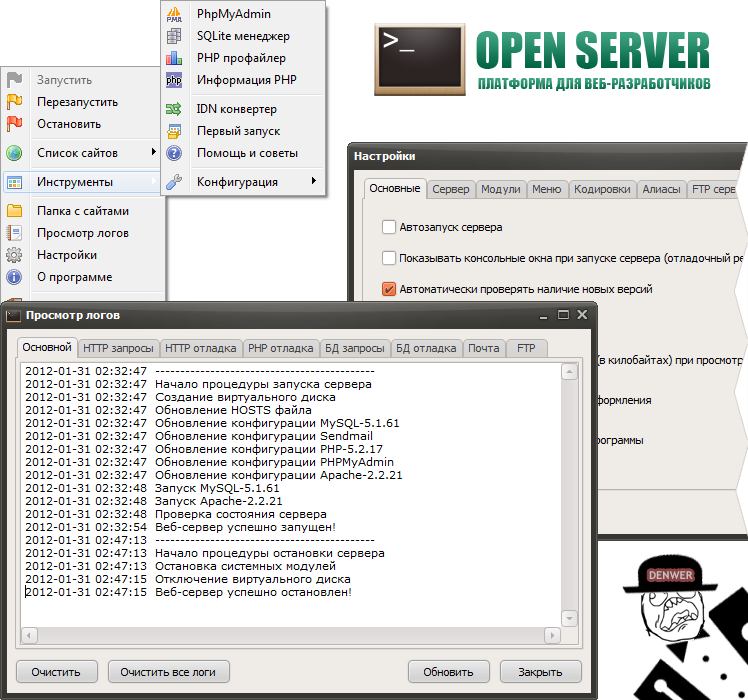
For debugging scripts in various environments, Open Server offers a choice of two types of HTTP servers, various versions of PHP and DBMS modules, as well as the ability to quickly switch between them.
HTTP modules: Apache 2.2.21 and Nginx 1.0.11;
DBMS modules: MySQL 5.1.61, MySQL 5.5.20 and PostgreSQL 9.1.1;
PHP modules: PHP 5.2.17 (IMagick 2.2.1, Zend Optimizer 3.3.3, IonCube Loader 4.0.7, Memcache 2.2.4) and PHP 5.3.9 (IMagick 2.3.0, Xdebug 2.1.3, IonCube Loader 4.0. 10, Memcache 2.2.6);
Great toolkit: HeidiSQL, Adminer, PHPMyAdmin, PHPPgAdmin, PgAdmin.
The package also includes such goodies as: Perl, FTP server, Sendmail, Memcached server!
Open Server is the only project I know that includes Nginx! Moreover, a convenient connection of rewrite rules through .nxaccess files in the root of the domain is implemented, and PHP works in True FastCGI (unkillable) mode.
All components are taken from official repositories and are always updated to the latest versions with each update of the package.
First of all, I want to note that Open Server is a completely and completely portable server. No system services, heaps of garbage in the registry and system32. You can always carry it with you on a USB flash drive (preferably on a high-speed one), run it on a working / home machine without fear that something will not work for you.
If the necessary system components are not available on the computer, Open Server will install them, just select in the [Tools - First Run] menu if the server is launched on the computer for the first time.
I do not want to describe the main features of the program, since for the most part they are standard for this kind of software. It goes without saying that using Open Server you can start / stop the server or open the desired domain. It will be much more interesting for you to learn about the specific “features” that make Open Server special, really special:
- a detailed view of the logs of all components in real time;
- The choice of HTTP, DBMS and PHP modules in any combination;
- Support for SSL and Cyrillic domains out of the box;
- support for aliases or domain names in another way, as well as a convenient form for setting them up (hello to fans of multisiting in Drupal!);
- creating a local subdomain without losing the visibility of the main domain on the Internet;
- access to domains (in one click) and quick access to configuration templates for modules;
- multilingual interface (Russian, Ukrainian, Belorussian, English);
The program is constantly being improved, all adequate requests from Open Server users are studied in detail and most of them are being implemented!
Initially, I led the development of a control program in the DevelStudio environment. I think there are those who read my article about this development environment. Since then, a lot of water has flowed, I realized that work on this project is extremely sluggish, there were no prospects in terms of developing the functionality of Open Server. I rewrote the program from scratch and starting from version 4.0 onwards, development is carried out in Delphi.
For many years in my daily work I used Denwer, after some time I switched to Vertrigo. I tried almost all other available options: XAMPP, AppServ, WAMPserver, TopServer, etc., but none of the above assemblies satisfied me. The limited functionality, the difficulty of customization, and sometimes simple external ugliness, discouraged me from using any of these “creations”.
Now I can recommend Open Server to all web developers without exception, even to those conservatives who are used to installing everything manually and nothing else.
Home page: http://open-server.ru
Dear Khabravchans, I will be glad to see you on the Open Server forum, I will listen with interest to your suggestions for the development of the project, wishes for connecting new components and other interesting ideas.
Open Server is a portable local WAMP / WNMP server that has a multifunctional management program and a large selection of connected components. The presented software package is not another amateur assembly assembled “on the knee”, it is the first full-fledged professional tool created specifically for web developers taking into account their recommendations and wishes.
If you are still using Denwer, Xampp, Vertrigo, etc. or prefer to install all server components separately - welcome to cat.
Components and Tools
For debugging scripts in various environments, Open Server offers a choice of two types of HTTP servers, various versions of PHP and DBMS modules, as well as the ability to quickly switch between them.
HTTP modules: Apache 2.2.21 and Nginx 1.0.11;
DBMS modules: MySQL 5.1.61, MySQL 5.5.20 and PostgreSQL 9.1.1;
PHP modules: PHP 5.2.17 (IMagick 2.2.1, Zend Optimizer 3.3.3, IonCube Loader 4.0.7, Memcache 2.2.4) and PHP 5.3.9 (IMagick 2.3.0, Xdebug 2.1.3, IonCube Loader 4.0. 10, Memcache 2.2.6);
Great toolkit: HeidiSQL, Adminer, PHPMyAdmin, PHPPgAdmin, PgAdmin.
The package also includes such goodies as: Perl, FTP server, Sendmail, Memcached server!
Open Server is the only project I know that includes Nginx! Moreover, a convenient connection of rewrite rules through .nxaccess files in the root of the domain is implemented, and PHP works in True FastCGI (unkillable) mode.
All components are taken from official repositories and are always updated to the latest versions with each update of the package.
Opportunities
First of all, I want to note that Open Server is a completely and completely portable server. No system services, heaps of garbage in the registry and system32. You can always carry it with you on a USB flash drive (preferably on a high-speed one), run it on a working / home machine without fear that something will not work for you.
If the necessary system components are not available on the computer, Open Server will install them, just select in the [Tools - First Run] menu if the server is launched on the computer for the first time.
I do not want to describe the main features of the program, since for the most part they are standard for this kind of software. It goes without saying that using Open Server you can start / stop the server or open the desired domain. It will be much more interesting for you to learn about the specific “features” that make Open Server special, really special:
- a detailed view of the logs of all components in real time;
- The choice of HTTP, DBMS and PHP modules in any combination;
- Support for SSL and Cyrillic domains out of the box;
- support for aliases or domain names in another way, as well as a convenient form for setting them up (hello to fans of multisiting in Drupal!);
- creating a local subdomain without losing the visibility of the main domain on the Internet;
- access to domains (in one click) and quick access to configuration templates for modules;
- multilingual interface (Russian, Ukrainian, Belorussian, English);
The program is constantly being improved, all adequate requests from Open Server users are studied in detail and most of them are being implemented!
A bit of history
Initially, I led the development of a control program in the DevelStudio environment. I think there are those who read my article about this development environment. Since then, a lot of water has flowed, I realized that work on this project is extremely sluggish, there were no prospects in terms of developing the functionality of Open Server. I rewrote the program from scratch and starting from version 4.0 onwards, development is carried out in Delphi.
Conclusion
For many years in my daily work I used Denwer, after some time I switched to Vertrigo. I tried almost all other available options: XAMPP, AppServ, WAMPserver, TopServer, etc., but none of the above assemblies satisfied me. The limited functionality, the difficulty of customization, and sometimes simple external ugliness, discouraged me from using any of these “creations”.
Now I can recommend Open Server to all web developers without exception, even to those conservatives who are used to installing everything manually and nothing else.
Home page: http://open-server.ru
Dear Khabravchans, I will be glad to see you on the Open Server forum, I will listen with interest to your suggestions for the development of the project, wishes for connecting new components and other interesting ideas.









