
An office that is always at hand: an example of how a virtual desktop works on portable devices
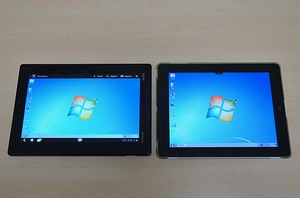
In one of our previous materials, we already demonstrated how, thanks to the Citrix Receiver solution, you can start and work with the MS Windows 7 operating system on the Apple iPad tablet. We decided to develop this topic and demonstrate how with the help of Citrix XenDesktop virtualization solution it is possible to work on various mobile platforms and how convenient it is to use a tablet PC for working in a virtual environment.
For the demonstration, we took three mobile devices with which modern users most often work and which operate under different operating systems. As the “experimental” two tablets were made - Apple iPad2 (iOS 5.0.1) and Lenovo ThinkPad Tablet (Android 3.1), as well as the Lenovo IdeaPad S10-3 netbook (Windows XP). Testing included connecting to a data center and performing the most popular operations in a virtual environment, many of which are inaccessible to mobile devices due to limitations imposed by software and hardware platforms.
So, let's begin.
Before connecting to a virtual environment, you must install the Citrix Receiver client program on your mobile device. This utility is designed for all major operating systems and can be easily found in the AppStore and Android Market, as well as download from the official Citrix website . In our case, only the iPad and IdeaPad needed to install the program, and on the ThinkPad Tablet, which is intended for corporate users, the Citrix Receiver program is pre-installed by default, and the tablet can connect to the virtual environment, which is called “out of the box”.
We connect the devices we have available to the virtual desktop located in the data center, which is located in one small European country. After entering the system and completing the authorization procedure, on the screen of the connected devices you can see the menu of the virtual desktop. The menu is configured in accordance with the operating systems and programs installed in the virtual machines.


The configuration of the Citrix Receiver client software allows you to run both operating systems and individual programs on a mobile device.
Virtual desktop allows you to run the necessary applications, either from a virtual machine or directly from the menu offered in the mobile OS. In this case, the speed of loading and running the application increases, since the components of the client operating system are not loading.
After a brief acquaintance with the Citrix Receiver client application, we proceed to launch the Windows 7 operating system.
As you can see from the video, the process is not complicated and takes no more than a minute.
MS Windows 7 operating system on Lenovo ThinkPad Tablet and Apple iPad2

tablets. Screenshot of Apple iPad 2 tablet.

Launching virtual desktop on Lenovo ThinkPad Tablet.


MS Word on iPad 2

When working with MS Word on iPad, you need to pull out the hidden menu located at the top of the screen and call up the virtual keyboard.

This is how the virtual keyboard looks in the most popular office applications MS Word and MS Excel.

Working with documents in a virtual environment
In addition to working with documents, the virtual desktop also allows you to use heavy, resource-intensive applications on any mobile device.
Thanks to the virtual desktop, you can even work with graphics on the iPad


Working with a 3D object on a Lenovo ThinkPad Tablet

Virtualization allows you to get the functionality of a powerful working PC on any mobile device, mitigating all software or hardware limitations. For example, you can run any flash movie or game on your iPad, watch high-definition video, or work with graphic models in specialized programs.
Tanks online on iPad

Small delays in operation are due to the insufficient speed of the WAN data channel and large delays due to the remoteness of the data center.
Virtual desktop with Windows 7 on a netbook

Virtual desktop significantly expands the capabilities of a mobile device, turning it into a full-fledged working tool that can almost completely replace your office PC. All you need to work is a data channel and a device with Citrix Receiver client software installed on it.