
Solving the blurry font problem in Ubuntu
Recently moved to Ubuntu 11.04. A well-thought-out, convenient system, basically everything suits me, but the fonts in the browser were displayed soapy. Spent a lot of time and finally found a solution to the problem.
I must admit, the network has little sensible information in Russian on Ubuntu. I searched according to the words “setting gnome fonts”, “the problem of fonts in ubuntu”, “soap fonts”, even “ugly fonts” (I intentionally listed all the options for Google).
The first thing that I found out was to install the mscorefonts (1) package. Now the fonts are similar to the Windows ones, but they look blurry anyway.
Then I found an article on Habré, which helped me only partially .
So, the .fonts.conf file did not give me anything personally (or rather, it only made it worse). Screen resolution set the required (for my 19 "1440x900 monitor corresponds to 89 dpi) (2).
Now through the" System - Options - Appearance "menu I was able to set clear fonts in the system (3). The" Thinning "or hinting setting is responsible for the clarity hinting), which is turned on when the “Best Contrast” mode is selected.
But the bad thing: google chrome (chromium) and firefox stubbornly continue to soap. And besides, Skype (and, obviously, other qt applications) is soaping.
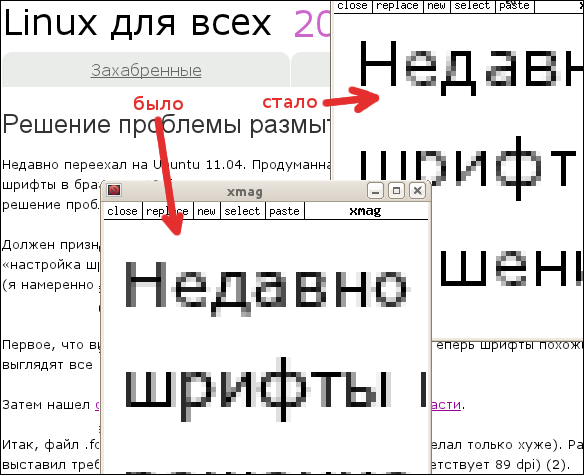
Here's what the browser looked like. You might everything seems to be ok, but the increase shows blur around the letters.

How is it usually happens, the solution was found on an English-language resource .
So, the last decisive action (4) is the removal of tricky configs (performed in the terminal):
On the original resource there is a recipe for recovering deleted files (which are actually symlinks), but I did not need it.
After restarting the chrome, everything worked out.
I hope this information helps other users use ubuntu as their primary OS.
Update from 10.10.11: reduced screenshots, now they are not scaled by habr.
I must admit, the network has little sensible information in Russian on Ubuntu. I searched according to the words “setting gnome fonts”, “the problem of fonts in ubuntu”, “soap fonts”, even “ugly fonts” (I intentionally listed all the options for Google).
The first thing that I found out was to install the mscorefonts (1) package. Now the fonts are similar to the Windows ones, but they look blurry anyway.
Then I found an article on Habré, which helped me only partially .
So, the .fonts.conf file did not give me anything personally (or rather, it only made it worse). Screen resolution set the required (for my 19 "1440x900 monitor corresponds to 89 dpi) (2).
Now through the" System - Options - Appearance "menu I was able to set clear fonts in the system (3). The" Thinning "or hinting setting is responsible for the clarity hinting), which is turned on when the “Best Contrast” mode is selected.
But the bad thing: google chrome (chromium) and firefox stubbornly continue to soap. And besides, Skype (and, obviously, other qt applications) is soaping.
Here's what the browser looked like. You might everything seems to be ok, but the increase shows blur around the letters.
How is it usually happens, the solution was found on an English-language resource .
So, the last decisive action (4) is the removal of tricky configs (performed in the terminal):
sudo rm /etc/fonts/conf.d/10-*.confOn the original resource there is a recipe for recovering deleted files (which are actually symlinks), but I did not need it.
After restarting the chrome, everything worked out.
I hope this information helps other users use ubuntu as their primary OS.
Update from 10.10.11: reduced screenshots, now they are not scaled by habr.