October 4, 2010 at 12:05
Keygen music. How it works?
A long time ago, many people were interested in one question: “This program takes only 100 kb, what kind of music does it play? How it works?"
So, this miracle is called - Tracker music. And most importantly - it takes up very little space, unlike .mp3 or .wav. In modern popular operating systems, tracker files (MOD, XM, S3M, IT, etc.) are played by most media players, for example, Winamp, VLC, Amarok, Audacious and others.
You can download such music, for example from here - keygenmusic.net , or from here www.modarchive.org . These are by no means the only resources; one has only to turn to the search.
In order to play such music in our program, we need a minimum knowledge of C ++, as well as minifmod, available in the source. According to the developers, minifmod will add only 50 kb to your exe-file (without compression).
So, the brief theory is over, we proceed to programming. For our tests - download everything you need from here www2.zippyshare.com/v/26128618/file.html (in the archive are the source code for the test project, minifmod itself, one music file, converter, etc.)
Step 1. We need to get the composition in the format * .xm or * .mod (if you have a file in * .mod format - you need to convert it to .xm format using the mod2xm converter)
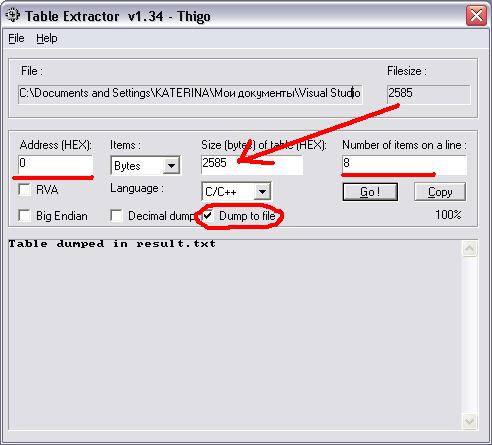
Step 2.Then open Table extractor, the File - Load menu and select our * .xm file. The settings will be as follows: After clicking on the Go! , in the folder with the .xm file, the Result.txt file will appear. Rename it to music.h and replace the file \ loadmusic \ music.h. In this file is our music track, which we will play. Stage 3. We create a new project, and connect to it everything that lies in lib and loadmusic. We will look something like this: Stage 4. Since in the project files in the old “C” style, the studio requires that the Precompiled Header be disabled, for this we turn them off in the project properties (in Visual Studio -> project properties -> C / C ++ - Precompiled Headers - Not Using Precompiled Headers) Stage 5.

The most important thing - it remains only to turn on the music and let it play))) The source file of the entry point I got the following:
By default, music starts playing immediately. If you enter 's' - then it stops, 'e' - exit the program.
What is the file size?
Testing conducted on VS 2010 Express Edition. I installed the use of static link, after which I got 166 kb exe. In order to reduce the size - compress it with upx, with a maximum compression ratio of -9. After compressing the file, the output is a 84 kb file, which is pretty good!
UPD: maybe someone does not have the studio at hand to compile. Here is a finished exe, 84 kb in size download
So, this miracle is called - Tracker music. And most importantly - it takes up very little space, unlike .mp3 or .wav. In modern popular operating systems, tracker files (MOD, XM, S3M, IT, etc.) are played by most media players, for example, Winamp, VLC, Amarok, Audacious and others.
You can download such music, for example from here - keygenmusic.net , or from here www.modarchive.org . These are by no means the only resources; one has only to turn to the search.
In order to play such music in our program, we need a minimum knowledge of C ++, as well as minifmod, available in the source. According to the developers, minifmod will add only 50 kb to your exe-file (without compression).
So, the brief theory is over, we proceed to programming. For our tests - download everything you need from here www2.zippyshare.com/v/26128618/file.html (in the archive are the source code for the test project, minifmod itself, one music file, converter, etc.)
Step 1. We need to get the composition in the format * .xm or * .mod (if you have a file in * .mod format - you need to convert it to .xm format using the mod2xm converter)
Step 2.Then open Table extractor, the File - Load menu and select our * .xm file. The settings will be as follows: After clicking on the Go! , in the folder with the .xm file, the Result.txt file will appear. Rename it to music.h and replace the file \ loadmusic \ music.h. In this file is our music track, which we will play. Stage 3. We create a new project, and connect to it everything that lies in lib and loadmusic. We will look something like this: Stage 4. Since in the project files in the old “C” style, the studio requires that the Precompiled Header be disabled, for this we turn them off in the project properties (in Visual Studio -> project properties -> C / C ++ - Precompiled Headers - Not Using Precompiled Headers) Stage 5.
The most important thing - it remains only to turn on the music and let it play))) The source file of the entry point I got the following:
#include


#include "loadmusic\loadmusic.h"

#include "lib\minifmod.h"


#define WIN32_LEAN_AND_MEAN // this will assume smaller exe


FMUSIC_MODULE *mod;     // fmod music handler


using namespace std;


int main()

{

  cout << "Press 'p' to play music " << endl << "'s' to stop" << endl << "'e' to exit" << endl;


  char i('p');

  do

  {

    switch(i)

    {

    case 'p':

        if (mod == NULL) // mod handle is free? (thouh it will work fine with other loaded audio devices)

        {

          // We defined our music file to be loaded in LoadMusic.cpp //

          //=============================================================//

          loadmusic(); // Call & set ready memory to load the music

          if(!FSOUND_Init(44100, 0)) // intialize memory for sound

          {

            return 1;

          }


          mod = FMUSIC_LoadSong(NULL, NULL); // handle = LoadSong()

          FMUSIC_PlaySong(mod); // Play it (from memory)

        }


      break;

    case 's':

        if (mod != NULL) // handle is loaded (playing)?

        {

          FMUSIC_FreeSong(mod); // Free memory (handle)

          FSOUND_Close(); // Close it (stop it from playing)

          mod=NULL; // make handle to be Free again

        }

      break;

    }


    cin >> i;

  }

  while(i != 'e');


  if (mod != NULL) // music is on?

    {

      FMUSIC_FreeSong(mod); // Free it from memory (the handle - "mod")

      FSOUND_Close(); // Close Music

    }


  return 0;

}


* This source code was highlighted with Source Code Highlighter.
By default, music starts playing immediately. If you enter 's' - then it stops, 'e' - exit the program.
What is the file size?
Testing conducted on VS 2010 Express Edition. I installed the use of static link, after which I got 166 kb exe. In order to reduce the size - compress it with upx, with a maximum compression ratio of -9. After compressing the file, the output is a 84 kb file, which is pretty good!
UPD: maybe someone does not have the studio at hand to compile. Here is a finished exe, 84 kb in size download