New SIP intercom Grandstream GDS3710
The American company Grandstream is one of the leaders in the market of equipment for IP-telephony, not only in terms of sales, but also in the range of manufactured devices. In addition to the production of communications (IP phones, IP-PBX, VoIP-gateways, SIP-adapters), the company also produces equipment for IP-surveillance (cameras, recorders). However, Grandstream doesn’t even think about stopping there: in 2015, the GVC3200 series of video conferencing systems and the GAC2500 audio conference phone were released. In 2016, the company actively took up the network market, presenting its first Wi-Fi access point GWN7610 to the world. The first novelty of 2017 was the hero of our review - SIP intercom Grandstream GDS3710 .

The intercom is made in a metal case, providing the degree of protection IP66 and IK09. Due to its weight, and this, for a moment, as much as 0.6 kg, the intercom makes a rather impressive impression.
In the upper part of the front panel there is a video camera, which is a 1 / 2.7 ”matrix with a resolution of 2 MP and a 1/2 '' lens with viewing angles of 180 degrees vertically and 150 degrees horizontally. We had to pay for wide viewing angles with significant image distortions around the edges, and in general, you won’t be able to make an artistic video for such a camera, but in order to identify the caller or see if anyone hid around the corner - the camera is enough.

To the left and to the right of the camera there are two microphones openings - there are no complaints about them, microphones. But there are drawbacks in the dialer panel below. It is sensory, pressing it is not very intuitive, the confirmation of the correct hit is a short-lit blue LED under the key. The call key — the area outlined for it is much wider than the response area — was also unsuccessfully executed — the call will occur only if you press the bell itself.
Under the touch panel are the speaker hole. The intercom, according to the developers' idea, can also function as an intercom-sounder, therefore, the speaker has a really powerful speaker and there are no special complaints about the quality of the sound it reproduces.
Behind the touch panel in the depth of the case is an RFID card reader. The device works with the most common EM4100 cards in Russia, operating at a frequency of 125 kHz. Included with the intercom are two cards and two trinkets with built-in RFID tags.
The most interesting is on the back of the doorphone under a plastic protective cover. There are all the connection interfaces, made in the form of a single terminal block. With its help, the intercom connects to the network and to the power supply. Moreover, the power supply can be carried out both by PoE technology, and with the help of an external power supply unit 12V.

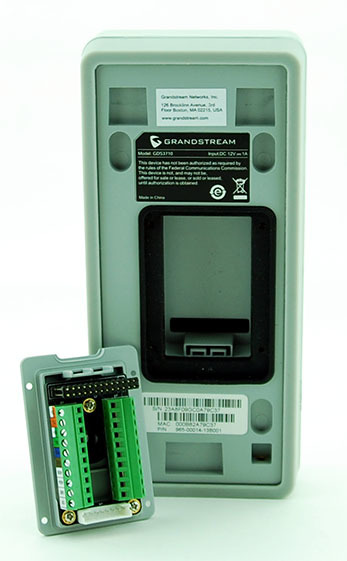
A separate terminal block is reserved for connecting an electric lock and external alarm devices. In particular, the Grandstream GDS3710 supports the connection of two external sensors (for example, motion sensors, smoke - ALARM IN) and one external alarm device (for example, a siren or an alarm lamp - ALARM OUT). Of the additional interfaces, support for Wiegand and RS485 should be highlighted.
The plastic cover, on which the terminal block is located, is securely fixed by four screws to the doorphone body, the wires are pulled inwards through a special rubber seal. Included with the device are three such seals, which differ in the size of the inlet - for pulling a bundle of wires of different diameters.
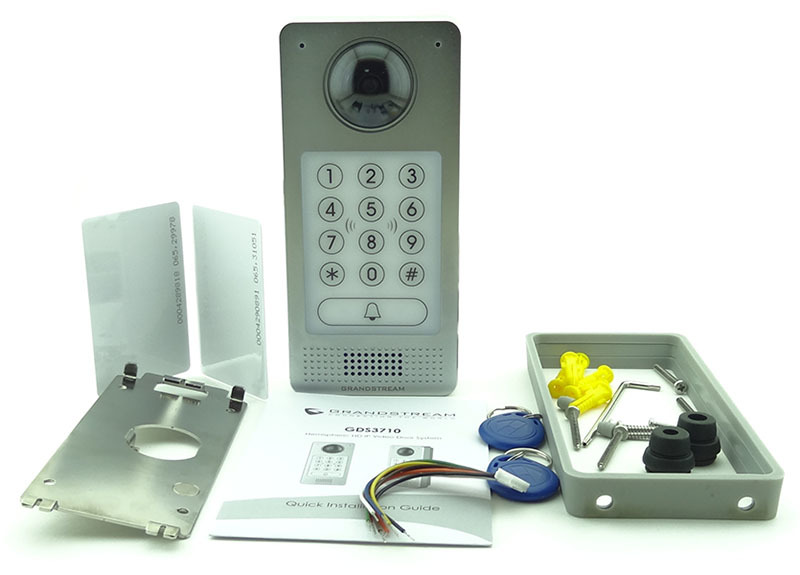
The intercom is mounted on the wall with the help of the supplied metal frame. At first, it is screwed to the wall (dowels and screws are included), then the intercom system snaps securely onto the frame and is additionally fastened with two screws so that it cannot simply be pulled off. The screw heads are closed with rubber plugs. In general, the intercom mount looks very thoughtful and convenient, no particular problems with it should arise.
The easiest way to use the Grandstream GDS3710 does not imply any additional equipment with the exception of an electric lock. In this case, employees can enter the premises by card or PIN code, and exit using the exit button. True, in this mode of use the GDS3710 is difficult to call an intercom, so you should not seriously consider it.
The functionality of the device is greatly expanded in the presence of at least one SIP phone. A call can be routed to this phone by pressing the call button on the doorphone. At the same time, no separate SIP-Proxy is required for this mode - a call from the intercom can be made in the Direct IP Call mode. The telephone operator can remotely open the door to visitors by dialing the code specified in the doorphone settings on the telephone keypad.
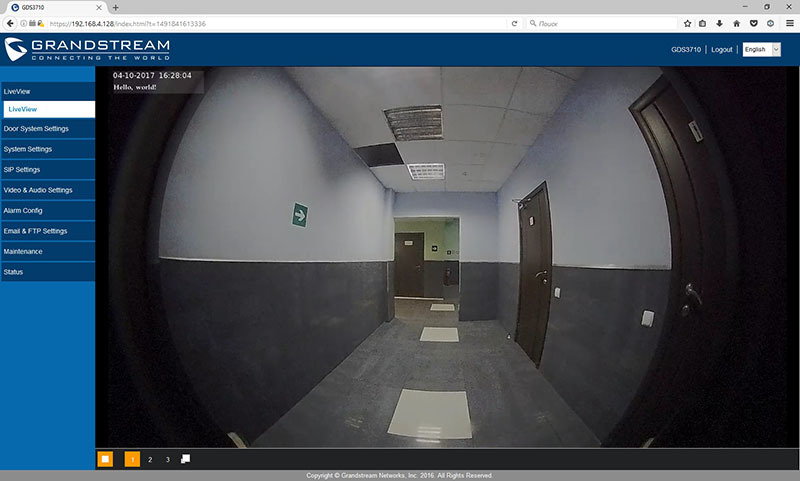
Currently video reception from the doorphone is supported by Grandstream GXV3240 and GXV3275 videophones . However, there is already a firmware (still in beta) for the GXP2100 series IP phones, which allows displaying a picture from the doorphone camera on the phone screen. If you use a regular SIP-phone, then the identification of visitors will have to be done exclusively by ear. Or, as an alternative, keep the GDS3710 web interface open, where live video from the camera is displayed.
When using the GDS3710 in an office environment - in a company with its own IP-PBX - the ability to use the intercom as the simplest intercom-siren is added. When you call the internal number of the intercom, it answers automatically. The list of subscribers who can make an intercom alert via the intercom can be limited. Similarly, the list of internal numbers that can be called in the opposite direction is configured. The truth is that this is not very conveniently implemented - each internal SIP subscriber is assigned a code to dial on the intercom to call this subscriber. Why it is impossible to allow calls directly to SIP numbers is not entirely clear.
Also, one or more Grandstream GDS3710 can be used as a surveillance camera. To do this, they can be connected to a network video recorder, for example, Grandstream GVR3550 or GVR3552. You can use any other DVR, as the intercom supports the ONVIF standard in terms of streaming media data. Data is transmitted over three streams, the transmission quality is configured independently for each stream. Available codecs are H264 and MJPEG, available resolutions are 320x240, 352x240, 480x272, 640x480, 1280x720 and 1920x1080, the number of frames per second is 5, 10, 15, 20, 25 and 30.
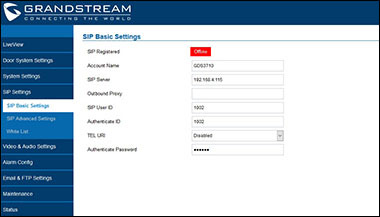
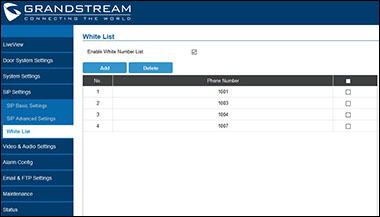
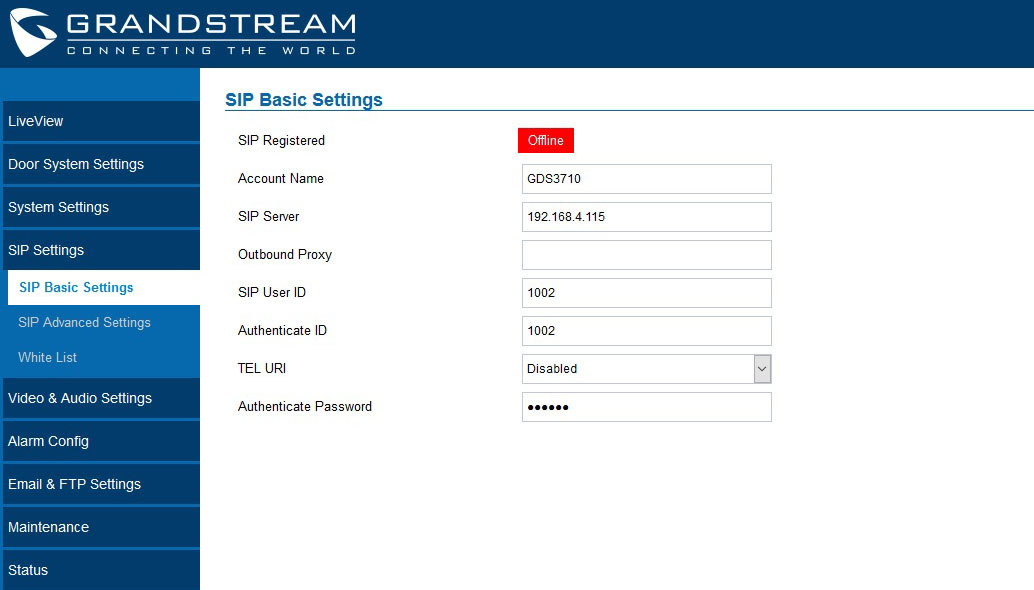
Setting up the GDS3710 is quite simple - by default, the intercom receives an IP address via DHCP and supports UPnP, so after switching it on, you can find it in the Windows Network section and from there enter the device’s web interface. If there is a SIP-Proxy in the network, we register the intercom on it as a normal IP phone in the “SIP Basic settings” section. In the section “White list” we list phone numbers that can call our intercom or simply remove this restriction. When using an intercom in non-SIP-Proxy mode, these settings are required and will not be required
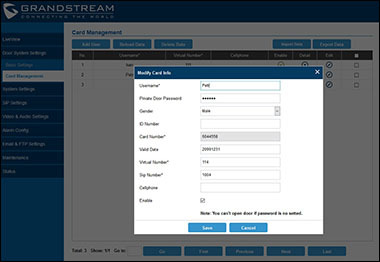
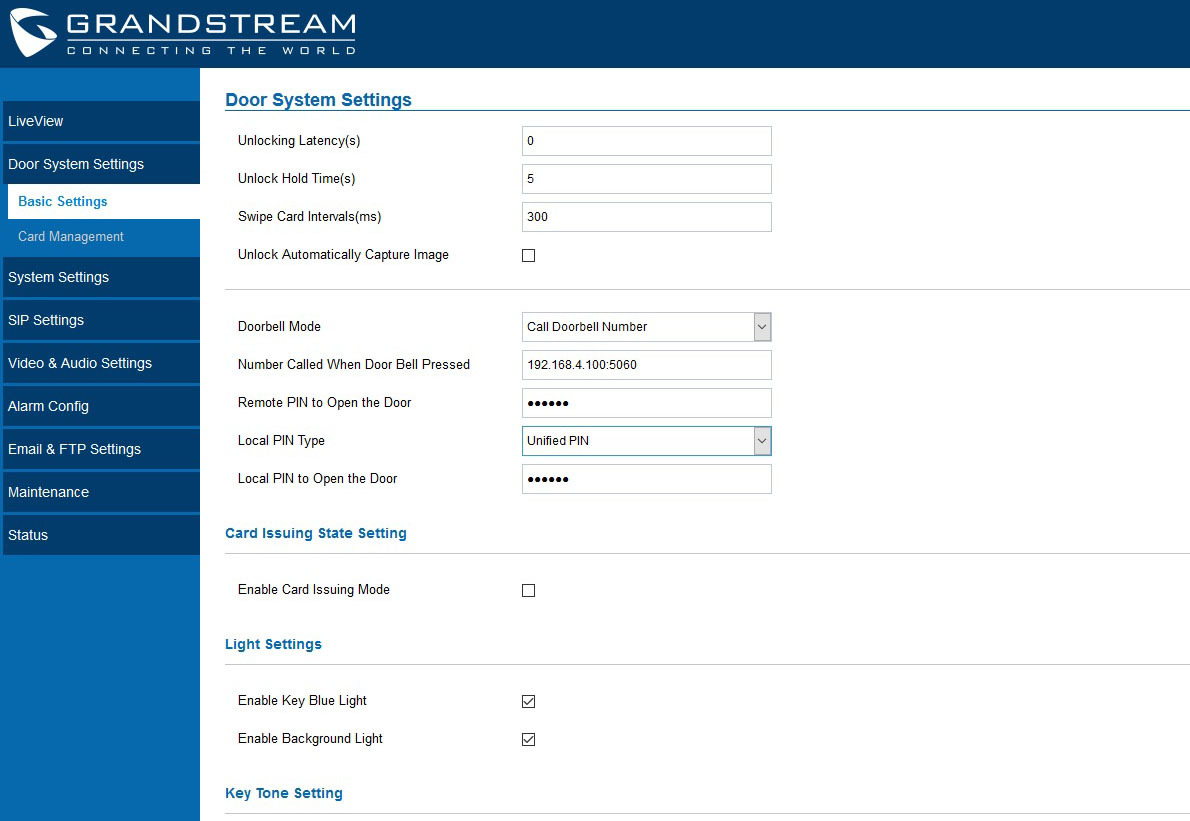
The next important section is “Door system settings”. Here, first of all, configure actions when you press the call key. In the simplest version, this is the internal SIP number of the subscriber to whom the call will go or the IP address (in the absence of SIP-Proxy). Also, the PIN-code is set here for the remote opening of the door by the operator and the PIN-code for opening the door when typing on the doorphone keypad. The latter can be both common to all employees and individual. Also in this section, the intercom can be switched to the registration mode of RFID-cards, so as not to start them manually. However, in order to activate registered cards, you will have to go to the “Card Management” section and fill in a lot of unnecessary information about its owner, including gender, real and virtual phone numbers (the last two fields have been made mandatory for some reason).

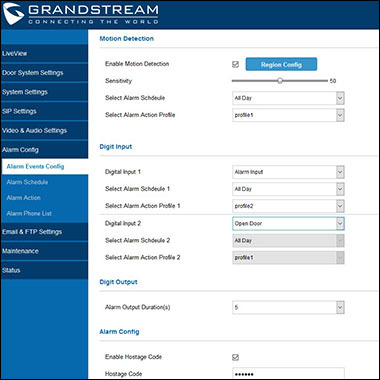
The most interesting section of setup is “Alarm Config”. Recall that the GDS3710 supports the connection of two external sensors from which it can receive alarms, and is also able to monitor certain events and generate an alarm on its own. First, due to the presence of the camera, the intercom can work as a motion sensor - the tracking zones and the sensor sensitivity are adjusted separately. Secondly, there is a built-in anti-theft protection - the intercom is able to track such an event as detaching from the mounting frame and generate an alarm signal. Thirdly, an alarm can be generated when a so-called “hostage code” is entered from the telephone keypad. Finally, the intercom will generate an alarm event when you enter five consecutive invalid login codes.
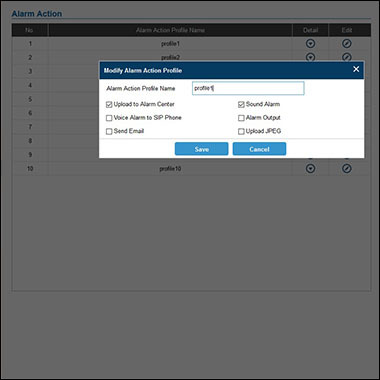
Each type of alarm event has its own time profile, as well as an action profile. The following actions are available for alarm actions: automatic call to one or several SIP numbers (SIP numbers, unfortunately, are the same for all action profiles), sending E-mail event notifications, sending screenshots at the time of an alarm to an FTP server, activation of the built-in siren; sending an alarm to an external sounder (Alarm out); and sending video from the doorphone to the Alarm Center.
Alarm Center is a special client-server application Grandstream GDSManager, designed to centrally manage a large number of Grandstream doorphones. The application allows you not only to monitor video streams from 72 doorphones at the same time and receive alerts about alarm events in real time, but also has a built-in simple working time accounting manager. So far it all looks a bit damp, but if there are improvements, it should be convenient and functional software.
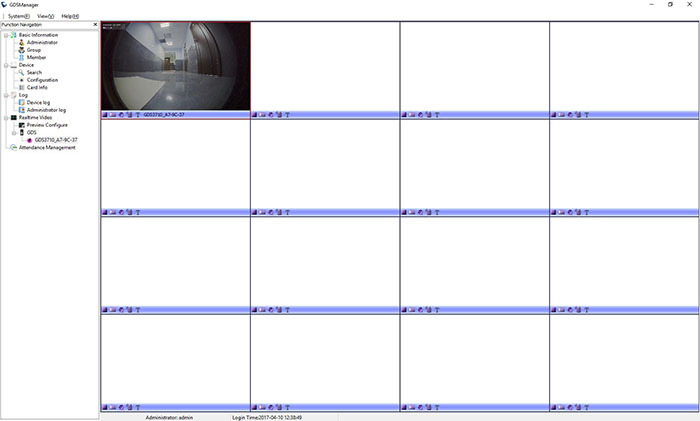
In general, the GDS3710 gives the impression of a very high-quality device. Looking at how carefully the intercom has been thought out and worked out in some aspects, I can’t even believe that this is Grandstream's first experience in the production of such devices. However, the American manufacturer in recent years has made a huge step forward in improving the quality of products, and all the latest devices of the company, as a rule, leave a very positive impression.
Of course, the GDS3710 has some drawbacks, which, however, can be classified as small ones. We have already noted a not very intuitive touch panel and a simple camera; there are small bugs on settings and the web interface. Perhaps the disadvantages include the rather high cost of the device - its retail price in Russia is expected to be around $ 380. Yes, it is quite reasonable price, considering the materials of which the intercom is made and its functionality. But in recent years, Russian consumers increasingly prefer simpler, but cheaper devices. Nevertheless, this intercom can be recommended, at least, to those companies and private consumers who already use Grandstream products in their infrastructure.
Appearance
The intercom is made in a metal case, providing the degree of protection IP66 and IK09. Due to its weight, and this, for a moment, as much as 0.6 kg, the intercom makes a rather impressive impression.
In the upper part of the front panel there is a video camera, which is a 1 / 2.7 ”matrix with a resolution of 2 MP and a 1/2 '' lens with viewing angles of 180 degrees vertically and 150 degrees horizontally. We had to pay for wide viewing angles with significant image distortions around the edges, and in general, you won’t be able to make an artistic video for such a camera, but in order to identify the caller or see if anyone hid around the corner - the camera is enough.
To the left and to the right of the camera there are two microphones openings - there are no complaints about them, microphones. But there are drawbacks in the dialer panel below. It is sensory, pressing it is not very intuitive, the confirmation of the correct hit is a short-lit blue LED under the key. The call key — the area outlined for it is much wider than the response area — was also unsuccessfully executed — the call will occur only if you press the bell itself.
Under the touch panel are the speaker hole. The intercom, according to the developers' idea, can also function as an intercom-sounder, therefore, the speaker has a really powerful speaker and there are no special complaints about the quality of the sound it reproduces.
Behind the touch panel in the depth of the case is an RFID card reader. The device works with the most common EM4100 cards in Russia, operating at a frequency of 125 kHz. Included with the intercom are two cards and two trinkets with built-in RFID tags.
Rear panel
The most interesting is on the back of the doorphone under a plastic protective cover. There are all the connection interfaces, made in the form of a single terminal block. With its help, the intercom connects to the network and to the power supply. Moreover, the power supply can be carried out both by PoE technology, and with the help of an external power supply unit 12V.
A separate terminal block is reserved for connecting an electric lock and external alarm devices. In particular, the Grandstream GDS3710 supports the connection of two external sensors (for example, motion sensors, smoke - ALARM IN) and one external alarm device (for example, a siren or an alarm lamp - ALARM OUT). Of the additional interfaces, support for Wiegand and RS485 should be highlighted.
The plastic cover, on which the terminal block is located, is securely fixed by four screws to the doorphone body, the wires are pulled inwards through a special rubber seal. Included with the device are three such seals, which differ in the size of the inlet - for pulling a bundle of wires of different diameters.
Mount
The intercom is mounted on the wall with the help of the supplied metal frame. At first, it is screwed to the wall (dowels and screws are included), then the intercom system snaps securely onto the frame and is additionally fastened with two screws so that it cannot simply be pulled off. The screw heads are closed with rubber plugs. In general, the intercom mount looks very thoughtful and convenient, no particular problems with it should arise.
Uses for Grandstream GDS3710
The easiest way to use the Grandstream GDS3710 does not imply any additional equipment with the exception of an electric lock. In this case, employees can enter the premises by card or PIN code, and exit using the exit button. True, in this mode of use the GDS3710 is difficult to call an intercom, so you should not seriously consider it.
The functionality of the device is greatly expanded in the presence of at least one SIP phone. A call can be routed to this phone by pressing the call button on the doorphone. At the same time, no separate SIP-Proxy is required for this mode - a call from the intercom can be made in the Direct IP Call mode. The telephone operator can remotely open the door to visitors by dialing the code specified in the doorphone settings on the telephone keypad.
Currently video reception from the doorphone is supported by Grandstream GXV3240 and GXV3275 videophones . However, there is already a firmware (still in beta) for the GXP2100 series IP phones, which allows displaying a picture from the doorphone camera on the phone screen. If you use a regular SIP-phone, then the identification of visitors will have to be done exclusively by ear. Or, as an alternative, keep the GDS3710 web interface open, where live video from the camera is displayed.
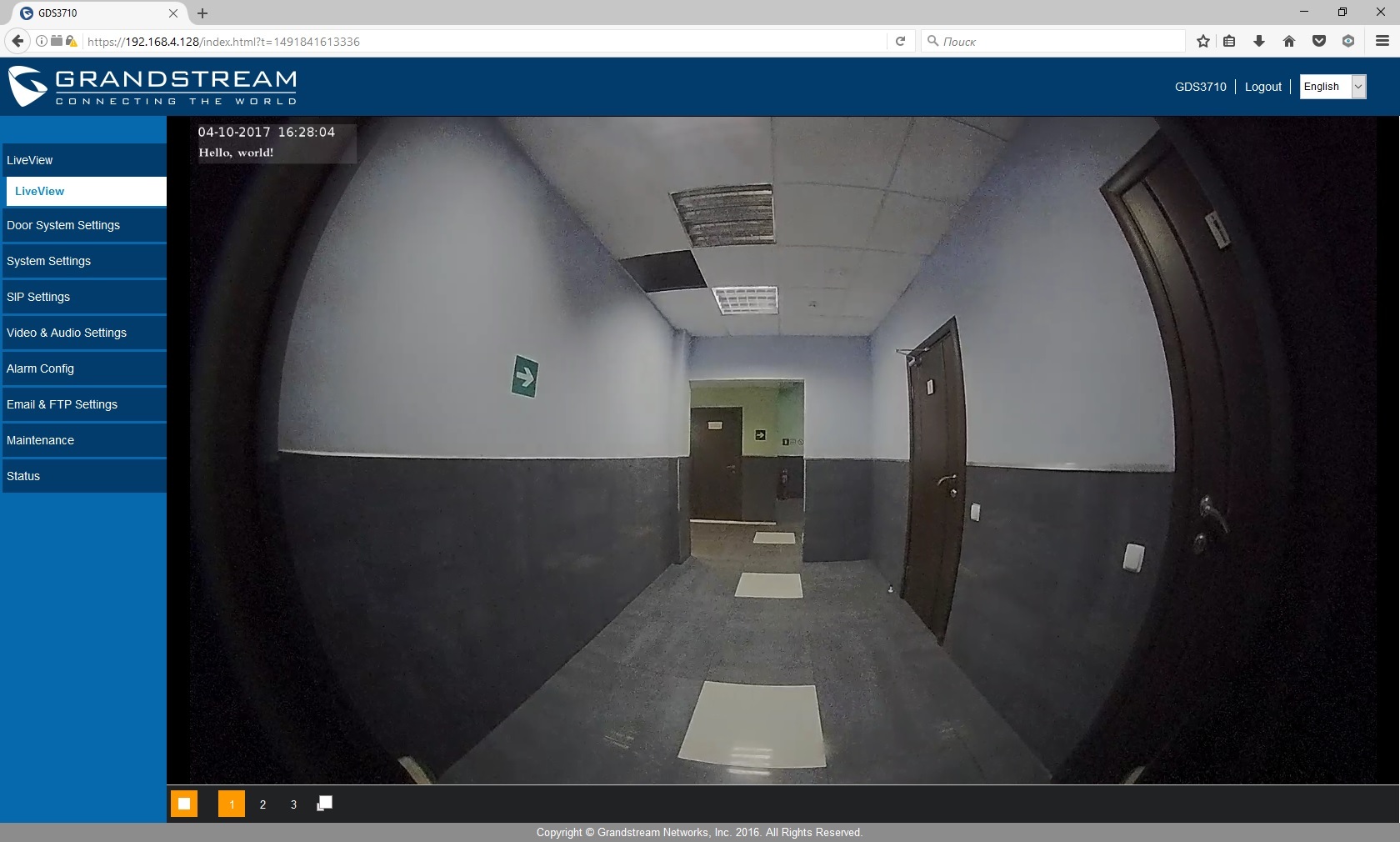
When using the GDS3710 in an office environment - in a company with its own IP-PBX - the ability to use the intercom as the simplest intercom-siren is added. When you call the internal number of the intercom, it answers automatically. The list of subscribers who can make an intercom alert via the intercom can be limited. Similarly, the list of internal numbers that can be called in the opposite direction is configured. The truth is that this is not very conveniently implemented - each internal SIP subscriber is assigned a code to dial on the intercom to call this subscriber. Why it is impossible to allow calls directly to SIP numbers is not entirely clear.
Also, one or more Grandstream GDS3710 can be used as a surveillance camera. To do this, they can be connected to a network video recorder, for example, Grandstream GVR3550 or GVR3552. You can use any other DVR, as the intercom supports the ONVIF standard in terms of streaming media data. Data is transmitted over three streams, the transmission quality is configured independently for each stream. Available codecs are H264 and MJPEG, available resolutions are 320x240, 352x240, 480x272, 640x480, 1280x720 and 1920x1080, the number of frames per second is 5, 10, 15, 20, 25 and 30.
Customization
Setting up the GDS3710 is quite simple - by default, the intercom receives an IP address via DHCP and supports UPnP, so after switching it on, you can find it in the Windows Network section and from there enter the device’s web interface. If there is a SIP-Proxy in the network, we register the intercom on it as a normal IP phone in the “SIP Basic settings” section. In the section “White list” we list phone numbers that can call our intercom or simply remove this restriction. When using an intercom in non-SIP-Proxy mode, these settings are required and will not be required

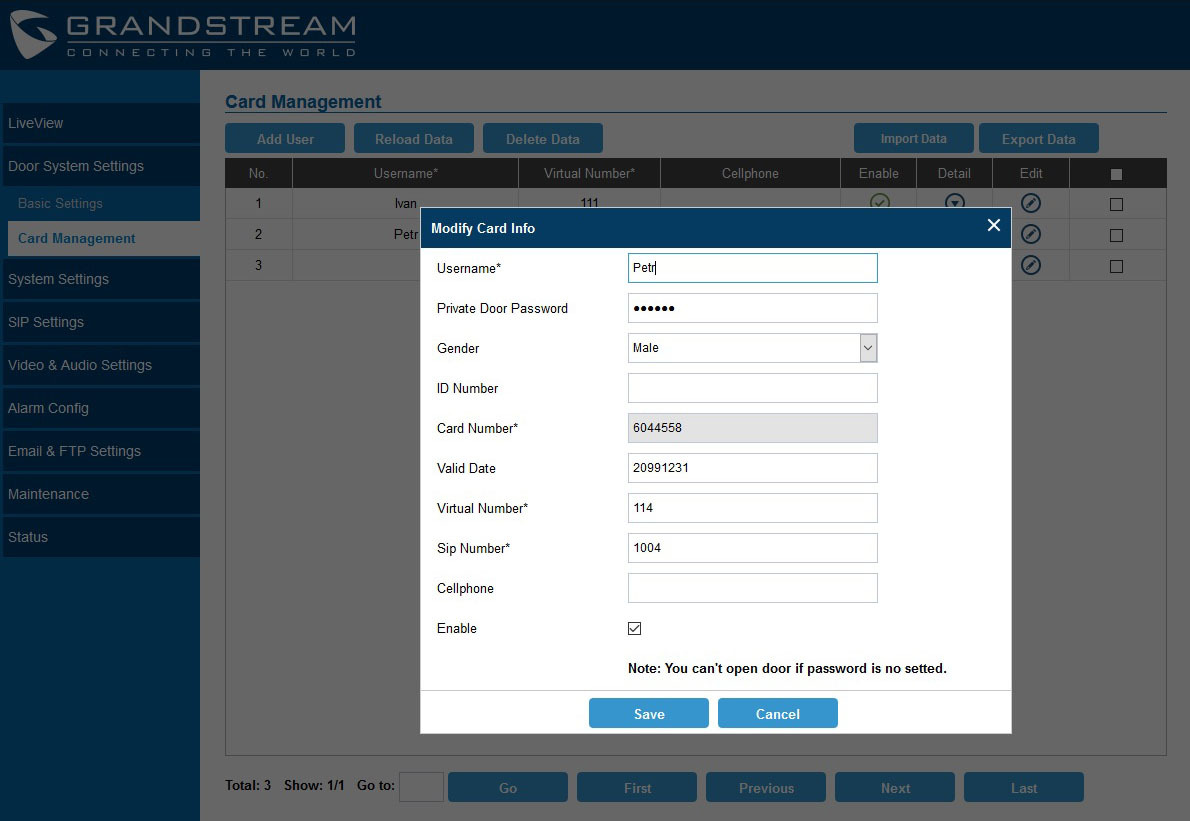
The next important section is “Door system settings”. Here, first of all, configure actions when you press the call key. In the simplest version, this is the internal SIP number of the subscriber to whom the call will go or the IP address (in the absence of SIP-Proxy). Also, the PIN-code is set here for the remote opening of the door by the operator and the PIN-code for opening the door when typing on the doorphone keypad. The latter can be both common to all employees and individual. Also in this section, the intercom can be switched to the registration mode of RFID-cards, so as not to start them manually. However, in order to activate registered cards, you will have to go to the “Card Management” section and fill in a lot of unnecessary information about its owner, including gender, real and virtual phone numbers (the last two fields have been made mandatory for some reason).
Disturbing events
The most interesting section of setup is “Alarm Config”. Recall that the GDS3710 supports the connection of two external sensors from which it can receive alarms, and is also able to monitor certain events and generate an alarm on its own. First, due to the presence of the camera, the intercom can work as a motion sensor - the tracking zones and the sensor sensitivity are adjusted separately. Secondly, there is a built-in anti-theft protection - the intercom is able to track such an event as detaching from the mounting frame and generate an alarm signal. Thirdly, an alarm can be generated when a so-called “hostage code” is entered from the telephone keypad. Finally, the intercom will generate an alarm event when you enter five consecutive invalid login codes.
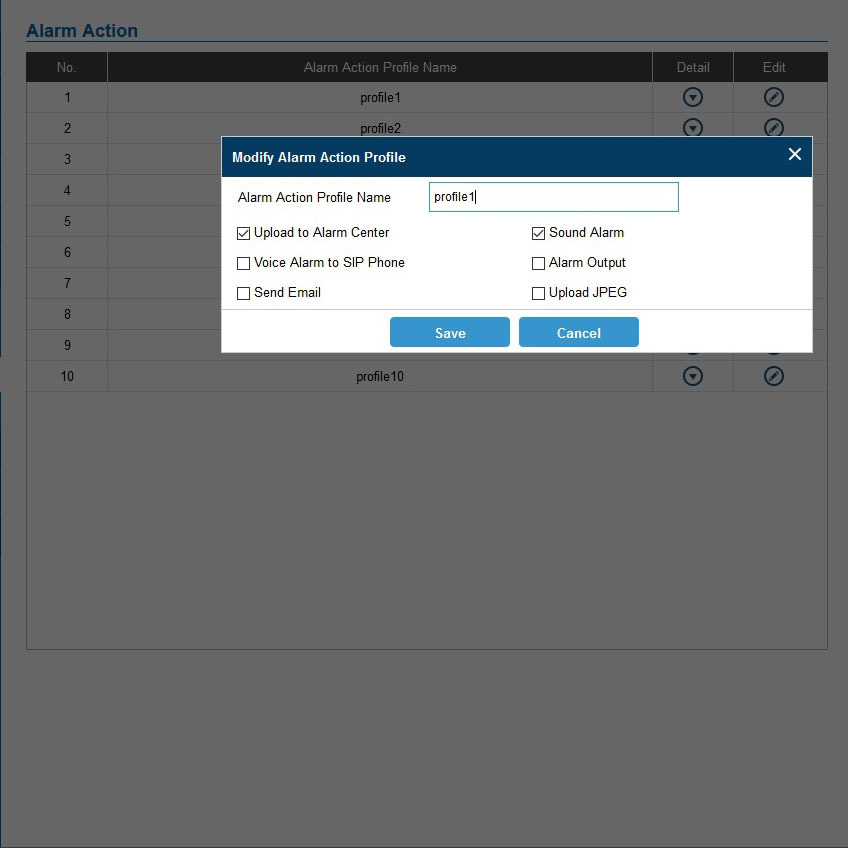
Each type of alarm event has its own time profile, as well as an action profile. The following actions are available for alarm actions: automatic call to one or several SIP numbers (SIP numbers, unfortunately, are the same for all action profiles), sending E-mail event notifications, sending screenshots at the time of an alarm to an FTP server, activation of the built-in siren; sending an alarm to an external sounder (Alarm out); and sending video from the doorphone to the Alarm Center.

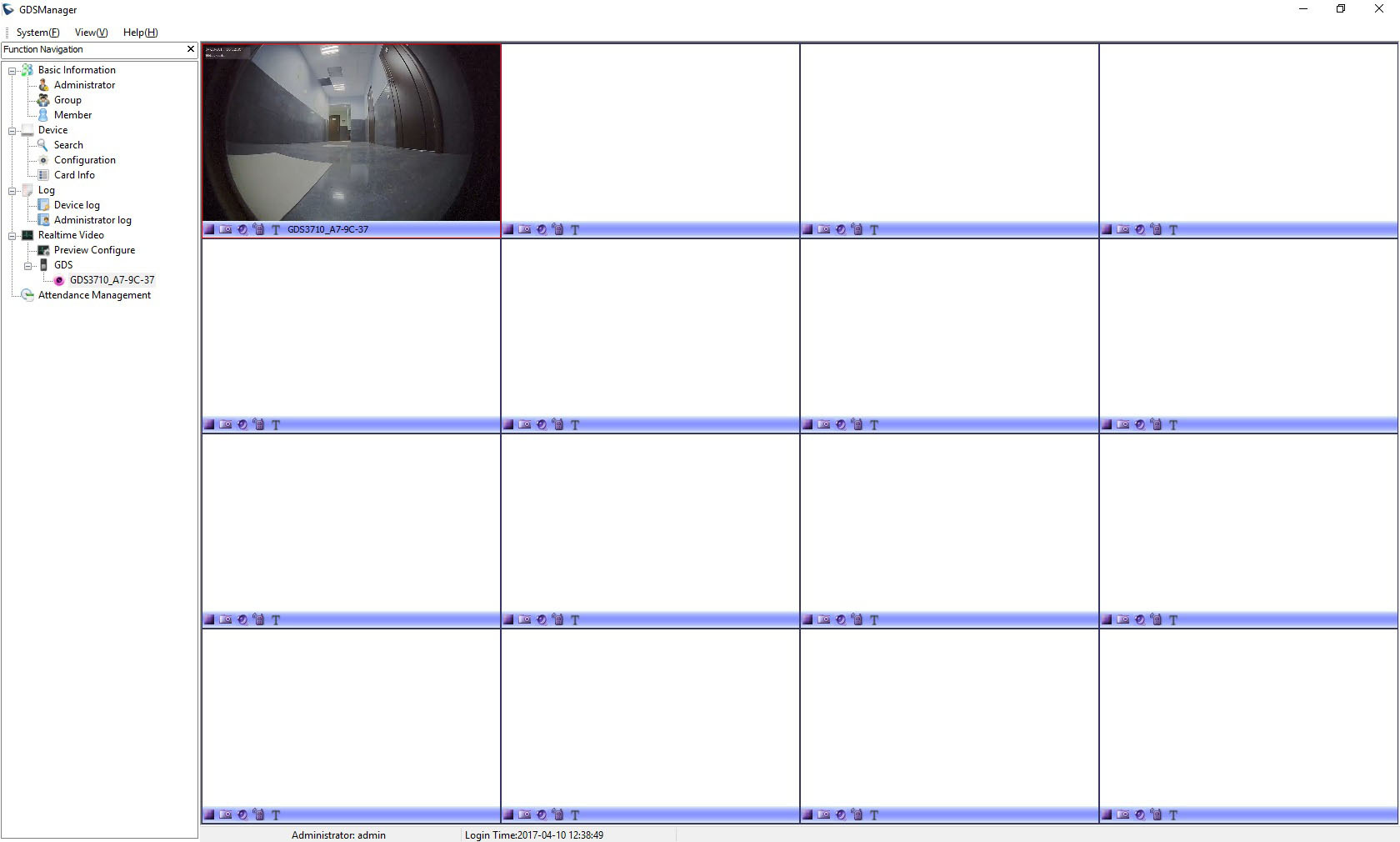
Alarm Center is a special client-server application Grandstream GDSManager, designed to centrally manage a large number of Grandstream doorphones. The application allows you not only to monitor video streams from 72 doorphones at the same time and receive alerts about alarm events in real time, but also has a built-in simple working time accounting manager. So far it all looks a bit damp, but if there are improvements, it should be convenient and functional software.
findings
In general, the GDS3710 gives the impression of a very high-quality device. Looking at how carefully the intercom has been thought out and worked out in some aspects, I can’t even believe that this is Grandstream's first experience in the production of such devices. However, the American manufacturer in recent years has made a huge step forward in improving the quality of products, and all the latest devices of the company, as a rule, leave a very positive impression.
Of course, the GDS3710 has some drawbacks, which, however, can be classified as small ones. We have already noted a not very intuitive touch panel and a simple camera; there are small bugs on settings and the web interface. Perhaps the disadvantages include the rather high cost of the device - its retail price in Russia is expected to be around $ 380. Yes, it is quite reasonable price, considering the materials of which the intercom is made and its functionality. But in recent years, Russian consumers increasingly prefer simpler, but cheaper devices. Nevertheless, this intercom can be recommended, at least, to those companies and private consumers who already use Grandstream products in their infrastructure.









