July 23, 2008 at 14:32
Disc burning utilities
Almost all Windows users know about the program Nero Burning Rom, but not a "neroy" single, you can burn discs. I tried to look at alternative utilities that exist in Russian and were updated in the last couple of months. Two of them are completely free.
ImgBurn ( www.imgburn.com , free)
It has the most ascetic interface and small size - only 1925Kb. The Russian interface is downloaded separately from the developers site.

Able to burn CDs and DVDs, allows you to set all the traditional settings - speed, close the session and so on. In addition, there are specific settings for certain types of drives, which, however, did not have time to come in handy during testing.
You can create ISO images and burn discs from them, but the program does not support the creation of audio and video discs, and does not author DVDs.
Conclusion : a convenient, small and fast utility that is useful to those who often burn discs with different types of data.
Ashampoo Burning Studio 8 (www.ashampoo.com, $ 49.99)
Size 31.55Mb, Russian interface is included in the package.

Large program reminiscent of Nero in size, functionality and, unfortunately, at a high price - about one and a half thousand rubles. The functional set is impressive in its scope - recording any kind of disc, DVD authoring, recording audio CDs, BluRay. Supported disc copying, as well as grabbing AudioCD.
It is possible to create custom menus for discs with screenshots and episodic breakdowns. The kit includes a program for drawing covers.
Conclusion : The program clearly claims to be Nero among professional users. It is necessary for those who are often involved in recording various discs and use all the functions. The most expensive program of our review.
ChiliBurner ( www.movavi.com , $ 29 or 999 rubles per package)
Size 14MB or 50MB (VideoSuite package), Russian interface only when downloading the package.

The utility exists in seven languages, but is separately downloaded and sold only in the English version. In Russian, you need to download the entire VideoSuite package. True, the price of a package in Russia is approximately equal to the price of one utility for foreigners.
An extremely simple interface in which you can select the type of disk - data, audio, video, action - recording or copying and make additional settings - PAL or NTSC, screen proportions, quality and type of disk.
Not only standard CD and DVD discs are supported, but also such not very common formats as Super-Video CD. You can create your own menu for the disk from a large number of proposed animated or static templates.
CDBurner XP ( www.cdburnerxp.se , free)
Size 2914Kb, Russian interface included.
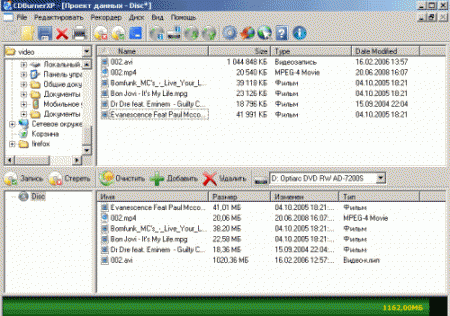
Despite being free, the program has a nice interface and an impressive amount of supported functions - support for CDs, DVDs and BluRay discs is announced. The user can copy discs, burn them from images (built-in utility for converting images from Nero to ISO formats) and create your own audio discs by setting pauses between tracks. Unfortunately, the program does not know how to do DVD authoring.
Conclusion : If you do not need to burn DVDs, then a great choice. Free program with a user-friendly interface. Reminds early versions of the same Nero.
ImgBurn ( www.imgburn.com , free)
It has the most ascetic interface and small size - only 1925Kb. The Russian interface is downloaded separately from the developers site.
Able to burn CDs and DVDs, allows you to set all the traditional settings - speed, close the session and so on. In addition, there are specific settings for certain types of drives, which, however, did not have time to come in handy during testing.
You can create ISO images and burn discs from them, but the program does not support the creation of audio and video discs, and does not author DVDs.
Conclusion : a convenient, small and fast utility that is useful to those who often burn discs with different types of data.
Ashampoo Burning Studio 8 (www.ashampoo.com, $ 49.99)
Size 31.55Mb, Russian interface is included in the package.
Large program reminiscent of Nero in size, functionality and, unfortunately, at a high price - about one and a half thousand rubles. The functional set is impressive in its scope - recording any kind of disc, DVD authoring, recording audio CDs, BluRay. Supported disc copying, as well as grabbing AudioCD.
It is possible to create custom menus for discs with screenshots and episodic breakdowns. The kit includes a program for drawing covers.
Conclusion : The program clearly claims to be Nero among professional users. It is necessary for those who are often involved in recording various discs and use all the functions. The most expensive program of our review.
ChiliBurner ( www.movavi.com , $ 29 or 999 rubles per package)
Size 14MB or 50MB (VideoSuite package), Russian interface only when downloading the package.
The utility exists in seven languages, but is separately downloaded and sold only in the English version. In Russian, you need to download the entire VideoSuite package. True, the price of a package in Russia is approximately equal to the price of one utility for foreigners.
An extremely simple interface in which you can select the type of disk - data, audio, video, action - recording or copying and make additional settings - PAL or NTSC, screen proportions, quality and type of disk.
Not only standard CD and DVD discs are supported, but also such not very common formats as Super-Video CD. You can create your own menu for the disk from a large number of proposed animated or static templates.
CDBurner XP ( www.cdburnerxp.se , free)
Size 2914Kb, Russian interface included.
Despite being free, the program has a nice interface and an impressive amount of supported functions - support for CDs, DVDs and BluRay discs is announced. The user can copy discs, burn them from images (built-in utility for converting images from Nero to ISO formats) and create your own audio discs by setting pauses between tracks. Unfortunately, the program does not know how to do DVD authoring.
Conclusion : If you do not need to burn DVDs, then a great choice. Free program with a user-friendly interface. Reminds early versions of the same Nero.