How we pierced the Great Chinese Firewall (Part 2)
Hello!
Nikita is with you again - a system engineer from SEMrush . And with this article, I continue the story of how we came up with a solution to bypassing the Chinese Firewall for our service semrush.com.
In the previous part I told:
- what problems appear after a decision is made “We need to make our service work in China”
- what problems does the Chinese Internet have
- why do i need an ICP license
- how and why we decided to test our test benches using catchpoint
- what was the result of our first solution based on Cloudflare China Network
- how we found a bug in DNS Cloudflare

This part is the most interesting, in my opinion, because it focuses on specific technical implementations of staging. And we will begin, or rather continue, with Alibaba Cloud .
Alibaba cloud
Alibaba Cloud is a fairly large cloud provider, which has all the services that allow it to honestly call itself a cloud provider. It’s good that they have the opportunity to register with foreign users, and that most of the site has been translated into English (for China it’s a luxury). In this cloud, you can work with many regions of the world, mainland China, as well as Ocean Asia (Hong Kong, Taiwan, etc.).
IPSEC
Started with geography. Since the test site was located on Google Cloud, we had to “link” Alibaba Cloud with GCP, so we opened the list of locations where Google is present. At that moment, they still did not have their own data center in Hong Kong.
The closest region was asia-east1 (Taiwan). Ali turned out to have cn-shenzhen (Shenzhen) as the closest region of mainland China to Taiwan .
Using terraform, they described and raised the entire infrastructure in GCP and Ali. The 100 Mbps tunnel between the clouds rose almost instantly. On the side of Shenzhen and Taiwan they raised proxy virtual machines. In Shenzhen, user traffic is terminated, proxied through a tunnel to Taiwan, and from there it goes directly to the external IP of our service in us-east (East Coast of the USA). Ping between virtuals on the 24ms tunnel , which is not so bad.
At the same time, we placed a test zone in Alibaba Cloud DNS . After delegating the zone to NS Ali, the resolving time decreased from 470 ms to 50 ms . Prior to this, the zone was also on Cloudlfare.
In parallel with the tunnel to asia-east1 , another tunnel was raised from Shenzhen directly to us-east4 . There they created more proxy virtual machines and began to measure both solutions, routing test traffic using Cookies or DNS. The test bench is schematically described in the following figure:
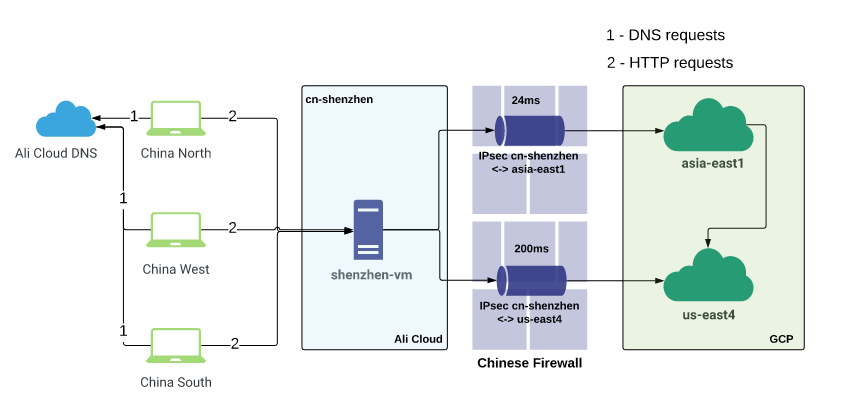
The latency for the tunnels is as follows:
Ali cn-shenzhen <--> GCP asia-east1 - 24ms
Ali cn-shenzhen <--> GCP us-east4 - 200ms
Catchpoint browser tests have reported excellent performance improvements.
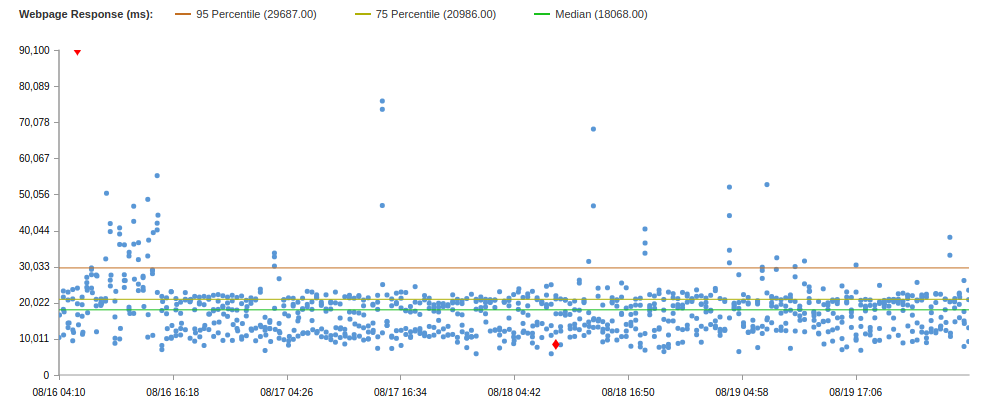
Compare the test results for the two solutions:
| Decision | Uptime | Median | 75 Percentile | 95 Percentile |
|---|---|---|---|---|
| Cloudflare | 86.6 | 18s | 30s | 60s |
| IPsec | 99.79 | 18s | 21s | 30s |
This is the solution data using the IPSEC tunnel through asia-east1 . Through us-east4, the results were worse, and there were more errors, so I will not give the results.
According to the results of this test, two tunnels, one of which is terminated in the closest region to China, and the other at the final destination, it became clear that it is important to “emerge” from the Chinese firewall as soon as possible, and then use fast networks (CDN providers) , cloud providers, etc.). Do not try in one fell swoop to go through the firewall and get to your destination. This is not the fastest way.
In general, the results are not bad, however, semrush.com has a median of 8.8s and 75 Percentile of 9.4s (on the same test).
And before moving on, I would like to make a small digression.
Lyrical digression
After the user visits the site www.semrushchina.cn , which resolves through the “fast” Chinese DNS servers, the HTTP request goes through our quick solution. The answer is returned in the same way, but in all JS-scripts, HTML-pages and other elements of the web page, the domain semrush.com is indicated for additional resources that must be loaded when rendering the page. That is, the client resolves the “main” A record www.semrushchina.c n and goes into the fast tunnel, quickly receives a response - an HTML page that states:
- download such and such js from sso.semrush.com,
- Take CSS files from cdn.semrush.com,
- and take more pictures from dab.semrush.com
- and so on.
The browser begins to go to the “external” Internet for these resources, each time passing through a firewall devouring the response time.
But on the previous test, the results are presented when the page does not have the resources of semrush.com , only semrushchina.cn , and * .semrushchina.cn is resolved to the address of the virtual machine in Shenzhen to get into the tunnel later.
Only in this way, throwing all possible traffic through your decision to quickly pass the Chinese firewall to the maximum, you can get acceptable speeds and indicators of site availability, as well as honest results of test solutions.
We did this without a single code edit on the side of the team products.
Subfilter
The solution was born almost immediately after this problem surfaced. We needed PoC (Proof of Concept) that our firewall pass solutions really work well. To do this, you need to maximize all traffic to the site in this solution. And we applied subfilter in nginx.
Subfilter is a fairly simple module in nginx that allows you to change one line in the body of a response to another line. So we changed all occurrences of semrush.com to semrushchina.cn in all answers.
And ... this did not work, because we received compressed content from the backends, so the subfilter could not find the desired line. I had to add another local server to nginx, which expanded the response and transmitted it to the next local server, which was already engaged in line substitution, compression and delivery to the next upstream proxy server.
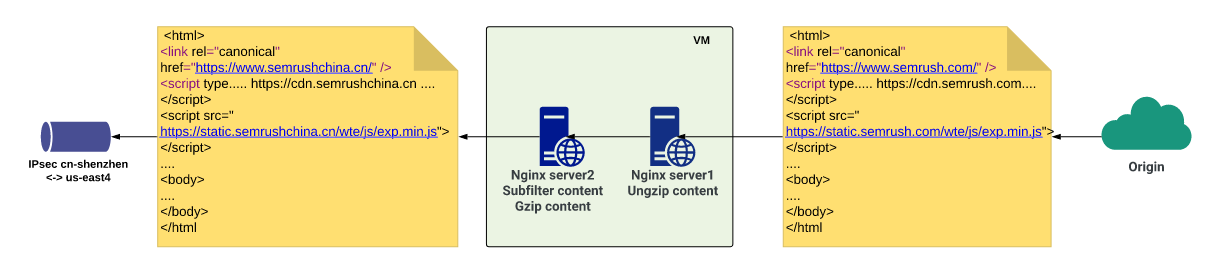
As a result, where the client would receive <subdomain> .semrush.com , he would receive <subdomain> .semrushchina.cn and obediently go through our decision.
However, it is not enough just to change the domain in one direction, because the backends still expect semrush.com in subsequent requests from the client. Accordingly, on the same server where the replacement is done in one direction, using a simple regular expression, we get the subdomain from the request, and then do proxy_pass with the $ host variable set in $ subdomain.semrush.com . It may seem confusing, but it works. And it works well. For individual domains that require different logic, they simply create their server blocks and make a separate configuration. Below are shortened nginx configs for clarity and demonstration of this scheme.
The following config processes all requests from China to .semrushchina.cn:
    listen 80;
    server_name ~^(?<subdomain>[\w\-]+)\.semrushchina.cn$;
    sub_filter '.semrush.com' '.semrushchina.cn';
    sub_filter_last_modified on;
    sub_filter_once off;
    sub_filter_types *;
    gzip on;
    gzip_proxied any;
    gzip_types text/plain text/css application/json application/x-javascript text/xml application/xml application/xml+rss text/javascript application/javascript;
    location / {
        proxy_pass http://127.0.0.1:8083;
        proxy_set_header Accept-Encoding "";
        proxy_set_header Host $subdomain.semrush.com;
        proxy_set_header X-Accept-Encoding $http_accept_encoding;
    }
}
This config is proxied to localhost on port 83, and there it waits for the following config:
    listen 127.0.0.1:8083;
    server_name *.semrush.com;
    location / {
        resolver 8.8.8.8 ipv6=off;
        gunzip on;
        proxy_pass https://$host;
        proxy_set_header Accept-Encoding gzip;
    }
}
I repeat, these are cropped configs.
Like that. It may look complicated, but in words. In fact, everything is easier than steamed turnip :)
The end of the lyrical digression
For a while, we were happy because the myth of falling IPSEC tunnels has not been confirmed. But then the tunnels began to fall. Several times a day for several minutes. A little, but it did not suit us. Since both tunnels were terminated on the Ali side on the same router, we decided that perhaps this is a regional problem and we need to raise the backup region.
Picked up. The tunnels began to fall at different times, but we had a fine-tuned failover at the upstream level in nginx. But then the tunnels began to fall at about the same time :) And again, 502 and 504. Uptime began to deteriorate, so we began to work out the option with Alibaba CEN (Cloud Enterprise Network).
Cen
CEN is the connectivity of two VPCs from different regions within the Alibaba Cloud, that is, you can connect private networks of any regions within the cloud to each other. And most importantly: this channel has a rather strict SLA . It is very stable both in speed and in uptime. But it’s never so simple:
- it is VERY hard to get if you are not Chinese citizens or legal entities,
- you need to pay for each megabit of bandwidth.
Having the opportunity to connect Mainland China and Overseas , we created a CEN between two Ali regions: cn-shenzhen and us-east-1 (the closest point to us-east4). In Ali us-east-1, they raised another virtual machine so that there was another hop .
It turned out like this:
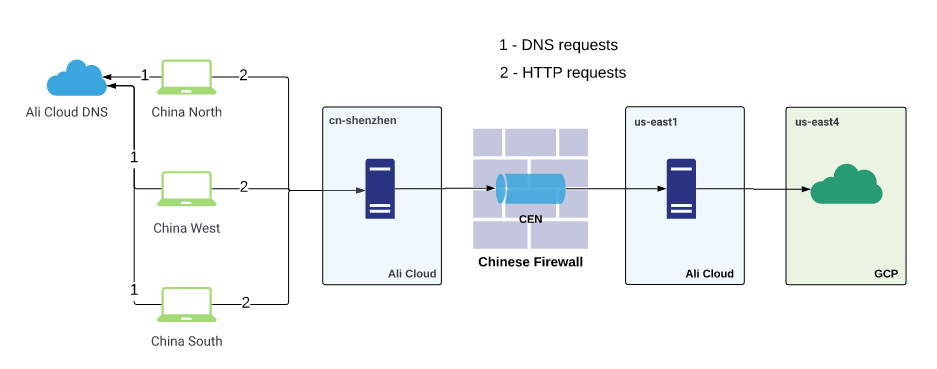
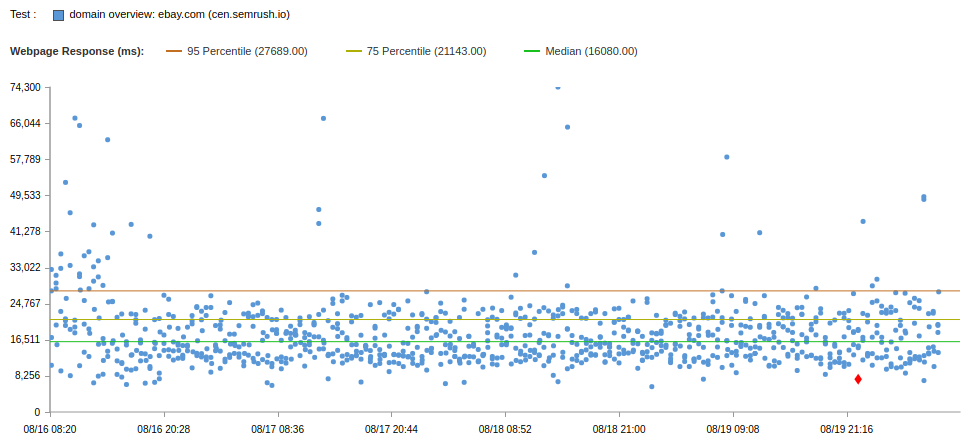
Browser test results below:
| Decision | Uptime | Median | 75 Percentile | 95 Percentile |
|---|---|---|---|---|
| Cloudflare | 86.6 | 18s | 30s | 60s |
| IPsec | 99.79 | 18s | 21s | 30s |
| Cen | 99.75 | 16s | 21s | 27s |
Performance is slightly better than IPSEC. But through IPSEC you can potentially download at a speed of 100 Mbps, and through CEN only at a speed of 5 Mbps and more expensive.
Hybrid begs, right? Combine IPSEC speed and CEN stability.
This is what we did by letting traffic through both IPSEC and CEN in the event of an IPSEC tunnel crash. Uptime has become much higher, but the site’s loading speed is poor. Then I drew all the schemes that we already used and tested, and decided to try adding a little more GCP to this scheme, namely GLB .
GLB
GLB is the Global Load Balancer (or Google Cloud Load Balancer). It has an important advantage for us: in the context of CDN it has anycast IP , which allows you to route traffic to the data center closest to the client, thanks to which the traffic gets to the fast Google network faster and less via the “normal” Internet.
Without thinking twice, we raised HTTP / HTTPS LB to GCP and put our virtual machines with subfilter backend.
There were several schemes:
- Use Cloudflare China Network , but this time Origin specify global GLB IP .
- Terminate clients in cn-shenzhen , and from there proxy traffic immediately to GLB .
- Go straight from China to the GLB .
- Terminate clients in cn-shenzhen , from there proxy to asia-east1 via IPSEC (in us-east4 via CEN), from there go to GLB (calmly, there will be a picture and explanation below)
We tested all of these options and a few more hybrid ones:
- Cloudflare + GLB
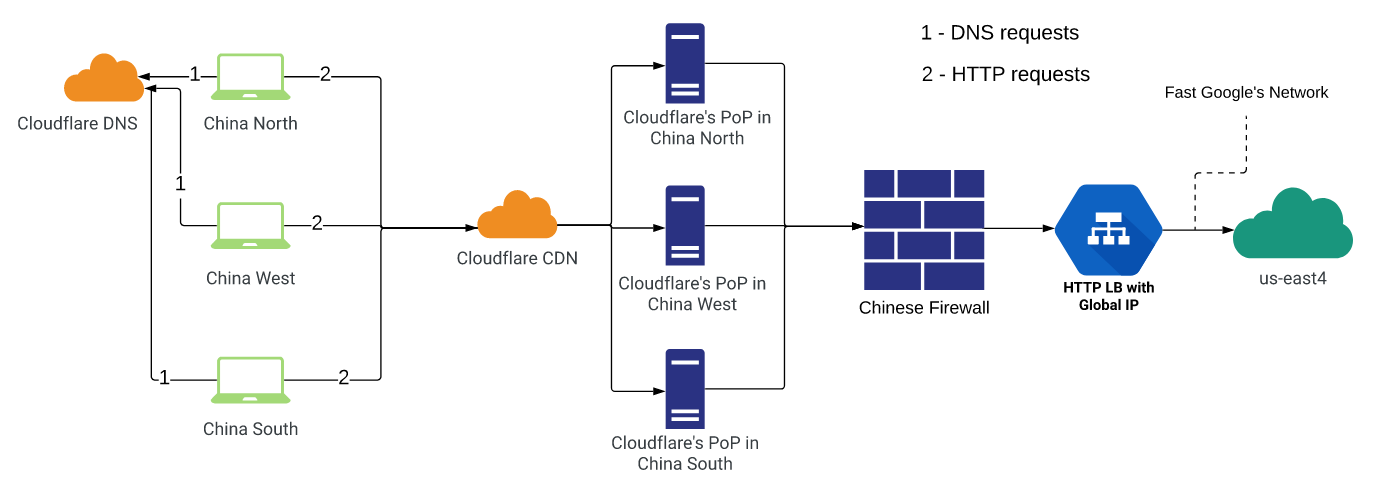
This scheme did not suit us for uptime and DNS errors. But the test was carried out before fixing the bug on the part of CF, perhaps now it is better (however, this does not exclude HTTP timeouts).
- Ali + GLB

This scheme also did not suit us for uptime, since GLB often dropped out of the upstream due to the impossibility of connecting at an acceptable time or timeout, because for a server inside China, the GLB address remains outside, and therefore, behind the Chinese firewall. The magic did not happen.
- GLB only
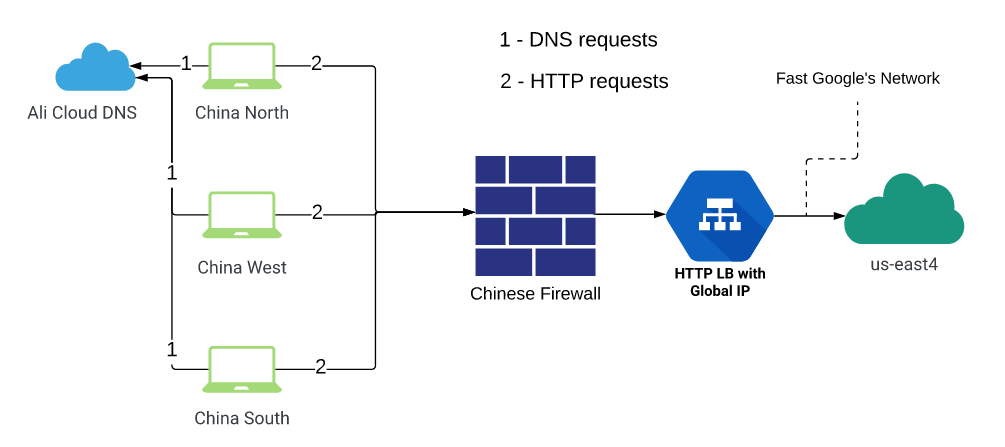
A variant similar to the previous one, only it did not use servers in China itself: the traffic went immediately to GLB (changed DNS records). Accordingly, the results were not satisfactory, as ordinary Chinese customers using the services of ordinary Internet providers have a much worse situation with passing through the firewall than Ali Cloud.
- Shenzhen -> (CEN / IPSEC) -> Proxy -> GLB
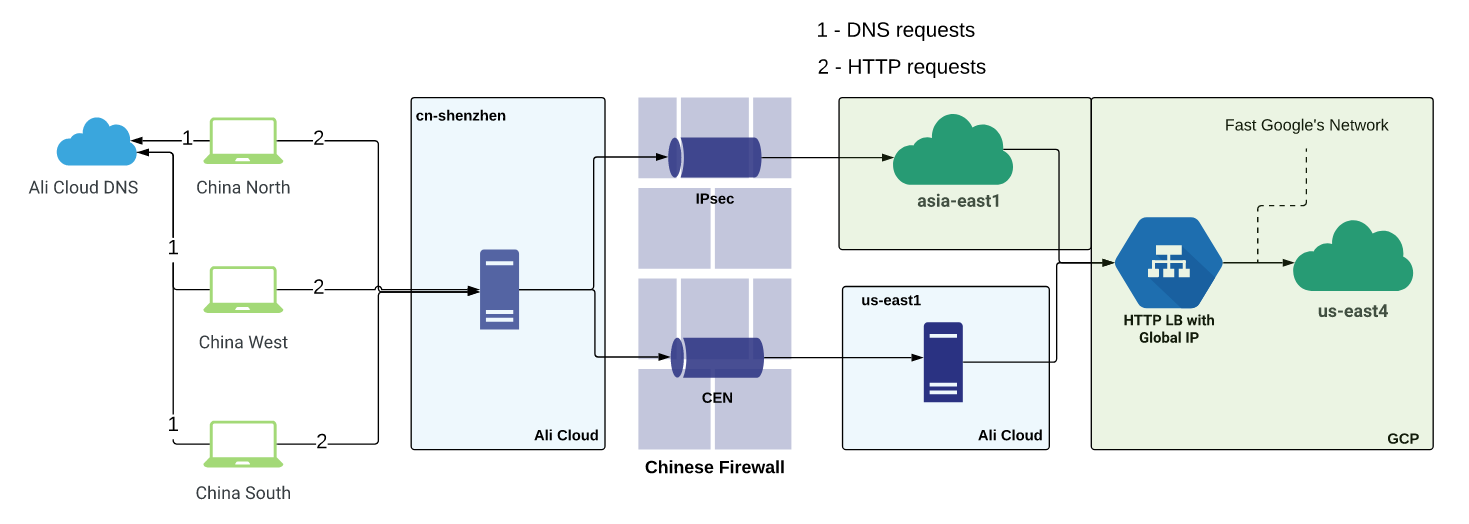
Here we decided to use the best of all solutions:
- stability and guaranteed SLA from CEN
- high speed from IPSEC
- Google’s “fast” network and its anycast.
The scheme looks something like this: user traffic is terminated on a virtual machine in ch-shenzhen . Nginx upstream settings are configured there, some of which refer to private IP servers located at the other end of the IPSEC tunnel, and some upstream connections to private server addresses on the other side of the CEN. IPSEC was configured to the asia-east1 region in GCP (it was the closest region to China at the time the solution was created. Now GCP also has a presence in Hong Kong). CEN - to the us-east1 region in Ali Cloud.
Further, traffic from both ends was directed to anycast IP GLB , that is, to the nearest Google presence point, and went through its networks to the us-east4 region in GCP, in which there were substitute virtual machines (with subfilter in nginx).
This hybrid solution, as we expected, allowed us to take advantage of each technology. In general, traffic goes through fast IPSEC, but if problems begin, we quickly and for several minutes throw these servers out of the upstream and send traffic through CEN only until the tunnel stabilizes.
Having implemented the 4th solution from the list above, we achieved what we wanted and what the business demanded of us at that time.
Browser test results for the new solution compared to the previous ones:
| Decision | Uptime | Median | 75 Percentile | 95 Percentile |
|---|---|---|---|---|
| Cloudflare | 86.6 | 18s | 30s | 60s |
| IPsec | 99.79 | 18s | 21s | 30s |
| Cen | 99.75 | 16s | 21s | 27s |
| CEN / IPsec + GLB | 99.79 | 13s | 16s | 25s |
Cdn
Everything is good in the solution we have implemented, but there is no CDN that could accelerate traffic at the level of regions and even cities. In theory, this should speed up the site for end users through the use of fast communication channels of the CDN provider. And we thought about it all the time. And now, the time has come for the next iteration of the project: search and testing of CDN providers in China.
And I will tell you about this in the next, final part :)