TDD applications on Spring Boot: fine-tuning the tests and working with the context
The third article in the series and a small branch from the main series - this time I will show you how the Spring integration test library works and how it works, what happens when you run the test and how you can fine-tune the application and its environment for the test.
I was prompted to write this article by a Hixon10 comment about how to use a real base, such as Postgres, in an integration test. The author of the comment suggested using the convenient all-included library embedded-database-spring-test . And I already added a paragraph and an example of use in the code, but then I thought about it. Of course, taking a ready-made library is correct and good, but if the goal is to understand how to write tests for a Spring application, then it will be more useful to show how to implement the same functionality yourself. Firstly, this is a great reason to talk about the fact that under the hood at Spring Test. And secondly, I believe that you can not rely on third-party libraries, if you do not understand how they are arranged inside, this only leads to the strengthening of the myth of the "magic" of technology.
This time there will be no user feature, but there will be a problem that needs to be solved - I want to start the real database on a random port and connect the application to this temporary database automatically, and after the tests I stop and delete the database.
At first, as already customary, a little theory. To people who are not too familiar with the concepts of bin, context, configuration, I recommend refreshing knowledge, for example, in my article The reverse side of Spring / Habr .
Spring test
Spring Test is one of the libraries included in the Spring Framework, in fact, everything that is described in the documentation section about integration testing is just about it. The four main tasks that the library solves are:
- Manage Spring IoC containers and their caching between tests
- Provide dependency injection for test classes
- Provide transaction management suitable for integration tests
- Provide a set of base classes to help the developer write integration tests
I highly recommend reading the official documentation, it says a lot of useful and interesting things. Here I will give a quick squeeze and a few practical tips that are useful to keep in mind.
Test life cycle
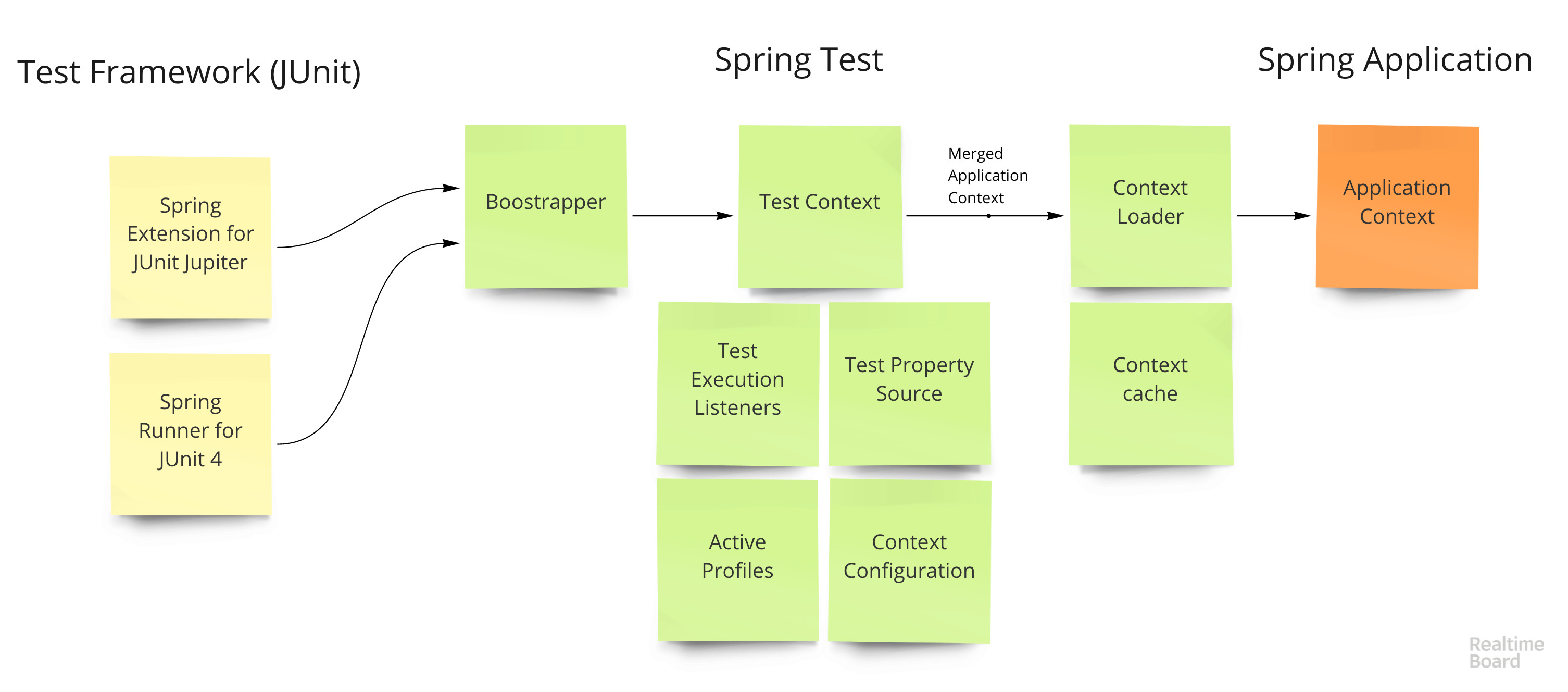
The life cycle of a test looks like this:
- The extension for the test framework (
SpringRunnerfor JUnit 4 andSpringExtensionfor JUnit 5) calls Test Context Bootstrapper - Boostrapper creates
TestContext- the main class that stores the current state of the test and application TestContextsets up different hooks (like starting transactions before the test and rollback after), injects dependencies into test classes (all@Autowiredfields on test classes) and creates contexts- A context is created using the Context Loader - it takes the basic configuration of the application and merges it with the test configuration (overlapped properties, profiles, bins, initializers, etc.)
- The context is cached using a composite key that fully describes the application - a set of bins, properties, etc.
- Test runs
Actually, all the dirty work of test management is done,spring-testandSpring Boot Testin turn, it adds several auxiliary classes, like familiar ones,@DataJpaTestand@SpringBootTestuseful utilities, likeTestPropertyValuesto dynamically change context properties. It also allows you to run the application as a real web-server, or as a mock-environment (without access via HTTP), it is convenient to wipe system components using@MockBean, etc.
Context Caching
Perhaps one of the very obscure topics in integration testing that raises many questions and misconceptions is context caching.(see paragraph 5 above) between tests and its effect on the speed of tests. A frequent comment I hear is that integration tests are "slow" and "run the application for each test." So, they do run - but not for every test. Each context (i.e. application instance) will be reused to the maximum, i.e. if 10 tests use the same application configuration, then the application will start once for all 10 tests. What does the "same configuration" of the application mean? For Spring Test, this means that the set of beans, configuration classes, profiles, properties, etc., has not changed. In practice, this means that, for example, these two tests will use the same context:
@SpringBootTest
@ActiveProfiles("test")
@TestPropertySource("foo=bar")
class FirstTest {
}
@SpringBootTest
@ActiveProfiles("test")
@TestPropertySource("foo=bar")
class SecondTest {
}
The number of contexts in the cache is limited to 32 - further, according to the LRSU principle, one of them will be deleted from the cache.
What can prevent the Spring Test from reusing the context from the cache and creating a new one?
@DirtiesContext
The easiest option - if the test is marked with annotations, the context will not be cached. This can be useful if the test changes the state of the application and you want to "reset" it.
@MockBean
A very unobvious option, I even rendered it separately - @MockBean replaces the real bean in context with a mock that can be tested through Mockito (in the following articles I will show how to use it). The key point is that this annotation changes the set of beans in the application and forces Spring Test to create a new context. If we take the previous example, for example, two contexts will already be created here:
@SpringBootTest
@ActiveProfiles("test")
@TestPropertySource("foo=bar")
class FirstTest {
}
@SpringBootTest
@ActiveProfiles("test")
@TestPropertySource("foo=bar")
class SecondTest {
     @MockBean
   CakeFinder cakeFinderMock;
}
@TestPropertySource
Any change to properties automatically changes the cache key and a new context is created.
@ActiveProfiles
Changing active profiles will also affect the cache.
@ContextConfiguration
Well, of course, any configuration change will also create a new context.
We start the base
So now with all this knowledge we will try take offunderstand how and where you can run the database. There is no single right answer here, it depends on the requirements, but you can think of two options:
- Run once before all tests in the class.
- Run a random instance and a separate database for each cached context (potentially more than one class).
Depending on the requirements, you can choose any option. If in my case, Postgres starts relatively quickly and the second option looks suitable, then the first one may be suitable for something more difficult.
The first option is not tied to Spring, but rather to a test framework. For example, you can make your Extension for JUnit 5 .
If you put together all the knowledge about the test library, contexts and caching, the task boils down to the following: when creating a new application context, you need to run the database on a random port and transfer the connection data to the context .
The interface is responsible for performing actions with the context before launching in Spring ApplicationContextInitializer.
ApplicationContextInitializer
The interface has only one method initialize, which is executed before the context is "started" (that is, before the method is called refresh) and allows you to make changes to the context - add beans, properties.
In my case, the class looks like this:
public class EmbeddedPostgresInitializer
        implements ApplicationContextInitializer {
    @Override
    public void initialize(GenericApplicationContext applicationContext) {
        EmbeddedPostgres postgres = new EmbeddedPostgres();
        try {
            String url = postgres.start();
            TestPropertyValues values = TestPropertyValues.of(
                    "spring.test.database.replace=none",
                    "spring.datasource.url=" + url,
                    "spring.datasource.driver-class-name=org.postgresql.Driver",
                    "spring.jpa.hibernate.ddl-auto=create");
            values.applyTo(applicationContext);
            applicationContext.registerBean(EmbeddedPostgres.class, () -> postgres,
                    beanDefinition -> beanDefinition.setDestroyMethodName("stop"));
        }
        catch (IOException e) {
            throw new RuntimeException(e);
        }
    }
}
The first thing that happens here is that embedded Postgres is launched from the yandex-qatools / postgresql-embedded library . Then, a set of properties is created - the JDBC URL for the newly launched base, the driver type, and the Hibernate behavior for the scheme (automatically create). One non-obvious thing spring.test.database.replace=noneis that we tell DataJpaTest that we don’t have to try to connect to the embedded database, such as H2, and we don’t need to replace the DataSource bin (this works).
And another important point is this application.registerBean(…). In general, this bean can, of course, not be registered - if no one uses it in the application, it is not particularly needed. Registration is only needed to specify the destroy method that Spring will call when the context is destroyed, and in my case, this method will call postgres.stop()and stop the database.
In general, that’s all, the magic ended, if any. Now I will register this initializer in a test context:
@DataJpaTest
@ContextConfiguration(initializers = EmbeddedPostgresInitializer.class)
...
Or even for convenience, you can create your own annotation, because we all love annotations!
@Target(ElementType.TYPE)
@Retention(RetentionPolicy.RUNTIME)
@DataJpaTest
@ContextConfiguration(initializers = EmbeddedPostgresInitializer.class)
public @interface EmbeddedPostgresTest {
}
Now any test annotated @EmbeddedPostgrestTestwill start the database on a random port and with a random name, configure Spring to connect to this database and stop it at the end of the test.
@EmbeddedPostgresTest
class JpaCakeFinderTestWithEmbeddedPostgres {
...
}
Conclusion
I wanted to show that there is no mysterious magic in Spring, there are just a lot of “smart” and flexible internal mechanisms, but knowing them you can get complete control on the tests and the application itself. In general, in combat projects, I do not motivate everyone to write their own methods and classes for setting up the integration environment for tests, if there is a ready-made solution, then you can take it. Although if the whole method is 5 lines of code, then probably dragging the dependency into the project, especially not understanding the implementation, is superfluous.