 March 1, 2019 at 10:34
Push Notifications from SpringBoot Server
Foreword
Greetings. Recently, I faced the challenge of setting up push notifications on the site. This was the first time I came across this, and this article helped me a lot . It already contains a description of the server side, but, in the process of studying this topic, I found a more convenient way to implement the means of the Firebase library itself. Actually, I would like to tell you about him, because I could not find a clear explanation on the Internet.
This article may also be useful for programmers in Node.js, Python, and Go, since the library is also available in these languages.
Straight to the point
In this article, I will only talk about the server side.So:
(you can configure the client part using the same article )
- First you need to go to the site , register and create a project.
- Next, in the upper left corner, click on the gear and select "Project Settings".
- Go to the tab “Service accounts”, select the language of interest to us, click on “create a private key” and download the generated file
This JSON file contains the configuration necessary for the Firebase library.Now let's take care of the server.
For convenience, declare the path to the downloaded file in application.properties
fcm.service-account-file = /path/to/file.jsonAdd the necessary dependencies in pom.xml
com.google.firebase firebase-admin 6.7.0 Create a bean that returns our JSON:
@ConfigurationProperties(prefix = "fcm")
@Component
public class FcmSettings {
    private String serviceAccountFile;
    public String getServiceAccountFile() {
        return this.serviceAccountFile;
    }
    public void setServiceAccountFile(String serviceAccountFile) {
        this.serviceAccountFile = serviceAccountFile;
    }
}
Config object
@Getter
@Setter
public class PushNotifyConf {
    private String title;
    private String body;
    private String icon;
    private String click_action;
    private String ttlInSeconds;
    public PushNotifyConf() {
    }
    public PushNotifyConf(String title, String body, String icon,
                                    String click_action, String ttlInSeconds) {
        this.title = title;
        this.body = body;
        this.icon = icon;
        this.click_action = click_action;
        this.ttlInSeconds = ttlInSeconds;
    }
}
Fields:
- title - Table of Contents
- body - notification text
- icon - link to the picture
- click_action - the link where the user will go when they click on the notification (with a name, example in the service)
You can add several of them, but not every browser will display everything (below is an example from Chroma)
- ttlInSeconds - notification validity time
And the service, which will be the whole logic of sending notifications:
@Service
public class FcmClient {
    public FcmClient(FcmSettings settings) {
        Path p = Paths.get(settings.getServiceAccountFile());
        try (InputStream serviceAccount = Files.newInputStream(p)) {
            FirebaseOptions options = new FirebaseOptions.Builder()
                  .setCredentials(GoogleCredentials.fromStream(serviceAccount))
                  .build();
            FirebaseApp.initializeApp(options);
        } catch (IOException e) {
            Logger.getLogger(FcmClient.class.getName())
                    .log(Level.SEVERE, null, e);
        }
    }
    public String sendByTopic(PushNotifyConf conf, String topic)
            throws InterruptedException, ExecutionException {
        Message message = Message.builder().setTopic(topic)
                .setWebpushConfig(WebpushConfig.builder()
                        .putHeader("ttl", conf.getTtlInSeconds())
                        .setNotification(createBuilder(conf).build())
                        .build())
                .build();
        String response = FirebaseMessaging.getInstance()
                .sendAsync(message)
                .get();
        return response;
    }
    public String sendPersonal(PushNotifyConf conf, String clientToken)
            throws ExecutionException, InterruptedException {
        Message message = Message.builder().setToken(clientToken)
                .setWebpushConfig(WebpushConfig.builder()
                        .putHeader("ttl", conf.getTtlInSeconds())
                        .setNotification(createBuilder(conf).build())
                        .build())
                .build();
        String response = FirebaseMessaging.getInstance()
                .sendAsync(message)
                .get();
        return response;
    }
    public void subscribeUsers(String topic, List clientTokens)
            throws  FirebaseMessagingException {
        for (String token : clientTokens) {
             TopicManagementResponse response = FirebaseMessaging.getInstance()
                    .subscribeToTopic(Collections.singletonList(token), topic);
        }
    }
    private WebpushNotification.Builder createBuilder(PushNotifyConf conf){
        WebpushNotification.Builder builder = WebpushNotification.builder();
        builder.addAction(new WebpushNotification
                .Action(conf.getClick_action(), "Открыть"))
                .setImage(conf.getIcon())
                .setTitle(conf.getTitle())
                .setBody(conf.getBody());
        return builder;
    }
}
Me: - Firebase, why are there so many builds?
Firebase: - Because
- The constructor is used to initialize FirebaseApp using our JSON file.
- The sendByTopic () method sends notifications to users subscribed to a given topic.
- The subscribeUsers () method subscribes to a topic (topic) of users (clientTokens).
can be executed asynchronously, for this .subscribeToTopicAsync () is used
- The sendPersonal () method implements the sending of a personal notification to the user (clientToken)
- The createBuilder () method creates a message
Result
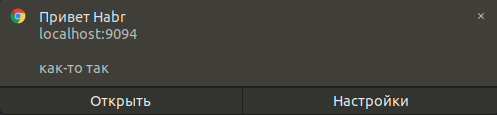
Another browser

There are no icons because Ubuntu :)
To summarize
Essentially, the Firebase library collects JSON for us like this:
{from: "Server key"
notification: {
title: "Привет Habr"
actions: (1) [
0: Object {
action: "https://habr.com/ru/top/",
title: "Открыть" }
]
length: 1
body: "как-то так"
image: "https://habrastorage.org/webt/7i/k5/77/7ik577fzskgywduy_2mfauq1gxs.png"
}
priority: "normal"}And on the client side, you are already parsing it as you like.
Thanks for attention!
Useful links:
firebase.google.com/docs/reference/admin/java/reference/com/google/firebase/messaging/WebpushNotification
habr.com/en/post/321924/#otpravka-uvedomleniy-s-servera
firebase.google.com/docs / web / setup









