Toshiba z20t absolutely silent business tablet
- Transfer

This is not a translation, although it is based on a foreign article. Here information and data will be added, which are not in the original, but which will allow you to better understand what is really hidden behind the numbers.
And also a few words about competitors and one useful tablet.
Why exactly silent? It so happened that the insulation in my apartment is such that you can hear the difference in the noise of the adapters between charging and the end of almost all devices, in such silence, even the smallest rustle of a fan is perceived as a noisy highway under the window. That is why I began to look for solutions. The atoms are too slow, the Haswells and Iviki are almost always with fans, and if without, they work too little, the wires are already pulled out too. I already thought I could not wait, but Broadwell suddenly loomed on the horizon in the summer of 2014!
The death has come for the desktop PC. The killer of Surface 3. The end of traditional laptops and ultrabooks. Who else needs a stationary PC or a regular laptop if a small and lightweight Windows tablet can provide enough power, uptime, interfaces and the capacity of the built-in drive?
These or similar headers can be found reading about new devices based on the Broadwell processor - the 5th generation core.
Specifications Toshiba Portege Z20t-B-10C
| CPU | Intel Core M-5Y71 1.2 GHz, |
| Video card | Intel HD Graphics 5300, Core: 300 - 900 MHz, |
| Memory | 800 MHz, Dual-Channel Memory, 8192 MB, Dual-Channel LPDDR3-1600, soldered, not expandable |
| Screen | 12.5 inch 16: 9, 1920x1080 pixel, capacitive (10 fingers) + digitizer, Toshiba TOS508F, IPS-Panel, LED-Backlight, glossy: no |
| Motherboard | Intel Broadwell-Y PCH-LP (Premium) |
| Storage device | Toshiba HG6 THNSNJ256GVNU, 256 GB, 198 GB free |
| Sound | Intel Broadwell PCH-LP - High Definition Audio Controller |
| Interfaces | 2 USB 3.0, 1 VGA, 1 HDMI, 1 Kensington Lock, 1 Docking Station Port, Audio Connections: Headset port (3.5 mm stereo jack), Card Reader: MicroSD, Sensors: 3D Acceleration Sensor, Ambient Light Sensor, Gyroscope |
| Networks | Intel I218-LM Gigabit (10/100 / 1000MBit), Intel Dual Band Wireless-AC 7265 (a / b / g / h / n / ac), Bluetooth 4.0, Sierra Wireless EM7305 Mobile Broadband 3G / LTE (4G) |
| The size | height x width x depth (in mm): 21 x 309 x 215 (= 0.83 x 12.17 x 8.46 in) |
| Battery | 72 Wh Lithium-Polymer, 36 Wh (tablet) + 36 Wh (dock) |
| OS | Microsoft Windows 8.1 Pro 64 Bit |
| Webcam | 2.0 MP (front) + 5.0 MP (rear), Speakers: Stereo, |
| Keyboard | Chiclet, Keyboard Light: yes, |
| Equipment | 2x Digitizer + 3 spare tips, 45-watt power adapter, brochures, Toshiba System Settings, Toshiba Tempro, Eco Utility, 12 Months Warranty |
| Weight | 1.493 kg (= 52.66 oz / 3.29 pounds), Power Supply: 150 g (= 5.29 oz / 0.33 pounds) |
The top configuration is given above, its price is about 2100 dollars. Without 4g, the price will be less by 400, SSD 128 is even 100 cheaper, and the simplest configuration with 4 GB of memory and a younger processor is $ 1,400.
The prices are strange, even considering that this is a business model. But the lousiest thing is that you need to take immediately the most necessary, since Toshiba does not allow you to upgrade, unlike Dell, for example. Lenovo has a similar pricing policy, its Helix 2 is also inappropriately expensive and it is also forbidden to upgrade ... It is clear that for those who have their hands growing from the right place, it will not be difficult to take the base model and upgrade it on the drive and wireless modules and it will come out much cheaper than taking the finished one, there will only be problems with the memory re-soldering and then not for everyone.
Now, let's talk about the device itself.
He has few competitors. The main ones are Lenovo Helix 2, Dell Venue Pro 11 7140 and Microsoft Surface Pro 3. Also, Lenovo Yoga 3 should be mentioned separately, it has a slightly different form factor, but it weighs only 1.2 kg, which is small, although cooling is not passive. The rest of these devices, either weigh significantly more, or too far from business use. For example, the Asus t300 CHI, although it weighs the least, but it has a small battery, few connectors, all of them are only mini-versions, and the keyboard is hinged, but it’s Bluetooth (I personally can’t trust password entry for such keyboards).
And for those who still believe that the Bluetooth communication range is only 10 meters - here is one very old piece of news. A Bluetooth range record of 1 km is set.A year ago, I saw that they could already grab about 3 km now, but I can’t find this article now. A 128-bit password key does not save, since the cracker will not even touch it. A new, more advanced, technologically advanced and easier way to hack Bluetooth devices has been developed, even if the built-in protocol protections are enabled. They learned to do this for a long time and with a rather dead processor in seconds or less. Here's another article: Hacking bluetooth devices .
This is what a 1.5 kilometer Bluetooth sniper looks like:

Dell Latitude 13 7350 and HP Envy X2-j001nf. The first weighs the kilogram itself, but there are no ports on the tablet, the second has the main ports, but the weight ... 1.2 kg, which already corresponds to Yoga 3 with a keyboard !!! And this is with an equal screen diagonal of 13.3 inches. The total weight of these tablets is 1.66 and 1.8, respectively, which suggests sadness ... Operating time is also not the best, and the performance of all fluctuates at close intervals. Acer aspire switch 12 generally unprecedented monster with a stand in the floor of the width of the screen, which does not separate. This miracle weighs 1.1 kg, and with a keyboard 1.45 kg. The only thing that pleases is a noticeably lower price than Toshiba.
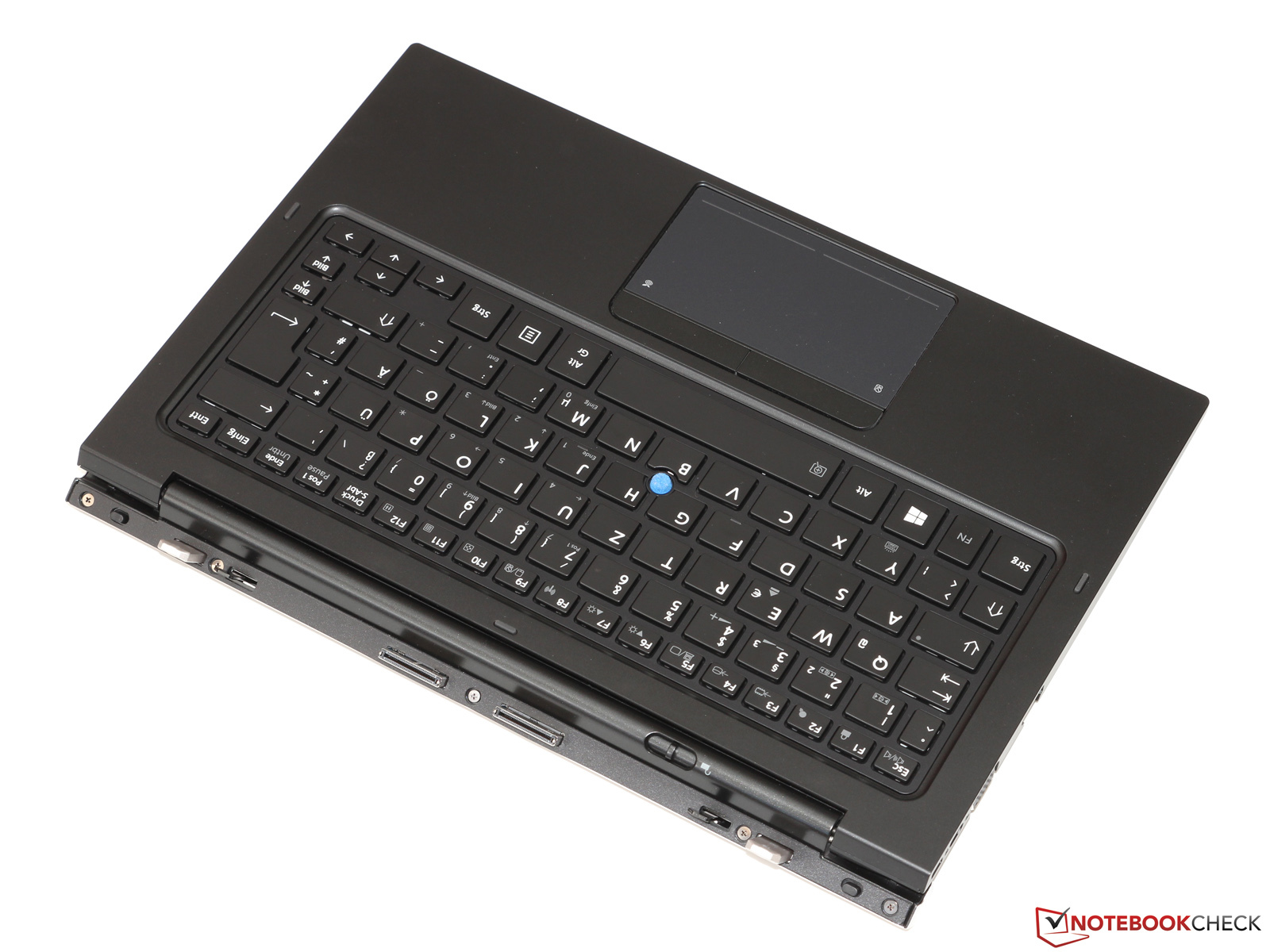
Keyboard
For a business tablet, this is one of the most important components. Since they are mainly taken for active printing. It weighs 763 grams. It is disconnected by shifting the lever in the upper left corner. The stroke is shorter and the press is softer than on Lenovo, but this is enough for fast typing. The keyboard is protected from spillage and has a backlight. PgUp / Down are represented by separate keys, you don’t have to press the Fn key to press them, which allows them to be used with one hand. The Home / End keys are located in the top row and therefore it will be inconvenient to use combinations like Ctrl + home / end and Ctrl + Shift + Home / End. It is very pleasing that a number of Fxx keys are saved here. You can also change the volume and brightness in Windows 8 through gestures, and there are also hardware sound keys and auto-adjustment of backlight! One could really more competently manage the space, considering how much Toshiba asks for his keyboard ... Logitech and other keyboard companies nervously bite their elbows, they can only dream of such a price tag for a keyboard with a hub, a pair of ports and a battery. But there is one fly in the ointment - the tablet in this keyboard is staggering, not very, but noticeably, which is very offensive for the keyboard, for which they ask for as much as $ 500!
Touchpad / trackpoint
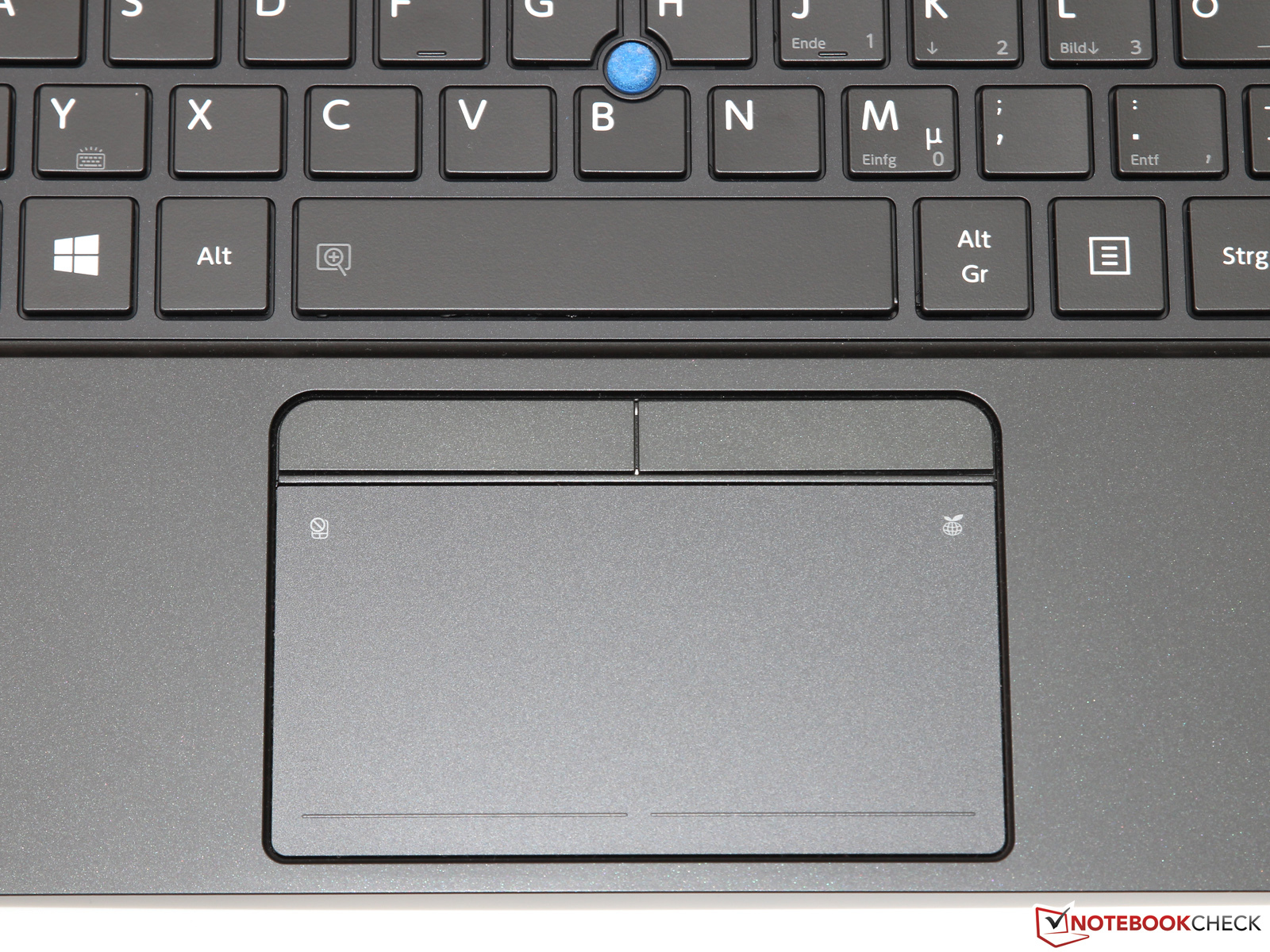
More precisely, it is a clickpad. The area is 10x5.2 cm, which is not bad. The surface is smooth, but quite tenacious at the same time. A double tap on the right-upper area of the clickpad turns on the energy-saving mode, and on the upper left, turns off the touchpad. The presence of a trackpoint indicates that the manufacturer wanted to please everyone who will work on this device. This is also indicated by Wacom styluses (digitizers), of which there are already 2!
Stylus pens
Why are there two of them? The fact is that the built-in stylus is too thin and inconvenient, but it is always at hand, and when more accurate work, an eraser and comfortable keys on the case are needed, then you can not do without a full-sized one. You can carry this in your pocket, say. Another very big plus in the Toshiba piggy bank is that Wacom styluses. This means that you can subsequently pick up later yourself the one that you like. Lenovo has the same stylus, but Dell has synaptic, Microsoft also uses some of its technology and also requires batteries, like Dell. Vacom does not require additional power. There is a feel driver on the Wacom website that usually fits all devices and provides more functionality and more accurate calibration. The styluses move quite smoothly, but some noise is heard, an anti-glare screen affects.
For those who first encounter Wacom styluses:
For work, they do not require batteries, so they can be much thinner than synaptic styluses. The principle of operation is based on inductance. When you bring it a certain distance, a point appears - the place where the touch with the screen will be counted. Also, the capacitive input is turned off and you can safely put the brush on the screen and work as with a regular pen. The wakoma driver allows you to program a lot of actions, for example, the operation of the right button even closer to the screen or from touching the tip. The back side is usually used as an eraser. In general, it feels like working with a pencil (gel pen for a glossy screen) on paper. And due to the appearance of the cursor in advance, you can even get on very small screen elements. Also, the guidance property is triggered from this appearance, which allows you to feel the comfort of the mouse when surfing sites.
Performance
The Broadwell concept needs to be redefined. Their peak performance is very high, even reaching the Haswell U level. But this peak lasts only a second, and then throttling is cut, first throttling by the thermal packet (TDP), and then by temperature. Therefore, you can safely multiply by zero in general any results of any tests that we see on the Internet ... since at least the temperature in the room in which the testing was carried out is not indicated anywhere. It is clear that the tests at 25 and 35 degrees will be noticeably different. From here, one more not very pleasant conclusion can be made - Broadwells are not for a hot climate.
On this site I was able to see the dependence of test results on runtime. There, at first fps was 40.3, but then fell to 33 and stopped at that. Also, a stress test was conducted on this site, it was clear that there was a drop in the processor frequency to 800-1200 MHz, depending on the device.
According to the results of synthetics, this processor is at the level of Surface Pro 3, but the tests take only a few seconds and during this time it just doesn’t have time to throttling, so you need to multiply the results somewhere by 0.6 to work with the adapter and by 0.3-0 , 4 for working with the battery if we are considering the long term. Yes, Broadwells are not designed for a long load, for rendering in Photoshop or something like that, but opening a browser page or compiling a small project here will go off with a bang and even faster than the same security about 3.
CPU frequencies in more detail
Single-threaded 2.9 GHz (8.3 W) at launch and 2.3 GHz (6 W) after a few seconds.
Multithreaded 2.6 GHz (12.5) at the start and 1.8 GHz (6 W) after a few seconds.
From a battery of 2 and 1.5 GHz for single and multi-threaded according to the translated article. It appears that TDP of 4.5 watts is set for this mode.
The frequencies of the video card are not indicated, but, say, to watch 4K video without brakes is enough in excess, but in games everything is not so rosy. At first, the frame rate will be higher, but within a few minutes it will sag. Until it reaches a minimum (in this article, at one of the games, a 20% drawdown of the frame rate after 10 minutes was noted).
Case heating
The case practically does not heat without load, but at maximum load it is already very significant. It is also bad that this area falls under the right hand in landscape orientation, but since it is more convenient to work with tablets in portrait mode, this should not cause discomfort.
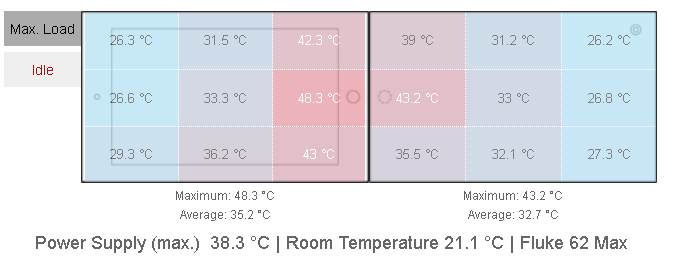
Pay attention to the room temperature. Here it is indicated. And if it was at this temperature that the tests were carried out, then of course everything is sad, since usually in residential premises from 25.
Drive speed
There is a solid-state worker and that’s it. Speed will only drop due to the fault of the processor or user (disabled or idle TRIM). Below are the results of his tests:

Battery
There are two batteries, the first in the tablet itself, and the second, the same capacity in the keyboard. This gives a total capacity of 72 watts. The working time of one tablet is approximately 2 times less. The batteries are discharged in turn and are first discharged in the keyboard. Charges first tablet. And since the tablet can be fixed on the contrary, we get a weighted, but long-playing tool. For some reason, its competitors do not possess such a function.
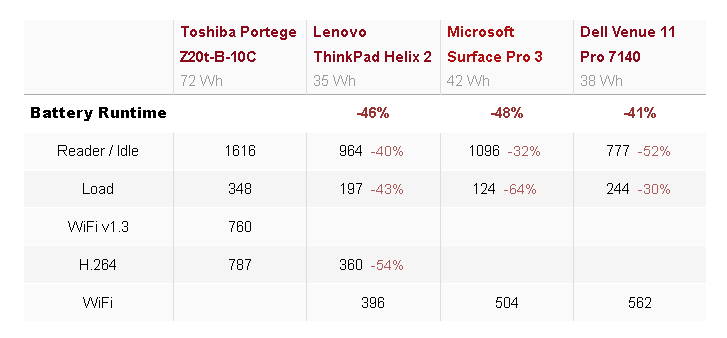
Something else is not listed in this table. The fact is that for Helix 2 and for Dell there are batteries in the keyboards, so their total operating time will be longer than indicated in this table. It seems that the author has a clear sympathy for Toshiba’s products, since he allows such an incorrect comparison. For Dell, it's 20 Wh (travel dock) and Lenovo is 26 Wh (Ultrabook Pro Keyboard). But since the dependence is non-linear (the matter is not only that the keyboard itself also consumes a certain amount of energy, Lenovo has it with a backlight), it is impossible to understand how much competitors really need to work together with the keyboard-dock with a simple 2 + 3 arithmetic ... Plus, there is still a factor in the ability to properly charge. Take a look at the charging chart:
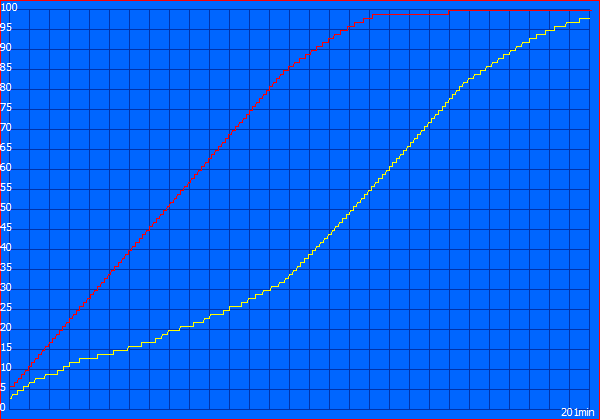
The battery shows 100% for a few more minutes, but the charging is not over yet. Full charge in Windows is called "Fully charged." For comparison, here is the discharge schedule:
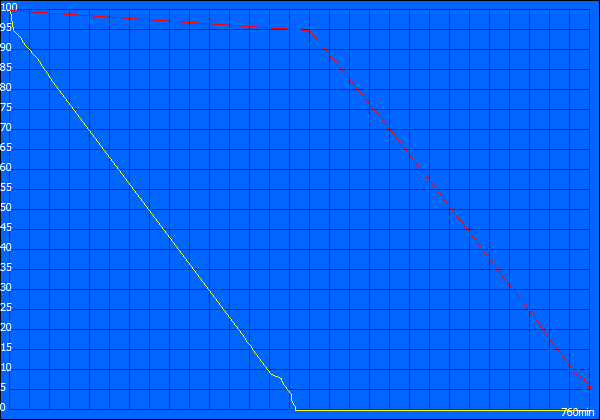
Judging by these graphs, the author knows how to charge, but it’s not reported anywhere whether 3-5 starting charge-discharge cycles were made, without which the battery does not gain its full capacity ... In general, there are some misunderstandings in this article.
Work in the sun
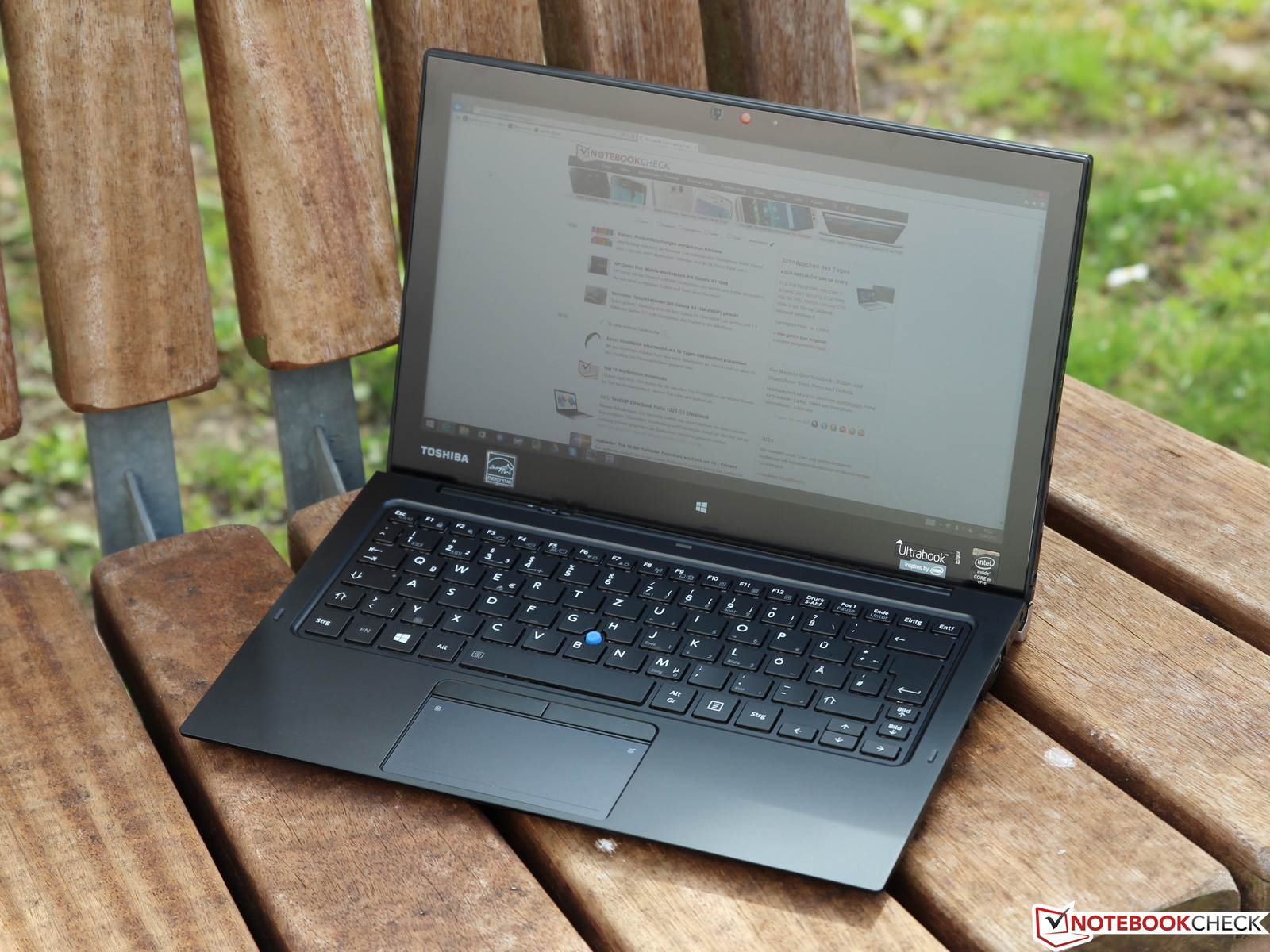
The matte finish and fairly good brightness of the display allow you to work perfectly even under direct rays. Toshiba is clearly the leader here, you just have to look at the picture.
Screen
But the screen itself is not as good as that of competitors. Yes, the anti-reflective coating is certainly good, but look at the color rendering, uniformity and everything will become clear. The author of that article was not able to calibrate the screen, the blue one fell out. And the difference between the maximum brightness (in the center) and the minimum (lower right corner) reaches 80 cd / m²:
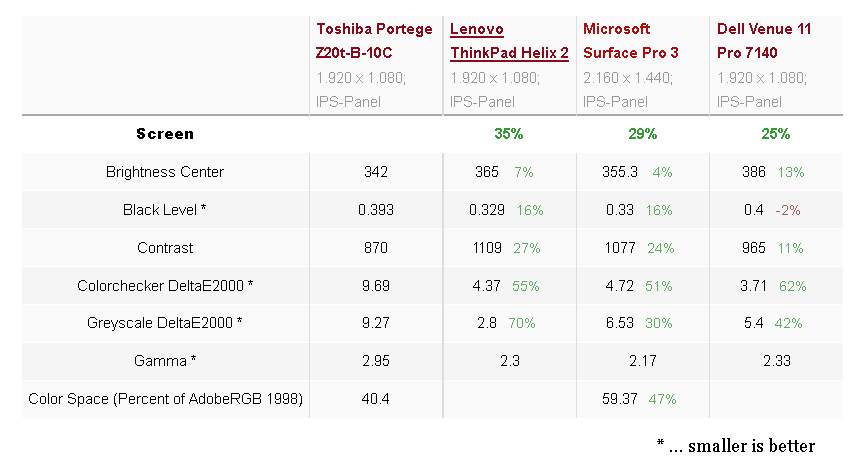
With this parameter, Toshiba clearly loses and significantly, so for some users this tablet will be too unacceptable.
Ports
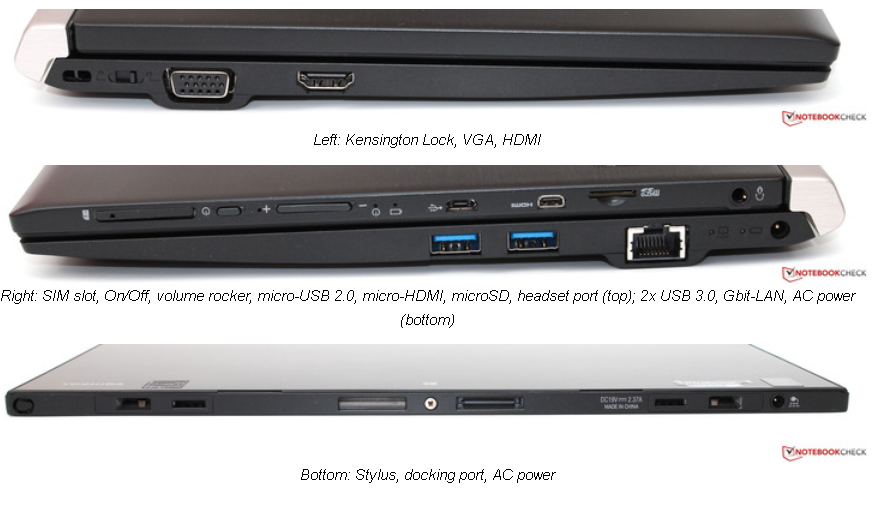
Toshiba offers almost all the necessary ports. I would probably replace micro-HDMI with micro-Displayport (the difference between 4 and 20 cents is not that big), but since there are a lot of adapters, this is not a problem for me. Kensington Lock, VGA, HDMI, SIM slot, On / Off, volume rocker, micro-USB 2.0, micro-HDMI, microSD, headset port (top); 2x USB 3.0, Gbit-LAN, Stylus, docking port.
Networks
I218-LM - Gigabit Ethernet. Wireless-AC 7265 - Bluetooth 4.0 and WLAN 2.4 / 5 GHz of 802.11a / b / g / n / ac standards with 2x2 technology theoretically supports up to 866 Mbit, but in practice only 300 Mbit were obtained, which is also not bad. The signal holds well and confidently. Sierra Wireless EM7305 - 3G / 4g download / upload speed 100/50 Mbit, respectively.
Cameras
Both cameras are so-so. The back with its 5 MP does not save even autofocus. The front 2 MP is not suitable for video conferencing. The microphones are so bad that the author of the article recommends using a headset for this purpose.
Speakers
Here they are more likely for show. In such a small case, it is simply impossible to make full-fledged speakers. There is nothing to do against the laws of physics, therefore, if we want to enjoy good sound, then only external speakers. I am glad that even though the sound is clear at maximum volume, thanks for that, you can’t count on more in such a form factor. As for me, I personally don’t understand what prevented the installation of large speakers in the keyboard, especially considering its cost.
Security
Here we have Kensington Lock, TPM, Intel vPro and AMT support, but no fingerprint reader. True, given that TPM is prohibited in Russia, then it does not exist. Helix 2 has a fingerprint reader. True knowledgeable people will say that with the exception of TPM, everything is too easy to manage. Yes, and this TPM with all sorts of crypto protections is also not without vulnerabilities, so you can really only rely on protection from gopniks or petty thieves, and not against those who really need the contents of your transformer tablet.
Screen Size Comparison
First, a short video, watch from 10 minutes. The diagonals of the screens are 11.6 and 12, but the aspect ratio is 16: 9 versus 3: 2.
Below will be a very unusual comparison, in which I will include all devices from 8 to 15.4 inches. This table allows you to take a fresh look at the values of the screen sizes and understand what diagonal you really need.

Specially copied the screen from Excel, so that everyone can be convinced of the formula. 2.54 is the conversion from inches to centimeters. Screens in inches, then the proportions and sizes of the sides.
Those who managed to work with Windows tablets understand the main problem of Microsoft products - this is a bad adaptation for small screens. Yes, it’s possible to set 125-150% of the screen ... but on a small screen because of the low resolution in some programs menus, forms, input fields and so on will not fit. You can set more than 150%, but in this mode there is no adaptation anymore and it is simply impossible to work. There is one trick that slightly facilitates the work with the pop-up menu, but it saves only if there is enough space on the screen.
a trick Microsoft doesn't seem to be aware of
1) call the context menu (hold the finger for a long time)
2) without stopping, swipe a few millimeters along the menu
3) you can now stop, the menu item cannot be selected under the finger
4) we now bring to the desired menu item and release
5) the item that was highlighted before releasing
2) without stopping, swipe a few millimeters along the menu
3) you can now stop, the menu item cannot be selected under the finger
4) we now bring to the desired menu item and release
5) the item that was highlighted before releasing
And so, you have to rotate the screen to get to the bottom of some element, which is also annoying ... Yes, and rotation is not a panacea. The fact is that Windows does not allow some windows to be wider than the screen width, so if there is no scrolling (and usually it isn’t in the options), then part of the inscriptions, points and even buttons can simply crawl out of the screen. Also, I noticed that if you put not some 125, 150, but some kind of uneven number, then blurring occurs.
Therefore, I brought this table above. It will allow you to understand which screen is really minimally necessary. You can see that due to the 3: 2 ratio, the sefes just has a huge width that can be surpassed only by 13.3 (16:10), and with a screen ratio of 16: 9 even less is obtained. That is why there it is most convenient to read electronic books (pdf, djvu), the text will be the largest.
From my own experience, I can say that somewhere around 11 inches (plus or minus individual finger sizes) is the screen size that you can work with your fingers and not be afraid in most cases to get into an unpleasant situation with menu items, windows or more anything. Until 10, it’s already difficult to do without a stylus and you have to use the TouchMousePointer program (don’t count it as an advertisement, but it is the only one so far).
Competitors
Dell venue 11
In fact, its screen is 10.8 inches. Its main disadvantage is size. It is really the smallest and because of this the most uncomfortable. The keyboard also does not shine, it is clearly not for high-speed printing (I'm talking about the one with the battery). There is no backlight. In the keyboard, the Fxx keys must be used via Fn. Here is her appearance:

The stylus is a synaptic, it requires a battery, and if it breaks, then buying a replacement is not easy. Sold separately, but there is no space inside the case. The screen is much better, both in terms of color reproduction, color gamut and brightness margin. The performance here is slightly higher than that of the counterparts on Broadwell, although this is synthetic and the measurement error is not indicated anywhere, so it is not a fact that the numbers went beyond it. The working time is pretty good, there is a rather noticeable excess over competitors. Perhaps this is due to the small diagonal, maybe that copper plate somehow influenced here, I can’t say, by the articles that exist, I don’t understand this. The weight of the tablet itself is 700, but the keyboard with a battery and loops 800, so the sum is more Toshiba, albeit a little, but more.
Lenovo Helix 2
Almost a complete analogue of Toshiba, with the exception of the screen, which is glossy, and a diagonal that is almost an inch less than 11.6 versus 12.5. But the weight for some reason is more. The tablet itself and the docking keyboard are also larger (I’m just talking about a full-fledged one with hinges and a battery, the usual one doesn’t fix the tablet at all and it makes no sense, it’s several times cheaper and better to buy from iPad, it's full on the market). In total, the weight approaches 1.7. The keys on this keyboard are very good, with recesses (this trifle greatly reduces errors in high-speed printing, the fingers themselves are adjusted in the process), plus the stroke is quite large. Backlit keys, there is also a trackpoint, a classic red for Lenovo. There is no space inside for the stylus. For him, there is only a loop on the outside. The stylus is one and quite large and also Wacom. The cost is also very high in Russia, the top-end option for 100,000 rubles. The glossy screen here is close to Dell, in some ways inferior, in some ways superior. In the keyboard, the Fxx keys must be used through Fn, which for me was a decisive factor against this 2 in 1.
Microsoft Surface Pro 3
So, the famous seface. Thanks to a huge advertising campaign, I have not heard about him, only very far from the IT industry. Yes, it is with active cooling, but it is almost silent (for my room it is noisy, but in 99.99% of cases it is not audible). It does not have a keyboard with hinges; instead, it is proposed to extend the leg from the back. Here is my IMHO, my practice has shown me that this leg is not suitable for working on your knees and in confined spaces (a table is forced), it adds too much in size. Here you can choose a processor from a more powerful one, to a longer one, but in the second case, the speed will be already lower than that of Broadwell, and the operating time is still less. The aspect ratio is unusual here, 3: 2. And the resolution is 2160x1440. This is how the keyboard looks:
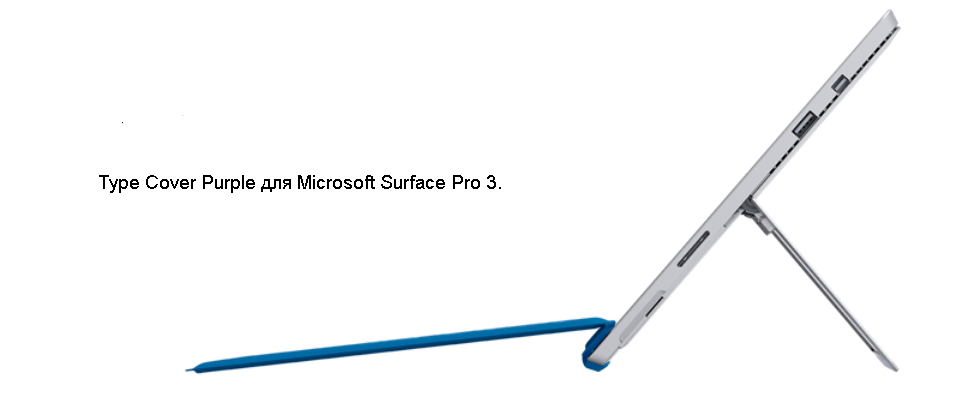
Microsoft keyboard for printing without battery, but with backlight. The weight is 295 grams and the tablet itself is 800. Which is certainly the least Broadwell, but the touchpad is supermicroscopic, by default, the function keys are not used, you need to press the Fn button, and even the arrows are very uncomfortable ... The stylus is brand-name from Microsoft, they won’t put it in the box as they don’t lay down keyboards, you have to buy all this, but they are not worth it ... In total, it will come out at the Lenovo level.
conclusions
Here they are the first signs of Intel Broadwell. It is surprising that already at this technological level they reached such a low TDP. It is clear that this was not just given and there were many complaints, but for those who need it now, there is virtually no choice. Only Dell is more or less cheap, but it has the smallest diagonal and there is no keyboard backlight, and it is not as good as we would like. The remaining three are very expensive, so if you suffer, then it’s better to wait for the 6th generation core, which should appear shortly after the 5th (there are no technical problems, the only question is in commerce, when they consider that it’s time and not to crush it 5th generation core). There is hope that by the new year they will already be. True to me personally (hereinafter exclusively IMHO, even veri), I really liked the Toshiba keyboard. Now, when there is a massive rejection of Fxx keys and several others, a solution like on this keyboard is almost perfect for me. Almost, since I'm used to actively using the keys Home, End, PgUp, PgDown, which are separated far away, two at the top, two at the bottom. Putting your keyboard on top of it is uncomfortable (I've already tried it with one laptop like that), since it moves off when you work on your knees or other uneven surface. Not that, of course. Here is an example of how I liked the solution to this problem:
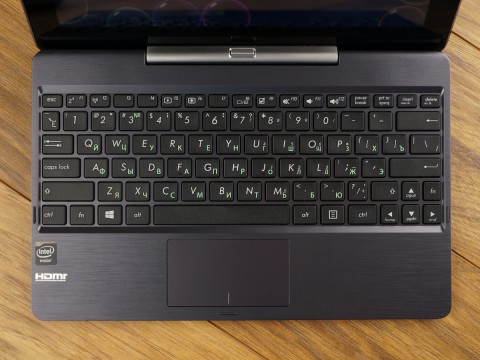
This is Asus T100 TAM / TAL. There are arrows of normal size and with one hand you can click on all four keys. And it's 10 inches! That Claudia really has other problems, but now is not about that. I use this to highlight the entire line (shift + up climbs into part of the previous one and you have to either edit it with the mouse or jump over the control for a long time). But, I repeat, the above is only my IMHO.
And so, I liked this 2 in 1. There is no ideal, but there is very close to it.
Thank you all for your attention!
Hope my brief review was helpful.
Update: I apologize for the gross error last time about bluetooth. Thanks to the watchful people who pointed to it ( istui) Of course then it was too late, my eyes were washed and so on, but this of course can not serve as an excuse. I’ll try to postpone the publication next time, if I don’t fit before midnight.
And also thanks to the one who posted the headlines.