April 7, 2015 at 17:10
NVIDIA GTX970 - Impairment Practice, Part 1
Recently we talked about video cards , studied in detail the internal world of the NVIDIA GTX 970 and the reasons for some ... public outrage regarding its memory volumes. The GTX 970 really has all 4 gigabytes of memory on board, but 3.5 GB are available at full speed - we have already considered the reason for this, and today we will see if the devil is so terrible as it is painted.
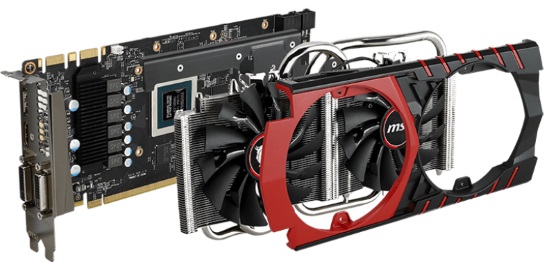
Just in case, if someone inattentively read the part before the kat. This is the second part of the material devoted to the performance of the NVIDIA GTX 970 graphics card, which I am trying to write in the most accessible language. The first can be found here ; the third will be released by ASAP this week. Today we will get acquainted with the general provisions in the gaming industry, with where the memory goes and why it is needed a lot. And at the same time we’ll evaluate how much is needed, see what the foreign benchmarkers and overclockers have measured, and whether three and a half gigabytes are enough for a comfortable game.
Engines are now breeding an indecent amount. The most popular are Unity, Unreal, Source, CryEngine, Gamebryo and Rage. All of them have their own pros and cons, their own characteristics and their own “characteristic” sketch, which no stylization will interrupt. In addition to these powerful gizmos, there are all sorts of inhouse bicycles from crutches that are used for specific games by specific developers, written from scratch or bought from companies that developed the engine once upon a time, and supplemented-improved-updated by the developers themselves for the needs of their toys.

All of these engines (with a rare exception, which we will not consider today) operate on concepts familiar to video cards: models consisting of polygon triangles, textures that are pulled by these same models and made color, shaders that calculate lighting and shading of objects.
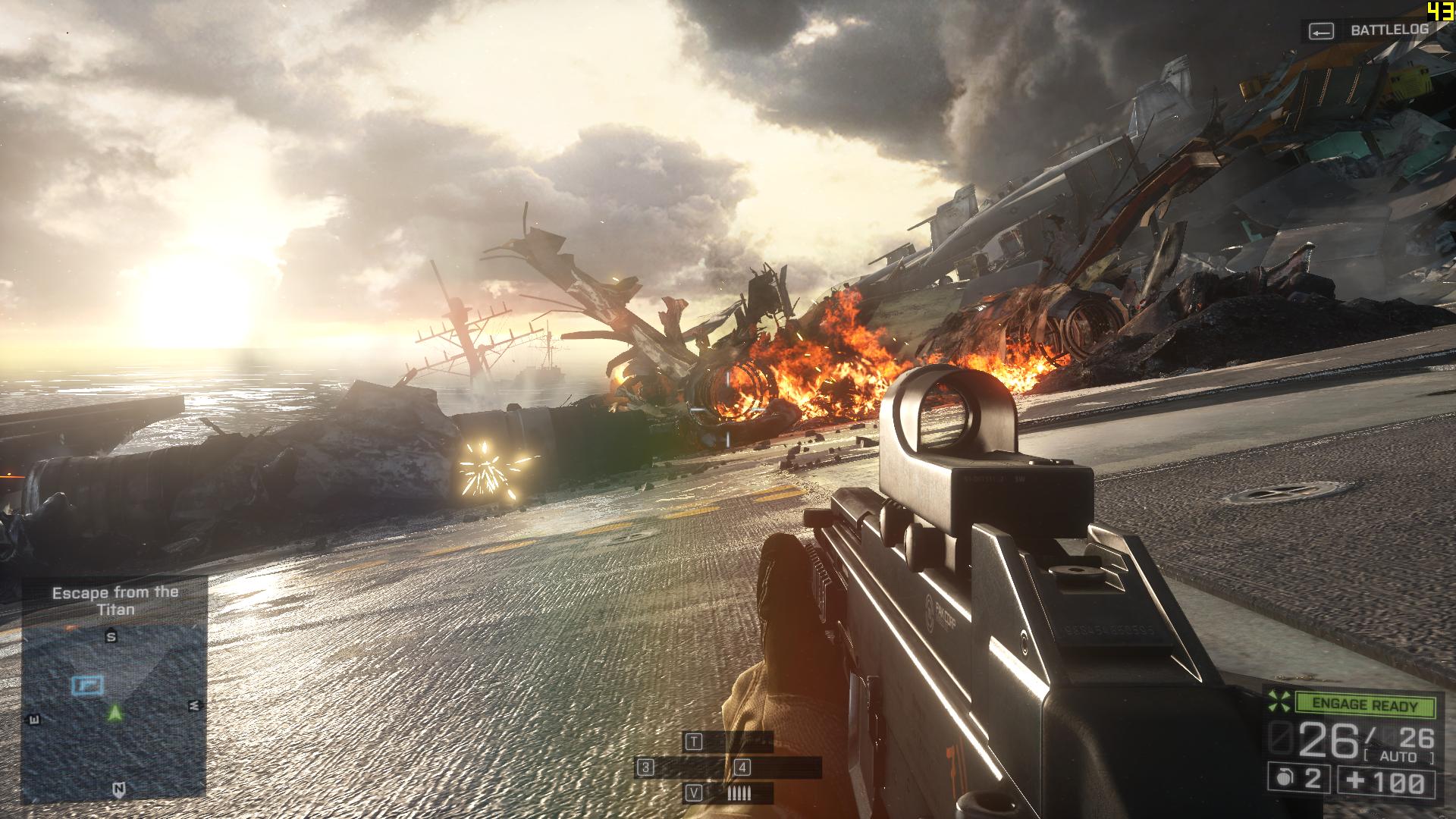
All this together implements an amazing picture that we see on monitors. Unfortunately, most calculations for optimization are performed with approximations, and most effects are clever fakes that allow you to improve the picture with "little blood": for example, not to deform the real surface, but to create the illusion of deformation using lighting and artful overlays of special filters that change the picture depending on the angle of view.

Have you ever wondered how many calculations are required for one frame? Here is a simple example: you went to the balcony in winter in a T-shirt, underpants and slippers. On the street minus twenty. Are you cold. Behind this concept of “cold” is a huge number of effects at the micro level: in particular, air molecules oscillate with less frequency than your body molecules. Colliding, they took part of the energy and accelerated, the layers of air surrounding you were heated, and your skin was cooling. Further, the magic of chemistry, physics and biology did some more miracles and the thought arose in your head that it would be nice to return to a warm house. Due to the fact that on the street the air molecules do not shake so much.
That's about the same level of abstraction separates you, the viewer and the player, from the kitchen that is cooked inside the video card. You can read more about the formation of three-dimensional graphics here or read the haqreu series of articles , which visually talks about all the stages of creating a beautiful picture.
In addition to the game settings (quality of textures, models and special effects), there are two parameters that radically change the test results. The first is the resolution, that is, the size of the final image, which the video chip will calculate and display many times per second.
Suppose you have an antediluvian monitor with a resolution of 640x480 pixels, each of which can display 65,535 colors (16-bit mode). Thus, each finished frame (without any compression) will occupy a minimum of 640x480x16 bits (2 bytes) - that is, about 600 KB. For a second, it would be nice to show the viewer at least 24 frames - already 14.4 MB of information.
The under-flood monitor - 1920x1080 and 32-bit mode - is already almost 2 million pixels in 4 bytes each, totaling almost 8 megabytes of uncompressed information and 190 megabytes for 24 frames.
The 4k2k monitor has twice the resolution on each axis - 3840x2160 pixels, that is, the area of each frame is four times larger, almost 32 megabytes each picture, and 780 MB only for storing a buffer of 24 frames. Of course, no one counts all these frames “for a second ahead,” but only the framebuffer will have to “skip” at least 780 megabytes per second.
In addition, you need to store models, textures somewhere (moreover, for one texture model there can be 5, 10, and 15 pieces - with different types of damage, materials, special effects), lighting parameters, and if the game can work with NVIDIA PhysX - more and physical calculations.
Of course, this whole thing can be squeezed, but it will take extra milliseconds, besides, the monitor will then "unclench" this picture back ... In general, the resolution in itself affects significantly. Now imagine that each point in the picture needs to be counted, say, after 20 operations — additions, multiplications, divisions, and so on ...
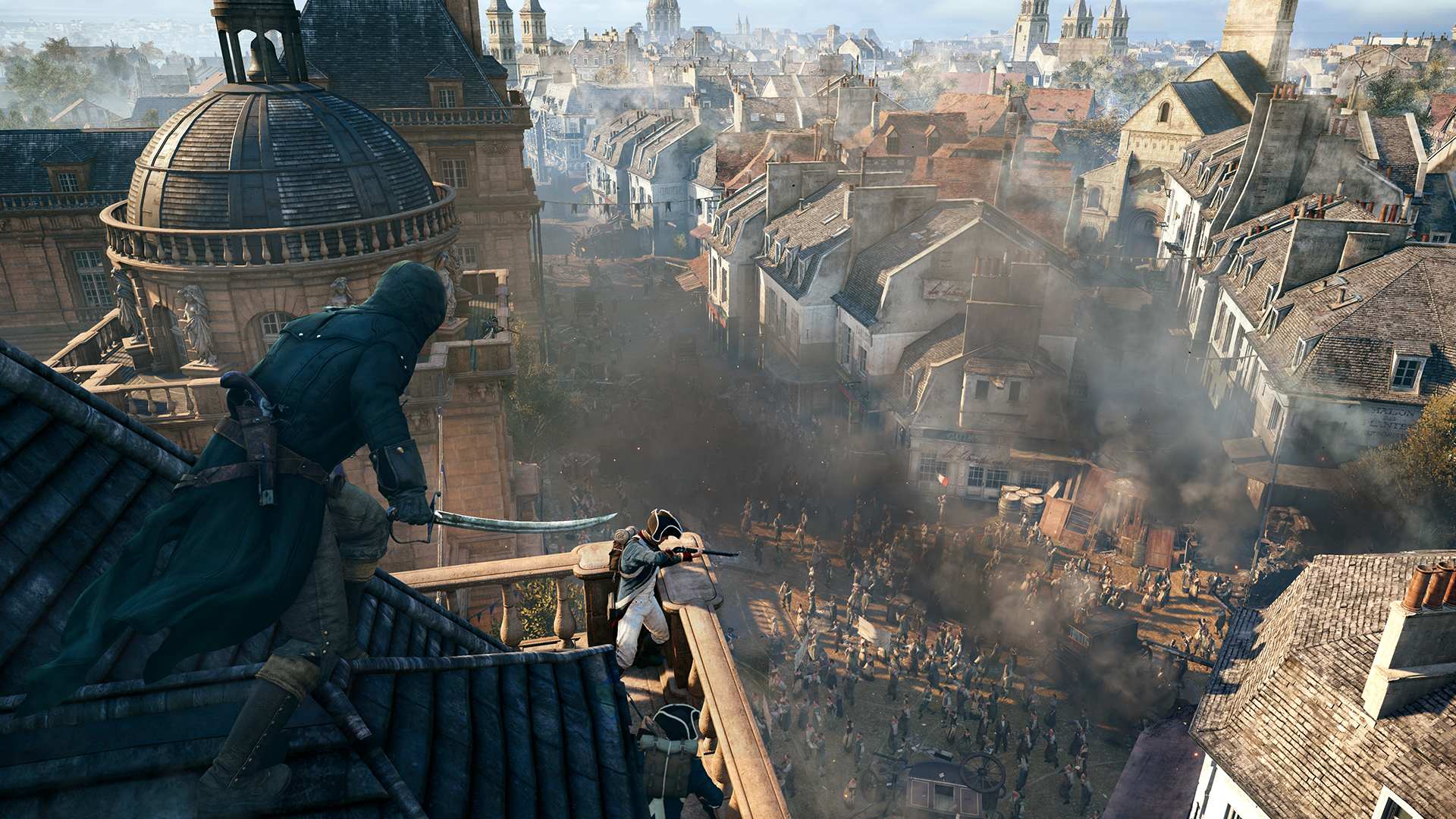
It’s clear why performance drops dramatically for high resolutions?
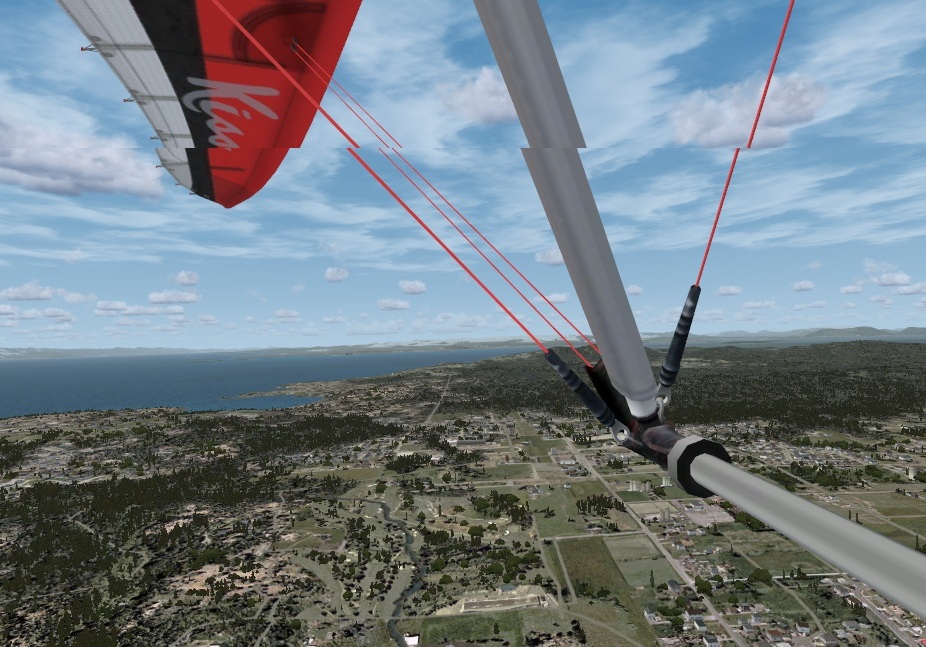
The second important aspect that affects performance is vertical synchronization.: since the frequency of production of finished frames at the factory video card can depend on many factors, and give the consumer monitor exactly 50/60/100 frames per second (depending on the model and the settings set) - special buffers and technologies are used to equalize the production rate synchronization, which allows both to avoid "overproduction" of frames, and to avoid tangible "drawdown" FPS in some cases and increase the overall smoothness of the picture. To test the performance of its normally you we conclude, as it has a negative impact on the maximum results. In the real scenario, the use of V-sync is usually, on the contrary, included in order to avoid the "ladder" and unpleasant effects from the mismatch of the refresh rate of the monitor frames and three-dimensional applications:
How to find out the most popular "average" gaming hardware? View the statistics of one of the largest distributors of PC games: Valve and its Steam service. Since the Steam client has access to the user’s hardware and regularly asks to send statistics, and players generally like to measure the length of their own ego, Valve has the latest and most up-to-date information about the hardware people play on.
We follow the link http://store.steampowered.com/hwsurvey/ , open the Primary Display Resolution section, see where the highest percentages are:
AlmostHD has almost 34% (1920x1080), followed by 1366x768 (greetings from laptops) with 26.5 %, almost 12.5% in total for the resolutions 1600x900 and 1680x1050.
Displays with a resolution of 2560x1440, 2560x1600 and 3840x2160 have a total (!) Of less than 2% in the market. Thus, fans of hi-rez are at least in the minority, and “sharpening” game engines under high resolutions a couple of years ago was at least not fashionable, and at most it was simply irrational. Therefore, some games not only consume naturally more resources at a resolution of 2560x1440 and higher, but also openly merge FullHD performance due to the optimization curve. Fortunately, modern iron has a decent margin of performance and allows you to overcome even such obstacles.
Synthetic benchmarks are one way to find out how powerful a video card is, how it manages its resources, where are its strengths and weaknesses. The disadvantage of synthetic tests is the test scenario itself: they reveal the maximum performance of the video card, striving neither for real optimization in the conditions of the game process, nor for real use cases. Recently, they are mainly used by 3DMark and Unigine. Here is what GTX 970 showed in the “synthetics” of the guys from 3Dnews.ru:
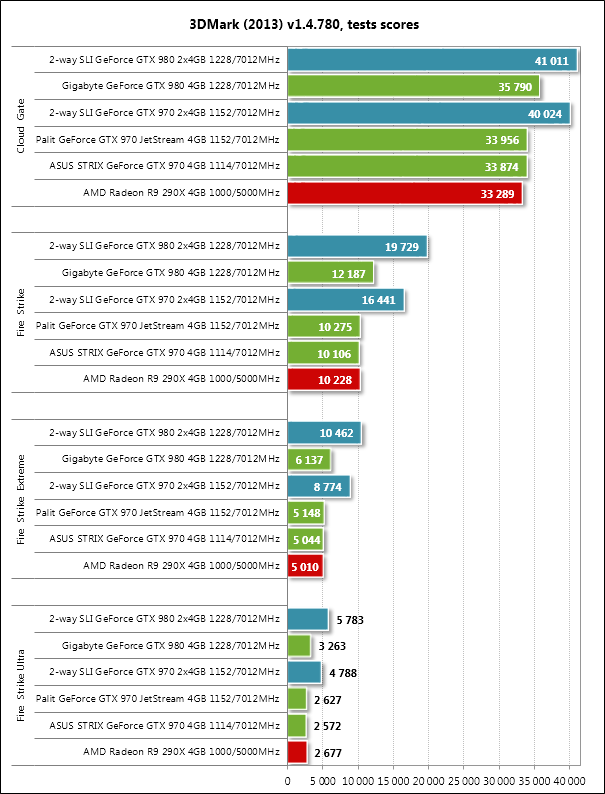
As you can see, in a purely synthetic "computational" test, the GTX 970 shows excellent results: it does not lag far behind the GTX 980 (which is one and a half times more expensive), in some places it surpasses the Radeon R9 290X, which in the past provided performance comparable to the GTX 780Ti. Bonuses of Maxwell architecture are clearly visible in the Unigine Valley test: at a resolution of 1920x1080, the GTX 970
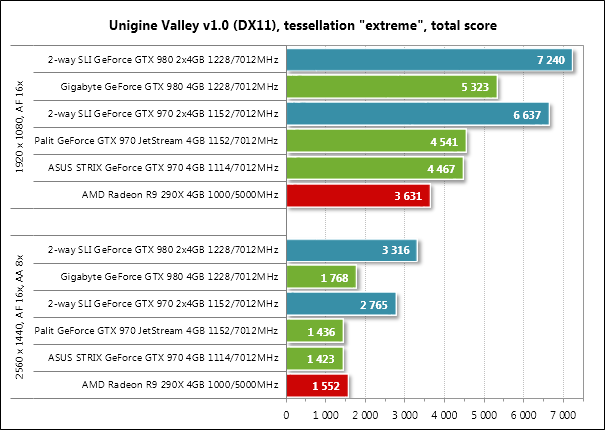
surely outperforms its red-white competitor, however ... However, at a resolution of 2560x1440, the R9 290X starts to win. We will talk about this a bit later.
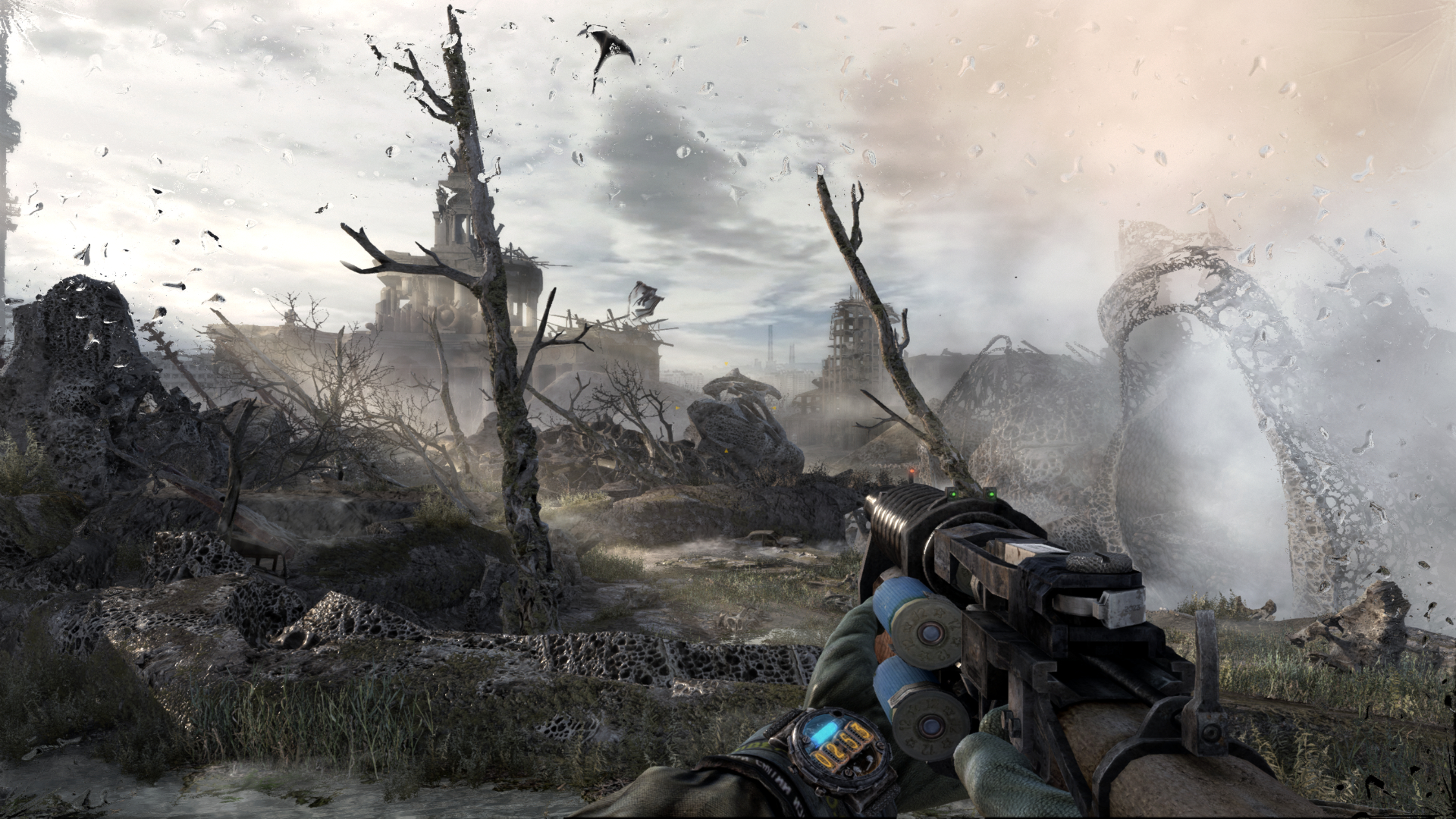
More "honest" measurement methods are performance tests built into game engines: they use real graphics that you will encounter in a particular toy, and often load not only the graphics card, but also the central processor: calculations of physics, AI behavior , the work of in-game scripts and other delights. The results of such tests can be significantly lower than synthetic ones if the game engine is very poorly written and developers simply did not bother with optimization issues: performance may not rest on the video card’s capabilities, but, for example, the processor’s work or the speed of reading information from the disk. Some of the most gluttonous and relatively goodoptimized toys are Battlefield 4, Crysis 3, Metro: Last Light, a series of Batman toys. All of them use the resources of modern PCs to the maximum, giving the most convincing and beautiful picture.
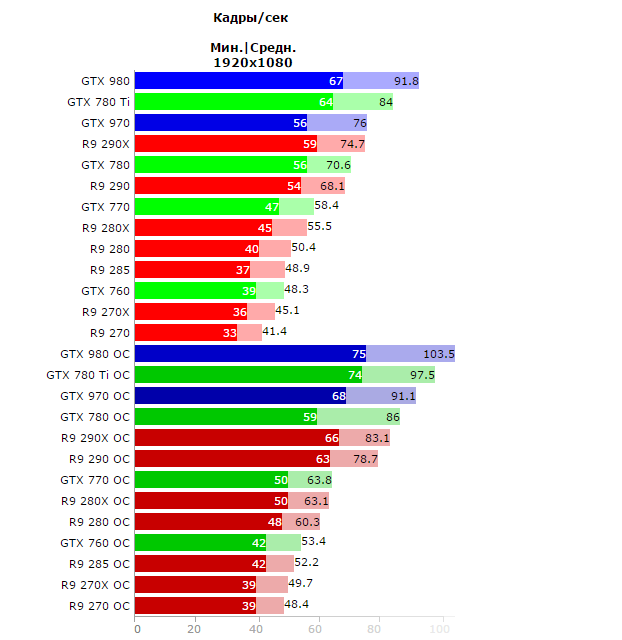
In order not to be subjective, not to be attached to a specific vendor, not to depend on the performance of any particular hardware, let's take a few reviews of the GTX 970 ( 1 , 2 , 3 , 4 ) and compare the results. Let their methods and test hardware differ slightly, but the order of values (and who surpasses whom in real tests) will always be approximately the same. To verify this, let's see the results of the BF4 benchmark:
As you can see, the results show approximately the same picture: at a resolution of 1920x1080, the GXT 970 shows excellent results, often surpassing the results of both the flagships of the previous generation and the top single-chip AMD R9 290X video card. As the resolution increases, the picture changes somewhat: without overclocking, the GTX 970 starts to yield to the red-white competitor, and the higher the resolution, the greater the loss. However, the GTX 970 has a couple of trump cards up its sleeve.
For brevity, we will not consider all the tests, but will familiarize ourselves with the conclusions of each of the reviews. Here's what Tom's Hardware found on the average performance in games for the GTX 970 relative to other video card models:
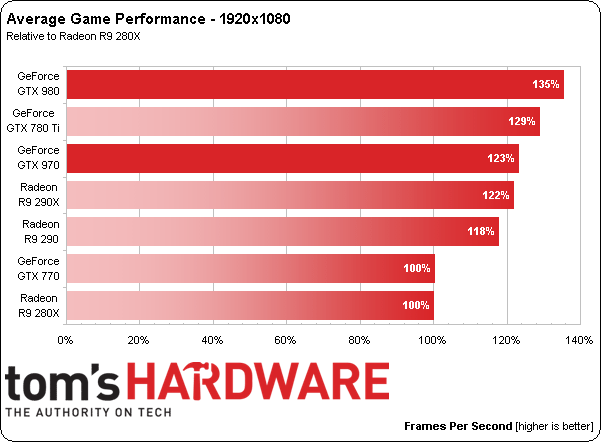
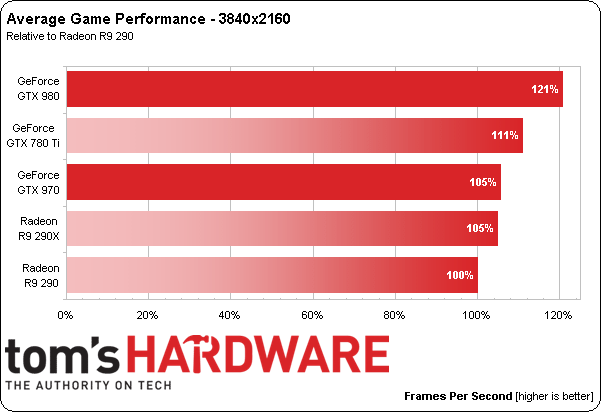
Unfortunately, the dollar exchange rate and any other economic processes introduce their own adjustments, and the price of a good R9 290X is comparable to the GTX 970 today, but the fact remains: a much more power hungry video card with “honest” 4 GB of memory is not always outperforms the less powerful GTX 970 with poor 4 GB.
What do other reviewers write? Yes, about the same, adjusted for the fact that prices rose a half to two times a lot of iron. Almost everywhere, the GTX 970 is called the most successful and promising acquisition and does not affect 3.5 GB of memory. Well, since in the reviews of the video cards themselves the issue is not addressed, it is necessary to google "debriefing."
For games in FullHD-resolution (1920 × 1080 pixels), we have already determined that the GTX 970 clearly does not rest on the volume of high-speed memory: all tests showed a convincing superiority even over the technically more powerful R9 290X. But what happens with the resolutions of 2560x1440, 2560x1600 and 3840x2160 pixels? Overclockers.ru experts
have already asked this question on the Internet , and here is their conclusion:
Here is another video proof from a foreign resource:
If the timestamp does not work, watch from ~ 3:22.
In a nutshell - the main game projects with outstanding graphics at resolutions 2560x1440 and higher consume about 3.5 GB of memory - sometimes a little more, sometimes a little less, but in general, the high-speed GTX 970 memory copes with the load perfectly, and if the game leaves the 3.5 GB limits , this practically does not affect the performance of real games, which can not be said about synthetic tests.
It turns out that there is enough memory, but the performance of the GM204 itself is not always the case. However, you can always lower the game settings a bit - the difference between “ultra-super-premium” quality and just “high / maximum” by eye in the heat of battle you simply won’t see - it won’t be there before. And in the cut scenes to find that the textures have become not perfectly clear, but almost perfect ... In general, all this garbage. :)
We will stop here today, and in a couple of days, wait for the final, third part of the article: in it we will independently measure performance and memory consumption, talk about “old” games, high resolution, features of Maxwell architecture and how in some tests drain the old lady 7970, and in some - blow up the results of the R9 290X.
Our reviews:
» Connect original gamepads to PC
» Razer Abyssus: the most affordable Razer
» Nikon 1 S2: one-button mirrorless
» Lenovo Miix 3-1030 review
» Understanding Wacom's art chaos
» ASUS ZenFone 5, LG L90, HTC Desire 601 - dual-sim consumer war, part 1
» ASUS Transformer Pad
» Razer Kraken headsets
PC Buyer's Guide cycle:
» PC Buyer's guide: choose a graphics card
» PC Buyer's Guide: choose a power supply
» PC Buyer's Guide: cooling
» PC Buyer's Guide 2015: Motherboards, chipsets and sockets
» Twist, twist want. We understand the lines of HDD
Foreword
Just in case, if someone inattentively read the part before the kat. This is the second part of the material devoted to the performance of the NVIDIA GTX 970 graphics card, which I am trying to write in the most accessible language. The first can be found here ; the third will be released by ASAP this week. Today we will get acquainted with the general provisions in the gaming industry, with where the memory goes and why it is needed a lot. And at the same time we’ll evaluate how much is needed, see what the foreign benchmarkers and overclockers have measured, and whether three and a half gigabytes are enough for a comfortable game.
About game engines
Engines are now breeding an indecent amount. The most popular are Unity, Unreal, Source, CryEngine, Gamebryo and Rage. All of them have their own pros and cons, their own characteristics and their own “characteristic” sketch, which no stylization will interrupt. In addition to these powerful gizmos, there are all sorts of inhouse bicycles from crutches that are used for specific games by specific developers, written from scratch or bought from companies that developed the engine once upon a time, and supplemented-improved-updated by the developers themselves for the needs of their toys.
All of these engines (with a rare exception, which we will not consider today) operate on concepts familiar to video cards: models consisting of polygon triangles, textures that are pulled by these same models and made color, shaders that calculate lighting and shading of objects.
All this together implements an amazing picture that we see on monitors. Unfortunately, most calculations for optimization are performed with approximations, and most effects are clever fakes that allow you to improve the picture with "little blood": for example, not to deform the real surface, but to create the illusion of deformation using lighting and artful overlays of special filters that change the picture depending on the angle of view.
Have you ever wondered how many calculations are required for one frame? Here is a simple example: you went to the balcony in winter in a T-shirt, underpants and slippers. On the street minus twenty. Are you cold. Behind this concept of “cold” is a huge number of effects at the micro level: in particular, air molecules oscillate with less frequency than your body molecules. Colliding, they took part of the energy and accelerated, the layers of air surrounding you were heated, and your skin was cooling. Further, the magic of chemistry, physics and biology did some more miracles and the thought arose in your head that it would be nice to return to a warm house. Due to the fact that on the street the air molecules do not shake so much.
That's about the same level of abstraction separates you, the viewer and the player, from the kitchen that is cooked inside the video card. You can read more about the formation of three-dimensional graphics here or read the haqreu series of articles , which visually talks about all the stages of creating a beautiful picture.
About building a picture
Article 1: Bresenham algorithm
Article 2: rasterize the triangle + clipping the back faces
Article 3: Remove invisible surfaces: z-buffer
Article 4: Necessary geometry: festival of matrices
4a: Building perspective distortion
4b: move the camera and what follows
4c: new rasterizer and correction of perspective distortions
Article 5: We write shaders for our library
Article 6: A little more than just a shader: rendering shadows
Article 2: rasterize the triangle + clipping the back faces
Article 3: Remove invisible surfaces: z-buffer
Article 4: Necessary geometry: festival of matrices
4a: Building perspective distortion
4b: move the camera and what follows
4c: new rasterizer and correction of perspective distortions
Article 5: We write shaders for our library
Article 6: A little more than just a shader: rendering shadows
What affects performance
In addition to the game settings (quality of textures, models and special effects), there are two parameters that radically change the test results. The first is the resolution, that is, the size of the final image, which the video chip will calculate and display many times per second.
Suppose you have an antediluvian monitor with a resolution of 640x480 pixels, each of which can display 65,535 colors (16-bit mode). Thus, each finished frame (without any compression) will occupy a minimum of 640x480x16 bits (2 bytes) - that is, about 600 KB. For a second, it would be nice to show the viewer at least 24 frames - already 14.4 MB of information.
The under-flood monitor - 1920x1080 and 32-bit mode - is already almost 2 million pixels in 4 bytes each, totaling almost 8 megabytes of uncompressed information and 190 megabytes for 24 frames.
The 4k2k monitor has twice the resolution on each axis - 3840x2160 pixels, that is, the area of each frame is four times larger, almost 32 megabytes each picture, and 780 MB only for storing a buffer of 24 frames. Of course, no one counts all these frames “for a second ahead,” but only the framebuffer will have to “skip” at least 780 megabytes per second.
In addition, you need to store models, textures somewhere (moreover, for one texture model there can be 5, 10, and 15 pieces - with different types of damage, materials, special effects), lighting parameters, and if the game can work with NVIDIA PhysX - more and physical calculations.
Of course, this whole thing can be squeezed, but it will take extra milliseconds, besides, the monitor will then "unclench" this picture back ... In general, the resolution in itself affects significantly. Now imagine that each point in the picture needs to be counted, say, after 20 operations — additions, multiplications, divisions, and so on ...
It’s clear why performance drops dramatically for high resolutions?
The second important aspect that affects performance is vertical synchronization.: since the frequency of production of finished frames at the factory video card can depend on many factors, and give the consumer monitor exactly 50/60/100 frames per second (depending on the model and the settings set) - special buffers and technologies are used to equalize the production rate synchronization, which allows both to avoid "overproduction" of frames, and to avoid tangible "drawdown" FPS in some cases and increase the overall smoothness of the picture. To test the performance of its normally you we conclude, as it has a negative impact on the maximum results. In the real scenario, the use of V-sync is usually, on the contrary, included in order to avoid the "ladder" and unpleasant effects from the mismatch of the refresh rate of the monitor frames and three-dimensional applications:
Optimization
How to find out the most popular "average" gaming hardware? View the statistics of one of the largest distributors of PC games: Valve and its Steam service. Since the Steam client has access to the user’s hardware and regularly asks to send statistics, and players generally like to measure the length of their own ego, Valve has the latest and most up-to-date information about the hardware people play on.
We follow the link http://store.steampowered.com/hwsurvey/ , open the Primary Display Resolution section, see where the highest percentages are:
AlmostHD has almost 34% (1920x1080), followed by 1366x768 (greetings from laptops) with 26.5 %, almost 12.5% in total for the resolutions 1600x900 and 1680x1050.
Displays with a resolution of 2560x1440, 2560x1600 and 3840x2160 have a total (!) Of less than 2% in the market. Thus, fans of hi-rez are at least in the minority, and “sharpening” game engines under high resolutions a couple of years ago was at least not fashionable, and at most it was simply irrational. Therefore, some games not only consume naturally more resources at a resolution of 2560x1440 and higher, but also openly merge FullHD performance due to the optimization curve. Fortunately, modern iron has a decent margin of performance and allows you to overcome even such obstacles.
Performance GTX970
Synthetic benchmarks are one way to find out how powerful a video card is, how it manages its resources, where are its strengths and weaknesses. The disadvantage of synthetic tests is the test scenario itself: they reveal the maximum performance of the video card, striving neither for real optimization in the conditions of the game process, nor for real use cases. Recently, they are mainly used by 3DMark and Unigine. Here is what GTX 970 showed in the “synthetics” of the guys from 3Dnews.ru:
As you can see, in a purely synthetic "computational" test, the GTX 970 shows excellent results: it does not lag far behind the GTX 980 (which is one and a half times more expensive), in some places it surpasses the Radeon R9 290X, which in the past provided performance comparable to the GTX 780Ti. Bonuses of Maxwell architecture are clearly visible in the Unigine Valley test: at a resolution of 1920x1080, the GTX 970
surely outperforms its red-white competitor, however ... However, at a resolution of 2560x1440, the R9 290X starts to win. We will talk about this a bit later.
More "honest" measurement methods are performance tests built into game engines: they use real graphics that you will encounter in a particular toy, and often load not only the graphics card, but also the central processor: calculations of physics, AI behavior , the work of in-game scripts and other delights. The results of such tests can be significantly lower than synthetic ones if the game engine is very poorly written and developers simply did not bother with optimization issues: performance may not rest on the video card’s capabilities, but, for example, the processor’s work or the speed of reading information from the disk. Some of the most gluttonous and relatively goodoptimized toys are Battlefield 4, Crysis 3, Metro: Last Light, a series of Batman toys. All of them use the resources of modern PCs to the maximum, giving the most convincing and beautiful picture.
In order not to be subjective, not to be attached to a specific vendor, not to depend on the performance of any particular hardware, let's take a few reviews of the GTX 970 ( 1 , 2 , 3 , 4 ) and compare the results. Let their methods and test hardware differ slightly, but the order of values (and who surpasses whom in real tests) will always be approximately the same. To verify this, let's see the results of the BF4 benchmark:
Battlefield 4, Ultra at 1920x1080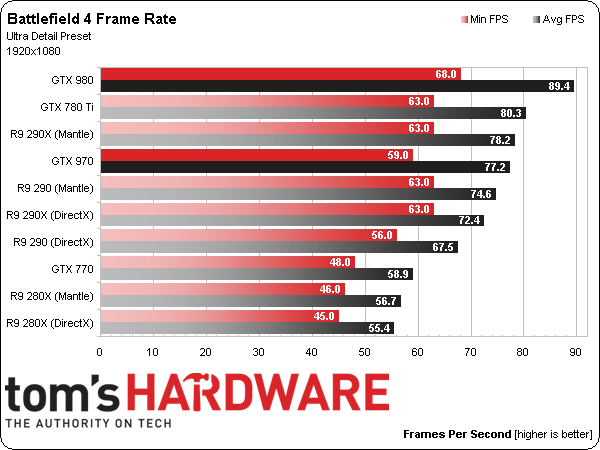
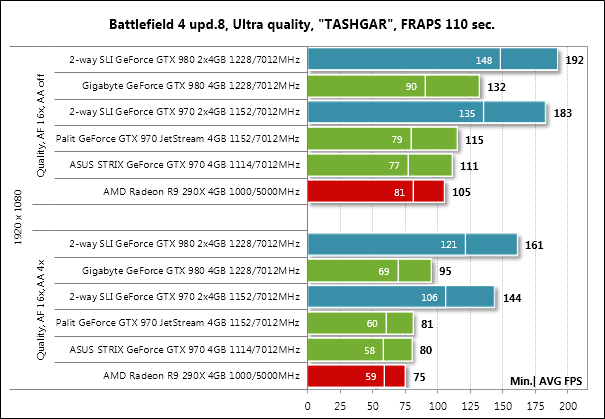

But what's going on at higher resolutions - 2560x1440 (1600) and 3840x2160: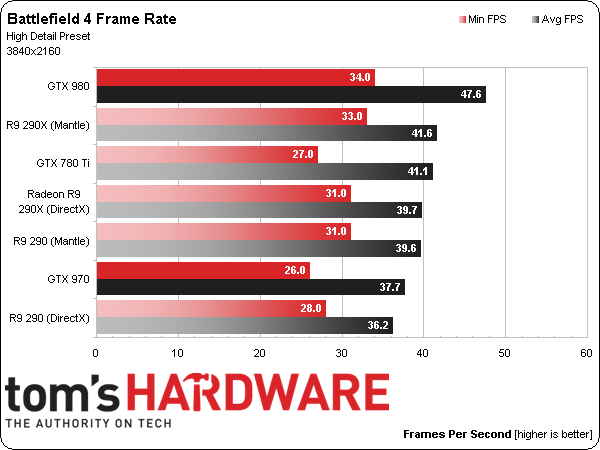
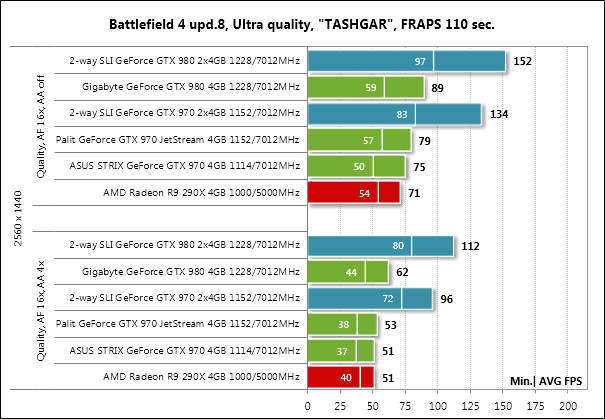


As you can see, the results show approximately the same picture: at a resolution of 1920x1080, the GXT 970 shows excellent results, often surpassing the results of both the flagships of the previous generation and the top single-chip AMD R9 290X video card. As the resolution increases, the picture changes somewhat: without overclocking, the GTX 970 starts to yield to the red-white competitor, and the higher the resolution, the greater the loss. However, the GTX 970 has a couple of trump cards up its sleeve.
For brevity, we will not consider all the tests, but will familiarize ourselves with the conclusions of each of the reviews. Here's what Tom's Hardware found on the average performance in games for the GTX 970 relative to other video card models:
Perhaps the GeForce GTX 970 does not set new performance records, but its price definitely makes the high-end graphics cards more affordable. For $ 330, it shows results comparable to the Radeon R9 290X, a graphics card that now costs $ 170 more. We did not expect to see such a powerful product for a price less than $ 400, which they ask for Radeon R9 290, which automatically makes the latter not such an attractive purchase.
Original:
As for the GeForce GTX 970, it may not bring performance to a new level, but its price definitely makes high-end performance more accessible. At $ 330 it delivers frame rates comparable to the Radeon R9 290X, a card that currently sells for an average price of about $ 170 more. We did not expect to see a product this potent at a price tier significantly below the $ 400 Radeon R9 290, which has suddenly become less appealing.
Unfortunately, the dollar exchange rate and any other economic processes introduce their own adjustments, and the price of a good R9 290X is comparable to the GTX 970 today, but the fact remains: a much more power hungry video card with “honest” 4 GB of memory is not always outperforms the less powerful GTX 970 with poor 4 GB.
What do other reviewers write? Yes, about the same, adjusted for the fact that prices rose a half to two times a lot of iron. Almost everywhere, the GTX 970 is called the most successful and promising acquisition and does not affect 3.5 GB of memory. Well, since in the reviews of the video cards themselves the issue is not addressed, it is necessary to google "debriefing."
How much memory is needed
For games in FullHD-resolution (1920 × 1080 pixels), we have already determined that the GTX 970 clearly does not rest on the volume of high-speed memory: all tests showed a convincing superiority even over the technically more powerful R9 290X. But what happens with the resolutions of 2560x1440, 2560x1600 and 3840x2160 pixels? Overclockers.ru experts
have already asked this question on the Internet , and here is their conclusion:
The turmoil around the GeForce GTX 970 was clearly at hand for someone. The technical characteristics of the video card are selected in such a way as to satisfy the demands of modern games in 99.9% of cases. And in cases where the amount of memory is insufficient, the lack of performance of the GM204 begins to affect. In other words, if there had theoretically not been a “3.5 GB problem”, users would hardly have noticed any changes.
Here is another video proof from a foreign resource:
If the timestamp does not work, watch from ~ 3:22.
In a nutshell - the main game projects with outstanding graphics at resolutions 2560x1440 and higher consume about 3.5 GB of memory - sometimes a little more, sometimes a little less, but in general, the high-speed GTX 970 memory copes with the load perfectly, and if the game leaves the 3.5 GB limits , this practically does not affect the performance of real games, which can not be said about synthetic tests.
It turns out that there is enough memory, but the performance of the GM204 itself is not always the case. However, you can always lower the game settings a bit - the difference between “ultra-super-premium” quality and just “high / maximum” by eye in the heat of battle you simply won’t see - it won’t be there before. And in the cut scenes to find that the textures have become not perfectly clear, but almost perfect ... In general, all this garbage. :)
We will stop here today, and in a couple of days, wait for the final, third part of the article: in it we will independently measure performance and memory consumption, talk about “old” games, high resolution, features of Maxwell architecture and how in some tests drain the old lady 7970, and in some - blow up the results of the R9 290X.
Our reviews:
» Connect original gamepads to PC
» Razer Abyssus: the most affordable Razer
» Nikon 1 S2: one-button mirrorless
» Lenovo Miix 3-1030 review
» Understanding Wacom's art chaos
» ASUS ZenFone 5, LG L90, HTC Desire 601 - dual-sim consumer war, part 1
» ASUS Transformer Pad
» Razer Kraken headsets
PC Buyer's Guide cycle:
» PC Buyer's guide: choose a graphics card
» PC Buyer's Guide: choose a power supply
» PC Buyer's Guide: cooling
» PC Buyer's Guide 2015: Motherboards, chipsets and sockets
» Twist, twist want. We understand the lines of HDD