 October 30, 2017 at 13:00
VPS hosting: how to choose?
We already wrote about what VPS hosting is , how virtual hosting, VPS hosting and dedicated hosting differ, what are their pros and cons, in which cases this or that type of hosting is more suitable, and we also discussed how to choose a reliable VPS provider with a limited budget. Perhaps the time has come to return to this topic. Not so much to repeat the past, but to highlight some points that we have not mentioned yet, as well as to find a good reason to share our news with you. So…

VPS is a virtual server with its own copy of the operating system and dedicated resources on a larger physical server. The physical system is divided into several virtual ones, and the server software is configured on them separately, making each virtual server work independently.
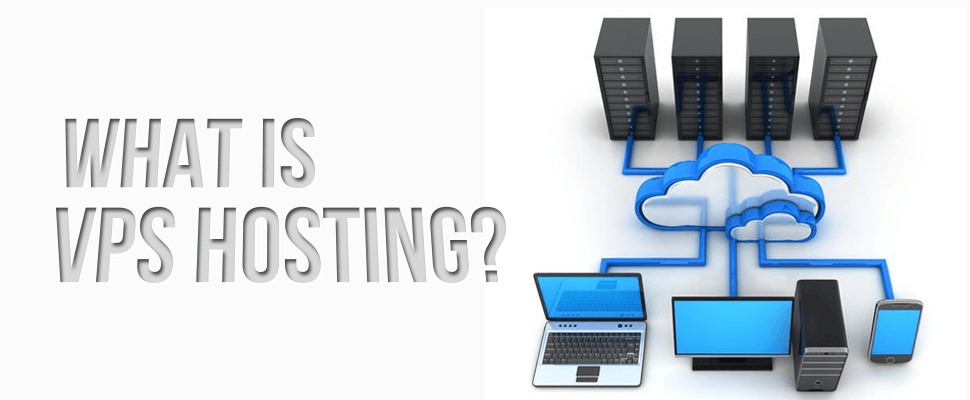
Although other websites may be hosted on the same physical system, yours will be the only one on this virtual server with resources allocated to it (CPU, RAM, disk space, etc.). Other websites on the same machine will not affect your work. This means that you get the system resources for which you pay. You also have full access to your server, as if it were your dedicated server. Therefore, VPS hosting gives you full control over your server and almost all the benefits of a more expensive dedicated server.
If you want to make the right choice, you need to take into account some common factors and do not forget about useful tips .
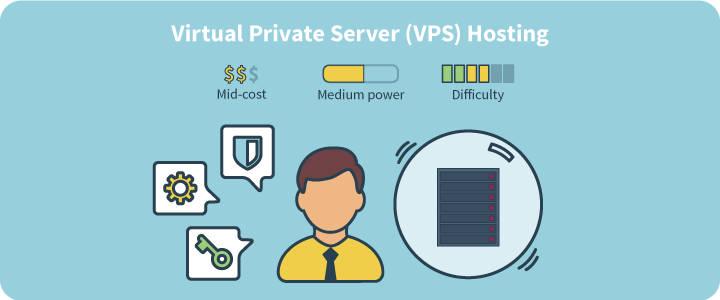
First you need to know what type of VPS environment you need: Windows or Linux. Linux is a great option, but has its own specifics. Regardless of your needs and comfort levels, if your site runs on ASP or ASP.net, then you will need to use the Windows environment.

With shared hosting (shared) you do not get root access to the server, and therefore the question of server management is not worth it. But in the case of VPS hosting, the entire virtual server is at your disposal. Thus, there must be someone who will follow him and control his performance. If your VPS provider takes care of this, then such hosting is called managed VPS hosting (managed). With unmanaged VPS hosting (unmanaged), you will have to take full responsibility for the virtual server.
Unmanaged hosting requires you to monitor performance and keep the server up and running. If your server software crashes or there is a security problem, you can only fix it as the sole administrator of your VPS server.
So, if you are an experienced user who is familiar with server management tools, then unmanaged hosting is suitable. No - it’s worth paying a little more and choosing a managed VPS.
The degree of VPS control for different providers varies and varies even in different plans of one provider. Most VPS hosting providers offer managed VPS hosting by default, but unmanaged VPS provides additional freedom. Of course, if you know how to manage and configure everything yourself.
Reservation mainly refers to the presence of excess resources in the data center of the provider. If the uninterruptible power supply does not work, there should be redundant UPSs and generators; if one server is overloaded, there must be another backup server and so on.
Scalability, on the other hand, indicates the ability to cope with the increased load on the server, usually using excess resources in the system. Both of these factors in combination provide uninterrupted operation and stable performance.
As with any purchase, the price will play a decisive role in your decision as to whether you will use the VPS services and which hosting provider you choose. VPS hosting prices vary significantly and depend on many factors, such as settings and customization options, various equipment specifications, service levels, etc. For example, from foreign providers for a basic VPS hosting package, which includes 1 GB of RAM and 20 GB of capacity storage, you need to pay somewhere in the range of $ 8 to $ 15. Here are a few examples:
But for comparison, our tariffs:
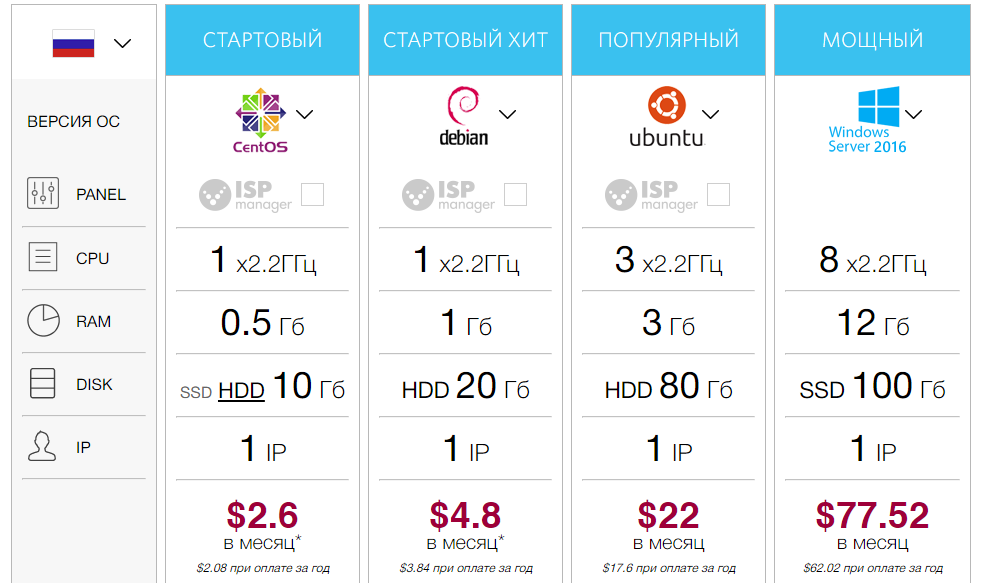
RUVDS tariffs The Start
tariff is the cheapest VPS server on Linux. The following configurations are offered to customers:
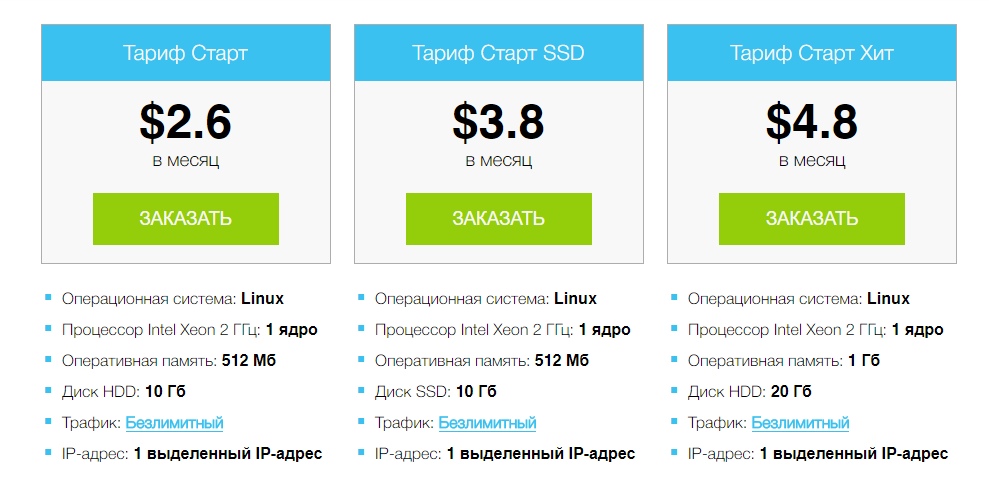
If desired, you can choose another configuration. A convenient configurator allows you to configure any server parameter, and we will offer the best price for it. Changing the characteristics of your virtual server is available at any time without data transfer and loss of funds.
In the VPS service, the term “cloud VPS server” is often used. Many people confuse regular VPS with cloud-based VPS hosting .
Normal VPS is part of a large server. We call this larger server the “parent server”. The parent server is actually a physical server. It "cuts" into several smaller servers with limited resources - VPS. A virtual server has physical limitations of the parent server, that is, real restrictions on the number of memory modules that can be added to the server, disks, etc.

Cloud VPS runs on multiple servers in a cluster. Like regular VPS, cloud-based VPS also uses the resources of a single machine, but this machine is actually a combination of several servers (a group of parent servers).
Cloud VPS has virtually no restrictions, since you can always add another server to the cluster (some clouds allow you to do this on the fly — with zero downtime) and increase storage capacity in the SAN. So, in general, cloud-based VPS hosting is better than the usual type because of its greater flexibility.
Server configuration plays an important role in the performance of your site, especially if you are on a regular VPS hosting. What kind of processor power you get, how much RAM and storage capacity will be allocated - everything matters. In addition, it is useful to learn about the characteristics of the physical machine - the host on which your VPS is located. It is better if it is a sufficiently powerful server of a famous brand: if the foundation is weak, then the whole building will be unreliable.

No matter how effective and good the VPS hosting providers are, problems sometimes arise out of nowhere. In such situations, to understand the problem, you need convenient and efficient support. If providers cannot provide round-the-clock customer support, they are simply not worth the money you spend. When you encounter a serious problem on your website and it has not been resolved for too long, you can lose potential visitors, and this can also mean financial losses. It is better to test the customer support service with the hosting provider before making the final choice.
Most hosting providers offer a free trial period. During this period, monitoring systems can be used to track server operation parameters. Using the test period of working with VDS / VPS server for free, you will see the quality of services.
This factor is the last in the list, but not in importance. Web hosting security issues cannot be ignored. Hackers and spammers are constantly trying to find new ways to infiltrate your sites and servers. Regardless of whether you plan to use your website just to host a blog, or open an online store, you need to be careful and not forget about the security of the website. Your website should be able to withstand a variety of threats - from viruses and malicious attacks to hacking and DDoS. Therefore, it is worth choosing such VPS hosting providers that implements and provides optimal security solutions in terms of functionality / cost.
There are various hosting packages to meet different business needs, website platforms and budgets. You need hosting packages that can protect your data and keep it safe and protect them from various unforeseen situations. These may include:
Anti-virus and anti-spam: Prevents viruses from infecting your files or any harmful activity using anti-virus and anti-spam software. A hosting package should always include this security feature. It will also help to prevent unauthorized access to your confidential information, such as transactions and contacts, prevent malicious programs from corrupting or encrypting your data, registering keystrokes, etc.

RUVDS continues the campaign in conjunction with Kaspersky Lab . Until October 31, you can use anti-virus protection of a virtual server with a 50% discount.
RUVDS suggests using advanced anti-virus protection for your virtual server . It is provided by an easy agent for virtual environments - a single security solution that ensures the security of your virtual servers and VDI. Light Agent protects VPS from both internal and external network attacks. Protection technology automatically monitors the network traffic of the hypervisor; upon detection, attack data is blocked.
It is important that it protects against ransomware programs such as Petya or WannaCry. System monitoring tools control the behavior of applications running on each virtual desktop. If suspicious behavior is detected (for example, activity characteristic of encryption programs), the application is blocked and malicious changes are automatically rolled back. Confidential data remains safe.
Since only one physical device is updated on each virtual host, a light agent will help to eliminate situations of “heavy” security software updates and system checks. Peaks in resource consumption are smoothed out thanks to the intellectual organization of verification tasks. The Virtual Security Appliance (SVM) automatically creates on-demand scan queues, distributing the scan tasks over time depending on the current load on the hypervisor.
Intelligent prioritization of tasks on SVM also eliminates the “noisy neighbor” problem: on-access scan tasks always get higher priority than on-demand scan to reduce the impact of scan operations on individual virtual machines on the response speed of neighboring machines.
SVM autonomously and continuously monitors its own operation and automatically reboots if its validation service stops or is interrupted for any reason. This approach ensures that the scanning technology will be available at any time and will be able to perform anti-virus scanning.
Data protection with RAID: RAID stands for “redundant array of independent disks” and is a fairly easy to install and configure feature. This fault-tolerant data warehouse technology can protect them from equipment failures. RAID has different levels and modes, so it is advisable to get the appropriate information from the selected web hosting provider. Levels / modes have a balance between speed and data redundancy.
Secure IMAP: This is a great option if you use multiple computers to access your mail. IMAP is also a good way to synchronize and back up your emails, because unlike Secure POP3, they will be protected and encrypted on a remote mail server, not on your computer.
SSL: SSL (Secure Sockets Layer) is an effective and powerful form of data encryption used by hosting providers. The URLs of SSL-certified websites begin with “https:”. With SSL enabled, all current transactions on the website are encrypted and protected.
Control Panels ( ISP Manager, CPanel, Plesk, etc.): The use of these tools depends on whether you use Linux or Windows as your shared hosting platform. Popular control panels allow you to run various software configurations, manage e-mail and billing, and perform administrative tasks.
Security at the application level: Allows you to control each user's access to applications and includes a user menu system in which various functions are available for different users depending on the role assigned to the user. Application-level security measures include authentication (biometric methods may be used) and authorization systems, firewalls, encryption / decryption programs, spyware detection / removal and auditing.

WordPress Security: Some providers offer specialized WordPress hosting products. WordPress is the most popular content management system (CMS). It allows you to create websites, blogs with a ready-made design, built-in statistics system, uploading photos and videos, etc. Security features include DDoS protection, additional firewalls, malware scanning, backup and automatic WordPress updates. Wordpress Security includes a plugin that allows you to simply change the default URL (wp-admin) for login.
There are also various plugins that will help you protect your logins from IP addresses, from which many attempts are made to enter your system.
Server maintenance: The provider must ensure that your server is maintained and updated on time to prevent attacks. A published security protocol that indicates that they are consistent in patching and updating your server software.
Protection against DDoS attacks: The security of online projects requires constant attention. The term “DDoS” is familiar to many from their own experience, or at least according to press reports. Unfortunately, this phenomenon has become widespread. A DDoS attack involves a distributed attack on an organization’s IT system in order to bring it to failure. In this case, legal users of the system cannot gain access to its resources, or this access is difficult.
Since September 2017, RUVDS company provides a service for protecting against DDoS attacks of your virtual server for free. All RUVDS clients can connect it when creating a new VPS server. The service is provided free of charge for the first month of use for every 0.5 Mbit / s of average load on the incoming channel. After the end of the free period, the cost of the service will be 400 rubles per month. The action " Protection against DDOS attacks " is available only for new servers.
With the service of protection against DDoS attacks, your resource will be safe. Network traffic analysis is performed 24/7, and protection allows you to stably withstand up to 1500 Gbit / s.
Cyber-risk insurance: This service in our country is still rare. Meanwhile, such insurance is necessary for any company dealing with data, especially personal data. For example, AIG has developed the CyberEdge insurance program to protect personal data in an enterprise from the consequences of its leakage or illegal use. The presence of the CyberEdge policy means that the company takes care of its risks and the risks of its customers, that it will not spend its own funds to eliminate the consequences, but will take advantage of the help of AIG. By trusting their data to such a company, customers can be sure that in case of an incident they will be able to receive damages. It is especially convenient if a similar service is offered by a hosting service provider. This is why RUVDS is responsible for all customer data.insured by AIG against cyber risks.
Availability of a foreign site: Russian hosting companies are increasingly offering hosting abroad and at the same time they can compete with foreign hosters. This allows you to ensure a high level of data security - technological and legal. And in some cases, foreign data centers will be a good option for companies whose business is focused on the foreign market, in particular, operating in the European market.
A foreign site can be used to place data in order to connect European customers to it. The cost of traffic will be significantly less. In addition, servers based in foreign data centers show the best response time for European users. Such data centers have direct access to European traffic exchange points. A foreign platform allows you to offer a wider selection of services to customers from various industries, for example, disaster-resistant configurations with spaced nodes.
What is VPS hosting?
VPS is a virtual server with its own copy of the operating system and dedicated resources on a larger physical server. The physical system is divided into several virtual ones, and the server software is configured on them separately, making each virtual server work independently.
Although other websites may be hosted on the same physical system, yours will be the only one on this virtual server with resources allocated to it (CPU, RAM, disk space, etc.). Other websites on the same machine will not affect your work. This means that you get the system resources for which you pay. You also have full access to your server, as if it were your dedicated server. Therefore, VPS hosting gives you full control over your server and almost all the benefits of a more expensive dedicated server.
How to choose?
If you want to make the right choice, you need to take into account some common factors and do not forget about useful tips .
Factor # 1: Windows or Linux?
First you need to know what type of VPS environment you need: Windows or Linux. Linux is a great option, but has its own specifics. Regardless of your needs and comfort levels, if your site runs on ASP or ASP.net, then you will need to use the Windows environment.
Factor # 2: Managed hosting versus unmanaged.
With shared hosting (shared) you do not get root access to the server, and therefore the question of server management is not worth it. But in the case of VPS hosting, the entire virtual server is at your disposal. Thus, there must be someone who will follow him and control his performance. If your VPS provider takes care of this, then such hosting is called managed VPS hosting (managed). With unmanaged VPS hosting (unmanaged), you will have to take full responsibility for the virtual server.
Unmanaged hosting requires you to monitor performance and keep the server up and running. If your server software crashes or there is a security problem, you can only fix it as the sole administrator of your VPS server.
So, if you are an experienced user who is familiar with server management tools, then unmanaged hosting is suitable. No - it’s worth paying a little more and choosing a managed VPS.
The degree of VPS control for different providers varies and varies even in different plans of one provider. Most VPS hosting providers offer managed VPS hosting by default, but unmanaged VPS provides additional freedom. Of course, if you know how to manage and configure everything yourself.
Factor 3: Redundancy and Scalability
Reservation mainly refers to the presence of excess resources in the data center of the provider. If the uninterruptible power supply does not work, there should be redundant UPSs and generators; if one server is overloaded, there must be another backup server and so on.
Scalability, on the other hand, indicates the ability to cope with the increased load on the server, usually using excess resources in the system. Both of these factors in combination provide uninterrupted operation and stable performance.
Factor No. 4: Price
As with any purchase, the price will play a decisive role in your decision as to whether you will use the VPS services and which hosting provider you choose. VPS hosting prices vary significantly and depend on many factors, such as settings and customization options, various equipment specifications, service levels, etc. For example, from foreign providers for a basic VPS hosting package, which includes 1 GB of RAM and 20 GB of capacity storage, you need to pay somewhere in the range of $ 8 to $ 15. Here are a few examples:
| Provider | Altushost | Arvixe | A small orange | Bluehost | Dreamhost | Godaddy |
| Storage | 40 GB | 50 GB | 50 GB | 30 GB SAN | 30 GB SSD | 40 GB |
| Data transfer | 2 TB | Not limited. | 1 TB | 1 TB | Not limited. | 1 TB |
| RAM | 1 GB | 1.5 GB | 2 GB | 2 GB | 1 GB | 1 GB |
| CPU cores | 2 | 4 | 2 | 2 | - | - |
| IP addresses | 2 | 2 | 1 | 1 | 1 | 0 |
| cPanel / WHM | Not | Yes | Yes | Yes | Yes | Yes |
| Price / month | $ 19.95 | $ 40 | $ 30 | $ 29.99 | $ 15 | $ 24.99 |
| Provider | Hostpapa | Inmotion | Interserver | iWeb | Linode | Lowendbox |
| Storage | 50 GB | 60 GB | 25 GB | 50 GB SSD | 24 GB SSD | 30 GB |
| Data transfer | Not limited. | 2 TB | 1 TB | Not limited. | 2 TB | 250 GB |
| RAM | 4 GB | 4 GB | 1 GB | 1 GB | 1 GB | 1 GB |
| CPU cores | 4 | 2 | 1 | 1 | 1 | 2 |
| IP addresses | 2 | 2 | 1 | 1 | - | 1 |
| cPanel / WHM | Yes | Yes | Not | - | Not | Not |
| Price / month | $ 46.66 | $ 29.99 | $ 6 | $ 43.80 | $ 10 | $ 12.95 |
| Provider | MediaTemple | Milesweb | MDD Hosting | Netfirms | SecureDragon | ZNetLive |
| Storage | 60 GB | 100GB | 35 GB | 20 GB | 30 GB | 40 GB |
| Data transfer | 1 TB | 1 TB | 1 TB | 1 TB | 2 TB | 800 GB |
| RAM | 1 GB | 1 GB | 1.5 GB | 512 MB | 2 GB | 1 GB |
| CPU cores | 1 | 2 | 2 | - | 4 | 1 |
| IP addresses | 2 | 1 | 2 | - | 1 | 1 |
| cPanel / WHM | Yes | Not | Yes | Not | Not | Yes |
| Price / month | $ 49.95 | $ 9 | $ 55.88 | $ 33 | $ 12.99 | $ 22.51 |
But for comparison, our tariffs:
RUVDS tariffs The Start
tariff is the cheapest VPS server on Linux. The following configurations are offered to customers:
If desired, you can choose another configuration. A convenient configurator allows you to configure any server parameter, and we will offer the best price for it. Changing the characteristics of your virtual server is available at any time without data transfer and loss of funds.
Factor # 5: Cloud and VPS Hosting
In the VPS service, the term “cloud VPS server” is often used. Many people confuse regular VPS with cloud-based VPS hosting .
Normal VPS is part of a large server. We call this larger server the “parent server”. The parent server is actually a physical server. It "cuts" into several smaller servers with limited resources - VPS. A virtual server has physical limitations of the parent server, that is, real restrictions on the number of memory modules that can be added to the server, disks, etc.
Cloud VPS runs on multiple servers in a cluster. Like regular VPS, cloud-based VPS also uses the resources of a single machine, but this machine is actually a combination of several servers (a group of parent servers).
Cloud VPS has virtually no restrictions, since you can always add another server to the cluster (some clouds allow you to do this on the fly — with zero downtime) and increase storage capacity in the SAN. So, in general, cloud-based VPS hosting is better than the usual type because of its greater flexibility.
Factor 6: Server Specifications and Configurations
Server configuration plays an important role in the performance of your site, especially if you are on a regular VPS hosting. What kind of processor power you get, how much RAM and storage capacity will be allocated - everything matters. In addition, it is useful to learn about the characteristics of the physical machine - the host on which your VPS is located. It is better if it is a sufficiently powerful server of a famous brand: if the foundation is weak, then the whole building will be unreliable.
- RAM and storage: how much RAM and disk space are offered? You will need at least 1 GB of RAM and 20 GB of memory. Of course, your needs will vary depending on your site’s traffic, storage requirements, etc.
- Data Transfer: Are there any restrictions on data transfer? If so, what are the options if you exceed these limits? Most VPS hosting providers have some limitations. You need to know what they are and what will happen if you need to exceed them.
- Operating System: What operating system do you need for VPS? Does your site require a specific Linux distribution, its latest version? It is important that the provider updates the OS regularly.
- Backup: What types of backup are used? How is your data and site architecture protected?
- IP Address: How many IP addresses are included in your service? What is the cost of additional addresses?
- CPU core: Web servers typically use very little CPU power, unless it is a game server. But still, it's worth knowing how many cores are allocated to your VPS account.
Factor # 7: Support
No matter how effective and good the VPS hosting providers are, problems sometimes arise out of nowhere. In such situations, to understand the problem, you need convenient and efficient support. If providers cannot provide round-the-clock customer support, they are simply not worth the money you spend. When you encounter a serious problem on your website and it has not been resolved for too long, you can lose potential visitors, and this can also mean financial losses. It is better to test the customer support service with the hosting provider before making the final choice.
Factor 8: Test Period
Most hosting providers offer a free trial period. During this period, monitoring systems can be used to track server operation parameters. Using the test period of working with VDS / VPS server for free, you will see the quality of services.
Factor 9: Security and Data Protection
This factor is the last in the list, but not in importance. Web hosting security issues cannot be ignored. Hackers and spammers are constantly trying to find new ways to infiltrate your sites and servers. Regardless of whether you plan to use your website just to host a blog, or open an online store, you need to be careful and not forget about the security of the website. Your website should be able to withstand a variety of threats - from viruses and malicious attacks to hacking and DDoS. Therefore, it is worth choosing such VPS hosting providers that implements and provides optimal security solutions in terms of functionality / cost.
Talk about security
There are various hosting packages to meet different business needs, website platforms and budgets. You need hosting packages that can protect your data and keep it safe and protect them from various unforeseen situations. These may include:
Anti-virus and anti-spam: Prevents viruses from infecting your files or any harmful activity using anti-virus and anti-spam software. A hosting package should always include this security feature. It will also help to prevent unauthorized access to your confidential information, such as transactions and contacts, prevent malicious programs from corrupting or encrypting your data, registering keystrokes, etc.
RUVDS continues the campaign in conjunction with Kaspersky Lab . Until October 31, you can use anti-virus protection of a virtual server with a 50% discount.
RUVDS suggests using advanced anti-virus protection for your virtual server . It is provided by an easy agent for virtual environments - a single security solution that ensures the security of your virtual servers and VDI. Light Agent protects VPS from both internal and external network attacks. Protection technology automatically monitors the network traffic of the hypervisor; upon detection, attack data is blocked.
It is important that it protects against ransomware programs such as Petya or WannaCry. System monitoring tools control the behavior of applications running on each virtual desktop. If suspicious behavior is detected (for example, activity characteristic of encryption programs), the application is blocked and malicious changes are automatically rolled back. Confidential data remains safe.
Since only one physical device is updated on each virtual host, a light agent will help to eliminate situations of “heavy” security software updates and system checks. Peaks in resource consumption are smoothed out thanks to the intellectual organization of verification tasks. The Virtual Security Appliance (SVM) automatically creates on-demand scan queues, distributing the scan tasks over time depending on the current load on the hypervisor.
Intelligent prioritization of tasks on SVM also eliminates the “noisy neighbor” problem: on-access scan tasks always get higher priority than on-demand scan to reduce the impact of scan operations on individual virtual machines on the response speed of neighboring machines.
SVM autonomously and continuously monitors its own operation and automatically reboots if its validation service stops or is interrupted for any reason. This approach ensures that the scanning technology will be available at any time and will be able to perform anti-virus scanning.
Data protection with RAID: RAID stands for “redundant array of independent disks” and is a fairly easy to install and configure feature. This fault-tolerant data warehouse technology can protect them from equipment failures. RAID has different levels and modes, so it is advisable to get the appropriate information from the selected web hosting provider. Levels / modes have a balance between speed and data redundancy.
Secure IMAP: This is a great option if you use multiple computers to access your mail. IMAP is also a good way to synchronize and back up your emails, because unlike Secure POP3, they will be protected and encrypted on a remote mail server, not on your computer.
SSL: SSL (Secure Sockets Layer) is an effective and powerful form of data encryption used by hosting providers. The URLs of SSL-certified websites begin with “https:”. With SSL enabled, all current transactions on the website are encrypted and protected.
Control Panels ( ISP Manager, CPanel, Plesk, etc.): The use of these tools depends on whether you use Linux or Windows as your shared hosting platform. Popular control panels allow you to run various software configurations, manage e-mail and billing, and perform administrative tasks.
Security at the application level: Allows you to control each user's access to applications and includes a user menu system in which various functions are available for different users depending on the role assigned to the user. Application-level security measures include authentication (biometric methods may be used) and authorization systems, firewalls, encryption / decryption programs, spyware detection / removal and auditing.
WordPress Security: Some providers offer specialized WordPress hosting products. WordPress is the most popular content management system (CMS). It allows you to create websites, blogs with a ready-made design, built-in statistics system, uploading photos and videos, etc. Security features include DDoS protection, additional firewalls, malware scanning, backup and automatic WordPress updates. Wordpress Security includes a plugin that allows you to simply change the default URL (wp-admin) for login.
There are also various plugins that will help you protect your logins from IP addresses, from which many attempts are made to enter your system.
Server maintenance: The provider must ensure that your server is maintained and updated on time to prevent attacks. A published security protocol that indicates that they are consistent in patching and updating your server software.
Protection against DDoS attacks: The security of online projects requires constant attention. The term “DDoS” is familiar to many from their own experience, or at least according to press reports. Unfortunately, this phenomenon has become widespread. A DDoS attack involves a distributed attack on an organization’s IT system in order to bring it to failure. In this case, legal users of the system cannot gain access to its resources, or this access is difficult.
Since September 2017, RUVDS company provides a service for protecting against DDoS attacks of your virtual server for free. All RUVDS clients can connect it when creating a new VPS server. The service is provided free of charge for the first month of use for every 0.5 Mbit / s of average load on the incoming channel. After the end of the free period, the cost of the service will be 400 rubles per month. The action " Protection against DDOS attacks " is available only for new servers.
With the service of protection against DDoS attacks, your resource will be safe. Network traffic analysis is performed 24/7, and protection allows you to stably withstand up to 1500 Gbit / s.
Cyber-risk insurance: This service in our country is still rare. Meanwhile, such insurance is necessary for any company dealing with data, especially personal data. For example, AIG has developed the CyberEdge insurance program to protect personal data in an enterprise from the consequences of its leakage or illegal use. The presence of the CyberEdge policy means that the company takes care of its risks and the risks of its customers, that it will not spend its own funds to eliminate the consequences, but will take advantage of the help of AIG. By trusting their data to such a company, customers can be sure that in case of an incident they will be able to receive damages. It is especially convenient if a similar service is offered by a hosting service provider. This is why RUVDS is responsible for all customer data.insured by AIG against cyber risks.
Availability of a foreign site: Russian hosting companies are increasingly offering hosting abroad and at the same time they can compete with foreign hosters. This allows you to ensure a high level of data security - technological and legal. And in some cases, foreign data centers will be a good option for companies whose business is focused on the foreign market, in particular, operating in the European market.
A foreign site can be used to place data in order to connect European customers to it. The cost of traffic will be significantly less. In addition, servers based in foreign data centers show the best response time for European users. Such data centers have direct access to European traffic exchange points. A foreign platform allows you to offer a wider selection of services to customers from various industries, for example, disaster-resistant configurations with spaced nodes.









