Airflow - a tool to conveniently and quickly develop and maintain batch data processing processes
Hello, Habr! In this article I want to talk about one great tool for developing batch data processing processes, for example, in the corporate DWH infrastructure or your DataLake. It will be about Apache Airflow (hereinafter Airflow). He is unfairly deprived of attention on Habré, and in the main part I will try to convince you that at least Airflow should be looked at when choosing a scheduler for your ETL / ELT processes.
I previously wrote a series of articles on the topic of DWH when I worked at Tinkoff Bank. Now I have become part of the Mail.Ru Group team and am engaged in the development of a platform for data analysis on the gaming direction. Actually, as the news and interesting solutions appear, the team and I will talk here about our platform for data analytics.
Prologue
So, let's begin. What is Airflow? This is a library (or a set of libraries ) for the development, planning and monitoring of work processes. The main feature of Airflow: Python code is used to describe (develop) processes. A lot of advantages for organizing your project and development follow from here: in fact, your (for example) ETL project is just a Python project, and you can organize it as you like, taking into account the infrastructure features, team size and other requirements. Instrumentally, everything is simple. Use, for example, PyCharm + Git. It is beautiful and very comfortable!
Now consider the main entities of Airflow. Having understood their essence and purpose, you optimally organize the architecture of processes. Perhaps the main essence is the Directed Acyclic Graph (hereinafter referred to as DAG).
DAG
DAG is a kind of semantic combination of your tasks that you want to perform in a strictly defined sequence on a specific schedule. Airflow provides a convenient web-based interface for working with DAGs and other entities:
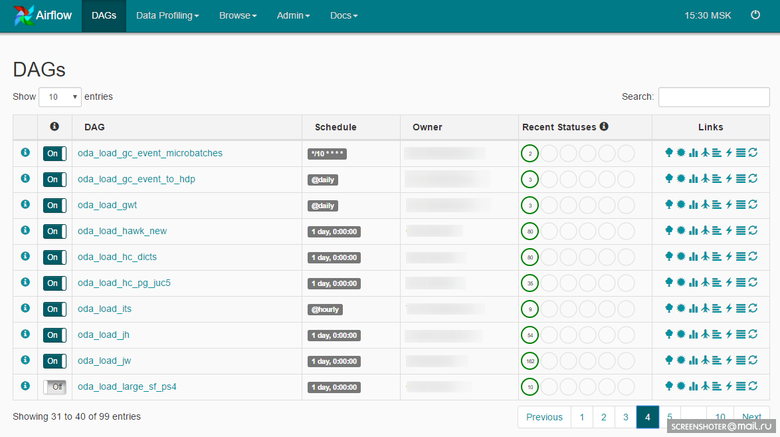
A DAG might look like this:

The developer, when designing the DAG, lays down the set of operators on which the tasks within the DAG will be built. Here we come to another important entity: Airflow Operator.
Operators
An operator is an entity on the basis of which task instances are created, which describes what will happen during the execution of the task instance. Airflow releases with GitHub already contain a set of operators ready for use. Examples:
- BashOperator is an operator for executing a bash command.
- PythonOperator is an operator for invoking Python code.
- EmailOperator - operator for sending email.
- HTTPOperator is an operator for working with http requests.
- SqlOperator - an operator for executing SQL code.
- Sensor - the operator of waiting for an event (the right time, the appearance of the required file, a row in the database, a response from the API, etc., etc.).
There are more specific operators: DockerOperator, HiveOperator, S3FileTransferOperator, PrestoToMysqlOperator, SlackOperator.
You can also develop operators, focusing on your own characteristics, and use them in the project. For example, we created MongoDBToHiveViaHdfsTransfer, an operator for exporting documents from MongoDB to Hive, and several operators for working with ClickHouse : CHLoadFromHiveOperator and CHTableLoaderOperator. In fact, as soon as frequently used code based on basic operators appears in a project, you can think about how to assemble it into a new operator. This will simplify further development, and you will replenish your library of operators in the project.
Further, all these instances of tasks need to be performed, and now we will focus on the scheduler.
Scheduler
Airflow's task scheduler is built on Celery . Celery is a Python library that allows you to organize a queue plus asynchronous and distributed execution of tasks. On the Airflow side, all tasks are divided into pools. Pools are created manually. As a rule, their goal is to limit the load on working with the source or to typify tasks inside DWH. Pools can be managed via the web interface:

Each pool has a limit on the number of slots. When creating a DAG, it is given a pool:
ALERT_MAILS =  Variable.get("gv_mail_admin_dwh")
DAG_NAME = 'dma_load'
OWNER = 'Vasya Pupkin'
DEPENDS_ON_PAST = True
EMAIL_ON_FAILURE = True
EMAIL_ON_RETRY = True
RETRIES = int(Variable.get('gv_dag_retries'))
POOL = 'dma_pool'
PRIORITY_WEIGHT = 10
start_dt = datetime.today() - timedelta(1)
start_dt = datetime(start_dt.year, start_dt.month, start_dt.day)
default_args = {
    'owner': OWNER,
    'depends_on_past': DEPENDS_ON_PAST,
    'start_date': start_dt,
    'email': ALERT_MAILS,
    'email_on_failure': EMAIL_ON_FAILURE,
    'email_on_retry': EMAIL_ON_RETRY,
    'retries': RETRIES,
    'pool': POOL,
    'priority_weight': PRIORITY_WEIGHT
}
dag = DAG(DAG_NAME, default_args=default_args)
dag.doc_md = __doc__
The pool specified at the DAG level can be redefined at the task level.
There is a separate process responsible for scheduling all tasks in Airflow - the Scheduler. Actually, Scheduler deals with all the mechanics of setting tasks for execution. The task, before getting into execution, goes through several stages:
- The previous tasks have been completed in the DAG; a new one can be queued.
- The queue is sorted depending on the priority of the tasks (priorities can also be managed), and if the pool has a free slot, the task can be taken to work.
- If there is a free worker celery, the task goes to it; the work that you programmed in the task begins using one or another operator.
Simple enough.
Scheduler runs on a variety of all DAGs and all tasks within DAGs.
In order for Scheduler to start working with DAG, DAG needs to set a schedule:
dag = DAG(DAG_NAME, default_args=default_args, schedule_interval='@hourly')There is a set of ready preset'ov: @once, @hourly, @daily, @weekly, @monthly, @yearly.
You can also use cron expressions:
dag = DAG(DAG_NAME, default_args=default_args, schedule_interval='*/10 * * * *')Execution date
To understand how Airflow works, it's important to understand what an Execution Date is for a DAG. In Airflow, the DAG has an Execution Date dimension, i.e., depending on the DAG’s schedule, task instances are created for each Execution Date. And for each Execution Date tasks can be performed repeatedly - or, for example, the DAG can work simultaneously on several Execution Date. This is clearly displayed here:
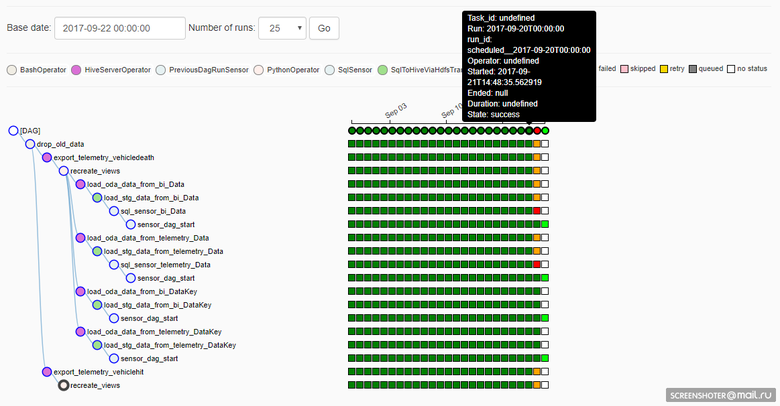
Unfortunately (and maybe fortunately: it depends on the situation), if the implementation of the task in the DAG is correct, then the execution in the previous Execution Date will go taking into account the adjustments. This is good if you need to recalculate data in past periods with a new algorithm, but bad, because the reproducibility of the result is lost (of course, no one bothers to return the necessary version of the source from Git and calculate once again what is needed, as it should).
Task generation
The DAG implementation is Python code, so we have a very convenient way to reduce the amount of code when working, for example, with sharded sources. Let you have three MySQL shards as a source, you need to get into each and take some data. Moreover, independently and in parallel. Python code in a DAG might look like this:
connection_list = lv.get('connection_list')
export_profiles_sql = '''
SELECT
  id,
  user_id,
  nickname,
  gender,
  {{params.shard_id}} as shard_id
FROM profiles
'''for conn_id in connection_list:
    export_profiles = SqlToHiveViaHdfsTransfer(
        task_id='export_profiles_from_' + conn_id,
        sql=export_profiles_sql,
        hive_table='stg.profiles',
        overwrite=False,
        tmpdir='/data/tmp',
        conn_id=conn_id,
        params={'shard_id': conn_id[-1:], },
        compress=None,
        dag=dag
    )
    export_profiles.set_upstream(exec_truncate_stg)
    export_profiles.set_downstream(load_profiles)
DAG turns out like this:
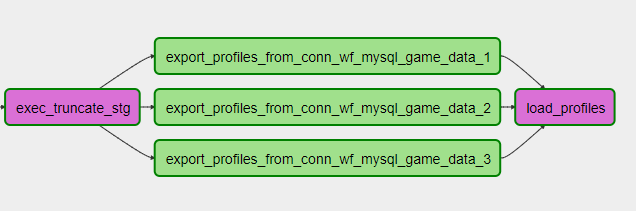
In this case, you can add or remove shards by simply adjusting the settings and updating the DAG. Conveniently!
You can use more complex code generation, for example, work with sources in the form of a database or describe a table structure, an algorithm for working with a table and, taking into account the features of the DWH infrastructure, generate the process of loading N tables to your storage. Or, for example, working with an API that does not support working with a parameter in the form of a list, you can generate N tasks in the DAG from this list, limit the parallelism of requests in the API to a pool and extract the necessary data from the API. Flexibly!
Repository
Airflow has its own backend repository, a database (maybe MySQL or Postgres, we have Postgres), which stores the status of tasks, DAGs, connection settings, global variables, etc., etc. I would like to say that the repository in Airflow is very simple (about 20 tables) and convenient if you want to build your own process on it. I recall 100,500 tables in the Informatica repository that needed to be tasted for a long time before understanding how to build a query.
Monitoring
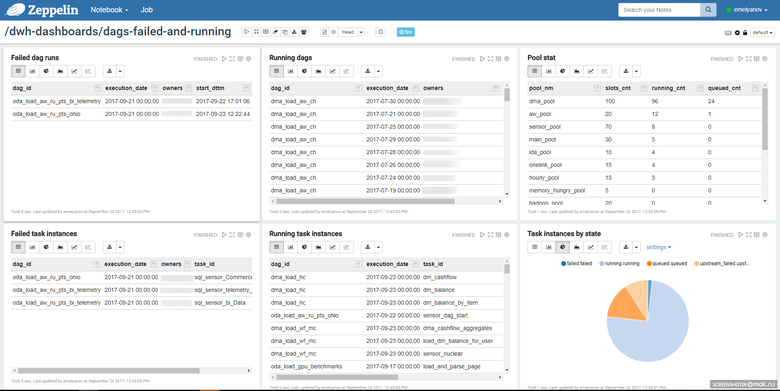
Given the simplicity of the repository, you yourself can build a process for monitoring tasks convenient for you. We use notepad in Zeppelin, where we look at the status of tasks:
This may be the web interface of Airflow itself:
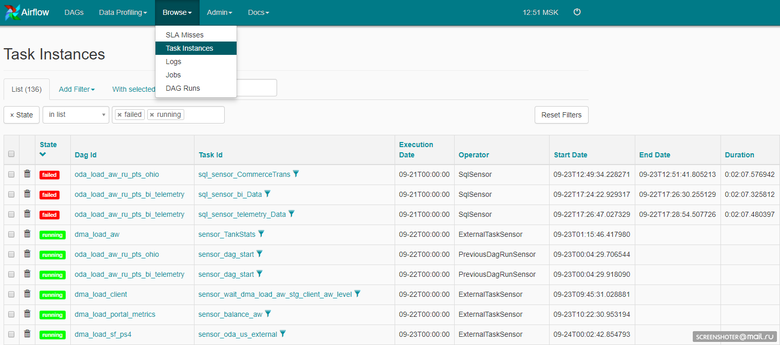
The Airflow code is open, so we added an alert to Telegram. Each working instance of the task, if an error occurs, spam into a group in Telegram, where the entire development and support team consists.
We get a prompt response through Telegram (if this is required), through Zeppelin - an overall picture of the tasks in Airflow.
Total
Airflow is primarily open source, and there is no need to expect miracles from it. Be prepared to spend time and effort building a working solution. Achievement goal, believe me, it's worth it. Development speed, flexibility, ease of adding new processes - you will like it. Of course, you need to pay a lot of attention to the organization of the project, the stability of Airflow itself: there are no miracles.
Now we have Airflow fulfilling about 6.5 thousand tasks every day . They are quite different in nature. There are tasks of loading data into the main DWH from many different and very specific sources, there are tasks of calculating windows in the main DWH, there are tasks of publishing data to fast DWH, there are many, many different tasks - and Airflow chews them all day after day. Speaking in numbers, this is 2.3 thousand ELT tasks of varying complexity inside DWH (Hadoop), about 2.5 hundred source databases , this is a team of 4 ETL developers who are divided into ETL data processing in DWH and ELT data processing inside DWH and of course another admin who deals with the service infrastructure.
Future plans
The number of processes is inevitably growing, and the main thing we will do in terms of Airflow infrastructure is scaling. We want to build an Airflow cluster, allocate a couple of legs for Celery workers, and make a duplicating head with task scheduling processes and a repository.
Epilogue
This, of course, is far from all that I would like to tell about Airflow, but I tried to highlight the main points. Appetite comes with eating, try it and you will like it :)