August 31, 2017 at 22:58
How (and why) we ported Shenzhen Solitaire to MS-DOS
- Transfer
Kate Holman and Zach Bart are developers from the game studio Zachtronics. If you like intricate technical articles about creating games for 25-year-old computers, you might like our puzzle games: SpaceChem , Infinifactory , TIS-100, and SHENZHEN I / O !
Getting down
Will two programmers, accustomed to creating games for modern computers with gigabytes of RAM and full-color HD displays, be able to port their games to MS-DOS? None of us had development experience on such old equipment, but working in artificially limited systems is the basis of Zachtronics game design, so we had to try!
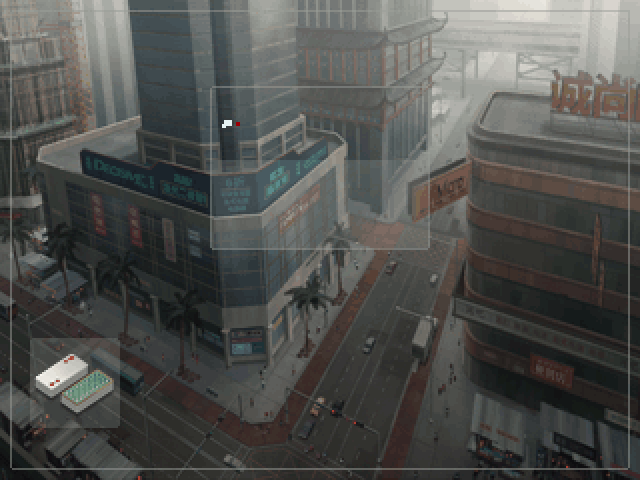
The project started with Zack creating the SHENZHEN SOLITAIRE mockup, a solitaire mini-game from our SHENZHEN I / O game (also sold as a standalone game ). Here's what solitaire might look like on a 256-color VGA display:
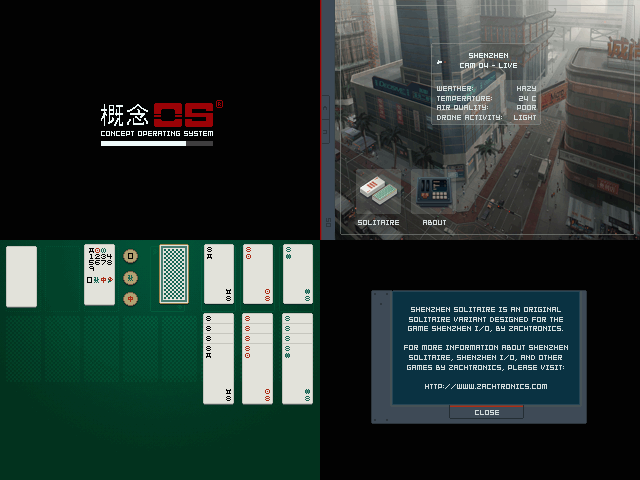
It looks like the games you could see on PC screens from the early 90s! Now you just have to write the code, right?
Development environment
First we need to figure out how to write programs that can be run on an ancient DOS computer. The target equipment will be a vintage IBM-compatible PC from the Zach collection:
- Intel 80386SX processor with a frequency of 20 MHz
- 5 MB RAM
- VGA card
- 3½-inch drive
- Serial mouse
- MS-DOS version 6.22
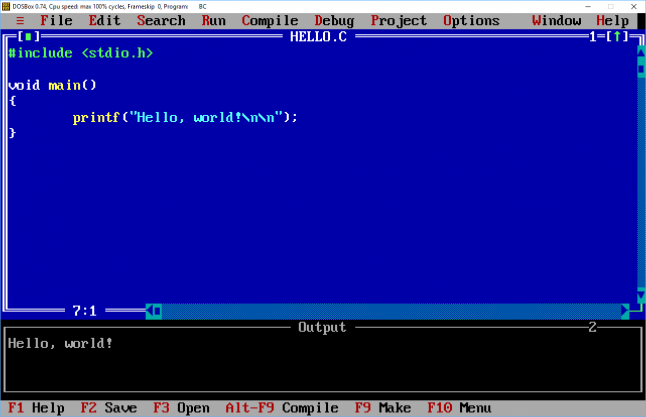
The only reasonable option for a programming language for a machine of that era would be C. We were not going to write the whole game in x86 assembly language! After thinking about different options for working tools, we settled on Borland C ++ 3.1, released in 1992. Launched in DOSBox Borland C ++ provided a convenient and accurate emulation of the target machine.
Graphics
Computers with VGA graphics had a couple of rendering modes. A popular and simple option was Mode 13h : resolution 320 x 200 pixels with 256 colors. A more difficult option was the unofficial Mode X mode.having a higher resolution: 320 x 240 pixels. There are a lot of manuals on Mode 13h on the Internet, and programming for it is very simple: 320x200 pixels are represented by an array of 64,000 bytes, each byte represents one pixel. Mode X is more mysterious and difficult to use, but it has obvious advantages: a resolution of 320 by 240, one of the few VGA resolutions with square pixels. It also supports rendering with 256 colors selected from the palette. Most colors can be used in any VGA mode. We wanted to make the graphics better and complicate our work, because we love it. Therefore, we decided to use Mode X.
So, we have a graphics mode with a lot of pixels and colors (for computers of that time). What will we draw? The most important elements are:
- Full-screen backgrounds (desktop wallpaper, green card table)
- Cards (including map icons and numbers on cards in three colors)
- Text (for buttons and labels)
We already had high-resolution full-color versions of all these resources from the original SHENZHEN SOLITAIRE version, but they need to be converted to a much lower resolution and used in total no more than 256 colors. By some tricks, such a conversion would not have been possible, only a few hours of work in Photoshop with manual redrawing of maps, symbols and interface elements, scaling of resolutions and color palettes of backgrounds.
And here the main disadvantage of Mode X becomes important: to represent 320 x 240 pixels, 76,800 bytes are needed. VGA cards have a total of 256 kilobytes of video memory, but they are divided into four “planes” of 64 kB each. You can access only one of them * at a time. This is quite suitable for Mode 13h, which requires only 64,000 bytes, but in Mode X you need to split its video data into several planes.
* Everything is a little more complicated: in some VGA modes, including Mode 13h, you can access several planes at the same time, but this approach has its drawbacks. Mode X allows the programmer to access only one plane at a time.
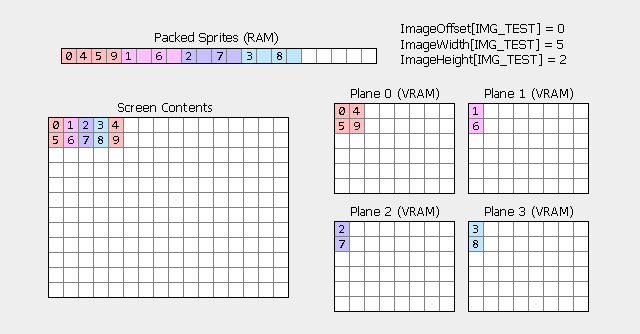
At this point, the graphics code begins to look complicated, so we turned to Graphics Programming Black BookMichael Abrash, the best source of knowledge about VGA. As the Black Book explains, Mode X splits pixel data into four planes. Each plane stores a quarter of the pixels in an alternating pattern. In plane 0, pixels 0, 4, 8, 12, etc. are stored. In plane 1, pixels 1, 5, 9, 13, and so on, are stored.
This is a classic situation in game programming: we know the output that we need to create, and the choice of how to structure the input data (in our case, images) will have a tremendous impact on the complexity and speed of the rendering code. Fortunately, we didn’t have to figure it out on our own: in Abrash’s book there are a lot of useful tips for efficient rendering in Mode X. Since the entire screen is divided into four planes, and switching between planes is a relatively slow process, the most convenient (and fast! ) option is to split each image into four data blocks so that the data portions of each of the planes are in one adjacent fragment. Thanks to this, the code becomes incredibly simple and as fast as possible. Here is the code that renders a full-screen (320 x 240) image into VGA memory:
// Пример кода: отрисовка изображения в память VGA
void far *vgaMemory = MAKE_FAR_POINTER(0xA000, 0x0000);
short bytesPerPlane = (320 / 4) * 240;
for (plane = 0; plane < 4; plane++)
{
    SetCurrentVgaPlane(plane);
    _fmemcpy(vgaMemory, imageData, bytesPerPlane);
    imageData += bytesPerPlane;
}
This piece of code also demonstrates some oddities that we will have to deal with when writing a 16-bit DOS program. Using 16-bit pointers, you can directly access only 64 kB of memory. (These are "near" pointers.) However, most DOS-based computers have much more memory, and addresses related to VGA memory already occupy 64 kB! In assembler, this problem is dealt with using segment registers. C usually uses "far pointers", that is, a 32-bit type of pointers that allows access to 1 megabyte. (Life has become much easier with the advent of 32-bit processors, because it became possible to access 4 GB of memory without worrying about segment registers.)
Fortunately, 64 kB is a lot, and almost the entire game fits into this framework. Only two pieces of code require the use of long pointers. I already mentioned the first one: VGA memory is located in the entire 64-kilobyte range from address 0xA0000. The second fragment is image data. Having converted all the graphics to low resolution with one byte per pixel, we got about 250 KB of image data stored in one large file. This is more than 64 kB, so it also required a long pointer. In addition, this part was the only one in the code for which we used dynamic memory allocation.
Memory management
The main source of errors and complexities in many C programs is dynamically allocated memory management. In Shenzhen Solitaire, we made everything simple: we knew exactly how many cards we needed to track, so we allocated memory for them in advance. There are no calls in the code
malloc()that can lead to errors, and there are no calls free()to forget about. (The same strategy applies to the state in the rest of the game.) Here's what the state of the solitaire engine looks like:// Пример кода: объявление состояния движка пасьянса
struct CardOrCell
{
byte Suit;
byte Value;
byte CellType;
struct CardOrCell *Parent;
struct CardOrCell *Child;
};
CardOrCell Cards[NUM_CARDS];
CardOrCell FreeCells[NUM_FREE_CELLS];
CardOrCell FoundationCells[NUM_FOUNDATION_CELLS];
CardOrCell TableauCells[NUM_TABLEAU_CELLS];
CardOrCell FlowerCell;
CardOrCell *DraggedCard;As I mentioned above, the only place where we were not able to use this strategy is image data, because it took up much more than 64 kB. Therefore, we saved all the images in one large file (as explained above, the image data was divided into four planes) and loaded them when loading the game along with displaying the loading bar:
// Пример кода: загрузка данных изображений из файла
// В настоящем исходном коде этот процесс более сложен,
// кроме того, он включает в себя более надёжную обработку ошибок.
FILE *f = fopen("SHENZHEN.IMG", "rb"); assert(f);
long size = GetSizeOfFile(f);
ImageData = farmalloc(size); assert(ImageData);
long loaded = 0;
byte huge *dest = ImageData;
while (loaded < size)
{
    long result = fread(dest, 1, 1024, f); assert(result != 0);
    loaded += result;
    dest += result;
    // (обновление полосы загрузки)
}
fclose(f);
The memory allocated for image data is never freed, because we use it throughout the program.
There is a funny detail in the download code: on the boot screen above the bar of the boot process, we draw a boot logo. However, we draw the loading screen before reading the image data! To cope with this cyclic dependence, we added a special rule to the image data packaging program: first of all, place image data for the boot logo. They load in the first one to two seconds after the game starts, and then can be displayed during the remaining boot process.
// Пример кода: отрисовка логотипа экрана загрузки
bool logoDrawn = false;
while (loaded < size)
{
    ...
    // Отрисовываем фон экрана загрузки после его загрузки:
    if (!logoDrawn && loaded > ImageOffsets[IMG_BOOT_BACKGROUND + 1])
    {
        Blit(IMG_BOOT_BACKGROUND, 101, 100);
        logoDrawn = true;
    }
}
Image preprocessing
How to find and use image data when rendering it? All images used in the game were saved in PNG files created in modern software. These PNGs were then processed in a special content baking program. The content caster converted PNG to a format that was easily processed by a 16-bit DOS program. In this case, three files were created: a large binary file containing all the pixel data in the form of palette indices, a small binary file containing a 256-color palette common to all images, and a C header file containing metadata, allowing you to give images names and find their data . Here's what the metadata looks like:
// Пример кода: метаданные изображений, автоматически сгенерированные
// инструментом для запекания контента
#define IMG_BUTTON        112
#define IMG_BUTTON_HOVER    113
#define IMG_CARD_FRONT        114
// ID других изображений...
long ImageOffsets[] = { 0L, 4464L, 4504L, 4544L, ... };
short ImageWidths[] = { 122, 5, 5, 5, ... };
short ImageHeights[] = { 36, 5, 5, 5, ... };
byte huge *ImageData = /* загружаемые из файла данные изображений */
For each PNG file processed by the content caster, they assign an ID (for example, IMG_CARD_FRONT), record its width, height and location of the data. To draw the image, we call the draw function, for example Blit (IMG_CARD_FRONT, x, y). The render function then calls ImageInfo (IMG_CARD_FRONT, ...) to retrieve the image data and metadata.
// Пример кода: поиск метаданных для изображения
void ImageInfo(short imageID, short *w, short *h, byte huge **image)
{
    assert(imageID >= 0 && imageID < IMAGE_COUNT);
    *w = ImageWidths[imageID];
    *h = ImageHeights[imageID];
    *image = ImageData + ImageOffsets[imageID];
}
Low level optimization: a bit of assembler
After completing the implementation of work with graphics, we completed the logic of the solitaire gameplay quickly, and everything looked beautiful, although it worked very slowly. As always, the only way to optimize effectively is by profiling code. Borland C ++ includes Turbo Debugger, a very useful profiler, given that he is 25 years old:
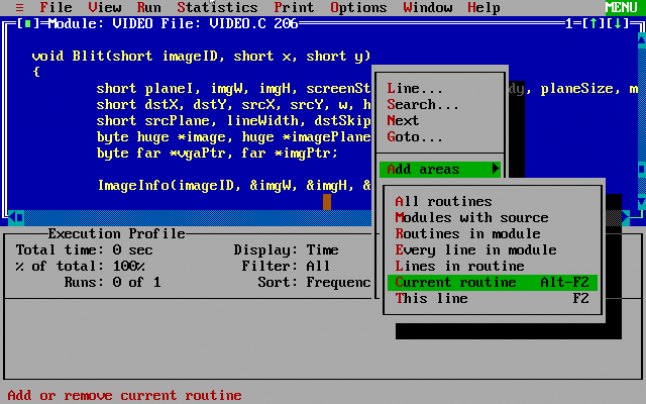
In our case, the profiling results were not surprising. The program spent almost all the time on rendering procedures, copying image data to VGA memory. Copying hundreds of thousands of pixels per second to 386 at a frequency of 20 MHz is a very demanding process! Studying the assembler code generated by the Borland compiler made it clear that there are many overheads that slow down the internal cycles of rendering procedures:
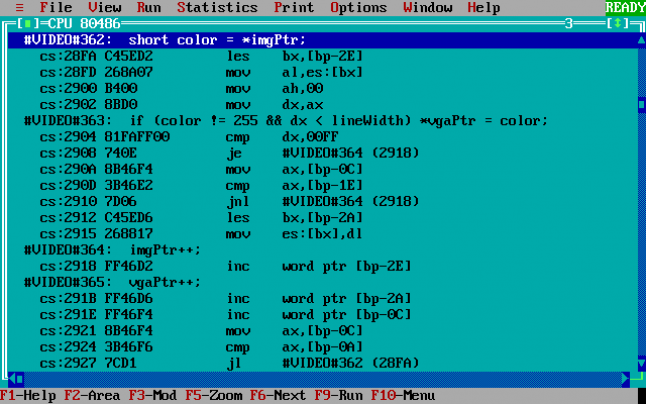
Although we tried to stick to C to the maximum, it was obvious that assembly language could not do without optimizing the critical internal cycles of rendering procedures. Assembly language was often used in programming games of the 90s, when the processors were slow, and the compiler optimizations were not so efficient. Therefore, we rewrote only the internal parts of the rendering functions on the built-in assembler code. Here is the built-in assembler code inside the Blit () function, which is used for most of the game rendering process:
// Пример кода: отрисовка встроенным ассемблерным кодом
byte far *vgaPtr = /* адрес памяти VGA */;
byte far *imgPtr = /* адрес исходных данных изображений */;
asm PUSHA
asm PUSH DS
asm LES DI, vgaPtr
asm LDS SI, imgPtr
asm MOV BX, h
asm CLD
each_row:
    asm MOV CX, lineWidth
    asm REP MOVSB   // Эта команда делает всю работу!
    asm ADD DI, dstSkip
    asm ADD SI, srcSkip
    asm DEC BX
    asm JNZ each_row
asm POP DS
asm POPA
Before this assembler code, there is a lot of C code that calculates where to draw, where to read the image data from, how to insert the drawn image into the visible area, but the vast majority of the execution time is spent on the REP MOVSB command. This command is similar to memcpy () from C, but natively supported by x86 processors, and this is the fastest * way to copy memory on earlier x86 processors, such as 386. Like memcpy (), you must specify a pointer to the source, a pointer to the recipient, and a number (in registers), after which the processor automatically copies the desired amount of data in a loop.
Shenzhen Solitaire for MS-DOS uses the built-in assembler language in only three pieces of code, and they are all very similar to this piece of code. Using the built-in assembler in these critical rendering functions increased the speed of these functions by 5-10 times. Despite the many lines of customization code and other code that runs in the game, most of the CPU time was spent simply copying bytes.
* In fact, REP MOVSW or REP MOVSD would be even faster, because instead of one, they copy 2 or 4 bytes at a time. However, in our version of Borland C ++ only 16-bit commands were supported, which prevented the use of MOVSD. We tried to use MOVSW, but we had difficulties with its proper operation. Even if REP MOVSW accelerated the rendering process by half, this would still not be enough to solve our high-level performance problems.
Double buffering
The next problem to be solved was flicker.
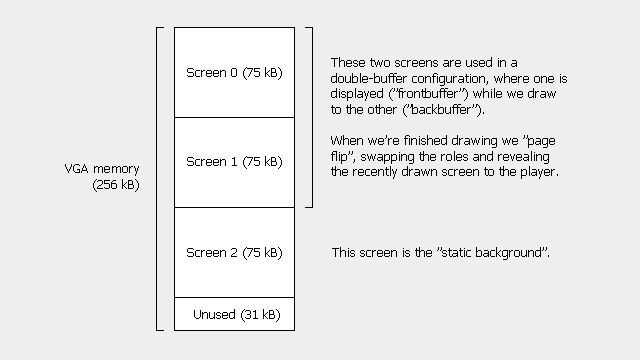
In Mode X mode, 75 kB of VGA memory is required to describe full-screen graphics. But 256 KB of VGA memory was enough to store three “screens” at the same time. In our code, we mentally called them Screen 0, Screen 1, and Screen 2. So far, we used only Screen 0. To implement double buffering, we used Screen 0 and 1. At each moment in time, one screen was the “front buffer” displayed on the screen, and the second was used as the “back buffer”, the area in which the game draws new or changed elements. When we are ready to display a new frame of graphics, we perform “page reflection”, a VGA function that instantly changes the displayed part of the memory.
Double buffering solved the flicker problem, but the game was still too slow. Just editing the low-level rendering code was not enough. As usual, Abrash foresaw this. The main message of the book Graphics Programming Black Book - the choice of suitable algorithms and high-level design programs give a greater gain in performance than low-level assembler tricks.
High Level Optimization: Static Background
First, we noticed that most of the screen almost always remains the same and does not change from frame to frame.
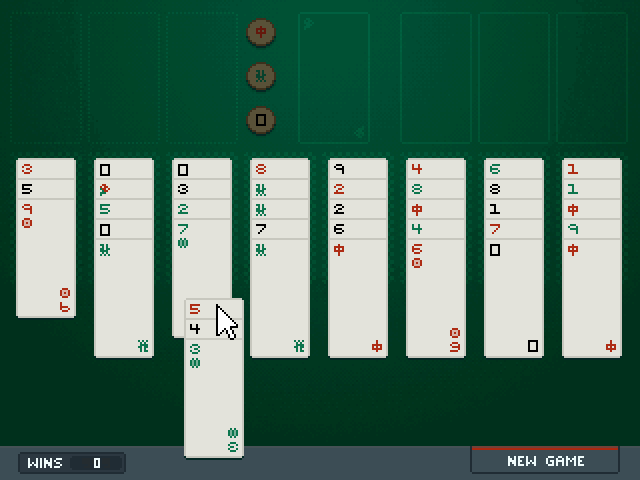
The mouse cursor usually moves around the screen, sometimes several cards are dragged, but the background and most cards remain completely unchanged. To take advantage of this, we have designated the last full-screen VGA Screen 2 memory as a “static background." We began to draw all rarely changed interface elements (that is, almost everything except the mouse cursor) on Screen 2. That is, the procedure for rendering each frame was usually like this:
- Copy the static background to the back buffer.
- We draw the mouse (and all draggable cards) into the back buffer.
- Make the back buffer visible.
This allowed us to get rid of the solid part of the work in most frames, but copying the entire static background was still a lot of work. Worse, when the static background changed, for example, when the map was lifted with the mouse, first the static background had to be completely redrawn in addition to another frame-by-frame work. This meant that usually the game worked smoothly, but when clicking on the cards or buttons there were noticeable and unacceptable braking.
At this stage of development, we had two main costs of performance: redrawing a static background (from time to time) and copying a static background to the back buffer (in each frame). We found a simple solution to reduce the cost of redrawing the background: each stack of cards has its own area on the screen, and usually you need to redraw just one or two stacks per frame. This meant that you only need to redraw 10-20% of the static background, which took proportionally less time.
High Level Optimization: Dirty Rectangles
The last problem that prevented the game from working at an acceptable frame rate was copying a static background that occurred every frame. Our solution was another classic technique from the era before the advent of hardware graphics acceleration: tracking dirty rectangles. You can remember the "dirty rectangles" on Windows 95, when programs freeze, such situations arose frequently. When the program crashed, the user could drag another window over the window of the hung program until it became empty or covered with graphic garbage. The areas in which the user was redrawing, dragging the window, were "dirty." The hung program should redraw them as soon as the user removed the window in the foreground from them.
We used dirty rectangles in a similar way. When a player moves the mouse or part of the static background changes, we add this area to the list of dirty rectangles. Then, instead of copying the entire static background to the back buffer, we copy only the dirty rectangles. Copying fewer pixels means that it takes less time to render a frame, which increases the frame rate.
Thanks to this improvement, the game was finally able to work smoothly on our test machine. We decided that most VGA-equipped computers have better specifications than our braking 20-MHz machine with a 386 processor, so we were sure that the game's performance would be high enough to release the game.
Enter
Compared to graphics, all other aspects of the game were unusually simple. On IBM-compatible computers, most of the basic services required are provided by BIOS and DOS using the interrupt-based API. These services include reading data entered from the keyboard and mouse, reading and writing to disks, opening files and allocating memory. Here are some of the interrupts we used at Shenzhen Solitaire:
- INT 16h: Keyboard API
- INT 21h: DOS system calls
- INT 33h: Mouse API
These APIs should be used from assembly code, something like this:
// Пример кода: вызов функций BIOS с помощью ассемблера
// Используем INT 16h, 1h для получения последней нажатой клавиши.
mov AL, 16h
mov AH, 01h
int 16h
// При нажатии клавиши устанавливается нулевой флаг.
jnz no_key_pressed
// Обработка ввода клавиши…
no_key_pressed:
// Продолжение выполнения программы...
Reading the state of the mouse is performed in a similar way: by calling INT 33h, 3h to get the current position of the mouse and the state of the buttons. Compared to direct access to hardware or even using the API of modern OSs, this is incredibly simple.
Sound
Sound effects are an important part of any game, but playing music and sound on very old PCs is a difficult task. The simplest option available on all IBM-compatible PCs is the PC speaker. This speaker is controlled by a simple timer chip on the motherboard. This means that the speaker is very easy to configure for continuous playback of sound at a constant frequency. Some PCs also have special sound cards, but they are much more difficult to use and they are not always in the system.
Due to the limitations of the PC speaker, we played only short “musical” fragments at certain points in the game: when the game started, when it closed, and after the victory. In the PC era of the 386 processor, there is little opportunity for accurate time measurement, and it is difficult to play even simple music through the PC speaker at the same time as performing other actions. Therefore, we again chose the simplest option: since the musical fragments are very short, we just stop the game for one or two seconds, that is, the duration of the music effect. The code for setting and playing back such fragments is very simple:
void PlayStartupMusic(void)
{
    sound(73);
    delay(220);
    sound(110);
    delay(220);
    sound(165);
    delay(220);
    sound(98);
    delay(220);
    sound(110);
    delay(220);
    sound(147);
    delay(440);
    nosound();
}
In addition to musical fragments, we wanted to add a sound effect with which cards would be taken and laid down so that the game felt more physical. It was also realized through the PC speaker by temporarily disabling the timer-based automatic sound generator and manually turning it on and off to create a short “click”.
Releasing the game!
Porting Shenzhen Solitaire to MS-DOS proved to be both easier and more complicated than we expected. Despite the huge difference in the power of the processors of the target equipment (single-core Intel 80386SX with a frequency of 20 MHz) and our usual equipment (four-core Intel Core i7-4770K with a frequency of 3500 MHz), non-optimized gameplay logic worked at lightning speed and had little effect on performance. But the disadvantage was that everything seems fast when it takes almost 150 milliseconds to draw all the pixels on the screen! In the process, we learned a lot about the architecture of computers, which now can be considered understandable only to the initiates. Despite the informative and interesting process, we are unlikely to use segment registers in future Zachtronics games. We are not so sadistic!
If you are interested in playing the Shenzhen Solitaire port under MS-DOS and reading this article until September 12, 2017, then evaluate our project on Kickstarter and order a copy of the game as part of our floppy-only release. Complete source code included!