July 2, 2017 at 12:44
How to protect corporate storage from cryptographic viruses with snapshots
For more than a year now, cryptographic viruses have shocked the IT market with the consequences of their clandestine work. Hiding behind a link in an email or in JavaScript code on a website page, they silently install on work computers or servers and begin quietly encrypting all information. After the end of encryption, some simply delete the encryption key, others require a ransom, but not all users who pay it receive the encryption key. How can you deal with them? The most important remedy is to be prepared for the worst.
Trying to defend against viruses and other hacker attacks only with antivirus and firewalls is like hanging locks on doors, setting an alarm / video surveillance and counting on someone not being able to get around this. As practice shows, even the most complex locks, the most intelligent security systems can be circumvented. You need to have “Plan B” and be prepared for the worst. The only way out is to be able to quickly and guaranteedly recover data. Using NetApp solutions as an example, consider these possibilities.
They have not only many integrations with many backup software, anti-virus systems and other infrastructure systems, but also provide high availability for NAS (NFS, CIFS / SMB) and SAN (iSCSI, FC, FCoE). Unified storage allows transparent data migration between nodes of a cluster, which can consist of 24 nodes, and also allows you to use all the nodes at the same time to serve the NAS and SAN in order to increase productivity. Thus, you can completely abandon Windows Server prone to vulnerabilities - do not buy licenses and build clusters for high availability, because all the functionality is already available in NetApp ONTAP, including integration with AD, security settings for files and folders, Access Based Enumeration and everyone’s familiar MMC management console.
Both in the largest organizations and in small firms, work files are placed on a public file storage so that everyone can use them. Centralization of storage makes it convenient for several people to work together on the same files, but this also entails the responsibility to protect such information. Naturally, to combat cryptographic viruses, it is necessary to regularly back up according to the 3-2-1 scheme. Backups are important to keep separate from the main system.
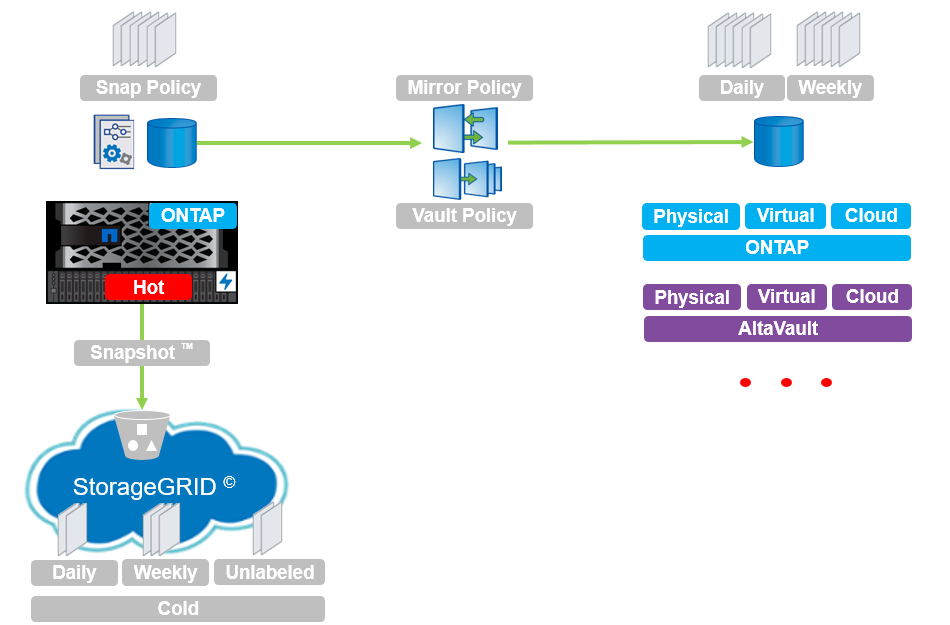
NetApp FAS / ONTAP storage systems have snapshots in their arsenal that do not affect performance and replication based on these snapshots, which allow integrating with a wide list of backup systems using NetApp storage technologyfor both NAS and SAN environments:
Let's take a closer look at one of these backup systems, Veeam Backup & Replication, which has gained trust and respect due to the ease and simplicity of the management interface. But this is not all the advantages of this product, which not only knows how to manage snapshots and replicas between NetApp FAS, ONTAP Select, ONTAP Cloud and AltaVault systems. It also allows storage to clone data on one of the sites for testing the health and recoverability of such backups. Cloning, like snapshots on the NetApp FAS / ONTAP system, is a very convenient technology that also does not affect performance and practically does not take up storage space at the initial moment of removing the snapshot. In addition, the creation takes less than a second, regardless of the size of the cloned data.
But a full recovery, firstly, can be quite lengthy, and secondly, backups can be performed not every 15 minutes, thus increasing RPO. And here it becomes clear how important the backups are snapshots, which can be performed much more often than backups from NAS or SAN storage and, accordingly, restore such data much faster from snapshots, thus significantly reducing the RPO value. And here it becomes clear how important it is that such snapshots function like a clock, do not slow down the operation of the entire storage, and do not have architectural problems of removal and consolidation. At the same time, snapshots are not a replacement for backups, but an important addition to a full backup strategy.
Snapshots are not a complete copy of data, only the difference of new data at the block level, a kind of reverse incremental backup, which uses storage space more efficiently than a full backup. But still, this space is used, the more changes, the more information gets into the snapshot. The configured auto-delete schedule for old snapshots will allow more rational use of storage resources and not eat up all available space on an expensive NAS storage. A backup, will store much longer copies of older versions of information.
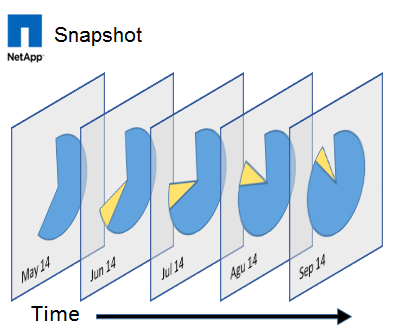
NetApp ONTAP snapshots are equally effective in both NAS and SAN environments, are equally architecturally designed, have the same interface, configuration, removal and recovery speed, which allows you to roll back faster in case of data corruption.
We should also mention the FabricPool technology , which allows transparently shifting snapshots and cold data from SSD drives to slow disks in the object storage, which will allow you to actively and often use such an important snapshot technology on expensive storage media.
There is a separate document on how to deal with cryptographic viruses using NetApp TR4572 systems .
Many have already encountered various snapshot implementations and already in practice know how snapshots should not work:
Snapshots in the ONTAP operating system for NetApp repositories do not work this way . They were first implemented in the ONTAP operating system, as part of the WAFL file system in 1993, and as you can see, these technologies have been tested over time. By the way, the word snapshot itself is a registered trademark of NetApp, and snapshot technology is patented. To study the issue of how WAFL snapshots work, you can download a virtual machine from the ONTAP storage image for free during the test period, which you can request from a Distributor or Integrator.
mysupport.netapp.com/NOW/cgi-bin/software/?product=ONTAP+Select&platform=Deploy+Install
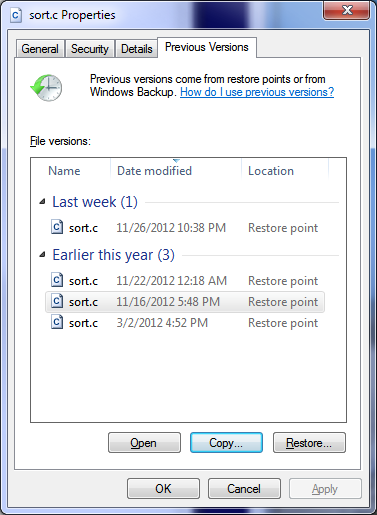
Integration of storage snapshots with operating systems will allow you to remove the routine from the storage administrator to restore individual files. So that users themselves can restore their files from snapshots directly from their Windows computer using standard OS tools.
Just deleting old snapshots that are already in the storage and configured in a well-established backup strategy is a significant waste of resources. After all, snapshots can be used to replicate them to the second, third, etc. storage systems. Firstly, there are already snapshots, why not use them, secondly, it’s much more profitable to transmit a delta than the entire data set every time, thirdly, snapshots work like reverse incremental backups. Those. do not require time for “bonding to full backup”, in the fourth ONTAP snapshots are similar to reverse incremental backups, but they do not require bonding or consolidation either before recovery, during replication, or during recovery, as happens with traditional incremental backups or reverse incremental backup. But there is no magic
Write Once Read Manu or WORM technology, also known by other commercial names, for example, NetApp SnapLock built on the basis of snapshoting, allows you to block data for a long period of time from changes, including from users of a storage system with elevated privileges. So you can store firmware, configurations from a variety of devices, such as switches, routers, and more. Files of this kind rarely, if ever, change during the life of a device, and WORM-enabled storages are a reliable place to locate important infrastructure configuration files that are definitely not infected, they cannot be changed, but they can be read. This property can be used to download configurations and firmware for key components of your infrastructure.
And of course, the ability to check files on the storage side will also not be superfluous . NetApp FAS / ONTAP systems integrate with a wide list of anti-virus systems that will scan corporate data on NAS storage. The most famous anti-virus scanning systems are supported:
As mentioned earlier, snapshots store a block delta in themselves - the difference between its previous state and between its current, that is, current. And the more changes are made to the actual data, the more the snapshot takes. In addition, it is worth mentioning about data compression and data deduplication technologies, which allow you to compress original data, saving storage space. So some data is not compressed. For example, photos, video or audio data, and what data is not yet compressed? Correct, encrypted files. And just imagine you set up a snapshot schedule, you have deduplication and compression. Snapshots are removed, and older ones are deleted, data is compressed, space consumption is fairly measured and stable. And suddenly snapshots begin to take up much, much more space than before, and deduplication and compression are no longer effective. These are the indicators of the silent and malicious operation of the ransomware virus: firstly, your data changes a lot (snapshots grow in volume compared to what it was before), and secondly, dedup and compression stopped giving results (it means it is being written incompressible information, for example, the original files are replaced with encrypted versions). These two indirect indicators lead to irrational storage space consumption, and you can notice this on the space consumption graph in the NetApp monitoring interface, which suddenly began to grow geometrically upwards. as it was before), secondly, dedup and compression stopped giving results (that means incompressible information is recorded, for example, the original files are replaced with encrypted versions). These two indirect indicators lead to irrational storage space consumption, and you can notice this on the space consumption graph in the NetApp monitoring interface, which suddenly began to grow geometrically upwards. as it was before), secondly, dedup and compression stopped giving results (that means incompressible information is recorded, for example, the original files are replaced with encrypted versions). These two indirect indicators lead to irrational storage space consumption, and you can notice this on the space consumption graph in the NetApp monitoring interface, which suddenly began to grow geometrically upwards.

Fpolicy and ONTAP directory-security APIs are mechanisms that allow you to analyze a file, and depending on the policies configured, allow or not allow, write it, or work with it for the SMB / CIFS protocol. File analysis can be carried out on the basis of the file extension (Fpolicy built-in functionality in ONTAP) or according to the content, then specialized software using these two mechanisms is needed.
The free product Cleondis SnapGuard Light Edition (SGLE) is intended not only for detection on a CIFS / SMB ball, but also for recovering from cryptographic viruses using snapshots on the NetApp ONTAP platform . SGLE is able to recognize the malicious patterns of ransomware viruses that start encrypting your files and stop clients who are infected from further harm and are fully compatible with existing anti-virus systems.
The free Prolion DataAnalyzer-light product provides the ability to detect ransomware viruses on the NetApp ONTAP platform with SMB / CIFS ball .
Varonis is a very powerful industrial solution that can not only track encryption, disconnect infected users from NAS (CIFS / SMB), but also find and recover those files that were encrypted.
WannaCry / Petya viruses use the vulnerability in the SMB1 protocol on Windows machines; this vulnerability is not present in NetApp ONTAP systems. But once it gets to Windows, the virus can encrypt files located on the NAS storage, that's why it is recommended to configure snapshots on a schedule. NetApp recommends disabling SMB1 and upgrading to the newer versions of SMB v2 or v3 protocols on Windows Workstation client to avoid infection.
Newer versions of the virus can disable shadow copying of VSS on Windows hosts, but since the snapshot schedule on the NetApp NAS is configured, turned on and off on the storage itself, turning off VSS will not affect the operation of snapshots.
PS. Also, check out the document describing ONTAP security settings for enhanced security (Security Hardening Guide for NetApp ONTAP 9) .
Due to mass infections of data with viruses like RansomWare, Megatrade, the official distributor of NetApp in Ukraine launches an action for its existing and future customers on:
In conclusion, it is worth noting that snapshots are not a replacement, but an important part of the backup strategy, which allows you to back up data more quickly, more often and restore it faster. WAFL snapshots are the basis for cloning, SnapLock and data replication to backup storage, do not slow down the system, do not require consolidation and gluing, and are an effective means of data backup. NetApp FAS / ONTAP Enterprise Storage Systems have multiple technologies and integrations to help you prepare for the worst. Well, in the context of recent events, the technologies discussed above also become very relevant for protecting your information from various malware.
English translation:
How to protect your corporate storage system against ransomware
Please send messages about errors in the text to the LAN . Comments, additions and questions on the opposite article, please comment.
Trying to defend against viruses and other hacker attacks only with antivirus and firewalls is like hanging locks on doors, setting an alarm / video surveillance and counting on someone not being able to get around this. As practice shows, even the most complex locks, the most intelligent security systems can be circumvented. You need to have “Plan B” and be prepared for the worst. The only way out is to be able to quickly and guaranteedly recover data. Using NetApp solutions as an example, consider these possibilities.
NetApp FAS / ONTAP Storage Systems
They have not only many integrations with many backup software, anti-virus systems and other infrastructure systems, but also provide high availability for NAS (NFS, CIFS / SMB) and SAN (iSCSI, FC, FCoE). Unified storage allows transparent data migration between nodes of a cluster, which can consist of 24 nodes, and also allows you to use all the nodes at the same time to serve the NAS and SAN in order to increase productivity. Thus, you can completely abandon Windows Server prone to vulnerabilities - do not buy licenses and build clusters for high availability, because all the functionality is already available in NetApp ONTAP, including integration with AD, security settings for files and folders, Access Based Enumeration and everyone’s familiar MMC management console.
Backup
Both in the largest organizations and in small firms, work files are placed on a public file storage so that everyone can use them. Centralization of storage makes it convenient for several people to work together on the same files, but this also entails the responsibility to protect such information. Naturally, to combat cryptographic viruses, it is necessary to regularly back up according to the 3-2-1 scheme. Backups are important to keep separate from the main system.
NetApp FAS / ONTAP storage systems have snapshots in their arsenal that do not affect performance and replication based on these snapshots, which allow integrating with a wide list of backup systems using NetApp storage technologyfor both NAS and SAN environments:
- Veeam Backup & Replication
- CommVault Simpana
- NetApp SnapManager / SnapCenter.
- NetApp SnapCreator (free framework)
- Veritas NetBackup
- Veritas BackupExec
- Syncsort
- Acronis
- IBM Spectrum Protect (Tivoli)
- EMC Networker
- HP Data Protector
- Cleondris DM
- Catalogic ECX / DPX
- Arcserve UDP
- Other
Let's take a closer look at one of these backup systems, Veeam Backup & Replication, which has gained trust and respect due to the ease and simplicity of the management interface. But this is not all the advantages of this product, which not only knows how to manage snapshots and replicas between NetApp FAS, ONTAP Select, ONTAP Cloud and AltaVault systems. It also allows storage to clone data on one of the sites for testing the health and recoverability of such backups. Cloning, like snapshots on the NetApp FAS / ONTAP system, is a very convenient technology that also does not affect performance and practically does not take up storage space at the initial moment of removing the snapshot. In addition, the creation takes less than a second, regardless of the size of the cloned data.
Rescue Snapshots
But a full recovery, firstly, can be quite lengthy, and secondly, backups can be performed not every 15 minutes, thus increasing RPO. And here it becomes clear how important the backups are snapshots, which can be performed much more often than backups from NAS or SAN storage and, accordingly, restore such data much faster from snapshots, thus significantly reducing the RPO value. And here it becomes clear how important it is that such snapshots function like a clock, do not slow down the operation of the entire storage, and do not have architectural problems of removal and consolidation. At the same time, snapshots are not a replacement for backups, but an important addition to a full backup strategy.
Snapshots are not a complete copy of data, only the difference of new data at the block level, a kind of reverse incremental backup, which uses storage space more efficiently than a full backup. But still, this space is used, the more changes, the more information gets into the snapshot. The configured auto-delete schedule for old snapshots will allow more rational use of storage resources and not eat up all available space on an expensive NAS storage. A backup, will store much longer copies of older versions of information.
SAN environment
NetApp ONTAP snapshots are equally effective in both NAS and SAN environments, are equally architecturally designed, have the same interface, configuration, removal and recovery speed, which allows you to roll back faster in case of data corruption.
Snapshots and NetApp FabricPool Technology
We should also mention the FabricPool technology , which allows transparently shifting snapshots and cold data from SSD drives to slow disks in the object storage, which will allow you to actively and often use such an important snapshot technology on expensive storage media.
There is a separate document on how to deal with cryptographic viruses using NetApp TR4572 systems .
How snapshots should not work
Many have already encountered various snapshot implementations and already in practice know how snapshots should not work:
- they should not increase the load on the disk subsystem simply from the presence of a snapshot;
- they should not increase the load simply from a larger number of snapshots;
- they should not be slowly created and deleted, and this process should not affect the performance of the disk subsystem;
- they should not be deleted so as to damage the master data;
- it should not matter how much data, everything should work quickly, instantly and without the slightest opportunity to damage information due to the removal or consolidation of the snapshot.
Snapshots in the ONTAP operating system for NetApp repositories do not work this way . They were first implemented in the ONTAP operating system, as part of the WAFL file system in 1993, and as you can see, these technologies have been tested over time. By the way, the word snapshot itself is a registered trademark of NetApp, and snapshot technology is patented. To study the issue of how WAFL snapshots work, you can download a virtual machine from the ONTAP storage image for free during the test period, which you can request from a Distributor or Integrator.
mysupport.netapp.com/NOW/cgi-bin/software/?product=ONTAP+Select&platform=Deploy+Install
Recovery Automation
Integration of storage snapshots with operating systems will allow you to remove the routine from the storage administrator to restore individual files. So that users themselves can restore their files from snapshots directly from their Windows computer using standard OS tools.
Snapshot Replication
Just deleting old snapshots that are already in the storage and configured in a well-established backup strategy is a significant waste of resources. After all, snapshots can be used to replicate them to the second, third, etc. storage systems. Firstly, there are already snapshots, why not use them, secondly, it’s much more profitable to transmit a delta than the entire data set every time, thirdly, snapshots work like reverse incremental backups. Those. do not require time for “bonding to full backup”, in the fourth ONTAP snapshots are similar to reverse incremental backups, but they do not require bonding or consolidation either before recovery, during replication, or during recovery, as happens with traditional incremental backups or reverse incremental backup. But there is no magic
Worm
Write Once Read Manu or WORM technology, also known by other commercial names, for example, NetApp SnapLock built on the basis of snapshoting, allows you to block data for a long period of time from changes, including from users of a storage system with elevated privileges. So you can store firmware, configurations from a variety of devices, such as switches, routers, and more. Files of this kind rarely, if ever, change during the life of a device, and WORM-enabled storages are a reliable place to locate important infrastructure configuration files that are definitely not infected, they cannot be changed, but they can be read. This property can be used to download configurations and firmware for key components of your infrastructure.
NAS antivirus protection
And of course, the ability to check files on the storage side will also not be superfluous . NetApp FAS / ONTAP systems integrate with a wide list of anti-virus systems that will scan corporate data on NAS storage. The most famous anti-virus scanning systems are supported:
- Symantec
- Trend micro
- Computer associates
- Mcafee
- Sophos
- Kaspersky
Snapshots as an indicator of RansomWare infection
As mentioned earlier, snapshots store a block delta in themselves - the difference between its previous state and between its current, that is, current. And the more changes are made to the actual data, the more the snapshot takes. In addition, it is worth mentioning about data compression and data deduplication technologies, which allow you to compress original data, saving storage space. So some data is not compressed. For example, photos, video or audio data, and what data is not yet compressed? Correct, encrypted files. And just imagine you set up a snapshot schedule, you have deduplication and compression. Snapshots are removed, and older ones are deleted, data is compressed, space consumption is fairly measured and stable. And suddenly snapshots begin to take up much, much more space than before, and deduplication and compression are no longer effective. These are the indicators of the silent and malicious operation of the ransomware virus: firstly, your data changes a lot (snapshots grow in volume compared to what it was before), and secondly, dedup and compression stopped giving results (it means it is being written incompressible information, for example, the original files are replaced with encrypted versions). These two indirect indicators lead to irrational storage space consumption, and you can notice this on the space consumption graph in the NetApp monitoring interface, which suddenly began to grow geometrically upwards. as it was before), secondly, dedup and compression stopped giving results (that means incompressible information is recorded, for example, the original files are replaced with encrypted versions). These two indirect indicators lead to irrational storage space consumption, and you can notice this on the space consumption graph in the NetApp monitoring interface, which suddenly began to grow geometrically upwards. as it was before), secondly, dedup and compression stopped giving results (that means incompressible information is recorded, for example, the original files are replaced with encrypted versions). These two indirect indicators lead to irrational storage space consumption, and you can notice this on the space consumption graph in the NetApp monitoring interface, which suddenly began to grow geometrically upwards.
File Screening Fpolicy
Fpolicy and ONTAP directory-security APIs are mechanisms that allow you to analyze a file, and depending on the policies configured, allow or not allow, write it, or work with it for the SMB / CIFS protocol. File analysis can be carried out on the basis of the file extension (Fpolicy built-in functionality in ONTAP) or according to the content, then specialized software using these two mechanisms is needed.
Free Cleondis SnapGuard Light Edition
The free product Cleondis SnapGuard Light Edition (SGLE) is intended not only for detection on a CIFS / SMB ball, but also for recovering from cryptographic viruses using snapshots on the NetApp ONTAP platform . SGLE is able to recognize the malicious patterns of ransomware viruses that start encrypting your files and stop clients who are infected from further harm and are fully compatible with existing anti-virus systems.
Free Prolion DataAnalyzer-light
The free Prolion DataAnalyzer-light product provides the ability to detect ransomware viruses on the NetApp ONTAP platform with SMB / CIFS ball .
Varonis
Varonis is a very powerful industrial solution that can not only track encryption, disconnect infected users from NAS (CIFS / SMB), but also find and recover those files that were encrypted.
SMB1 and WannaCry / Petya
WannaCry / Petya viruses use the vulnerability in the SMB1 protocol on Windows machines; this vulnerability is not present in NetApp ONTAP systems. But once it gets to Windows, the virus can encrypt files located on the NAS storage, that's why it is recommended to configure snapshots on a schedule. NetApp recommends disabling SMB1 and upgrading to the newer versions of SMB v2 or v3 protocols on Windows Workstation client to avoid infection.
Newer versions of the virus can disable shadow copying of VSS on Windows hosts, but since the snapshot schedule on the NetApp NAS is configured, turned on and off on the storage itself, turning off VSS will not affect the operation of snapshots.
Turn off SMB1 and SMB2
Open Powershall as administrator and insert the following lines
Set-ItemProperty -Path "HKLM:\SYSTEM\CurrentControlSet\Services\LanmanServer\Parameters" SMB1 -Type DWORD -Value 0 -Force
Set-ItemProperty -Path "HKLM:\SYSTEM\CurrentControlSet\Services\LanmanServer\Parameters" SMB2 -Type DWORD -Value 0 -Force
netsh advfirewall firewall add rule dir=in action=block protocol=TCP localport=445 name="Block_TCP-445"
netsh advfirewall firewall add rule dir=in action=block protocol=TCP localport=135 name="Block_TCP-135"
netsh advfirewall firewall add rule dir=in action=block protocol=TCP localport=139 name="Block_TCP-139"
PS. Also, check out the document describing ONTAP security settings for enhanced security (Security Hardening Guide for NetApp ONTAP 9) .
Due to mass infections of data with viruses like RansomWare, Megatrade, the official distributor of NetApp in Ukraine launches an action for its existing and future customers on:
- configure ONTAP snapshots for NAS, SnapRestore, Virtual Storage Console
- installing the free RansomWare infection monitoring software for ONTAP (CIFS / SMB)
- configure ONTAP integration with anti-virus systems for CIFS / SMB
- training on using ONTAP snapshots with SAN access
Conclusion
In conclusion, it is worth noting that snapshots are not a replacement, but an important part of the backup strategy, which allows you to back up data more quickly, more often and restore it faster. WAFL snapshots are the basis for cloning, SnapLock and data replication to backup storage, do not slow down the system, do not require consolidation and gluing, and are an effective means of data backup. NetApp FAS / ONTAP Enterprise Storage Systems have multiple technologies and integrations to help you prepare for the worst. Well, in the context of recent events, the technologies discussed above also become very relevant for protecting your information from various malware.
English translation:
How to protect your corporate storage system against ransomware
Please send messages about errors in the text to the LAN . Comments, additions and questions on the opposite article, please comment.