
 April 18, 2017 at 11:30
Visualization of interface animation requirements
- Transfer
Roman Shelekhov, head of the VTB Bank corporate electronic channels development group and master of the Guild of Free Designers , specially adapted “Netology” for Paul van Oijen's article on visualizing animation requirements.
Today, dynamics is an integral part of design. Interactive design is no longer the prerogative of animators or visual effects specialists. Large companies such as Google and IBM see animation design as a key part of their design guidelines.
Designers around the world have realized that animation is more than a fancy addition to the interface being created. This is an incredibly powerful tool that accompanies and guides the user along the necessary route inside the interface.
Using interactive design greatly improves the user experience. That is why the start pages of design-oriented sites are filled with GIF-animation and a large number of animated elements. It is inspiring to use this approach in working on your own projects.
A few hours, or even days, you spend diligently collecting animated prototypes in Principle, Flinto, After Effects, or elsewhere. In the end, an amazing animation is born, which, in your opinion, is ideal for the project.
After exporting, you double-check the result to make sure everything is moving correctly and at a given pace. Finally, save the video in a safe place. So simple. Happened. Now all you have to do is send the video to the developers so that they can do everything as soon as possible. Excellent!
Call the developers and give them a video that hardly lasts longer than a few seconds. Perhaps you add a few vague comments to it - that’s all. What needs to be done?
Repeat exactly!
Here. That is all that the developers get. Video or GIF animations plus small instructions are all they have to play the animation in the interface. It is not surprising that even the most experienced developers often do not want to work with motion design. They do not like to spend a lot of time, not knowing whether the effort will pay off.
It makes sense. Imagine that you were handed a brush, some paint, a blank canvas and a grainy print of Picasso. What should be done? Repeat exactly. You wouldn't like that either, right?
Any designer or developer creating animation in a team is most likely faced with a similar scenario.
Surely you were wondering: what is the best way to transfer requirements for the implementation of motion design to another specialist? A great solution for collaborating on designing and creating animations is ...
... to use an animation curve.
Inspired by this stunning performance, an
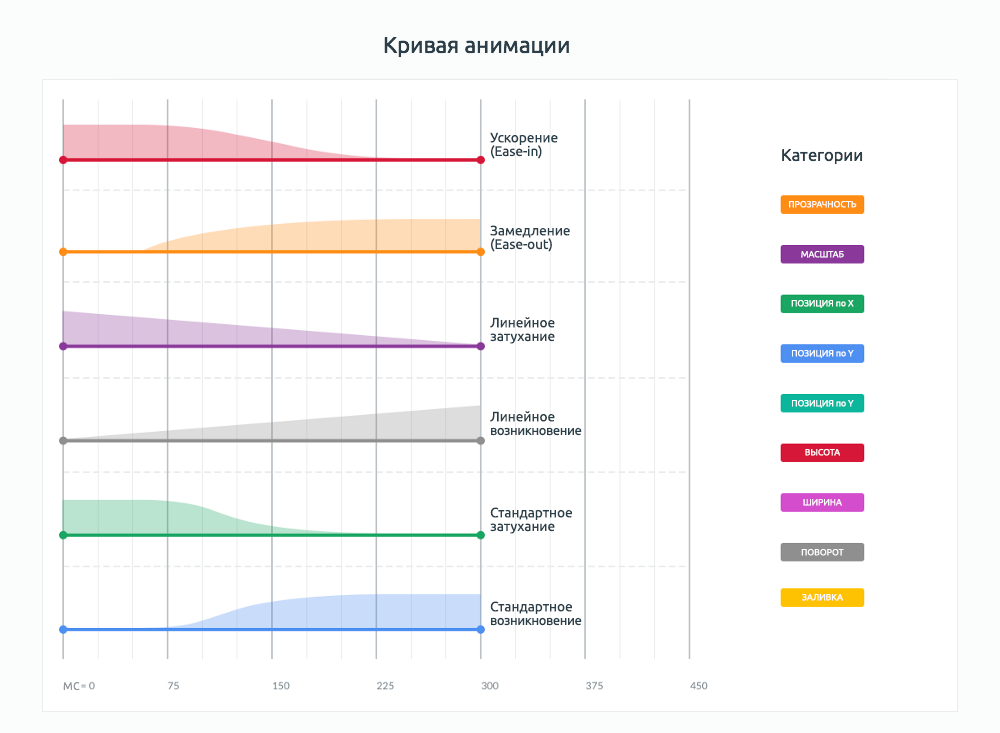
animation curve or motion graph is a graphical representation of the animation timeline. An animation curve is like a symbol on a map. This is a visual illustration that seriously helps to understand the requirements. The curve answers many animation questions:
Even a quick look at the animation curve gives a lot of information. This allows you not to waste time studying the timeline of the tools that you used, because it can be even more confusing.
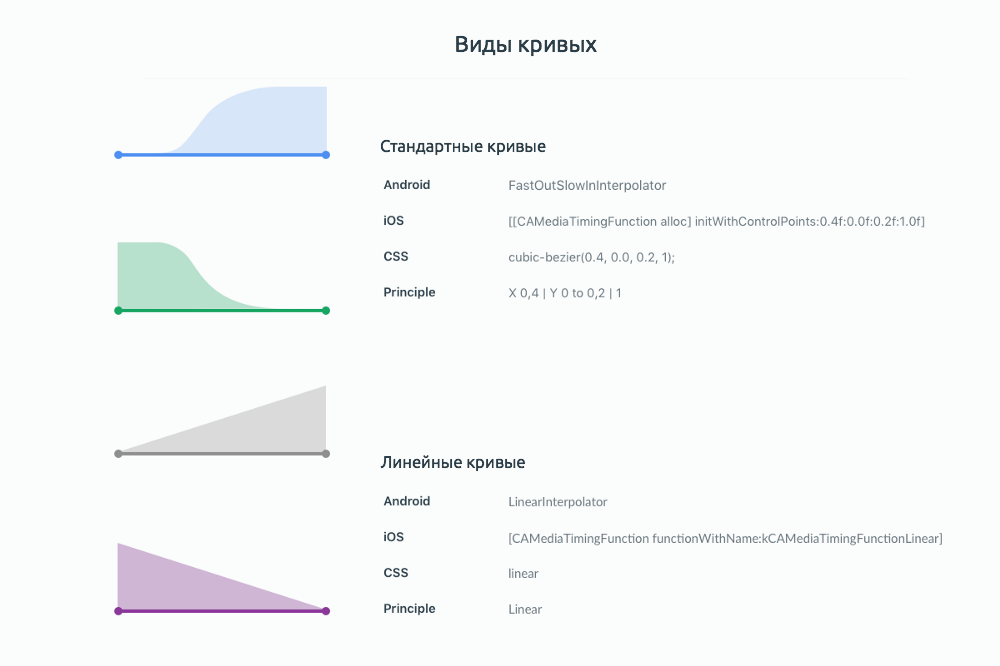
Look at these pretty curves
(specifications are kindly provided by Material Design )
Video (or GIF)
Choosing from a list of options
The main tool for describing motion design is video or GIF animation. When delegating a task to developers, it’s easiest to demonstrate the desired result.

Immersing yourself in boring details
A curve is a detail of the animation, boring details of the movement of elements. Such visibility helps developers understand the features of animation and not think about the features of design tools or timelines in After Effects. You do not have to constantly stand above the soul of developers to make sure that everything is perfect to the last pixel. The curve determines how and which elements will change - and not a single detail will be missed.
In this particular case, the curve allows you to determine several fundamental things:
If we assume that the types of curves are predetermined and standard for the project, then the developers only need to set the beginning and duration of the animation, apply the form of the curve and select the changing property of the object.
The curve will not show the exact values of the properties of the objects, for example, changing the transparency from 0% to 100% or shifting the position along Y from 450 to 550. These values should still be documented by the designer and studied by the developer. But the use of animation curves is much clearer than the phrase "repeat exactly".
Thanks for attention!
Motion design is a promising area not only in the field of "clean" video, but also in the field of interface design. Moving graphics enliven the interface and enrich the user experience. As you can see from the article, trendsetters Google and IBM have included motion design in their guidelines. This means that live interfaces will gain in popularity and will be used more and more often.
In order to learn how to create motion graphics and master the profession of motion designer, Netologiya offers the course Motion Design: Graphics in Motion . You will learn how to work in Adobe After Effects, learn the basics of composition, colorization and typography, master the basic techniques of graphic design and be able to create commercials and presentation videos, as well as use motion design in interface animations.Sign up!
“Animation energizes the interface and lets the user know what happens before, during, and after the action.” - IBM
Today, dynamics is an integral part of design. Interactive design is no longer the prerogative of animators or visual effects specialists. Large companies such as Google and IBM see animation design as a key part of their design guidelines.
Designers around the world have realized that animation is more than a fancy addition to the interface being created. This is an incredibly powerful tool that accompanies and guides the user along the necessary route inside the interface.
Filling gaps in knowledge
Using interactive design greatly improves the user experience. That is why the start pages of design-oriented sites are filled with GIF-animation and a large number of animated elements. It is inspiring to use this approach in working on your own projects.
A few hours, or even days, you spend diligently collecting animated prototypes in Principle, Flinto, After Effects, or elsewhere. In the end, an amazing animation is born, which, in your opinion, is ideal for the project.
After exporting, you double-check the result to make sure everything is moving correctly and at a given pace. Finally, save the video in a safe place. So simple. Happened. Now all you have to do is send the video to the developers so that they can do everything as soon as possible. Excellent!
Call the developers and give them a video that hardly lasts longer than a few seconds. Perhaps you add a few vague comments to it - that’s all. What needs to be done?
Repeat exactly!
Here. That is all that the developers get. Video or GIF animations plus small instructions are all they have to play the animation in the interface. It is not surprising that even the most experienced developers often do not want to work with motion design. They do not like to spend a lot of time, not knowing whether the effort will pay off.
It makes sense. Imagine that you were handed a brush, some paint, a blank canvas and a grainy print of Picasso. What should be done? Repeat exactly. You wouldn't like that either, right?
Use an animation curve
Any designer or developer creating animation in a team is most likely faced with a similar scenario.
Surely you were wondering: what is the best way to transfer requirements for the implementation of motion design to another specialist? A great solution for collaborating on designing and creating animations is ...
... to use an animation curve.
Inspired by this stunning performance, an
animation curve or motion graph is a graphical representation of the animation timeline. An animation curve is like a symbol on a map. This is a visual illustration that seriously helps to understand the requirements. The curve answers many animation questions:
- Which element is animated?
- What element property (transparency, position, rotation angle, etc.) changes?
- When does animation begin and end?
- What kind of curve is used?
Even a quick look at the animation curve gives a lot of information. This allows you not to waste time studying the timeline of the tools that you used, because it can be even more confusing.
Look at these pretty curves
(specifications are kindly provided by Material Design )
On practice
Video (or GIF)
Choosing from a list of options
The main tool for describing motion design is video or GIF animation. When delegating a task to developers, it’s easiest to demonstrate the desired result.
Animation Requirements
Immersing yourself in boring details
A curve is a detail of the animation, boring details of the movement of elements. Such visibility helps developers understand the features of animation and not think about the features of design tools or timelines in After Effects. You do not have to constantly stand above the soul of developers to make sure that everything is perfect to the last pixel. The curve determines how and which elements will change - and not a single detail will be missed.
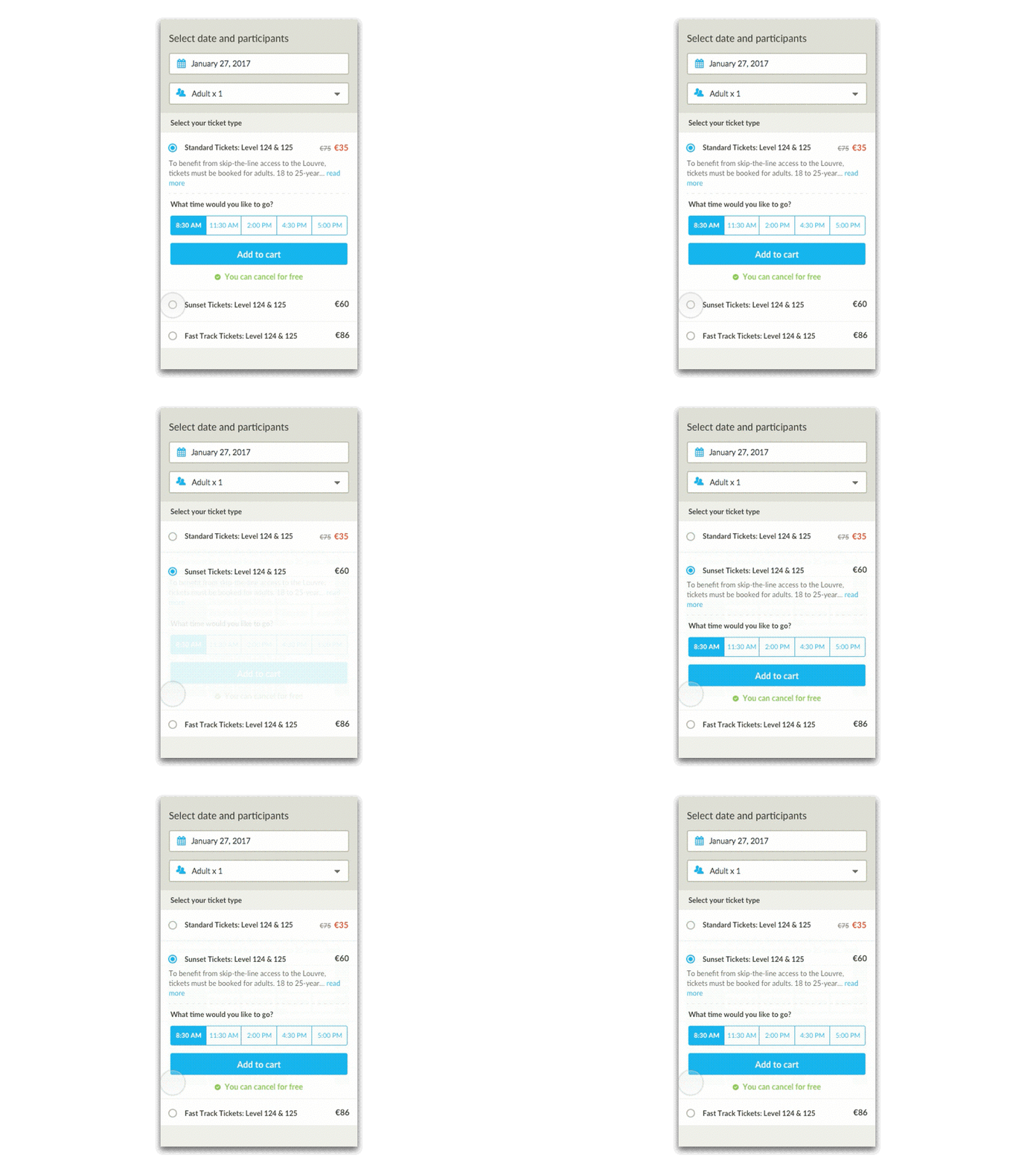
In this particular case, the curve allows you to determine several fundamental things:
- The animation consists of two separate parts: the first starts at 0 ms, and the second starts at 250 ms.
- Three types of curves are used to animate objects: “acceleration” (Ease-in), “deceleration” (Ease-out) and “standard attenuation”.
- The animation affects four objects: two radio buttons (Radio Button # 1 and # 2), the name and content of the pop-up card (Option # 2).
- Four properties of objects are affected in the same way: fill, transparency, Y position, and scale.
If we assume that the types of curves are predetermined and standard for the project, then the developers only need to set the beginning and duration of the animation, apply the form of the curve and select the changing property of the object.
The curve will not show the exact values of the properties of the objects, for example, changing the transparency from 0% to 100% or shifting the position along Y from 450 to 550. These values should still be documented by the designer and studied by the developer. But the use of animation curves is much clearer than the phrase "repeat exactly".
Thanks for attention!
From the editors
Motion design is a promising area not only in the field of "clean" video, but also in the field of interface design. Moving graphics enliven the interface and enrich the user experience. As you can see from the article, trendsetters Google and IBM have included motion design in their guidelines. This means that live interfaces will gain in popularity and will be used more and more often.
In order to learn how to create motion graphics and master the profession of motion designer, Netologiya offers the course Motion Design: Graphics in Motion . You will learn how to work in Adobe After Effects, learn the basics of composition, colorization and typography, master the basic techniques of graphic design and be able to create commercials and presentation videos, as well as use motion design in interface animations.Sign up!