 March 2, 2017 at 10:46
All the “joys” of CallKit or how we did the caller ID on iOS 10

2GIS has long wanted to share with users of iPhones its knowledge of phone numbers of companies from the directory. The Android platform provided such an opportunity , but for iOS there was no suitable tool for a long time.
In June, we went to WWDC 2016, and at one of the sessions, the guys from Apple mentioned that you can finally do “gorgeous astonishment” - the caller ID for iOS 10. Our joy knew no bounds, but for the time being: how Apple loves , she provided a feature with a number of restrictions.
Prototype
The first “joy” we encountered was the “rich” documentation, namely:
→ CXCallDirectoryExtensionContext
    @interface CXCallDirectoryExtensionContext : NSExtensionContext
    @property (nonatomic, weak, nullable) id delegate;
    - (void)addBlockingEntryWithNextSequentialPhoneNumber:(CXCallDirectoryPhoneNumber)phoneNumber;
    - (void)addIdentificationEntryWithNextSequentialPhoneNumber:(CXCallDirectoryPhoneNumber)phoneNumber label:(NSString *)label;
    - (void)completeRequestWithCompletionHandler:(nullable void (^)(BOOL expired))completion;
    @end
→ CXCallDirectoryManager
    @interface CXCallDirectoryManager : NSObject
    @property (readonly, class) CXCallDirectoryManager *sharedInstance;
    - (void)reloadExtensionWithIdentifier:(NSString *)identifier completionHandler:(nullable void (^)(NSError *_Nullable error))completion;
    - (void)getEnabledStatusForExtensionWithIdentifier:(NSString *)identifier completionHandler:(void (^)(CXCallDirectoryEnabledStatus enabledStatus, NSError *_Nullable error))completion;
    @end
And that’s it. Well, it could have been worse.
From this we see that the dialer for iOS is an application extension that spins a separate process, you can overload it and get its status. Looks like what we need.
In the extension itself, you can add numbers in the form of "phone / name" and add numbers to block.
The first prototype was ready in 30 minutes. One personal phone, wired in extension, one test phone was added to the lock, everything started up the first time, there was no limit to joy. The future looked extremely bright - we already imagined how all this would fall into the next release the next day.
Until we encountered the second “joy”: we cannot enable the dialer from the main application. You need to send the user deep into the settings, which obviously does not go to increase the conversion of this feature.
Then they began to add a bunch of numbers and a third “joy” emerged: all numbers must be recorded in the database before they are determined (this is just the famous Apple security - so that we do not get access to the incoming callerID). And our base is about 4,000,000 signed numbers. That is 140 MB of textual information, or 40 MB, if you shake the tin itself, and all this must somehow be delivered to the extension.
Armed with this knowledge, we prepared the data in the form of “phone / name” and began to saw an already more real prototype.
Database
At first they decided to stupidly add all the numbers, and again a surprise - the numbers should not be added anyhow, but in ascending order: 01, 02, 911, etc. Otherwise, the extension drops. In the first beta 8, xcode extension crashed without error at all.
It turned out further that we are limited to 1,999,999 numbers. Yes, exactly 1,999,999, not 2,000,000, which also does not quite equal our 4,000,000 numbers. First they wanted to make three extensions, each of them was filled up to 1,999,999 numbers and did not blow into the mustache. Then they decided to divide by region: Moscow + Peter, the rest of Russia, a foreigner. But they refused this decision, because it was necessary to come up with a more complex delivery and make the feature even less stable, and the work of several extensions working simultaneously was also not stable. Yes, and I did not want to force the user to include all three extensions. As a result, we decided to leave only the numbers of the cities established by the user.
At first, they wanted to deliver data through SQLite. We put together a simple database of 100,000 numbers from Novosibirsk, wrote the logic for working with the database, launched a demo project, and ... nothing. There are no errors, everything is ok, but the numbers are not determined.
After digging this case, we found out that when you try to pull data from SQLite into an ascending order, the database creates a cache of 30 MB and the extension crashes from memory. After digging through the Apple forums, we realized that it’s better not to get out for 5 MB of RAM. As a result, with a combined database for Moscow, St. Petersburg and a couple of cities, it will be necessary to greatly complicate the queries to the database, build well-optimized memory and speed fetches, and complicate the testing process. There was no time to do all this, reluctance, besides, my competencies in the near-base technologies were clearly not enough.
Sawed up your dumb, like a log, data format in the form of a bit sequence:
[uint16_t: Block size] [unsigned long long int: Phone] [String: Name]
and a very simple parser without troubles:
    @interface DGSPhonesDataReader : NSObject
    /**
     Текущее значение телефона, пока не позван next, будет 0
     */
    @property (nonatomic, assign, readonly) unsigned long long int phone;
    /**
     Текущее значение имени, пока не позван next, будет nil
     */
    @property (nonatomic, copy, readonly, nullable) NSString *name;
    - (instancetype)initWithFilePath:(NSString *)path;
    - (BOOL)next;
    @end
    #import "DGSPhonesDataReader.h"
    @interface DGSPhonesDataReader ()
    @property (nonatomic, strong, readonly) NSData *data;
    @property (nonatomic, assign) NSUInteger location;
    @property (nonatomic, assign, readwrite) unsigned long long int phone;
    @property (nonatomic, copy, readwrite, nullable) NSString *name;
    @end
    @implementation DGSPhonesDataReader
    - (instancetype)initWithFilePath:(NSString *)path
    {
            self = [super init];
            if (self == nil) return nil;
            NSError *error = nil;
            _data = [NSData dataWithContentsOfFile:path options:NSDataReadingMappedIfSafe error:&error];
            _location = 0;
            if (_data == nil)
            {
                    NSLog(@"DGSPhonesDataReader data create error: %@", error);
            }
            return self;
    }
    - (BOOL)next
    {
            uint16_t blockLength;
            [self.data getBytes:&blockLength range:NSMakeRange(self.location, sizeof(blockLength))];
            self.location += sizeof(blockLength);
            unsigned long long int phone;
            NSUInteger textLength = blockLength - sizeof(phone);
            [self.data getBytes:&phone range:NSMakeRange(self.location, sizeof(phone))];
            self.phone = phone;
            self.location += sizeof(phone);
            uint8_t buffer[textLength];
            [self.data getBytes:buffer range:NSMakeRange(self.location, textLength)];
            self.name = [[NSString alloc] initWithBytes:buffer length:textLength encoding:NSUTF8StringEncoding];
            self.location += textLength;
            return self.location < self.data.length;
    }
    @end
Yes, in theory, you need to use the cache, read in a block of 8 KB and all sorts of such things. But such an algorithm runs through a database of 2,000,000 numbers in 10 seconds in a separate system process, without affecting the main application in any way, moreover, this happens once per update, so we decided not to bother with optimization.
Hurrah! Now we can safely parse phone numbers from the database, quietly falling into the 5 MB memory limit. But time passes, and the feature is still not ready.
Data delivery
Next, it was necessary to understand how to deliver this data to the extension, that is, in fact, in a separate application. Sewing them there will not work, as the user downloads new regions, deletes the old ones, and we also want to update everything, the data is outdated, new ones are added, but we are a company about accuracy and relevance.
It turned out that everything had already been invented for us and there was a wonderful thing called App Groups, which allows us to fumble data between two applications from the same developer.
You can put the file in the main application along the path:
    + (NSString *)extensionDataPath
    {
            return [[[NSFileManager defaultManager] containerURLForSecurityApplicationGroupIdentifier:[self extensionGroupName]].path stringByAppendingPathComponent:@"Dialer"];
    }
and in extension get it through:
NSString *databasePath = [[DGSCallKitExtensionModel extensionDataPath] stringByAppendingPathComponent:manifest.databaseName];
Although there were no problems with the delivery, thanks for that.
Then we prepared the data in the desired format. If you don’t go too deep, you need to scatter a 500 MB .tsv file in 108 regions, overtake it in a binary format, archive and create a job on Jenkins so that you don’t do all this with your hands and have a ready-made footcloth for each release without any particular pain. In short, we also spent a decent amount of time on this - about 90% of the entire development.
The task arose to deliver this data to the phone (second 90% of the development).
At first, we decided to use the “On demand resources” technology, and at the same time to find out why we need a third, always empty tab in xcode - Resource Tags.
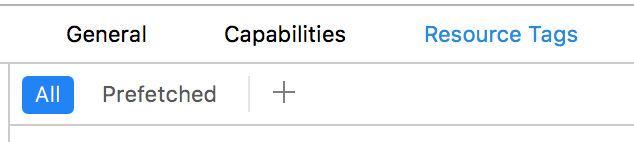
These guys will tell you better:
In short, Resource Tags for us is just manna from heaven (namely Download Only On Demand). It allows you to tag some application resources with tags, indicate their type, and when filling in the application, it will not include them in the binar. Then they can be downloaded using NSBundleResourceRequest and obtained through [NSBundle mainBundle]. That is, you don’t need to kick other teams at all, think of how to store them and how to deliver them to the user. And Apple itself stores all the data + provides a very adequate API for retrieving it. What promised fast integration even here.
But not everything turned out to be so rosy: in the first release, this technology proved to be extremely lousy, and about 20% of users were stupidly unable to download anything. Digging through the Apple forums, we found out that we don’t have such a problem alone, but they didn’t fix it for a long time and didn’t react to it at all.
Resource Tags had to be cut and delivered in a different way. As a result, they entered data into the city update database. Now, along with updating the city, users receive new base numbers.
All ahead
At the very least, dialer got into the AppStore, and here we were waiting for the fourth "joy".
After a successful installation, we deleted the database, because why store what is already in the phone’s memory. It turned out that not everything is so simple: if the user goes into the settings, turns off and on the extension, then instead of just turning on, the extension goes according to the full update scenario. My bad, we did not take this into account, and everyone who did this lost their bases without the possibility of updating them. In the next version, we quickly corrected this and now leave the data on the phone while they are still relevant.
We constantly receive complaints that the identifier does not work, or questions about how to turn it on. So far, as an intermediate option, we have made a separate item about the determinant in the 2GIS settings.
With iOS 10.3, Apple threw even more problems: if you upgrade to this version, the identifier disappears in the settings until the user either reinstalls the application or rolls the update. Extension as a whole behaves unstably. Periodically (for unknown reasons and laws) it turns off or completely disappears from the settings when updating. Sometimes, in the process of updating numbers, the system silently nails the extension with error codes:
→ CXErrorCodeCallDirectoryManagerErrorLoadingInterrupted;
→ CXErrorCodeCallDirectoryManagerErrorUnknown.
Back in October, we created a couple of radars at Apple asking them to give us a pen to allow users to enable the dialer from the application itself, and about bugs with 10.3. Apple ignores the first ticket since October, and the second is in a very long line.

So in the near future we are unlikely to be able to make the product better for the user.
How it all ultimately works:
- User swings city / cities;
- From the city we get a database of numbers in our format;
- We look at all the databases that are installed on the user (we store them in a common UserDefaults between the extension and the main application);
- Each database has a hash. If at least one hash does not match or a new one appears, we write all new databases to the shared storage and mark them as ready for installation. This is necessary in case the user does not activate the extension, but minimizes the application and enables it later;
- If the extension is active, reboot it through:
[[CXCallDirectoryManager sharedInstance] reloadExtensionWithIdentifier:bundleID completionHandler:^(NSError * _Nullable error) {}]; - In the extension itself, when he receives:
- (void)beginRequestWithExtensionContext:(CXCallDirectoryExtensionContext *)context
We are looking to see if there are databases ready for installation. If there is, we go through everything and add numbers through:[context addIdentificationEntryWithNextSequentialPhoneNumber:phone label:name]; - We mark the bases as installed;
- Repeat the process for each update;
In code, it looks something like this:
    - (RACSignal *)reloadExtensionsIfNeeded
    {
            @weakify(self);
            if (![DGSCallKitFetchModel isExtensionAvailable] || self.manifests.count == 0) return [RACSignal empty];
            return [[[[[[[[[self fetchCanBeInstalledExtensionsRegionCodes]
                    filter:^BOOL(NSSet *regionCodes) {
                            return regionCodes.count > 0;
                    }]
                    deliverOn:[RACScheduler scheduler]]
                    flattenMap:^RACStream *(NSSet *regionCodes) {
                            @strongify(self);
                            return [RACSignal combineLatest:@[
                                    [self downloadDatabasesWithRegionCodesIfNeeded:regionCodes],
                                    [DGSCallKitFetchModel fetchExtensionEnabled]
                            ]];
                    }]
                    flattenMap:^RACStream *(RACTuple *t) {
                            @strongify(self);
                            RACTupleUnpack(NSSet *regionCodes, NSNumber *extensionEnabled) = t;
                            // Если дайлер не включен, то ничего не делаем
                            if (!extensionEnabled.boolValue) return [RACSignal empty];
                            // Если есть готовые базы, но они еще не установлены,
                            // то попробуем их установить в случае если пользователь разрешил дайлер в настройках,
                            // В остальных случаях не перезагружаем дайлер
                            if ([self shouldInstallDatabasesWithRegionCodes:regionCodes])
                            {
                                    return [RACSignal return:regionCodes];
                            }
                            else if ([self dialerEnabledWithRegionCodes:regionCodes])
                            {
                                    [self trackDialerInstalledEventWithRegionCodes:regionCodes];
                            }
                            return [RACSignal empty];
                    }]
                    flattenMap:^RACStream *(NSSet *regionCodes) {
                            @strongify(self);
                            return [self updateExtensionWithRegionCodes:regionCodes];
                    }]
                    doNext:^(NSSet *regionCodes) {
                            @strongify(self);
                            ULogInfo(@"Dialer extension installed with region codes: %@", regionCodes);
                            [self trackDialerInstalledEventWithRegionCodes:regionCodes];
                    }]
                    doError:^(NSError *error) {
                            @strongify(self);
                            ULogError(@"Dialer extension error: %@", error);
                            [self.analyticsSender trackEventWithCategory:kDGSCategoryDialer
                                                                                                      action:kDGSActionDialerFailed
                                                                                                       label:error.localizedDescription
                                                                                                       value:nil];
                    }]
                    doCompleted:^{
                            ULogInfo(@"Dialer extension reload completed signal");
                    }];
    }
    + (RACSignal *)fetchExtensionEnabled
    {
            NSString *bundleID = [DGSCallKitExtensionModel extensionBundleID];
            return [RACSignal createSignal:^RACDisposable *(id subscriber) {
                    [[CXCallDirectoryManager sharedInstance] getEnabledStatusForExtensionWithIdentifier:bundleID completionHandler:^(CXCallDirectoryEnabledStatus enabledStatus, NSError * _Nullable error) {
                            if (enabledStatus == CXCallDirectoryEnabledStatusEnabled)
                            {
                                    [subscriber sendNext:@YES];
                            }
                            else
                            {
                                    [subscriber sendNext:@NO];
                            }
                            [subscriber sendCompleted];
                    }];
                    return nil;
            }];
    }
    - (RACSignal *)updateExtensionWithRegionCodes:(NSSet *)regionCodes
    {
            ULogInfo(@"Reload dialer extension with tag: %@", regionCodes);
            NSString *bundleID = [DGSCallKitExtensionModel extensionBundleID];
            return [RACSignal createSignal:^RACDisposable *(id subscriber) {
                    [[CXCallDirectoryManager sharedInstance] reloadExtensionWithIdentifier:bundleID completionHandler:^(NSError * _Nullable error) {
                            if (error)
                            {
                                    [subscriber sendError:error];
                            }
                            else
                            {
                                    [subscriber sendNext:regionCodes];
                                    [subscriber sendCompleted];
                            }
                    }];
                    return nil;
            }];
    }
The main problem in implementing this feature was the preparation of data and its delivery to the application. If you sew in an extension of about 100,000 phones, then the feature can be done in an hour (provided that you have them).
If there is no data in a ready-made format and you need to deliver and update it in a cunning way, then integration of this feature will take a lot of time, and due to the complexity of its inclusion, users, unfortunately, will not say “thank you very much”. In most reviews, there will be something like “it doesn’t work for me”, “I downloaded the application, but it doesn’t determine anything” and stuff like that.
Instead of a conclusion
At the moment, the feature is completed, in the near future there are no plans to finalize it. But still I want to make a selection according to the most determined numbers - somewhere around 100,000 numbers - and sew them immediately in the extension so that users immediately get the minimum functionality without having to download regions. We also have quite a lot of data on “toxic” numbers: collection agencies, various polls, various financial pyramids and other undesirable numbers that Dialer Android users complained about. We, too, can deliver them in a separate package to everyone.
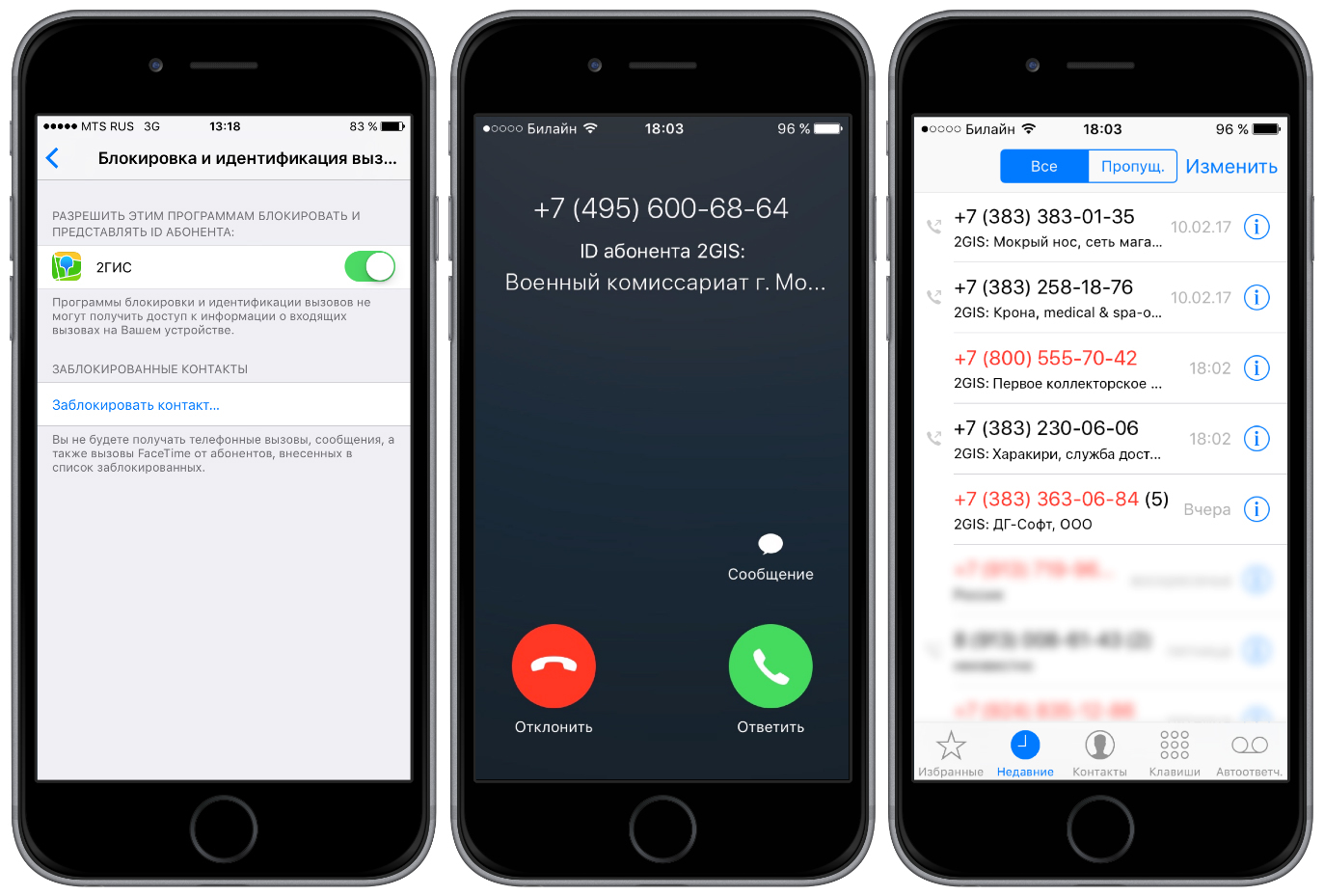
In general, I wanted something more stable and more user-friendly, so that even my mother herself could turn it on. In any case, at least 20,000 users turned on the extension, and this is a real benefit and a feeling that everything was not in vain.









