February 1, 2017 at 11:31
Exceptions in the UEFI Application
Any programmer who is familiar with UEFI knows that there is no built-in exception handling mechanism there. We are talking about try / except blocks, which are an extension of Microsoft C / C ++ compilers. It is very useful to have such a mechanism and take full advantage of the advantages that it gives. Therefore, in this article we will focus on solving this problem. Also attached to the article is a complete implementation of the mechanism with its demonstration based on the UEFI application. Only Intel 64-bit processors are affected, and only they are implied in the discussion. The implementation of the mechanism is located in the exceptions folder of the git repository at: https://github.com/anatolymik/machineries.git .
First, let's talk a little about how exceptions are generally handled. First of all, an exception is a special situation. As a rule, an exception occurs because the processor cannot execute a specific instruction. When such an event occurs, the processor calls the exception handler whose entry point is in the IDT table. The processor has many exceptions, so the corresponding handler is called according to its type.

As you can see from the figure above, there are only 256 exception handlers. Moreover, the first 32 are reserved for exceptions. The rest are used to handle interrupts, which we will not talk about here. As already mentioned, the corresponding handler is called according to the type of exception. For example, when dividing the number by 0, the exception handler 0 is called, or if the processor encounters an unfamiliar instruction in the stream, the exception handler 6 is called. For more details, see the Intel 64 and IA-32 Architectures Software Developer's Manual. We just touched upon the hardware of the processor, without which the processing of hardware errors is impossible, but that’s not all.
Speaking about try / except blocks, it should be mentioned that when the compiler encounters them, it generates meta-information that describes the location of each block in the executable file. This information is located in a separate place, more precisely, in the .pdata section of the PE image.
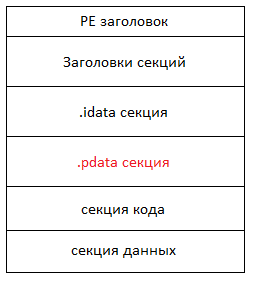
As you can see from the figure, the code, data and various information about the executable file (for example, as in our case, descriptors of try / except blocks) are located in a single image. All this data is distributed in so-called sections, according to the type of data itself. Returning to the discussion of the .pdata section, it should be mentioned that for each try / except block, in addition to its location, the address of its handler is also stored. Typically, this is code enclosed in except and finally blocks. For more information on PE file format, see the Microsoft Portable Executable and Common Object File Format Specification. We have just touched upon the software tools necessary for the functioning of the mechanism under consideration, now we will look at all this once again comprehensively.
Despite the fact that try / except blocks are processed by the compiler in the process of code generation, and in general they are the mechanism of the language itself, their operation requires support from the operating system. Moreover, it should be noted that part of the processing is performed by the operating system, and part is performed by the executable file itself. There is also some part that is executed by the executable itself, but is not generated by the compiler, and it needs to be implemented instead. For example, the reserved name __c_specific_handler is the name of the function that is responsible for handling the exception. In the absence of its implementation, the linker will not be able to generate an executable file. In the development tools for Windows, implementations of these functions are included in libraries that are bundled with the application.
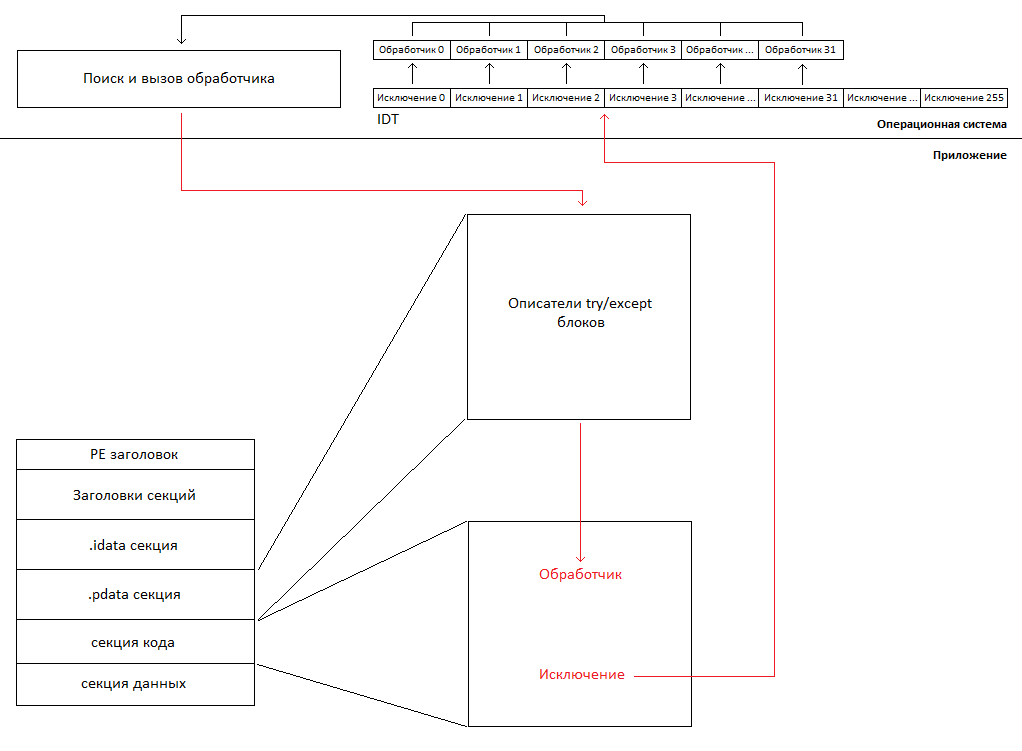
As shown in the figure above, when an exception occurs, the processor calls the corresponding handler from the IDT table. The exception handlers are set by the operating system during its initialization, i.e. when an exception occurs, the operating system itself receives control. The handlers of all exceptions are very similar, they store all the necessary information for processing and information unique to a particular type of exception. Then all these handlers call the function of searching and calling the handler. The function scans the .pdata section in order to find a handler that matches the specific code section in which the exception occurred. And if the handler is found, then the operating system passes control to it, otherwise the application terminates with an error. We just looked at the process of raising and handling exceptions, therefore, we can move on to discuss what needs to be done in the UEFI application so that the exceptions fully function. Also, it should be noted that the description is very simplified.
Since there is nothing in UEFI that would have anything to do with exceptions, it is obvious that all of the above needs to be implemented. Further, in the process of listing, in order to facilitate the study of source codes from the implementation attached to the article, we will also refer to its functions, files and folders. First of all, you need to implement exception handlers. They are located in the exccpu.asm file from the exc folder. It is also necessary to set their addresses in the IDT, this is performed by the CpuInitializeExceptionHandlers function located in the exccpu.cpp file from the exc folder. Almost all of these handlers call the CpuDispatchException function from the exccpu.cpp file, which is actually the starting point in finding and calling the exception handler. The DispatchException and UnwindStack functions located in the excdsptch.cpp file from the exc folder, responsible for finding and calling exception handlers. To scan the .pdata section, it is necessary to implement the processing functions of the PE image. These functions are used by the previously mentioned functions of searching and calling exception handlers. Implementation of scanning functions of the PE image are grouped in a separate folder - pe. And finally, implementations of the __C_specific_handler and _local_unwind reserved functions are needed. Both functions are implemented in the excchandler.cpp file from the exc folder. The entry point to the application is the EfiMain function located in the efi.cpp file from the project root. It should be noted that setting the address of the handlers in the IDT is simplified for demonstration purposes. If we talk about a full implementation, then you need an isolated IDT. These functions are used by the previously mentioned functions of searching and calling exception handlers. Implementation of scanning functions of the PE image are grouped in a separate folder - pe. And finally, implementations of the __C_specific_handler and _local_unwind reserved functions are needed. Both functions are implemented in the excchandler.cpp file from the exc folder. The entry point to the application is the EfiMain function located in the efi.cpp file from the project root. It should be noted that setting the address of the handlers in the IDT is simplified for demonstration purposes. If we talk about a full implementation, then you need an isolated IDT. These functions are used by the previously mentioned functions of searching and calling exception handlers. Implementation of scanning functions of the PE image are grouped in a separate folder - pe. And finally, implementations of the __C_specific_handler and _local_unwind reserved functions are needed. Both functions are implemented in the excchandler.cpp file from the exc folder. The entry point to the application is the EfiMain function located in the efi.cpp file from the project root. It should be noted that setting the address of the handlers in the IDT is simplified for demonstration purposes. If we talk about a full implementation, then you need an isolated IDT. implementations of the __C_specific_handler and _local_unwind reserved functions are needed. Both functions are implemented in the excchandler.cpp file from the exc folder. The entry point to the application is the EfiMain function located in the efi.cpp file from the project root. It should be noted that setting the address of the handlers in the IDT is simplified for demonstration purposes. If we talk about a full implementation, then you need an isolated IDT. implementations of the __C_specific_handler and _local_unwind reserved functions are needed. Both functions are implemented in the excchandler.cpp file from the exc folder. The entry point to the application is the EfiMain function located in the efi.cpp file from the project root. It should be noted that setting the address of the handlers in the IDT is simplified for demonstration purposes. If we talk about a full implementation, then you need an isolated IDT.
Perhaps that’s all. It is worth adding that the description of this mechanism has been repeatedly covered on the Internet in various details. And this article is unique due to the attached implementation and demo. Although, initially, when there was a need to implement this mechanism for projects working outside the Windows environment, the previously mentioned descriptions were not enough. Including had to reverse Windows, and the description of UNWIND_INFO version 2 could not be found at all. Therefore, the article was originally conceived in a different format, in a very detailed format, after reading which there would be no questions left. In practice, writing it has degenerated into writing documentation, not an article, which can be boring to read, because From the very beginning it is not clear which problem is being solved. Therefore, it was written just such simple and easy option, without any details. A detailed version is planned to be published in parts.
First, let's talk a little about how exceptions are generally handled. First of all, an exception is a special situation. As a rule, an exception occurs because the processor cannot execute a specific instruction. When such an event occurs, the processor calls the exception handler whose entry point is in the IDT table. The processor has many exceptions, so the corresponding handler is called according to its type.
As you can see from the figure above, there are only 256 exception handlers. Moreover, the first 32 are reserved for exceptions. The rest are used to handle interrupts, which we will not talk about here. As already mentioned, the corresponding handler is called according to the type of exception. For example, when dividing the number by 0, the exception handler 0 is called, or if the processor encounters an unfamiliar instruction in the stream, the exception handler 6 is called. For more details, see the Intel 64 and IA-32 Architectures Software Developer's Manual. We just touched upon the hardware of the processor, without which the processing of hardware errors is impossible, but that’s not all.
Speaking about try / except blocks, it should be mentioned that when the compiler encounters them, it generates meta-information that describes the location of each block in the executable file. This information is located in a separate place, more precisely, in the .pdata section of the PE image.
As you can see from the figure, the code, data and various information about the executable file (for example, as in our case, descriptors of try / except blocks) are located in a single image. All this data is distributed in so-called sections, according to the type of data itself. Returning to the discussion of the .pdata section, it should be mentioned that for each try / except block, in addition to its location, the address of its handler is also stored. Typically, this is code enclosed in except and finally blocks. For more information on PE file format, see the Microsoft Portable Executable and Common Object File Format Specification. We have just touched upon the software tools necessary for the functioning of the mechanism under consideration, now we will look at all this once again comprehensively.
Despite the fact that try / except blocks are processed by the compiler in the process of code generation, and in general they are the mechanism of the language itself, their operation requires support from the operating system. Moreover, it should be noted that part of the processing is performed by the operating system, and part is performed by the executable file itself. There is also some part that is executed by the executable itself, but is not generated by the compiler, and it needs to be implemented instead. For example, the reserved name __c_specific_handler is the name of the function that is responsible for handling the exception. In the absence of its implementation, the linker will not be able to generate an executable file. In the development tools for Windows, implementations of these functions are included in libraries that are bundled with the application.
As shown in the figure above, when an exception occurs, the processor calls the corresponding handler from the IDT table. The exception handlers are set by the operating system during its initialization, i.e. when an exception occurs, the operating system itself receives control. The handlers of all exceptions are very similar, they store all the necessary information for processing and information unique to a particular type of exception. Then all these handlers call the function of searching and calling the handler. The function scans the .pdata section in order to find a handler that matches the specific code section in which the exception occurred. And if the handler is found, then the operating system passes control to it, otherwise the application terminates with an error. We just looked at the process of raising and handling exceptions, therefore, we can move on to discuss what needs to be done in the UEFI application so that the exceptions fully function. Also, it should be noted that the description is very simplified.
Since there is nothing in UEFI that would have anything to do with exceptions, it is obvious that all of the above needs to be implemented. Further, in the process of listing, in order to facilitate the study of source codes from the implementation attached to the article, we will also refer to its functions, files and folders. First of all, you need to implement exception handlers. They are located in the exccpu.asm file from the exc folder. It is also necessary to set their addresses in the IDT, this is performed by the CpuInitializeExceptionHandlers function located in the exccpu.cpp file from the exc folder. Almost all of these handlers call the CpuDispatchException function from the exccpu.cpp file, which is actually the starting point in finding and calling the exception handler. The DispatchException and UnwindStack functions located in the excdsptch.cpp file from the exc folder, responsible for finding and calling exception handlers. To scan the .pdata section, it is necessary to implement the processing functions of the PE image. These functions are used by the previously mentioned functions of searching and calling exception handlers. Implementation of scanning functions of the PE image are grouped in a separate folder - pe. And finally, implementations of the __C_specific_handler and _local_unwind reserved functions are needed. Both functions are implemented in the excchandler.cpp file from the exc folder. The entry point to the application is the EfiMain function located in the efi.cpp file from the project root. It should be noted that setting the address of the handlers in the IDT is simplified for demonstration purposes. If we talk about a full implementation, then you need an isolated IDT. These functions are used by the previously mentioned functions of searching and calling exception handlers. Implementation of scanning functions of the PE image are grouped in a separate folder - pe. And finally, implementations of the __C_specific_handler and _local_unwind reserved functions are needed. Both functions are implemented in the excchandler.cpp file from the exc folder. The entry point to the application is the EfiMain function located in the efi.cpp file from the project root. It should be noted that setting the address of the handlers in the IDT is simplified for demonstration purposes. If we talk about a full implementation, then you need an isolated IDT. These functions are used by the previously mentioned functions of searching and calling exception handlers. Implementation of scanning functions of the PE image are grouped in a separate folder - pe. And finally, implementations of the __C_specific_handler and _local_unwind reserved functions are needed. Both functions are implemented in the excchandler.cpp file from the exc folder. The entry point to the application is the EfiMain function located in the efi.cpp file from the project root. It should be noted that setting the address of the handlers in the IDT is simplified for demonstration purposes. If we talk about a full implementation, then you need an isolated IDT. implementations of the __C_specific_handler and _local_unwind reserved functions are needed. Both functions are implemented in the excchandler.cpp file from the exc folder. The entry point to the application is the EfiMain function located in the efi.cpp file from the project root. It should be noted that setting the address of the handlers in the IDT is simplified for demonstration purposes. If we talk about a full implementation, then you need an isolated IDT. implementations of the __C_specific_handler and _local_unwind reserved functions are needed. Both functions are implemented in the excchandler.cpp file from the exc folder. The entry point to the application is the EfiMain function located in the efi.cpp file from the project root. It should be noted that setting the address of the handlers in the IDT is simplified for demonstration purposes. If we talk about a full implementation, then you need an isolated IDT.
Perhaps that’s all. It is worth adding that the description of this mechanism has been repeatedly covered on the Internet in various details. And this article is unique due to the attached implementation and demo. Although, initially, when there was a need to implement this mechanism for projects working outside the Windows environment, the previously mentioned descriptions were not enough. Including had to reverse Windows, and the description of UNWIND_INFO version 2 could not be found at all. Therefore, the article was originally conceived in a different format, in a very detailed format, after reading which there would be no questions left. In practice, writing it has degenerated into writing documentation, not an article, which can be boring to read, because From the very beginning it is not clear which problem is being solved. Therefore, it was written just such simple and easy option, without any details. A detailed version is planned to be published in parts.