 December 28, 2016 at 17:36
Adding ColorKey to libGDX
Hi Habr! In this article, I will talk about adding colorkey to the libgdx library (or any other that has shaders). As you know, there is no native support for “transparent color” in libgdx, so you have to store a full-color image in the RGBA8888 format (4 bytes per pixel), or in a truncated RGBA4444 format (2 bytes per pixel), which allows you to halve memory usage, but greatly degrades picture. When creating 2D games, often, just one bit of transparency would be enough ... Especially on mobile platforms ... but it doesn’t ... Let's make it!
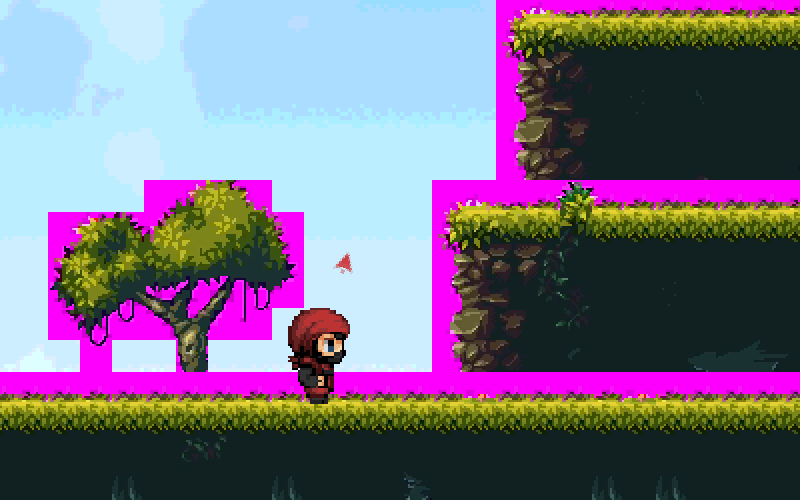
RGBA8888
First, we need a reference image in the RGBA8888 format, with which all subsequent attempts to save bytes will be compared. We will experiment with a set of tiles from which the level is drawn, we do not pay attention to the sky and the little man. The tile size is 512 and 512 pixels. On the disk, the textures are saved in 8-bit png with transparency and occupy 20 kilobytes (you can save in 32-bit png, with the same result, because the graphics are simple, but there is always transparency or it is not). In the video memory they will occupy 512 * 512 * 4 = 1 megabytes exactly. Less hotstsa, this is not the only texture ...
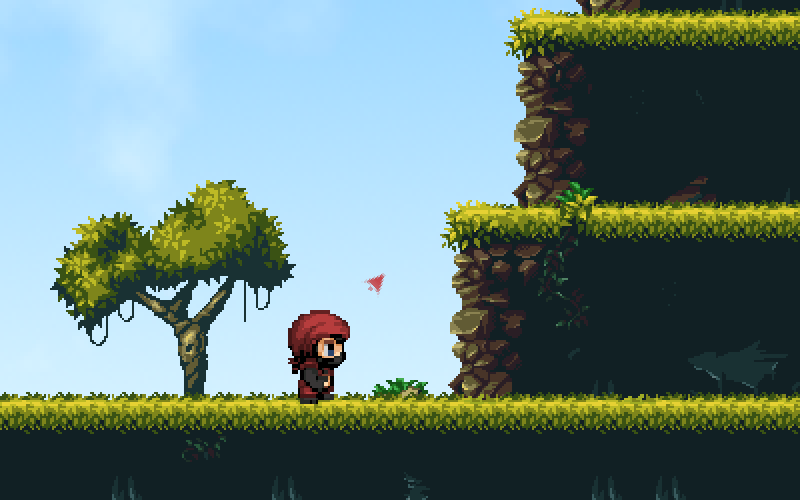
RGBA4444
First of all, the idea arises of using truncated bit depth. Pixelart is simple, there are few colors, but we’ll save 512 kilobytes right away. We try: The
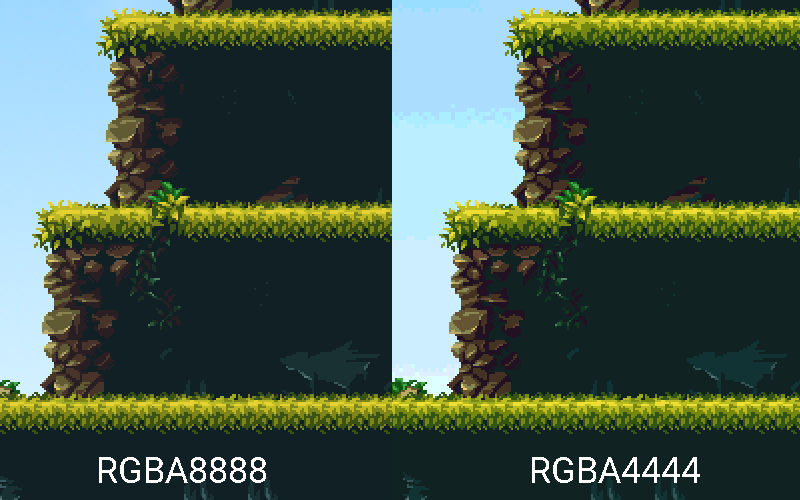
grass has only slightly changed its shade, you can put up with it, but the stones have suffered critically. If you are ready to come to terms with this, then you can not read further. I'm not ready.
We are writing a shader!
Without further ado, I copied the default shaders and modified the fragment shader:
	private static String fragmentShader = "#ifdef GL_ES\n" //
			+ "#define LOWP lowp\n" //
			+ "precision mediump float;\n" //
			+ "#else\n" //
			+ "#define LOWP \n" //
			+ "#endif\n" //
			+ "varying LOWP vec4 v_color;\n" //
			+ "varying vec2 v_texCoords;\n" //
			+ "uniform sampler2D u_texture;\n" //
			+ "void main()\n"//
			+ "{\n" //
			+ "  LOWP vec4 pixel = texture2D(u_texture, v_texCoords);\n"//
			+ "  gl_FragColor = v_color * pixel;\n" //
			+ "  if( pixel.rgb == vec3(1.0, 0.0, 1.0) ){gl_FragColor.a = 0.0;}\n"//
			+ "}";
Only the last three lines are interesting. First, save the texel color (Important! Texture interpolation should be turned off, i.e. when loading use NEAREST filtering). Then we set the pixel color by multiplying the texel color by the vertex color. If you do not mix vertex colors, then this multiplication can be replaced by assignment. And finally, we compare the texel color with the “transparent color” and, if the colors match, then make the pixel transparent. As the "transparent" I chose the classic vyviglazno-purple rgb (255,0,255). Surely you can get rid of the conditional operator, but ... "And it will do so!".)
RGB565
Now we do not need to spend 4 bits to store 1 bit of transparency and we can spend more bits to store color information. Here's what came out of it: the vyrviglazik became transparent, and the loss of color information by eye is not distinguishable (depending on the input image, it can become quite distinguishable, especially on gradients).
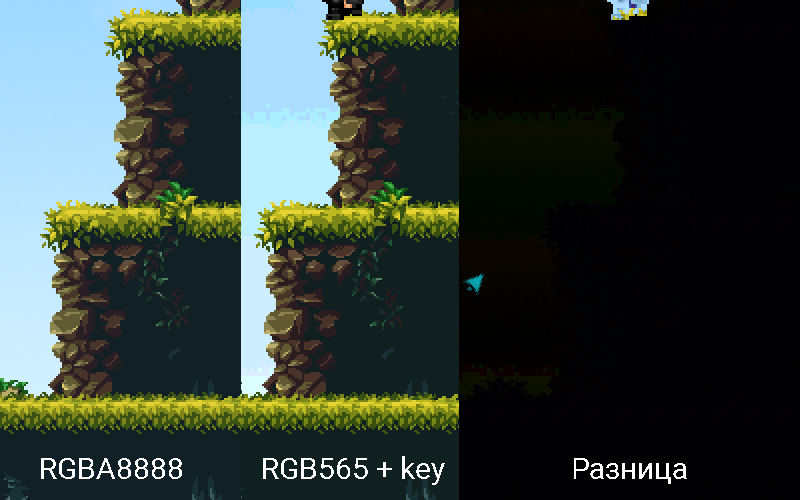
That's how we easily and naturally reduced memory consumption by half, almost without loss of quality and speed (after all, I want to get rid of the conditional operator in the shader). But I want more. I want to compress the textures to ETC1 format, but with transparency. Still, six times less than RGB. and not on disk, but in memory!
Trying ... Epic Fail. Expected. The title picture is just the result of this attempt. The result is expected, because ETC1 is a lossy compression format. With heavy losses. The vyrviglazny color became cloudy and pixels of a semi-vviglazovy color appeared. Typically, the alpha channel is stored in a separate texture. Often - without compression. But this is not our method! Let's see what you can achieve if you mess around with the shader a bit.
Shader for entertainers
 if( vec3( min(pixel.r,0.95), max(pixel.g,0.05), min(pixel.b,0.95)) == vec3(0.95, 0.05, 0.95) )
 {
    gl_FragColor.a = 0.0;
 }
Replace only the last line in our shader. Now we are comparing not strictly with a specific color, but with a slight deviation: we allow the red and blue components to be a bit darker, and the green - lighter.
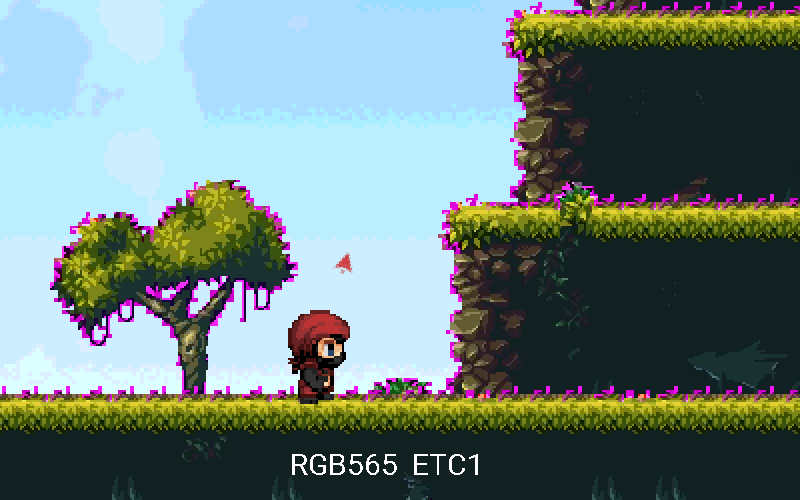
There is no need to even compare with the original, the artifacts are visible with the naked eye. But! If you play with the allowable deviation, or consider the "distance" between the colors (also with a sufficient deviation), then it is quite possible to achieve tolerable results for a specific set of textures. When you fight for every kilobyte, this method may be quite acceptable.
Transparent jpeg?
Why not? We already have a shader that will make any test transparent. If you are lucky, the result will even be usable. If it is important that the disk space is occupied, and png presses too badly, then why not. We’ll try two options at once: with the compression profile “maximum” and “very high”
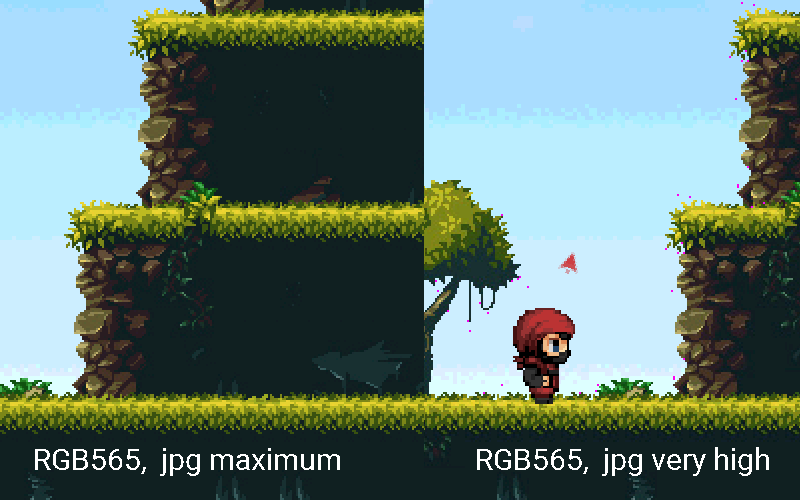
We see that with the profile "maximum" it is quite possible to use jpg with a "transparent color". In theory. If using png is less profitable.
So, we managed to halve the occupied memory by almost not losing the colorful textures, but getting a “transparent color” to indicate completely transparent areas. As a bonus, we learned to make transparent jpg.
I hope the note will be useful not only to me. I hope even more that someone will offer equivalent code without a conditional statement. Thanks for attention.
UPD :
The user FadeToBlack proposed two shader options without a conditional statement:
This shader can only be used with textures in which transparency is specified through a color key. Textures with real transparency will not display correctly. The shader from the article correctly processes both textures with real transparency and with “transparent color”.
			void main()
			{
			     LOWP vec4 pixel = texture2D(u_texture, v_texCoords);
			     gl_FragColor = v_color * pixel;
			     gl_FragColor.a = float(pixel.rgb != vec3(1.0,0.0,1.0));
			}
And this shader is equivalent to the shader in the article, but without a conditional statement. Translucency for the entire sprite can be set through the color of the sprite vertices, regardless of the transparency of the texture.
			void main()
			{
			     LOWP vec4 pixel = texture2D(u_texture, v_texCoords);
			     gl_FragColor = v_color * pixel;
			     gl_FragColor.a = gl_FragColor.a * float(pixel.rgb != vec3(1.0,0.0,1.0));
			}









