Comparison of the performance of the analytical DBMS Exasol and Oracle In-Memory Option
 I devoted my previous article to how and how much you can speed up analytical (typical for OLAP / BI systems) queries in Oracle DBMS by connecting the In-Memory option. To continue this topic, I want to describe several alternative database management systems for analytics and compare their performance. And I decided to start with the in-memory RDBMS Exasol .
 For tests, the results of which I publish, TPC-H Benchmark is selected and, if desired, readers can repeat my tests.
Brief information about DBMS Exasol
Exasol is a relational analytic in-memory database with the following key features:
- Memory-with In . The database is primarily intended for storing and processing data in RAM. In this case, the data is duplicated on the disk and the entire database does not have to fit into memory. When executing queries, data that is not in memory is read from disk;
- MPP (massive parallel processing). Data is distributed across the cluster nodes for high-performance parallel processing (implemented according to the shared nothing architecture );
- Column-wise data storage. Information in tables is stored in columns in a compressed form, which greatly speeds up analytical queries;
- Supports ANSI SQL 2008 standard ;
- It integrates well with most BI tools ;
- In-Database Analytics. Support for user functions in the languages LUA, Python, R, Java.
- Java-based interface to Hadoop's HDFS .
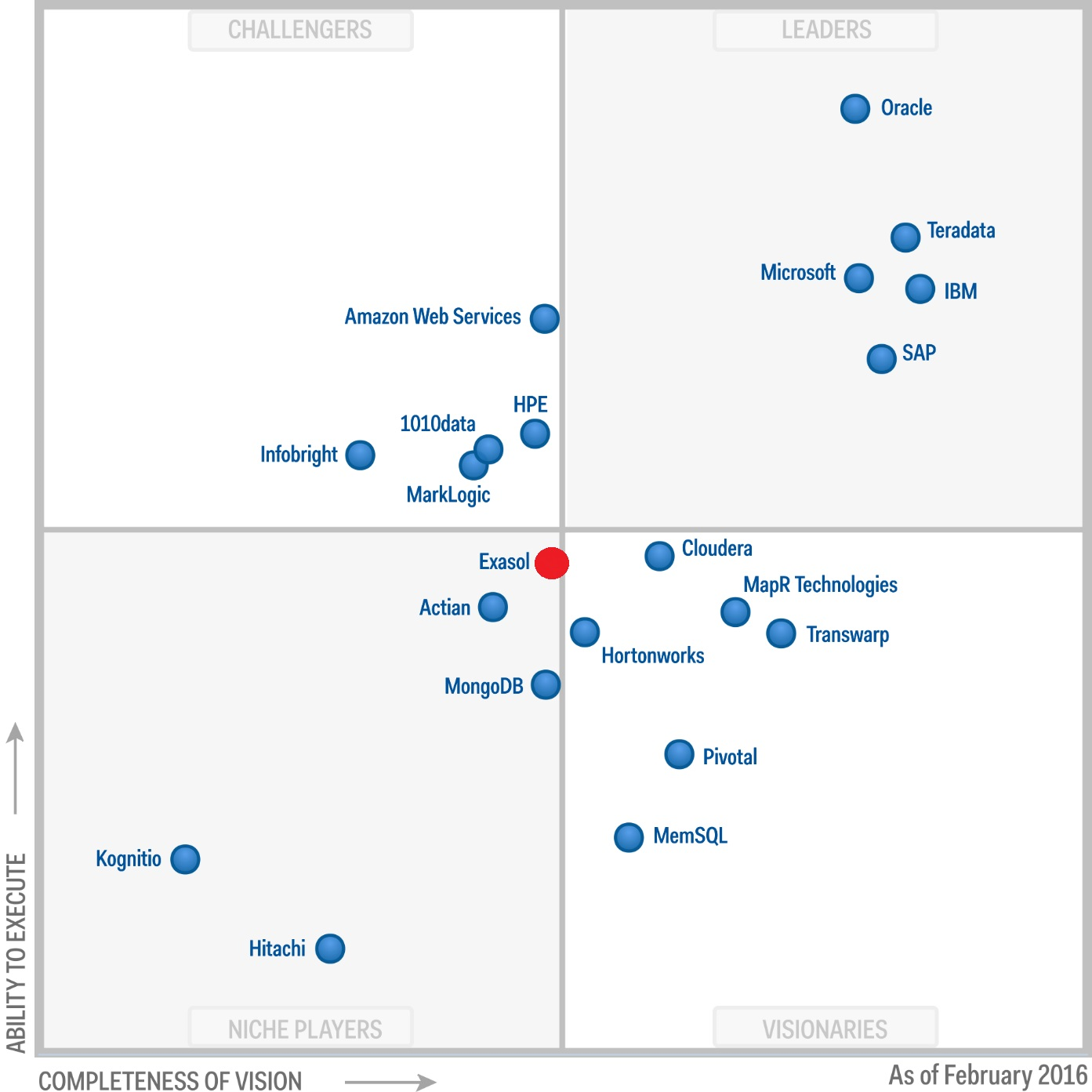
You can read more about the capabilities of Exasol in an excellent article on Habré. I will only add that, despite the low popularity in our area, this is a mature product that has been present in the Gartner Magic Quadrant for Data Warehouse and Data Management Solutions for Analytics since 2012.
TPC-H Benchmark
For a performance test, I used tpc-h benchmark , which is used to compare the performance of analytical systems and data warehouses. This benchmark is used by many manufacturers of both DBMS and server hardware. There are many results available on the tpc-h page , for the publication of which it is necessary to fulfill all the requirements of the specification on 136 pages. I was not going to publish officially my test, so I did not strictly follow all the rules. In the TPC-H rating - Top Ten Performance Results Exasol is the leader in performance (in volumes from 100 GB to 100 TB), which was the reason for my interest in this DBMS.
TPC-H allows you to generate data for 8 tables using a given parameterscale factor , which determines the approximate amount of data in gigabytes. I limited myself to 2 GB, since I tested Oracle In-Memory on this volume.

The benchmark includes 22 SQL queries of varying complexity. I note that the queries generated by the qgen utility need to be adjusted to the specific features of a particular DBMS, but in the case of Exasol the changes were minimal: replacing set rowcount with LIMIT clause and replacing keyword value . For the test, 2 types of load were generated:
- 8 virtual users in parallel 3 times in a circle perform all 22 requests
- 2 virtual users in parallel 12 times in a circle perform all 22 requests
As a result, in both cases the execution time of 528 SQL queries was estimated. Who are interested in DDL scripts for tables and SQL queries, write in the comments.
For the purposes of comparing a database or analytics equipment (including for Big Data) I also recommend paying attention to another more recent benchmark - TPC-DS . It has more tables and significantly more queries - 99.
Test site
Notebook with the following specifications:
Intel Core i5-4210 CPU 1.70GHz - 4 virt. processors; DDR3 16 Gb; SSD Disk.
OS:
MS Windows 8.1 x64
VMware Workstation 12 Player
Virtual OS: CentOS 6.8 (Memory: 8 Gb; Processors: 4)
DBMS:
EXASOL V6 Free Small Business Edition rc1 ( single node )
Loading data into an Exasol database
I downloaded data from text files using the EXAplus utility . Download script:
IMPORT INTO TPСH.LINEITEM
    FROM LOCAL CSV FILE 'D:\lineitem.dsv'
    ENCODING = 'UTF-8'
    ROW SEPARATOR = 'CRLF'
    COLUMN SEPARATOR = '|'
    SKIP = 1
    REJECT LIMIT 0;
The download time for all files was 3 minutes. 37 sec I also note that the documentation with many examples left a very good impression. So, it describes a number of alternative ways of loading data: directly from various DBMSs, using ETL tools, and others.
The following table provides information on how data is organized in Exasol and Oracle In-Memory:
| Exasol | Oracle IM | |||||||
|---|---|---|---|---|---|---|---|---|
| Table | Number of lines | The amount of raw data (Mb) | The amount of tables in memory (Mb) | Coef. compression | Number of indices | The volume of indexes in memory (Mb) | The amount of tables in memory (Mb) | Coef. compression |
| LINEITEM | 11,996,782 | 1,562.89 | 432.5 | 3.61 | 4 | 109.32 | 474.63 | 3.29 |
| ORDERS | 3,000,000 | 307.25 | 97.98 | 3.14 | 2 | 20.15 | 264.38 | 1.16 |
| PARTSUPP | 1,600,000 | 118.06 | 40.46 | 2.92 | 2 | 5.24 | 72.75 | 1.62 |
| Customomer | 300,000 | 39.57 | 20.99 | 1.89 | 2 | 1.42 | 32.5 | 1.22 |
| PART | 400,000 | 51.72 | 10.06 | 5.14 | 1 | 1.48 | 20.5 | 2.52 |
| SUPPLIER | 20,000 | 2.55 | 2.37 | 1.08 | 4.5 | 0.57 | ||
| NATION | 25 | 0 | 0.01 | 0.00 | 1.13 | 0.00 | ||
| REGION | 5 | 0 | 0.01 | 0.00 | 1.13 | 0.00 | ||
| Total | 17,316,812 | 2,082.04 | 604.38 | 3.44 | eleven | 137.61 | 871.52 | 2.39 |
This information can be viewed in Exasol in the SYS.EXA_ALL_OBJECT_SIZES and SYS.EXA_ALL_INDICES system tables .
Test results
| Oracle IM | Exasol | |
|---|---|---|
| 8 sessions (1st launch), sec. | 386 | 165 |
| 8 sessions (2nd launch), sec. | ~ 386 | thirty |
| 2 sessions (1st launch), sec. | 787 | 87 |
| 2 sessions (2nd launch), sec. | ~ 787 | 29th |
Thus, we see that this Exasol test is faster than Oracle IM at the 1st launch and much faster from the 2nd launch. Exasol accelerates repeated executions of SQL queries by automatically creating indexes. 11 indexes occupied approximately 23% in the RAM in relation to the size of the tables themselves, which, in my opinion, is worth such an acceleration. I note that Exasol does not provide the ability to manage indexes. Here is a translation of a phrase from the documentation on the topic of optimization:
EXASolution deliberately hides complex performance tuning mechanisms for clients, such as for example: creating various types of indexes, calculating statistics on tables, etc. Queries in EXASolution are analyzed using the optimizer and the necessary steps for optimization are performed in a fully automatic mode.
The results show that in my case, Oracle parallelized queries better (8 sessions compared to 2). I have not yet dealt with the reasons for this in detail.
Exasol in the cloud
For those who want to independently evaluate the performance of Exasol without having to install a virtual OS and download data, there is a demo of Exasol in the cloud . After registration, I was given 2 weeks access to a cluster of 5 servers. There is available a TPCH scheme with Scale Factor = 50 (50 Gb, ~ 433 million records). The 2nd run of my test with 2 sessions on this data took about 2 minutes.
Finally
For myself, I concluded that the Exasol DBMS is a great option for building a data warehouse and an analytical system on it. Unlike the universal Oracle DB, Exasol is designed for analytics. You can give an analogy with cars: for fishing trips it’s good to have an SUV, and for traveling around the city a compact passenger car.
As in the previous article, I urge everyone to draw any serious conclusions only after tests on your specific cases.
That's all for now, the next step is the test for HPE Vertica.
PS: I would be very grateful if the guys from Tinkoff Bank (@Kapustor) share information about their final choice , and Badoo (@wildraid) the news of the project .









