 December 21, 2016 at 09:46
What does the operator monitor hide from the client?
Smart gadgets - smartphones, tablets - and the increasing availability of digital technology have spoiled us users. Now it seems that to solve any issue there should be its own interface - of course, intuitive, touch-friendly and accessible on any device.
Modern telecom operators provide their customers with extensive self-service capabilities through portals, mobile applications and tablets at points of sale:
- adding and changing services;
- tariff setting and configuration of services;
- statistics and details of use;
- financial monitoring;
- work with bonuses;
- payment for services
and many others.
At the same time, consultants in the store or call center operators, performing similar operations, work in other systems and interfaces.
Why create and maintain multiple systems? Is unification of these interfaces possible? And what is hidden from the client?
Self service interface
Let's look at a few examples of the self-service interface, which are easy to find by the search engine for the query “Personal account of a telecom operator”.
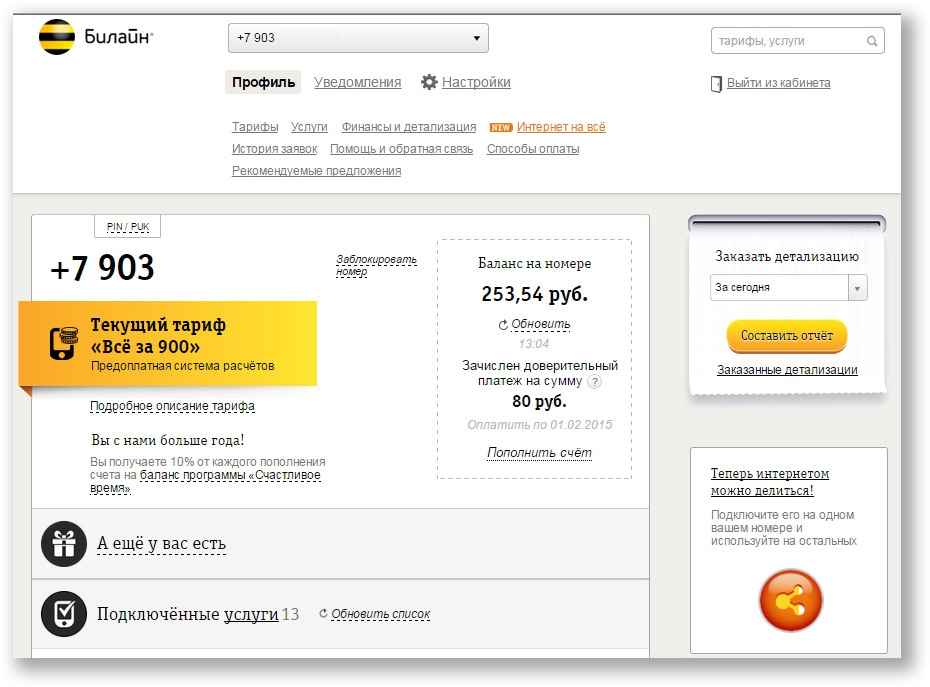
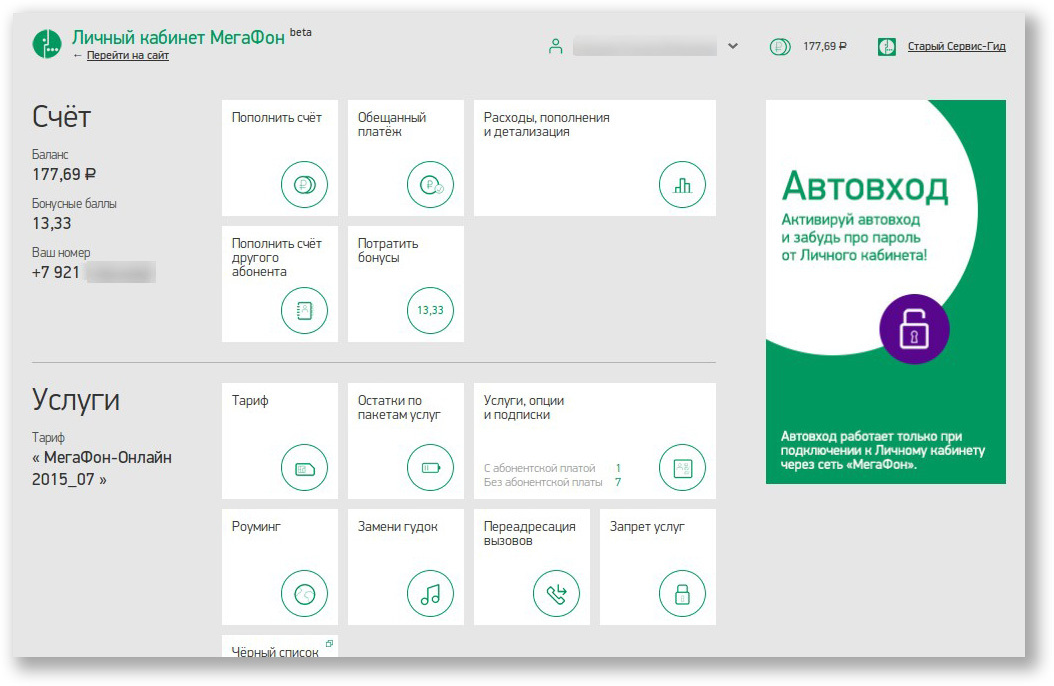
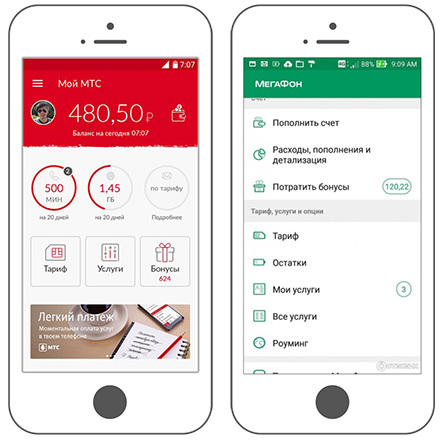
They look, of course, differently, but common features are clearly traced:
- Start screens show key information (tariff, current balance, bonus points);
- details and functions are “hidden” in other sections or under buttons;
- The design is maximally simplified so that the client can figure it out on their own;
- There are advertising and special offers.
Customer Service Workplace
And this is the interface for the call center operator developed by Netcracker. During the development process, we based our detailed research on the daily work of Tier 1 operators around the world.
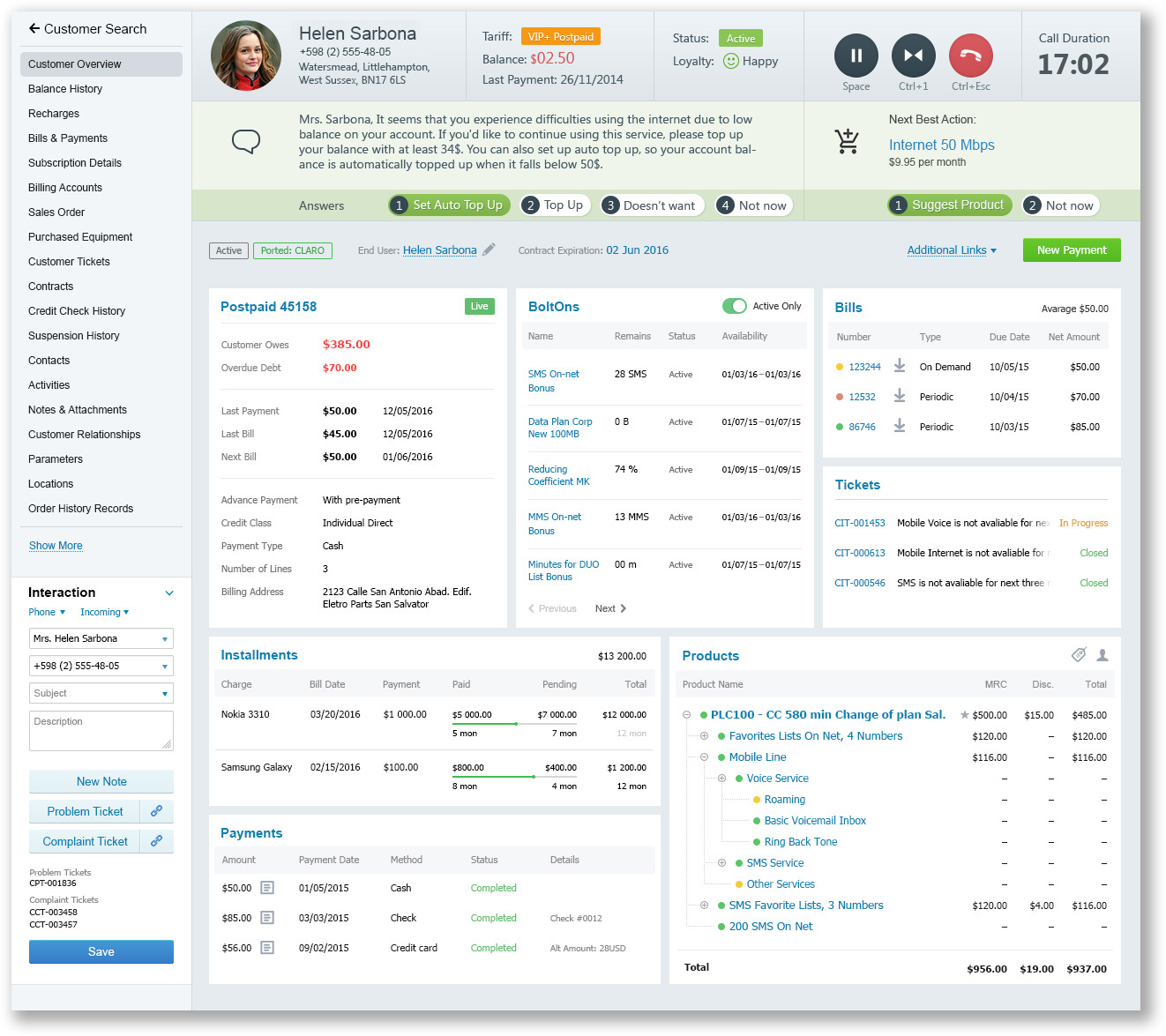
Call center operator interface developed by Netcracker.
In our understanding, the professional interface should be built on the tasks of the employee and focus on improving KPI indicators. In this case:
- Average handle time
- After call work
- First call resolution
- Learning curve et al.
During UX micro-design, we wanted to speed up the execution of top scenarios as much as possible. Therefore, among our priorities were the following tasks:
- Determining the importance of data and the frequency of access to it. This affected the sequence and layout of widgets.
- Providing dynamic data composition depending on the context of the conversation. Widgets corresponding to the current scenario go up.
- Applying the actionable analytics approach. From the entire set of data, we focus on what is connected with the context of the client’s appeal.
Obviously, such a tool requires training and education of employees. Note:
- On the start screen, the data density is much higher. The operator sees finances, connected services, non-monetary balances, the history of recent calls.
- Many parameters and controls are not signed, there are abbreviations, color coding is applied.
- There are few tips and help information. Most of the operator knows by heart.
In addition, the operator can access what the client will not see:
- Scripting - a sequence of questions that the operator must ask the client. It depends on the scenario and often changes.
- Statuses of products, services, billing and processing facilities. In the personal account, the client sees only a small part of this.
- Customer loyalty indicators , including those that came from social networks.
- Up-sell / Cross-sell - analysis of what the customer has already bought in order to sell him additional products and services.
- Next best action is a complex and voluminous analysis of customer behavior. She analyzes what the client has contacted and anticipates what can make him happier.
- Interaction Log - here record the interaction with the client. They describe the problems and their solutions, create applications in the back end, categorize calls for subsequent analysis of statistics.
The differences in user and operator systems are due to two reasons:
- Different system requirements.
The operator and the client have different skills and scenarios of interaction with the system. Intuitiveness (the ability to quickly understand the interface) and satisfaction (the impression of the system as a whole) are important for the client. For operators, the main thing is productivity and speed, i.e. the ability to process the appeal as quickly as possible so that the client is satisfied. - The
client does not need to remember different goals when and why he went to his personal account. The goal of the client is to find out about the services. The company's goal is to sell more. The company collects and systematizes appeals in order to predict what else can be offered to the client. In addition, the company takes care of how to increase customer loyalty. This directly affects whether the client will continue to use the services.
Tomorrow is a single interface

All telecom operators (and not only telecom) seek to reduce the cost of customer service - one of the most significant items of expenditure. As a result, operators are looking for new approaches to the process of interaction with subscribers:
- Customers value convenience and time, so digital communication channels are developing: social networks, online consultants, etc.
- Self-service portals are becoming more convenient and functional, so that customers can manage their services on their own.
- Due to the high turnover and lack of qualified specialists in call centers, companies often turn to outsourcing. Therefore, interfaces are becoming more simple and understandable.
- Increasingly, the client and consultant are simultaneously looking at one screen. If in the store they together choose a product from a tablet, then during a call to the call center the operator connects to the client’s session and purchases and sets up services on his behalf. Thus, the customer service representative trains the subscriber each time so that the next time the subscriber can do it himself, without the help of a representative. This, of course, increases the processing time of the application, but thereby solves the strategic task of bringing the service to self-service.
As a result, self-service gives customers more information and opportunities, and the operator’s interface is simplified. In fact, the interfaces are moving towards each other.
SelfService + Project
A good example of such a rapprochement is SelfService +, a joint project of our company and a large telecom operator in North America with a subscriber base of several tens of millions of subscribers.
The essence of the project
In new areas, houses are being built. Mostly these houses are bought by young people and middle-aged people. Checking into the apartment, the owner discovers a box that has been installed by the telecom operator. The box provides modern telecom services: Internet, TV, telephony, international calls, etc. The owner visits the site, selects services, sets up, pays and immediately starts using them.
Customer interaction with the operator begins in digital format. This implies that the client will continue to serve himself independently, minimizing the company's costs for customer care. The North American operator plans to “run through” the processes and systems to a new audience and gradually transfer its entire subscriber base to this format.
How the call center operator works in such a model
This project does not create a separate special system for call center operators like the one we described. Operators work in the same self-service interface as customers. This is possible even within the same session with the client. But the question arises: how can the operator get access to special functions of the system - additional information about the client, logging of the reason for contacting, scripting of questions to be asked, next best action?
For this, the self-service interface is enriched with special operator functions. They are added on top of what the client sees.
Let's look at an example. Here is one of the steps of buying through the eyes of the client (the name of the operator and corporate styles are changed to fictitious).
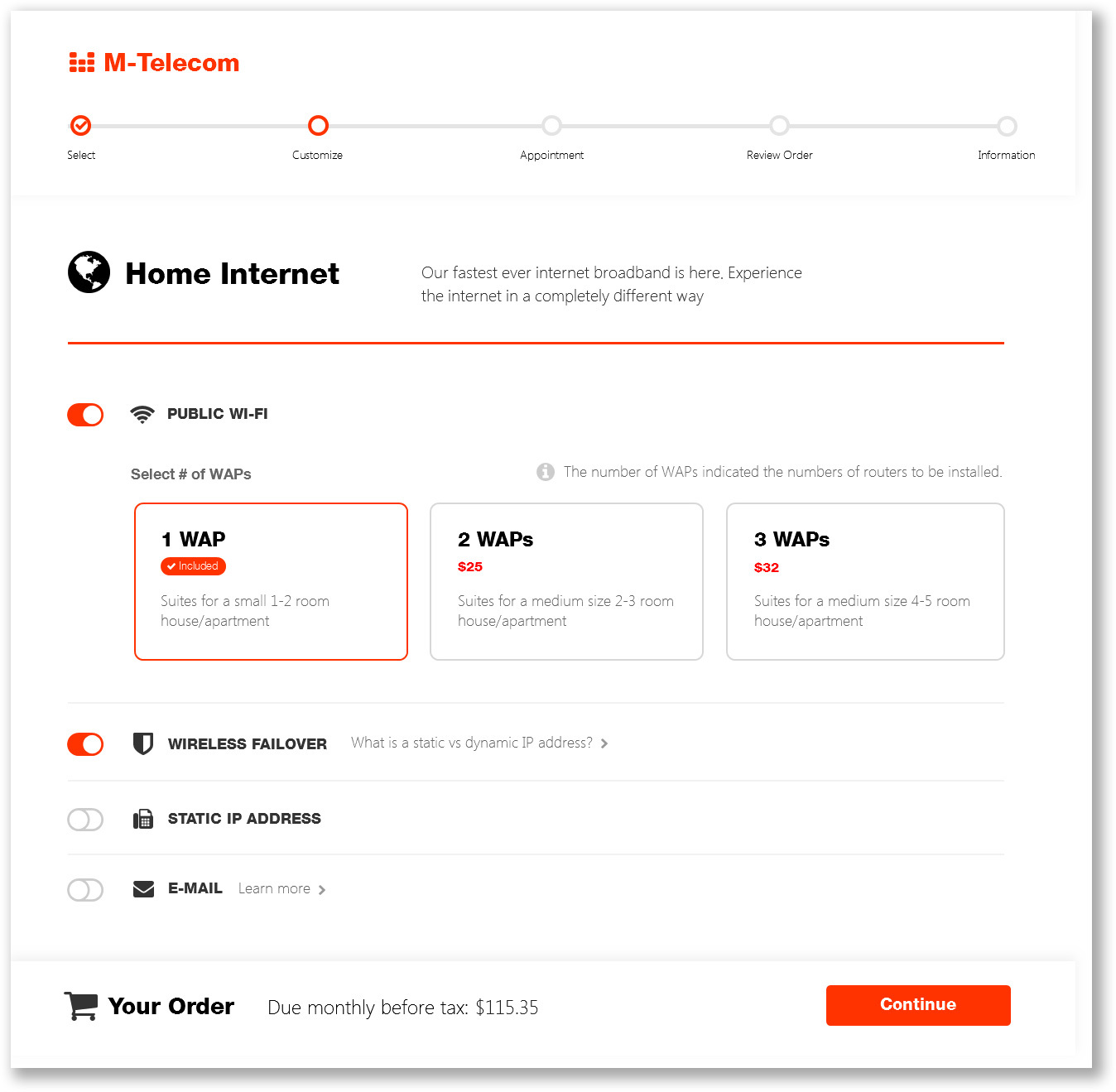
Telecom services order page for a customer.
The client chose the tariff, which included the Internet and mobile communications, and proceeded to refine the options. At this moment, he doubted how many wireless access points he should install in the apartment, and decided to call the call center. The call center operator is connected to the client’s screen. However, the operator sees more than the buyer:
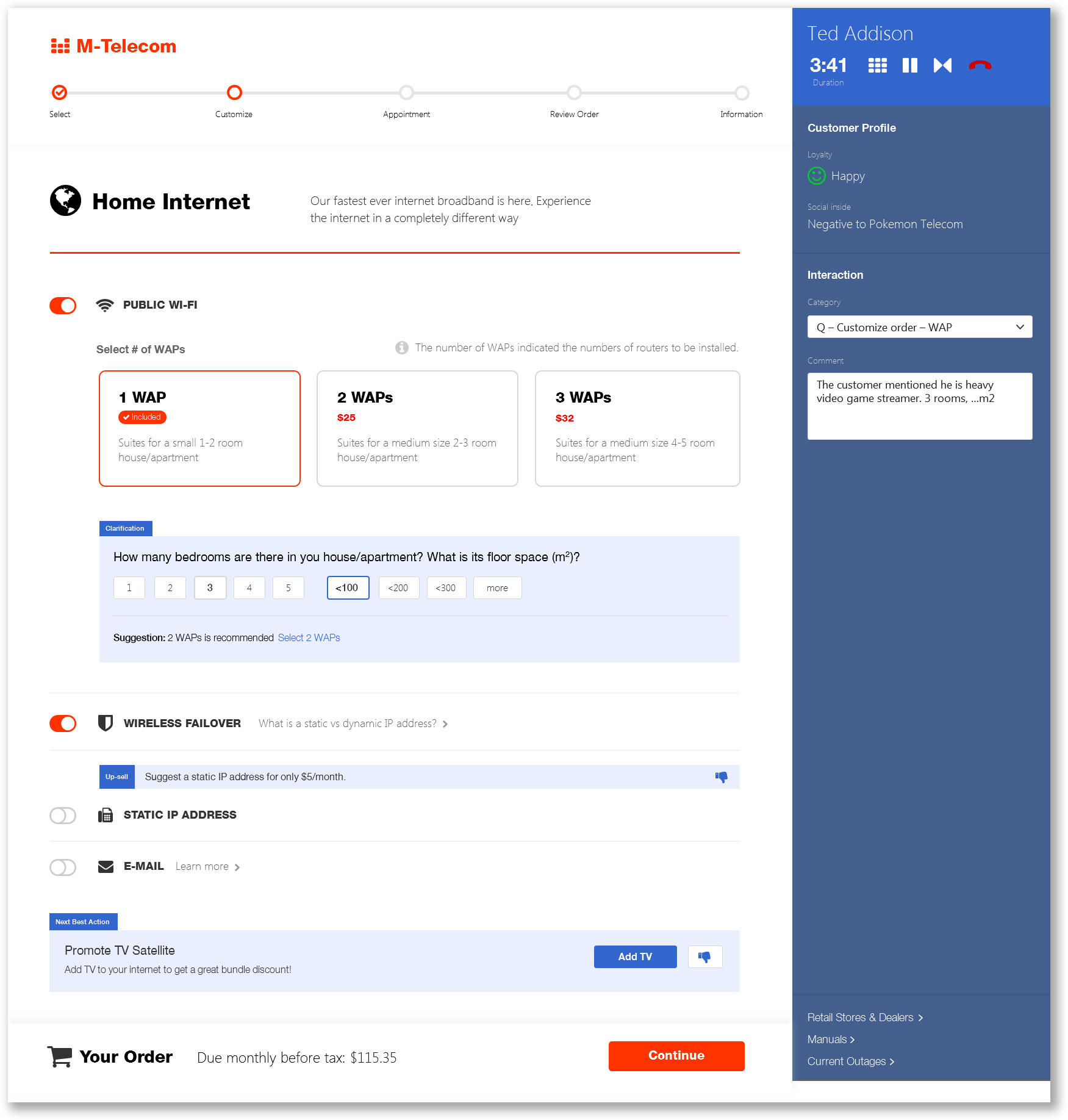
Telecom services order page for the operator.
The operator has access to both buyer statuses (including information from social networks), the Interaction autocomplete block, and dynamic upsell / cross-sell offers. However, the screen-flow of the purchase looks similar, and the operator goes through the entire process together with the buyer in real time.
The provider understands that such interfaces are a compromise and right now the speed of operators in stores and call centers will drop. After all, an operator - a user with different experience and expectations - is forced to work in the customer’s interface. This means more clicks, a different navigation logic, less data on one screen and unusual accents.
However, in the long run, this approach will allow:
- Develop self-service and reduce call center costs;
- Simplify operator interfaces, reduce requirements for their qualifications and accelerate training;
- use the full power of analytics to offer the customer what he wants to buy at the right time.
Secret becomes apparent
Now it’s clear what is hidden from the client in the operator’s monitor: the latest service approaches. Today, telecom operators know enough about customers to be able to sell them even what the customers themselves did not think about. But this is not a “vparivanie” dubious goods. It is the desire to study the consumer and offer exactly what will make him happy. Of course, the transformation of processes and tools will not bring immediate benefits. But the key to business success is high quality service. Therefore, these investments will pay off in the long run.
And although the requirements for CRM systems are known, and the systems themselves have long been implemented and used, telecom companies are beginning to realize that not only functionality is important. Against the backdrop of the global spread of digital technology, everyday user experience and expectations inevitably penetrate the field of specialized software. Caring for customer experience pushes product design forward. In addition, the convenience of the interface and the speed of the operator directly affect customer satisfaction and, ultimately, profit.
Customer expectations are growing, the definition of UX is changing before our eyes, the requirements for product quality go to a new level. And we at Netcracker are aware that in these conditions our responsibility also grows. Information technology has reached a level of development where there are almost no barriers in terms of implementing functionality and integration with business. But in order to adequately meet the challenges of the industry, to supply and implement innovative solutions around the world, it is necessary to continue to focus on the user experience. This is one of the key requirements in order to successfully compete in the market.
It would be interesting to know about your projects in this area. Have you ever developed similar systems? What did they look like? Write in the comments!









