 November 27, 2016 at 17:37
Integration of Opencart with 1C Enterprise
Today, e-commerce has gone far ahead and online store entrepreneurs have not used their own warehouses for a long time, but most often sell goods
directly from the supplier’s warehouse.
In this regard, it became possible to publish volumes on the website of goods inconceivably exceeding the largest hypermarket: 2,000 items, 6,000 items or more. Moreover, each product can have different characteristics, such as: color, size, type of material, etc. And then the number of objects can exceed 20,000. Such online stores most often include auto parts stores, children's toys, clothing / accessories stores, etc.
Having such a quantity of goods, the business sets new automation conditions: the mandatory integration of an online store with the existing organization accounting system. More often this system is the 1C Enterprise program system, which has firmly entered the life of any business. In this article, we will consider the integration of an online store on the popular Opencart content management system and 1C Trade Management.
CMS Opencart - developed and positions itself as a convenient platform for online stores.
A 1C Trade Management - as a configuration tailored for organizations selling goods and keeping records of goods in stock. For e-commerce in this configuration there is a functional exchange with the site:
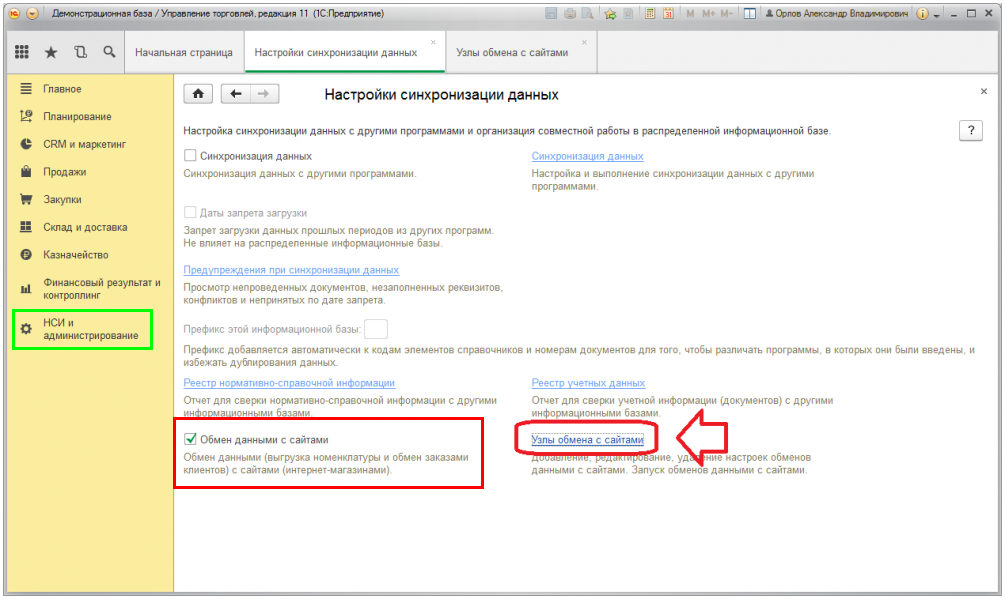
However, it is in any configurations: 1C: Trade Management, 1C Retail, 1C Integrated Automation, 1C Management of a small company, 1C ERP and others. To integrate Opencart with 1C Trade Management, today there are many modules and exchange methods. All of them can be divided into several types:
1. Direct recording of product data in the site database with embedding additional functionality in the 1C program
2. Direct recording of product data through external exchange processing
3. Data exchange using the Commerce ML standard
About the first type: most often, 1C configuration modification, embedding third-party code is used for its implementation. Usually, with this option, the so-called “removal of configurations” from the support takes place, which allows the automatic technical support 1C to take extra money for updating such configurations. For direct recording in the site database, you also need to additionally install the 1C component that connects to the mysql site. This can also sometimes be difficult, due to the specifics of installing the component on the 1C platform and the operation of the operating system.
About the second type : everything is the same, but 1C configuration change does not occur.
About the third view:The exchange according to the Commerce ML standard is that 1C generates an XML data file and sends it to the site. Further, the site reads the received file and writes to the site database. The same technology is used for CMS 1C-Bitrix. The advantages of this method is that from the 1C side the XML file upload is fully implemented and is in any configuration, it remains only to configure the connection to the site.
But to connect through the standard functionality of exchanging with the 1C website, the site must have a certain script or data exchange module with 1C.
All existing exchange modules allow uploading to the site and receiving the following information from the site:
In my opinion, the most convenient and easy to install and implement Opencart exchange module with 1C Enterprise this .
It works on all versions of Opencart, does not require the installation of any additional. third-party modules to the site and to any 1C configuration change or 1C platform modification.
Now about how it works in all modules, including this one, the connection between 1C objects and Opencart database tables (the standard prefix didn’t remove by default for clarity):
The table may not be complete, but the main objects are reflected in it. In most cases, it is these database tables that use modern exchange modules to download information from 1C.
The data exchange time between Opencart and 1C Enterprise is greatly limited by 1C. So, the average statistics on the time of preparing data from 1C (before sending data to the website) can take the following time:
20 thousand positions - 10 minutes
60 thousand positions - 15 minutes
80 thousand positions - 25 minutes
After data preparation by 1C program, uploading data to a site, the speed of which can be limited only by the speed of the data transmission channel.
The final stage is the time of reading the received XML file directly on the site, and writing to the database. The time here is not significant, and usually the server "reads" the data very quickly.
With the method of exchanging direct writes to the database, this point is omitted. Basically, all the main time for the exchange is spent on preparing data from 1C with any data exchange method.
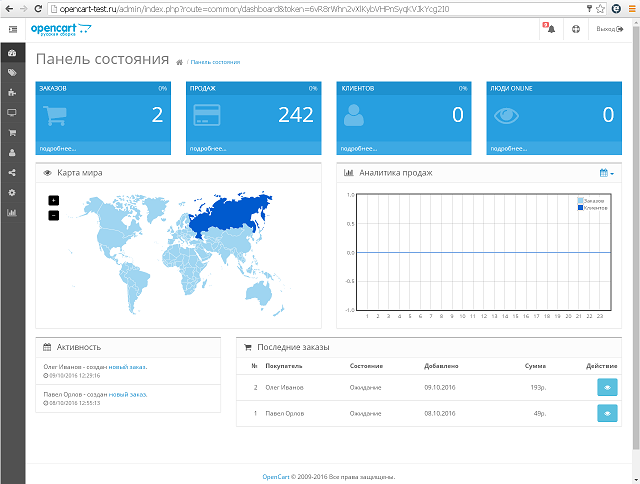
Conclusion : in general, Opencart is not a very bad and convenient system for managing an online store. Easy to program. The main page of the admin panel is very conveniently and beautifully implemented, allowing you to analyze sales volumes by different countries:
But at the same time, there is an opinion that opencart starts to work poorly with a very large number of products on the site. It is treated by optimizing and using caching. For small online stores, a good and economical CMS is quite good.
directly from the supplier’s warehouse.
In this regard, it became possible to publish volumes on the website of goods inconceivably exceeding the largest hypermarket: 2,000 items, 6,000 items or more. Moreover, each product can have different characteristics, such as: color, size, type of material, etc. And then the number of objects can exceed 20,000. Such online stores most often include auto parts stores, children's toys, clothing / accessories stores, etc.
Having such a quantity of goods, the business sets new automation conditions: the mandatory integration of an online store with the existing organization accounting system. More often this system is the 1C Enterprise program system, which has firmly entered the life of any business. In this article, we will consider the integration of an online store on the popular Opencart content management system and 1C Trade Management.
CMS Opencart - developed and positions itself as a convenient platform for online stores.
A 1C Trade Management - as a configuration tailored for organizations selling goods and keeping records of goods in stock. For e-commerce in this configuration there is a functional exchange with the site:
However, it is in any configurations: 1C: Trade Management, 1C Retail, 1C Integrated Automation, 1C Management of a small company, 1C ERP and others. To integrate Opencart with 1C Trade Management, today there are many modules and exchange methods. All of them can be divided into several types:
1. Direct recording of product data in the site database with embedding additional functionality in the 1C program
2. Direct recording of product data through external exchange processing
3. Data exchange using the Commerce ML standard
About the first type: most often, 1C configuration modification, embedding third-party code is used for its implementation. Usually, with this option, the so-called “removal of configurations” from the support takes place, which allows the automatic technical support 1C to take extra money for updating such configurations. For direct recording in the site database, you also need to additionally install the 1C component that connects to the mysql site. This can also sometimes be difficult, due to the specifics of installing the component on the 1C platform and the operation of the operating system.
About the second type : everything is the same, but 1C configuration change does not occur.
About the third view:The exchange according to the Commerce ML standard is that 1C generates an XML data file and sends it to the site. Further, the site reads the received file and writes to the site database. The same technology is used for CMS 1C-Bitrix. The advantages of this method is that from the 1C side the XML file upload is fully implemented and is in any configuration, it remains only to configure the connection to the site.
But to connect through the standard functionality of exchanging with the 1C website, the site must have a certain script or data exchange module with 1C.
All existing exchange modules allow uploading to the site and receiving the following information from the site:
- Uploading to the website of groups and subgroups of nomenclature
- Uploading to the website of the nomenclature, name, article, description
- Uploading to the site several images for goods from 1C
- Upload to the manufacturer’s website specified in the nomenclature
- Uploading to the website of additional custom details of the item in the product attributes
- Uploading prices to the site
- Uploading to the site the types of prices for groups of site buyers
- Uploading to the website the quantity of goods in the warehouse and constant updating of current balances
- Downloading from the site in 1C orders from customers
- Download from the site in 1C of the Counterparty and Partner participating in the order
- Download from the site in 1C of the nomenclature participating in the order
- Creating a selection when uploading to the site
In my opinion, the most convenient and easy to install and implement Opencart exchange module with 1C Enterprise this .
It works on all versions of Opencart, does not require the installation of any additional. third-party modules to the site and to any 1C configuration change or 1C platform modification.
Now about how it works in all modules, including this one, the connection between 1C objects and Opencart database tables (the standard prefix didn’t remove by default for clarity):
| Object 1C | Opencart Database Tables |
|---|---|
| Elements of the reference book “Nomenclature” | oc_product, oc_product_description |
| Properties of the elements of the directory "Nomenclature" | oc_attribute, oc_attribute_description, oc_product_attribute |
| Images of the item "Nomenclature" | oc_product, oc_product_image |
| Groups of the reference book "Nomenclature" | oc_category, oc_category_description |
| Model Terms of Sale Agreement or Item Price Types | oc_customer_group, oc_customer_group_description, oc_product_discount |
| Stock item balances | oc_product |
| Item price | oc_product, oc_product_discount |
| Customer Order Document and Order Items | oc_order, oc_order_product, oc_order_status |
| Buyer or Counterparty participating in the order | oc_order |
The table may not be complete, but the main objects are reflected in it. In most cases, it is these database tables that use modern exchange modules to download information from 1C.
The data exchange time between Opencart and 1C Enterprise is greatly limited by 1C. So, the average statistics on the time of preparing data from 1C (before sending data to the website) can take the following time:
20 thousand positions - 10 minutes
60 thousand positions - 15 minutes
80 thousand positions - 25 minutes
After data preparation by 1C program, uploading data to a site, the speed of which can be limited only by the speed of the data transmission channel.
The final stage is the time of reading the received XML file directly on the site, and writing to the database. The time here is not significant, and usually the server "reads" the data very quickly.
With the method of exchanging direct writes to the database, this point is omitted. Basically, all the main time for the exchange is spent on preparing data from 1C with any data exchange method.
Conclusion : in general, Opencart is not a very bad and convenient system for managing an online store. Easy to program. The main page of the admin panel is very conveniently and beautifully implemented, allowing you to analyze sales volumes by different countries:
But at the same time, there is an opinion that opencart starts to work poorly with a very large number of products on the site. It is treated by optimizing and using caching. For small online stores, a good and economical CMS is quite good.









