How to generate meaningful commits. Apply Conventional Commits Standard
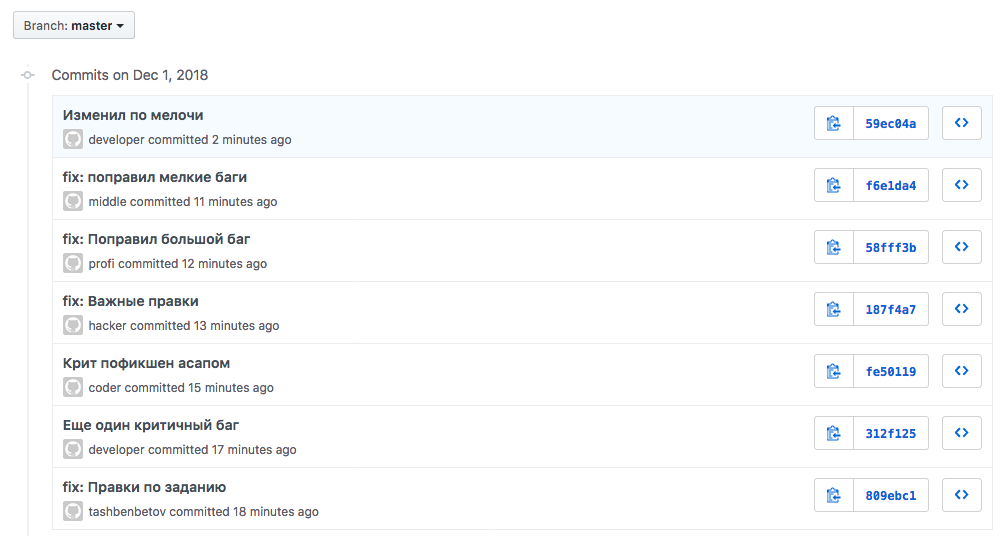
Habitual chaos in commit names. Familiar picture?
Surely you know git-flow . This is a great set of conventions for organizing work with branches in Git. It is well documented and widely distributed. Usually we are familiar with the correct branching and talk a lot about it, but, unfortunately, we pay too little attention to the name of commits, so often the messages in Git are written haphazardly.
My name is Yerzhan Tashbenbetov, I work in one of the Yandex.Market teams. And today I will tell Habr's readers what tools we use to create meaningful commits in the team. I invite you to join the discussion of this topic.
The lack of agreement on commits makes it difficult to work with history in Git. That was on our team. Before using common for all regulations and implementation of automation, typical commits looked as follows:
SECRETMRKT-700: пропали логотипы партнеров
Приложение падает, поправил.
SECRETMRKT-701, SECRETMRKT-702: Отцентрировал картинки на всех ...
First, each developer wrote messages as he wanted: someone described the task, someone listed the changes made, someone used a random phrase generator. Everything was at odds with each other. Second, task numbers that were present in commits often shortened useful text. All this made it difficult to work effectively with history in Git.
For this reason, we implemented the Conventional Commits standard in the team , began to generate commits in the commitizen console utility and check the result using commitlint . As a result, commits have changed and become like this:
refactor(tutorial): оптимизировать работу эпиков в тултипах
feat(products): добавить банер с новогодними скидками
fix(products): исправить в банере формат даты
Reading the history and recognizing the changes made easier. We didn’t refuse to specify task numbers, everything was neatly transferred inside commits according to Conventional Commits convention .
Next, I'll tell you how to achieve a similar order in Git.
Best practices, recommendations, and common solutions for commiting
If you try to understand what practices are used in the industry, you can find the following options:
- Articles with general tips on writing commits. For the most part, they are quite logical and fairly well open the topic, but there is a sense of confusion and lack of a comprehensive solution to the issue.
- Standards for writing commits. They are few. They are documents with a clear list of rules, often written specifically for a large library or framework. These standards are captivating system approach, popularity and support in the open-source community.
We need more order in commits!
Methodology Conventional Commits stands out from the other standards and deserves scrutiny for several reasons:
- It is well documented and worked out. In its specification answers to the most common questions.
- The creators of the convention were inspired by the requirements for writing commits, which are used in the popular and time-tested framework AngularJS .
- Several large and popular open-source libraries (such as yargs and lerna ) follow the rules of the convention .
- The advantages include preparation for the automatic formation of the Release Notes and Change Log.
An example of a commit for this standard:
fix(products): поправить длину строки с ценой
Часть заголовков неправильно отображается в мобильной версии из-за ошибок
в проектировании универсальных компонентов.
МЕТА ДАННЫЕ: SECRETMRKT-578, SECRETMRKT-602
Basic abstracts of Conventional Commits
- The developer should adhere to the following commit structure:
<type> (<scope>): <subject>
<body>
<footer> - A commit should have a header, maybe a body and a footer.
- The commit title should start with a type ( type ) indicating the specifics of the changes made to the code base and end with a description.
- Along with the mandatory feat , fix (the use of which is strictly regulated), other types are allowed.
- A commit may have a scope . It characterizes the code snippet affected by the changes. The area follows the type of commit. The standard does not regulate a clear list of areas. Examples of domains: eslint, git, analytics, etc.
- The commit description should be immediately after the type / area.
- The commit body can be used to detail changes. The body should be separated from the description by an empty line.
- A footer should be used to specify external links, commit context, or other meta information. The footer should be separated from the body by a blank line.
In addition to the rules listed in the convention, we use the following popular recommendations:
- In the body of a commit we write what was changed and why .
- We use the following types of commits:
build Build a project or change external dependencies ci Configuring CI and working with scripts docs Documentation update feat Adding new functionality fix Error correction perf Changes to improve performance refactor Editing the code without correcting errors or adding new features revert Rollback to previous commits style Code style edits (tabs, indents, full stops, commas, etc.) test Adding tests - We write the description in the imperative mood , just like Git itself.
Merge branch 'fix / SECRETMRKT-749-fix-typos-in-titles'
- We do not download the description of the commit with punctuation marks.

Standard commits Conventional Commits use kotribyutory lerna
How easy is it to go to the correct name of commits?
Need to add automation and convenience. To solve this issue, we need two tools: the commit generator and the commit linter, which is configured to be checked before pushing to the repository.
Configure the commitizen utility
This tool allows you to generate commits using the built-in wizard. In addition, commitizen is well supported by the community and, thanks to additional modules, is perfectly customizable.
- Install the commitizen utility globally (you may need administrator privileges).
npm i -g commitizen - Next install the adapter cz-customizable . It is needed to set up a template with questions used by the commitizen utility .
npm i -D cz-customizable - Create a file commitizen.js, it is needed to configure cz-customizable. Place the created file in the directory ./config/git. I recommend not to litter the project root with configuration files and try to group the files in the folder prepared for this. Content:Show commitizen.js
"use strict"; module.exports = { // Добавим описание на русском языке ко всем типам types: [ { value: "build", name: "build: Сборка проекта или изменения внешних зависимостей" }, { value: "ci", name: "ci: Настройка CI и работа со скриптами" }, { value: "docs", name: "docs: Обновление документации" }, { value: "feat", name: "feat: Добавление нового функционала" }, { value: "fix", name: "fix: Исправление ошибок" }, { value: "perf", name: "perf: Изменения направленные на улучшение производительности" }, { value: "refactor", name: "refactor: Правки кода без исправления ошибок или добавления новых функций" }, { value: "revert", name: "revert: Откат на предыдущие коммиты" }, { value: "style", name: "style: Правки по кодстайлу (табы, отступы, точки, запятые и т.д.)" }, { value: "test", name: "test: Добавление тестов" } ], // Область. Она характеризует фрагмент кода, которую затронули изменения scopes: [ { name: "components" }, { name: "tutorial" }, { name: "catalog" }, { name: "product" } ], // Возможность задать спец ОБЛАСТЬ для определенного типа коммита (пример для 'fix')/* scopeOverrides: { fix: [ {name: 'style'}, {name: 'e2eTest'}, {name: 'unitTest'} ] }, */// Поменяем дефолтные вопросы messages: { type: "Какие изменения вы вносите?", scope: "\nВыберите ОБЛАСТЬ, которую вы изменили (опционально):", // Спросим если allowCustomScopes в true customScope: "Укажите свою ОБЛАСТЬ:", subject: "Напишите КОРОТКОЕ описание в ПОВЕЛИТЕЛЬНОМ наклонении:\n", body: 'Напишите ПОДРОБНОЕ описание (опционально). Используйте "|" для новой строки:\n', breaking: "Список BREAKING CHANGES (опционально):\n", footer: "Место для мета данных (тикетов, ссылок и остального). Например: SECRETMRKT-700, SECRETMRKT-800:\n", confirmCommit: "Вас устраивает получившийся коммит?" }, // Разрешим собственную ОБЛАСТЬ allowCustomScopes: true, // Запрет на Breaking Changes allowBreakingChanges: false, // Префикс для нижнего колонтитула footerPrefix: "МЕТА ДАННЫЕ:", // limit subject length subjectLimit: 72 }; - Add the package.json links to the cz-customizable and previously created configuration file:Show part package.json
{ "config": { "commitizen": { "path": "node_modules/cz-customizable" }, "cz-customizable": { "config": "config/git/commitizen.js" } }, } - Let's check the resulting result. Type the following command in the terminal:
git cz
The commitizen wizard will first collect information about the type and area of the commit, then sequentially ask for the text that will be in the description, in the body, in the footer, and after your consent will create a commit.
Be sure to look at an example of the work of the configured commitizen utility and the cz-cusomizable adapter connected to it
Configure the husky and commitlint utilities
- Install husky and commitlint in the project :
npm i -D husky @commitlint/cli - With the help of husky we will add check of kommit. To do this, immediately after the scripts in package.json, add the following hook and specify a link to the commitlint.js file in it:Show part package.json
{ "scripts": { "test": "echo \"Error: no test specified\" && exit 1" }, "husky": { "hooks": { "commit-msg": "commitlint -E HUSKY_GIT_PARAMS -g './config/git/commitlint.js'" } }, "devDependencies": { "@commitlint/cli": "^7.2.1", "husky": "^1.1.3", } - Create a file commitlint.js, necessary for the correct operation of the linter. Place the created file in the directory ./config/git. File contents:Show commitlint.js
// Файл создан на основе @commitlint/config-conventionalmodule.exports = {
  rules: {
    // Тело коммита должно начинаться с пустой строки"body-leading-blank": [2, "always"],
    // Нижний колонтитул коммита должен начинаться с пустой строки"footer-leading-blank": [2, "always"],
    // Максимальная длина заголовка 72 символа"header-max-length": [2, "always", 72],
    // Область всегда только в нижнем регистре"scope-case": [2, "always", "lower-case"],
    // Описание не может быть пустым"subject-empty": [2, "never"],
    // Описание не должно заканчиваться '.'"subject-full-stop": [2, "never", "."],
    // Тип всегда только в нижнем регистре"type-case": [2, "always", "lower-case"],
    // Тип не может быть пустым"type-empty": [2, "never"],
    // Перечислим все возможные варианты коммитов"type-enum": [
      2,
      "always",
      [
        "build",
        "ci",
        "docs",
        "feat",
        "fix",
        "perf",
        "refactor",
        "revert",
        "style",
        "test"
      ]
    ]
  }
};
Everything. Now all commits will be checked before being sent to the repository :)
Be sure to look at the example of the work of the configured commitlint utility.
So choose commitizen or commitlint?
Both! In conjunction, they bring excellent results: the first generates commits, the second checks them.
Why do standards recommend the use of imperative?
This is a very interesting question. A commit is a change in code; a message in a commit can be interpreted as a guide to changing this code. Make, change, add, update, fix - all these are specific instructions for the developer.
By the way, the imperative is recommended in the Git versioning system itself :
[[imperative-mood]]
Describe your changes in imperative mood, e.g. "make xyzzy do frotz"
instead of "[This patch] makes xyzzy do frotz" or "[I] changed xyzzy
to do frotz", as if you are giving orders to the codebase to change
its behavior.
Why stick to any conventions? Is it worth spending time on it? What is the profit in this?
Worth it. In general, I noticed that we have become more willing to detail the changes made to the code base. In the body of a commit, we describe in detail why we had to use certain solutions. Understanding the history has become objectively easier. Plus, our product is developing, and we expect replenishment in the team. I am sure that thanks to the implementation of the standard and automation, it will be easier for new users to integrate into the development process.
Try and share the result.
Useful links:
- Repository with all the code from this article.
- Standard Conventional Commits .
- Commitlint is a tool for validating commits.
- Online configurator correct commits.
- Good advice on the name of commits.









