 September 28, 2016 at 17:00
Google Photos cannot delete files from an SD card
Many Android users have faced the annoying problem of accessing applications to the SD card. One such application is Google Photos. Once, everything was fine. But in Android 4.4, Google introduced a new system configuration that prevents applications from writing to the sd card. Deleting images through the gallery, and then deleting them again in google photos is extremely inconvenient.
For myself, I solved the problem by rooting the device and fixing the configuration. Details on the video:
But for ordinary users, everything should work without root. I suggest discussing how to do this in this article. I invite representatives of Google, Android developers and all interested in habrakat.
Some users were deprived of functionality without warning. I saw user comments with the following situation. Previously, they stored photos on an sd card and used google photo without any problems. Then the phone manufacturer proposed to make an OTA update (to 4.4 or higher), which users agreed to. But they could not even think that they would lose functionality. Now google photo cannot delete pictures, and to anesthetize the process of managing pictures, they are forced to store them in internal memory, which in itself is painful.
Google has long wanted to ban unhindered access to applications on the sd card. This is explained by the fact that when you uninstall the application, the system cannot find out which files belong to the application, so the sd card is cluttered. And in Android 4.4 google introduced such a thing as SAF (Storage Access Framework). They forbade applications to change anything on the sd card, with the exception of the application’s personal directory. And if the application asks, it gives the right to read (but not write) everything on the sd card.
Quote from here :
That is, for applications that are not preinstalled on the phone, and in my case google Photos was not preinstalled, there is officially no way to somehow manage files! Google, I don’t understand how to do this. Do not finish the feature - finish it. But why introduce into consumer devices something that still does not work?
As I said above, for myself, I have already solved the problem by correcting the system configuration (I need root). What about “simple” users who have not heard of root? I have some ideas how to solve this problem. Some of them are suitable only for Google, and some may be able to be implemented by the community. So what are the options?
Google should make everything work if possible. It is clear that they cannot advise rooting the device. But what about the private directory /storage/extSdCard/Android/data/com.google.android.apps.photos? What do they store there? Most likely there is not a recycle bin, because files deleted to the recycle bin are located in /data/user/0/com.google.android.apps.photos/files/trash_files. I do not know, maybe in Android it is not customary to store user data in such directories. Just offering a working option.
Those. if the application sees that it works on Android 4.4 and does not have access rights, then display a message like “No access. In the settings of your system camera, we suggest saving to the directory /storage/extSdCard/Android/data/com.google.android.apps.photos/DCIM. Keep in mind that when you delete google photos all the pictures will be deleted. " Now the application is ignoring this directory. If you put a snapshot in it, the directory will not appear in the selection list for synchronization.
Most likely this is a dead option, since the camera must be a system one (otherwise it will not be able to write to someone else's directory on the sd card), and the system camera most likely does not know how to select the directory to save (it does not know exactly on S4).
But it turns out that the developers found a loophole that still allows applications to manipulate files. I myself checked: restored the original platform.xml (in which there is no write access to the sd card), rebooted, installed the total commander and ... Uninstallation works! And even the code is.
Here the decision is for Google, maybe such a decision is unacceptable to them. But as for me, there is nothing wrong with using the bug as a feature, because they have to do everything to work.
That article says that not all devices will work such a hack. There is nothing left but to just show a message that there is no access. True, you can hint in it that the root would help, or the transition to another version of Android, and the older one will also work.
I also had the idea that Google can update their google services (and this is a system application) so that it can be accessed by a non-system google photos application with a request to delete the file. And you won’t need root. Will google do this?
In Android 5.0, google has improved SAF, and now applications may ask the user to provide write access to specific directories.
Quote from here :
But even on Android 5 google, the photo does not use this feature, but simply reports that it does not have access. I believe that before synchronizing any directory, the application must first ask for write permissions to it through SAF, so that you can delete pictures . This can be done right from the very activity where you select with the switch which directories you want to synchronize (Settings - Startup and Synchronization - Select folders). Google, why aren’t you doing this?
Here's how the application behaves now:
It should be:
If there are google representatives here, pass the information to the developers. Because this topic has been discussed for a long time, but Google does not correct the situation.
And for habrayuzery who are able to develop on Android I want to ask a question. Is it possible to change the application as I said, but on my own, without waiting for google? I know about the mismatch of the digital signature, but in our case this is not important. After all, all this is necessary only if the application is not system. And if it is not systemic, then you can remove it and then install it with a different signature. I saw a modified application instead of youtube - OGYouTube. Perhaps this is just what I am describing.
Fill out this form if you had / have the problem described.
On this I believe that I have done my job. Now google go. Or community.
For myself, I solved the problem by rooting the device and fixing the configuration. Details on the video:
But for ordinary users, everything should work without root. I suggest discussing how to do this in this article. I invite representatives of Google, Android developers and all interested in habrakat.
Some users were deprived of functionality without warning. I saw user comments with the following situation. Previously, they stored photos on an sd card and used google photo without any problems. Then the phone manufacturer proposed to make an OTA update (to 4.4 or higher), which users agreed to. But they could not even think that they would lose functionality. Now google photo cannot delete pictures, and to anesthetize the process of managing pictures, they are forced to store them in internal memory, which in itself is painful.
What's the deal
Google has long wanted to ban unhindered access to applications on the sd card. This is explained by the fact that when you uninstall the application, the system cannot find out which files belong to the application, so the sd card is cluttered. And in Android 4.4 google introduced such a thing as SAF (Storage Access Framework). They forbade applications to change anything on the sd card, with the exception of the application’s personal directory. And if the application asks, it gives the right to read (but not write) everything on the sd card.
Quote from here :
Just to sum up, here are the options 3rd-party apps have on KitKat:
An app without any permissions:
Automatic read and write for designated private folders on the primary and secondary storage
With WRITE_EXTERNAL_STORAGE, they also have:
Read and write for any public folder on the primary (built-in) storage
Read (not write) for any public folder on the secondary (SD card) storage
That is, for applications that are not preinstalled on the phone, and in my case google Photos was not preinstalled, there is officially no way to somehow manage files! Google, I don’t understand how to do this. Do not finish the feature - finish it. But why introduce into consumer devices something that still does not work?
What to do in this situation?
As I said above, for myself, I have already solved the problem by correcting the system configuration (I need root). What about “simple” users who have not heard of root? I have some ideas how to solve this problem. Some of them are suitable only for Google, and some may be able to be implemented by the community. So what are the options?
Option "Personal Directory"
Google should make everything work if possible. It is clear that they cannot advise rooting the device. But what about the private directory /storage/extSdCard/Android/data/com.google.android.apps.photos? What do they store there? Most likely there is not a recycle bin, because files deleted to the recycle bin are located in /data/user/0/com.google.android.apps.photos/files/trash_files. I do not know, maybe in Android it is not customary to store user data in such directories. Just offering a working option.
Those. if the application sees that it works on Android 4.4 and does not have access rights, then display a message like “No access. In the settings of your system camera, we suggest saving to the directory /storage/extSdCard/Android/data/com.google.android.apps.photos/DCIM. Keep in mind that when you delete google photos all the pictures will be deleted. " Now the application is ignoring this directory. If you put a snapshot in it, the directory will not appear in the selection list for synchronization.
Most likely this is a dead option, since the camera must be a system one (otherwise it will not be able to write to someone else's directory on the sd card), and the system camera most likely does not know how to select the directory to save (it does not know exactly on S4).
Option "Not a bug, but a feature"
But it turns out that the developers found a loophole that still allows applications to manipulate files. I myself checked: restored the original platform.xml (in which there is no write access to the sd card), rebooted, installed the total commander and ... Uninstallation works! And even the code is.
Here the decision is for Google, maybe such a decision is unacceptable to them. But as for me, there is nothing wrong with using the bug as a feature, because they have to do everything to work.
Option "Everything is bad, but you will be updated"
That article says that not all devices will work such a hack. There is nothing left but to just show a message that there is no access. True, you can hint in it that the root would help, or the transition to another version of Android, and the older one will also work.
Bookmark Option
I also had the idea that Google can update their google services (and this is a system application) so that it can be accessed by a non-system google photos application with a request to delete the file. And you won’t need root. Will google do this?
Solution for more recent versions of Android
In Android 5.0, google has improved SAF, and now applications may ask the user to provide write access to specific directories.
Quote from here :
Richer access to secondary shared storage devices
In KitKat we introduced APIs that let apps read / write file in app-specific directories on secondary storage devices, such as SD cards.
We heard loud and clear that developers wanted richer access beyond these directories, so in Lollipop we added the new ACTION_OPEN_DOCUMENT_TREE intent. Apps can launch this intent to pick and return a directory from any supported DocumentProvider, including any of the shared storage supported by the device. Apps can then create, update, and delete files and directories anywhere under the picked tree without any additional user interaction. Just like the other document intents, apps can persist this access across reboots.
This gives apps broad, powerful access to manage files while still involving the user in the initial selection process. Users may choose to give your app access to a narrow directory like “My Vacation Photos,” or they could pick the top-level of an entire SD card; the choice is theirs.
But even on Android 5 google, the photo does not use this feature, but simply reports that it does not have access. I believe that before synchronizing any directory, the application must first ask for write permissions to it through SAF, so that you can delete pictures . This can be done right from the very activity where you select with the switch which directories you want to synchronize (Settings - Startup and Synchronization - Select folders). Google, why aren’t you doing this?
Summarize
Here's how the application behaves now:
The user clicked the little bin.
Is there direct access to write to the sd card?
Yes - delete the image.
No - display a message that there is no access.
It should be:
The user clicked the little bin.
Is there direct access / through a loophole for recording to the sd card?
Yes - delete the image.
No - then
- Are we running Android 5.0+?
- Yes - request access to the directory through SAF and delete the snapshot.
- No - (that is most likely it is 4.4. But there may also be a specially modified 4.3-, configured as in 4.4) then:
- - Display a message: “There is no access, but the root will help you, or change the version of Android” or “ Configure the system camera to save images in /storage/extSdCard/Android/data/com.google.android.apps.photos/DCIM ", or" Update google services, we will give write access through them "at the discretion of google.
Need developers
If there are google representatives here, pass the information to the developers. Because this topic has been discussed for a long time, but Google does not correct the situation.
And for habrayuzery who are able to develop on Android I want to ask a question. Is it possible to change the application as I said, but on my own, without waiting for google? I know about the mismatch of the digital signature, but in our case this is not important. After all, all this is necessary only if the application is not system. And if it is not systemic, then you can remove it and then install it with a different signature. I saw a modified application instead of youtube - OGYouTube. Perhaps this is just what I am describing.
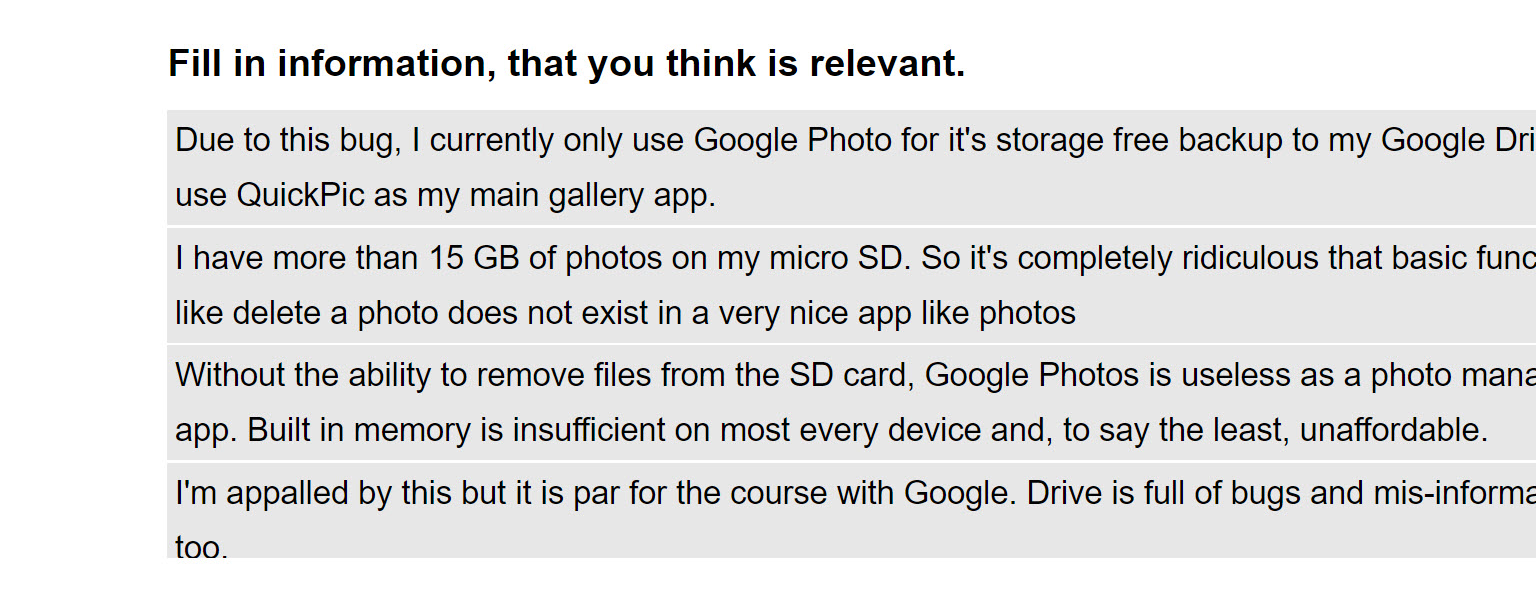
Fill out this form if you had / have the problem described.
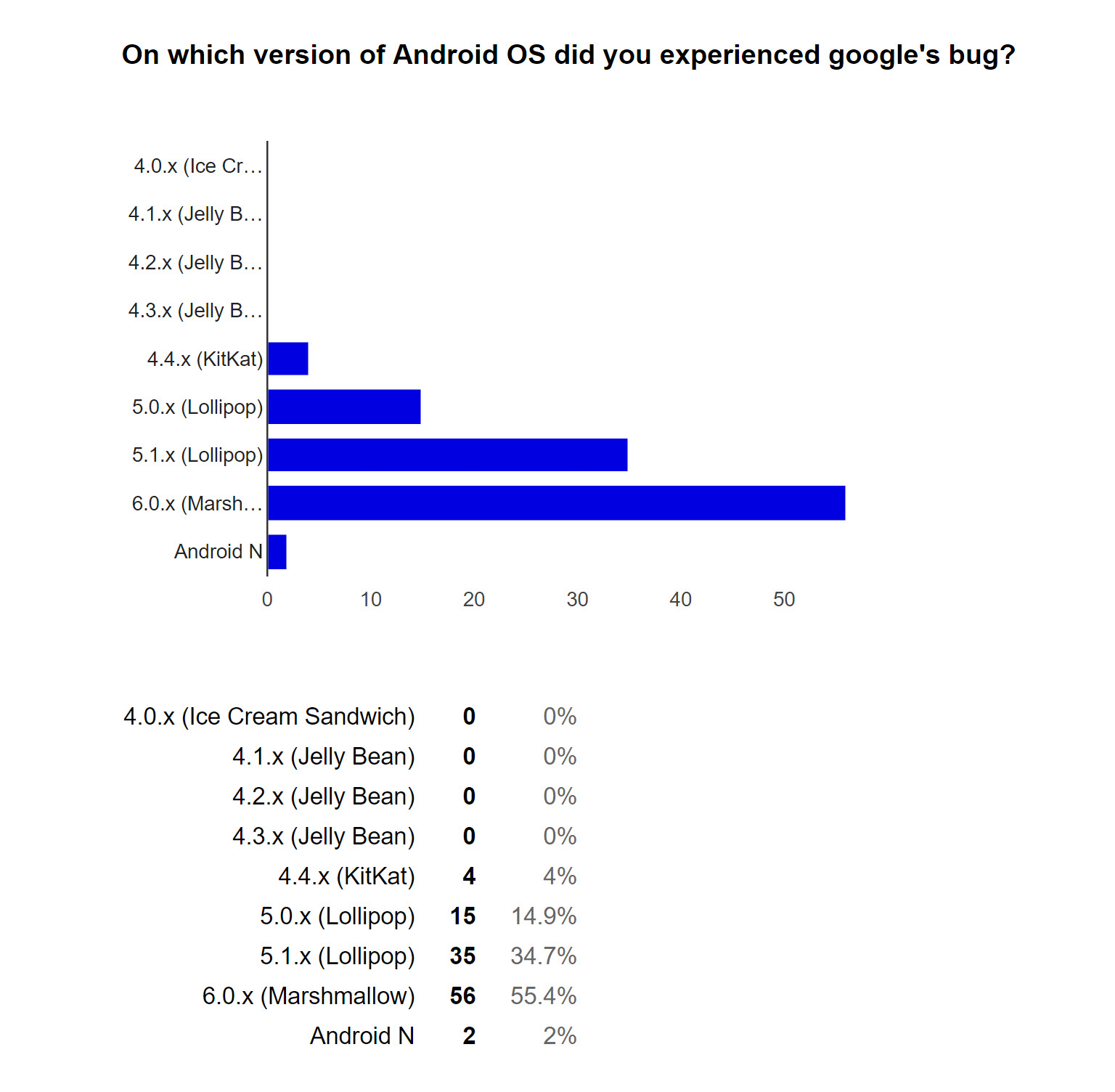
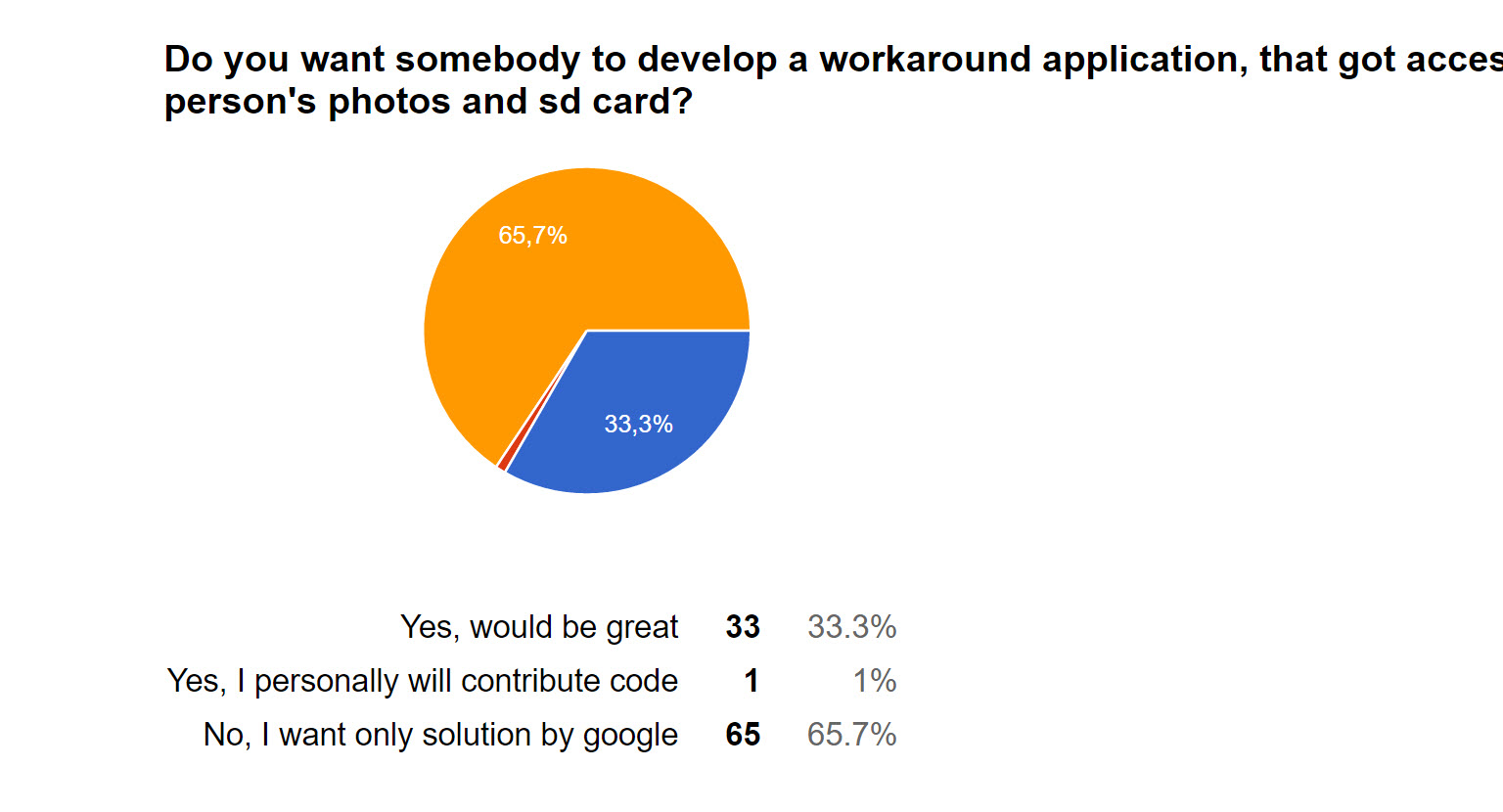
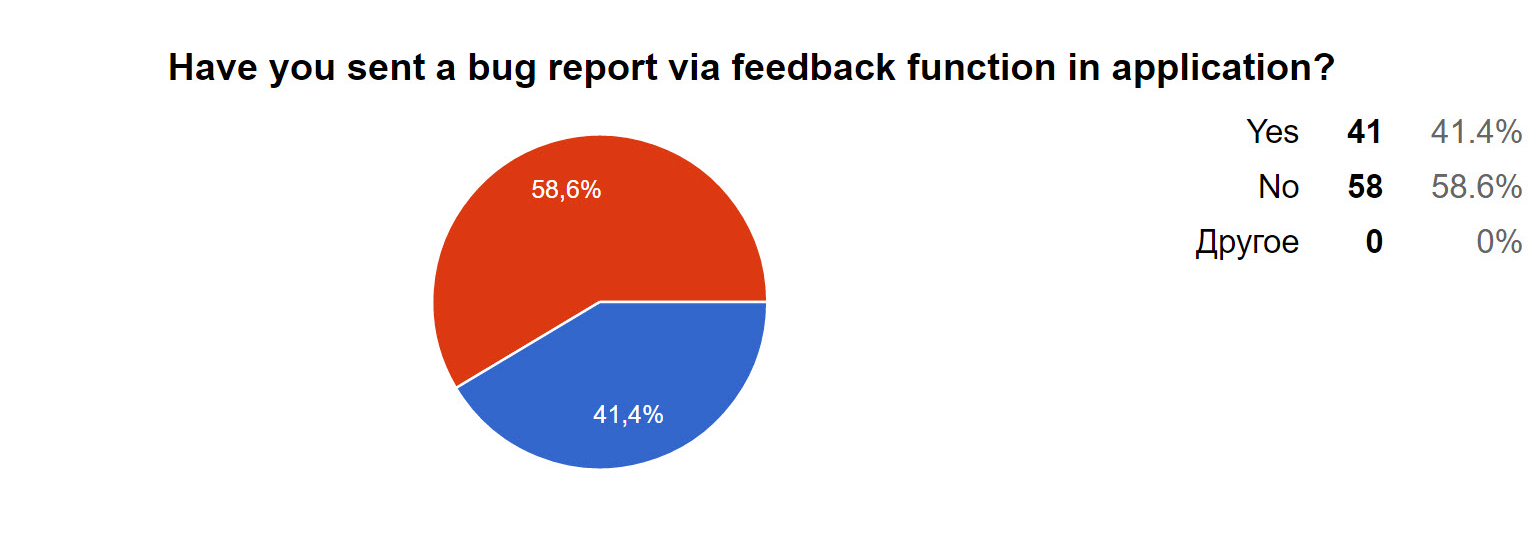
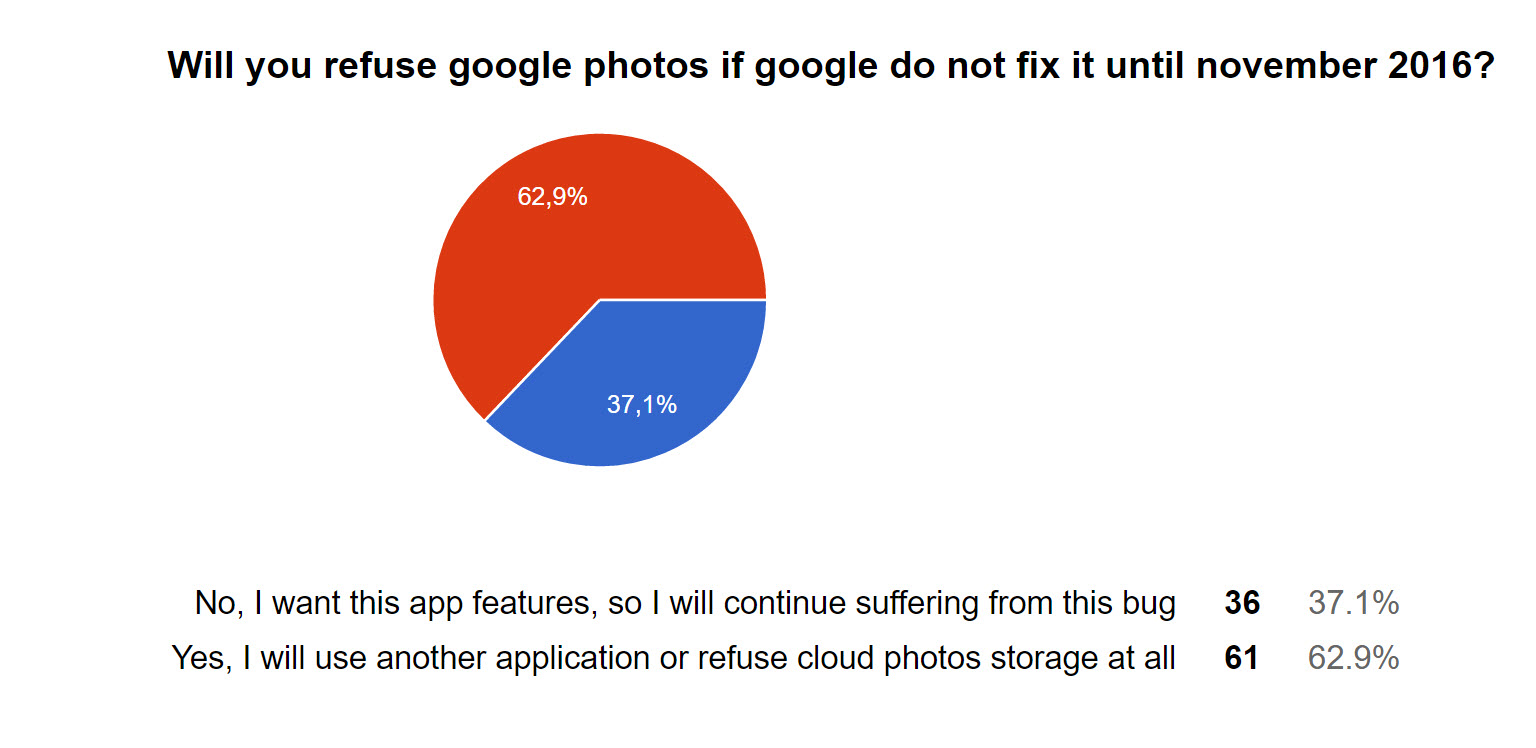
Survey results
Number of answers: 101 (at the time of September 20, 2016):



On this I believe that I have done my job. Now google go. Or community.









