Choose a long way (or goodbye to MAX_PATH)

Many users of Windows PCs, not to mention developers, are familiar with problems when working with long (over 260 characters, MAX_PATH) file or directory paths.
This article discusses ways to get rid of this remnant when developing applications on various platforms (WinApi, .Net Framework, .Net Core) and activating native support for long paths in Windows 10 (Anniversary Update).
Win API Applications
In applications that use the Win API to work with files, the recipe for getting rid of the MAX_PATH restriction has been known since time immemorial - you had to use the Unicode version of the function with the ending “W” to work with the directory or file and start the path with the \\? \ Prefix. This made it possible to use paths up to 32,767 characters long.
In Windows 10 (1607), the behavior of functions for working with files has changed: it has become possible to disable the check of MAX_PATH restrictions at the system level.
This has affected the following functions:
To work with directories: CreateDirectoryW, CreateDirectoryExW, GetCurrentDirectoryW, RemoveDirectoryW, SetCurrentDirectoryW. And for working with files: CopyFileW, CopyFile2, CopyFileExW, CreateFileW, CreateFile2, CreateHardLinkW, CreateSymbolicLinkW, DeleteFileW, FindFirstFileW, FindFirstFileExW, FindNextFileW, GetFileAttributesW, GetFileAttributesExW, SetFileAttributesW, GetFullPathNameW, GetLongPathNameW, MoveFileW, MoveFileExW, MoveFileWithProgressW, ReplaceFileW, SearchPathW, FindFirstFileNameW, FindNextFileNameW, FindFirstStreamW, FindNextStreamW, GetCompressedFileSizeW, GetFinalPathNameByHandleW.
This eliminates the need to use the \\? \ Prefix and potentially gives applications running directly or indirectly through the Win API a chance to get support for long paths without having to rebuild them. How to activate this feature is described at the end of the article.
.Net Framework
Although the .Net Framework uses the Win API to work with files, the previous change would not have brought any results. BCL code has built-in preliminary checks on the admissibility of directory and file names, and it didn’t even reach the call to the Win API functions, throwing a well-known exception. By popular demand of the community (more than 4,500 on UserVoice) in version 4.6.2, path length limit checks were cut from BCL code, giving it to the operating and file systems!
Here is what it gives:
- When using the prefix “\\? \” We can work with long paths as in the Win API,
Directory.CreateDirectory("\\\\?\\" + long_dir_name); - If you activate the native support for long Windows 10 (1607) file names, you don’t even need to use the prefix!
How to turn on:
- Use .Net Framework 4.6.2 as the target when building the application.
- Use a configuration file, for example, if the application has already been built under .Net 4.0:
.Net core
Here support for long paths was announced back in November 2015. The nature of the project and the lack of the strict need for backward compatibility apparently affected Open Source.
How to enable:
Everything works out of the box. Unlike the implementation in the .Net Framework - there is no need to add the prefix “\\? \” - it is added automatically if necessary.
Here here you can see an example.
How to enable long path support in Windows 10 (1607)
This feature is disabled by default. This is because this function is experimental, and there is a need to modify various subsystems and applications for full support.
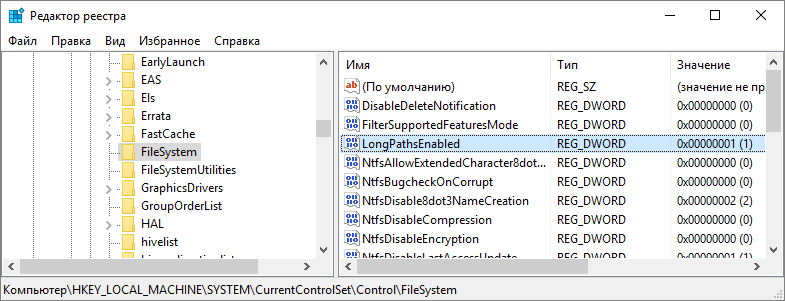
You can enable built-in support for long paths by creating or changing the following registry key parameter: HKLM \ SYSTEM \ CurrentControlSet \ Control \ FileSystem Parameter LongPathsEnabled (Type: REG_DWORD) 1 - corresponds to the value enabled.
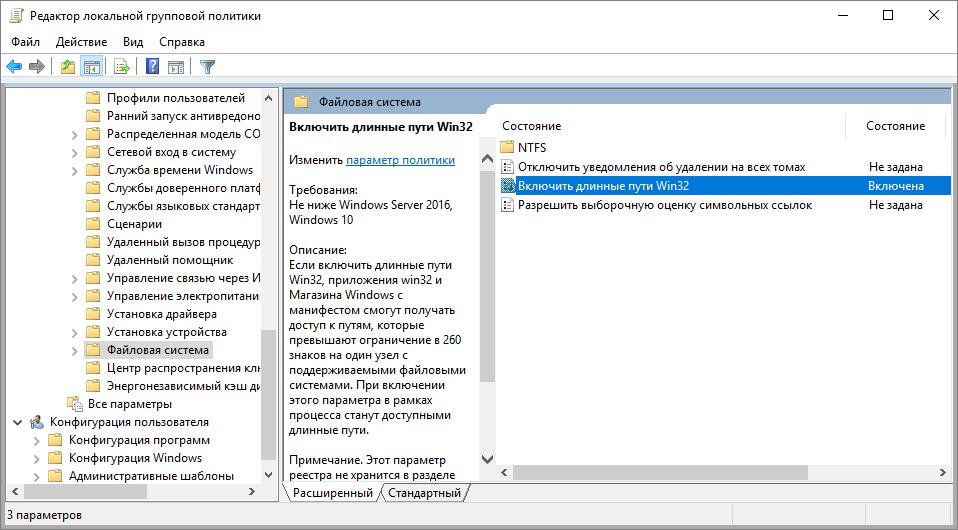
Or through group policies (Win + R \ gpedit.msc) Computer Configuration> Administrative Templates> System> Filesystem> Enable NTFS long paths. It is also in the localized version: Computer Configuration> Administrative Templates> System> File System> Enable Win32 Long Paths.
Further, the sources disagree on the manifest (or I misunderstood, but at the moment I have no way to check). For example, the MSDN documentation says that the manifest can be used as an alternative way to activate support for long paths in individual applications, and the MSDN blog states that this is the second required step after activation in policies.
But they converge in the format of the job for this option:
true Unfortunately, this will not work with CMD, at the moment, due to the peculiarities of working with paths, but in PowerShell everything should work.
PS
This concludes my short Friday post, leaving out the issues of completeness of long path support in Windows 10 (1607), or performance when using various combinations of Windows editions, file systems and APIs. As new facts and experimental results become available, the post will be updated.
Thanks for attention!









