March 23, 2016 at 14:05
QNX RTOS: Qnet - Transparent Network Interworking
 I hope that the long-awaited continuation of the cycle of notes on the QNX real-time operating system . This time I would like to talk about Qnet - QNX's own network protocol. I’ll clarify right away that in addition to the native Qnet network, QNX supports the TCP / IP protocol stack, which should be familiar to administrators of Unix-like systems in general. Therefore, in the note, I will first talk a little about the network administrator
 io-pkt, and then in more detail about the Qnet protocol. In the course of the story, four lyrical and one technical digressions await us.What is Qnet?
The QNX network is a group of interconnected target systems, each of which operates under the control of the QNX Neutrino RTOS. In such a network, any program has access to any resource on any node (node, this is the name of individual computers on the network). A resource can be a file, a device or a process (including the launch of processes on another node). At the same time, the target systems (those nodes) can be computers of various architectures - x86, ARM, MIPS and PowerPC (the current implementation of Qnet works including in a cross-endian environment). But as if that weren’t enough, any POSIX application ported to QNX (porting often requires only rebuilding) without any modification will have the above mentioned Qnet network capabilities. Intrigued, how does this come about?
The Qnet protocol extends the messaging engine to the QNX Neutrino microkernel network. So the biggest secret of Qnet is revealed, later in the article we will look at how this all works.
As a lyrical digression.
This post is about QNX 6.5.0, but sometimes I will recall other versions of QNX6 and even QNX4. And now I remembered ... A similar approach with its own network was in QNX4, where the network was called FLEET. The Qnet and FLEET protocols are not compatible with each other; differences in the implementation of the cores are affecting. There are also differences in the addressing of the nodes. Nevertheless, the same principle is based on the distribution of the messaging mechanism to the microkernel network.
Io-pkt network subsystem
The network subsystem is a typical representative of one of the QNX subsystems, i.e. consists of an administrator
io-pkt*(built on the technology of the QNX resource manager), device modules (drivers), for example, devnp-e1000.soprotocol modules, for example lsm-qnet.so, and utilities, for example, ifconfigand nicinfo. By the way, three QNX network manager: io-pkt-v4, io-pkt-v4-hcand io-pkt-v6-hc. The suffix v4indicates that this manager only supports IPv4, and option c v6supports IPv4 and IPv6. The suffix hc(high capacity) means an advanced version with support for encryption and Wi-Fi. Therefore, sometimes in the literature you can find a name io-pkt*, but we will call the managerio-pkt(without asterisk), as in our case, it doesn’t matter which version of TCP / IP we are talking about, because this article is about Qnet.As a lyrical digression.
In previous versions of QNX6, the network manager was called
At the time
io-net, and the TCP / IP protocol module was not linked to io-net, but was a separate module like it lsm-qnet.so. Although wait a minute, the modules then had a different prefix, so the TCP / IP modules were called npm-tcpip-v4.soand npm-tcpip-v6.so, and Qnet - npm-qnet.so. Although the latter is also not entirely true, in ancient times (in the era of QNX 6.3.2) there were two Qnet modules - npm-qnet-compat.so(for compatibility with older versions of QNX6) and npm-qnet-l4_lite.so(a new protocol that is supported by the module lsm-qnet.sofrom QNX 6.5.0). By the way, npm stands for Network Protocol Module, and lsm stands for Loadable Shared Module. At the time
io-net, network driver modules wore the proud devn prefix. Drivers forio-pkthave a different prefix - devnp. Old drivers can also be connected to io-pkt, while the layer module is automatically used devnp-shim.so.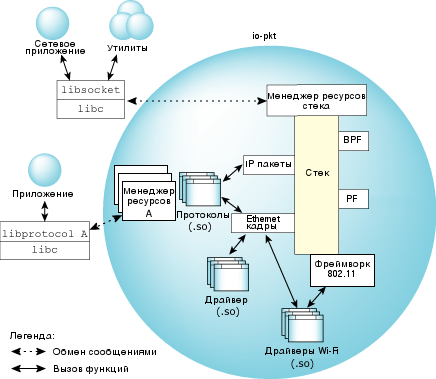
Fig. 1. A detailed view of the architecture
io-pkt. The architecture
io-pktis shown in Fig. 1. At the lower level are the drivers for wired and wireless networks. These are loadable modules (DLLs, shared libraries). It is worth noting that in addition to Ethernet, other transmission media are also supported. For example, the driverdevn-fd.soallows you to organize the transmission and reception of data using a file descriptor (fd is just a file descriptor), so you can organize the network, for example, on a serial port. Speeds, of course, will be appropriate, but sometimes it helps a lot. Device drivers are connected to the multithreaded component of the second level (stack). The stack, firstly, provides bridge connectivity and relay capabilities. Secondly, the stack provides a unified packet management interface and IP, TCP, and UDP protocol processing. At the top level, there is a resource manager that implements the transfer of messages between the stack and user applications, i.e. It provides job functions open(), read(), write()and ioctl(). Library libsocket.sotransforms the interfaceio-pktin the BSD socket layer API, which is the standard for most modern network code. The stack also provides interfaces for working with data on Ethernet and IP layers, which allows protocols (for example, Qnet) executed in the form of DLLs to connect to the required level (IP or Ethernet). If interaction with external applications is required, the protocol (for example, Qnet) may include its own resource manager. In addition to drivers and protocols, the stack includes packet filtering: BPF (Berkeley Packet Filter) and PF (Packet Filter).
Example run
io-pktwith Qnet protocol support:io-pkt-v4-hc -d e1000 -p qnet
The option
-dindicates the network controller driver devnp-e1000.so; the option -ploads the Qnet module. In fact, when installing QNX from the installation disk, the network starts automatically from the startup scripts; manual startup is usually required in the case of embedding QNX and to reduce the system boot speed. In addition to working with Ethernet frames, Qnet can also be encapsulated in IP packets. This can be convenient, for example, when working in distributed networks. It should be borne in mind that overhead costs in this case increase. Example run to run Qnet over IP:
io-pkt-v4-hv -d e1000 -p qnet bind=ip,resolve=dns
If for some reason it
io-pktwas launched without Qnet support, then the module lsm-qnet.socan be loaded later, for example:mount -Tio-pkt lsm-qnet.so
More complete information about
io-pktcan be obtained in the QNX help system, and we will move on to the main topic of our article.How does Qnet work?
From the user's point of view, Qnet works completely transparently ... Stop. But is it time to clarify the meaning of the word transparently in this context? Perhaps it’s time. The term transparency, in our case, means that access to a remote resource does not require any additional actions compared to access to a local resource. I’ll try to explain with examples below.
After starting Qnet creates a directory / net, which displays the file system of each network node in a separate directory with the name of the node. If the host name (hostname) is not set (that is, the default name is localhost), then in the / net directory it will be called the name composed of the MAC address. For example, the following command displays the contents of the root directory of the zvezda node:
ls -l /net/zvezda
The following command allows you to edit one of the startup scripts on the zvezda node:
vi /net/zvezda/etc/rc.d/rc.local
With access to files sorted out, there is nothing unusual here. Access to devices works similarly. So, for example, you can work with the serial port on another node:
qtalk -m /net/zvezda/dev/ser1
And here is an example more interesting:
phcalc -s /net/zvezda/dev/photon
Typically, Photon applications (this is a standard QNX graphical window subsystem) allow you to specify the server to which you will connect (option
-s). In this case, the application runs on the local node, and the graphic window will be displayed on the zvezda node. The local host does not even need to run the graphics subsystem. This can be convenient in some cases, for example, when the node does not have a graphic controller, but a graphical display of the collected data from the sensors or system setup is required. Also, such an approach may allow to offload the central processor of the graphic server.As a lyrical digression.
The described approach can be applied not only to the graphics subsystem, but also to any other, including oddly enough to the network. And even sometimes used in QNX4, which requires a separate license for each module, including a separate license for the TCP / IP stack. You can run the manager
Tcpipon only one node in the FLEET network, and send all socket library requests to this node. Do not worry, QNX6 usually doesn’t. Yes, and in the case of io-pktthis makes no sense, because The TCP / IP stack is inseparable from itself io-pkt.With files and devices, I hope, sorted out. But what about the processes? With this, too, everything is simple. A number of system utilities provide an option
-nthat says that you need to either work on a remote host or collect information from a remote host. For example, you can get a list of running processes with command line arguments like this:pidin -n zvezda arg
If some utility or program does not support the option
-n, then a standard utility comes to the rescue on, which is just designed to run applications on another node, for example:on -f zvezda ls
In this case, the utility
lsruns on the zvezda host, and the output of the utility is displayed in the current terminal.As a lyrical digression.
In fact, the utility
onprovides rich capabilities for managing the parameters of the launched processes. You can not only start processes on a remote host, but also change the priority level, dispatch discipline, start processes from another user, and even bind a process to a specific processor core. You can read more in the help for the utility.Stopping the process is also simple because utility
slaysupports option -n. For instance:slay -n zvezda io-usb
In the same way, with the help of
slayit you can send any other signal, not only SIGTERM.How does Qnet work from a programmer’s point of view?
In the previous section, we looked at Qnet from the perspective of an RTOS user. In most cases, even software development is not required to support Qnet. Is that really true? Those. to create a network application does not require working with any special frameworks and libraries? Yes, not required. If you work with POSIX, then you will not even notice the difference. But in order not to be unfounded, I will give the code of a small program that, as an example, saves a string to a file (including on a remote node):
#include
#include
#include
#include
int main(int argc, char *argv[])
{
  int fd;
  char str[] = "This is a string.\n";
  if ( argc < 2 )
  {
    printf("Please specify file name.\n");
    exit(1);
  }
  if ( (fd = open(argv[1], O_RDWR|O_CREAT, 0644)) < 0 )
  {
    perror("open()");
    exit(1);
  }
  write(fd, str, sizeof(str)-1);
  close(fd);
  return 0;
}
This code is compatible with Qnet. After all, there really is no difference in which file the string is saved in
/tmp/1.txtor /net/zvezda/tmp/1.txt. The same thing with devices, two pieces of code for the programmer are identical (the difference is only in the file name):fd = open("/dev/ser1", O_RDWR);
and
fd = open("/net/zvezda/dev/ser1", O_RDWR);
What makes this simplicity of working with a network possible? POSIX-calls, for example
open(), give rise to a series of low-level calls to the microkernel, control messaging exchange : ConnectAttach(), MsgSend()etc. The program code required for networking is identical to the one used locally. The difference will be only in the path name, in case of network operation, the path name will contain the host name. The prefix with the name of the node is converted to the handle of the node, which is later used in a low-level callConnectAttach(). Each node in the network has its own descriptor. The namespace of the file system paths is used to search for the descriptor. In the case of one machine, the search result will be a node descriptor, a process identifier, and a channel identifier. In the case of the Qnet network, the result will be the same, only the node descriptor will be nonzero (i.e., it is not equal to ND_LOCAL_NODE, and this indicates a remote connection). However, all these challenges are hidden and there is no need to take care of them if you just use them open().What is hidden behind a simple function open()?
Consider a situation where an application on a node
node1needs to use a serial port /dev/ser1on a node node2. In fig. Figure 2 shows what operations are performed when the application calls a function open()with a name /net/node2/dev/ser1. 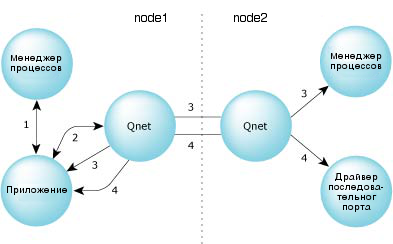
Fig. 2. Messaging over the Qnet network.
- The application sends a message to the local process manager asking for permission to the path name
/net/node2/dev/ser1. Because/netresponsible for the namespacelsm-qnet.so, the process manager returns a redirect message in which it indicates that the application should contact the local network administratorio-pkt. - The application sends a message to the local network administrator
io-pktwith the same request for resolving the path name. The local network administrator returns a redirect message indicating the node descriptor, process identifier, and channel identifier of the node process managernode2. - The application creates a connection with the node's process manager
node2and once again sends a request for resolving the path name. The process manager on the node,node2in turn, returns another redirect message indicating the node descriptor, the process identifier and the channel identifier of the serial port driver on its own node (node2). - The application creates a connection with the serial port driver on the host
node2and receives a connection identifier that can be used for further messaging (for example, during callsread(),write()and other POSIX functions).
After all this quest, the exchange of messages by the received connection identifier occurs in exactly the same way as in the case of local exchange. It is important that all subsequent messaging operations are performed directly between the application on the node
node1and the serial port driver (also, by the way, a regular application in QNX) on the node node2. I emphasize once again that for a programmer using the POSIX function,
open()all these low-level calls are hidden. As a result of the call open(), either a file descriptor or an error code will be received.As a technical digression.
When resolving a name at each step, the name components that were resolved are automatically deleted from the request. In the example above, in step 2, the request to the local network administrator contains only
node2/dev/ser1. In step 3, the name contains only dev/ser1. In step 4, only ser1.Quality of Service Policies
The Qnet protocol supports multi-channel transmission. To select an operating mode when using multiple channels, Quality of Service (QoS) policies are applied. On Qnet networks, QoS essentially selects the transmission medium. But if the system has only one network interface, then QoS does not work. The following quality of service policies are supported:
- loadbalance - Qnet protocol will use any available communication channels and will be able to distribute data transfer between them. This policy is used by default. In this mode, the throughput between nodes will be equal to the sum of the throughputs on all available channels. If one of the channels breaks, then Qnet will automatically switch to using other available channels. Service packets will be automatically sent to the failed channel, and when communication is restored, Qnet will use this channel again.
- preffered - only one specified communication channel is used, and the rest are ignored until the main one fails. After the failure of the main communication channel, Qnet switches to loadbalance mode using all available channels. When restoring the main channel, Qnet switches to preffered mode .
- exclusive - only one specified communication channel is used, and the remaining channels will NOT be used even if the main one fails.
A path name modifier starting with the tilde character (~) is used to set the quality of service policy. For example, to use the QoS exclusive policy on the interface
en0to access the serial port on the zvezda host, the name would be:/net/zvezda~exclusive:en0/dev/ser1
When to use Qnet?
The choice of a protocol depends on a number of factors. The Qnet protocol is intended for a network of trusted computers running QNX Neutrino RTOS and having the same byte order. Qnet does not authenticate requests. Access rights are protected by the usual user permissions and file groups. The Qnet protocol is also a connection-establishing protocol; network error messages are sent to the client process.
If computers with various operating systems work in the network or the degree of trust in the network is not high, then it is worth considering the use of other protocols with which QNX also works, for example, TCP / IP, in particular, FTP, NFS, Telnet, SSH and others.
Instead of an epilogue
In the note, of course, not all Qnet features and features are considered, but a general description of the protocol features is given. If you are interested in Qnet or QNX technology in general, then you can read more about material on these and other topics in the System Architecture of QNX Neutrino. Documentation is available in electronic form on the website www.qnx.com (in English), partial translation available on site www.kpda.ru . There is also a Russian translation in print:
QNX Neutrino 6.5.0 Real-Time Operating System System Architecture. ISBN 978-5-9775-3350-8
Real-Time Operating System QNX Neutrino 6.5.0 User Guide. ISBN 978-5-9775-3351-5