 March 1, 2016 at 13:16
VMware NSX and Nutanix: building a fully software-defined data center (Software-Defined Datacenter)
- Transfer
The combination of VMware NSX for vSphere and the Nutanix Xtreme Computing Platform (XCP) has made it possible to create fully software-defined data centers (DPCs). XCP allows administrators to build a virtualization infrastructure that is free from the limitations of traditional architectures.
The end-to-end VMware NSX and Nutanix XCP solutions provide virtual machines with access to fast local subsystems — the computing subsystem and storage subsystem — and provide a flexible and secure network infrastructure without the restrictions imposed by physical components.
In order to test the possibility of transparent and stable operation of VMware NSX for vSphere in its cluster, Nutanix tested 2 main scenarios for using this system. In the first option, the Nutanix Controller VM (CVM) was a virtual machine connected to a VLAN on a traditional network, and the working virtual machines were located on NSX virtual networks. In the second scenario, both the running virtual machines and CVM were connected to the NSX virtual network segments. Connecting CVM to the NSX network complicates the overall configuration and setup of the system, but makes it possible to use the isolation and microsegmentation functions for the Nutanix cluster.
Use Cases and Benefits
Before delving into a discussion of these scenarios, let's look at the most typical NSX use case given inVMware NSX design guide . We’ll check out several of the benefits of using software-defined networks. The figure shows 3 different segments with virtual machines: the web services segment, the application segment, and the database segment. The traffic of these virtual machines is handled by three different VXLAN-based virtual networks (VNI 5001-5003).
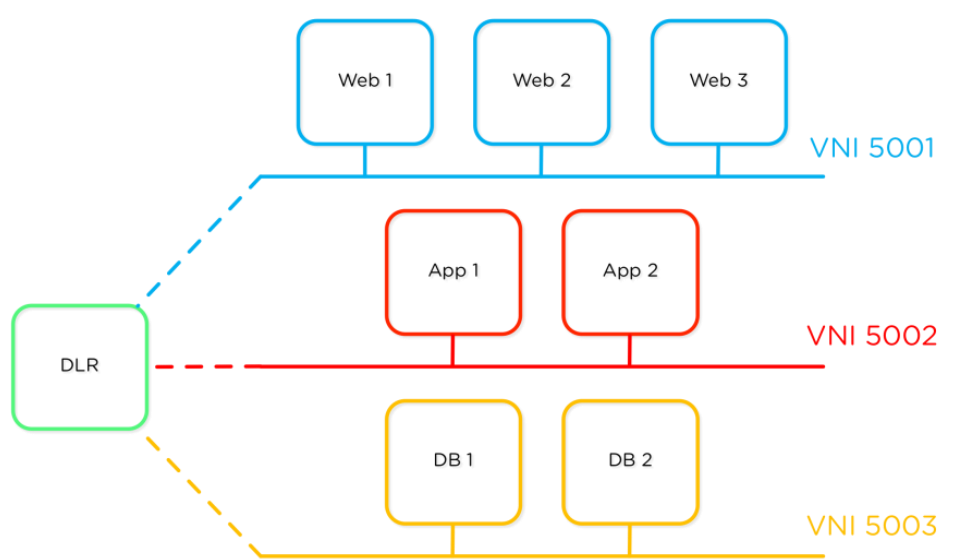
Thanks to packet encapsulation in VXLAN, each virtual network segment is not connected in any way with the physical network infrastructure. Distributed logical router (DLR), operating at the core level of each hypervisor, combines these virtual network segments at the 3rd level without forwarding packets to the physical router. Routing is done right in the core of the hypervisor. Moreover, Distributed Firewall (DFW) applies security policies at the network adapter level of virtual machines, regardless of the presence and location of physical firewalls on the network.

Distributed router and firewall (DFW and DLR) operate at the level of each hypervisor in the cluster. Due to the fact that these are distributed components, routing and filtering of traffic are carried out right where the virtual machines work, regardless of the underlying network infrastructure. There are only two requirements to the physical network infrastructure - communication between hypervisors and support for large network frames (jumbo frames).
The lack of binding of the virtual machine to the topology of the physical network means that its addressing and control will not affect the network configuration. Isolated virtual “islands” can be created inside virtual network segments, which can be quickly copied and transferred, for example, to the cloud. One example of use is to create a copy of the infrastructure instance (network segment and virtual machines) for developers, the second example is to restore a holistic copy of a working project from an archive copy for verification, without worrying that this will affect workflows and lead to IP conflict addresses.

Scenario 1 - NSX is used only for working virtual machines.
The recommended NSX configuration for Nutanix is to use isolated NSX virtual subnets for groups of user VMs, for example, for web services, applications and DBMSs, while the Nutanix management virtual machine (CVM) is connected to a regular port group on a distributed switch. This greatly simplifies the configuration of the entire complex.
In the example below, the traffic of the storage subsystem is transmitted between nodes (hosts) via VLAN 101, and the traffic of working virtual machines encapsulated in VXLAN is transmitted through VLAN 401.

Scenario 2 - NSX is used for both workload and Nutanix CVM.
In an alternative embodiment, shown below, both working virtual machines and Nutanix CVM are connected to the NSX network. Communication between CVMs on different nodes of a Nutanix cluster is provided via a 5000 virtual network. The addressing of virtual adapters for control and VXLAN, in the above example, illustrates the situation when two cluster nodes are in different server racks separated by a router (at level 3). Encapsulating packets in VXLAN overcomes this limitation.

While this scenario is a bit more complicated than the previous one, it allows you to take advantage of NSX's microsegmentation and isolation features for Nutanix CVM. You can isolate CVM and the storage network in one virtual segment, which, in turn, is distributed across several physical L3 subnets.
It is important to note that the recommendations for constructing leaf-spine topology remain valid for Nutanix physical nodes. Addressing between ESXi hosts in different racks can be organized at Layer 3 (L3), but network connections between Nutanix nodes must meet bandwidth and latency requirements.
Conclusion
Using VMware NSX with Nutanix enables system administrators to build powerful and flexible solutions that are free from the limitations of traditional physical infrastructures. The Nutanix Xtreme Computing Platform (XCP) provides computing resources and a storage subsystem, while NSX creates a virtual network infrastructure that is not tied to physical network components. Nutanix verified that both of these components successfully integrate with each other to achieve all the benefits of a software-defined data center, including logical separation of storage infrastructure, isolation of virtual networks, security policies that are moved along with virtual machines and workflow automation.
Nutanix with VMware NSX allows administrators to focus on building scalable applications, because no matter where the virtual machine works, it will always have access to the necessary resources. A stable and reliable physical infrastructure provides the basis for a flexible and convenient virtual network, always ready for expansion if necessary.
Author: Jason Burns, Senior Solutions & Performance Engineer at Nutanix
Translation: Sergey Tarasevich, Systems Engineer Trinity
Original article: next.nutanix.com/t5/Nutanix-Connect-Blog/VMware-NSX-on-Nutanix-Build-a-Software -Defined-datacenter / ba-p / 7590
Trinity engineers will be happy to advise you on server virtualization, storage, workstations, applications, networks. Order a consultation.
The end-to-end VMware NSX and Nutanix XCP solutions provide virtual machines with access to fast local subsystems — the computing subsystem and storage subsystem — and provide a flexible and secure network infrastructure without the restrictions imposed by physical components.
In order to test the possibility of transparent and stable operation of VMware NSX for vSphere in its cluster, Nutanix tested 2 main scenarios for using this system. In the first option, the Nutanix Controller VM (CVM) was a virtual machine connected to a VLAN on a traditional network, and the working virtual machines were located on NSX virtual networks. In the second scenario, both the running virtual machines and CVM were connected to the NSX virtual network segments. Connecting CVM to the NSX network complicates the overall configuration and setup of the system, but makes it possible to use the isolation and microsegmentation functions for the Nutanix cluster.
Use Cases and Benefits
Before delving into a discussion of these scenarios, let's look at the most typical NSX use case given inVMware NSX design guide . We’ll check out several of the benefits of using software-defined networks. The figure shows 3 different segments with virtual machines: the web services segment, the application segment, and the database segment. The traffic of these virtual machines is handled by three different VXLAN-based virtual networks (VNI 5001-5003).
Thanks to packet encapsulation in VXLAN, each virtual network segment is not connected in any way with the physical network infrastructure. Distributed logical router (DLR), operating at the core level of each hypervisor, combines these virtual network segments at the 3rd level without forwarding packets to the physical router. Routing is done right in the core of the hypervisor. Moreover, Distributed Firewall (DFW) applies security policies at the network adapter level of virtual machines, regardless of the presence and location of physical firewalls on the network.
Distributed router and firewall (DFW and DLR) operate at the level of each hypervisor in the cluster. Due to the fact that these are distributed components, routing and filtering of traffic are carried out right where the virtual machines work, regardless of the underlying network infrastructure. There are only two requirements to the physical network infrastructure - communication between hypervisors and support for large network frames (jumbo frames).
The lack of binding of the virtual machine to the topology of the physical network means that its addressing and control will not affect the network configuration. Isolated virtual “islands” can be created inside virtual network segments, which can be quickly copied and transferred, for example, to the cloud. One example of use is to create a copy of the infrastructure instance (network segment and virtual machines) for developers, the second example is to restore a holistic copy of a working project from an archive copy for verification, without worrying that this will affect workflows and lead to IP conflict addresses.
Scenario 1 - NSX is used only for working virtual machines.
The recommended NSX configuration for Nutanix is to use isolated NSX virtual subnets for groups of user VMs, for example, for web services, applications and DBMSs, while the Nutanix management virtual machine (CVM) is connected to a regular port group on a distributed switch. This greatly simplifies the configuration of the entire complex.
In the example below, the traffic of the storage subsystem is transmitted between nodes (hosts) via VLAN 101, and the traffic of working virtual machines encapsulated in VXLAN is transmitted through VLAN 401.
Scenario 2 - NSX is used for both workload and Nutanix CVM.
In an alternative embodiment, shown below, both working virtual machines and Nutanix CVM are connected to the NSX network. Communication between CVMs on different nodes of a Nutanix cluster is provided via a 5000 virtual network. The addressing of virtual adapters for control and VXLAN, in the above example, illustrates the situation when two cluster nodes are in different server racks separated by a router (at level 3). Encapsulating packets in VXLAN overcomes this limitation.
While this scenario is a bit more complicated than the previous one, it allows you to take advantage of NSX's microsegmentation and isolation features for Nutanix CVM. You can isolate CVM and the storage network in one virtual segment, which, in turn, is distributed across several physical L3 subnets.
It is important to note that the recommendations for constructing leaf-spine topology remain valid for Nutanix physical nodes. Addressing between ESXi hosts in different racks can be organized at Layer 3 (L3), but network connections between Nutanix nodes must meet bandwidth and latency requirements.
Conclusion
Using VMware NSX with Nutanix enables system administrators to build powerful and flexible solutions that are free from the limitations of traditional physical infrastructures. The Nutanix Xtreme Computing Platform (XCP) provides computing resources and a storage subsystem, while NSX creates a virtual network infrastructure that is not tied to physical network components. Nutanix verified that both of these components successfully integrate with each other to achieve all the benefits of a software-defined data center, including logical separation of storage infrastructure, isolation of virtual networks, security policies that are moved along with virtual machines and workflow automation.
Nutanix with VMware NSX allows administrators to focus on building scalable applications, because no matter where the virtual machine works, it will always have access to the necessary resources. A stable and reliable physical infrastructure provides the basis for a flexible and convenient virtual network, always ready for expansion if necessary.
Author: Jason Burns, Senior Solutions & Performance Engineer at Nutanix
Translation: Sergey Tarasevich, Systems Engineer Trinity
Original article: next.nutanix.com/t5/Nutanix-Connect-Blog/VMware-NSX-on-Nutanix-Build-a-Software -Defined-datacenter / ba-p / 7590
Trinity engineers will be happy to advise you on server virtualization, storage, workstations, applications, networks. Order a consultation.









