
 October 12, 2015 at 13:14
My first card on Leaflet.js
How I made my first card on Leaflet.js.
I don’t understand anything in cartography and geoinformation services, therefore this article will be more likely to be a fact-finding and to help beginners, since in my opinion there isn’t much information in Russian on the Internet, and I got to some by chance.
So the task was as follows: there is a black and white tablet (a small piece of a city map) of 5913x7863 pixels in the format .bmp + .shp layers.
From all this you need to make an online map, the main functionality of which is to display attributes when you click on a layer and enable / disable these layers.
The choice fell on leaflet.js , as it is an open source shell, OSM and my favorite 2GIS are made on it . In addition, it works well on mobile devices.
To begin with, you need to cut the map into tiles (256x256 px squares) so that the map loads quickly. Since I understood little about this, I did not dig into gdal2tiles.py , and its graphical maptiler shell costs money, I just downloaded the simple LeafletPano program. It just cuts any picture into tiles, just set the minimum and maximum level of approximation (variable z).
When we cut everything and uploaded to the hosting, you can also connect:
After slicing, you need to bind the tiles (256x256 px squares) to the coordinates. And here the most interesting part begins: the fact is that the coordinate system of these maps is a conditional local plan scheme , that is, it is a flat local city coordinate system, which essentially has nothing to do with latitude and longitude.
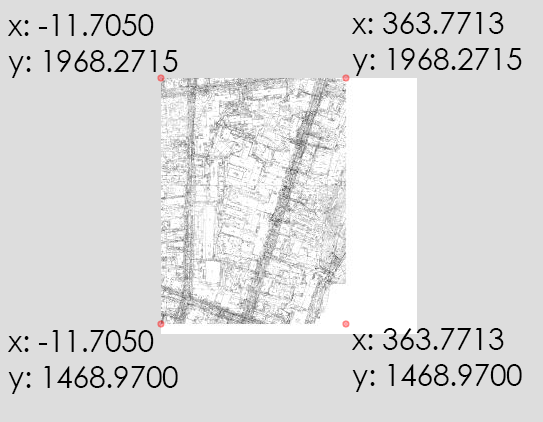
So, what was to be done: a map measuring 5913x7863 pixels should have been located in such coordinates:
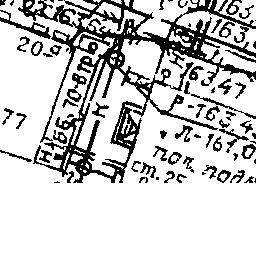
What is the difficulty? In that, as I have already said, tiles are 256x256px squares, and the number of pixels in height 7863 by 256 is not divisible without a remainder, 73 pixels are missing. Accordingly, the LeafletPano program (like any other tile cutter) supplements the last squares with white so that their size is 256x256, and not 256x183.
It looks like this:
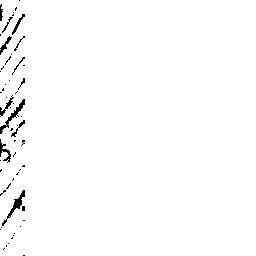
Similarly with the width - 5913 is also not divided by 256 and 231px is not enough.
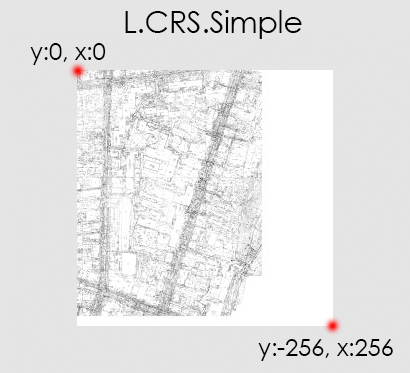
And since we are talking about a flat coordinate system, then going into the documentation we see the finished L.CRS.Simple system built into Leaflet (it is designed for flat images, without reference to coordinates). How does she work? L.CRS.Simple sets the width and height to 256 and -256, respectively.
Based on L.CRS.Simple, we will create our coordinate system using transformation = new L.Transformation (a, b, c, d). The formula in the documentation is very simple: (x, y) are transformed into (a * x + b, c * y + d), all in all 4 numbers. Then a little mathematics:
Calculate the height in the coordinates we need:
Divide it by the height in pixels:
Multiply by 73 missing pixels:
We add the height of the map in coordinates to the height of the missing pixels in the coordinates (I hope I wrote clearly):
Now divide the height in the previous coordinate system (L.CRS.Simple) by the desired height:
And we subtract this coefficient from unity:
Hurrah! We got a and -c from the formula (a * x + b, c * y + d) , it remains to get the b and d
coordinate in X (for some reason without a minus) we multiply by the coefficient:
and the y coordinate is multiplied by a coefficient
Create a new coordinate system:
Now we connect .shp. The main essence of these interactive maps in the display of attribute information when you click on the map. When connecting .shp, it is, but Russian inscriptions are displayed by krakozyabrams. Attribute information is stored in a .dbf file and it is obviously in its encoding, but whatever you do with it will not help (I tried a huge number of ways to change the .dbf encoding), so the only way out is to convert .shp to a more native one Leaflet .geojson format with utf-8 encoding. This can be done using the QGIS program.
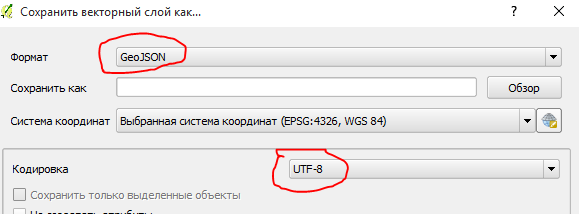
Next, we connect the plugin for Leaflet, which facilitates the recording form by connecting .geojson layers called leaflet-ajax.
Connect .geojson layers:
Well, at the end, make the display of layers on / off, for this we insert L.control.layers:
Bottom line:
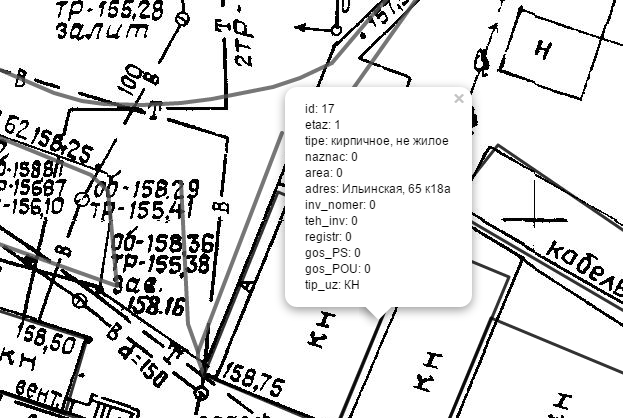
PS What’s next: I want the cards to look adequately, like on the OSM, and not just the buildings indicated by the lines. Also, I'm not sure what I'm doing in the most appropriate way, there are probably ways with GeoServer or something like this, where you don’t have to do so much manually. Most likely you need to dig towards the device of cards on OSM, because now my cards look awful.
Any hints and comments are appreciated.
I don’t understand anything in cartography and geoinformation services, therefore this article will be more likely to be a fact-finding and to help beginners, since in my opinion there isn’t much information in Russian on the Internet, and I got to some by chance.
So the task was as follows: there is a black and white tablet (a small piece of a city map) of 5913x7863 pixels in the format .bmp + .shp layers.
(initially the maps were drawn in the .dwg format (auto cad format), but this is a closed format and you can’t do anything with it, so the guys had to save each layer separately in .shp + attribute data in .dbf)
From all this you need to make an online map, the main functionality of which is to display attributes when you click on a layer and enable / disable these layers.
The choice fell on leaflet.js , as it is an open source shell, OSM and my favorite 2GIS are made on it . In addition, it works well on mobile devices.
To begin with, you need to cut the map into tiles (256x256 px squares) so that the map loads quickly. Since I understood little about this, I did not dig into gdal2tiles.py , and its graphical maptiler shell costs money, I just downloaded the simple LeafletPano program. It just cuts any picture into tiles, just set the minimum and maximum level of approximation (variable z).
Screenshot LeafletPano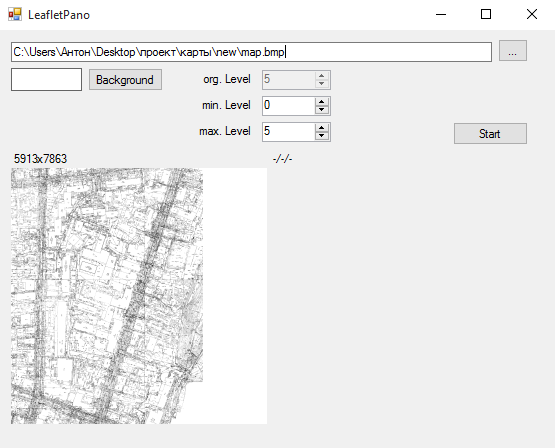
When we cut everything and uploaded to the hosting, you can also connect:
Script code
map = L.map('map', {                                                       // подключаем карту
     crs: L.CRS.Wall,                                                    // выбираем систему координат (об этом ниже)
        maxZoom: 5,                                                     // максимальный zoom (приближение)
         minZoom: 0                                                      // минимальный zoom (приближение)
        }).setView([1700,170], 0);                                      // точка просмотра при заходе на сайт с картой
        var osn = L.tileLayer('./images/map/{z}-{x}-{y}.jpg', {         // подключаем тайлы
            attribution: 'супер-карты',                               // комментарий (отображается справа внизу)
            continuousWorld: true,                                   // В документах написано, что если мы используем не настоящие координаты, то должно быть true (что-то связанное с долготой и широтой)
            noWrap: true                                                  // Не загружает до бесконечности лишние тайлы вне рамок карты
        }).addTo(map);
After slicing, you need to bind the tiles (256x256 px squares) to the coordinates. And here the most interesting part begins: the fact is that the coordinate system of these maps is a conditional local plan scheme , that is, it is a flat local city coordinate system, which essentially has nothing to do with latitude and longitude.
So, what was to be done: a map measuring 5913x7863 pixels should have been located in such coordinates:
What is the difficulty? In that, as I have already said, tiles are 256x256px squares, and the number of pixels in height 7863 by 256 is not divisible without a remainder, 73 pixels are missing. Accordingly, the LeafletPano program (like any other tile cutter) supplements the last squares with white so that their size is 256x256, and not 256x183.
It looks like this:
Similarly with the width - 5913 is also not divided by 256 and 231px is not enough.
And since we are talking about a flat coordinate system, then going into the documentation we see the finished L.CRS.Simple system built into Leaflet (it is designed for flat images, without reference to coordinates). How does she work? L.CRS.Simple sets the width and height to 256 and -256, respectively.
Based on L.CRS.Simple, we will create our coordinate system using transformation = new L.Transformation (a, b, c, d). The formula in the documentation is very simple: (x, y) are transformed into (a * x + b, c * y + d), all in all 4 numbers. Then a little mathematics:
Calculate the height in the coordinates we need:
1968.2715 - 1468.9700 = 499,3015
Divide it by the height in pixels:
499,3015 / 7863 = 0,0635001271779219
Multiply by 73 missing pixels:
0,0635001271779219 * 73 = 4,6355092839883
We add the height of the map in coordinates to the height of the missing pixels in the coordinates (I hope I wrote clearly):
499,3015 + 4,6355092839883 = 503,9370092839883
Now divide the height in the previous coordinate system (L.CRS.Simple) by the desired height:
256 / 503,9370092839883 = 0,5079999985786595
And we subtract this coefficient from unity:
1 - 0,5079999985786595 = 0,4920000014213405
Hurrah! We got a and -c from the formula (a * x + b, c * y + d) , it remains to get the b and d
coordinate in X (for some reason without a minus) we multiply by the coefficient:
11.7050 * 0,4920000014213405 = 5,758860016636791
and the y coordinate is multiplied by a coefficient
1968.2715 * 0,4920000014213405 = 968,389580797584
Create a new coordinate system:
L.CRS.Wall = L.extend({}, L.CRS.Simple, {
  transformation: new L.Transformation(0.4920000014213405, 5.758860016636791, -0.4920000014213405, 968.389580797584),
});
Now we connect .shp. The main essence of these interactive maps in the display of attribute information when you click on the map. When connecting .shp, it is, but Russian inscriptions are displayed by krakozyabrams. Attribute information is stored in a .dbf file and it is obviously in its encoding, but whatever you do with it will not help (I tried a huge number of ways to change the .dbf encoding), so the only way out is to convert .shp to a more native one Leaflet .geojson format with utf-8 encoding. This can be done using the QGIS program.
Next, we connect the plugin for Leaflet, which facilitates the recording form by connecting .geojson layers called leaflet-ajax.
Connect .geojson layers:
Embed code .geojson
var dorogi = new L.GeoJSON.AJAX("geoj/dorogi.geojson", {onEachFeature: function (feature, layer) {
      if (feature.properties) {
        var info = function(k){
            var str = k + ": " + feature.properties[k];
            return str;
        }
        layer.bindPopup(Object.keys(feature.properties).map(info).join("
"),{maxHeight:200});
        layer.setStyle({ color: '#555', clickable: true, weight: 4, opacity: 0.8});
      }
    }});
Well, at the end, make the display of layers on / off, for this we insert L.control.layers:
Code L.control.layers
var baseMaps = {};
    var overlayMaps = {
      "Планшет": osn,
       "Дороги": dorogi,
       "Газопровод": gazoprovod,
      "Водопровод": vodoprovod,
      "Здания": zdaniz_new
	};
    L.control.layers(baseMaps, overlayMaps).addTo(map);
Bottom line:
PS What’s next: I want the cards to look adequately, like on the OSM, and not just the buildings indicated by the lines. Also, I'm not sure what I'm doing in the most appropriate way, there are probably ways with GeoServer or something like this, where you don’t have to do so much manually. Most likely you need to dig towards the device of cards on OSM, because now my cards look awful.
Any hints and comments are appreciated.