Big Data A to Z. Part 2: Hadoop
- Tutorial
Hello, Habr! In a previous article, we looked at the MapReduce parallel computing paradigm. In this article, we will move from theory to practice and consider Hadoop , a powerful Apache foundation big data toolkit.
The article describes what tools and tools Hadoop includes, how to install Hadoop, provides instructions and examples of developing MapReduce-programs for Hadoop.

As you know, MapReduce proposed the MapReduce paradigm in 2004 in its MapReduce article : Simplified Data Processing on Large Clusters . Since the proposed article contained a description of the paradigm, but there was no implementation - several Yahoo programmers proposed their implementation as part of work on the nutch web crawler . You can read the Hadoop history in more detail in the article The history of Hadoop: From 4 nodes to the future of data
Initially, Hadoop was, first of all, a tool for storing data and launching MapReduce tasks, now Hadoop is a large stack of technologies, either otherwise related to the processing of big data (not only using MapReduce).
The main (core) components of Hadoop are:
There are also a large number of projects directly related to Hadoop, but not included in the Hadoop core:
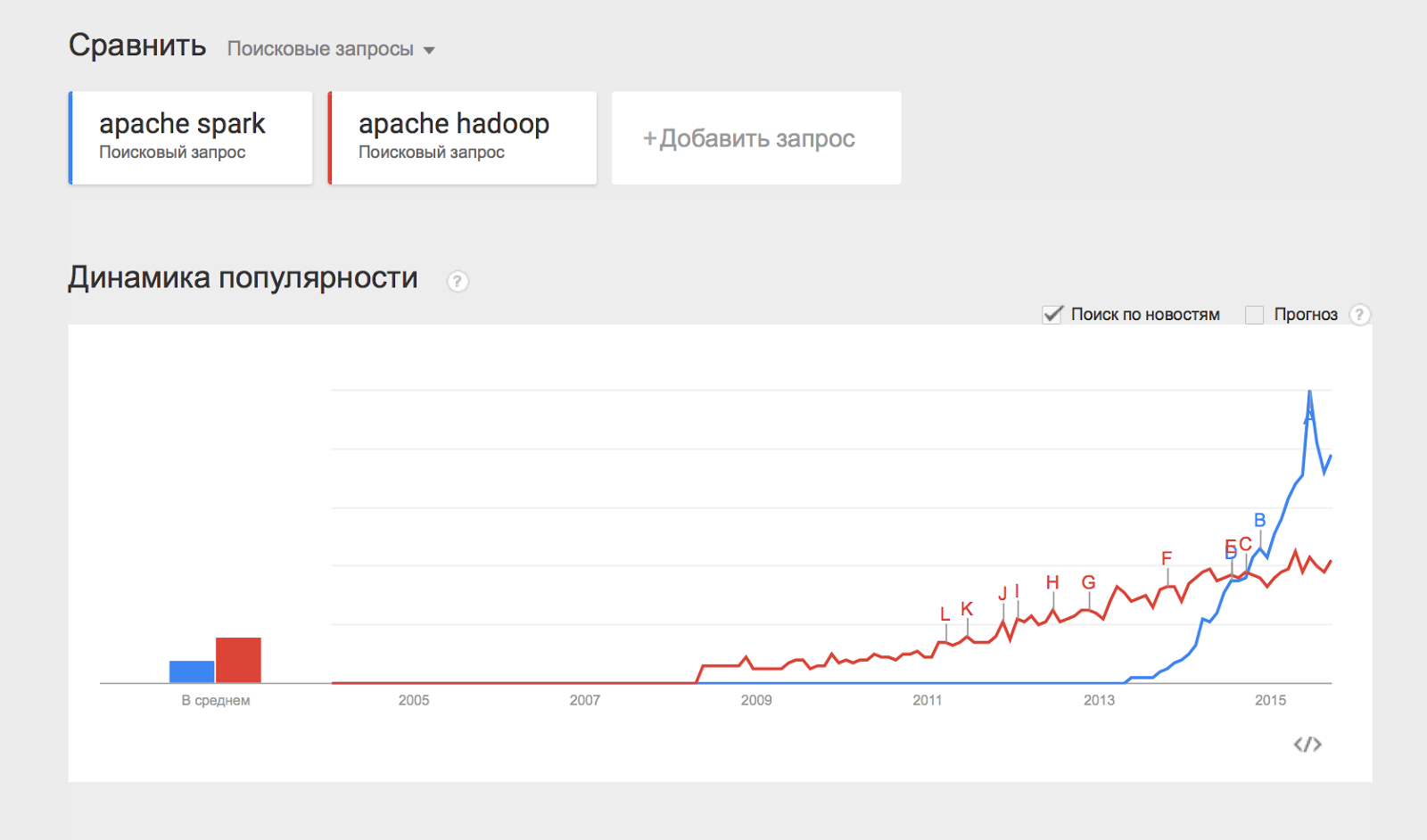
I would also like to mention the Apache Spark project , which is an engine for distributed data processing. Apache Spark usually uses Hadoop components, such as HDFS and YARN, for its work, and it has recently become more popular than Hadoop:
Some of the listed components will be devoted to separate articles in this series of materials, but for now let’s figure out how to get started Hadoop and put it into practice.
Previously, installing Hadoop was a rather difficult task - you had to individually configure each machine in the cluster, make sure that nothing was forgotten, and carefully configure the monitoring. With the growing popularity of Hadoop, companies have emerged (such as Cloudera , Hortonworks , MapR ) that provide their own Hadoop assemblies and powerful tools for managing the Hadoop cluster. In our material cycle, we will use the Cladodera Hadoop assembly.
In order to install Hadoop on your cluster, you need to follow a few simple steps:
The cluster must run on one of the supported linux family operating systems: RHEL, Oracle Enterprise linux, SLES, Debian, Ubuntu.
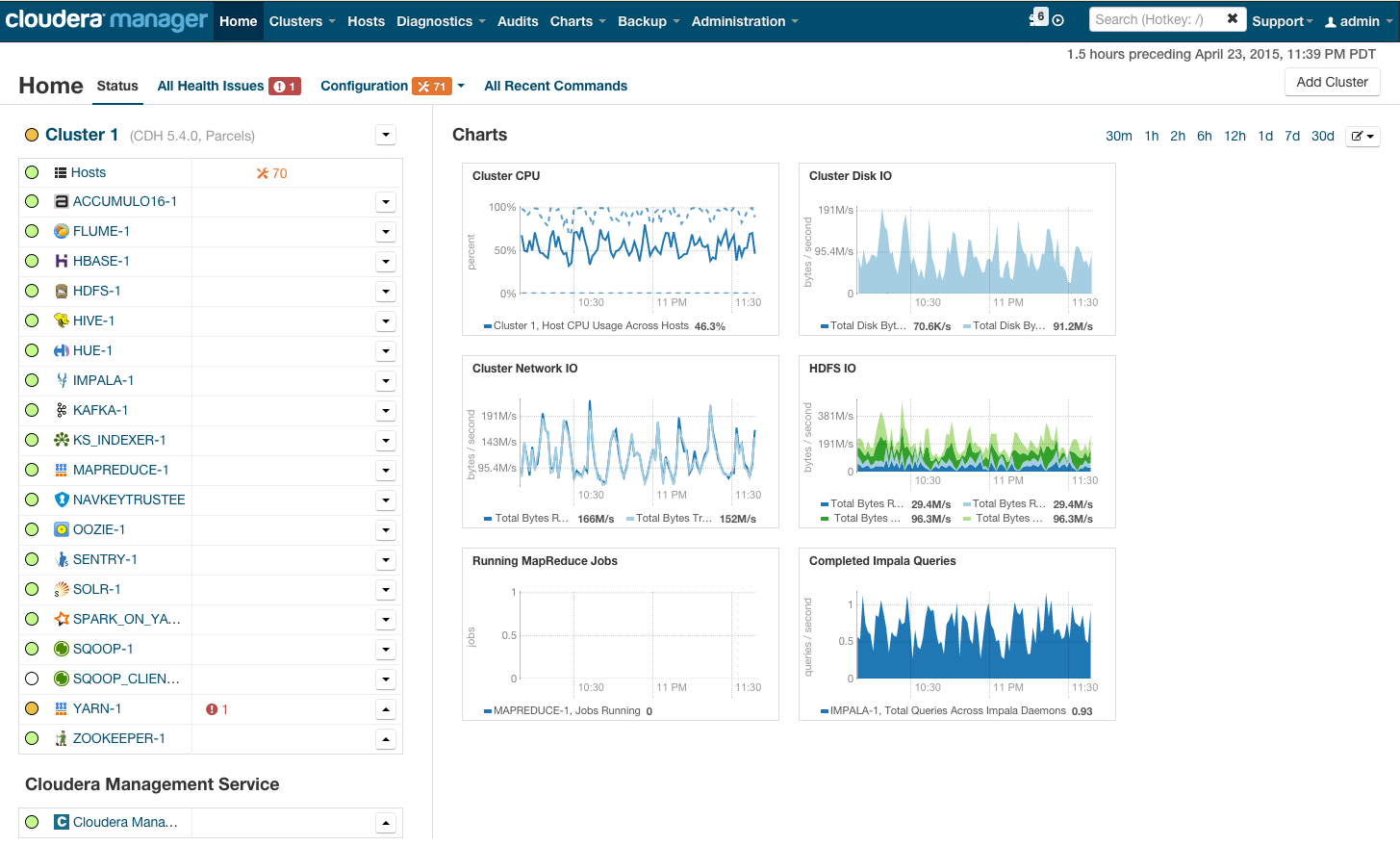
After installation, you will receive a cluster management console where you can watch installed services, add / remove services, monitor cluster status, edit cluster configuration:
For more details on installing Hadoop on a cluster using the cloudera manager, see the link in the Quick Start section.
If you plan to use Hadoop for a “try”, you can not bother with the purchase of expensive hardware and configure Hadoop on it, but simply download the pre-configured virtual machine from the link and use the configured hadoop.
Now we show how to run the MapReduce task on Hadoop. As a task, we use the classic WordCount example , which was discussed in the previous article in the series . In order to experiment with real data, I prepared an archive of random news from the site lenta.ru . You can download the archive from the link .
Let me remind you the statement of the problem: there is a set of documents. It is necessary for each word occurring in a set of documents to calculate how many times a word occurs in a set.
Solution :
Map splits the document into words and returns a lot of pairs (word, 1).
Reduce summarizes the occurrences of each word:
Now the task is to program this solution in the form of code that can be executed on Hadoop and run.
The easiest way to run a MapReduce program on Hadoop is to use the Hadoop streaming interface. The Streaming interface assumes that map and reduce are implemented as programs that receive data from stdin and output the result to stdout .
The program that executes the map function is called mapper . The program that runs reduce is called reducer , respectively .
The Streaming interface assumes by default that one input line in a mapper or reducer corresponds to one input entry for map.
The output of mapper goes to the input of reducer in the form of pairs (key, value), while all pairs corresponding to one key:
So, we implement mapper and reducer in python:
The data that Hadoop will process must be stored on HDFS. Download our articles and put on HDFS. To do this, use the hadoop fs command :
The hadoop fs utility supports a large number of methods for manipulating the file system, many of which repeat the standard linux utilities one-on-one. More details about its capabilities can be found here .
Now run the streaming task:
The yarn utility is used to launch and manage various applications (including map-reduce based) on the cluster. Hadoop-streaming.jar is just one example of such a yarn application.
Next are the launch options:
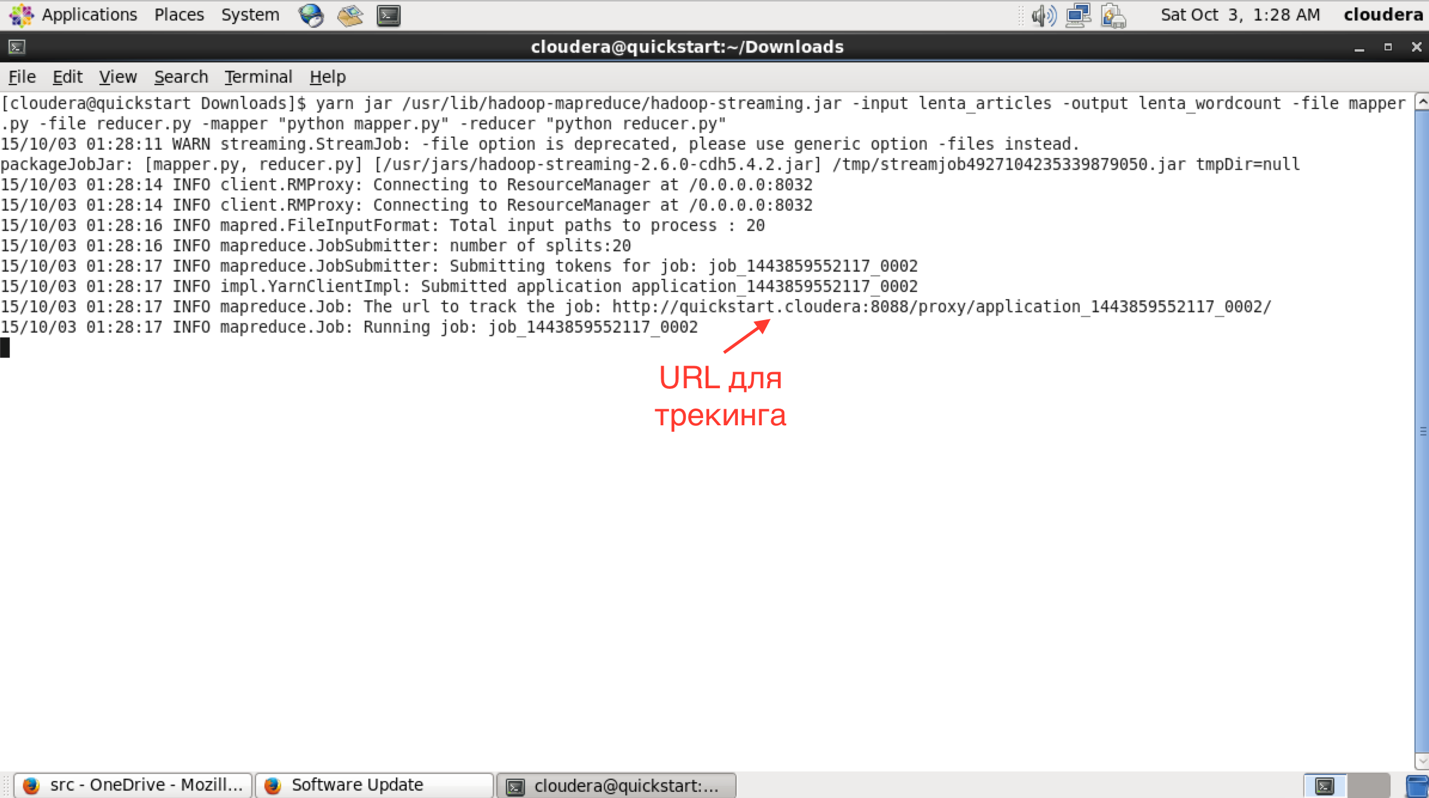
After starting in the console, you can see the progress of the task and the URL to view more detailed information about the task.
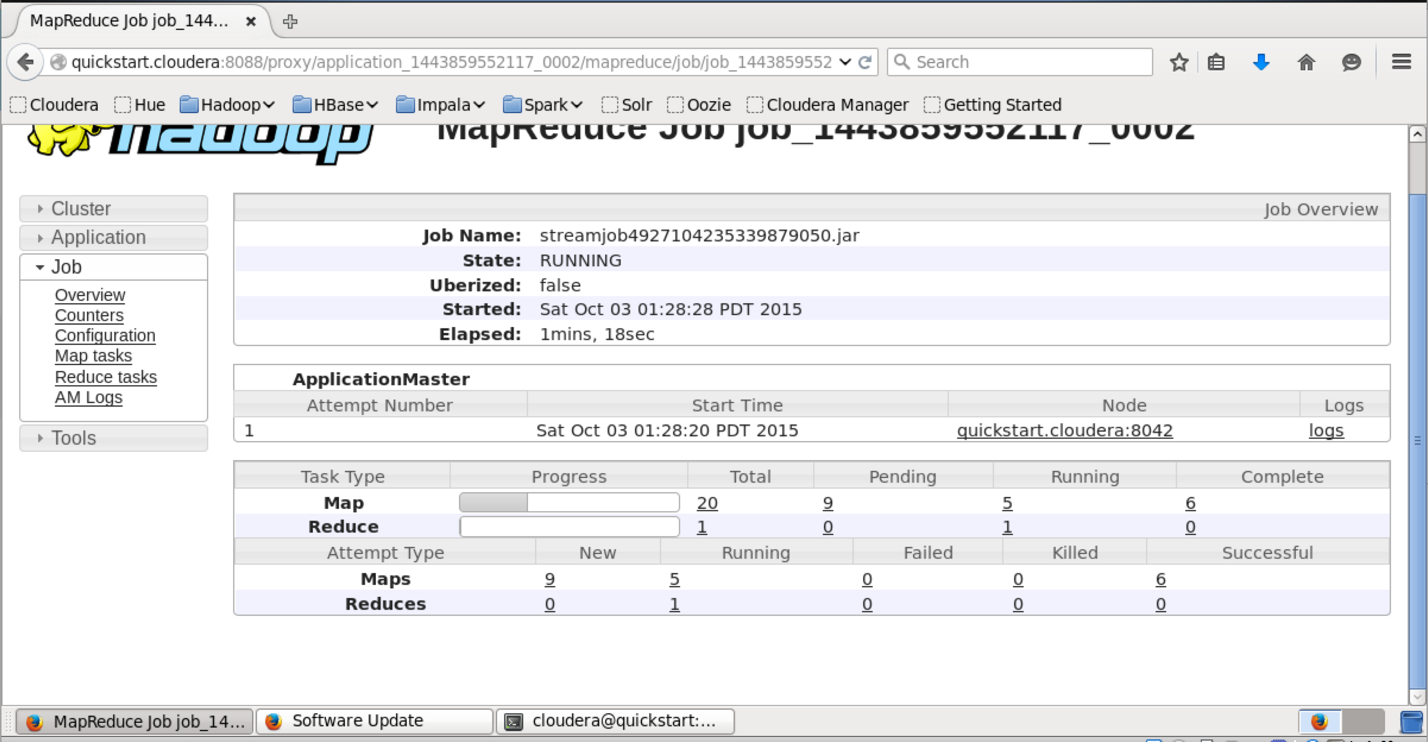
In the interface accessible by this URL, you can find out more detailed status of task execution, see the logs of each mapper and reducer (which is very useful in case of fallen tasks).
After successful execution, the result of work is added up on HDFS to the folder we specified in the output field. You can view its contents using the “hadoop fs -ls lenta_wordcount” command.
The result itself can be obtained as follows:
The “hadoop fs -text” command displays the contents of the folder in text form. I sorted the result by the number of occurrences of words. As expected, the most common words in a language are prepositions.
Hadoop itself was written in java, and hadoop-a's native interface is also java-based. Let's show what the native java application for wordcount looks like:
This class does exactly the same thing as our Python example. We create the TokenizerMapper and IntSumReducer classes, inheriting them from the Mapper and Reducer classes, respectively. Classes passed as template parameters indicate the types of input and output values. The native API implies that the map function is supplied with a key-value pair. Since in our case the key is empty, we simply define Object as the key type.
In the Main method, we start the mapreduce task and determine its parameters - name, mapper and reducer, the path in HDFS, where the input data is and where to put the result.
For compilation we need hadoop libraries. I use Maven to build, for which cloudera has a repository. Instructions for setting it up can be found here. As a result, the pom.xmp file (which is used by maven to describe the project assembly), I got the following):
Let's collect the project in a jar package:
After the project is built into a jar-file, the launch occurs in a similar way, as in the case of the streaming-interface:
We are waiting for execution and checking the result:
As you might guess, the result of the execution of our native application coincides with the result of the streaming application that we launched in the previous way.
In the article, we examined Hadoop, the software stack for working with big data, described the installation process of Hadoop using the cloudera distribution example, showed how to write mapreduce programs using the streaming interface and the native Hadoop API.
In the following articles of the series, we will examine in more detail the architecture of the individual components of Hadoop and Hadoop-related software, show more complex versions of MapReduce programs, consider ways to simplify working with MapReduce, as well as MapReduce restrictions and how to circumvent these restrictions.
Thank you for your attention, we are ready to answer your questions.
Author’s Youtube Channel on Data Analysis
Part 1: Principles of working with big data, the MapReduce paradigm
Part 3: Techniques and development strategies for MapReduce applications
Part 4: Hbase
The article describes what tools and tools Hadoop includes, how to install Hadoop, provides instructions and examples of developing MapReduce-programs for Hadoop.
Hadoop General Information
As you know, MapReduce proposed the MapReduce paradigm in 2004 in its MapReduce article : Simplified Data Processing on Large Clusters . Since the proposed article contained a description of the paradigm, but there was no implementation - several Yahoo programmers proposed their implementation as part of work on the nutch web crawler . You can read the Hadoop history in more detail in the article The history of Hadoop: From 4 nodes to the future of data
Initially, Hadoop was, first of all, a tool for storing data and launching MapReduce tasks, now Hadoop is a large stack of technologies, either otherwise related to the processing of big data (not only using MapReduce).
The main (core) components of Hadoop are:
- Hadoop Distributed File System (HDFS) - a distributed file system that allows you to store information of almost unlimited volume.
- Hadoop YARN is a framework for managing cluster resources and task management, including the MapReduce framework.
- Hadoop common
There are also a large number of projects directly related to Hadoop, but not included in the Hadoop core:
- Hive - a tool for SQL-like queries over big data (turns SQL queries into a series of MapReduce tasks);
- Pig is a high-level data analysis programming language. One line of code in this language can turn into a sequence of MapReduce tasks;
- Hbase - a column database that implements the BigTable paradigm;
- Cassandra - a high-performance distributed key-value database;
- ZooKeeper - a service for distributed configuration storage and synchronization of changes to this configuration;
- Mahout is a Big Data library and machine learning engine.
I would also like to mention the Apache Spark project , which is an engine for distributed data processing. Apache Spark usually uses Hadoop components, such as HDFS and YARN, for its work, and it has recently become more popular than Hadoop:
Some of the listed components will be devoted to separate articles in this series of materials, but for now let’s figure out how to get started Hadoop and put it into practice.
Install Hadoop on a cluster using Cloudera Manager
Previously, installing Hadoop was a rather difficult task - you had to individually configure each machine in the cluster, make sure that nothing was forgotten, and carefully configure the monitoring. With the growing popularity of Hadoop, companies have emerged (such as Cloudera , Hortonworks , MapR ) that provide their own Hadoop assemblies and powerful tools for managing the Hadoop cluster. In our material cycle, we will use the Cladodera Hadoop assembly.
In order to install Hadoop on your cluster, you need to follow a few simple steps:
- Download Cloudera Manager Express on one of the machines in your cluster from here ;
- Assign execution rights and run;
- Follow the installation instructions.
The cluster must run on one of the supported linux family operating systems: RHEL, Oracle Enterprise linux, SLES, Debian, Ubuntu.
After installation, you will receive a cluster management console where you can watch installed services, add / remove services, monitor cluster status, edit cluster configuration:
For more details on installing Hadoop on a cluster using the cloudera manager, see the link in the Quick Start section.
If you plan to use Hadoop for a “try”, you can not bother with the purchase of expensive hardware and configure Hadoop on it, but simply download the pre-configured virtual machine from the link and use the configured hadoop.
Running MapReduce Programs on Hadoop
Now we show how to run the MapReduce task on Hadoop. As a task, we use the classic WordCount example , which was discussed in the previous article in the series . In order to experiment with real data, I prepared an archive of random news from the site lenta.ru . You can download the archive from the link .
Let me remind you the statement of the problem: there is a set of documents. It is necessary for each word occurring in a set of documents to calculate how many times a word occurs in a set.
Solution :
Map splits the document into words and returns a lot of pairs (word, 1).
Reduce summarizes the occurrences of each word:
| |
Now the task is to program this solution in the form of code that can be executed on Hadoop and run.
Method number 1. Hadoop streaming
The easiest way to run a MapReduce program on Hadoop is to use the Hadoop streaming interface. The Streaming interface assumes that map and reduce are implemented as programs that receive data from stdin and output the result to stdout .
The program that executes the map function is called mapper . The program that runs reduce is called reducer , respectively .
The Streaming interface assumes by default that one input line in a mapper or reducer corresponds to one input entry for map.
The output of mapper goes to the input of reducer in the form of pairs (key, value), while all pairs corresponding to one key:
- Guaranteed to be processed by a single run reducer'a;
- They will be submitted to the input in a row (that is, if one reducer processes several different keys, the input will be grouped by key).
So, we implement mapper and reducer in python:
#mapper.py import sys
defdo_map(doc):for word in doc.split():
    yield word.lower(), 1for line in sys.stdin:
    for key, value in do_map(line):
        print(key + "\t" + str(value))
#reducer.py import sys
defdo_reduce(word, values):return word, sum(values)
prev_key = None
values = []
for line in sys.stdin:
key, value = line.split("\t")
if key != prev_key and prev_key isnotNone:
result_key, result_value = do_reduce(prev_key, values)
print(result_key + "\t" + str(result_value))
values = []
prev_key = key
values.append(int(value))
if prev_key isnotNone:
result_key, result_value = do_reduce(prev_key, values)
print(result_key + "\t" + str(result_value)) The data that Hadoop will process must be stored on HDFS. Download our articles and put on HDFS. To do this, use the hadoop fs command :
wget https://www.dropbox.com/s/opp5psid1x3jt41/lenta_articles.tar.gz
tar xzvf lenta_articles.tar.gz
hadoop fs -put lenta_articles
The hadoop fs utility supports a large number of methods for manipulating the file system, many of which repeat the standard linux utilities one-on-one. More details about its capabilities can be found here .
Now run the streaming task:
yarn jar /usr/lib/hadoop-mapreduce/hadoop-streaming.jar\
 -input lenta_articles\
 -output lenta_wordcount\
 -file mapper.py\
 -file reducer.py\
 -mapper "python mapper.py"\
 -reducer "python reducer.py"
The yarn utility is used to launch and manage various applications (including map-reduce based) on the cluster. Hadoop-streaming.jar is just one example of such a yarn application.
Next are the launch options:
- input - folder with source data on hdfs;
- output - folder on hdfs where you want to put the result;
- file - files that are needed during the map-reduce task;
- mapper is the console command that will be used for the map stage;
- reduce is the console command that will be used for the reduce stage.
After starting in the console, you can see the progress of the task and the URL to view more detailed information about the task.
In the interface accessible by this URL, you can find out more detailed status of task execution, see the logs of each mapper and reducer (which is very useful in case of fallen tasks).
After successful execution, the result of work is added up on HDFS to the folder we specified in the output field. You can view its contents using the “hadoop fs -ls lenta_wordcount” command.
The result itself can be obtained as follows:
hadoop fs -text lenta_wordcount/* | sort -n -k2,2 | tail -n5
с	 41
что	 43
на	 82
и	 111
в	 194
The “hadoop fs -text” command displays the contents of the folder in text form. I sorted the result by the number of occurrences of words. As expected, the most common words in a language are prepositions.
Method number 2
Hadoop itself was written in java, and hadoop-a's native interface is also java-based. Let's show what the native java application for wordcount looks like:
import java.io.IOException;
import java.util.StringTokenizer;
import org.apache.hadoop.conf.Configuration;
import org.apache.hadoop.fs.Path;
import org.apache.hadoop.io.IntWritable;
import org.apache.hadoop.io.Text;
import org.apache.hadoop.mapreduce.Job;
import org.apache.hadoop.mapreduce.Mapper;
import org.apache.hadoop.mapreduce.Reducer;
import org.apache.hadoop.mapreduce.lib.input.FileInputFormat;
import org.apache.hadoop.mapreduce.lib.output.FileOutputFormat;
publicclass WordCount {
    public static class TokenizerMapper
            extends Mapper<Object, Text, Text, IntWritable>{
        private final static IntWritable one = new IntWritable(1);
        private Text word = new Text();
        publicvoid map(Object key, Textvalue, Context context
        ) throws IOException, InterruptedException {
            StringTokenizer itr = new StringTokenizer(value.toString());
            while (itr.hasMoreTokens()) {
                word.set(itr.nextToken());
                context.write(word, one);
            }
        }
    }
    public static class IntSumReducer
            extends Reducer<Text,IntWritable,Text,IntWritable> {
        private IntWritable result = new IntWritable();
        publicvoid reduce(Text key, Iterable<IntWritable> values,
                           Context context
        ) throws IOException, InterruptedException {
            int sum = 0;
            for (IntWritable val : values) {
                sum += val.get();
            }
            result.set(sum);
            context.write(key, result);
        }
    }
    public static void main(String[] args) throws Exception {
        Configuration conf = newConfiguration();
        Job job = Job.getInstance(conf, "word count");
        job.setJarByClass(WordCount.class);
        job.setMapperClass(TokenizerMapper.class);
        job.setReducerClass(IntSumReducer.class);
        job.setOutputKeyClass(Text.class);
        job.setOutputValueClass(IntWritable.class);
        FileInputFormat.addInputPath(job, new Path("hdfs://localhost/user/cloudera/lenta_articles"));
        FileOutputFormat.setOutputPath(job, new Path("hdfs://localhost/user/cloudera/lenta_wordcount"));
        System.exit(job.waitForCompletion(true) ? 0 : 1);
    }
}
This class does exactly the same thing as our Python example. We create the TokenizerMapper and IntSumReducer classes, inheriting them from the Mapper and Reducer classes, respectively. Classes passed as template parameters indicate the types of input and output values. The native API implies that the map function is supplied with a key-value pair. Since in our case the key is empty, we simply define Object as the key type.
In the Main method, we start the mapreduce task and determine its parameters - name, mapper and reducer, the path in HDFS, where the input data is and where to put the result.
For compilation we need hadoop libraries. I use Maven to build, for which cloudera has a repository. Instructions for setting it up can be found here. As a result, the pom.xmp file (which is used by maven to describe the project assembly), I got the following):
<?xml version="1.0" encoding="UTF-8"?><projectxmlns="http://maven.apache.org/POM/4.0.0"xmlns:xsi="http://www.w3.org/2001/XMLSchema-instance"xsi:schemaLocation="http://maven.apache.org/POM/4.0.0 http://maven.apache.org/xsd/maven-4.0.0.xsd"><modelVersion>4.0.0</modelVersion><repositories><repository><id>cloudera</id><url>https://repository.cloudera.com/artifactory/cloudera-repos/</url></repository></repositories><dependencies><dependency><groupId>org.apache.hadoop</groupId><artifactId>hadoop-common</artifactId><version>2.6.0-cdh5.4.2</version></dependency><dependency><groupId>org.apache.hadoop</groupId><artifactId>hadoop-auth</artifactId><version>2.6.0-cdh5.4.2</version></dependency><dependency><groupId>org.apache.hadoop</groupId><artifactId>hadoop-hdfs</artifactId><version>2.6.0-cdh5.4.2</version></dependency><dependency><groupId>org.apache.hadoop</groupId><artifactId>hadoop-mapreduce-client-app</artifactId><version>2.6.0-cdh5.4.2</version></dependency></dependencies><groupId>org.dca.examples</groupId><artifactId>wordcount</artifactId><version>1.0-SNAPSHOT</version></project>Let's collect the project in a jar package:
mvn clean packageAfter the project is built into a jar-file, the launch occurs in a similar way, as in the case of the streaming-interface:
yarnjarwordcount-1.0-SNAPSHOT.jarWordCountWe are waiting for execution and checking the result:
hadoop fs -text lenta_wordcount/* | sort -n -k2,2 | tail -n5
с	 41
что	 43
на	 82
и	 111
в	 194
As you might guess, the result of the execution of our native application coincides with the result of the streaming application that we launched in the previous way.
Summary
In the article, we examined Hadoop, the software stack for working with big data, described the installation process of Hadoop using the cloudera distribution example, showed how to write mapreduce programs using the streaming interface and the native Hadoop API.
In the following articles of the series, we will examine in more detail the architecture of the individual components of Hadoop and Hadoop-related software, show more complex versions of MapReduce programs, consider ways to simplify working with MapReduce, as well as MapReduce restrictions and how to circumvent these restrictions.
Thank you for your attention, we are ready to answer your questions.
Author’s Youtube Channel on Data Analysis
Links to other articles in the series:
Part 1: Principles of working with big data, the MapReduce paradigm
Part 3: Techniques and development strategies for MapReduce applications
Part 4: Hbase