September 9, 2015 at 03:33
As I wrote the guitar tuner for iOs on Swift. And also a little about DSP, standing waves and how to achieve accuracy of ± 0.1Hz
 In this article I will talk about how I had the idea to write my tuner and what it led to. I will also share my modest knowledge in the field of DSP (digital signal processing) obtained at the university, and how they helped me solve some problems. And of course, I will share the source code and the experience of programming on Swift that I gained during the implementation of this project.
Background
The idea to write my own tuner for a guitar came up with me quite a long time ago, about 10 years ago when I was at university. There were a number of reasons for this:
- Firstly, there are not so many really high-quality tuner programs - some simply incorrectly determine the frequency, or work extremely unstable on the upper strings. In addition, all the tuners that I have come across are à priori tuned to A440 (when tuned to 440 Hz for the first octave ). But there is also a setting for C256 ( tuned to 256 Hz until the first octave ). Many tuners do not allow tuning in frets, although if you need to play on 5-7 frets, it is better to tune the instrument on the same frets.
- Secondly, the visualization of the settings in the form of a slider, spectrum or frequency waveform, in my opinion, is a little physical. I wanted to show how the wave generated by the instrument looks directly - how clean it is, or vice versa distorted. Make visualization visual and responsive.
- Thirdly, I wanted to apply to the benefit of mankind my knowledge in the field of DSP obtained at the university.
In general, the idea sat in my head for a long time, but it was possible to realize it only this year, as finally there was free time, an iOs device and some mobile development experience.
Bit of theory
Anyone who is a little familiar with European stringed instruments knows that each string is tuned to a certain note, and a certain frequency corresponds to this note. The difference between a note and a frequency is that each note carries some musical function. And this function is determined by the position of the note relative to other notes, for example, the note to in the C major sequence plays the role of the tonic, i.e. main and most stable sound. If this note moves a little, then it will lose its function. In order for the extracted sounds to correspond to the notes, it is necessary to observe a strict correspondence between the intervals of notes and the ratio of frequencies. The correspondence of the extracted sound to the function that was laid in the note will depend on the accuracy and stability of the frequency generated by the string.
What is the sound generated by a string? If we use the ADSR model proposed by the American researcher and composer Vladimir Usachevsky for the first synthesizers, then the sound of the string is harmonic oscillation modulated by some envelope. This envelope is called ADSR, because it has four characteristic points: attack ( English attack ), decline (English decay ), sustain ( eng. sustain ) and attenuation ( eng. release ).
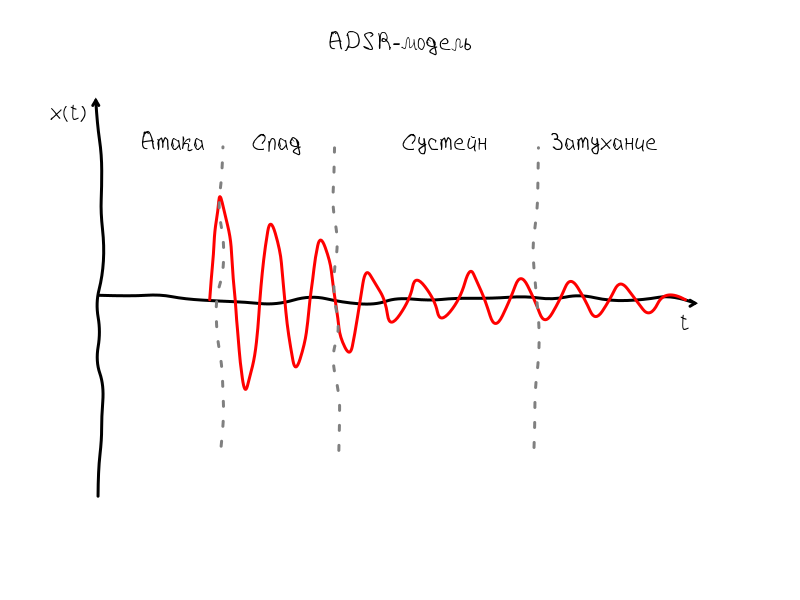
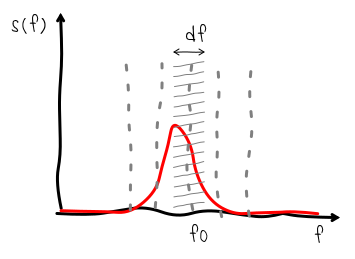
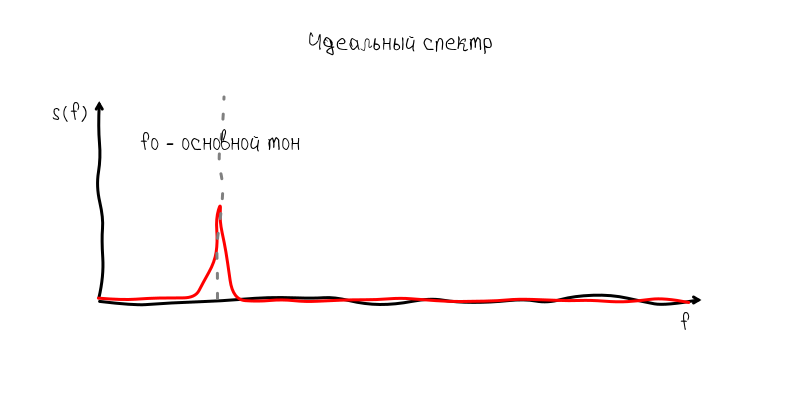
The sustain interval most clearly conveys the frequency, as fluctuations occur with almost no change in amplitude. If the guitar generated the ideal monoharmonic sound, then, taking into account the ADSR envelope, the spectrum of such an oscillation would have the form of a narrow strip. The shape of this strip would correspond to the spectrum of the envelope:
But a real instrument generates nonlinear oscillatory processes, as a result of which additional harmonics appear, which are called overtones.
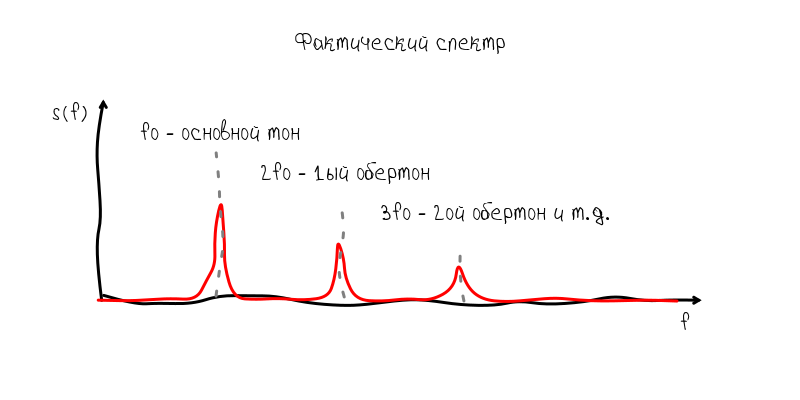
These overtones are pretty insidious fellow travelers, because they can prevail over the fundamental tone and interfere with the determination of frequency. But nevertheless, usually the main tone is well defined without additional manipulations.
So, on the basis of these representations, we can outline the path along which the program should work:
- Calculate the Fourier transform of a sound wave
- Find the fundamental tone on the spectrum
- Calculate pitch frequency
About the standing waves
Typically, the sound on a graph is represented as a time sweep. At the point zero on the abscissa axis, the value is located at the initial moment of observation, then, respectively, the values that will be observed after 1 s, 2 s, etc. The measurement process in this case can be imagined as an imaginary frame that moves uniformly from left to right. This frame can be called by different names: observation window ( English observation window ), observation interval ( English observation interval ), time window ( English time window ) - all these terms mean about the same thing.
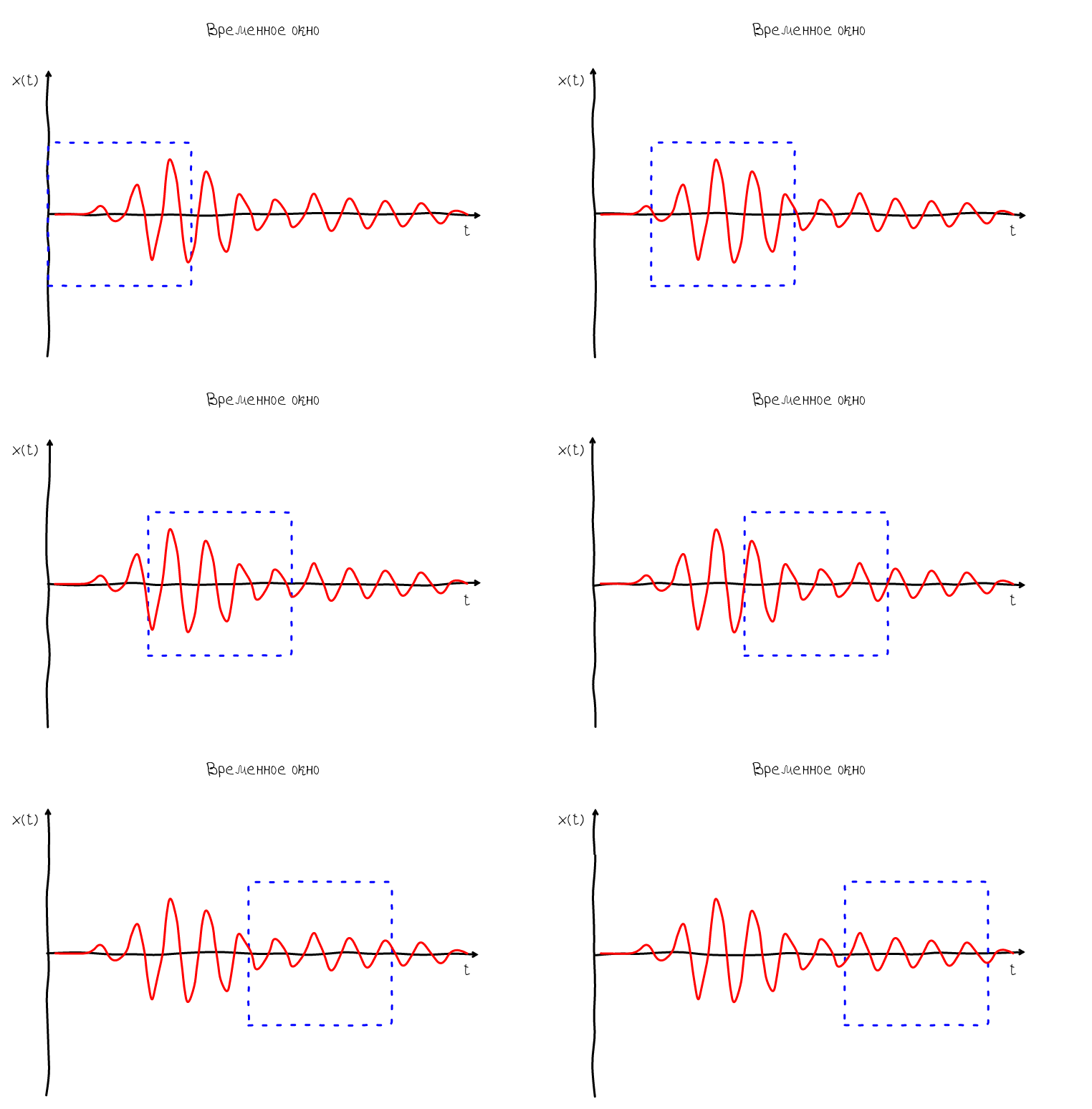
So, the frame allows us to understand how the measurement process takes place and which moments appear at the beginning of the frame and which at the end. Based on this, we can imagine what will happen if we compare the coordinate system with the frame - we will have a feeling that the sound wave appears on the right side of the graph and disappears on the left. Such a wave is called traveling:
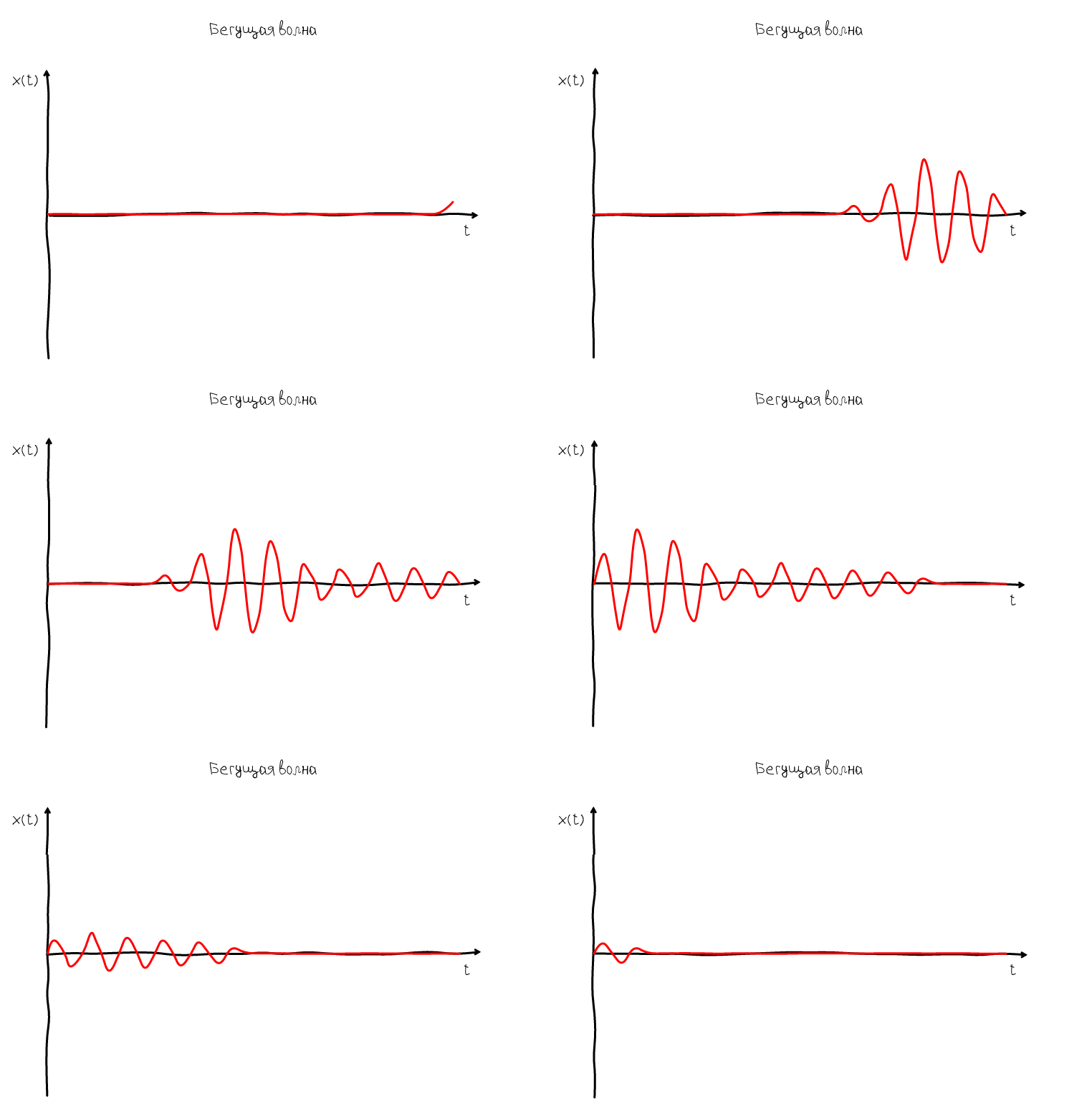
But such a representation of the sound wave is not informative, because a wave can move very, very fast. Our task is somehow to stop the wave. In order for the wave to stop, its speed should be 0. And since the wave has two speeds: phase and group, then you can get two types of standing waves:
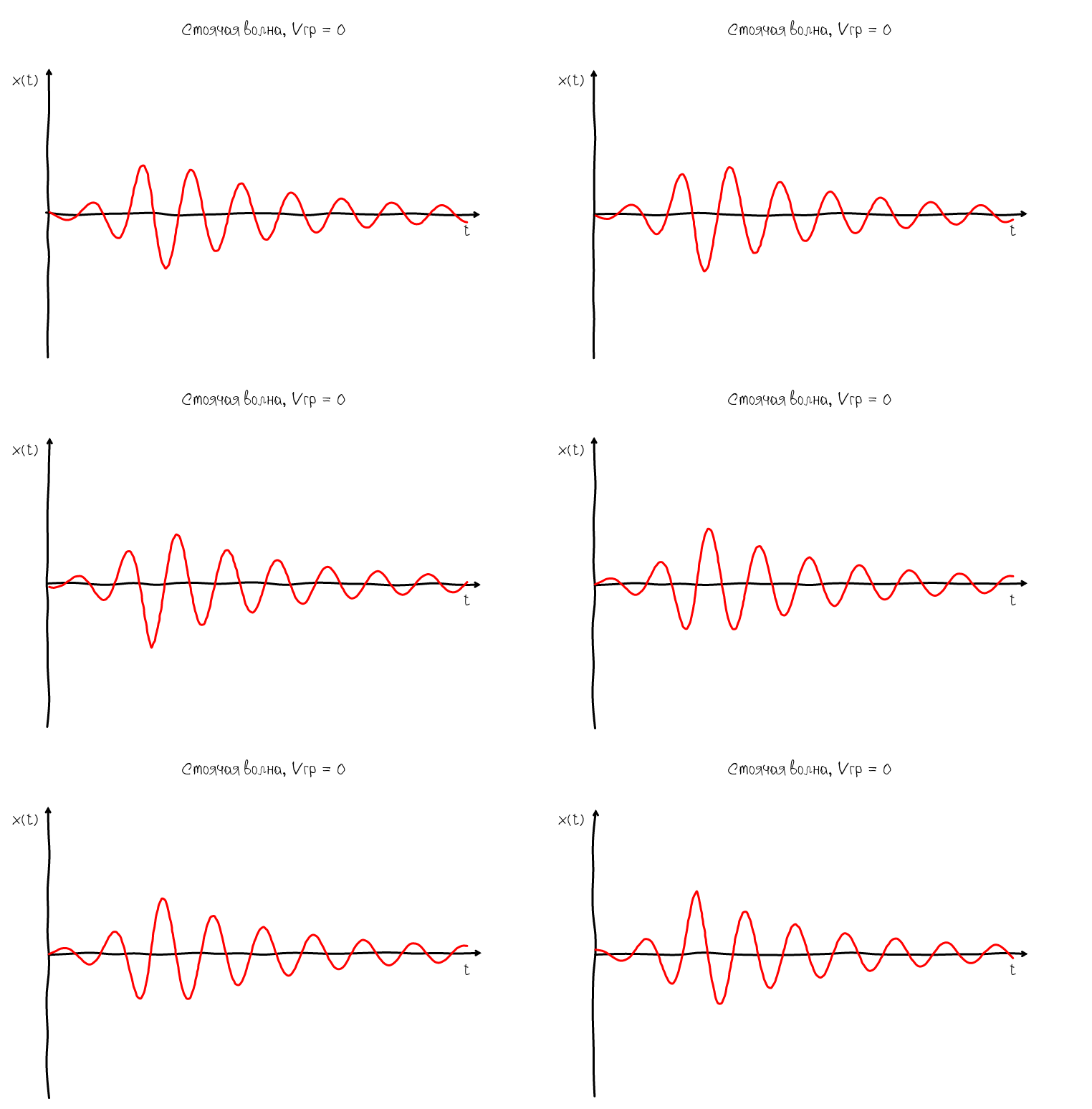
A standing wave in which the group velocity is equal to zero is characterized by the fact that its envelope always remains in one place. But at the same time, the oscillations do not stop - zeros and humps continue to move along the abscissa. Obviously, such a wave does not suit us, because Of interest is what happens inside the ADSR envelope, namely, at the moment when we observe oscillations in the sustain mode.
To do this, there is another type of standing waves in which the phase velocity is zero:
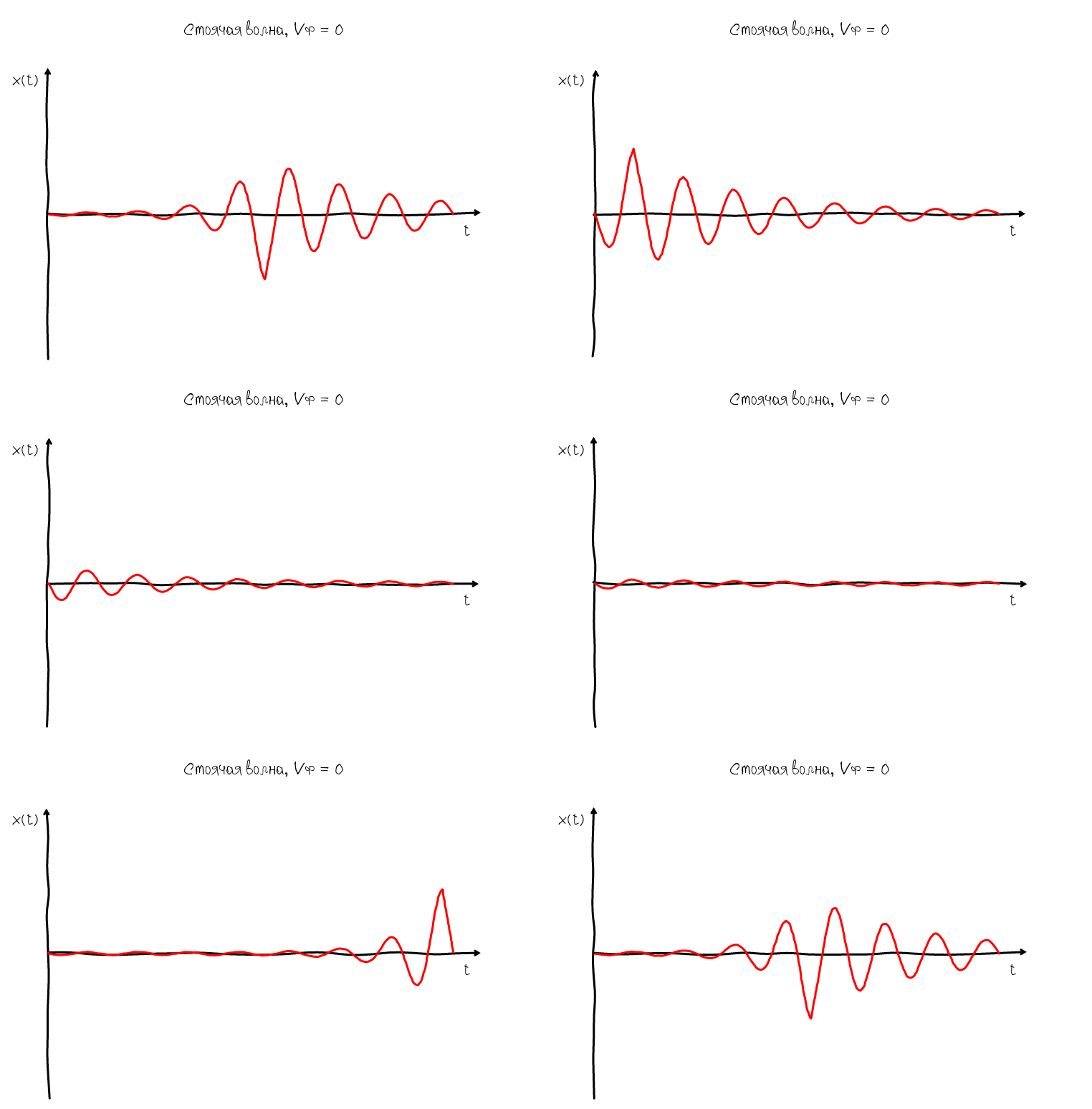
Zero phase velocity ensures that the nodes and humps always remain in one place, so we can easily see the shape of the harmonic oscillation and evaluate how close it is to the ideal sinusoidal shape. The algorithm for obtaining such a wave is obvious:
- Find the pitch phase
- Shift the displayed wave by phase
Implementation
Microphone recording
In fact, Apple provides many high-level multimedia capabilities from Objective-C / Swift. But in essence, now working with sound revolves around Audio Queue Services:
Audio Queue Services provides features similar to those previously offered by the Sound Manager and in OS X. It adds additional features such as synchronization. The Sound Manager is deprecated in OS X v10.5 and does not work with 64-bit applications. Audio Queue Services is recommended for all new development and as a replacement for the Sound Manager in existing Mac apps.
a source
But unlike SoundManager, which was a pretty high-level solution, Audio Queue Services are clumsy wrappers that simply repeat the Swift C code:
    func AudioQueueNewInput(_ inFormat: UnsafePointer,
                      _ inCallbackProc: AudioQueueInputCallback,
                      _ inUserData: UnsafeMutablePointer,
                      _ inCallbackRunLoop: CFRunLoop!,
                      _ inCallbackRunLoopMode: CFString!,
                      _ inFlags: UInt32,
                      _ outAQ: UnsafeMutablePointer) -> OSStatus
There is no profit from low-level code in Swift, so I left the audio capture to the auxiliary C-code. If we omit the secondary code for buffer management, the record setup is to initialize the AQRecorderState structure using the AudioQueueNewInput function:
    void AQRecorderState_init(struct AQRecorderState* aq, double sampleRate, size_t count){
        aq->mDataFormat.mFormatID = kAudioFormatLinearPCM;
        aq->mDataFormat.mFormatFlags = kLinearPCMFormatFlagIsPacked | kLinearPCMFormatFlagIsSignedInteger;
        aq->mDataFormat.mSampleRate = sampleRate;
        aq->mDataFormat.mChannelsPerFrame = 1;
        aq->mDataFormat.mBitsPerChannel = 16;
        aq->mDataFormat.mFramesPerPacket = 1;
        aq->mDataFormat.mBytesPerPacket = 2;// for linear pcm
        aq->mDataFormat.mBytesPerFrame = 2;
        AudioQueueNewInput(&aq->mDataFormat, HandleInputBuffer, aq, NULL, kCFRunLoopCommonModes, 0, &aq->mQueue);
        DeriveBufferSize(aq->mQueue,
                         &aq->mDataFormat,
                         (double)count / sampleRate,  // seconds
                         &aq->bufferByteSize);
        for (int i = 0; i < kNumberBuffers; ++i) {
            AudioQueueAllocateBuffer(aq->mQueue, aq->bufferByteSize, &aq->mBuffers[i]);
            AudioQueueEnqueueBuffer(aq->mQueue, aq->mBuffers[i], 0, NULL);
        }
        aq->mCurrentPacket = 0;
        aq->mIsRunning = true;
        aq->buffer = Buffer_new(32768);
        aq->preview_buffer = Buffer_new(5000);
        AudioQueueStart(aq->mQueue, NULL);
    }
Data recording occurs through the HandleInputBuffer function. Calls Buffer_write_ints converts data from int to float and saves it to the buffer for further processing.
    static void HandleInputBuffer (
        void                                 *aqData,
        AudioQueueRef                        inAQ,
        AudioQueueBufferRef                  inBuffer,
        const AudioTimeStamp                 *inStartTime,
        UInt32                               inNumPackets,
        const AudioStreamPacketDescription   *inPacketDesc
    ) {
        struct AQRecorderState* pAqData = (struct AQRecorderState*)aqData;
        if(inNumPackets == 0 && pAqData->mDataFormat.mBytesPerPacket != 0)
            inNumPackets = inBuffer->mAudioDataByteSize / pAqData->mDataFormat.mBytesPerPacket;
        const SInt16* data = inBuffer->mAudioData;
        Buffer_write_ints(pAqData->buffer, data, inNumPackets);
        Buffer_write_ints(pAqData->preview_buffer, data, inNumPackets);
        if (pAqData->mIsRunning == 0) return;
        AudioQueueEnqueueBuffer(pAqData->mQueue, inBuffer, 0, NULL);
    }
Performance Issues and Swift
Initially, the idea was to use the Swift language 100%. In general, I did so, rewrote all the code in Swift except for the FFT for which the implementation from the Accelerate library was used. But strangely enough, the Swift version produced a huge load in the region of 95% of the processor time and a delay in signal processing which led to a terribly slow rendering.
In this form, of course, the application was not suitable for use, so I had to completely transfer all signal processing to the Accelerate library. But even after that, the load still remained high. I had to transfer to C those operations with arrays that required only one pass, i.e. linear runtime. To illustrate, I will give identical Swift and C code:
    class Processing{
        ...
        func getFrequency() -> Double {
            var peak: Double = 0
            var peakFrequency: Double = 0
            for i in 1..spectrum[i]
                var f: Double = fd * i / spectrum.count
                if (spectrumValue > peak) {
                    peak = spectrum[i]
                    peakFrequency = f
                }
            }
            return peakFrequency
        }
    }
    double get_frequency(p* processing){
        double peak = 0;
        double peakFrequency = 0;
        for(size_t i = 1; i < p.spectrumLength / 2; i ++){
            double spectrumValue = p->spectrum[i];
            double f = p->fd * i / p->spectrumLength;
            if (spectrumValue > peak) {
                peak = spectrum;
                peakFrequency = f;
            }
        }
        return peakFrequency;
    }
In general, even a trivial passage through the array, if it is done in a cycle with a frequency of 20 calls per second, could quite load the device.
Perhaps this was the problem of the first version of Swift, but in the end I had to completely exclude from Swift everything that performed bitwise operations. So in Swift there was only one responsible for creating arrays, passing to auxiliary libraries written in C, as well as rendering code in OpenGL ES 2.
But was Swift good? Of course, with regard to high-level tasks, Swift copes with this fine. Writing code is much nicer, modern syntax that does not require constant semicolons, a lot of intuitive and useful syntactic sugar. So, despite the fact that using Swift caused some problems, the whole language seemed pretty nice.
Microphone Sensitivity Problem
So, after rewriting part of the code in C, it seemed that the moment when I could tune my guitar was about to come. But then another trouble arose about which I did not think at all. The microphone on the iPhone badly cut the low-frequency part of the spectrum. Of course, I assumed that the microphones in smartphones are far from ideal, but everything turned out to be much worse because The blockage began already at 200 Hz.
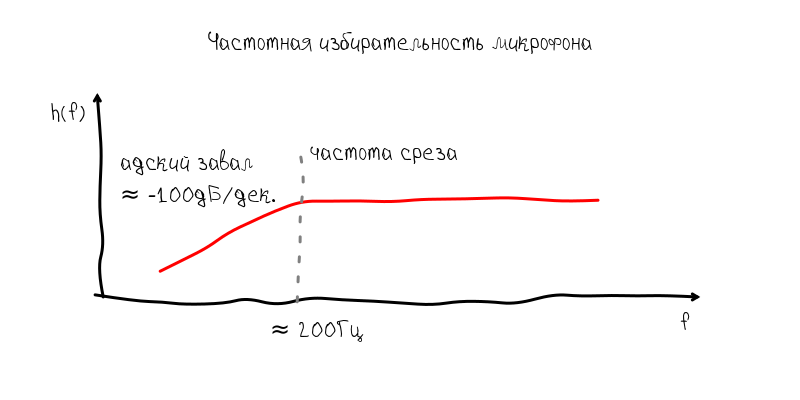
As for tuning the guitar, such a blockage of the frequency response makes it impossible to tune the sixth string, because it has a frequency of approximately 80 Hz. With this weakening, the fundamental tone begins to sink in harmonics with a frequency of 160 Hz, 240 Hz, etc.
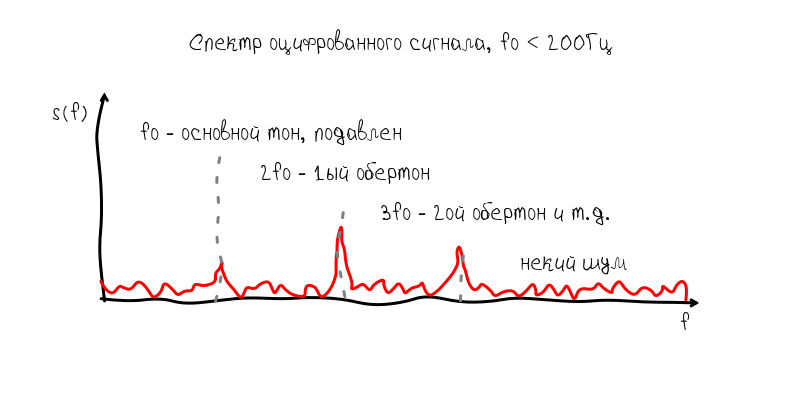
I immediately outlined two possible solutions to this problem:
- if a twin appears at the fundamental frequency with a frequency of 0.5, then this should indicate that the fundamental tone is muffled and the resulting frequency should be adjusted and be 1 / 2f
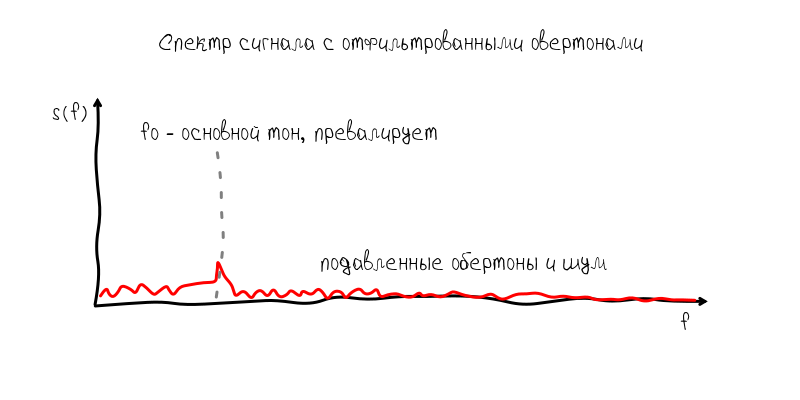
- enable the user to suppress overtones with a low-pass filter, which will cut off frequencies somewhat higher than the tone of the string
The first option seemed more interesting, because did not require additional effort from the user. Nevertheless, he was not entirely wealthy, because led to many bad situations. For example, the main frequency was sometimes cut by a microphone so strongly that it was at the level of 1-2% of its first harmonic. In addition, since Since the guitar resonator is a very nonlinear device, a situation often arose when the second, third, and even fourth harmonics began to compete in amplitude. This led to the fact that the tone was captured four times higher than the main one.
In principle, these problems could be solved programmatically. The main disappointment was caused by the fact that the harmonics in the guitar walk very much, so tuning them does not provide accuracy of ± 0.1 Hz. This is apparently due to the fact that the main tone is set by the string with a fairly stable frequency, on the contrary, harmonics are supported mainly due to vibrations in the guitar body and can deviate by a few Hertz during the sound of the string.
Therefore, the first decision had to be abandoned for the sake of a more predictable and less convenient one. So, a low-pass filter has approximately the following frequency response:
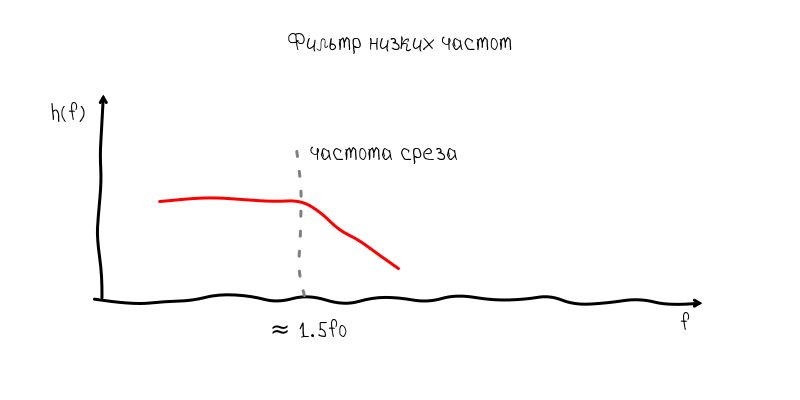
A block to the right of the cutoff frequency suppresses overtones, so that the pitch again becomes prevailing. The price paid for this overall decrease in the signal-to-noise ratio and, as a result, a slight decrease in accuracy, but within the acceptable range.
Accuracy vs Performance
In digital signal processing, the task of choosing the size of the observation window always pops up. A large observation window allows you to collect more information, to make an accurate and stable estimate of the signal parameters. On the other hand, this creates a number of problems due to the fact that it is necessary to store and process a large number of samples at a time, plus a proportional delay in signal processing.
In turn, Accelerate allows you to calculate the spectrum of sequences not exceeding 32,768 samples. But such a number of counts means that the step of the frequency grid in the spectrum is approximately 1.35 Hz. On the one hand, this is an allowable value when it comes to, for example , the first octavewith a frequency of 440 Hz, i.e. notes that are obtained on the open first string (the thinnest). But on the sixth string, such a mistake is fatal, because between mi of the big octave and, for example, the big octave is only 3 Hz. Those. an error of 1.35 Hz is an error of half a tone.
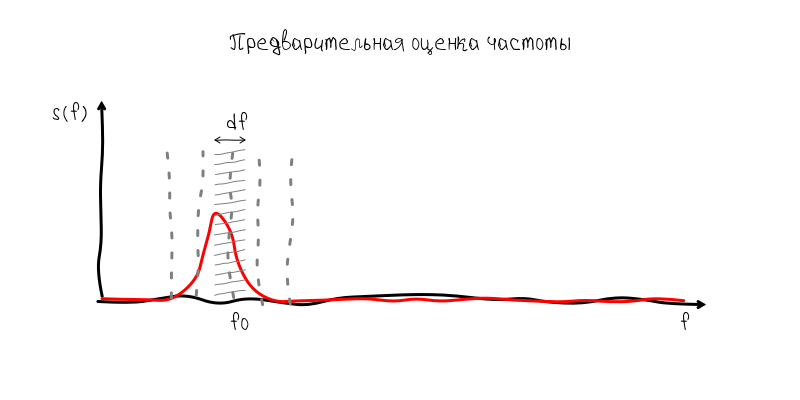
Nevertheless, the solution to this problem is quite simple, but it also demonstrates the full power of time-frequency analysis. Because it is not possible to accumulate a few seconds of the signal, then we can accumulate the value of the spectrum at the fundamental frequency with repeated Fourier transform. Mathematically, the result will be equivalent to processing a 1.35 Hz filter at the fundamental frequency. Having only 16 complex readings, we can increase the accuracy of the result by 16 times, i.e. up to approximately 0.08 Hz, which is slightly more accurate ± 0.1 Hz.
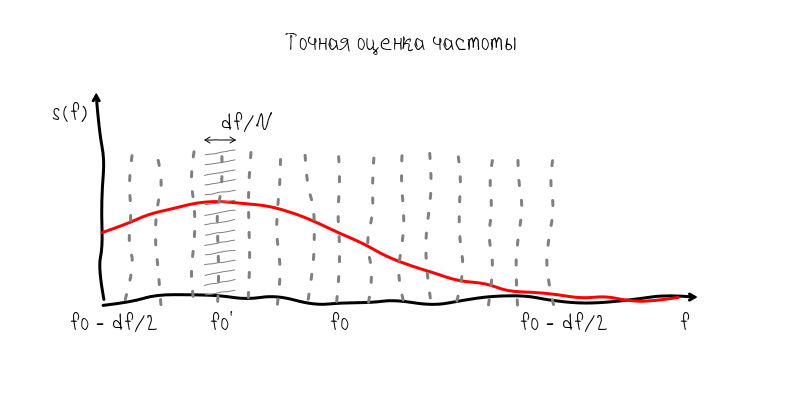
In other words, without information about the value of the fundamental tone, we would have to increase the time window to 5 s to obtain accuracy of ± 0.1 Hz and process 163840 samples. But since with a time window of 0.743 s we can already make a frequency estimate with an accuracy of 1.35 Hz, then for a more accurate estimate it is enough to accumulate samples from an extremely narrow band with a sampling rate of 2.7 Hz. For this, 2.7 Hz * 5 s = 13.75 complex readings (or 16 if rounded and taken with a margin) is quite enough.
Matching notes and frequencies
This task is quite easily solved on Swift. I created a special Tuner class in which I entered all the information about the supported tools and matching rules. All these calculations are based on the two formulas “baseFrequency * pow (2.0, (n - b) / 12.0)” and “12.0 * log (f / baseFrequency) / log (2) + b”,
where baseFrequency is the base frequency of 440 Hz or 256 Hz, b - note number in integers, ranging from to subcontract .
The code is quite Chinese:
class Tuner {
    ...
    init(){
        addInstrument("guitar", [
            ("Standard", "e2 a2 d3 g3 b3 e4"),
            ("New Standard", "c2 g2 d3 a3 e4 g4"),
            ("Russian", "d2 g2 b2 d3 g3 b3 d4"),
            ("Drop D", "d2 a2 d3 g3 b3 e4"),
            ("Drop C", "c2 g2 c3 f3 a3 d4"),
            ("Drop G", "g2 d2 g3 c4 e4 a4"),
            ("Open D", "d2 a2 d3 f#3 a3 d4"),
            ("Open C", "c2 g2 c3 g3 c4 e4"),
            ("Open G", "g2 g3 d3 g3 b3 d4"),
            ("Lute", "e2 a2 d3 f#3 b3 e4"),
            ("Irish", "d2 a2 d3 g3 a3 d4")
        ])
        ...
    }
    ...
    func noteNumber(noteString: String) -> Int {
        var note = noteString.lowercaseString
        var number = 0
        var octave = 0
        if note.hasPrefix("c") { number = 0; }
        if note.hasPrefix("c#") { number = 1; }
        ...
        if note.hasPrefix("b") { number = 11; }
        if note.hasSuffix("0") { octave = 0; }
        if note.hasSuffix("1") { octave = 1; }
        ...
        if note.hasPrefix("8") { octave = 8; }
        return 12 * octave + number
    }
    func noteString(num: Double) -> String {
        var noteOctave: Int = Int(num / 12)
        var noteShift: Int = Int(num % 12)
        var result = ""
        switch noteShift {
            case 0: result += "c"
            case 1: result += "c#"
            ...
            default: result += ""
        }
        return result + String(noteOctave)
    }
    func noteFrequency(noteString: String) -> Double {
        var n = noteNumber(noteString)
        var b = noteNumber(baseNote)
        return baseFrequency * pow(2.0, Double(n - b) / 12.0);
    }
    func frequencyNumber(f: Double) -> Double {
        var b = noteNumber(baseNote);
        return 12.0 * log(f / baseFrequency) / log(2) + Double(b);
    }
    func frequencyDistanceNumber(f0: Double, _ f1: Double) -> Double {
        var n0 = frequencyNumber(f0)
        var n1 = frequencyNumber(f1)
        return n1 - n0;
    }
    func targetFrequency() -> Double {
        return noteFrequency(string) * fretScale()
    }
    func actualFrequency() -> Double {
        return frequency * fretScale()
    }
    func frequencyDeviation() -> Double {
        return 100.0 * frequencyDistanceNumber(noteFrequency(string), frequency)
    }
}
Standing wave visualization
As for the standing wave that allows you to see the shape of the sound wave of the instrument, then, as I already wrote, the algorithm is absolutely trivial - the wavelength is calculated from the found fundamental frequency and the phase is estimated, and then a shift is made from the found value. Data is taken from the auxiliary preview buffer, which, unlike the main one, does not accumulate. Those. works according to the “ tumbling window ” algorithm :
    double waveLength = p->fd / f;
    size_t index = p->previewLength - waveLength * 2;
    double* src = &p->preview[index];
    // в цикле происходит разложение основного тона на реальную и мнимую составляющую
    double re = 0; double im = 0;
    for (size_t i = 0; i < waveLength*2; i++) {
        double t = (double)2.0 * M_PI * i / waveLength;
        re += src[i] * cos(t);
        im += src[i] * sin(t);
    }
    double phase = get_phase(re, im); // фаза волны относительно начала
    double shift = waveLength * phase / (2.0 * M_PI); // искомый сдвиг
    // положение начала стоячей волны
    double* shiftedSrc = &p->preview[index - (size_t)(waveLength - shift) - (size_t)waveLength];
Appearance
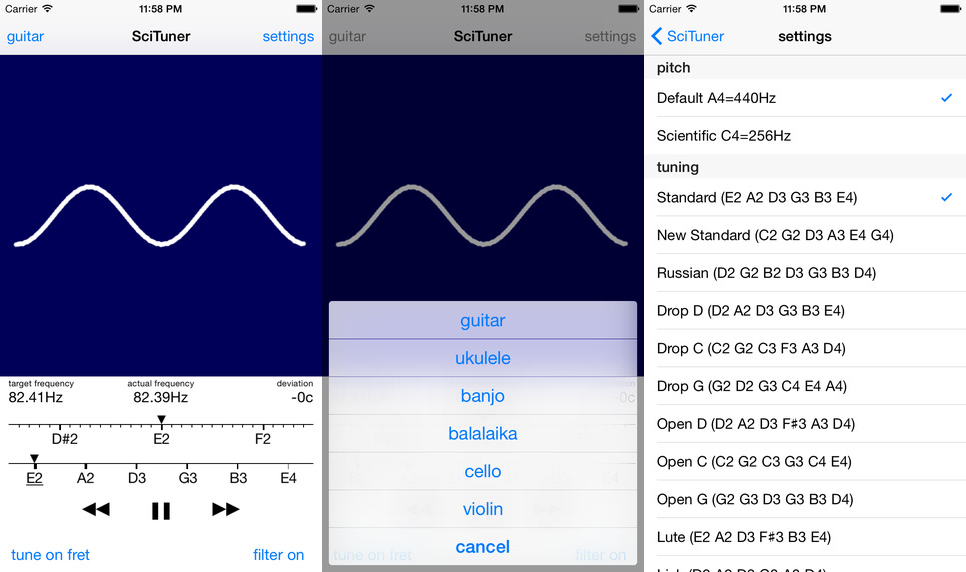
Appearance and navigation I made on the basis of the built-in player, only instead of switching over tracks, switching on strings occurs:
Conclusion
The entire path of developing an application on Swift / C took about two months. The application turned out to be quite difficult to implement. Firstly, the performance of smartphones still leaves much to be desired and the “head-on” solutions in a high-level language turn out to be absolutely unsuitable for everyday use by users. Secondly, the topic of sound processing is terribly unpopular among developers for iOs, so information has to be collected bit by bit. Although this concerns, probably, any topic not related to the UI when developing for mobile applications. Thirdly, even though Swift communicates well with C-data, anyway this way of development is terribly inconvenient and terribly labor-consuming.
Despite the fact that the article turned out to be quite significant, many subtleties and nuances remained unlit. I hope the source code of the application will help clarify incomprehensible points:
 github.com/kreshikhin/scituner
The source code is accompanied by a MIT license. Therefore, you can safely use the code sections you are interested in or the entire project code for your own purposes.