June 5, 2015 at 16:37
How to identify duplicate pictures using PHP
No one has canceled the human factor in any project, and if users upload pictures to the site on their own, duplicates cannot be avoided. When it comes to thousands of files, you can’t just review everything with your eyes, and repeating pictures are not only that nobody needs, they also take up space, spend resources and ultimately slow down the work.
Therefore, sooner or later, the question arises of automating the process of searching for repetitions, and here we will consider the main ones, and also try in business.
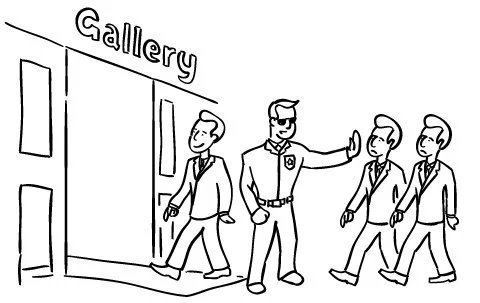
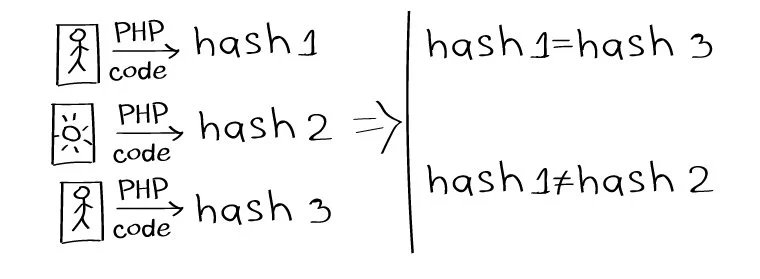
One way to identify duplicates is to compare files by generating a hash value from the contents of a given file.
A simple example of computing an image hash:
The result looks something like this: bff8b4bc8b5c1c1d5b3211dfb21d1e76
If the hashes of the two images match, the images are the same.
The method is far from the most accurate, since it works only for identical pictures, with the slightest difference - the sense is zero.
The Imagick :: compareImages image processing function returns an array that contains the reconstructed image and the difference between the images.
An example of use when comparing two images:
As a result, the two compared pictures are molded into one, on which the differences are visible.
You can also get a numerical expression of differences for each parameter (example from the website ):
To quickly find duplicates, you must install the gd2 and libpuzzle libraries .
Installation:
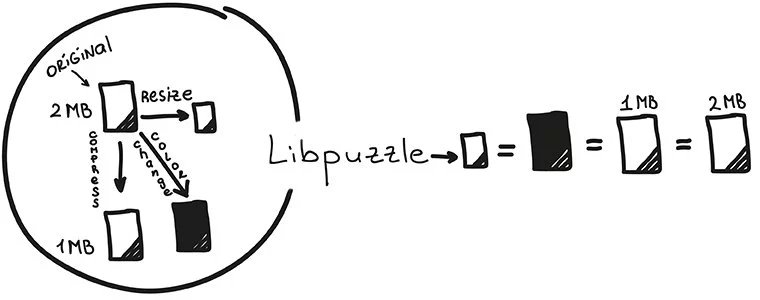
Libpuzzle is designed to quickly search for visual similarities in images ( GIF , PNG , JPEG ). First, the raster image is divided into blocks - frames that do not carry particularly significant information are automatically discarded. The difference between adjacent blocks forms a vector - this is the so-called picture caption. The similarity of the pictures is determined by the distance between two such vectors. Therefore, usually a color change, resize, or compression does not affect the output of libpuzzle.
Libpuzzle is pretty easy to use. Signature calculation for two images:
Calculation of distance between signatures:
Checking images for similarity:
Compression of signatures for storage in the database:
Most likely, the most accurate way to find duplicates is to compare files through a perceptual hash . A similarity check is done by counting the number of different positions between two hashes, this is the Hamming distance . The smaller the distance, the greater the coincidence.

It differs from the first method in that it indicates not only the same / unequal, but also the degree of difference. You can read more about this principle in a good translation .
Installation for UNIX platforms looks like this:
You can actually try it through i.onthe.io/phash . Downloading images through the interface and the output indicator of "uniformity".
Get the hash of the first image:
We get the hash of the second image:
We get the Hamming distance between two images:
We did almost all the possible manipulations with the same photo to check which changes prevent duplicates from detecting through pHash and which ones do not.
For example, with a mirror image - the picture remains unrecognized .
But with the colors you can play as much as you like - this will not affect the result of the comparison .
What can not be said about the manipulation of RGB-channels, John again did not recognize , although the Hamming distance for this case is much less.
Other results look like this:
* depends on the size of the cropped area. When cutting a small frame several pixels thick from the picture, the Hamming distance will be zero, therefore the similarity is 100%. But the more tangible the crop - the greater the distance - the less likely it is to find a duplicate. You can read about searching for cropped duplicates through perceptual hashes here .
** the same as with crop. When turning a couple of degrees, the distance is negligible, but the greater the angle of inclination, the greater the difference.
Comparing files through hash function
One way to identify duplicates is to compare files by generating a hash value from the contents of a given file.
A simple example of computing an image hash:
The result looks something like this: bff8b4bc8b5c1c1d5b3211dfb21d1e76
If the hashes of the two images match, the images are the same.
The method is far from the most accurate, since it works only for identical pictures, with the slightest difference - the sense is zero.
Imagemagick
The Imagick :: compareImages image processing function returns an array that contains the reconstructed image and the difference between the images.
An example of use when comparing two images:
compareImages($image2, Imagick::METRIC_MEANSQUAREERROR);
$result[0]->setImageFormat("png");
echo $result[0];
?>
As a result, the two compared pictures are molded into one, on which the differences are visible.
You can also get a numerical expression of differences for each parameter (example from the website ):
-> compare -verbose -metric mae rose.jpg reconstruct.jpg difference.png
Image: rose.jpg
 Channel distortion: MAE
  red: 2282.91 (0.034835)
  green: 1853.99 (0.0282901)
  blue: 2008.67 (0.0306503)
  all: 1536.39 (0.0234439)
gd2 and libpuzzle
To quickly find duplicates, you must install the gd2 and libpuzzle libraries .
Installation:
apt-get install libpuzzle-php php5-gd
Libpuzzle is designed to quickly search for visual similarities in images ( GIF , PNG , JPEG ). First, the raster image is divided into blocks - frames that do not carry particularly significant information are automatically discarded. The difference between adjacent blocks forms a vector - this is the so-called picture caption. The similarity of the pictures is determined by the distance between two such vectors. Therefore, usually a color change, resize, or compression does not affect the output of libpuzzle.
Libpuzzle is pretty easy to use. Signature calculation for two images:
$cvec1 = puzzle_fill_cvec_from_file('img1.jpg');
$cvec2 = puzzle_fill_cvec_from_file('img2.jpg');
Calculation of distance between signatures:
$d = puzzle_vector_normalized_distance($cvec1, $cvec2);
Checking images for similarity:
if ($d < PUZZLE_CVEC_SIMILARITY_LOWER_THRESHOLD) {
  echo "Pictures are looking similar\n";
} else {
  echo "Pictures are different, distance=$d\n";
}
Compression of signatures for storage in the database:
$compress_cvec1 = puzzle_compress_cvec($cvec1);
$compress_cvec2 = puzzle_compress_cvec($cvec2);
Perceptual hash
Most likely, the most accurate way to find duplicates is to compare files through a perceptual hash . A similarity check is done by counting the number of different positions between two hashes, this is the Hamming distance . The smaller the distance, the greater the coincidence.
It differs from the first method in that it indicates not only the same / unequal, but also the degree of difference. You can read more about this principle in a good translation .
Installation for UNIX platforms looks like this:
$ ./phpize
$ ./configure [--with-pHash=...]
$ make
$ make test
$ [sudo] make install
You can actually try it through i.onthe.io/phash . Downloading images through the interface and the output indicator of "uniformity".
How it works
Get the hash of the first image:
$phash1 = ph_dct_imagehash($file1);
We get the hash of the second image:
$phash2 = ph_dct_imagehash($file2);
We get the Hamming distance between two images:
$dist = ph_image_dist($phash1,$phash2);
We did almost all the possible manipulations with the same photo to check which changes prevent duplicates from detecting through pHash and which ones do not.
For example, with a mirror image - the picture remains unrecognized .
But with the colors you can play as much as you like - this will not affect the result of the comparison .
What can not be said about the manipulation of RGB-channels, John again did not recognize , although the Hamming distance for this case is much less.
Other results look like this:
| Do not interfere (Hamming distance = 0) | Interfere (Hamming distance in parentheses) |
|---|---|
| Changed file name | Crop (34) * |
| Format (JPEG, PNG, GIF) | Rotate 90 ° (32) ** |
| Google PageSpeed Optimization | Mirror Image (36) |
| Resize with and without proportions | Repositioning Curves in RGB Channels (18) |
| Change color gamut and sharpness |
* depends on the size of the cropped area. When cutting a small frame several pixels thick from the picture, the Hamming distance will be zero, therefore the similarity is 100%. But the more tangible the crop - the greater the distance - the less likely it is to find a duplicate. You can read about searching for cropped duplicates through perceptual hashes here .
** the same as with crop. When turning a couple of degrees, the distance is negligible, but the greater the angle of inclination, the greater the difference.
Abstract
- Use ImageMagick to compare images , and hash comparison to search for completely identical images .
- To find slightly modified images - use the libpuzzle library .
- Comparison through a perceptual hash is one of the most reliable, you can try it here .