 May 18, 2015 at 23:48
The revolution of interfaces. USB 3.1 Type-C in detail. Electronic view
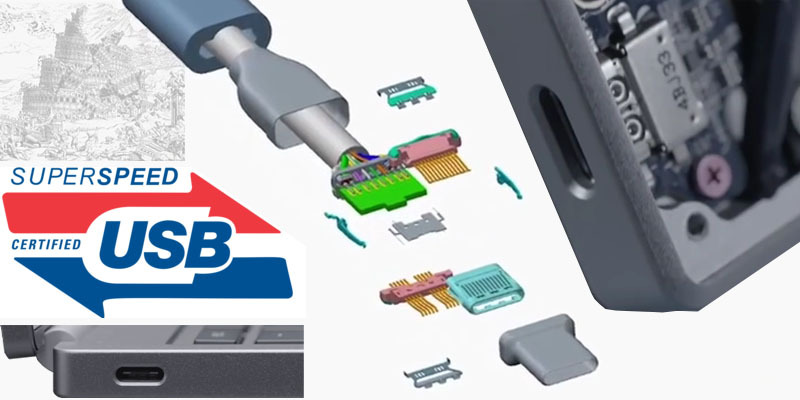
It is rare that one extra letter in the name of the standard threatens to revolutionize the world of data transfer interfaces and gadgets, but the appearance of the latest version of USB 3.1 Type-C seems to be just that case. What does the next update of the good old USB interface promise to bring to us?
- Data transfer rate up to 10 GBps
- Ability to power devices with power consumption up to 100W from the port
- Connector dimensions comparable to micro-USB
- The symmetry of the connector - it does not have a top and bottom, which means there is no key that often leads to damage to both the connectors themselves and the gadgets connected through them
- Using this interface, devices with voltage up to 20 volts can be powered
- There are no more different types of connectors - A and B. At both ends of the cable are exactly the same connectors. Both data and supply voltage can be transmitted through the same connector in both directions. Depending on the situation, each connector can act as a master or slave
- We are promised that the connector design can withstand up to 10,000 connections
- It is possible to use this interface for direct connection instead of some other widely used interfaces for quick data exchange.
- The standard is compatible from top to bottom both with the usual USB 3 interface and with its younger brothers. Of course, not directly, but with the help of an adapter through it, it is possible to connect, say, a USB 2.0 disk
Under the cut, I’ll try to understand the topic by bones - starting from the design of the connector and cable, and ending with a brief overview of equipment profiles and new chips to support the capabilities of this interface. I thought for a long time on what platform to post the article, because all the previous ones related to this topic went to GT, but in my publication there are so many technical details that it will be more useful not to geeks, but to potential developers who should start looking at it today. Therefore, I ventured to put the article here.
I will not touch on the history of the development of the USB interface, this topic is not poorly developed in this comic
Electronics - Contact Science
To begin with, comparative photos of today's hero in the company of distinguished ancestors.
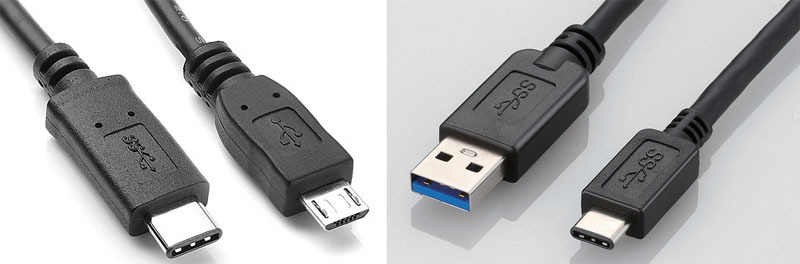
The USB Type-C connector is slightly larger than the usual USB 2.0 Micro-B, but noticeably more compact than the dual USB 3.0 Micro-B, not to mention the classic USB Type-A.
The dimensions of the connector (8.34 × 2.56 mm) allow it to be used without any difficulties for devices of any class, including smartphones and tablets.

The signal and power terminals are placed on the plastic insert, perhaps this is its weakest place in the central part of the connector. The USB Type-C pin group contains 24 pins. Let me remind you that USB 1.0 / 2.0 had only 4 contacts, and USB 3.0 connectors already required 9 pins.


If you look closely at the picture on the left, you can see that the contacts have different lengths. This ensures their closure in a certain sequence. In the figure in the center, we see the presence of latches that must hold the stuck cable and provide a tactile click during the connection-disconnection process. The right graph shows the dependence of the force in the process of insertion-removal of the connector.
The peaks that we see on it are the moments of the latch.
It can be stated that the developers of the standard did, if not everything, then almost everything, so that the connector becomes as convenient and reliable as possible: it is inserted at either end and on either side with a noticeable click. In their opinion, he is able to survive this procedure more than 10 thousand times.
Many-Faced Symmetric Janus
An extremely pleasant and useful feature of USB-C is the symmetrical design of the connector, allowing you to connect it to the port on either side. This is achieved due to the symmetrical arrangement of its findings.
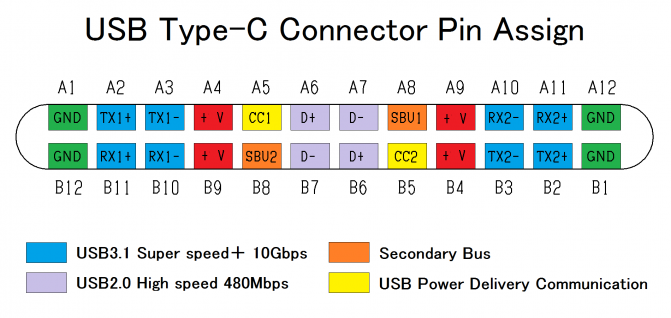
On the edges are the conclusions of the earth. The positive power contacts are also located symmetrically. In the center are the contacts responsible for compatibility with the USB2 interface and younger. They were lucky the most - they are duplicated and therefore a 180-degree rotation when connecting is not terrible. The blue color indicates the outputs responsible for high-speed data exchange. As we see here, everything is trickier. If we turn the connector, for example, the output of TX1 will change places with TX2, but at the same time, the input site of RX1 will take RX2.
Conclusions Secondary Bus and USB Power Delivery Communication are utility and are intended for communication between two connected devices. After all, they need to tell a lot about each other before starting the exchange, but more on that later.
In the meantime, one more feature. The USB Type-C port was originally designed as a one-stop solution. In addition to direct data transfer via USB, it can also be used in the Alternate Mode for implementing third-party interfaces. VESA has used this flexibility of USB Type-C, introducing the ability to transmit video through DisplayPort Alt Mode.
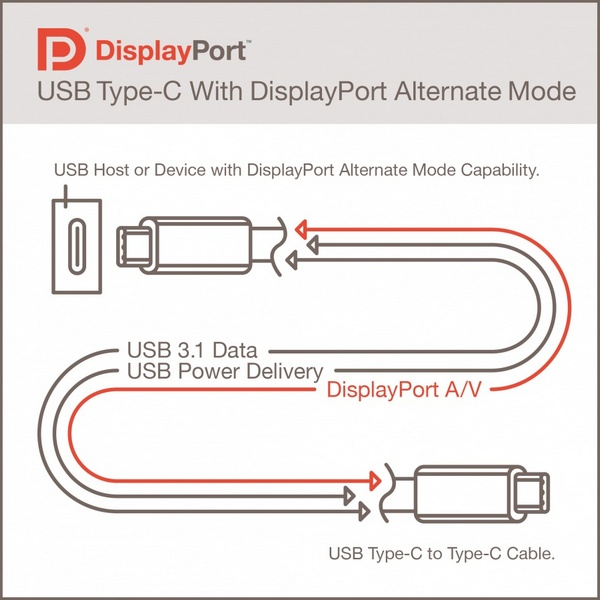
USB Type-C has four high speed Super Speed USB lines (in pairs). If two of them stand out for the needs of DisplayPort, this is enough to get a picture with a resolution of 3840 × 2160. At the same time, the data transfer speed via USB does not suffer. At the peak, it's still the same 10 Gb / s (for USB 3.1 Gen2). Also, the transmission of the video stream does not affect the energy capabilities of the port. For displayPort needs, even 4 high-speed lines can be allocated. In this case, resolutions up to 5120 × 2880 will be available. In this mode, USB 2.0 lines remain unused, because USB Type-C can still transfer data in parallel, albeit at a limited speed.
In alternative mode, SBU1 / SBU2 contacts are used to transfer the audio stream, which are converted to AUX + / AUX- channels. For the USB protocol, they are not involved, because there are also no additional functional losses.
When using the DisplayPort interface, the USB Type-C connector can still be connected either way. The necessary signal coordination is provided initially.
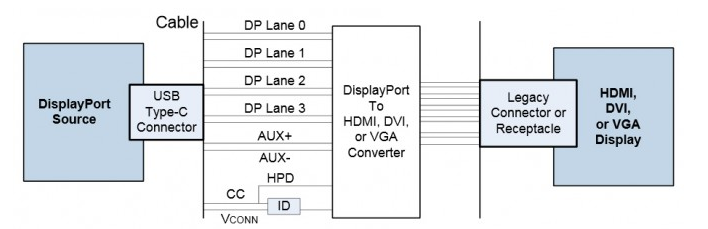
Connecting devices using HDMI, DVI and even D-Sub (VGA) is also possible, but for this you need separate adapters, however, these must be active adapters, as for DisplayPort Alt Mode, Dual-Mode Display Port (DP ++) is not supported .
Alternative USB Type-C mode can be used not only for DisplayPort protocol. Perhaps soon we will learn that this port learned, for example, to transmit data using PCI Express or Ethernet.
And she gave it, and she gave it. In general ... about nutrition.
Another important feature that USB Type-C brings is the ability to transfer energy up to 100 watts through it. This is enough not only to power / charge mobile devices, but also to use laptops, monitors, and if you dream up, then a small laboratory power source.
With the advent of the USB bus, power transmission was an important, but nonetheless secondary function. The USB 1.0 port provided only 0.75 W (0.15 A, 5 V). Enough for the mouse and keyboard, but nothing more. For USB 2.0, the nominal current was increased to 0.5 A, which made it possible to receive 2.5 watts from it for powering, for example, 2.5 ”external hard drives. For USB 3.0, a nominal current of 0.9 A is provided, which, with a constant supply voltage of 5 V, guarantees a power of 4.5 watts. Special reinforced connectors on motherboards or laptops were capable of delivering up to 1.5 A to accelerate charging of connected mobile devices, but this is “only” 7.5 W. Against the backdrop of these numbers, the ability to transmit 100 watts looks fantastic.
In order to fill the USB Type-C port with such energy, the USB Power Delivery 2.0 (USB PD) specification is supported. If there is none, the USB Type-C port will be able to properly deliver 7.5 W (1.5 A, 5 V) or 15 W (3A, 5 V) to the mountain, depending on the configuration. There is not enough space in this article for a detailed description of this specification, and still I will not do it better than the respected stpark in my wonderful article .
However, completely bypassing this crucial topic will not work.
In order to provide a power of 100 watts at a voltage of five volts, a current of 20 amperes will be required! This with the dimensions of the USB Type-C cable is probably possible only if you make it from a superconductor! I'm afraid that today it will cost users a lot, so the developers of the standard went a different way. They increased the supply voltage to 20 volts. “Excuse me, but it will completely burn my favorite tablet” - you exclaim, and you will be absolutely right. In order not to fall prey to angry users, engineers conceived a trick - they introduced a system of power profiles. Before connecting, any device is in standard mode. The voltage in it is limited to five volts, and the current is two amperes. To connect to devices of the old type with this mode, everything will end, but for more advanced cases, after data exchange, the devices switch to another agreed mode of operation with advanced features. To get acquainted with the main existing modes, take a look at the table.
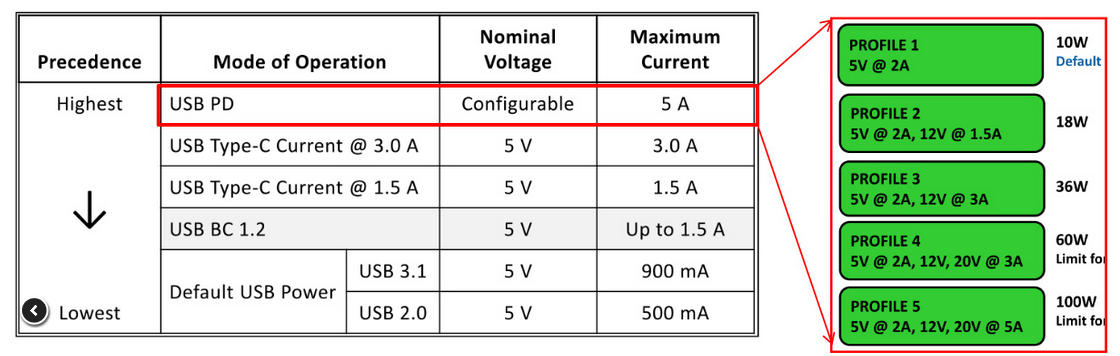
Profile 1 guarantees the possibility of transferring 10 watts of energy, the second is already 18 watts, the third is 36 watts, the fourth is as much as 60 watts, and the fifth is our cherished hundred! A port corresponding to a higher level profile supports all the states of the previous ones in descending order. As reference voltages, 5V, 12V, and 20V were selected. The use of 5V is necessary for compatibility with a huge fleet of existing USB peripherals. 12V is the standard supply voltage for various system components. 20V is proposed taking into account the fact that external power supplies with 19–20V are used to charge the batteries of most laptops.
A few words about cables!
Support for the format described in the article in full will require enormous work not only of programmers, but also of electronics manufacturers. You will need to develop and deploy a very large number of components. The most obvious are the connectors. In order to withstand high currents of the supply voltage, not to interfere with the transmission of very high frequency signals, and even not to fail after the second connection and not to fall out at the most inopportune moment, their manufacturing quality should be radically higher compared to the USB format 2.
To combine the transmission of high power energy and a signal with gigabit traffic, cable manufacturers will have to seriously strain.
Admire how the cutaway cable looks suitable for our task.
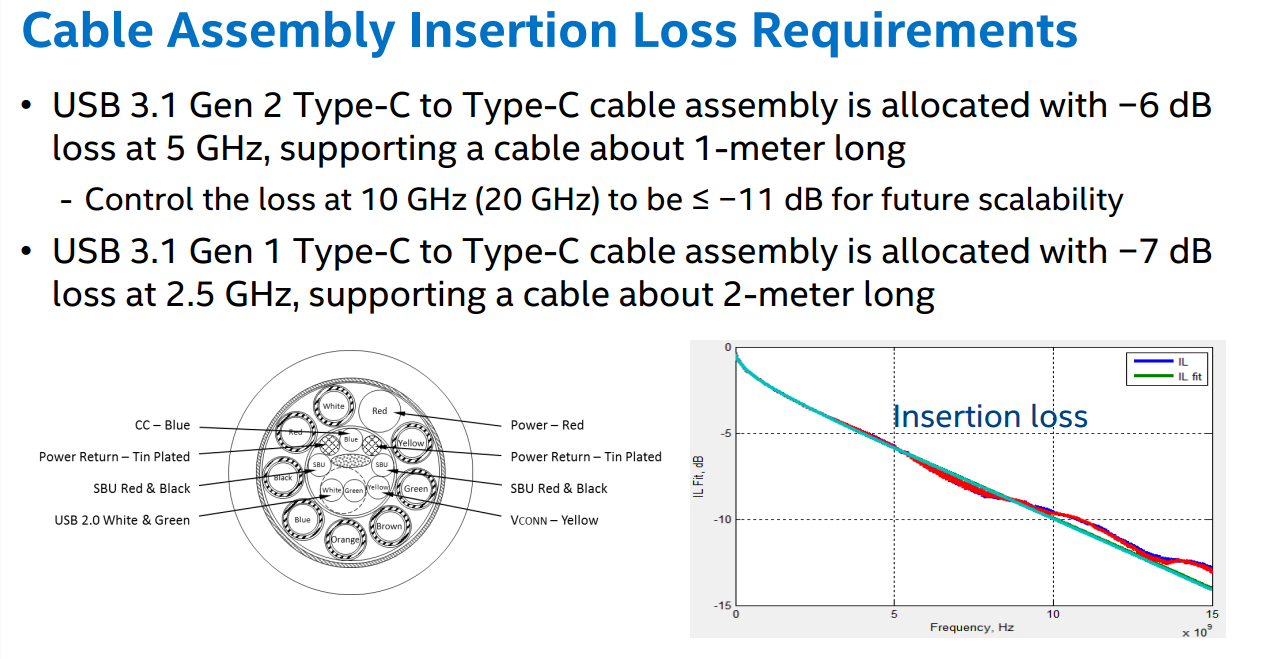
Speaking of limitations on cable lengths when using the USB 3.1 interface. For data transfer without significant losses at speeds up to 10 Gb / s (Gen 2), the cable length with USB Type-C connectors should not exceed 1 meter, for connection at speeds up to 5 Gb / s (Gen 1) - 2 meters.
Circuitry manufacturers of motherboards, docking stations and laptops will puzzle for a long time how to generate power of the order of hundreds of watts, and tracers how to bring it to the USB Type-C connector.
Low-start chip makers.
Symmetrical connection and operation of signal lines in different modes will require the use of high-speed signal switch chips. Today the first swallows have already appeared. Here, for example, is a switch from Texas Instruments, which supports operation in devices in both host and slave mode. It is capable of switching lines of differential pairs with a signal frequency up to 5 GHz.

At the same time, the dimensions of the HDC3SS460 3.5 chip are 5.5 mm and in standby mode it consumes a current of the order of 1 microampere. In active mode, less than a milliampere. More advanced solutions exist, for example, NXP chips support an exchange frequency of up to 10 GHz.
Power managers began to appear, combined with protection circuits for signal lines from static, for example, such a product from NXP

It is intended for the correct processing of the moment of connection of the connector, as well as the opening of the power circuit in case of malfunctions. This chip already supports VBUS voltage up to 30 volts, but with the maximum switched current everything is much worse - it should not exceed 1 ampere, which is understandable, considering the dimensions - 1.4 by 1.7 mm!
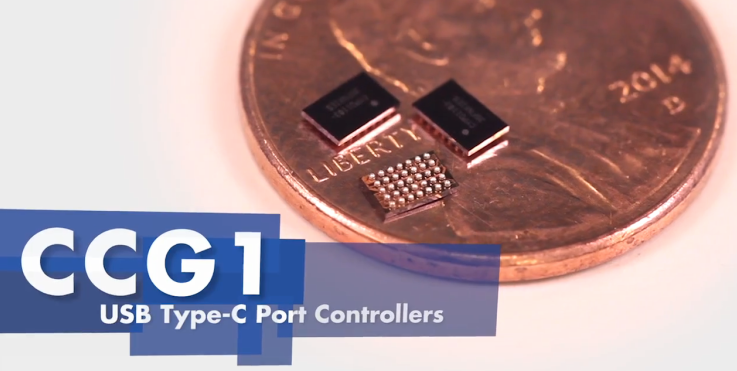
The undisputed leader in this area was Cypress, which released a specialized microcontroller with an ARM Cortex M0 core that supports all five power profiles possible for the standard.
A typical connection scheme for use in a laptop gives some idea about it, and you can learn more about it by downloading a datasheet.

Unlike the NXP chip, it is focused on managing external power switches and therefore can provide switching of the required currents and voltages, despite its small size.
Attention, An important feature
The fact that several demokits have already been created for him greatly increases the likelihood of the latter.

Elevator to Heaven or Tower of Babel.
So today the revolutionary situation has completely developed. The tops cannot, but the lower classes do not want to live the old way. Everyone is tired of the mess with a huge number of cables, chargers, power supplies and their low reliability.

The new standard has generated unprecedented activity. The flagships of the electronic industry - Apple, Nokia, Asus, are preparing to release their first gadgets with support for USB Type-C. The Chinese are already stamping cables and adapters. On the approach docking stations and hubs supporting high load capacity. Chip manufacturers are developing new microcircuits and are thinking of how to cram the driver of the new port into the microcontroller. Marketers decide where to plug a new connector, and engineers scratch turnips trying to implement multidisciplinary devices from existing electronic components.
So far, only one thing is not clear. What will we get as a result? A convenient and reliable connector that will replace the lion's share of interfaces and find everyday use, or the Babel crowd, because the situation may begin to develop according to a not very favorable scenario:
Users can finally get confused in numerous specifications and cables that will look exactly the same, but with This will only be certified for certain profiles. Try to figure it out with all these markings.


But even if it works out, this is unlikely to solve the problem - the Chinese, without a twinge of conscience, will easily put any badge on any cord. And if necessary, then until the heap on each side of one cable are different, they will not be confused even if they are mutually exclusive.
The market is flooded with an incredible amount of adapters of different calibers and of dubious quality.

Trying to connect one device to another, you will never know what result this process will lead to, and because of which the connection is either completely absent or everything is terribly buggy. Either one of the gadgets does not support the desired profile, or it supports but not too correctly, or instead of a high-quality cable, it came across a crude Chinese fake. And what do you want to do if suddenly the only connector remaining on it fails on your laptop?
Wait and see how it comes out. In the meantime, we hope for the best, although in the transition period it will definitely not be easy. I understand that my article didn’t answer all the questions about the new standard, but it’s time to round off and get to work already, otherwise I’ve got the first client who is already dreaming of a board with USB Type-C support. There is a chance to test this miracle of technology in practice and then share personal experience.
See you again.
PS The new standard is already leading to the emergence of very exotic devices. So announced a cable of 100 meters in length, which seems to be in no way fit into the standards. The whole thing is that he is active. At both ends, the cable has a USB3 interface to optical signal converter. The signal is transmitted optically and converted back at the output. Naturally, it does not transmit energy, but only data. Moreover, each of the converters at its ends is powered by the connector to which it is connected.
I think that soon self-respecting companies will begin to insert active tags in their cables to confirm authenticity. The problem of hubs will give rise to unprecedented activity among developers and manufacturers of DC-DC converters. As rightly noted dear user TimsTimsfor example, a situation may arise that a device that supplies power is capable of delivering only 12 volts, and devices connected to it will begin to demand say one thing is another, say another 18.
In general, this standard promises to feed more than one developer, and manufacturers will not be left out of the way.
Only registered users can participate in the survey. Please come in.
What are the prospects for the USB 3.1 Type-C standard?
- 48.8% Fast and victorious procession, will quickly supersede most competing standards 944
- 23.5% There will be serious confusion with the specifications, which will greatly annoy the user 454
- 9.3% Standard will destroy problems associated with low-quality cables and accessories 180
- 6.9% The design of the connectors will be too unreliable 134
- 11.3% Will find its narrow niche 219









