April 3, 2013 at 22:12
DotPeek 1.1 EAP available for download
In our recent post, we announced the release of the 8th version of ReSharper in EAP, mentioning improved decompilation support. Today, we are pleased to announce that the next version of dotPeek, our free decompiler, has also reached the EAP stage. Here are some new features you can try today.
Many of our users asked us to add the ability to save the decompiled assembly in the format of a Visual Studio project ready for compilation. We took your wishes into account and now you can right-click on the decompiled assembly and select the option “export to project”:

All you need to do is provide the program with a path to save the project and its name. You can also generate a Visual Studio solution (.sln file) if you need it.

The dialog above allows you to generate a project (.csproj) containing all decompiled files. dotPeek is very smart when it comes to creating projects - here are some optimizations that it implements:
By the way, dotPeek also keeps track of the export history of projects. If you try to export the project again, it will offer you the following dialog:
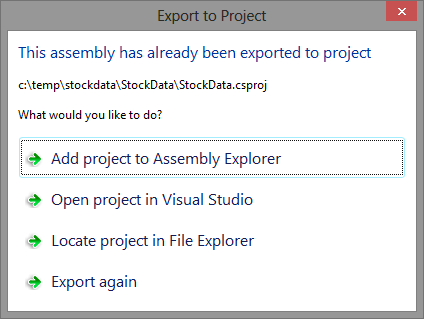
In order to simplify the orientation in the newly generated code, Assembly Explorer supports instant loading of the generated project. This option is available as one of the check boxes ( Add project to Assembly Explorer ) in the screenshot above.

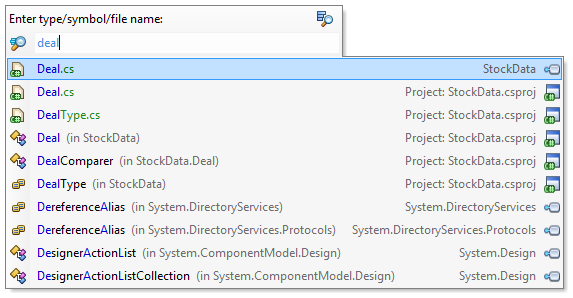
Like ReSharper, dotPeek supports a new paradigm, so pressing Ctrl + T now allows you to navigate to files, characters, and types in one menu:
Here are some more features that have become available:
If you want to test all of the above features immediately , then download EAP and try it!
Program with pleasure!
Export assembly to a project
Many of our users asked us to add the ability to save the decompiled assembly in the format of a Visual Studio project ready for compilation. We took your wishes into account and now you can right-click on the decompiled assembly and select the option “export to project”:
All you need to do is provide the program with a path to save the project and its name. You can also generate a Visual Studio solution (.sln file) if you need it.
The dialog above allows you to generate a project (.csproj) containing all decompiled files. dotPeek is very smart when it comes to creating projects - here are some optimizations that it implements:
- If PDB files are available, dotPeek restores the file and folder structure of the original project;
- If the project uses unsafe code, the generated project is configured to allow its use;
- The type of assembly is detected automatically and, accordingly, is configured in the project.
By the way, dotPeek also keeps track of the export history of projects. If you try to export the project again, it will offer you the following dialog:
Support for project files in Assembly Explorer
In order to simplify the orientation in the newly generated code, Assembly Explorer supports instant loading of the generated project. This option is available as one of the check boxes ( Add project to Assembly Explorer ) in the screenshot above.
Go to everything
Like ReSharper, dotPeek supports a new paradigm, so pressing Ctrl + T now allows you to navigate to files, characters, and types in one menu:
And one more thing
Here are some more features that have become available:
- dotPeek now saves the layout of windows, and also stores a list of previously opened files;
- Like Visual Studio, dotPeek allows you to add bookmarks and navigate between them;
- In addition to the MSI installer, dotPeek is also available as one single .exe file.
If you want to test all of the above features immediately , then download EAP and try it!
Program with pleasure!