 April 8, 2019 at 00:03
Integration with SAP ERP. Implementation of a mobile price checker in a store
- Tutorial
In our example of integration of SAP ERP with third-party software, we will use the SAP Connector for Microsoft .NET to obtain data from SAP. The software for the data collection terminal (TSD) will interact with the Microsoft Internet Information Server (IIS) on the server and with any client software such as Internet Explorer, the technology used to develop the component is asp.net in the C # programming language.
When developing a functional module (FM) in SAP, specify the parameter "Remote module":

The function takes the value I_WERKS factory and returns the table TAB:
FUNCTION Y_GET_MATNR_PRICE
  IMPORTING
    VALUE(I_WERKS) TYPE WERKS_D
  TABLES
    TAB LIKE YSOUT_PRICE
  EXCEPTIONS
    NO_DATA
    NO_VKORG.
We will save the settings for IIS in the SQL Server database in a separate table:

In asp.net parts in C # we use SAP Connector for Microsoft .NET
Setting up the SAP Connector:
    public class MyBackendConfig : IDestinationConfiguration
    {
        SaalutDataClasses1DataContext context;
        public RfcConfigParameters GetParameters(String destinationName)
        {
            if (context == null)
                context = new SaalutDataClasses1DataContext();
            if ("AEP".Equals(destinationName))
            {
                var settingsSP = (from s in context.SettingsSAPERPTbls
                                  select s).FirstOrDefault();
                RfcConfigParameters parms = new RfcConfigParameters();
                parms.Add(RfcConfigParameters.Name, settingsSP.SystemID);
                parms.Add(RfcConfigParameters.AppServerHost, settingsSP.MessageServerHost);
                if (settingsSP.LogonGroup != null || settingsSP.LogonGroup != "")
                    parms.Add(RfcConfigParameters.LogonGroup, settingsSP.LogonGroup);
                parms.Add(RfcConfigParameters.SystemID, settingsSP.SystemID);
                parms.Add(RfcConfigParameters.SystemNumber, settingsSP.SystemNumber);
                if (settingsSP.SAPRouter != null || settingsSP.SAPRouter != "")
                    parms.Add(RfcConfigParameters.SAPRouter, settingsSP.SAPRouter);
                parms.Add(RfcConfigParameters.User, settingsSP.SAPUser);
                parms.Add(RfcConfigParameters.Password, settingsSP.SAPPassword);
                parms.Add(RfcConfigParameters.Client, settingsSP.Client);
                parms.Add(RfcConfigParameters.Language, "en");
                parms.Add(RfcConfigParameters.PoolSize, "5");
                parms.Add(RfcConfigParameters.MaxPoolSize, "10");
                parms.Add(RfcConfigParameters.IdleTimeout, "600");
                return parms;
            }
            else return null;
        }
        public bool ChangeEventsSupported()
        { return false; }
        public event RfcDestinationManager.ConfigurationChangeHandler ConfigurationChanged;
    }
Setting up a connection with SAP ERP and receiving data from FM Y_GET_MATNR_PRICE (c #):
                RfcDestinationManager.RegisterDestinationConfiguration(cfg);//1
                RfcDestination prd = RfcDestinationManager.GetDestination("AEP");//2
                RfcRepository repo = prd.Repository;//3
                IRfcFunction pricesBapi =
                    repo.CreateFunction("Y_GET_MATNR_PRICE");//4
                pricesBapi.SetValue("I_WERKS", werk); //5
                pricesBapi.Invoke(prd); //6
                IRfcTable detail = pricesBapi.GetTable("TAB");
We paste the received data into the SQL Server table:
                int i = 0;
                foreach (IRfcStructure elem in detail)
                {
                    string matnr = elem[0].GetString();
                    double kbetr = elem[1].GetDouble();
                    string kschl = elem[2].GetString();
                    string assort = elem[3].GetString();
                    SAPPriceTbl np = new SAPPriceTbl();
                    np.MATNR = matnr;
                    np.KBETR = kbetr;
                    np.KSCHL = kschl;
                    np.ASSORT = assort;
                    context.SAPPriceTbls.InsertOnSubmit(np);
                    if (i == 100)
                    {
                        context.SubmitChanges();
                        i = 0;
                    }
                    i++;
                }
                context.SubmitChanges();
We draw the interface in Visual Studio for the Data Collection Terminal (TSD). When working with TSD, we search by barcode, visually compare the price on the TSD screen with the price on the price tag, and in case of discrepancies we add to the log:
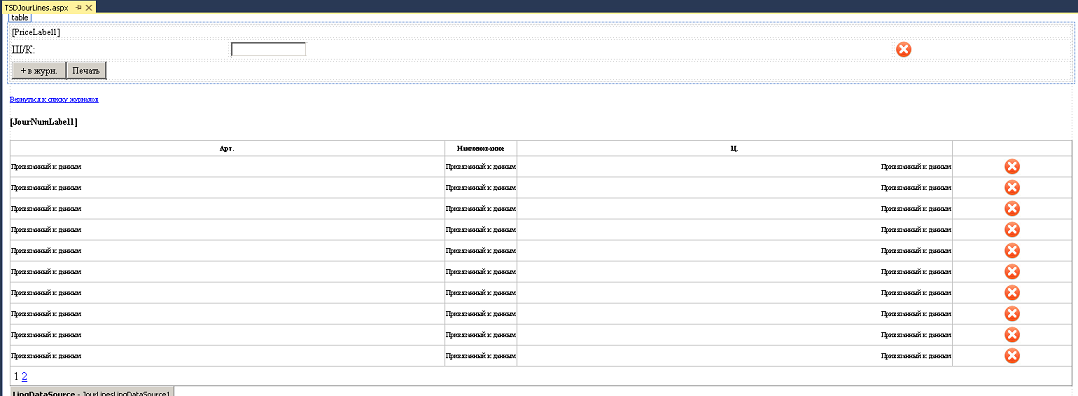
Formed price tags magazine, print and replace price tags on the trading floor.
→ Full C # code can be viewed on GitHub
→ Full SAP function module code as an example on GitHub
The functionality of SAP Connector for Microsoft .NET and C # allows you to receive data in a simple and convenient way from SAP ERP.









