Mattermost. Integration with external services (part 2)
We will continue to deal with mattermost regarding integration with external services.
Part two. Integration with Zabbix
In the second part of the story about integration of mattermost, we will talk about sending accident reports from zabbix to mattermost. As a result of searches on the network,
this script was taken as a basis . The code is written in Perl, so you may need to install pearl-packages. Before proceeding to the description of the code (it is slightly changed compared to the original one), first, as usual, we will make some settings.
Mattermost
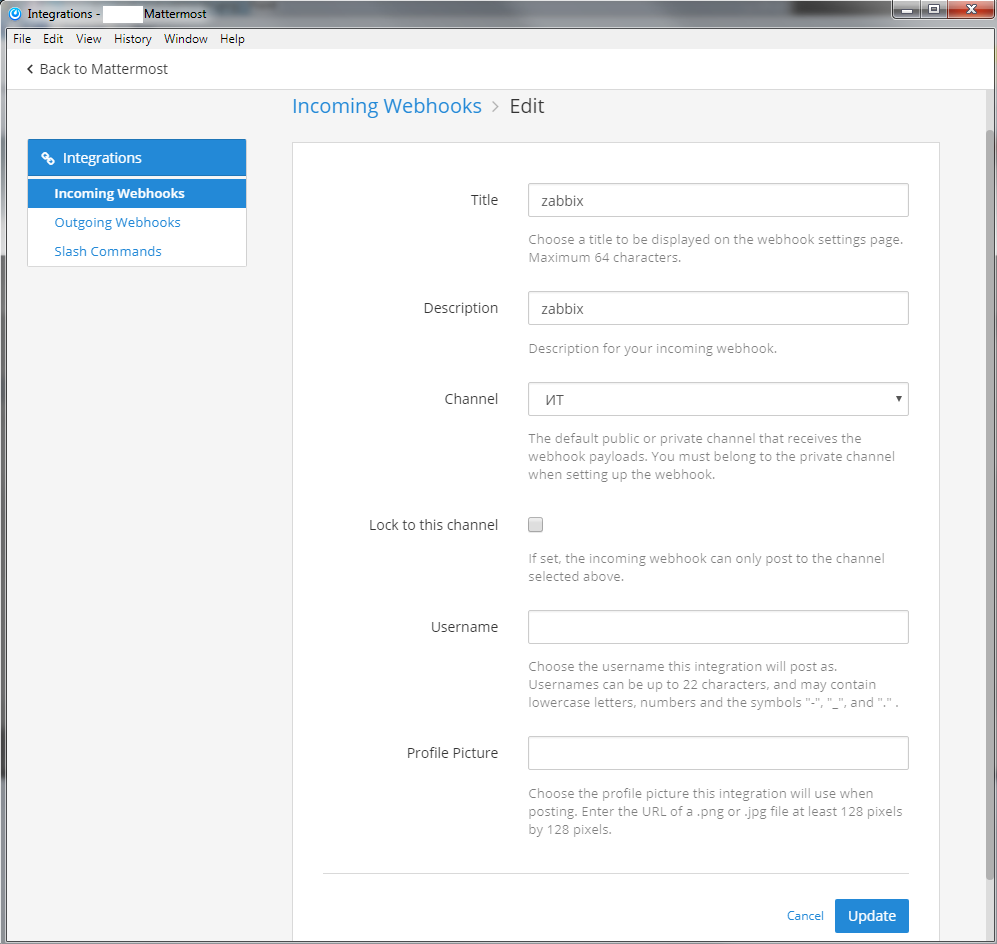
To use the mechanism of receiving messages from third-party services, you need to add a record of incoming "hooks". We go to the settings "Integrations" -> "Incoming webhooks" and add the entry:
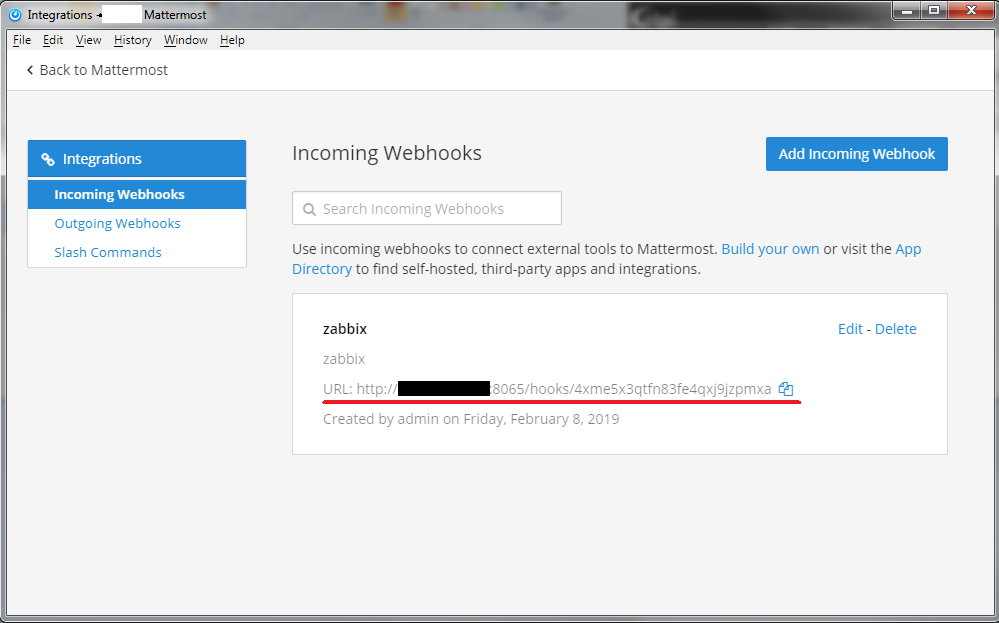
After, copy the underlined link to paste into the script.
Zabbix
In the zabbix management interface, through the "Administration" -> "Notification Methods" menu, add a new notification method:
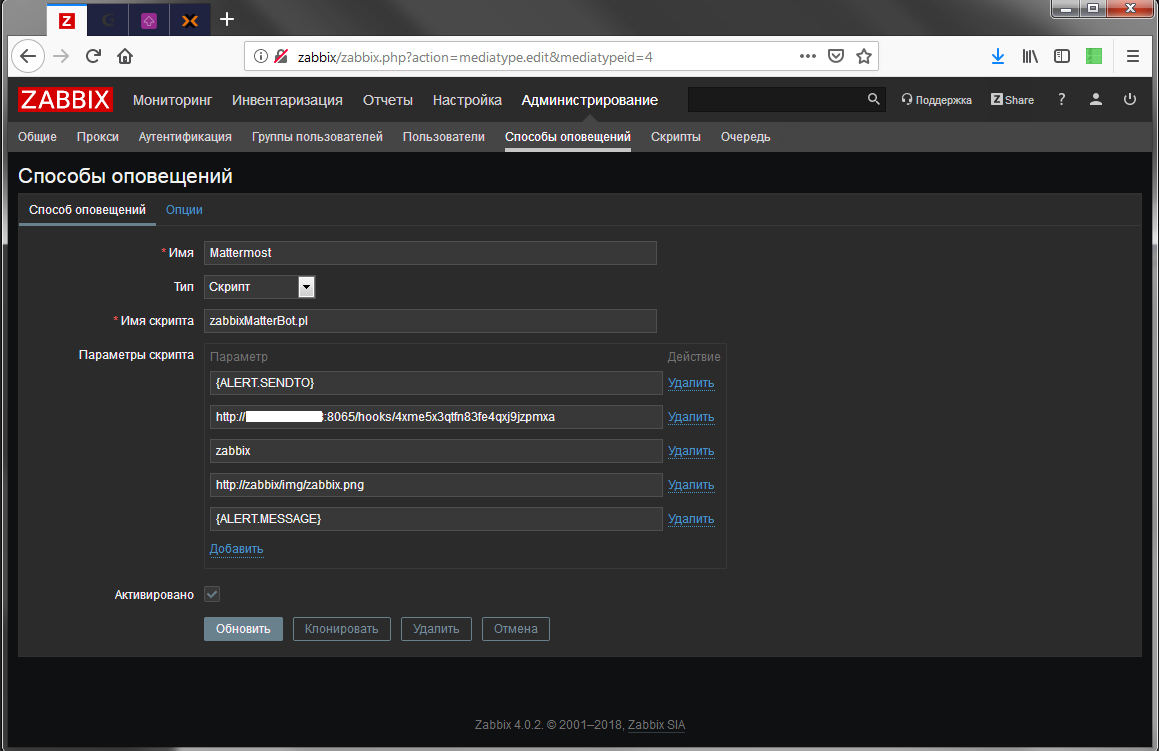
Where in the script parameters should be indicated:
- {ALERT.SENDTO}
- Link to mattermost webhook (which was copied earlier)
- Username in mattermost from which messages will come
- Link to avatar (file must be accessible via http)
- {ALERT.MESSAGE}
Then, in the user settings, add a new notification method:
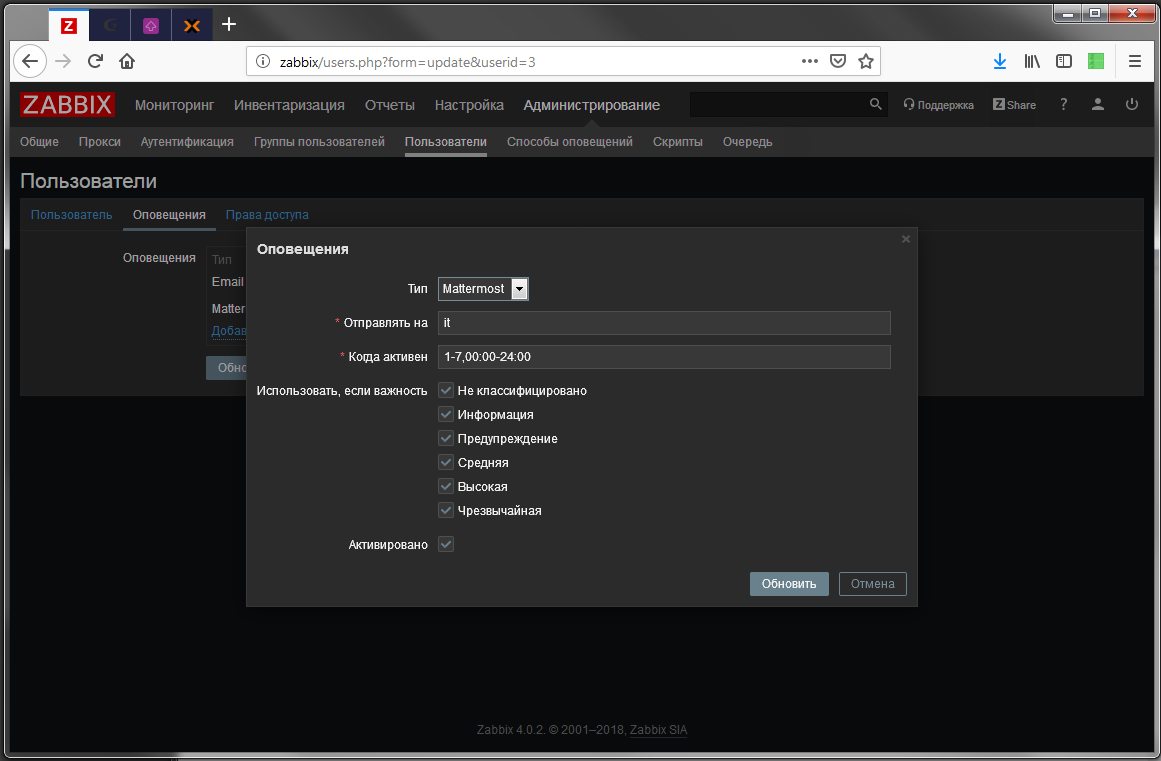
Where in the field "Send to" you need to indicate the name of the channel in mattermost, where the messages will be streamed, in our case it is "it" (it is worth noting that the system name of the channel is used). This value will be substituted for the macro {ALERT.SENDTO}, which appears in the parameters of the newly created notification method. {ALERT.MESSAGE} - this, in fact, will be the message itself.
The original script has undergone some changes, this is due to the fact that the version of zabbix used is not sending the message to json (maybe this is configured somewhere). Therefore, the code had to be changed. The code is provided with comments and should not cause difficulties in understanding.
On the server where Zabbix is installed, create the file /usr/lib/zabbix/alertscripts/zabbixMatterBot.pl (I have Debian and zabbix installed from the official repository) with the following contents:
 #!/usr/bin/perl
 # https://github.com/drewbeer/zabbix-mattermost-alertscript DrewBeer
 # passes data in and curls it out via json to mattermost webhooks as attachments.
 # you can use this as you wish, free as in beer, life is that way.
 # minify your json before you set it in zabbix, it will make your life easier
 use warnings;
 use strict;
 use JSON;
 use Data::Dumper;
 # включаем режим отладки, /tmp/zabbix-mattermost.log
 my $debug = 0;
 my $logFH;
 my $zabbixData = ();
 # debug log the incoming data
 if ($debug) {
   open($logFH, '>>', '/var/log/zabbix/zabbix-mattermost.log');
   my $dump = Dumper(@ARGV);
   print $logFH "args:\n$dump\n";
 }
 # получаем данные с zabbix
 # соответственно - название канала, ссылку на mattermost, имя бота,
 # сылку на иконку, и сообщение
 my ($channel, $hook, $botName, $iconUrl, $body) = @ARGV;
 $zabbixData = $body;
 # создаем сообщение
 my $payload;
 $payload = processInternal($zabbixData);
 # Отладка
 if ($debug) {
   print $logFH "final payload: $payload\n";
 }
 # отправляем сообщение
 if ($payload) {
   sendPayload($payload);
 }
 exit;
 # процедура отправки сообщения
 # используется curl
 sub sendPayload {
   my($payload) = @_;
   my $cmd = qq( curl -s -i -X POST --data-urlencode '$payload' $hook > /dev/null);
   if ($debug) {
     $cmd = qq( curl -i -X POST --data-urlencode '$payload' $hook );
   }
   my $cmdOutput = `$cmd`;
   # final debug
   if ($debug) {
     print $logFH "curl:\n$cmd \n$cmdOutput\n";
   }
 }
 # разбираем сообщение от zabbix
 # и подготавливаем json-ответ
 sub processInternal {
   my $data = shift;
   my $attach = ();
   # заполняем требуемые поля
   $attach->{'channel'} = $channel;
   $attach->{'username'} = $botName;
   $attach->{'icon_url'} = $iconUrl;
   $attach->{'response_type'} = 'comment';
   $attach->{'text'} = $data;
   if ($debug) {
     my $body = Dumper $attach;
     print $logFH "object:\n$body\n";
   }
   my $jsonBody = encode_json $attach;
   # экранируем все кавычки
   my $jsonPayload = qq(payload=$jsonBody);
   # возвращаем готовый ответ
   return $jsonPayload;
 }
Now either we wait for the trigger to work, or we simulate an accident in zabbix and we get a message
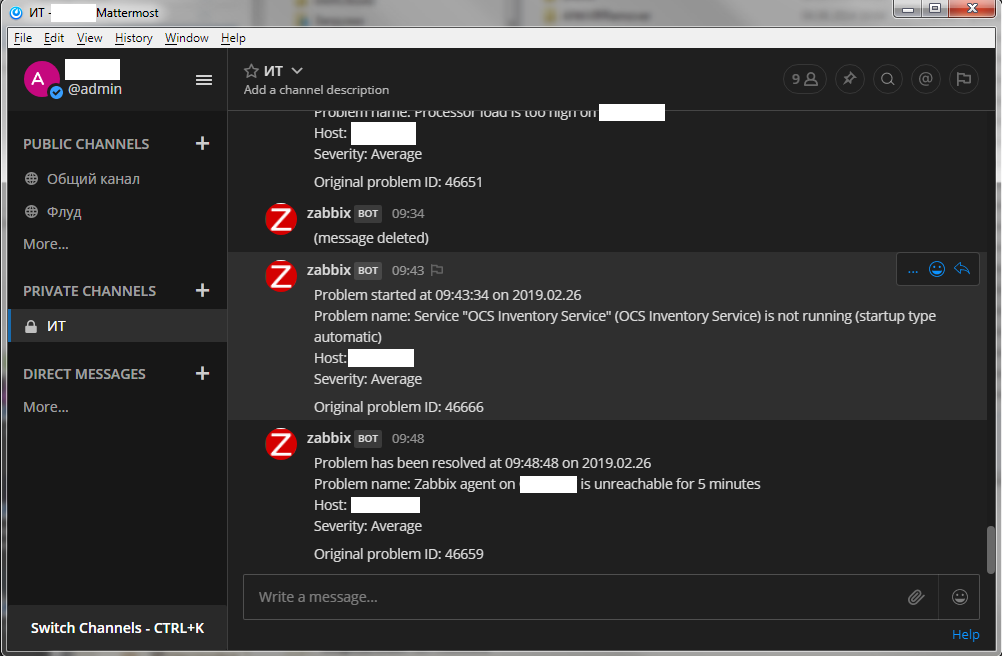
That's all the integration.









