Mattermost. Integration with external services
Choosing the replacement used by our messaging system, I came across a description of Mattermost, and decided to give it a try. One of the advantages of the described system is its simple integration with third-party services, the so-called "hooks" (outgoing and incoming hooks). That's about setting up interaction through hooks with external systems and this article will be (in our particular case, it is zabbix and glpi).
Part one. Integration with GLPI
Since we, in our work, use GLPI to account for equipment, software, connections, registration of technical support calls, it would be logical to organize the possibility for users to send applications to TP from mattermost.
API
GLPI has http rest api for integration with external services. The documentation for it is available in the installed system at the link http: //glpi/apirest.php/#glossary (where "glpi" is the address of your server).
Having thought a little over the task, it was decided to implement the exchange algorithm on php, in favor of this solution is the fact that php is already installed in the system and the script was organically entered into glpi and is available at http: //glpi/mm.php . The result is a kind of "proxy" that receives a request from mattermost, converts to the desired format and sends the GLPI. All http requests are sent in JSON format.
The work procedure consists of 5 parts:
- Receiving a request from mattermost
- Session initialization in glpi
- Retrieving data from a request
- Sending data to glpi
- Closing session
Before proceeding with the description of the script code, we will carry out preparatory work both in mattermost and in glpi.
GLPI
- Let's create the helpdesk user, on behalf of which requests will be created, and going into the settings of this user, we will generate tokens:
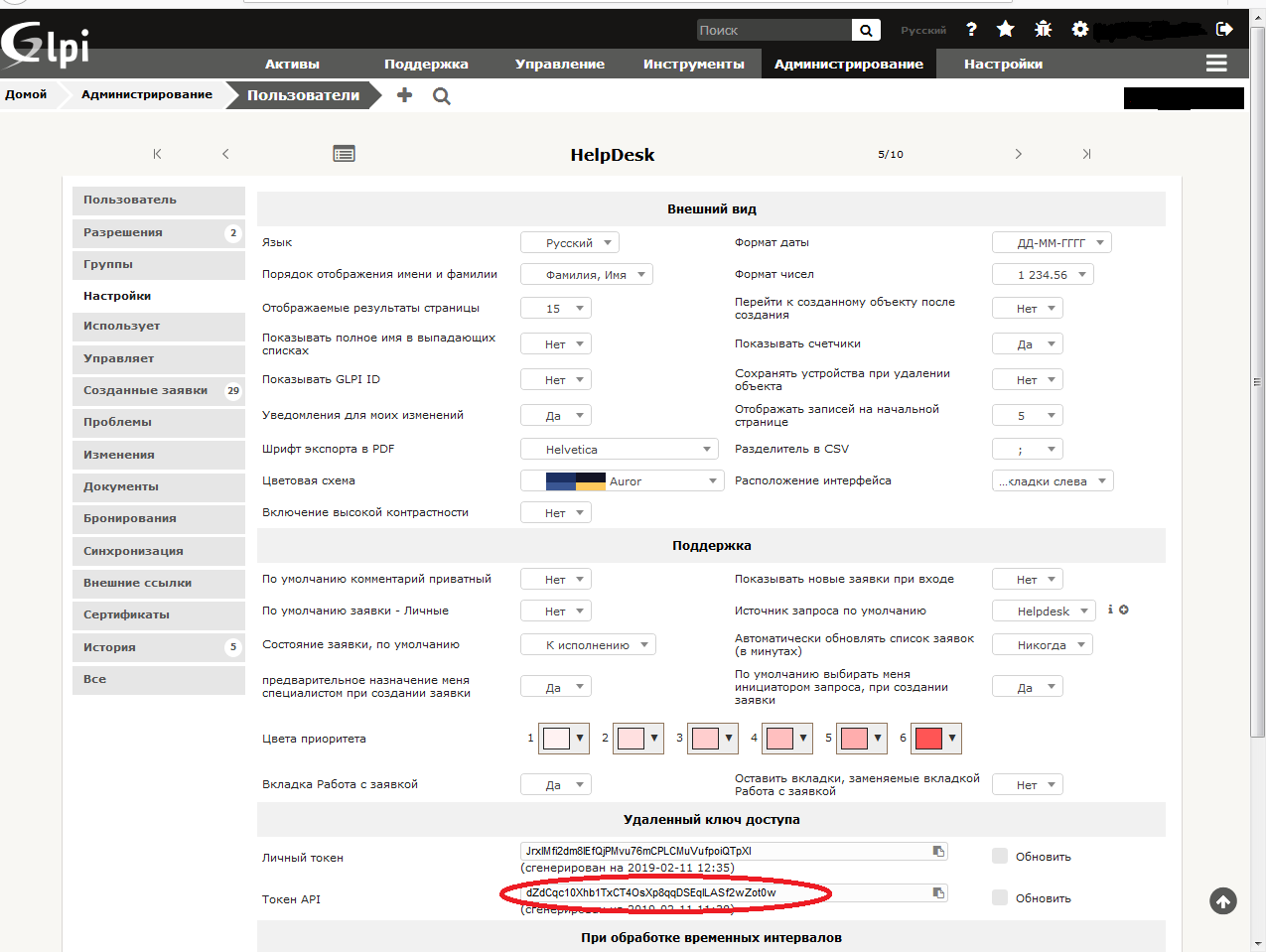
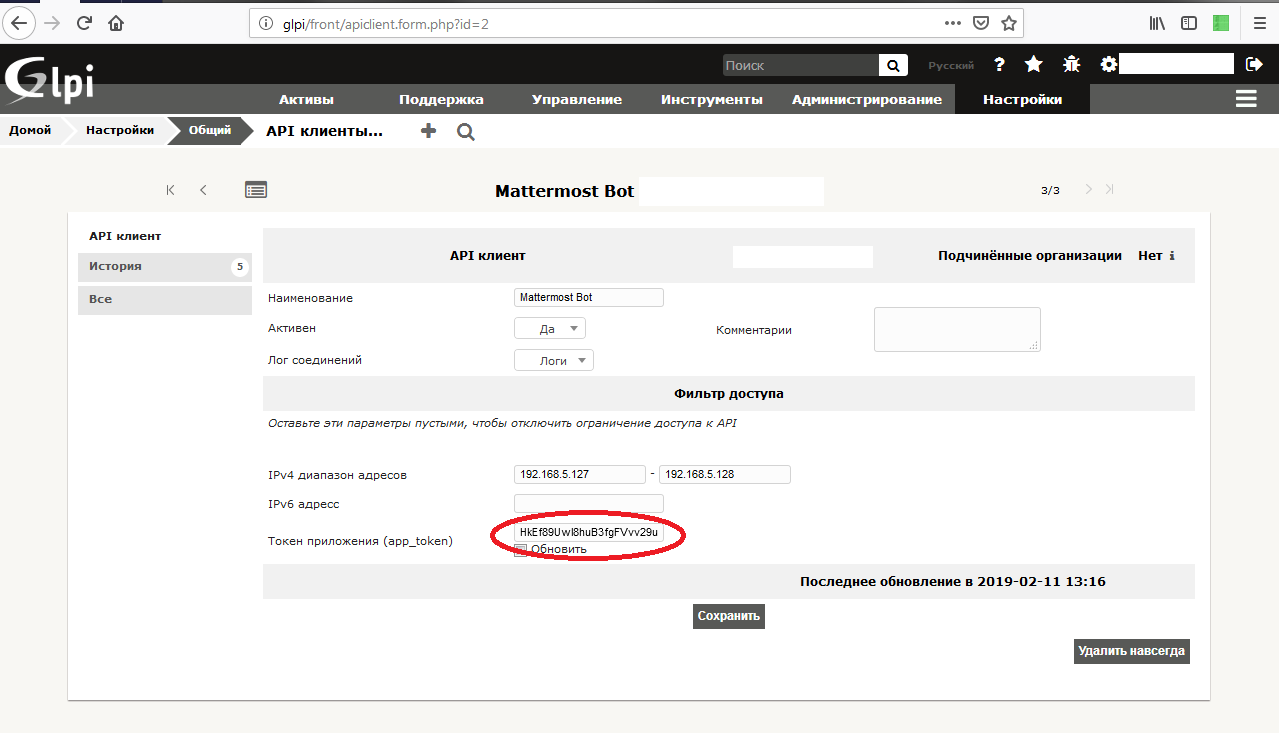
The one circled in red will be user_token. - In the system settings, you need to add a client to interact with the API. To do this, go to "Settings" -> "General" -> "API" and clicking on the "Add Client" button, add a record and generate a token (app_token)
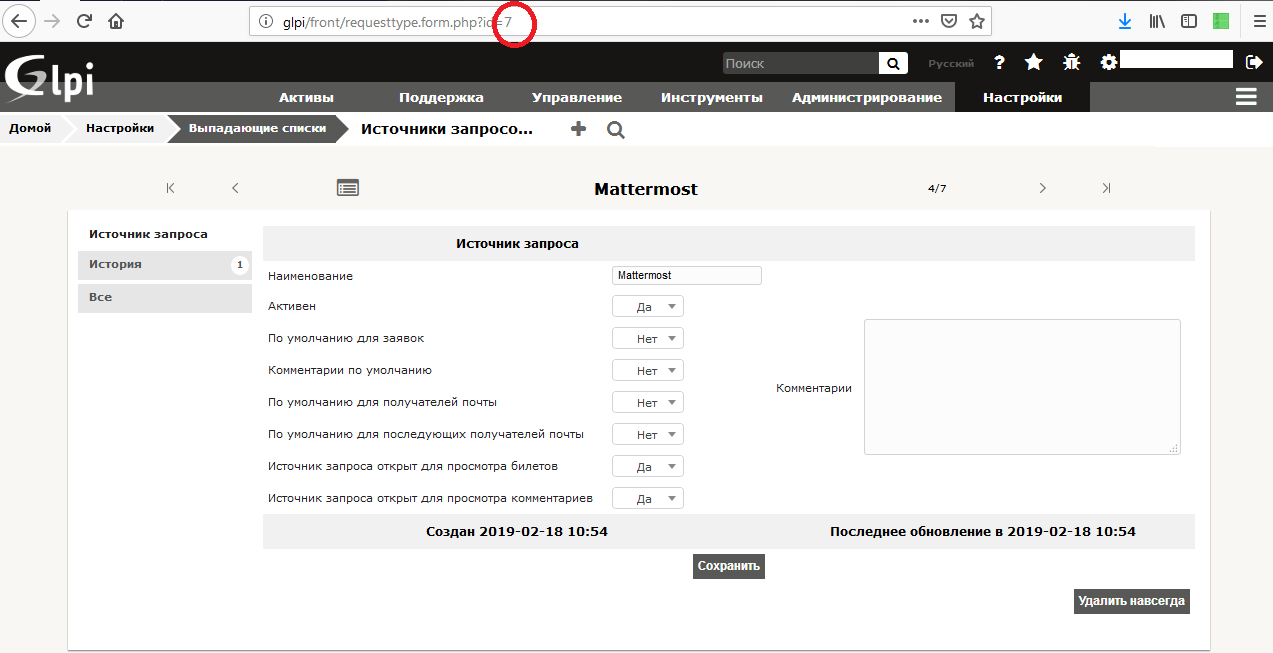
- To identify the source of requests in the system, add an entry to the directory "Sources of requests" and going into the just added entry, remember its id (circled in red)
This completes the API setup in GLPI.
Mattermost
In the Mattermost client menu, go to "Inegration" -> "Outgoing Webhooks" click "Add" and add an entry. On the screen, I emphasized the significant fields. Here we should make a digression: in mattermost, the “trigger” for starting the procedure for sending a request is a word or phrase, which, being indicated at the beginning of the message, actually starts the process. In our case, the trigger word is “112” (here there is a direct association with the Ministry of Emergencies).
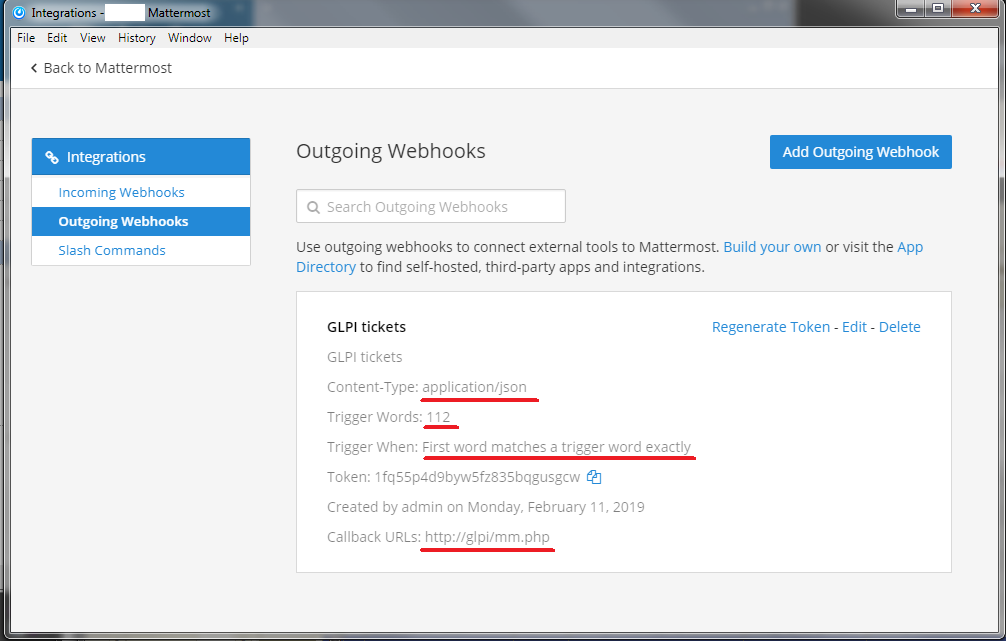
The default username and the link to the avatar can be added (or you can not add it), since these parameters will be transferred in the request. But in order for mattermost to be able to process these parameters, in the server settings you need to change a couple of options in the file /opt/mattermost/config/config.json
 "EnablePostUsernameOverride": true,
 "EnablePostIconOverride": true,
This completes the setup. It’s time to move on to writing code. The script is copied to the root directory with glpi files, in my case it is /var/www/html/glpi/mm.php
  'comment',
    'text'=> 'Ваш запрос передан в службу технической поддержки'
 );
 echo json_encode($reply);
 # Инициируем пользовательскую сессию в glpi
 # тут нам и понадобятся ранее сгенерированные токены
 # данный запрос вернёт идентификатор сессии для дальнейшей работы
 if( $curl = curl_init() ) {
    curl_setopt($curl, CURLOPT_HTTPHEADER, array('Content-Type: application/json', 'Authorization: user_token '.$user_app_token, 'App-Token: '.$app_token));
    curl_setopt($curl, CURLOPT_URL, 'http://glpi/apirest.php/initSession');
    curl_setopt($curl, CURLOPT_POST, true);
    curl_setopt($curl, CURLOPT_RETURNTRANSFER, true);
    $out = curl_exec($curl);
    $session = json_decode($out, true);
    $session_token = $session["session_token"];
    #echo $session_token;
    curl_close($curl);
 }
 # подготовим текст для запроса создания заявки
 $json = array(
    'input'=> array(
        'name'=>'Заявка от '.$data["user_name"],
        'requesttypes_id'=>$requesttypes_id,
        'content'=>$message_text,
        'type'=>$type
    )
 );
 # Отправим запрос
 if( $curl = curl_init() ) {
    curl_setopt($curl, CURLOPT_HTTPHEADER, array('Content-Type: application/json', 'App-Token: '.$app_token, 'Session-token: '.$session_token));
    curl_setopt($curl, CURLOPT_URL, 'http://glpi/apirest.php/Ticket');
    curl_setopt($curl, CURLOPT_POST, true);
    curl_setopt($curl, CURLOPT_RETURNTRANSFER, true);
    curl_setopt($curl, CURLOPT_POSTFIELDS, json_encode($json));
    $out = curl_exec($curl);
    curl_close($curl);
 }
 # Закроем сессию
 if( $curl = curl_init() ) {
    curl_setopt($curl, CURLOPT_HTTPHEADER, array('Content-Type: application/json', 'App-Token: '.$app_token, 'Session-token: '.$session_token));
    curl_setopt($curl, CURLOPT_URL, 'http://glpi/apirest.php/killSession');
    curl_setopt($curl, CURLOPT_POST, false);
    curl_setopt($curl, CURLOPT_RETURNTRANSFER, true);
    $out = curl_exec($curl);
    curl_close($curl);
 }
 ?>
The result of this script will be an added request in the incident registration system in GLPI. In pictures, it looks like this:
We write a message in mattermost:
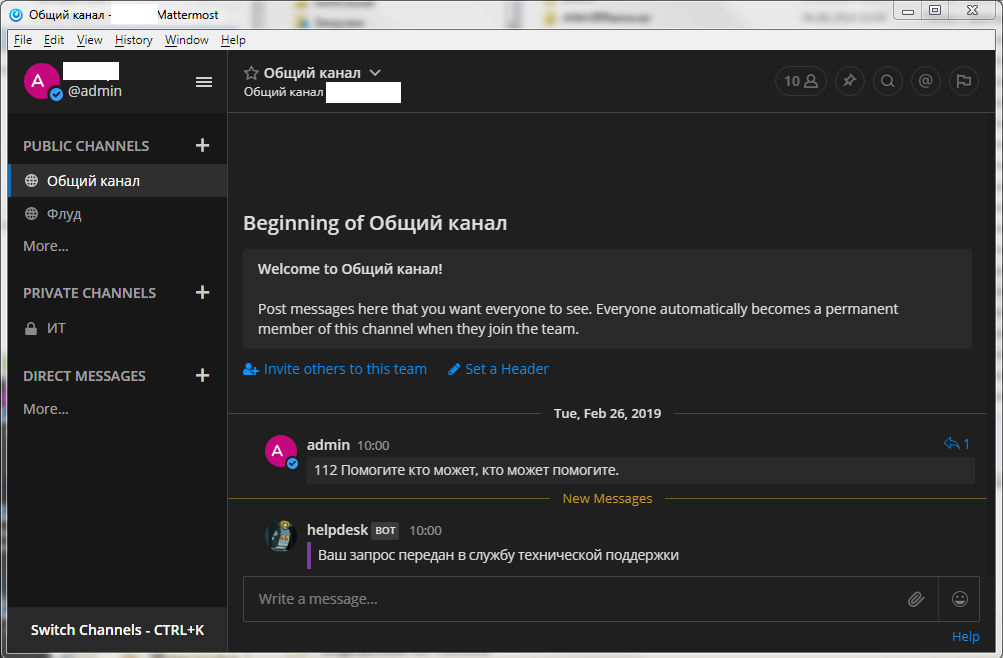
We go to the GLPI "Support" -> "Applications" and a new message should appear in the list:
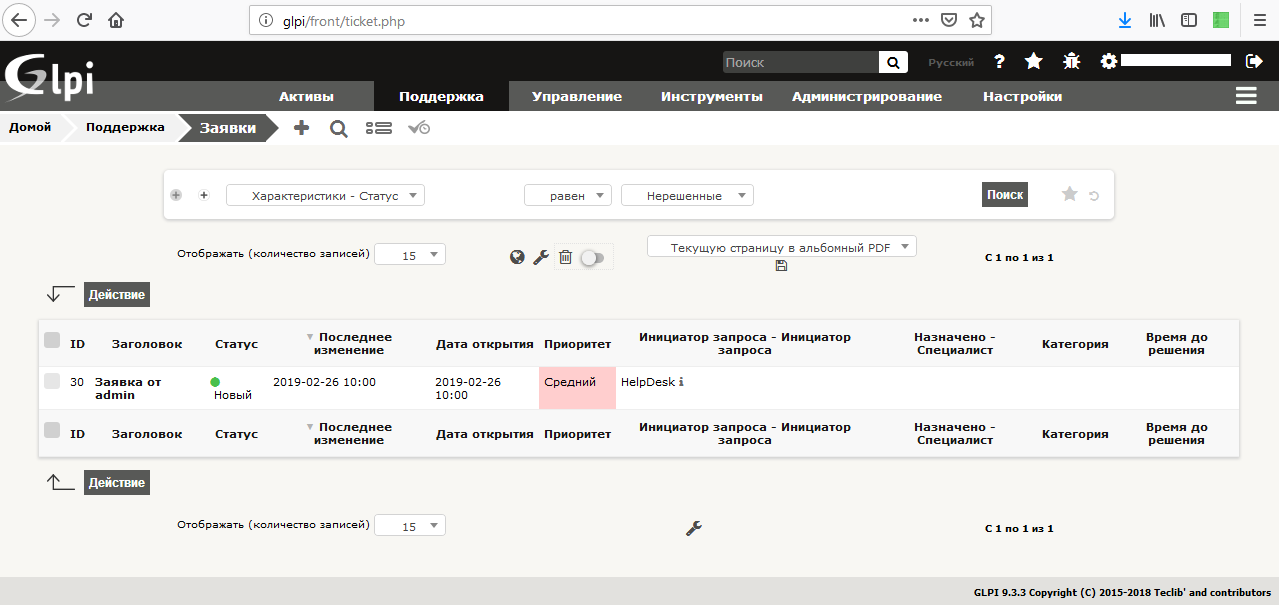
By clicking on the message header, more detailed information will open (the fields whose values are transmitted in the script are circled in red)
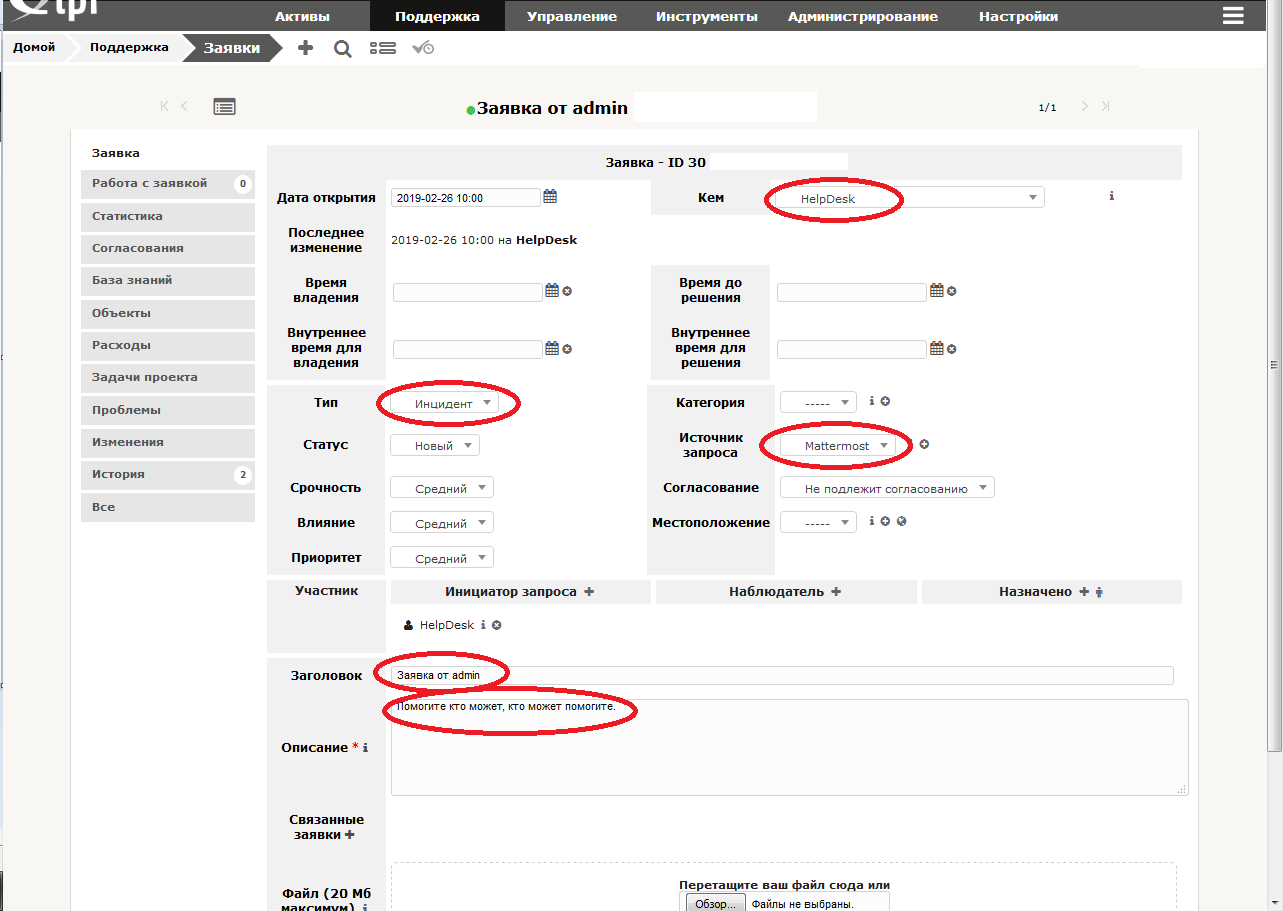
On this setting sending messages to GLPI from Mattermost can be considered complete. Having worked a bit on the code, nothing will prevent you from implementing a change in the type of request (incident or request).