
Balance between security devices in proxy mode and the impact on network performance
The nearly exponential growth over the past decade of cyberattacks on various types of applications has reinforced the need for an improved network perimeter security infrastructure that can check and block all kinds of traffic. Next-generation security appliance manufacturers (NGFWs) understand the need for deep inspection and have moved beyond transport layer firewalling to the web, email, file transfer, and other applications.

The next big problem faced by such security devices is the quality of inspection when increasing the volume of encrypted traffic. To ensure that security devices capture all traffic, including encrypted traffic, they must be deployed in proxy mode when performing intrusion prevention tasks. Implementing proxies for security usually involves performance degradation and latency.
The security effectiveness of encrypted traffic verification is undeniable. However, history has shown that any in-line security device that introduces significant delays is either reserved or moved out-of-band after a certain time. Here we discuss proxy implementation, the overhead they add to the network, test scripts that can help detect such performance impacts, and tips and tricks for better proxy implementation.
What is a proxy?
Simply put, a proxy is a computer or device that mediates between two systems, such as:
- hosts on a secure network and the Internet;
- Internet clients and servers in a private network.
The proxy terminates any connection initiated by the client and opens a new connection between itself and the server. This helps the proxy achieve several goals as an intermediary, for example, client authentication, load balancing between multiple servers, faster responses through caching mechanisms, and most importantly, security through traffic verification.

Here we concentrate on security devices and the impact of enabling proxy mode on them.
Work proxies for security
To achieve security objectives, the security device must monitor all sessions, analyze each downloaded file, detect any malicious actions and prevent threats from entering protected targets. Now that most of the Internet traffic is encrypted, it is required that the security devices be deployed in proxy mode to effectively inspect all this encrypted traffic. You have to pay for it with performance - the following are a few operations that affect the performance of security devices in proxy mode, but are needed for security tasks:
- Opening two separate connections for each incoming connection: one from the connection initiator to the proxy, and the other from the proxy to the addressee;
- Intercepting encrypted SSL traffic and decrypting all payloads, checking all traffic, again encrypting and sending to the addressee;
- Based on the verification - blocking / reporting of any suspicious traffic, while ensuring unhindered passage of legitimate traffic.
Impact of enabling proxies on performance
The deep inspection functionality makes proxy security devices a major bottleneck (the so-called bottleneck) and can lead to reduced network performance.
Due to strong SSL ciphers and large key sizes, proxies can affect performance, even if the network is operating at 10% of maximum capacity.
In most cases, performance degradation is accompanied by errors caused by packet resets, session delay (session-delay), session failure (TCP Retries and Timeouts), and transaction errors (Packet Drop).
Tests demonstrating the impact of enabling proxies on performance
To make a proxy firewall (FW) more reliable and efficient in handling these bottlenecks, you need to test and verify them before deployment. The following are serious delays that occur when proxy mode is enabled on security devices.
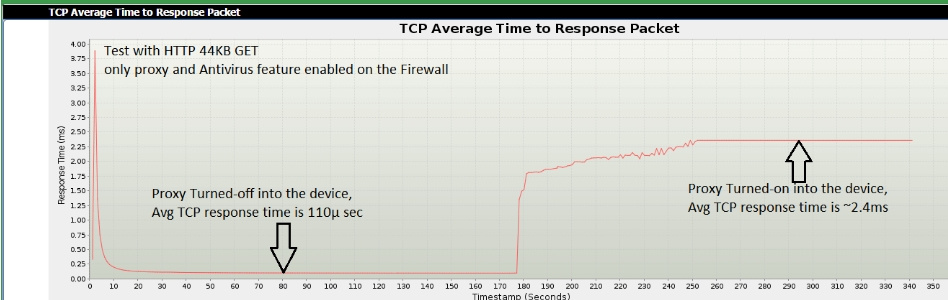
Scenario 1: Proxy without SSL. HTTP GET with a 200OK response with a 44K page size. For the test, IXIA BreakingPoint is used to simulate HTTP clients and servers with a security device in the middle. The goal of the test is to achieve the maximum number of unique TCP / HTTP sessions per second. To understand the effect of proxy performance, proxy mode and inspection during testing were included.
Observation 1 : The average TCP response time, when a device works without and with proxy mode, differs by more than 22 times.
Observation 2 : The average duration of a TCP session is increased 225 times if you compare the device’s operating mode without and with a proxy.

Scenario 2 : Similar to the scenario described above, except that now the HTTP-GET 44KB page is encrypted with a TLS1.1 session.
Observation 1 : with encrypted traffic, in proxy mode, there is an increase in TCP response time by 20 times. [Note. In general, the TCP response time is higher for encrypted traffic due to the delay that the proxy introduces, which spends more resources to process this traffic].

Observation 2 : The average duration of a TCP session increases at a staggering 400 times.

Tips for Implementing an Effective Proxy
1. Choosing the Right Manufacturer
Hardware and software are constantly optimized for better proxy processing. The so-called “offloading” and methods for allocating allocated resources increase the efficiency of proxy mode in security devices. Clients should be aware of this and compare the characteristics of security devices in proxy mode, as one of the criteria for choosing a manufacturer.
2. Choosing the right ciphers and encryption methods when possible
The choice of ciphers that the client or server uses cannot always be controlled by security experts, but they must ensure, where possible, that the encrypted traffic uses the most efficient ciphers that provide better performance without compromising security (for example, ECDHE-ECDSA 256 -bit for exchanging public keys).
3. Use different levels of encryption on secure and non-secure sides.
Proxies, according to the design, should work with two separate connections. The secure side connection that usually opens between the proxy server and the end host can provide lower TLS encryption, as it is located behind the devices / security perimeter. The user can choose lower encryption or no encryption on the secure side. This will increase the efficiency of one of the two connections and therefore improve the overall performance of the security device in proxy mode.

conclusions
The two tests described here demonstrate the extreme impact of proxy mode on security devices. On the other hand, the increased security efficiency of in-line devices in proxy mode reduces security risks. Organizations no longer want to increase security risks, even if it means better performance, so we see a lot of proxy mode implementation in security devices. When we implement proxies in security infrastructures, efficient and rational deployment and the best features of security devices will help reduce the impact of proxies on network performance and, accordingly, business performance.
The study is based on Amritam Putatunda and Rakesh Kumar.
Additional resources:
https://www.ixiacom.com/
https://www.ixiacom.com/products/breakingpoint
https://www.ixiacom.com/products/breakingpoint-ve
https://www.ixiacom.com/products/breakingpoint-aws
The next big problem faced by such security devices is the quality of inspection when increasing the volume of encrypted traffic. To ensure that security devices capture all traffic, including encrypted traffic, they must be deployed in proxy mode when performing intrusion prevention tasks. Implementing proxies for security usually involves performance degradation and latency.
The security effectiveness of encrypted traffic verification is undeniable. However, history has shown that any in-line security device that introduces significant delays is either reserved or moved out-of-band after a certain time. Here we discuss proxy implementation, the overhead they add to the network, test scripts that can help detect such performance impacts, and tips and tricks for better proxy implementation.
What is a proxy?
Simply put, a proxy is a computer or device that mediates between two systems, such as:
- hosts on a secure network and the Internet;
- Internet clients and servers in a private network.
The proxy terminates any connection initiated by the client and opens a new connection between itself and the server. This helps the proxy achieve several goals as an intermediary, for example, client authentication, load balancing between multiple servers, faster responses through caching mechanisms, and most importantly, security through traffic verification.
Here we concentrate on security devices and the impact of enabling proxy mode on them.
Work proxies for security
To achieve security objectives, the security device must monitor all sessions, analyze each downloaded file, detect any malicious actions and prevent threats from entering protected targets. Now that most of the Internet traffic is encrypted, it is required that the security devices be deployed in proxy mode to effectively inspect all this encrypted traffic. You have to pay for it with performance - the following are a few operations that affect the performance of security devices in proxy mode, but are needed for security tasks:
- Opening two separate connections for each incoming connection: one from the connection initiator to the proxy, and the other from the proxy to the addressee;
- Intercepting encrypted SSL traffic and decrypting all payloads, checking all traffic, again encrypting and sending to the addressee;
- Based on the verification - blocking / reporting of any suspicious traffic, while ensuring unhindered passage of legitimate traffic.
Impact of enabling proxies on performance
The deep inspection functionality makes proxy security devices a major bottleneck (the so-called bottleneck) and can lead to reduced network performance.
Due to strong SSL ciphers and large key sizes, proxies can affect performance, even if the network is operating at 10% of maximum capacity.
In most cases, performance degradation is accompanied by errors caused by packet resets, session delay (session-delay), session failure (TCP Retries and Timeouts), and transaction errors (Packet Drop).
Tests demonstrating the impact of enabling proxies on performance
To make a proxy firewall (FW) more reliable and efficient in handling these bottlenecks, you need to test and verify them before deployment. The following are serious delays that occur when proxy mode is enabled on security devices.
Scenario 1: Proxy without SSL. HTTP GET with a 200OK response with a 44K page size. For the test, IXIA BreakingPoint is used to simulate HTTP clients and servers with a security device in the middle. The goal of the test is to achieve the maximum number of unique TCP / HTTP sessions per second. To understand the effect of proxy performance, proxy mode and inspection during testing were included.
Observation 1 : The average TCP response time, when a device works without and with proxy mode, differs by more than 22 times.
Observation 2 : The average duration of a TCP session is increased 225 times if you compare the device’s operating mode without and with a proxy.
Scenario 2 : Similar to the scenario described above, except that now the HTTP-GET 44KB page is encrypted with a TLS1.1 session.
Observation 1 : with encrypted traffic, in proxy mode, there is an increase in TCP response time by 20 times. [Note. In general, the TCP response time is higher for encrypted traffic due to the delay that the proxy introduces, which spends more resources to process this traffic].
Observation 2 : The average duration of a TCP session increases at a staggering 400 times.
Tips for Implementing an Effective Proxy
1. Choosing the Right Manufacturer
Hardware and software are constantly optimized for better proxy processing. The so-called “offloading” and methods for allocating allocated resources increase the efficiency of proxy mode in security devices. Clients should be aware of this and compare the characteristics of security devices in proxy mode, as one of the criteria for choosing a manufacturer.
2. Choosing the right ciphers and encryption methods when possible
The choice of ciphers that the client or server uses cannot always be controlled by security experts, but they must ensure, where possible, that the encrypted traffic uses the most efficient ciphers that provide better performance without compromising security (for example, ECDHE-ECDSA 256 -bit for exchanging public keys).
3. Use different levels of encryption on secure and non-secure sides.
Proxies, according to the design, should work with two separate connections. The secure side connection that usually opens between the proxy server and the end host can provide lower TLS encryption, as it is located behind the devices / security perimeter. The user can choose lower encryption or no encryption on the secure side. This will increase the efficiency of one of the two connections and therefore improve the overall performance of the security device in proxy mode.
conclusions
The two tests described here demonstrate the extreme impact of proxy mode on security devices. On the other hand, the increased security efficiency of in-line devices in proxy mode reduces security risks. Organizations no longer want to increase security risks, even if it means better performance, so we see a lot of proxy mode implementation in security devices. When we implement proxies in security infrastructures, efficient and rational deployment and the best features of security devices will help reduce the impact of proxies on network performance and, accordingly, business performance.
The study is based on Amritam Putatunda and Rakesh Kumar.
Additional resources:
https://www.ixiacom.com/
https://www.ixiacom.com/products/breakingpoint
https://www.ixiacom.com/products/breakingpoint-ve
https://www.ixiacom.com/products/breakingpoint-aws