 June 8, 2017 at 19:12
What is Zimbra?
Zimbra is an open source software product for automation and simplification of joint activities of any working groups on the scale of state or private business. Now Zimbra is used in more than 5,000 companies, including such global brands as NTT Communications, Comcast, Dell, Cadbury, Investec, Rackspace, Red Hat, VMware, H&R Block and Vodafone. In total, more than 100 million end users in more than 140 countries. Zimbra is the third largest teamwork provider in the world with an active community of developers and a global partner network.
Zimbra consists of two platforms:
For large companies, the scalable and feature-rich Zimbra Collaboration Suite application suite is of most interest. This solution combines a corporate cloud with the capabilities of email and project management systems. Users in one product share documents and folders and work together in applications. chatting and voicemail, Click-to-call and integration with social networks, web services and applications (Facebook, Twitter, Socialcast, Oracle and SAP).
Zimbra Collaboration Suite is presented in two main editions.
The Zimbra Collaboration Suite includes client and server software, as well as the following application packages.
Zimbra Core - includes libraries, utilities and basic configuration files.
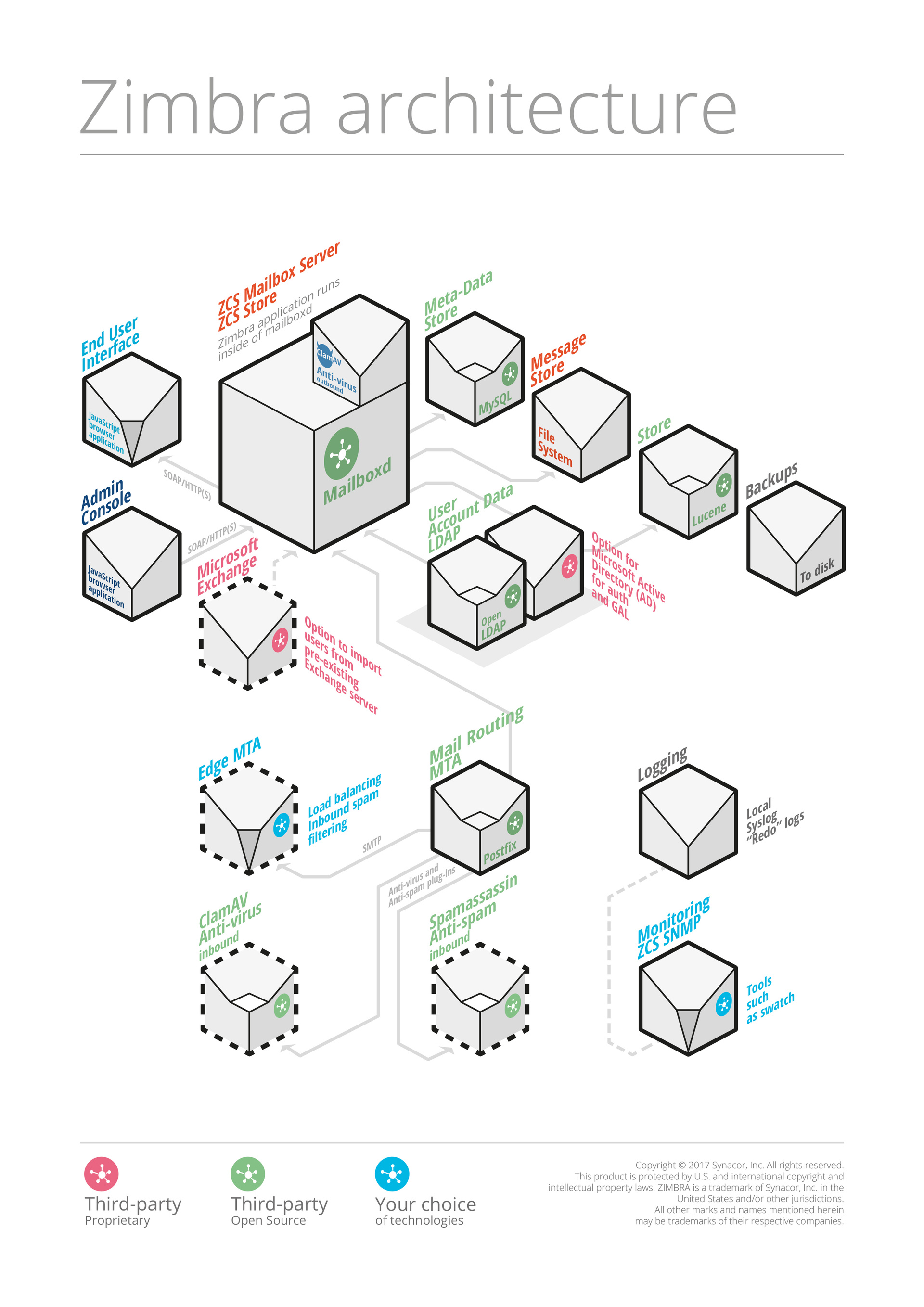
Zimbra Store (Zimbra server) - installs components for the mail server, including Jetty, which is a servlet container that runs Zimbra software inside itself. In the Zimbra Collaboration Suite, this servlet container is called mailboxd. The mail server includes the following components:
Zimbra LDAP - LDAP directory services provide a centralized repository for information about the users and devices that are allowed to use on your network. The central repository used for Zimbra LDAP data is the OpenLDAP directory server. Zimbra Collaboration Suite uses OpenLDAP as an open source LDAP directory server. User authentication is provided through OpenLDAP. Each account on the Zimbra server has a unique mailbox identifier, which is the main point of account identification.
Note: Zimbra also supports integration with Microsoft Active Directory Server.
Zimbra mta- Postfix-open source mail transfer agent (MTA), which receives mail via SMTP and delivers each message to the desired Zimbra server mailbox using the local message delivery protocol (LMTP). Zimbra MTA also includes antivirus and antispam components.
Zimbra-SNMP - Zimbra uses a pattern to monitor syslog output to generate SNMP traps.
Zimbra Logger - installs tools for syslog aggregation, reporting. If you do not install Logger, the server statistics section of the administration console will not be displayed.
Zimbra Spell - Aspell is an open source spell checker used by the Zimbra web client.
Zimbra Proxy and Zimbra Memcached- zimbra proxy packages.
Zimbra System Directory Tree - The main directories created by Zimbra installation packages.
Zimbra Desktop is a client email application that can be used as an email client for any server (postfix, exchange, lotus). Zimbra Web Access provides all the same features as Zimbra Desktop, but works through a browser.
Zimbra provides a very flexible functionality for administration and deployment. The architecture of the software product includes open source development using standard protocols. Third-party software is included with Zimbra and is part of the installation process.
Minimum system requirements: Intel / AMD 2.0 GHZ + 8 GB Ram, 10 GB disk space.
With a redesigned browser-based interface, Zimbra offers the most innovative way to exchange messages, connecting end users with information and action in their personal clouds. The mail service Zimbra Collaboration Suite will allow you to completely abandon paper documentation and permanently solve the problem of storing important documents. The service provides convenient data archiving and access control for a certain circle of employees.
Official site - zimbra.com
Zimbra is able to compete with the most popular email programs and web services, because it offers a range of solutions for business customers.
For all questions related to the Zextras Suite, you can contact the representative of Zextras Katerina Triandafilidi by e-mail [email protected]
Zimbra consists of two platforms:
- Zimbra Collaboration Suite - mail server, organizer and user personalization. This is an enterprise-class collaboration solution for email, calendar, and office tools.
- Zimbra Community is a corporate social network, a virtual space for exchanging files and messages between employees.
Zimbra Collaboration Suite
For large companies, the scalable and feature-rich Zimbra Collaboration Suite application suite is of most interest. This solution combines a corporate cloud with the capabilities of email and project management systems. Users in one product share documents and folders and work together in applications. chatting and voicemail, Click-to-call and integration with social networks, web services and applications (Facebook, Twitter, Socialcast, Oracle and SAP).
Basic features of Zimbra Collaboration Suite:
- Delivery, storage and sending e-mail.
- Indexing mail.
- Logging a mail server.
- Support for IMAP, POP, CalDAV and CarDAV protocols.
- Directory service.
- Antispam protection (Spam Assassin).
- Antivirus protection (ClamAV).
- Synchronization with mobile platforms: Android, iOS, Windows.
Zimbra Collaboration Suite is presented in two main editions.
- Zimbra Open Source Edition is a completely free and free version of Zimbra, containing all the basic functionality.
- Zimbra Network Edition is a paid version of Zimbra, characterized by the possibility of domain administration, the presence of a connector for Microsoft Outlook, and other functions.
The Zimbra Collaboration Suite includes client and server software, as well as the following application packages.
Zimbra Core - includes libraries, utilities and basic configuration files.
Zimbra Store (Zimbra server) - installs components for the mail server, including Jetty, which is a servlet container that runs Zimbra software inside itself. In the Zimbra Collaboration Suite, this servlet container is called mailboxd. The mail server includes the following components:
- Data store - MySQL database that contains all message metadata including tags, conversations, and pointers to where messages are stored in the file system. Email identifiers are associated with OpenLDAP user accounts.
- Message store - the place where all emails are located, including message texts and any file attachments. Messages are stored in MIME format.
- Index store - index files for each mailbox. Index and search technology are provided through Apache Lucene. Each message is automatically indexed, and each mailbox has an index file associated with it.
Zimbra LDAP - LDAP directory services provide a centralized repository for information about the users and devices that are allowed to use on your network. The central repository used for Zimbra LDAP data is the OpenLDAP directory server. Zimbra Collaboration Suite uses OpenLDAP as an open source LDAP directory server. User authentication is provided through OpenLDAP. Each account on the Zimbra server has a unique mailbox identifier, which is the main point of account identification.
Note: Zimbra also supports integration with Microsoft Active Directory Server.
Zimbra mta- Postfix-open source mail transfer agent (MTA), which receives mail via SMTP and delivers each message to the desired Zimbra server mailbox using the local message delivery protocol (LMTP). Zimbra MTA also includes antivirus and antispam components.
Zimbra-SNMP - Zimbra uses a pattern to monitor syslog output to generate SNMP traps.
Zimbra Logger - installs tools for syslog aggregation, reporting. If you do not install Logger, the server statistics section of the administration console will not be displayed.
Zimbra Spell - Aspell is an open source spell checker used by the Zimbra web client.
Zimbra Proxy and Zimbra Memcached- zimbra proxy packages.
Zimbra System Directory Tree - The main directories created by Zimbra installation packages.
Zimbra Desktop is a client email application that can be used as an email client for any server (postfix, exchange, lotus). Zimbra Web Access provides all the same features as Zimbra Desktop, but works through a browser.
Features of Zimbra Web Clients:
- Create, read, reply, forward, and other standard features,
- View mail on the topic of conversation.
- Email tagging for easy grouping of messages.
- Advanced search and save results.
- Calendar for scheduling appointments.
- Shared calendar, email folders, address books, and a portfolio of folders.
- Setting mailbox preferences, including those that define mail filtering options
- Using ZCS Documents to Create, Organize, and Share Web Documents
- Using tasks to create to-do lists and task management
Zimbra Administration
Zimbra provides a very flexible functionality for administration and deployment. The architecture of the software product includes open source development using standard protocols. Third-party software is included with Zimbra and is part of the installation process.
Zimbra Components:
- Jetty Web Application Server.
- Postfix, an open-source mail transfer agent (MTA).
- OpenLDAP, an open source implementation of LDAP that provides user authentication.
- MySQL database.
- Lucene, an open-source full-featured text search engine
- Antivirus and antispam open-source components:
- ClamAV, antivirus scanner that protects against malicious files
- SpamAssassin, an email filter that attempts to identify spam
- Amavisd - New Interfaces Between MTA and One or More Content Validators
- James / Sieve filtering used to create filters for email.
Zimbra administration features:
- AJAX Web Administration Console.
- Class of Service (CoS) Management
- Adding accounts and domains
- Setting account restrictions for both individual and CoS accounts
- Create and edit mailing lists
- Compatible with Microsoft Exchange 2007/2010.
- Migration from Microsoft Exchange and Domino.
- Install virtual hosts on a domain
- Server management
- View and manage system status
- Controlling usage.
Zimbra deployment options:
- Operating Systems: RHEL, CentOS, Oracle Linux, and Ubuntu.
- Cloud Services: Oracle Cloud, VMware vCloud, Amazon EWS.
- Virtual machines: VMWare, Xen, KVM.
Minimum system requirements: Intel / AMD 2.0 GHZ + 8 GB Ram, 10 GB disk space.
With a redesigned browser-based interface, Zimbra offers the most innovative way to exchange messages, connecting end users with information and action in their personal clouds. The mail service Zimbra Collaboration Suite will allow you to completely abandon paper documentation and permanently solve the problem of storing important documents. The service provides convenient data archiving and access control for a certain circle of employees.
Official site - zimbra.com
Zimbra is able to compete with the most popular email programs and web services, because it offers a range of solutions for business customers.
For all questions related to the Zextras Suite, you can contact the representative of Zextras Katerina Triandafilidi by e-mail [email protected]









