
 April 7, 2017 at 09:12
Sandbox Technologies Check Point SandBlast. Part 2
- Tutorial

Continuing the theme of network sandboxes. In the previous module, I already gave a little “sad” statistics of targeted attacks. Summarizing the foregoing, we can draw several main conclusions:
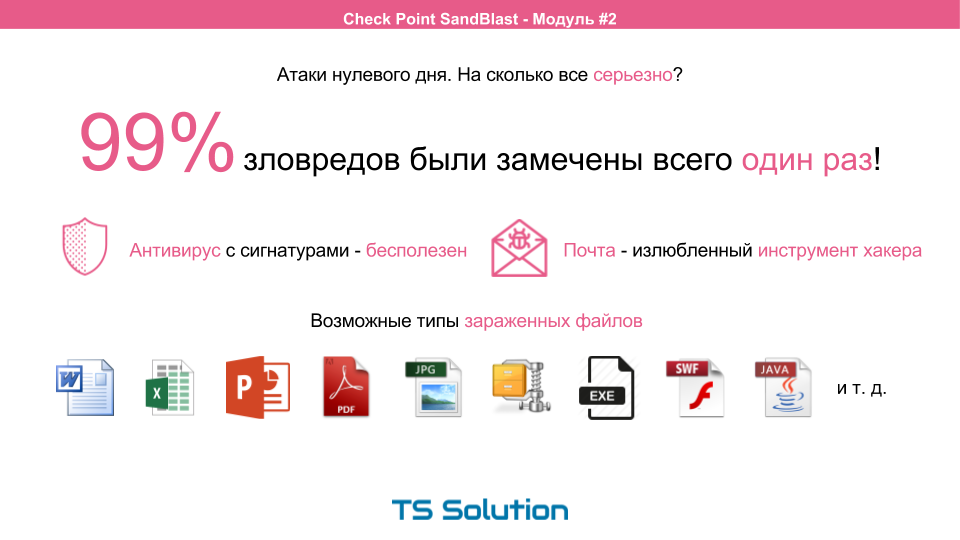
- 99% of malware was detected only once. For this reason, signature protection is simply powerless.
- Mail is a hacker's favorite tool. As a rule, malware is delivered in the form of files or links to files.
- Contrary to popular belief, not only exe, flash, and java files can be contagious. Those. By banning this type of file, you are still not protected. The malware can be hidden in authorized documents such as: doc, excel, pdf, powerpoint, archives and so on.
In this regard, a relatively new type of protection has appeared ...
Sandbox
Today is probably the only way to deal with zero-day attacks. What exactly is the task of the classic sandbox? Further there will be many pictures from the presentation and, as usual, the video at the end (both theoretical and practical part).

The Sandbox task is very simple:
- Open file (even infected)
- Analyze activity (changes in the registry, changes in network activity, file system activity, starting system processes, etc.)
- Lock or skip file
Naturally, all actions take place in a virtual machine in specially prepared images. It would seem that here it is a victory over zero-day attacks. But not so simple.
Sandbox Bypass Technologies
As soon as the sandboxes were announced as a new means of defense, the so-called “Arms Race” began. Hackers began to write more intelligent malware:
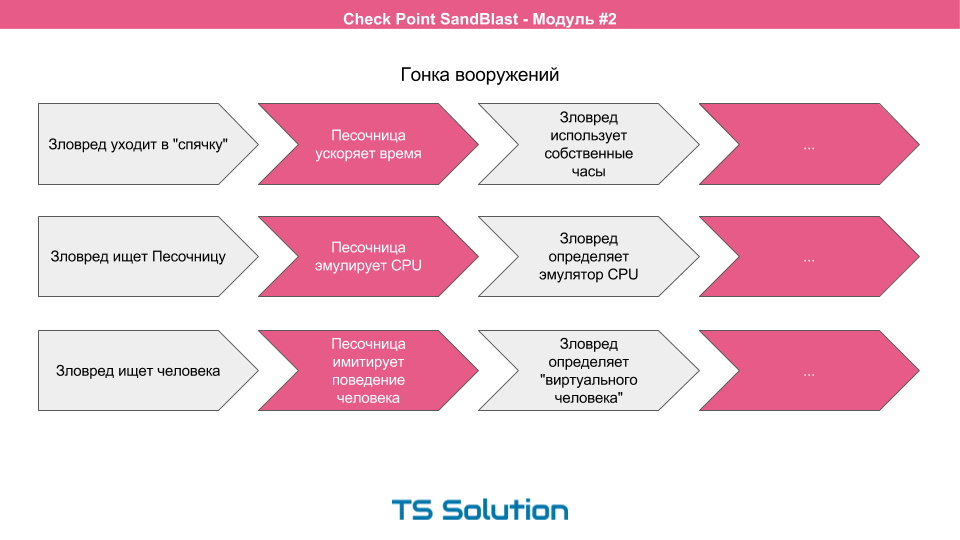
- For example, the malware could go into hibernation and not start immediately, so that the sandbox could skip this file further into the network. Sandbox developers immediately reacted and began to speed up time in virtual machines. What hackers responded by using their own timers inside the malware (usually by running some kind of “more” calculation inside the program), i.e. stopped looking at the system clock.
- Then the malware began to try to find the sandbox, i.e. determine where they were launched. Sandboxes began to try to hide the fact of their presence by emulating a physical CPU. But the malware pretty quickly learned to define this emulation.
- Newer versions of malware began to try to find a person at the computer, i.e. try to determine that they were not launched by a robot. These were various sensors for mouse movement, pressing the keyboard, etc. Sandboxes began to imitate human behavior. But it is very difficult. Malwares quite easily began to define a “virtual” person. For example, one of the malware was packed into a doc format document, where a picture of a naked woman was inserted in the middle of the document. Any healthy person when viewing a document lingered on this picture. The sandbox did not do this and simply scrolled the file, simulating human behavior. Thus, the malware easily determined that it was discovered by a robot, i.e. sandbox.
This "arms race" continues to this day.
Check Point SandBlast
Due to the problems mentioned above, a new sandbox technology, CheckPoint SandBlast, was introduced relatively recently.
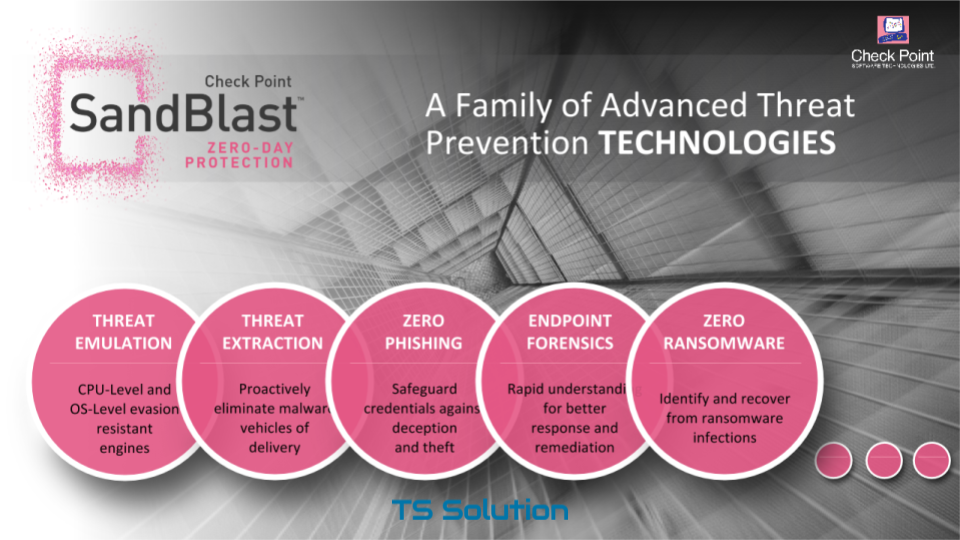
This technology provides a very wide range of protective equipment:
- Threat Emulation - file emulation technology
- Threat Extraction - file cleaning technology
- Zero Phishing - Phishing Protection
- Endpoint Forensics - IB Incident Investigation Module
- Zero Ransomware - ransomware protection
In this article and labs, we will focus on Threat Emulation (i.e. file emulation) and Threat Extraction (i.e. file cleanup).
Features of Threat Emulation
What is the feature of Check Point emulation technology? How does she deal with the previously voiced “arms race”? Let's look at the work of the Threat Emulation module using an example of a typical life cycle of almost all malicious programs.
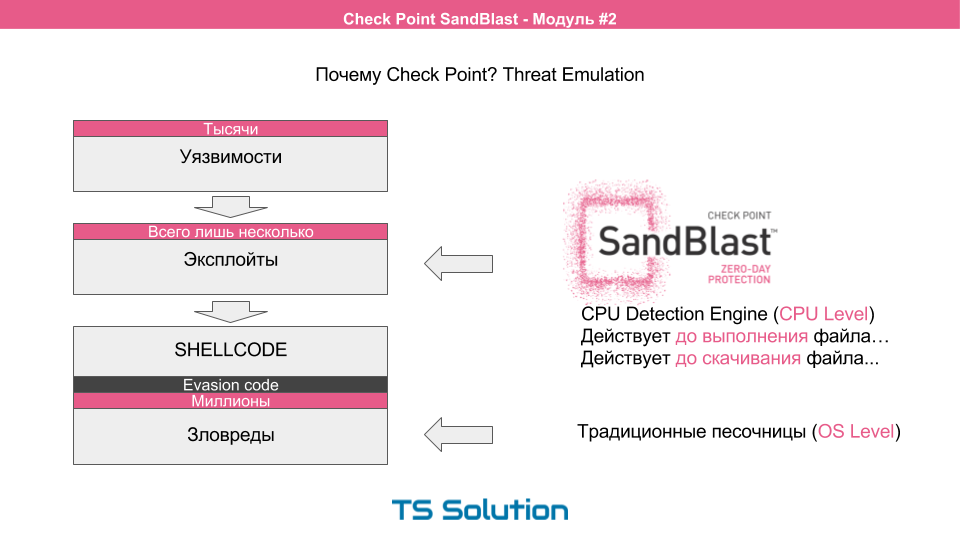
- The first thing the malware delivery process begins with is a software vulnerability . There are thousands of these vulnerabilities, it all depends on the software you use (it can be a browser, acrobat reader, email client, etc.). Most of these vulnerabilities are unknown even to the software manufacturers themselves, otherwise they would have released a patch (which they periodically do), but this is almost always after someone has used this vulnerability.
- In order to exploit these vulnerabilities, special exploits are needed . Those. mini programs that, having performed a certain sequence of actions, can get a certain level of access to the victim’s system. There are very few exploits and new ones are extremely rare.
- The exploit can carry inside itself the so-called shellcode (i.e., another mini-program that will be executed directly on the victim’s computer). Typically, this shellcode is used to download additional malware, or to create malware directly on the victim’s computer using “improvised tools”. A little later we will consider how this happens.
- Shellcods use various techniques for circumventing security features.
- As a result, we get a huge number of possible malware variations. Which will also have various sandbox bypass technologies.
Classic (traditional) sandboxes begin to work at this stage. Such sandboxes are also called OS Level . At the same time, it is likely that the sandbox will still not be able to cope with a similar number of types of malware.
The checkpoint approach in this case is more logical. It is much more reasonable to intercept malicious programs where there are fewer of their options and the probability of their determination to strive for 100%. This is the exploit phase.
The checkpoint at the processor level sees the execution of the exploit and allows you to lock the file before executing or downloading additional modules. This revolutionary approach ( CPU Level) became possible after the advent of Intel Haswell processors, where such monitoring is allowed at the hardware level. At the same time, the checkpoint also supports the classic sandbox mode, i.e. OS Level
Let's now see how the collection of the necessary shellcode actually looks.
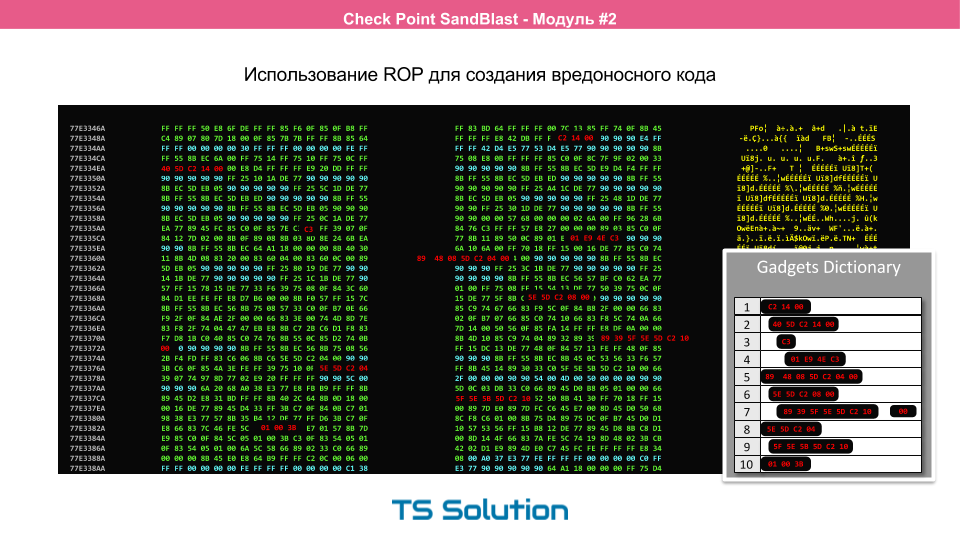
To begin with, it’s very primitive to transfer the entire malicious file to the victim’s computer, as In this case, various antiviruses or IPSs can detect the attack. Therefore, hackers came up with a rather interesting way. They began to collect malicious code directly on the victim’s computer using already running processes. This method was called ROP , i.e. return oriented programming. On this slide you can see how the code for the malware is collected. Here is the work of Adobe Reader in hexadecimal. The necessary functions are highlighted and the so-called gadget is assembled. It is this process (improper use of the program) that allows you to see and prevent Threat Emulation. We will not consider ROP in detail since This is a very complex topic and deserves a separate series of articles.
The problems of traditional sandboxes
Now let's look at the main problems of traditional sandboxes.

The main problem of sandboxes is that not only infected files are sent to the analysis, but also normal, clean files (this also applies to Threat Emulation). After which the emulation process takes place. This process is not instantaneous and can take from 1 to 30 minutes. At the same time, no one excludes false positives when a normal file is mistaken and discarded. As a result, we have a bunch of annoyed users who do not want to wait for their files.
As a result, most sandboxes are configured in bypass mode, i.e. source files reach users while emulation is in progress. And this is the usual detection, not blocking. This is unacceptable in the case of encryptors, as then it will be too late.
Threat Extraction technology is designed to solve this problem.
Benefits of Threat Extraction
This technology is designed for instant cleaning of files and sending it to the user. At this time, the source file is emulated using the Threat Emulation module.
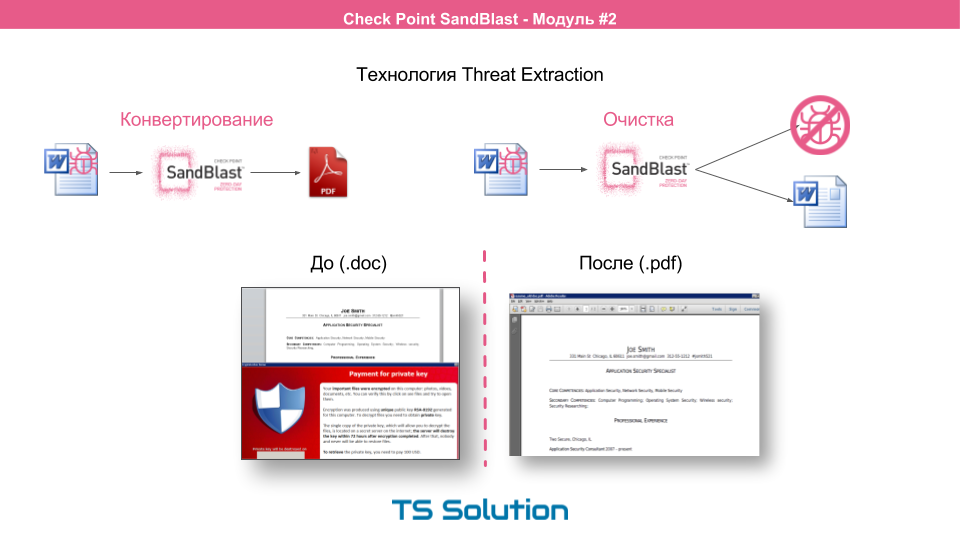
There are two main ways to clean incoming files:
- The first is converting the source file to pdf. In fact, the file is “printed out” on a virtual printer. The user receives a pdf document without dangerous content. In 90% of cases, the user is enough to get acquainted with the document.
- The second way is to clear all active content from the source file. All macros are cut out and the output is a completely sterile file with preservation of the original extension (doc, ppt, etc.).
I highly recommend paying attention to the first method, because in this case, the malware has no chance of survival. It will only be safer to print the file onto real paper.
In addition, the user still has the opportunity to get the source file if a false positive still occurred, or if the source document contains important macros (for example, an excel file with macros). If we take for example the files that were received by mail, then the user will be provided with already cleared files with a link to the source file.
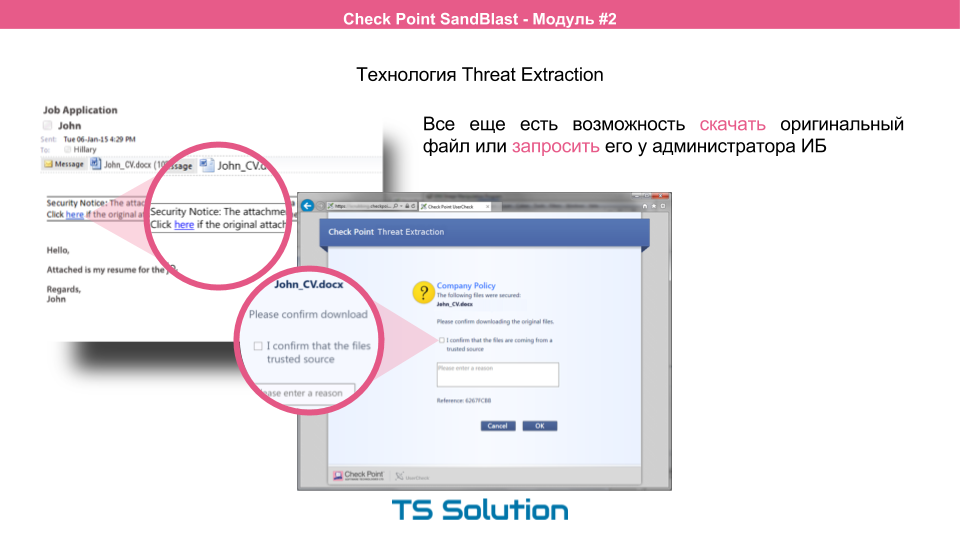
If you click on this link, the user will be taken to a special portal where he will have the opportunity to request the source file. In this case, he will be warned of its possible harmfulness. Whether the user gets this file already depends on the settings. You can issue these files manually after a more thorough analysis by information security administrators.
The product line of Check Point SandBlast
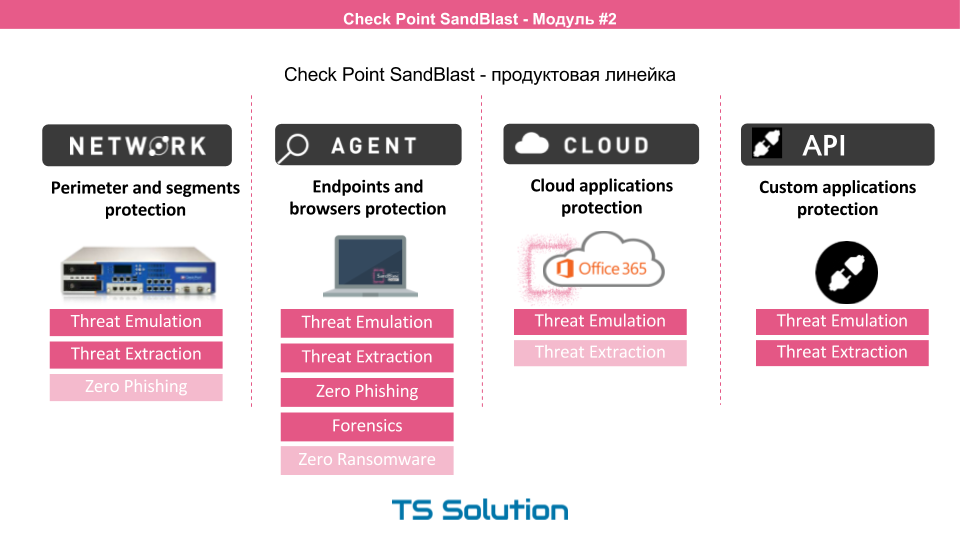
If we consider the product line CheckPoint SandBlast, we can distinguish 4 areas. It:
- Network devices to protect the perimeter or any segments
- Agents to protect end workstations
- Cloud protection for Office 365 (Gmail support coming soon)
- And a specialized API that allows you to use the cloud checkpoint to third-party applications and manufacturers
At the same time, as can be seen from the picture, each solution has different functionality. In this part, we will focus on the first option, i.e. network level security. There are three deployment options for network-level security:
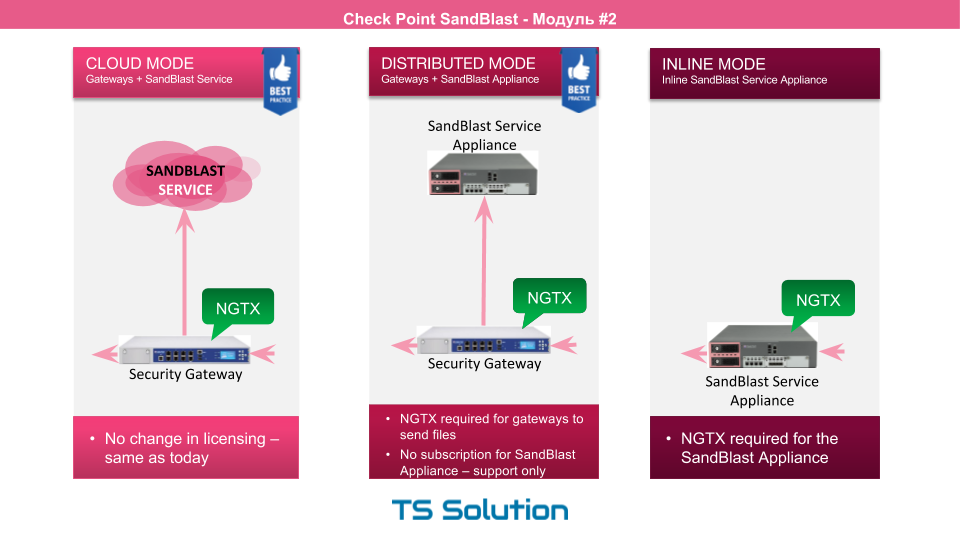
- Using a cloud sandbox. An NGTX license is activated on an existing CheckPoint gateway. Files are sent for emulation to the cloud. In my opinion, this is the most optimal and economical option. However, in some companies it is forbidden to send your own files to an external network, even for analysis.
- Local sandbox. A freestanding hardware is used - SandBlast Applince. In this case, the Check Point gateway with NGTX licenses sends the file already to your SandBlast device, where the files are checked.
- Local sandbox in inline mode. Suitable if you do not have a Check Point gateway.
Now we can move on to laboratory work and test the Threat Emulation and Threat Extraction solutions in practice.
Video course on the second part of
All the foregoing theory. part can be viewed in video format:
In addition, there are three laboratory works:
Laboratory work No. 3
During this lesson, we will configure the Threat Emulation blade (cloud version) and try to simulate the passage of infected files through the gateway. Then we analyze the logs again and block the download of malicious files for the Win7 user.
Laboratory work No. 4
This time we will consider the option of local emulation, i.e. without sending files to the cloud. We will also try checking email messages, for this we will configure Check Point as MTA, i.e. mail transfer agent. Then we will try to send the infected file by mail and make sure that it is blocked. And of course, we analyze the logs.
Laboratory work No. 5
As we saw in the last lesson, file emulation is a very effective means of protection, but it does take some time! Especially for those who do not like to wait until files are emulated, there is Threat Extraction technology. During the lesson, we activate it and try again to send the infected file by mail. As a result, we should get an already cleared, or rather converted, pdf document.
To be continued ...
PS If you want to protect your computer from new and unknown attacks, click here.