HPE SecureMail - The Best Secure Email Software 2017
Mail security involves more than just encrypting emails. The HPE SecureMail class package provides users with all the necessary tools at the lowest cost for staff training and system administration.

What makes secure email
software In addition to securing mail, this type of software complies with the laws and legal requirements, and also tracks mail (tracking).
The best software of this class has an appropriate administration console, built-in various reports, tools for sorting mail logs, date tracking and archiving. Many of these programs are compatible with all types of email, including mobile.
Often, the most convenient option for a client becomes combining email encryption tools with the business applications they use. In this case, you should first pay attention to the HPE SecureMail software.
In addition, the TopTenReviews resource ranking for secure mail software put this package in first place in the top ten for 2017. It also received a number of awards at the end of 2016
============ =============
TopTenReviews ranking
1. HPE SecureMail
2. DataMotion
3. Proofpoint
4. EdgeWave
5. Trend Micro
6. Cryptzone
7. Symantec
8. Sophos
9. LuxSci
10. Privato
11. Comodo
=========================
How to choose Email Encryption Software
Small businesses can directly trust their employees to decide which emails they send should be encrypted. In this situation, almost any local desktop or cloud solution will work quite well.
Larger companies usually do not include the end user in the decision-making process about encrypting a particular letter, using pre-configured filters based on role policies.
In this case, emails are encrypted after they leave the employee’s desktop — at the point through which they pass. This can be a mail server, gateway, special hardware device or web portal.
Sometimes the encryption method is chosen taking into account the rules and restrictions imposed by corporate IT integration and compatibility requirements. This applies, for example, to Outlook plug-ins, email sent from mobile devices, some email protocols and archiving methods.
The experience that the recipient has is also relevant. Therefore, often enterprises are looking for a secure email solution that provides easy-to-use options for exchanging secure mail.
Modern Email Encryption Software (EES) is usually compared by the following criteria.
1. Security Level. All email software provides encryption of emails anyway. However, the best email services offer a wider range of security options — at least end-user-initiated encryption and corporate policy-based encryption.
2. Recipient experience . The best for the user is software that allows him to send and receive encrypted letters with his personal passwords, without the participation of an administrator who manages user requests.
3. Management Tools. Competitive EES should have developed and at the same time simple administration tools for the user. Best software also provides simple or even automated deployment capabilities and pre-configured policies that comply with general legal restrictions.
4. Integration and compatibility . To be truly useful and effective, mail encryption software must work in conjunction with popular business software, such as, for example, Salesforce, GroupWise, etc. The best are EES, compatible with most popular platforms and used business applications. Consider the HPE SecureMail software selection criteria.
HPE SecureMail HPE SecureMail

Deployment Options
HPE SecureMail (HPESM) provides risk management by protecting communications, proprietary data and user information. The package provides complete protection, which is compatible with corporate business systems.
HPESM does not require complex key management, which often occurs in such cases, nevertheless, providing a sufficiently high level of security that meets, inter alia, the current requirements for financial and medical information systems.
Large financial institutions trust HPESM, but this secure e-mail can be recommended for individual use if necessary. It is available as a cloud solution, as an on-premise option (deployed at the customer’s site), or as a hybrid model.
The cloud version is a fully functional SaaS service. The on-premise solution comes in the form of an ISO image that includes CentOS (a version of Red Hat Linux). The system can be independently installed by administrators on almost any hardware used today, of their choice.
Security Level
HPESM uses Identity-Based Encryption (IBE, Public Key Cryptography). Since the security policy is encoded directly in the encryption and authentication methods, there is no need to manage traditional security certificates. This significantly reduces the resources typically required for key management. The HPESM Gateway also supports the common protocols TLS, S / MIME and PGP.

How it works. The diagram shows how encryption technology protects information - corporate and user.
The package is also recommended for financial communications where an increased level of security is required. It provides the HP SecureData Payments service for continuous payment transaction protection and browser protection through HP SecureData Web.
All solutions are scalable, and have no limitations in this regard. The administrator does not need to formulate policies separately. However, HPESM can also manage policies, and assign unique permissions to different users and groups.
Recipient Experience
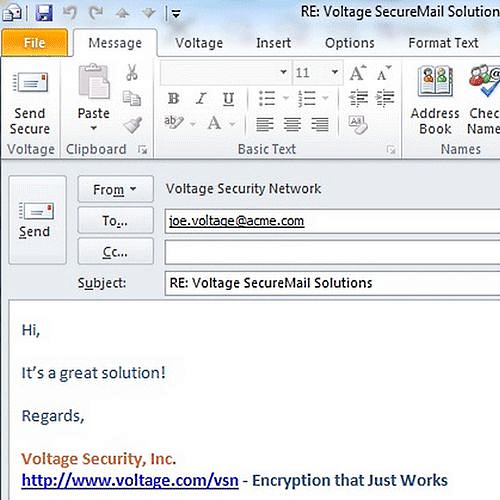
End User Response to Received Encrypted Message
Successful collaborative secure communications are directly dependent on end-user experience. HPESM mail does not require deep study and can be opened by the client directly in Outlook using the appropriate plug-in.
Management Tools
For the most part, deploying HPESM does not require specific, individual settings and can be done over the network. After HPESM is deployed, the administrator only needs to manage policies and groups, monitor events and manage archiving.

The administrator allows certain users access to encrypted files by simply selecting them from the list
HPESM is fully compatible with Windows Active Directory and Exchange. Users after booting into Windows can also be automatically loaded into HPESM. The package has a large number of options for customizing reports, including a set of pre-configured reports. The same goes for sorting and searching. They include reports by date, domain, user, sender, reader, user, etc.

From this menu you can encrypt files and send them by e-mail. You can also configure access of certain users to them.
Directly from the management console, the administrator can easily create new policies, such as encryption for new clients, mobile policies, authentication requirements, etc. From the same single console, the administrator also sets backup and archiving schedules.
Integration and Compatibility
HPESM has numerous built-in real-world use cases based on market research. The product works with all mail servers, Microsoft Office 365, ERP-, CRM- and many other systems.

Encryption of important office documents, such as Excel spreadsheets, is integrated directly into the
HPESM application, which is compatible with Identity and Access Management Systems (IAMS), Mobile Device Management (MDM), and Blackberry Enterprise Server, Microsoft Exchange, Symantec Enterprise Vault, Thales nShield Connect Hardware Security Modules (HSMs), Operator Card Set (OCS), etc.
HPESM has an API to integrate with almost all widely used enterprise systems. This makes it one of the most compatible EES class solutions. Additional features include secure transfer of large files, digital signatures, file encryption (transmitted as applications), eDiscovery and archiving. Encryption works with files of any type, and they remain safe, regardless of where they are stored.
HPE SecureMail at the enterprise
Pros — HPE SecureMail provides natural-mail communications, a wide range of hardware compatibility, and integration with most business applications. HPESM supports user and corporate encryption, and includes rich reporting capabilities.
Cons - If your company uses Lotus Notes, you should work with Lotus email security tools. HPESM is also not compatible with Android Honeycomb.
Verdict - HPE SecureMail provides secure e-mail options suitable for almost all organizations, whether it is a standalone small or medium-sized company, or a large multinational financial institution.
HPESM seamlessly integrates with your existing IT infrastructure and provides end-user friendly encrypted email. The product requires few resources and meets the requirements of eDiscovery.
The solution offers more direct and tight integration than most similar systems and APIs for various business applications. You should contact him if you need a secure email solution that is easily integrated into the current IT infrastructure of the enterprise.
What makes secure email
software In addition to securing mail, this type of software complies with the laws and legal requirements, and also tracks mail (tracking).
The best software of this class has an appropriate administration console, built-in various reports, tools for sorting mail logs, date tracking and archiving. Many of these programs are compatible with all types of email, including mobile.
Often, the most convenient option for a client becomes combining email encryption tools with the business applications they use. In this case, you should first pay attention to the HPE SecureMail software.
In addition, the TopTenReviews resource ranking for secure mail software put this package in first place in the top ten for 2017. It also received a number of awards at the end of 2016
============ =============
TopTenReviews ranking
1. HPE SecureMail
2. DataMotion
3. Proofpoint
4. EdgeWave
5. Trend Micro
6. Cryptzone
7. Symantec
8. Sophos
9. LuxSci
10. Privato
11. Comodo
=========================
How to choose Email Encryption Software
Small businesses can directly trust their employees to decide which emails they send should be encrypted. In this situation, almost any local desktop or cloud solution will work quite well.
Larger companies usually do not include the end user in the decision-making process about encrypting a particular letter, using pre-configured filters based on role policies.
In this case, emails are encrypted after they leave the employee’s desktop — at the point through which they pass. This can be a mail server, gateway, special hardware device or web portal.
Sometimes the encryption method is chosen taking into account the rules and restrictions imposed by corporate IT integration and compatibility requirements. This applies, for example, to Outlook plug-ins, email sent from mobile devices, some email protocols and archiving methods.
The experience that the recipient has is also relevant. Therefore, often enterprises are looking for a secure email solution that provides easy-to-use options for exchanging secure mail.
Modern Email Encryption Software (EES) is usually compared by the following criteria.
1. Security Level. All email software provides encryption of emails anyway. However, the best email services offer a wider range of security options — at least end-user-initiated encryption and corporate policy-based encryption.
2. Recipient experience . The best for the user is software that allows him to send and receive encrypted letters with his personal passwords, without the participation of an administrator who manages user requests.
3. Management Tools. Competitive EES should have developed and at the same time simple administration tools for the user. Best software also provides simple or even automated deployment capabilities and pre-configured policies that comply with general legal restrictions.
4. Integration and compatibility . To be truly useful and effective, mail encryption software must work in conjunction with popular business software, such as, for example, Salesforce, GroupWise, etc. The best are EES, compatible with most popular platforms and used business applications. Consider the HPE SecureMail software selection criteria.
HPE SecureMail HPE SecureMail
Deployment Options
HPE SecureMail (HPESM) provides risk management by protecting communications, proprietary data and user information. The package provides complete protection, which is compatible with corporate business systems.
HPESM does not require complex key management, which often occurs in such cases, nevertheless, providing a sufficiently high level of security that meets, inter alia, the current requirements for financial and medical information systems.
Large financial institutions trust HPESM, but this secure e-mail can be recommended for individual use if necessary. It is available as a cloud solution, as an on-premise option (deployed at the customer’s site), or as a hybrid model.
The cloud version is a fully functional SaaS service. The on-premise solution comes in the form of an ISO image that includes CentOS (a version of Red Hat Linux). The system can be independently installed by administrators on almost any hardware used today, of their choice.
Security Level
HPESM uses Identity-Based Encryption (IBE, Public Key Cryptography). Since the security policy is encoded directly in the encryption and authentication methods, there is no need to manage traditional security certificates. This significantly reduces the resources typically required for key management. The HPESM Gateway also supports the common protocols TLS, S / MIME and PGP.
How it works. The diagram shows how encryption technology protects information - corporate and user.
The package is also recommended for financial communications where an increased level of security is required. It provides the HP SecureData Payments service for continuous payment transaction protection and browser protection through HP SecureData Web.
All solutions are scalable, and have no limitations in this regard. The administrator does not need to formulate policies separately. However, HPESM can also manage policies, and assign unique permissions to different users and groups.
Recipient Experience
End User Response to Received Encrypted Message
Successful collaborative secure communications are directly dependent on end-user experience. HPESM mail does not require deep study and can be opened by the client directly in Outlook using the appropriate plug-in.
Management Tools
For the most part, deploying HPESM does not require specific, individual settings and can be done over the network. After HPESM is deployed, the administrator only needs to manage policies and groups, monitor events and manage archiving.
The administrator allows certain users access to encrypted files by simply selecting them from the list
HPESM is fully compatible with Windows Active Directory and Exchange. Users after booting into Windows can also be automatically loaded into HPESM. The package has a large number of options for customizing reports, including a set of pre-configured reports. The same goes for sorting and searching. They include reports by date, domain, user, sender, reader, user, etc.
From this menu you can encrypt files and send them by e-mail. You can also configure access of certain users to them.
Directly from the management console, the administrator can easily create new policies, such as encryption for new clients, mobile policies, authentication requirements, etc. From the same single console, the administrator also sets backup and archiving schedules.
Integration and Compatibility
HPESM has numerous built-in real-world use cases based on market research. The product works with all mail servers, Microsoft Office 365, ERP-, CRM- and many other systems.
Encryption of important office documents, such as Excel spreadsheets, is integrated directly into the
HPESM application, which is compatible with Identity and Access Management Systems (IAMS), Mobile Device Management (MDM), and Blackberry Enterprise Server, Microsoft Exchange, Symantec Enterprise Vault, Thales nShield Connect Hardware Security Modules (HSMs), Operator Card Set (OCS), etc.
HPESM has an API to integrate with almost all widely used enterprise systems. This makes it one of the most compatible EES class solutions. Additional features include secure transfer of large files, digital signatures, file encryption (transmitted as applications), eDiscovery and archiving. Encryption works with files of any type, and they remain safe, regardless of where they are stored.
HPE SecureMail at the enterprise
Pros — HPE SecureMail provides natural-mail communications, a wide range of hardware compatibility, and integration with most business applications. HPESM supports user and corporate encryption, and includes rich reporting capabilities.
Cons - If your company uses Lotus Notes, you should work with Lotus email security tools. HPESM is also not compatible with Android Honeycomb.
Verdict - HPE SecureMail provides secure e-mail options suitable for almost all organizations, whether it is a standalone small or medium-sized company, or a large multinational financial institution.
HPESM seamlessly integrates with your existing IT infrastructure and provides end-user friendly encrypted email. The product requires few resources and meets the requirements of eDiscovery.
The solution offers more direct and tight integration than most similar systems and APIs for various business applications. You should contact him if you need a secure email solution that is easily integrated into the current IT infrastructure of the enterprise.









